


The best free AI music generators for YouTube are CapCut for an all-in-one video workflow and Adobe Firefly for custom, commercially safe soundtrack drafts. Loudly is useful for short experiments, while Mubert, Soundful, Canva and AIVA fit personal or non-monetized videos. Always check the license for the exact plan and track before enabling ads.
Free generation does not automatically mean free commercial use. Some services let you create music at no cost but prohibit monetization, require attribution, limit downloads or keep the audio inside their editor. For a YouTube creator, the license and export path matter as much as the sound.
This comparison was checked on September 6, 2026 against current US-facing product, pricing, help and legal pages. Plans and usage rights change quickly. Save a copy of the license or entitlement shown when you generate and download a track.
Best free AI music generators for YouTube at a glance
| Tool | Best for | Free access checked | YouTube caveat |
|---|---|---|---|
| CapCut | Generating and editing in one app | Official page says unlimited free generations and downloads | Confirm the generated track is covered, not a separately licensed library asset |
| Adobe Firefly | Custom background scores for monetized videos | Limited complimentary credits; music costs 20 credits per generated minute | Free allowance is not stated as a fixed number of tracks |
| Loudly | Short instrumental ideas | Daily free use and 30-second tracks | Public pages do not clearly quantify the allowance; retain the track license |
| Mubert Render | Non-monetized background music | 25 generations and five MP3 downloads monthly | Free use is noncommercial and requires attribution |
| Soundful | Template-based instrumentals | Unlimited generations and one MP3 monthly | Personal use only; credit Soundful |
| Canva AI Music | Personal videos edited in Canva | 900 tokens monthly and up to 10 soundtracks daily | Free output is personal-only and raw audio cannot be downloaded separately |
| AIVA | MIDI sketches and longer compositions | Three MP3 or MIDI downloads monthly | No monetization; AIVA owns the Free-plan copyright and requires credit |
How we ranked free AI music tools for YouTube
We screened 12 services and ranked seven. The criteria were actual zero-dollar access, account and card requirements, generation allowance, track length, video-fit controls, MP3 or editor export, attribution, YouTube synchronization rights, monetization, Content ID restrictions, privacy, rights clarity and ease of matching music to a finished cut.
CapCut, Adobe Firefly, Loudly, Mubert Render, Soundful, Canva AI Music and AIVA made the list. Suno, ElevenLabs Music, Udio, Beatoven.ai and Stable Audio were screened but not ranked. Suno’s current Free plan has no monthly song downloads and no commercial rights; ElevenLabs’ Free music terms do not permit downloads or commercial use; Udio still disables audio downloads; Beatoven ties the usable license to a download rather than a clearly documented ongoing free export allowance; and Stable Audio’s meaningful creator use is primarily paid.
This is a documentation-based comparison, not a GravityDevOps listening test. We did not compare the seven tools with a controlled prompt, test paid accounts or submit generated tracks to Content ID. A recent TechRadar hands-on review of Firefly’s audio tools supplied independent workflow context, but it does not validate every vendor or licensing claim.
1. CapCut: best overall free AI music generator for YouTube
CapCut is the most practical starting point when the music is one part of a YouTube edit. Its desktop AI Music tool turns a prompt such as “warm lo-fi instrumental, 90 seconds, gentle build, no vocals” into a track that can be placed directly on the timeline. Beat markers, fades, volume controls and the broader video editor reduce the work of moving audio between applications.
The official AI music generator page currently says generation and download are free without a published limit, offers MP3, FLAC, WAV and AAC export, and describes generated songs as royalty-free for personal and commercial projects, including YouTube. That is unusually generous, but creators should distinguish generated music from CapCut’s separate stock, template and sound-library assets, which can carry their own labels and regional terms.
Availability may vary by country, device and account. Save the project, generation record and the current rights statement. A “copyright detector” can flag likely conflicts, but no automated check guarantees that a track will never receive a claim.
Pros: no-cost generation, audio downloads, built-in video editing, beat markers and the clearest current Free commercial-use statement.
Cons: product availability varies, public terms can differ from promotional wording, and library assets must be checked separately.
2. Adobe Firefly: best for commercially safe soundtrack drafts
Adobe Firefly’s Generate Music tool is designed around soundtracks rather than viral songs. A creator can specify vibe, style, purpose, energy and tempo, or upload a video so Firefly can suggest a starting prompt. This is useful for explainers, product demos, documentaries and tutorials where the score should follow the pace without competing with narration.
Adobe’s Generate Music documentation describes the feature as producing unique original tracks. Its generative-credit guide says music costs 20 credits per generated minute and Free users receive limited complimentary premium generations, but it does not promise a fixed number of free tracks. Treat this as useful sample access, not an unlimited free tier.
Adobe’s current tutorial describes Generate Music output as commercially safe for social and YouTube use. That does not eliminate the need to review the output, avoid infringing prompts and retain the entitlement shown in the account. It does make Firefly a stronger candidate than personal-use-only plans for a monetized channel.
Pros: video-aware prompting, useful score controls, current commercial-safety positioning and a workflow built for background music.
Cons: complimentary access is limited and nonnumeric, one generated minute costs 20 credits, and availability can depend on account and region.
3. Loudly: best for 30-second instrumental experiments
Loudly combines text-to-music with parameter controls for genre, energy, instruments, key, tempo, duration and structure. This makes it useful for a YouTube Short, intro sting or quick mood test where a full song would be excessive.
The Loudly FAQ says the Free plan exposes roughly 90% of features, provides a daily allowance and caps free tracks at 30 seconds. It does not publish the daily generation or download count. The same page says its plans include downloads and commercial-use rights, while other product wording has historically emphasized paid commercial licensing. That inconsistency is why Loudly ranks below CapCut and Firefly here.
Before uploading, inspect the license tied to the downloaded track and save it with the project. If the license does not explicitly cover a monetized YouTube video, use the track only for an unmonetized test or ask Loudly for written clarification.
Pros: detailed instrumental controls, fast iteration and a useful length for Shorts and intros.
Cons: 30-second Free cap, unpublished allowance and licensing language that needs track-level confirmation.
4. Mubert Render: best free option for non-monetized videos
Mubert Render is purpose-built for functional background music. Prompts and filters can target a mood, activity, genre or video theme, and the generated track can be synchronized to footage rather than released as a standalone song.
The Ambassador plan includes 25 generations and five MP3 downloads monthly. Mubert’s licensing FAQ says Free tracks may be used in personal projects without ads or monetization, provided the description visibly credits Mubert, links to Mubert Render and includes the requested hashtag. Monetized YouTube use requires a paid plan.
Mubert prohibits registering its tracks in Content ID and does not allow standalone music distribution. If a false claim appears, the company advises using the license agreement supplied with the download when disputing it.
Pros: clear YouTube-specific license, five real monthly MP3 exports and controls suited to background scoring.
Cons: Free videos cannot be monetized, attribution is mandatory and Content ID registration is prohibited.
5. Soundful: best for template-based instrumental beds
Soundful favors musical templates and parameters over long text prompts. Creators choose a style, key and tempo, then generate variations. It is a straightforward way to sketch unobtrusive background beds for vlogs, study videos and personal channels.
The Free plan lists unlimited generations, more than 25 styles and one MP3 download per month. Its personal license specifically mentions YouTube among permitted platforms, but commercial use requires a paid plan. Soundful also asks Free users to credit it in the video description.
“Royalty-free” on the pricing page describes the license structure; it does not turn the personal Free license into a monetization grant. Standard outputs are nonexclusive, so another user may receive similar music. Do not register the track as exclusively yours.
Pros: unlimited previews, simple musical controls, one monthly MP3 and explicit personal YouTube use.
Cons: no free commercial use, required credit, one download monthly and limited style selection.
6. Canva AI Music: best for personal videos edited in Canva
Canva’s AI Music app lets a creator choose mood, style, duration and intensity, then place the result directly into a video design. It is convenient for users already building thumbnails, intros, slideshows or Shorts in Canva.
The AI Music page currently describes 900 monthly tokens and up to 10 soundtracks per day on the Free plan. Free output is limited to personal projects. Canva also says users cannot download the generated raw audio as a separate asset; the music must stay within a Canva design and export.
That makes Canva suitable for an unmonetized personal vlog or school project, not a revenue-generating YouTube workflow. Paid AI Music plans expand commercial use for music embedded in a Canva export, but still do not permit separate raw-audio download.
Pros: video and music in one browser editor, a published allowance and easy duration matching.
Cons: Free is personal-only, raw audio export is blocked and the tool sits within Canva’s wider pooled AI limits.
7. AIVA: best for MIDI-based YouTube composition sketches
AIVA is more composition-oriented than most prompt-to-song tools. Its support for styles, musical influences and MIDI export is useful when a creator wants to arrange or substantially transform a generated idea in a digital audio workstation.
The Free Forever plan includes three downloads per month, tracks up to three minutes and MP3 or MIDI export without a credit card. The boundaries are explicit: AIVA owns the copyright, monetization is prohibited and credit is required. AIVA’s paid Standard plan is the tier positioned for limited monetization on YouTube and other named social platforms.
Free MIDI can still be educational, but editing notes does not automatically erase the source license. Keep AIVA’s terms with the project and do not assume that a small arrangement change creates unrestricted ownership.
Pros: MIDI export, three monthly downloads, longer tracks and a composition-first workflow.
Cons: no Free monetization, required attribution and AIVA ownership of Free-plan compositions.
Which tool should a YouTube creator choose?
- Choose CapCut when you want to generate, sync and edit a track inside the same YouTube production workflow.
- Choose Adobe Firefly for custom background scoring when commercial-safety documentation matters more than a predictable free quota.
- Choose Loudly for a 30-second Short or intro after verifying the exact download license.
- Choose Mubert or Soundful for a personal, non-monetized channel where attribution is acceptable.
- Choose Canva when the entire personal video will be created and exported from Canva.
- Choose AIVA when MIDI and further human arrangement matter more than Free monetization.
For a broader comparison of song generators, start with our guide to the best free AI music generators. The adjacent guides to free AI video generators for YouTube and free AI voice generators for YouTube cover visuals and narration. Better prompts also reduce wasted credits; our prompt-engineering guide explains how to specify constraints and test one variable at a time.
How to use AI music on YouTube without avoidable claims
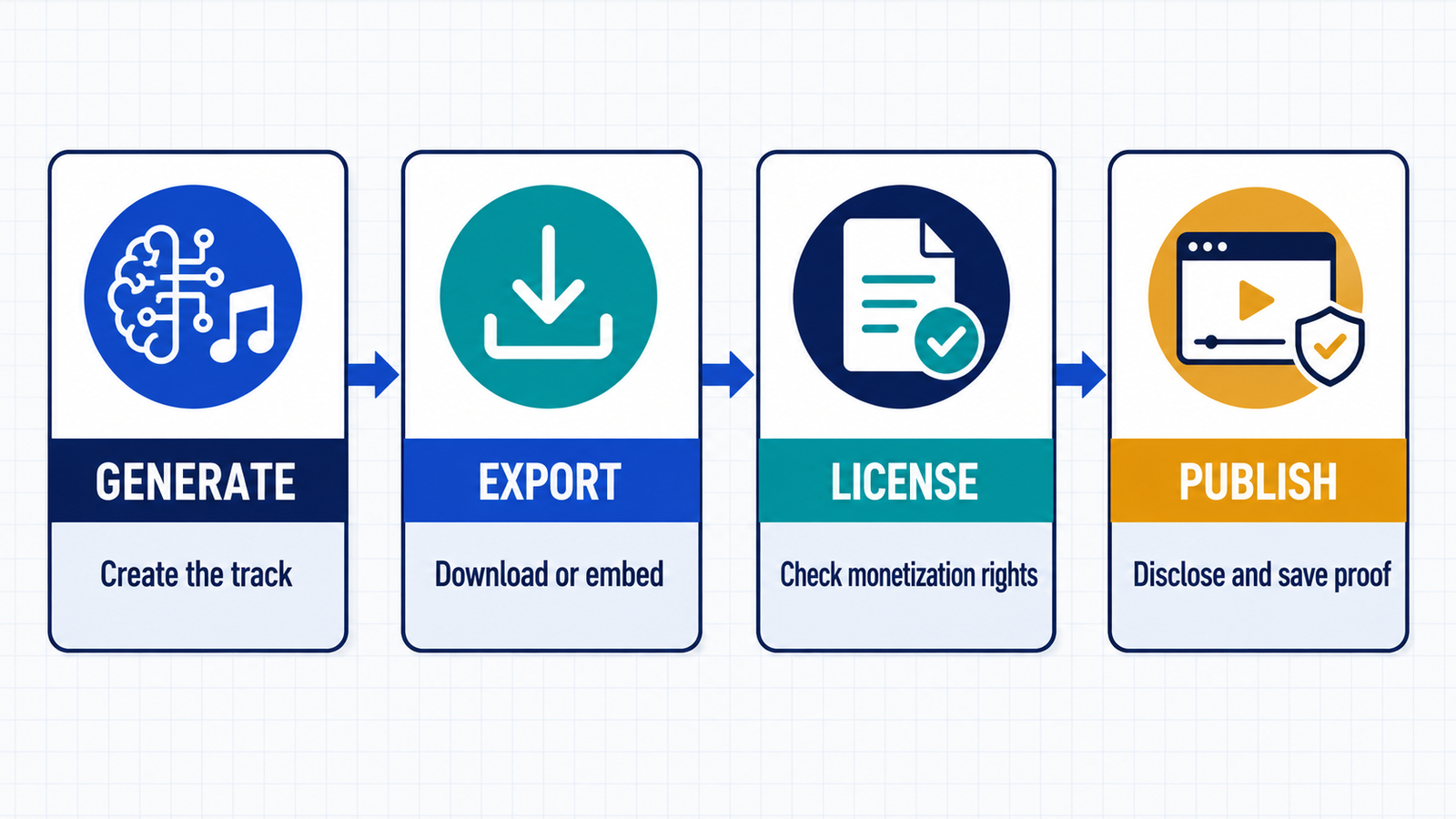
- Decide whether the video will earn money. Ads, sponsorships, affiliate promotion, client work and brand channels can all move a project outside a personal-use license.
- Generate for the edit. Specify exact duration, energy curve, tempo, instruments, vocal status and moments where narration needs space.
- Confirm export rights. A generation preview, share link or in-editor soundtrack is not necessarily a downloadable file.
- Save evidence. Keep the track ID, account tier, date, receipt if any, license text and the project file.
- Avoid artist imitation. Do not request a living performer’s identity, upload copyrighted audio without permission or clone a voice without consent.
- Review before publishing. Listen for recognizable lyrics or melodies, distorted vocals, unwanted samples and abrupt transitions.
- Do not register nonexclusive music in Content ID. Several vendors prohibit it, and claims against other licensed users can violate platform rules.
YouTube disclosure, monetization and copyright rules
YouTube’s AI disclosure guidance lists AI-generated music as content creators should disclose. YouTube says using the disclosure does not by itself limit audience reach or monetization eligibility. The label is transparency, not a substitute for music rights.
The YouTube monetization policy also requires original, authentic value. AI assistance is not automatically disqualifying, but mass-produced, minimally varied or template-like channels may be ineligible. A valid music license does not rescue an otherwise repetitive channel.
Finally, cleared synchronization rights do not guarantee that a fully AI-generated track is copyrightable or exclusive. A tool may grant permission to use an output while retaining ownership or licensing similar output to others. For a client campaign, large paid promotion or a channel built primarily around music, obtain rights in writing or use a plan expressly designed for that use.
Frequently asked questions
Can I monetize YouTube videos with free AI music?
Sometimes, but not under most free plans. CapCut’s current AI-music page explicitly describes free generated tracks as commercially usable, while Adobe positions Firefly Generate Music as commercially safe but gives only limited complimentary access. Mubert, Soundful, Canva and AIVA restrict their Free output to personal or noncommercial projects. Check the exact track and tier before enabling ads.
Will YouTube demonetize a video because its music is AI-generated?
Not simply because AI was used. YouTube says disclosure does not reduce monetization eligibility by itself. The video must still clear music rights, comply with advertiser and community rules, and provide original value rather than appearing mass-produced or repetitive.
Do I need to disclose AI-generated background music?
Yes. YouTube’s current examples specifically include AI-generated music among content creators should disclose using the AI-use setting during upload. Keep the disclosure accurate even when the music is only one layer of a larger human-made video.
Can I put an AI-generated track into YouTube Content ID?
Do not do so unless the service grants the necessary exclusive rights and explicitly allows registration. Mubert prohibits Content ID registration, and nonexclusive licenses can create false claims against other legitimate users. A right to synchronize music with a video is not the same as exclusive ownership.
Bottom line: CapCut is the most practical free starting point for a complete YouTube workflow, while Adobe Firefly is the strongest documentation-led option for commercially safe soundtrack drafts. The other tools are valuable for personal or non-monetized videos, but their Free licenses should not be stretched into commercial use.


