


The best AI writing tools for website content are Jasper for brand-controlled marketing, Writesonic for SEO-led articles, Surfer for optimizing existing pages, HubSpot for built-in CMS publishing, Copy.ai for repeatable go-to-market workflows, ChatGPT for flexible drafting, and Claude for source-heavy long pages. The right choice depends less on raw prose and more on where the draft must go next.
AI can accelerate briefs, first drafts, rewrites and page variants, but it cannot supply firsthand experience, approve product claims or guarantee search performance. This comparison, checked on September 10, 2026, ranks tools by their usefulness in a real website publishing workflow. Pricing and usage limits can change, so verify the linked plan page before buying.
Best AI writing tools for website content at a glance
| Tool | Best for | Access checked | Main limitation |
|---|---|---|---|
| Jasper | Brand-governed marketing teams | 7-day Pro trial; card required | No permanent free plan |
| Writesonic | SEO-led blog production | No-card trial; current paid packages vary by scope | Useful SEO workflow is relatively expensive |
| Surfer | Refreshing and optimizing pages | Discovery shown at $49/month billed annually | Optimization guidance is not editorial judgment |
| HubSpot Content Hub | Writing and publishing in one CMS | Free plan; no card | Strongest value is inside HubSpot |
| Copy.ai | Repeatable GTM content workflows | Free entry offer; Chat plan $29/month | Current free and paid packaging is confusing |
| ChatGPT | Flexible solo drafting and revision | Free plan with variable limits | No native SEO score or CMS approval flow |
| Claude | Long, source-led pages | Limited Free plan; Pro $20/month | Projects and Research require paid access |
How we ranked the tools
We screened 11 credible products: Jasper, Writesonic, Surfer, HubSpot Content Hub, Copy.ai, ChatGPT, Claude, Grammarly, Frase, Scalenut and Writer. The seven ranked tools cover the widest range of website-content jobs without pretending that a blog generator and a proofreading layer solve the same problem.
This is a documentation-based comparison, not a matched-prompt output test. We reviewed official product, pricing, help, privacy and security pages, then used independent AI-writer testing from TechRadar for context. The criteria were:
- Website formats: landing pages, product pages, service pages, articles, metadata and calls to action.
- Editorial control: outlines, section-level revision, source handling and the ability to preserve approved facts.
- Brand control: reusable voice, terminology, audience and knowledge settings.
- Search workflow: briefs, optimization, internal links and integration with publishing systems.
- Access: free plan or trial boundaries, price, usage allowance and card requirement.
- Governance: collaboration, privacy statements, approval controls and traceability.
We did not award points for promises to “guarantee rankings” or make text “undetectable.” Google’s current generative-AI guidance says the technology can help with research and structure, but scaled pages that add little value can violate its spam policy. Accuracy, relevance and original value still matter more than how the draft was produced.
1. Jasper: best for brand-controlled website copy
Jasper is the strongest choice when several marketers need to produce pages that follow the same voice, vocabulary and audience rules. Its Pro plan includes Canvas, marketing agents, two Brand Voices, five knowledge assets and three audiences. Jasper can build a voice from uploaded examples or URLs, and its comparison preview shows a version with and without the voice applied.
That structure is useful for landing-page families, product launches and multi-author sites. A content lead can encode the approved voice once instead of pasting a long style prompt into every session. Business customers get unlimited brand customization and more advanced governance.
Access and caveat: Jasper lists Pro at $69 per seat monthly or $59 monthly when billed annually. The seven-day trial requires a credit card and converts to a paid subscription unless canceled. Pro is limited to one seat, two Brand Voices and five knowledge assets; formal Style Guide rules are a Business feature.
Pros: purpose-built marketing controls, reusable audiences, strong brand governance. Cons: no permanent free tier, card-required trial, and the highest-value governance features sit in custom-priced Business.
2. Writesonic: best for SEO-led article production
Writesonic is the most complete fit here for teams that want keyword research, article drafting and content optimization in one system. Its AI Article Writer is designed for long-form content and supports a staged workflow rather than only producing a single opaque draft. That makes it easier to approve the topic, outline and evidence before spending time on prose.
Its current positioning combines traditional SEO, AI-search visibility and content operations. That breadth is useful for an editorial team, but it also means buyers should separate the writing allowance from site-audit and visibility limits when comparing plans.
Access and caveat: Writesonic advertises a no-credit-card trial. Its current paid packages combine article allowances with site audits, projects, AI-search tracking and agent workflows; the precise tiers displayed have changed over time. Compare the live package with your real publishing volume. These allowances are not a promise that every generated page is accurate or ready to rank.
Pros: integrated research, drafting and optimization; clear article allowance on paid tiers. Cons: costly for occasional use, many overlapping modules, and all factual claims still need source review.
3. Surfer: best for updating existing pages
Surfer is more useful as an optimization workspace than as a blank-page writer. Its plans combine a content editor, AI writing assistant, optimization guidance and integrations with WordPress, Google Docs and Contentful. The Pro tier also includes internal-link suggestions and a cannibalization report, both practical for established sites with growing archives.
Use it to compare an existing draft with the subjects covered by current search results, find missing concepts and manage refreshes. Do not treat a rising content score as proof that a paragraph is correct, original or good for readers.
Access and caveat: Surfer lists Discovery at $49 per month billed annually for 120 documents, Standard at $99 for 360 documents and Pro at $182 with broader AI-search tracking. “Start for free” is not presented as a permanent zero-dollar writing plan on the checked pricing table.
Pros: strong optimization workflow, useful integrations, practical archive controls. Cons: expensive if you only need drafting, and competitor-derived suggestions can encourage sameness if followed mechanically.
4. HubSpot Content Hub: best AI writer inside a CMS
HubSpot is the easiest recommendation for a business already publishing through HubSpot. Its AI tools can generate and refine website pages, blog posts, knowledge-base articles and calls to action without moving copy between a chatbot and a CMS. The free tier can build landing pages, create blog posts with AI and provide basic SEO tips.
The benefit is operational: the draft lives near templates, forms, analytics and publishing. That reduces copy-and-paste errors and makes it easier to review the complete page rather than a text fragment. It is less attractive if WordPress or another CMS is already central to your stack.
Access and caveat: HubSpot lists a $0 plan with no card required. Starter begins at $10 per seat monthly on the checked page and removes HubSpot branding; Professional starts at $500 monthly and adds features such as brand voice and content remix. HubSpot does not publish a durable per-user free AI-writing quota on that overview.
Pros: free entry, direct page creation, connected CMS and analytics. Cons: platform lock-in, HubSpot branding on Free, and advanced brand operations become expensive.
5. Copy.ai: best for repeatable go-to-market workflows
Copy.ai is a better fit for recurring systems than one-off blog posts. Its workflows can combine research, generation and integrations for jobs such as turning a product brief into web copy, email and sales assets. That is valuable when the same launch process repeats across products or regions.
Copy.ai’s security page says customer prompts are not shared with other customers and individual data is not used to train its models. Businesses should still review the full contract, retention terms and any connected data sources before uploading confidential product plans.
Access and caveat: Copy.ai’s current pricing page lists Chat at $29 monthly or $24 monthly billed annually for five seats. A separate current trial page advertises no-card access and 2,000 free words per month. Because those official surfaces describe different packaging, confirm the allowance shown in your account before committing. Workflow plans rise sharply above Chat.
Pros: reusable workflows, multiple model providers, useful for campaign repurposing. Cons: confusing packaging and poor value if you only need occasional page drafts.
6. ChatGPT: best flexible option for solo website owners
ChatGPT is the easiest starting point when you need one tool for discovery, outlining, drafting, rewrites and critique. Canvas supports direct editing and targeted revision, while Projects can hold a site brief, approved terminology and reference material. Search can help locate current sources, but writers should open and verify every important source themselves.
It works especially well when you provide a disciplined brief: audience, page goal, proof points, prohibited claims, internal links and a required call to action. For a repeatable process, pair it with a clear prompting framework and keep source material in a dedicated project.
Access and caveat: ChatGPT Free includes Canvas, search and limited file uploads, but usage limits vary. Plus is $20 per month on the checked US plan information. Consumer data controls differ from business workspace defaults, so check settings before adding unreleased or customer-specific information.
Pros: flexible, low-friction and strong for iterative editing. Cons: variable free limits, no native page-level SEO score, and no built-in approval workflow for most CMSs.
7. Claude: best for long pages grounded in source files
Claude is a strong choice for long service pages, pillar pages and technical explainers built from a large body of approved material. Custom styles control tone and format, while paid Projects provide a reusable knowledge base and project instructions. Anthropic says Projects can automatically use retrieval-augmented generation as the knowledge base grows.
This makes Claude useful when a writer must reconcile product documentation, interview transcripts and an existing style guide. It does not replace claim-level verification. A fluent synthesis can still blur what a source says or omit an important condition.
Access and caveat: Claude Free includes writing, editing and web search with limited usage. Pro costs $20 monthly or the equivalent of $17 monthly when billed annually. Unlimited Projects and Research are paid features, and usage depends on message length, attachments, conversation length and tools.
Pros: good fit for long source packets, reusable styles and paid project knowledge. Cons: variable limits, paid project features and no native CMS publishing layer.
Useful alternatives that did not make the main list
Grammarly is the best companion when the draft already exists. Its Free plan includes grammar help, tone detection and 100 generative prompts per month; Pro lists 2,000 prompts monthly and costs $12 per month billed annually or $30 month to month. It is stronger as an editing and consistency layer than as an end-to-end website-content system.
Frase and Scalenut are credible SEO-writing alternatives for teams that prefer their research and brief workflows. Writer deserves consideration for enterprise terminology, governance and approved knowledge. They were not ranked because this shortlist already includes stronger representatives for small-team SEO, flexible drafting and integrated publishing.
How to choose the right AI website content tool
- Choose the bottleneck, not the longest feature list. Jasper solves brand consistency; Surfer solves refresh and optimization workflow; HubSpot solves handoff into the CMS.
- Run a paid pilot on real pages. Test a landing page, product page and refresh using the same brief. Measure factual corrections, edit time, brand violations and publishing friction—not word count.
- Build an evidence pack. Give the tool approved product facts, pricing, expert input and customer evidence. For technical material, a retrieval-grounded workflow can reduce unsupported improvisation.
- Separate drafting from approval. Require a human to verify names, numbers, testimonials, legal claims, competitor comparisons, accessibility and links.
- Review privacy and rights. Do not upload customer data, confidential roadmaps or licensed source material until the organization has approved the product’s terms and workspace settings.
If you are new to the underlying technology, start with this beginner’s guide to generative AI. Small businesses comparing broader document workflows can also use our guide to AI document creation tools.
A safer workflow from brief to publication
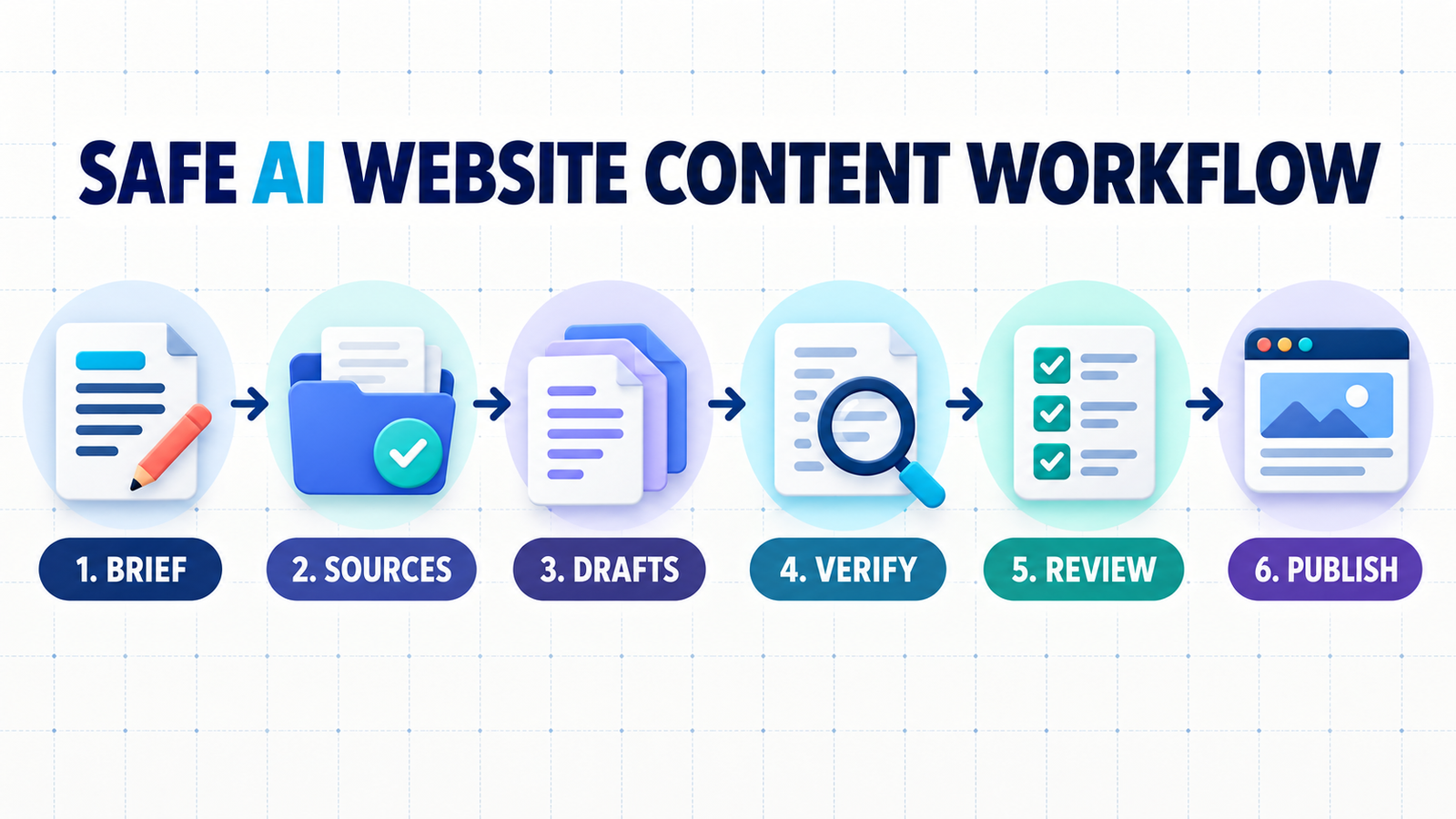
Start with a one-page brief that defines the reader, job to be done, conversion goal, approved claims and evidence. Ask the tool for an outline before prose. Assign a source to every factual section, then draft one section at a time. After the draft, run separate passes for usefulness, brand voice, search intent, legal or product claims, accessibility and links.
Publish only after a person has compared the copy with the source pack and viewed it in the actual page template. The rendered page can reveal repeated headings, awkward calls to action or mobile layout problems that are invisible in a chat window. Finally, monitor queries, conversions and support feedback; revise the page when the underlying product or user need changes.
Frequently asked questions
What is the best AI writing tool for website content?
Jasper is the best fit for teams that prioritize brand governance, while ChatGPT is the most flexible starting point for solo users. Writesonic and Surfer are stronger when SEO workflow is the main bottleneck, and HubSpot is best when the website already runs on its CMS.
Can AI-written website content rank on Google?
AI use alone does not qualify or disqualify a page. Google says it prioritizes helpful, reliable, people-first content and warns against scaled generation that adds little value. Original evidence, accurate claims, clear structure and useful human editing remain essential.
Which AI website writer is actually free?
HubSpot Content Hub, ChatGPT and Claude have ongoing free access, subject to features or variable usage limits. Grammarly Free is useful for editing and includes 100 generative prompts monthly. Jasper offers only a card-required seven-day trial, while Surfer’s pricing page does not show a permanent free writing plan.
Should AI publish directly to WordPress?
Not without a review gate. Direct integration can save time, but a person should verify claims, sources, internal links, metadata, image rights and the rendered page before publication. Automation should move approved content, not silently turn a model’s first draft into a public page.
Editorial note: This review is based on publicly available product documentation and independent testing context checked September 10, 2026. GravityDevOps did not run a controlled output-quality benchmark or receive payment from the listed vendors for inclusion.

