


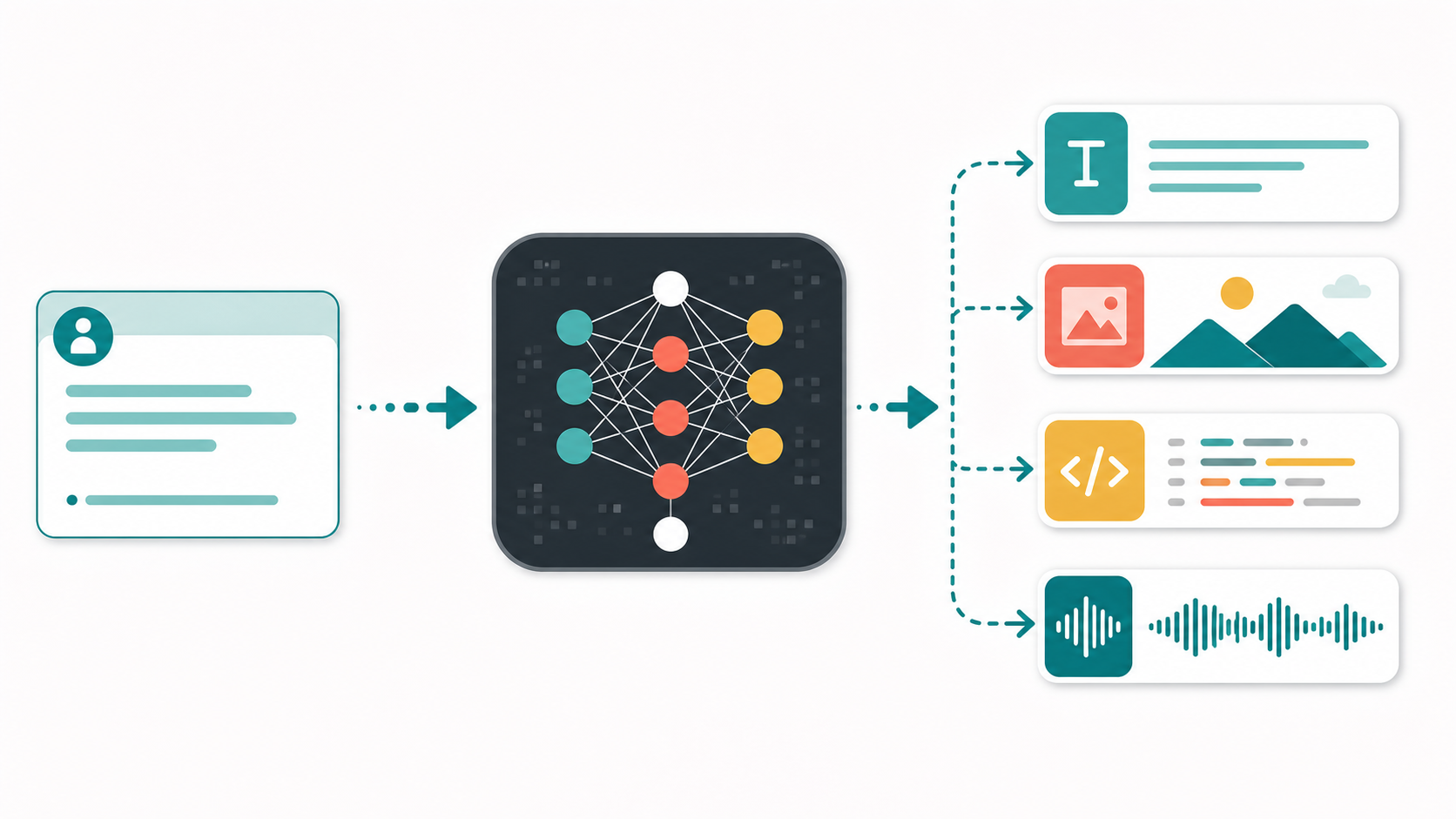
Generative AI is one of the most talked-about technologies in the world right now, but the basic idea is simple: it is artificial intelligence that can create new content. Instead of only analyzing information or making predictions, generative AI can produce text, images, code, music, video, summaries, plans, and more from a prompt.
If you have ever asked a chatbot to draft an email, used an image generator to create artwork, or asked an AI tool to explain a difficult topic in simpler words, you have already used generative AI. This beginner’s guide explains what generative AI is, how it works, where it is useful, and what to watch out for before depending on it.
What Is Generative AI?
Generative AI is a type of artificial intelligence designed to generate new material based on patterns it has learned from large amounts of data. The word “generative” means it can create something that did not exist in exactly that form before.
Traditional AI often focuses on classification, prediction, or detection. For example, it might identify whether an email is spam, predict customer demand, or detect a face in a photo. Generative AI goes a step further: it can write a response, design an image, create a product description, summarize a report, produce code, or suggest new ideas.
Common examples include AI chatbots, text generators, AI image tools, coding assistants, voice generation tools, and video generation systems. These tools are different in form, but they share the same broad goal: generating useful output from user instructions.
How Generative AI Works in Simple Terms
Generative AI models are trained on huge collections of data. Depending on the tool, this data may include text, images, code, audio, video, or other formats. During training, the model learns patterns: how sentences are structured, how concepts relate to each other, how images are composed, or how code is commonly written.
When you type a prompt, the model does not simply copy and paste from a database. Instead, it predicts and constructs a likely response based on the patterns it has learned. For text, it predicts what words should come next. For images, it builds visual elements that match the prompt. For code, it generates instructions that resemble valid programming patterns.
A helpful way to think about it is this: the prompt is your instruction, the model is the pattern engine, and the output is a newly generated result. Better prompts usually lead to better results because they give the model clearer direction.
What Can Generative AI Create?
Generative AI can work across many content formats. A text model can draft blog posts, emails, social media captions, product descriptions, FAQs, study notes, and business documents. An image model can create illustrations, concept art, thumbnails, mockups, and visual ideas. A coding assistant can suggest functions, explain errors, write tests, or help document software.

Here are some practical beginner-friendly use cases:
- Writing assistance: drafting emails, outlines, summaries, and blog posts.
- Learning support: explaining difficult topics in simple language or creating study plans.
- Design ideation: generating rough concepts for thumbnails, posters, ads, and product visuals.
- Programming help: explaining code, suggesting snippets, writing tests, and debugging common errors.
- Business productivity: summarizing meetings, preparing reports, drafting proposals, and organizing ideas.
Popular Types of Generative AI Tools
Generative AI tools are often grouped by the kind of output they create. Text generation tools answer questions, write drafts, summarize content, translate language, and help with research. Image generation tools create visuals from descriptions. Code generation tools help developers write and understand software. Audio and voice tools can generate narration, music, or sound effects. Video generation tools can create short clips, animations, or visual scenes from prompts.
Many modern tools are also multimodal, which means they can work with more than one type of input or output. For example, a multimodal AI system may be able to read an image, answer questions about it, write related text, and help create a design brief from the same conversation.
Why Generative AI Matters
Generative AI matters because it lowers the barrier to creating and understanding information. A beginner can use it to get a first draft instead of staring at a blank page. A developer can use it to explore an unfamiliar library. A small business owner can create content ideas without hiring a large team. A student can ask for simpler explanations and examples.
The biggest benefit is not that AI replaces human thinking. The real value is that it can speed up early drafts, suggest options, explain concepts, and help people move from idea to execution faster. Used well, it becomes a creative and productivity assistant.
Limitations and Risks
Generative AI is powerful, but it is not perfect. It can produce incorrect information with confidence. It may misunderstand context. It can reflect bias from training data. It may generate content that sounds polished but lacks accuracy. For sensitive topics such as health, finance, legal matters, or security, human review and expert verification are essential.

Privacy is another important concern. You should avoid entering passwords, private customer data, confidential company documents, or sensitive personal information into tools unless you understand the tool’s data policy and your organization’s rules.
How to Use Generative AI Effectively
The quality of the output depends heavily on the quality of the prompt. A vague prompt like “write about AI” may produce a generic answer. A better prompt gives context, audience, format, tone, and goal.
For example, instead of asking, “Explain generative AI,” you could ask, “Explain generative AI to a beginner in simple language, include three examples, avoid technical jargon, and end with a short summary.” That gives the model a clearer target.
Here are a few prompt tips:
- Describe the audience and purpose.
- Specify the format, such as bullet points, article, table, checklist, or email.
- Ask for examples when learning a new concept.
- Request revisions instead of accepting the first output.
- Verify important facts before publishing or making decisions.
Will Generative AI Replace People?
Generative AI will change many workflows, but it is best understood as a tool rather than a complete replacement for human judgment. It can draft, summarize, suggest, and automate parts of a task, but people still provide goals, taste, ethics, strategy, domain knowledge, and final accountability.
In many jobs, the people who benefit most will be those who learn how to use AI thoughtfully: asking better questions, reviewing outputs carefully, combining AI suggestions with real expertise, and applying human judgment where it matters.
Final Thoughts
Generative AI is artificial intelligence that creates new content from prompts. It can help with writing, learning, coding, design, analysis, and everyday productivity. For beginners, the best way to understand it is to start small: ask it to explain a topic, summarize a document, brainstorm ideas, or improve a draft.
The key is to use it with curiosity and caution. Generative AI can be a powerful assistant, but it should not be treated as an unquestionable authority. Give clear instructions, review the output, protect private information, and verify anything important. Used responsibly, generative AI can help you learn faster, create faster, and think through ideas in a more structured way.

