

The best AI writing assistant for most students is Grammarly when the goal is to improve a draft they already wrote. ChatGPT Study Mode is better for questioning ideas and learning before drafting, while Paperpal is the strongest specialist for academic language. No tool can verify your argument, sources or permission to use AI for you.
That distinction matters. A writing assistant should help a student think, revise and learn—not quietly replace the work an assignment is designed to assess. This comparison focuses on tools that can provide feedback, coaching, language correction, outlining or citation support while leaving the student responsible for the final text. Free access, school licensing and product limits were checked on September 14, 2026; vendors can change them at any time.
Best AI writing assistants for students at a glance
| Tool | Best for | Current no-cost access | Main limitation |
|---|---|---|---|
| Grammarly | Polishing a student-written draft | Free plan with 100 AI prompts per month | Stronger rewrites and plagiarism checks are paid |
| ChatGPT Study Mode | Learning, outlining and Socratic feedback | Available on the Free plan; normal account limits apply | Can still make factual and citation errors |
| Microsoft Study and Learn | School-managed writing coaching | Included with eligible Education A1, A3 and A5 licenses | Your institution must enable Copilot Chat |
| Paperpal | Academic and research writing | 200 language corrections monthly and five AI uses daily | Heavier thesis and manuscript work needs a paid tier |
| Jenni AI | Citation-aware drafting in one editor | 10 autocompletes daily and limited edits, chat and reviews | Free export and AI allowances are narrow |
| QuillBot | Comparing paraphrases and summaries | 125 words per paraphrase in two modes | Easy to misuse as a substitute for original synthesis |
| LanguageTool | Multilingual grammar and light rewriting | Basic checking and three AI paraphrases daily | Free field and rewriting limits are restrictive |
These are not seven versions of the same product. Grammarly and LanguageTool work best late in the process. ChatGPT and Microsoft’s learning agent are better as coaches. Paperpal and Jenni are aimed at academic workflows, while QuillBot is a focused rewriting utility. The right choice depends on the task your instructor actually permits.
How we selected the best AI writing assistant for students
We screened 11 credible products: Grammarly, ChatGPT, Microsoft Study and Learn, Paperpal, Jenni AI, QuillBot, LanguageTool, Gemini, Claude, ProWritingAid and Hemingway Editor. We compared their official product, pricing, help and privacy material across eight criteria:
- Learning value: whether the tool can question, explain or suggest instead of only producing finished prose.
- Revision control: whether a student can accept changes selectively and preserve their own voice.
- Academic fit: support for papers, source-grounded work, citations, formal tone or school-managed accounts.
- Free access: the practical allowance, account requirement and difference between a permanent tier, institutional entitlement and trial.
- Verification: whether claims and citations can be traced back to the student’s real sources.
- Privacy: published controls for uploaded assignments, conversations and model training.
- Access: US availability, browser or document integrations and administrator dependencies.
- Integrity risk: how easily the product could replace rather than support the student’s own work.
This is a documentation-based comparison, informed by independent product coverage and education research. We did not run a controlled, matched-essay benchmark, test paid university accounts or measure grades. A 2025 study on academic writing argues that active learning—asking students to evaluate AI output against academic criteria—can address some risks of overreliance. That approach shaped our ranking.
1. Grammarly: best overall for improving your own draft
Grammarly is the safest default when you already have a draft and want help with grammar, clarity and tone. It works across browsers and common writing surfaces, so students can review suggestions in context rather than paste an entire paper into a separate generator. The free tier includes core correctness help, tone feedback and, according to Grammarly’s current plan page, 100 generative AI prompts per month.
Why it ranks first: selective suggestions make it easier to remain the author. You can read the reason for a change, reject it and keep your phrasing. That is more educational than asking a chatbot to replace several paragraphs at once.
Watch out: full-sentence rewrites, plagiarism detection and deeper fluency features sit behind paid plans. Even a grammar tool may count as AI under a course policy. Penn State’s guidance, for example, explicitly says assignment rules can apply to Grammarly and Copilot as well as general chatbots.
2. ChatGPT Study Mode: best for thinking before writing
ChatGPT Study Mode is a better fit than a blank chatbot when the purpose is to learn. It can ask questions, surface gaps in an argument, explain a reading and quiz you before you draft. OpenAI says Study Mode is available across ChatGPT plans, including Free, and uses the normal model, message and upload limits for the account.
Why it ranks highly: its guided format can help a student develop a thesis, test counterarguments or turn notes into an outline without immediately producing a submission-ready essay. A useful prompt is: “Ask me questions until I can defend my thesis; do not write the paragraph for me.” For more reliable results, use the principles in our prompt engineering guide.
Watch out: Study Mode can still give direct answers, misread uploads or invent facts. Verify every factual claim against course materials. Consumer ChatGPT conversations may be used to improve models unless you turn off that setting; OpenAI documents the choice in its data-use guidance. Do not upload private peer feedback, protected research data or identifiable student records.
3. Microsoft Study and Learn: best when your school provides it
Microsoft’s Study and Learn Agent is built around coaching rather than ghostwriting. It can use uploaded Word files, slides and PDFs, then lead scaffolded conversations and provide writing support without writing the assignment for you. Microsoft says it is included at no extra cost with Education A1, A3 and A5 licenses for eligible users age 13 and older.
Why it stands out: an institution-managed account can be a better home for course material than an unrelated consumer service, and the learning agent’s stated design matches productive effort. It is especially practical for schools already using Microsoft 365.
Watch out: “included” is not the same as universally free. Your institution must hold an eligible license and enable Copilot Chat; administrators control access for learners ages 13–17. The current experience is on web and Windows desktop, with other platforms planned. Ask your school what retention and acceptable-use settings apply.
4. Paperpal: best for academic language and research manuscripts
Paperpal is purpose-built for academic prose. It combines language correction, academic-tone rewriting, research search, reference checks and integrations for Word, Google Docs, Chrome and Overleaf. Its free-plan help page lists 200 language correction suggestions per month and five uses of AI features per day.
Why it belongs here: subject-aware academic language support is more useful for a thesis or journal-style paper than a generic “make this sound better” button. Paperpal also says uploaded content is not used to train its models, though students should still read institutional research-data rules before uploading unpublished work.
Watch out: the allowance is suitable for light revision, not a long dissertation. A citation suggestion is only a lead: open the actual paper, confirm the author, title, date and claim, and cite the source you read. Do not cite an AI-generated summary as though it were the original evidence.
5. Jenni AI: best citation-aware drafting workspace
Jenni combines autocomplete, document chat, citations, PDF uploads and export in one academic editor. Its current US pricing page lists a permanent free plan with 10 AI autocompletes per day, 10 PDF uploads, unlimited citations and limited AI edits, chat messages and reviews. No credit card is required to start.
Why it made the list: students working from a small library of real sources can keep notes, citations and paragraphs in one place. The autocomplete limit also discourages treating the product as an unlimited essay machine.
Watch out: Jenni’s pricing table and feature summary do not describe every small allowance identically, so check the in-app Usage page before relying on a number. Free document export is more limited than paid export. Autocomplete can still flatten your voice or make a plausible claim unsupported by the cited source.
6. QuillBot: best for studying alternative phrasing
QuillBot is useful when you compare a sentence you wrote with a few clearer alternatives. Its current free Paraphraser accepts up to 125 words at a time and provides Standard and Fluency modes. The free suite also offers basic grammar checking and limited summarization.
Why it is useful: the narrow input window suits sentence-level learning. Ask why a rewrite is clearer, then recreate the idea in your own words rather than accepting it blindly.
Watch out: substituting synonyms does not make copied reasoning original. A “humanizer” is not proof of authorship, permission or academic integrity, and detector scores are not reliable evidence that work is acceptable. Always cite the underlying source and follow the assignment’s disclosure rules.
7. LanguageTool: best lightweight multilingual assistant
LanguageTool supports more than 30 languages and works through browser, desktop and office-app integrations. Its current free comparison lists basic grammar, punctuation and style checks plus three AI-powered paraphrases per day. The product is a good fit for multilingual students who need surface-level corrections without a large generative workspace.
Why it is included: it is focused, easy to ignore when a suggestion is wrong and useful beyond English. LanguageTool’s plan comparison also makes the free-versus-paid boundary visible.
Watch out: the free text-field limit and three daily rewrites make it impractical for whole-paper revision. LanguageTool’s legal terms say user content is not used to train its AI models, but never assume that a browser extension is permitted on an exam or inside a managed school system.
Why Gemini, Claude, ProWritingAid and Hemingway did not rank
Gemini and Claude are capable general assistants, and both can help question an outline or critique a paragraph. They did not outrank ChatGPT Study Mode or Microsoft’s learning agent because their most relevant student advantage depends on account type, school administration or variable limits, while the core writing workflow overlaps heavily. Google’s school-account controls are worth checking: Gemini access and limits vary by Education edition.
ProWritingAid is a credible alternative for detailed reports and long-form style. Its free plan checks 500 words at a time, allows two runs of each report daily and 10 daily rephrases. Hemingway’s free editor is valuable for readability, but its generative rewriting is a paid feature. Both are sensible alternatives when you want editing rather than research or tutoring. Students comparing broader research workflows can also read our AI tools for research and drafting guide and our content revision comparison.
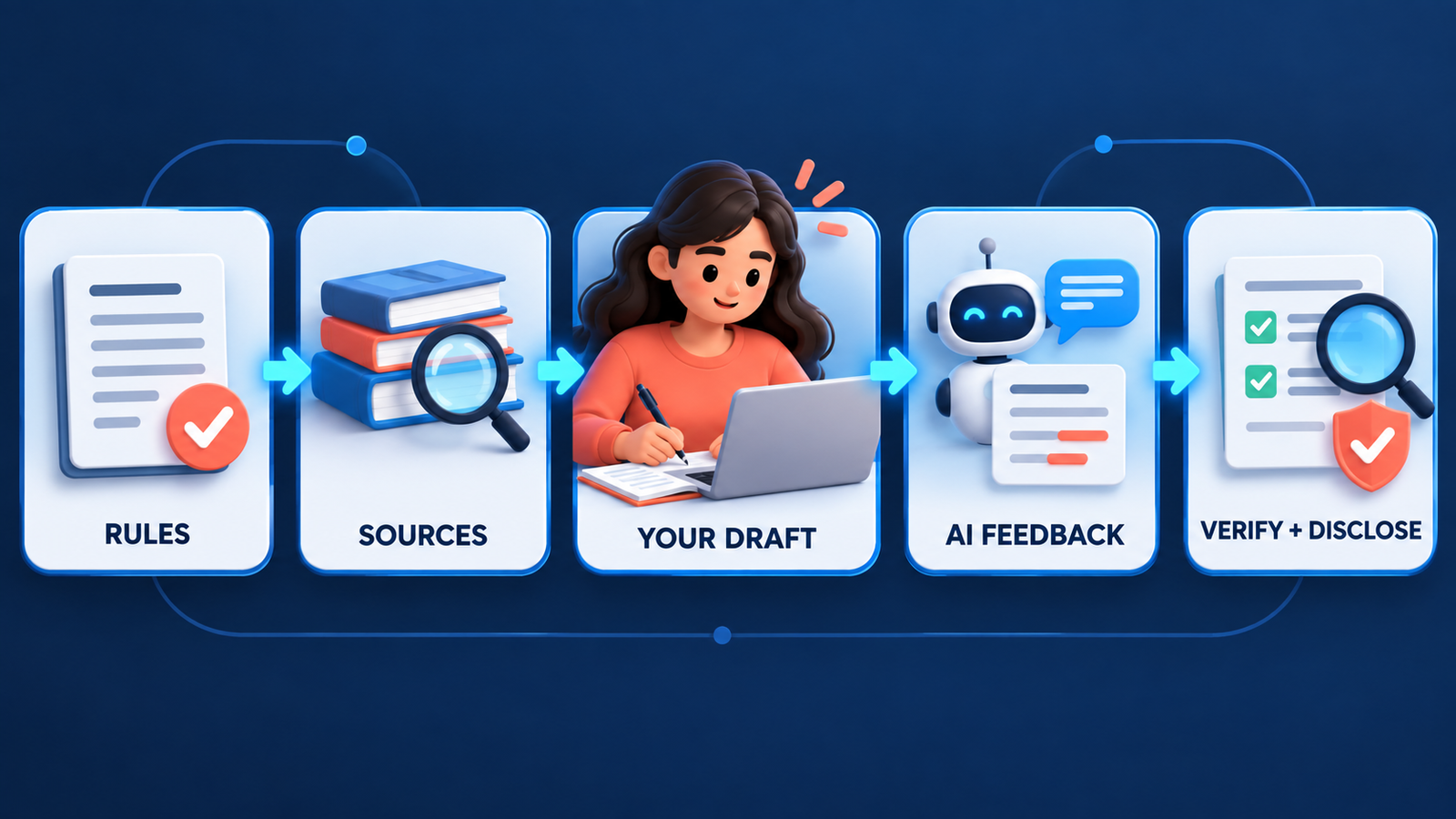
A safe student workflow for AI-assisted writing
- Read the assignment and AI policy first. “AI allowed” may mean brainstorming only, grammar only or full use with disclosure. Ask your instructor when the boundary is unclear.
- Collect real sources yourself. Use library databases, assigned readings and primary material. Keep a source log before opening an AI assistant.
- Write a claim or rough outline in your own words. This gives the assistant something to question without outsourcing the intellectual starting point.
- Ask for feedback, not replacement text. Request counterarguments, missing evidence, confusing transitions or questions a skeptical reader would ask.
- Verify every fact and citation. Penn State’s AI limitations guidance warns that generated references can be fabricated. Open every source and confirm that it supports the sentence.
- Revise selectively and preserve your voice. Compare suggestions, explain why you accepted them and keep version history where possible.
- Disclose use as required. Save prompts or an edit log if your class asks for process evidence. Never use a paraphraser or “humanizer” to conceal prohibited generation.
If generative AI is new to you, our beginner’s guide to generative AI explains why these systems can sound confident even when they are wrong. Students preparing slides rather than papers may find the separate comparison of free AI presentation makers for students more relevant.
How to choose the right tool
Choose Grammarly or LanguageTool when your own draft exists and surface errors are the problem. Choose ChatGPT Study Mode or Microsoft Study and Learn when you need questions, explanations and practice before writing. Choose Paperpal for research manuscripts, Jenni for a citation-centered drafting workspace, and QuillBot only for limited sentence-level comparisons.
The most important feature is not generation speed. It is whether the product helps you see and defend the decisions in your final paper. If you cannot explain a claim, locate its source or reproduce the reasoning without the assistant, the draft is not ready to submit.
Frequently asked questions
Can students use an AI writing assistant without plagiarizing?
Sometimes, but permission depends on the course and assignment. Use AI only for allowed tasks, cite or disclose it when required, verify sources and submit your own reasoning and wording. Paraphrasing generated or copied text does not automatically make it original.
Which AI writing assistant is completely free?
Grammarly, ChatGPT, Paperpal, Jenni, QuillBot and LanguageTool all have ongoing free access, but every tier has limits. Microsoft Study and Learn is included only through an eligible school license. None offers unlimited, unrestricted academic writing assistance at no cost.
Can AI writing tools create accurate citations?
They can format or suggest citations, but they can also attach the wrong source or invent a reference. Treat every result as unverified until you open the source, confirm the bibliographic details and ensure it supports your exact claim.
Should I upload my full essay or research data?
Not by default. Remove personal information, unpublished findings, peer data and instructor-only material. Check the tool’s data controls and your school’s rules. Institution-managed education accounts may provide stronger protections than consumer accounts, but local policy still governs.


