
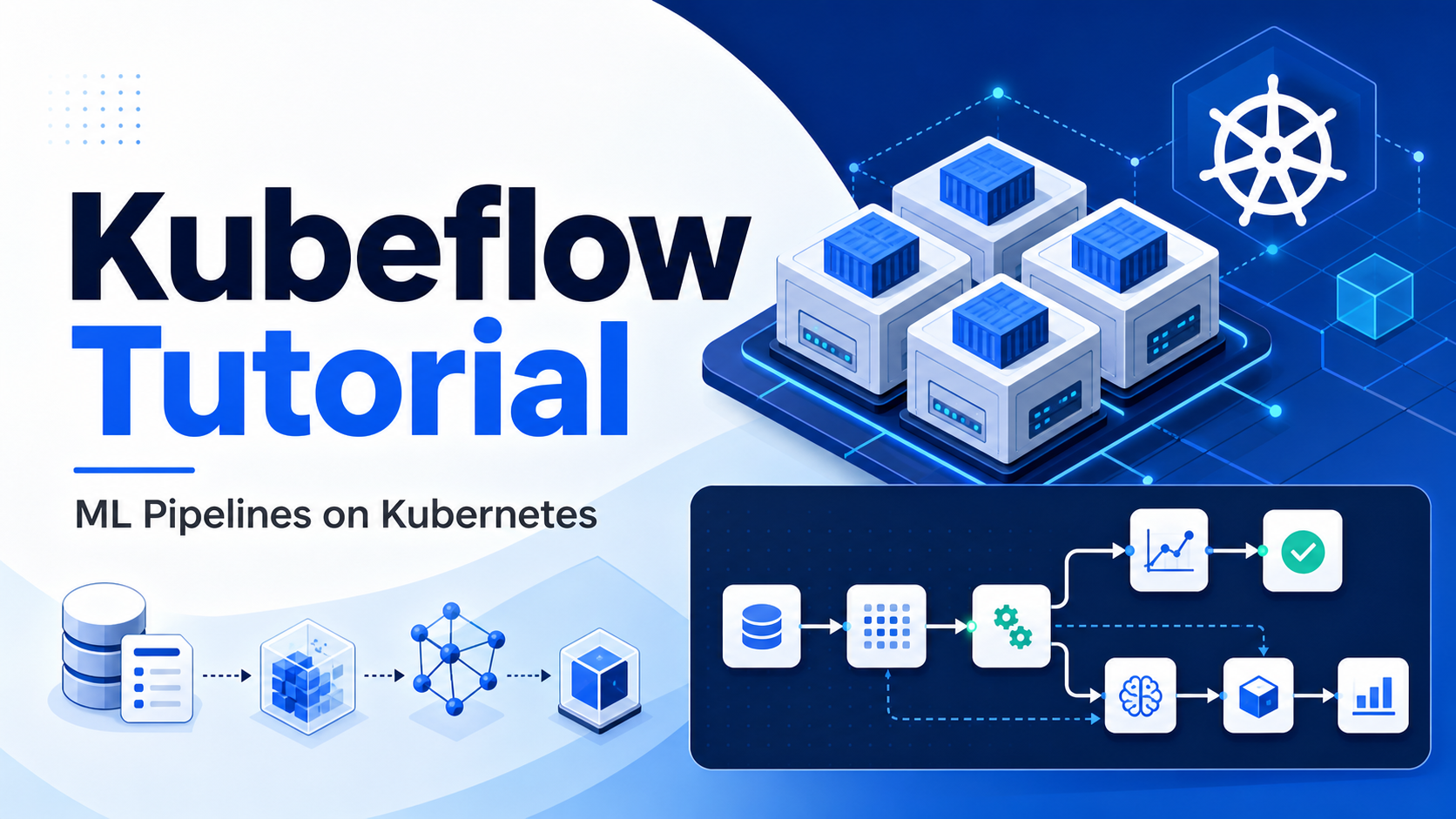

Quick Answer: Kubeflow is an open source machine learning platform for teams that want to run repeatable ML workflows on Kubernetes. The most useful starting point is usually Kubeflow Pipelines: you write Python components, compose them into a directed pipeline, compile the pipeline to YAML, run it on a Kubernetes-backed Kubeflow Pipelines deployment, and track artifacts, runs, and experiments from the UI or API. Kubeflow is powerful, but it is best for teams that already operate Kubernetes or need portable, containerized ML workflows rather than a simple notebook-only setup.
What Kubeflow Solves
Training a model in a notebook is useful for exploration, but production machine learning needs more structure. Data has to be prepared the same way every time. Training needs pinned dependencies and repeatable compute. Evaluation needs to block poor models before deployment. Artifacts need to be stored, compared, and traced back to the code and data that produced them.
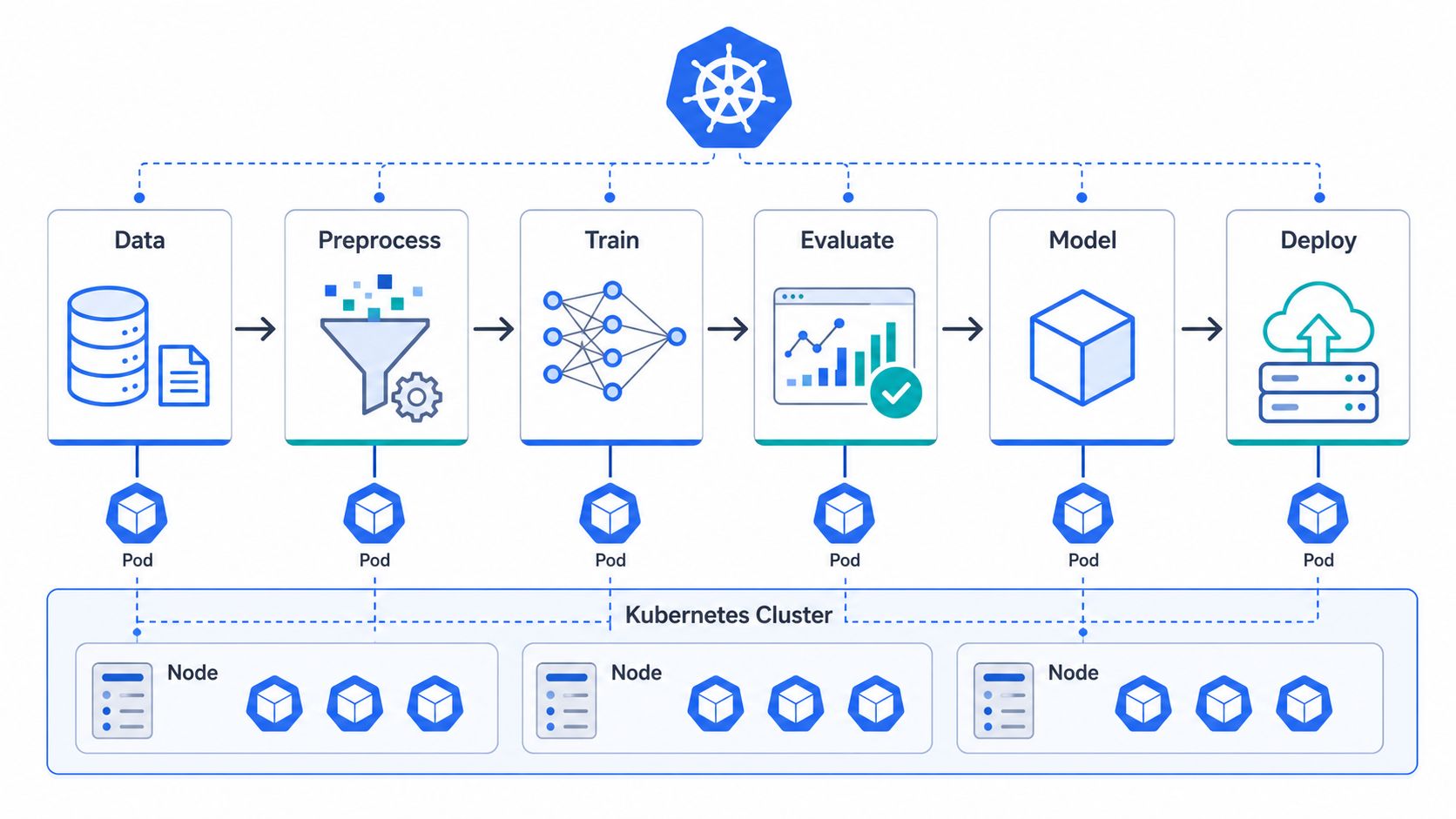
Kubeflow brings those steps into Kubernetes. Its core idea is simple: treat the ML workflow as a set of containerized tasks that run in order, pass inputs and outputs between each other, and leave a record of each run. The Kubeflow documentation describes Kubeflow Pipelines as a platform for building and deploying portable, scalable ML workflows using containers on Kubernetes-based systems.
That matters because Kubernetes is already good at scheduling containers, isolating workloads, scaling resources, restarting failed pods, and integrating with cloud infrastructure. Kubeflow adds ML-specific workflow concepts on top: components, pipelines, experiments, runs, artifacts, pipeline versions, and recurring runs.
Use Kubeflow when you need:
- Repeatable training and evaluation workflows.
- Containerized ML steps that can run on shared infrastructure.
- Experiment tracking for pipeline runs and artifacts.
- A platform that can work across Kubernetes environments.
- Separation between ML workflow authors and cluster operators.
Do not start with Kubeflow if your team only needs lightweight experiment tracking or occasional notebook runs. Kubeflow has real operational weight. It shines when the Kubernetes foundation is already valuable to the organization.
Kubeflow vs Kubeflow Pipelines
People often use “Kubeflow” to mean the whole platform, but the piece most beginners should learn first is Kubeflow Pipelines, often shortened to KFP.
Kubeflow can include multiple projects and distributions. The official installation guidance now separates Kubeflow subprojects from full Kubeflow distributions, which is important for beginners: you do not always need to install everything just to learn pipelines. Kubeflow Pipelines can be deployed as a subproject, while a full distribution can provide a broader platform experience.
Kubeflow Pipelines gives you:
- A Python SDK for defining components and pipelines.
- A compiler that turns pipeline code into YAML.
- A backend that runs the pipeline on Kubernetes.
- A UI for experiments, runs, pipeline versions, and artifacts.
- APIs for submitting and managing runs programmatically.
For a first learning path, focus on KFP concepts before trying to operate a full production Kubeflow distribution.
Core Concepts Beginners Should Know
Component
A component is one step in the workflow. In the KFP SDK, the recommended beginner-friendly style is a Python function decorated with @dsl.component. The SDK packages that function so it can run as a containerized task in the pipeline.
A component should do one clear job: preprocess a dataset, train a model, evaluate metrics, register a model, or run a batch prediction. Keep components small enough to test independently.
Pipeline
A pipeline is the graph that connects components. The official docs describe a pipeline as the logical structure for executing components together as an ML workflow in a Kubernetes cluster. In code, you define a pipeline with @dsl.pipeline, then call component functions inside it.
Task
When a component is used inside a pipeline, it becomes a task. A task can depend on another task’s output, receive parameters, request resources, and produce artifacts.
Artifact
An artifact is an output such as a dataset, model file, metrics file, or report. In real systems, artifacts are stored in object storage or a configured pipeline root so downstream steps can consume them.
Experiment and Run
An experiment groups related runs. A run is one execution of a pipeline. For example, you might run the same training pipeline with different hyperparameters and compare the outputs.
Prerequisites
For this tutorial, you should be comfortable with:
- Basic Python.
- Docker images and containers.
- Kubernetes concepts such as namespaces, pods, services, and secrets.
kubectlaccess to a test cluster.
For local learning, a small Kubernetes cluster such as Kind, Minikube, or a managed development cluster is enough. For production, plan for proper identity, storage, networking, observability, resource quotas, artifact storage, and backup.
Install the Python SDK in a virtual environment:
python -m venv .venv
source .venv/bin/activate
pip install --upgrade pip
pip install kfp
Check the installed version:
python - <<'PY'
import kfp
print(kfp.__version__)
PY
The current KFP docs emphasize the v2 SDK. Avoid starting new projects on old v1 examples unless you are maintaining an existing Kubeflow deployment.
A Small Kubeflow Pipeline Example
Create a file named iris_pipeline.py:
from kfp import dsl


@dsl.component(
    packages_to_install=["scikit-learn==1.5.2", "pandas==2.2.2"],
    base_image="python:3.11",
)
def train_model(test_size: float) -> float:
    from sklearn.datasets import load_iris
    from sklearn.ensemble import RandomForestClassifier
    from sklearn.model_selection import train_test_split
    from sklearn.metrics import accuracy_score

    iris = load_iris()
    x_train, x_test, y_train, y_test = train_test_split(
        iris.data,
        iris.target,
        test_size=test_size,
        random_state=42,
        stratify=iris.target,
    )

    model = RandomForestClassifier(n_estimators=80, random_state=42)
    model.fit(x_train, y_train)
    predictions = model.predict(x_test)
    accuracy = accuracy_score(y_test, predictions)
    print(f"accuracy={accuracy:.4f}")
    return float(accuracy)


@dsl.component(base_image="python:3.11")
def validate_model(accuracy: float, minimum_accuracy: float) -> str:
    if accuracy < minimum_accuracy:
        raise RuntimeError(
            f"Model accuracy {accuracy:.4f} is below threshold {minimum_accuracy:.4f}"
        )
    return f"Model passed with accuracy {accuracy:.4f}"


@dsl.pipeline(name="iris-training-pipeline")
def iris_pipeline(test_size: float = 0.2, minimum_accuracy: float = 0.85):
    train_task = train_model(test_size=test_size)
    validate_model(
        accuracy=train_task.output,
        minimum_accuracy=minimum_accuracy,
    )
This example is intentionally small. It shows the shape of a real ML pipeline:
- One component trains and returns a metric.
- A second component enforces a quality gate.
- The pipeline wires the output from training into validation.
In production, you would usually separate data extraction, feature generation, training, evaluation, model registration, and deployment into different components. You would also persist model artifacts rather than returning only a float.
Compile the Pipeline
Add a compile step:
from kfp import compiler
from iris_pipeline import iris_pipeline

compiler.Compiler().compile(
    pipeline_func=iris_pipeline,
    package_path="iris_training_pipeline.yaml",
)
Run it:
python compile_pipeline.pyThe compiler produces a YAML file that the backend can run. The Kubeflow docs note that KFP uses Python decorators such as dsl.component and dsl.pipeline to turn type-annotated Python functions into components and pipelines, then compiles the DSL objects to a self-contained pipeline YAML file.
Commit both the pipeline source and the generated YAML if your team wants GitOps-style review, or generate YAML in CI if you prefer to treat it as a build artifact.
Run the Pipeline
Once Kubeflow Pipelines is available, you can upload and run the compiled pipeline from the UI. The typical beginner workflow is:
- 1. Open the Kubeflow Pipelines UI.
- 2. Create or select an experiment.
- 3. Upload
iris_training_pipeline.yaml. - 4. Start a run and provide parameter values.
- 5. Watch each task execute as a Kubernetes-backed step.
- 6. Review logs, outputs, and run status.
You can also submit runs from Python:
import kfp

client = kfp.Client(host="https://YOUR_KFP_ENDPOINT")

run = client.create_run_from_pipeline_package(
    pipeline_file="iris_training_pipeline.yaml",
    arguments={
        "test_size": 0.2,
        "minimum_accuracy": 0.85,
    },
    experiment_name="iris-demo",
)

print(run)
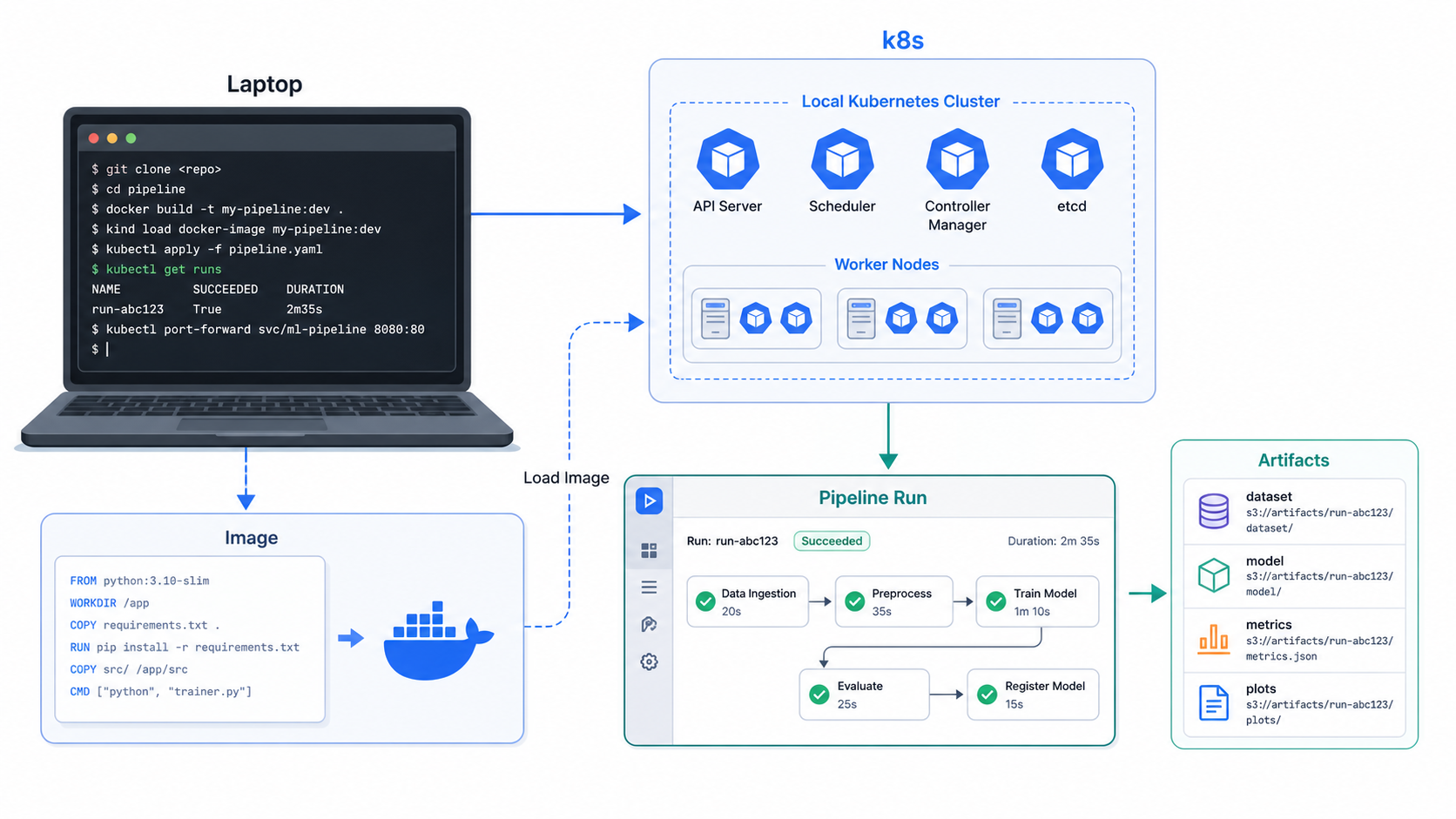
Authentication depends on your Kubeflow deployment. A local test setup may use port-forwarding, while a shared environment may require OAuth, ingress, session cookies, or a service account integration. Do not hard-code credentials into pipeline code.
Installing Kubeflow Pipelines: Practical Options
Kubeflow installation is where many beginners get stuck. The right approach depends on whether you want to learn, evaluate, or run production workloads.
Option 1: Use a Kubeflow Distribution
A distribution packages multiple Kubeflow pieces together. This is usually better when you want the broader platform experience: notebooks, dashboards, profiles, authentication, and shared services.
Choose this route if:
- Your organization wants a standard ML platform on Kubernetes.
- You need multi-user workflows.
- You have platform engineering support.
- You want a supported cloud or vendor package.
Option 2: Install Kubeflow Pipelines as a Subproject
The official installation guide explains that Kubeflow subprojects can be deployed as standalone services. This is often a better learning path for pipeline-focused teams because it reduces the platform surface area.
Choose this route if:
- You mainly need workflow orchestration.
- Your team already has Kubernetes and object storage.
- You want to integrate KFP into an existing internal platform.
Option 3: Use a Managed ML Pipeline Service
If your team is cloud-first and does not want to operate the backend, compare Kubeflow Pipelines with managed alternatives. For example, Vertex AI Pipelines can consume KFP-style pipelines, and other cloud ML platforms provide their own workflow systems.
The tradeoff is portability versus operational simplicity. Kubeflow gives more control on Kubernetes. Managed services reduce infrastructure work but tie more of the workflow to a provider.
Production Design Checklist
Before you move beyond a demo, answer these questions.
Where will artifacts live?
Do not rely on task-local files. Store models, datasets, metrics, and reports in durable object storage. Define a clear retention policy so old experiment artifacts do not silently become a storage bill.
How will images be built?
For serious pipelines, avoid installing large dependencies at runtime in every component. Build versioned component images in CI and scan them before use. Runtime installs are convenient for tutorials but slow and harder to control.
How will secrets be injected?
Use Kubernetes secrets, workload identity, or your cloud identity system. Never place database passwords, cloud keys, or tokens in pipeline parameters.
How will resource requests be set?
Training steps can starve other workloads if CPU, memory, and GPU requests are not defined. Start with conservative defaults, then tune based on metrics.
How will failures be debugged?
Make logs useful. Print dataset shape, parameter values, model version, metric values, and artifact paths. Avoid printing secrets or large raw datasets.
Who owns the platform?
Kubeflow is not only an ML engineering tool. It is also a Kubernetes platform. Production ownership should include cluster upgrades, ingress, identity, storage, observability, backup, and incident response.
Common Mistakes
Treating Kubeflow as a notebook replacement
Kubeflow Pipelines is for repeatable workflows, not casual experimentation. Use notebooks for exploration, then promote stable steps into components.
Creating one giant component
If one component downloads data, trains, evaluates, registers, and deploys, you lose the benefit of a pipeline. Split the workflow around meaningful boundaries.
Ignoring container image strategy
Runtime package installation is fine for a small tutorial. In production, it makes runs slower and less reproducible. Build images ahead of time.
Mixing v1 and v2 examples
Search results still contain older KFP v1 tutorials. The official docs flag v1 pages as legacy and recommend the v2 SDK for new work. Check the version before copying code.
Underestimating Kubernetes operations
If your cluster has weak observability, confusing ingress, no resource quotas, or poor storage configuration, Kubeflow will expose those gaps quickly.
Troubleshooting
Pipeline compiles but upload fails
Check that your SDK version is compatible with the backend. If you copied code from an old tutorial, migrate it to the v2 SDK style.
Component fails immediately
Open the task logs. Look for import errors, missing packages, or a base image mismatch. If a package is large or compiled, build a custom image instead of using packages_to_install.
Task cannot access data
Confirm the data path is reachable from inside the cluster, not only from your laptop. For cloud storage, verify service account permissions and network egress.
Pipeline run is stuck pending
Use Kubernetes commands:
kubectl get pods -A
kubectl describe pod POD_NAME -n NAMESPACE
kubectl get events -n NAMESPACE --sort-by=.metadata.creationTimestamp
Common causes include insufficient CPU or memory, missing image pull secrets, unavailable GPUs, or namespace quotas.
The UI shows only some runs
In multi-user environments, the UI can scope experiments and runs to a namespace. Confirm you are looking at the right namespace and profile.
Kubeflow and the Modern MLOps Stack
Kubeflow sits in the orchestration layer of MLOps. It does not replace every surrounding tool.
You may still need:
- GitHub Actions, GitLab CI, or Jenkins for code CI.
- Argo CD or Flux for GitOps deployment.
- Prometheus and Grafana for platform monitoring.
- A model registry for approval and release state.
- Feature stores for reusable feature pipelines.
- Data quality tooling for validation.
- Container security scanning for component images.
The best pattern is to connect Kubeflow to the tools your platform already uses. For example, CI can test component code and build images. Argo CD can manage KFP manifests or supporting Kubernetes resources. Prometheus can monitor cluster health. Kubeflow then owns the ML workflow run itself.
For related DevOps foundations, see the GravityDevOps guide to best CI/CD tools in 2026. If your team is also evaluating AI platform patterns, the beginner guide to generative AI is a useful companion.
Next Steps
Start small:
- 1. Write one pipeline with two or three components.
- 2. Compile it locally.
- 3. Run it in a test Kubeflow Pipelines environment.
- 4. Move dependencies into versioned images.
- 5. Add artifact storage and useful metrics.
- 6. Add a quality gate before model registration or deployment.
Once that works, standardize a project template for your team. Include directory structure, component image build rules, testing strategy, artifact conventions, and a runbook for debugging failed pipeline tasks.
Kubeflow is worth learning when your ML workflows are becoming too important to live in ad hoc scripts. The goal is not to make Kubernetes part of every data scientist’s day. The goal is to give ML teams a repeatable path from experiment to governed, observable workflow.
FAQ
What is Kubeflow used for?
Kubeflow is used to run machine learning workflows on Kubernetes. Teams use it for repeatable training pipelines, experiment runs, artifact tracking, model evaluation, and platform workflows around ML systems.
Is Kubeflow the same as Kubernetes?
No. Kubernetes is the container orchestration platform. Kubeflow is an ML platform that runs on Kubernetes and adds ML-specific workflow concepts such as pipelines, experiments, runs, and artifacts.
Is Kubeflow good for beginners?
Kubeflow Pipelines is learnable for beginners who already know basic Python and Kubernetes concepts. Full Kubeflow operations can be difficult for beginners because it involves identity, ingress, storage, namespaces, and cluster administration.
Do I need Kubeflow for every ML project?
No. Small projects may only need notebooks, scripts, or a managed ML service. Kubeflow becomes more useful when workflows need repeatability, shared infrastructure, containerized steps, and stronger production controls.
What is the difference between Kubeflow Pipelines v1 and v2?
Kubeflow Pipelines v2 is the current SDK direction for new work. Older v1 examples still exist, but the official docs label v1 content as legacy and recommend migrating new code to v2 patterns.
Can Kubeflow run on AWS, Azure, or Google Cloud?
Yes. Kubeflow runs on Kubernetes-based environments, so it can run on managed Kubernetes services such as Amazon EKS, Azure AKS, and Google Kubernetes Engine, as well as other Kubernetes clusters. Operational details vary by cloud.
How does Kubeflow compare with Airflow?
Airflow is a general workflow orchestrator often used for data pipelines. Kubeflow Pipelines is designed for ML workflows on Kubernetes, with ML-specific concepts around components, artifacts, experiments, and pipeline runs. Some teams use both: Airflow for broader data orchestration and Kubeflow for model training workflows.
Schema-Ready FAQ
[
  {
    "question": "What is Kubeflow used for?",
    "answer": "Kubeflow is used to run machine learning workflows on Kubernetes, including repeatable training pipelines, experiment runs, artifact tracking, model evaluation, and ML platform workflows."
  },
  {
    "question": "Is Kubeflow the same as Kubernetes?",
    "answer": "No. Kubernetes is the container orchestration platform. Kubeflow is an ML platform that runs on Kubernetes and adds ML-specific workflow concepts such as pipelines, experiments, runs, and artifacts."
  },
  {
    "question": "Is Kubeflow good for beginners?",
    "answer": "Kubeflow Pipelines is approachable for beginners who know basic Python and Kubernetes concepts, but operating a full Kubeflow platform requires more Kubernetes administration knowledge."
  },
  {
    "question": "Do I need Kubeflow for every ML project?",
    "answer": "No. Kubeflow is most useful when ML workflows need repeatability, shared Kubernetes infrastructure, containerized steps, artifact tracking, and stronger production controls."
  },
  {
    "question": "What is the difference between Kubeflow Pipelines v1 and v2?",
    "answer": "Kubeflow Pipelines v2 is the current SDK direction for new work. Older v1 examples still exist, but v1 documentation is legacy and new projects should use v2 patterns."
  },
  {
    "question": "Can Kubeflow run on AWS, Azure, or Google Cloud?",
    "answer": "Yes. Kubeflow runs on Kubernetes-based environments, including managed Kubernetes services such as Amazon EKS, Azure AKS, and Google Kubernetes Engine."
  },
  {
    "question": "How does Kubeflow compare with Airflow?",
    "answer": "Airflow is a general workflow orchestrator, while Kubeflow Pipelines is designed for ML workflows on Kubernetes with components, artifacts, experiments, and model-oriented pipeline runs."
  }
]
Sources
- Kubeflow Pipelines overview: https://www.kubeflow.org/docs/components/pipelines/overview/
- Kubeflow installation guide: https://www.kubeflow.org/docs/started/installing-kubeflow/
- Kubeflow Pipelines getting started: https://www.kubeflow.org/docs/components/pipelines/getting-started/
- Kubeflow component concept: https://www.kubeflow.org/docs/components/pipelines/concepts/component/
- Kubeflow pipeline concept: https://www.kubeflow.org/docs/components/pipelines/concepts/pipeline/
- Kubeflow Pipelines installation operator guide: https://www.kubeflow.org/docs/components/pipelines/operator-guides/installation/


