
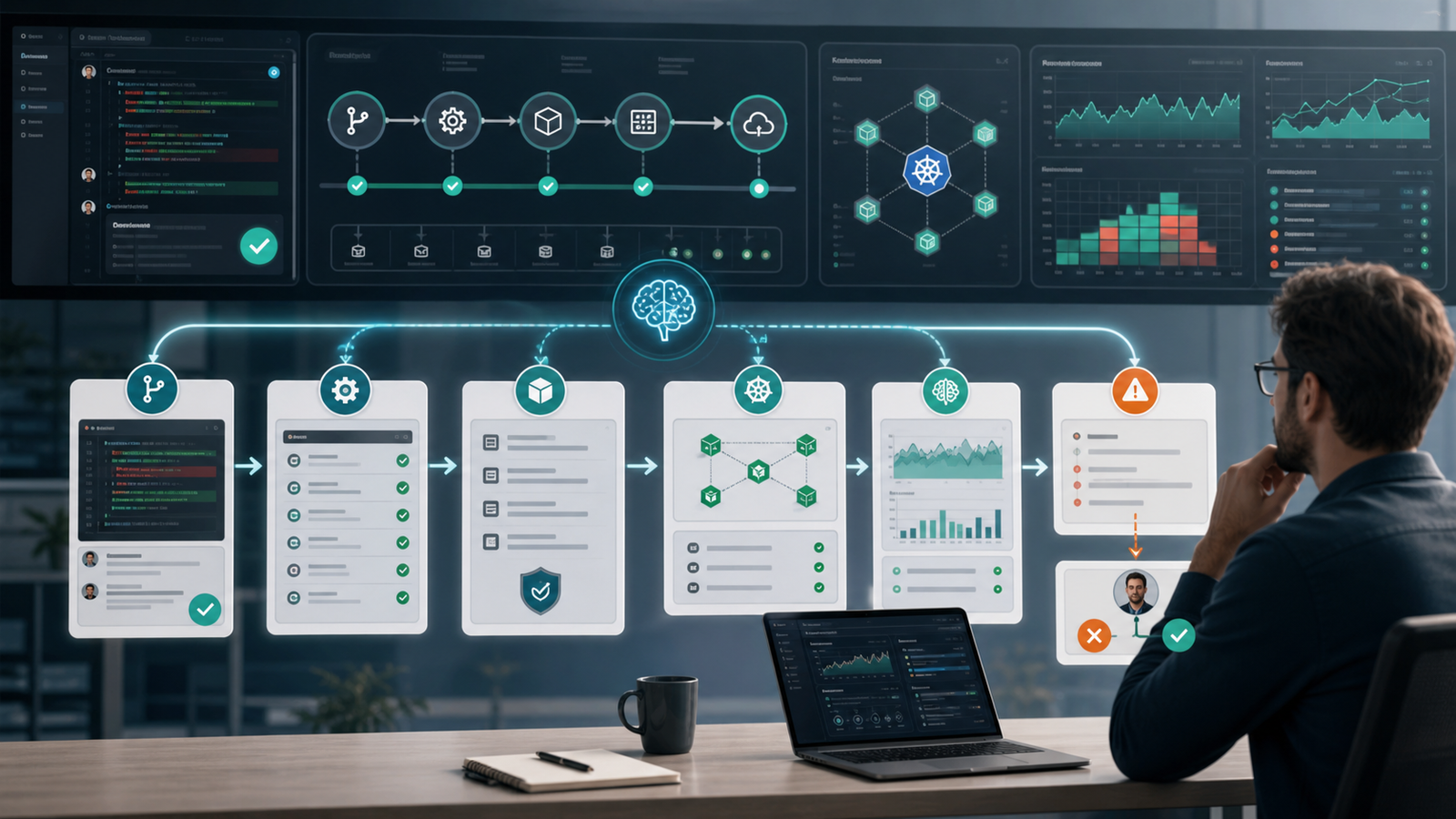

Search interest around AI and DevOps has moved past whether teams should use AI. The questions are practical: how do you use AI in CI/CD without shipping bad changes, which tasks should be automated first, how does AIOps fit with monitoring, and what guardrails stop AI agents from becoming production risk?
This guide turns those questions into a realistic workflow.
Quick Answer
The best way to use AI in DevOps in 2026 is to start with low-risk assistance, then add controlled automation. Use AI to summarize pull requests, explain pipeline failures, suggest tests, group alerts, draft runbook steps, and flag cloud cost anomalies. Keep humans responsible for production approvals, infrastructure changes, security exceptions, and rollback decisions until the workflow has evidence, audit logs, and policy checks.
A practical AI DevOps workflow has five layers: code review, CI/CD debugging, infrastructure checks, AIOps, and incident response support.
If your team is new to the topic, read GravityDevOps’ beginner guide to generative AI first. If you are comparing pipeline platforms, pair this article with Best CI/CD Tools in 2026 Compared.
Why AI DevOps Is Different From Normal Automation
Traditional DevOps automation is deterministic. A script runs a command, a pipeline executes known stages, and Terraform applies a reviewed plan. AI automation is different because it reasons over context and produces probabilistic output. That is useful for long build logs, noisy alerts, or unclear incidents, but risky if AI can change production without boundaries.
Think of AI in DevOps as a decision-support layer before you treat it as an execution layer. The highest-value first use cases are summarizing changes, explaining build failures, finding likely incident owners, suggesting missing tests, converting logs into timelines, comparing Kubernetes deployments against policy, and drafting rollback checklists.
Once those jobs are reliable, teams can move toward controlled production actions. GravityDevOps covers that shift in Agentic CI/CD in 2026.
Most-Searched AI DevOps Questions Teams Are Really Asking
Based on current search patterns, product documentation, and the type of questions appearing around DevOps tooling, the highest-intent AI DevOps topics cluster into six areas:
| Search Intent | Real Need | Best Workflow |
|---|---|---|
| “AI in DevOps” | A plain explanation and examples | Beginner overview and adoption roadmap |
| “AI CI/CD tools” | Pipeline automation and build debugging | CI/CD assistant workflow |
| “AIOps tools” | Alert reduction and incident detection | Monitoring and incident response workflow |
| “AI for Kubernetes” | Cluster troubleshooting and policy checks | Platform engineering guardrails |
| “DevSecOps AI” | Secure code review and risk detection | Security scanning plus human review |
| “AI DevOps agent” | Autonomous or semi-autonomous operations | Agent permissions and approval design |
A mature setup connects these through one operating model: context comes from code, pipelines, infrastructure, observability, and incidents; AI interprets it; policy decides what can be acted on automatically.
A Practical AI DevOps Workflow
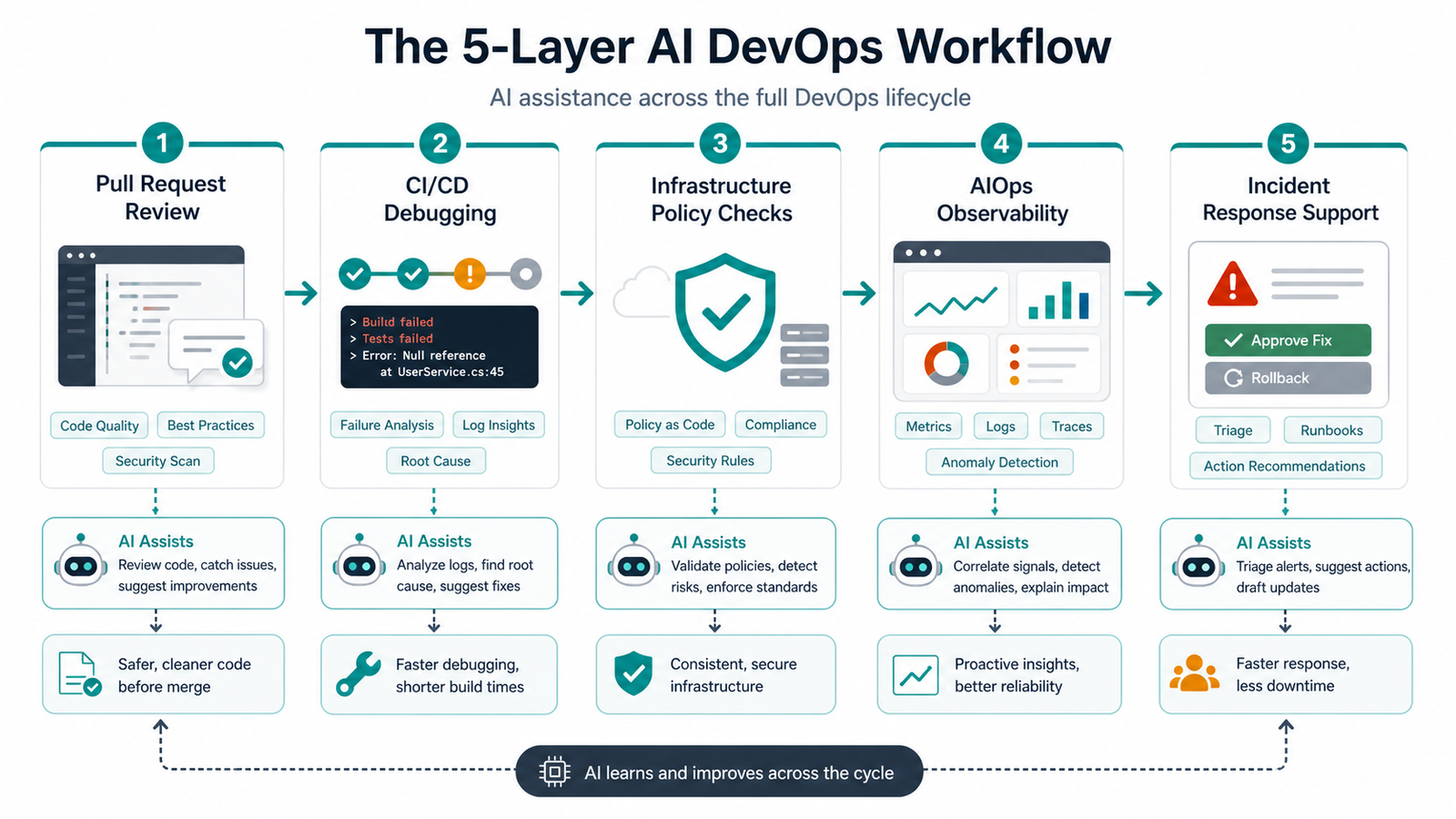
1. Start With Pull Request Summaries and Risk Notes
The safest first step is AI-assisted pull request review. The AI should not approve or merge code. It should summarize the change and highlight risk.
A useful PR assistant should answer which services changed, whether database or permission risk exists, what tests are missing, what rollback risk exists, and which reviewer is likely needed.
Example prompt:
Review this pull request for deployment risk.
Return:
1. Summary in plain English.
2. Risk level: low, medium, or high.
3. Missing tests or validation steps.
4. Files that need human review.
5. Rollback notes if this reaches production.
This saves reviewer time without weakening ownership. Developers still read the code, but they start with a better map.
2. Use AI to Explain CI/CD Failures
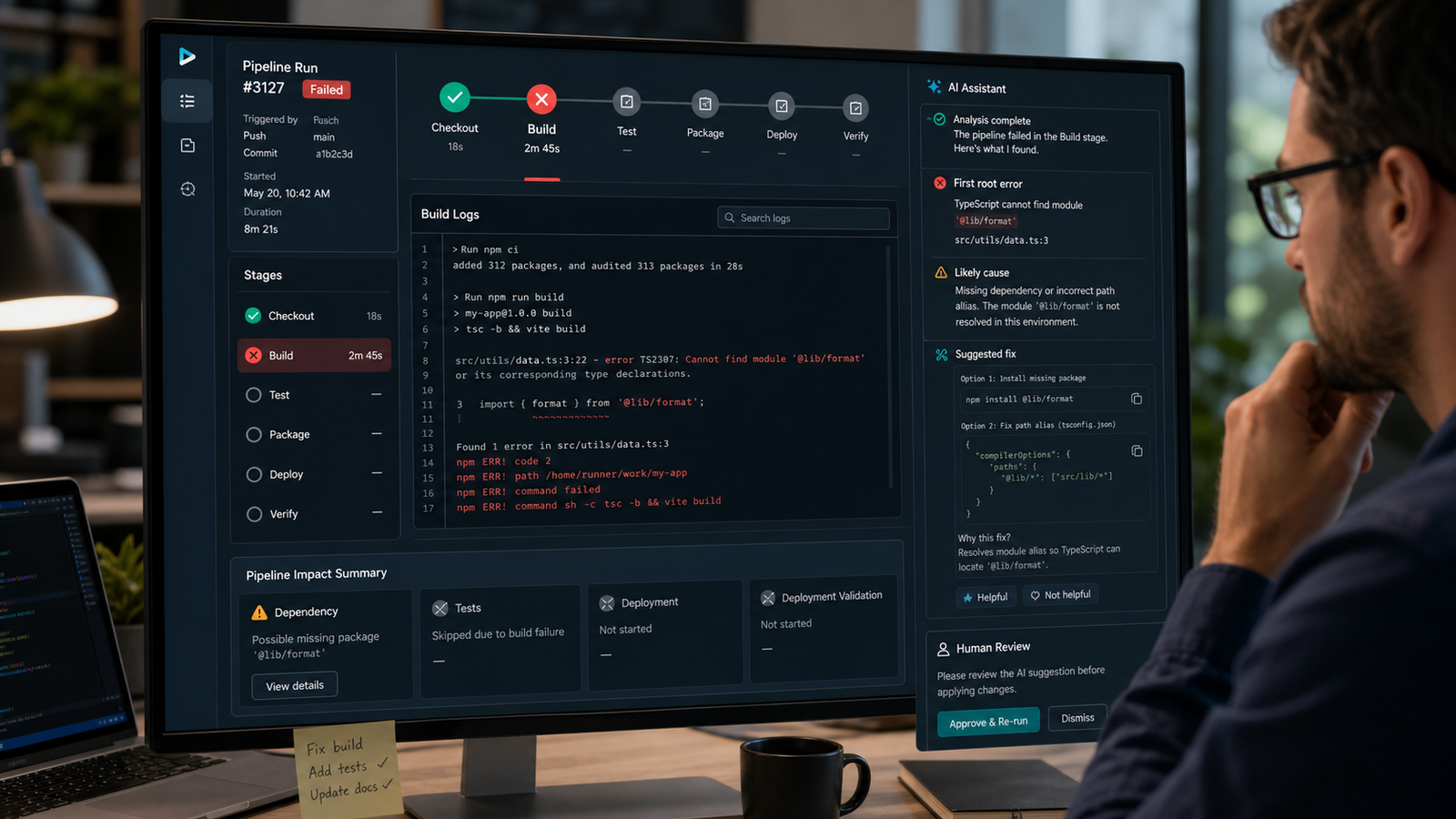
CI/CD logs are one of the best AI DevOps use cases because they are long, repetitive, and confusing. A model can summarize the failed stage, identify the first relevant error, and suggest likely fixes.
A good CI/CD assistant should ignore noise after the first root error, classify the failure, link it to a recent commit when possible, suggest a minimal retry or fix, and avoid pretending certainty when evidence is weak.
For example, if a Node.js pipeline fails after a lockfile change, the assistant can point to dependency resolution. If a Kubernetes deploy fails with an image pull error, it can separate registry authentication from application health.
Do not give AI write access on day one. Let it suggest a patch or command, then require a developer to apply it.
3. Add Infrastructure and Policy Checks
AI is useful for explaining infrastructure-as-code, but policy engines should enforce the rules. Use AI to help humans understand Terraform, Helm, Kubernetes, or cloud changes. Use deterministic checks for the gate.
Good AI-assisted infrastructure review asks whether the change exposes a public endpoint, widens IAM permissions, increases cost, removes backup or encryption settings, or differs from the ticket.
Combine the AI explanation with Terraform plan review, Open Policy Agent, Checkov, tfsec, kube-score, or cloud-native policy systems. AI explains and prioritizes; policy blocks dangerous changes.
4. Bring AIOps Into Observability
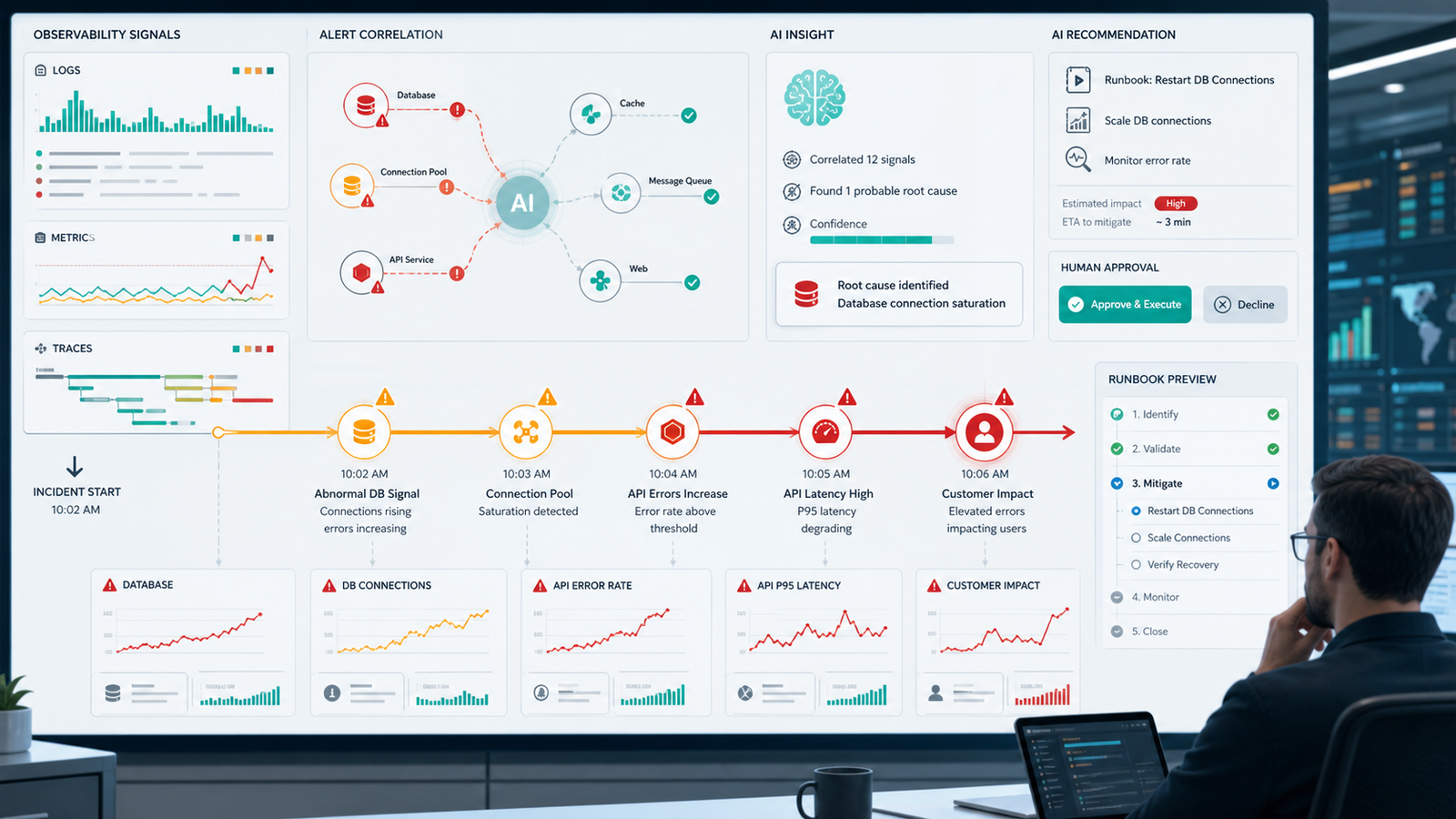
AIOps is where AI DevOps becomes most valuable for operations teams. Monitoring tools already collect metrics, logs, traces, and events. The hard part is turning that volume into an incident narrative.
If you are still building monitoring, start with GravityDevOps’ Prometheus and Grafana monitoring tutorial. AI will not fix missing telemetry.
Once telemetry exists, AI can group related alerts, summarize log spikes, identify the first abnormal metric, compare the current incident with past incidents, draft a timeline, and recommend a runbook.
For example, a payment API outage may trigger CPU, latency, error-rate, queue-depth, and database alerts. A good AIOps workflow says: database connection saturation began first, queue depth rose three minutes later, API latency followed, and checkout errors crossed the customer-impact threshold after that.
Tool Selection Criteria
AI DevOps tools are not all the same. Use this table to decide what you need:
| Need | Look For | Avoid |
|---|---|---|
| PR and code review help | Repository context, inline suggestions, test awareness | Tools that approve changes without reviewer control |
| CI/CD debugging | Build-log parsing, pipeline integrations, flaky-test detection | Generic chatbots with no pipeline context |
| AIOps | Metrics, logs, traces, alert correlation, incident history | Tools that only reword alerts |
| DevSecOps | SAST/DAST context, secret detection, dependency risk, policy mapping | AI-only security without deterministic scanners |
| Platform engineering | Kubernetes, Terraform, cloud IAM, service catalog context | Agents with broad cloud permissions by default |
| Cost optimization | Usage trends, rightsizing suggestions, unit economics | One-time recommendations with no ownership model |
Pricing caveat: AI DevOps products may charge by seat, repository, usage, event volume, or observability ingestion. Test with real pipeline minutes, build logs, alert volume, and retention.
Pros and Cons of AI in DevOps
Pros include faster debugging, better PR and incident summaries, reduced alert fatigue, easier onboarding, documentation drafts from real operational context, and earlier detection of risky infrastructure changes.
Cons include hallucinated causes when telemetry is incomplete, production risk from broad agent permissions, sensitive data exposure, weaker fundamentals if teams trust AI blindly, rising observability costs, and shallow recommendations from poor context.
Use AI where it improves human judgment first. Automate execution only after the workflow has evidence, scoped permissions, rollback plans, and auditability.
Beginner Implementation Plan
If you are starting this month, use a 30-day rollout.
Week 1: Inventory and Boundaries
List repositories, CI/CD systems, cloud accounts, monitoring tools, and incident channels. Decide what data AI tools may access, excluding secrets, production credentials, private customer data, and unrestricted cloud control.
Create a simple rule: AI can read more than it can write.
Week 2: PR and CI/CD Assistance
Enable AI summaries for pull requests and build failures. For CI/CD, begin with read-only log analysis. If the tool suggests a fix, require a human commit.
Week 3: Observability and Incident Summaries
Connect monitoring and incident data. Ask AI to draft incident timelines and runbook suggestions, then compare its summary against the human review.
Week 4: Policy and Controlled Actions
Add policy checks around infrastructure and deployment changes. If you experiment with agents, give them narrow permissions: open a pull request but do not merge it, restart a non-production job but not production, draft a rollback command but require approval, and create an incident summary without closing the incident.
This creates a safe path from assistance to automation.
Common Mistakes and Troubleshooting
Do not use AI as a replacement for monitoring. If metrics and logs are poor, AI will produce confident guesses. Do not give agents admin access by default, and do not send secrets, customer data, or unrestricted cloud outputs into tools without approval.
If suggestions are generic, add the pipeline file, recent commits, service ownership, logs, and deployment environment. If root causes are wrong, ask for the earliest relevant failure and the exact log line. If recommendations are risky, reduce permissions and return to suggestion-only mode.
FAQ
Is AI going to replace DevOps engineers?
No. AI changes DevOps work, but it does not remove the need for engineering judgment. Teams still need people to design systems, set policy, debug unclear failures, handle incidents, and own production decisions.
What is the best first AI DevOps use case?
The best first use case is read-only assistance: pull request summaries, CI/CD failure explanations, and incident timeline drafts. These deliver value without giving AI direct production control.
How is AIOps different from AI in DevOps?
AIOps focuses on operations data such as logs, metrics, traces, alerts, and incidents. AI in DevOps is broader and can include code review, CI/CD, infrastructure, security, platform engineering, documentation, and cost optimization.
Should AI agents be allowed to deploy to production?
Only after strong controls exist. Production deployment agents should have scoped permissions, policy checks, approval gates, audit logs, rollback plans, and a proven history of correct behavior in lower environments.
Which AI DevOps tools should beginners compare?
Beginners should compare tools by workflow, not hype. Start with your existing CI/CD platform, code host, observability platform, and security scanner. Then evaluate whether dedicated AIOps or agent tools add measurable value.
What data should not be sent to AI DevOps tools?
Avoid sending secrets, production credentials, private customer data, regulated records, and unrestricted cloud outputs unless your organization has approved the vendor, retention settings, and data-processing terms.
Schema-Ready FAQ Structure
Use the FAQ questions above as schema-ready entries:
[
  {"question": "Is AI going to replace DevOps engineers?", "answer": "No. AI changes DevOps work, but engineers remain responsible for system design, policy, debugging, incidents, and production ownership."},
  {"question": "What is the best first AI DevOps use case?", "answer": "Start with read-only assistance such as pull request summaries, CI/CD failure explanations, and incident timeline drafts."},
  {"question": "How is AIOps different from AI in DevOps?", "answer": "AIOps focuses on operations telemetry and incidents, while AI in DevOps also covers code, CI/CD, infrastructure, security, documentation, and cost."},
  {"question": "Should AI agents be allowed to deploy to production?", "answer": "Only with scoped permissions, approval gates, policy checks, audit logs, rollback plans, and evidence from lower environments."},
  {"question": "Which AI DevOps tools should beginners compare?", "answer": "Compare tools around your workflow: CI/CD, repositories, observability, security scanning, AIOps, and agent permissions."},
  {"question": "What data should not be sent to AI DevOps tools?", "answer": "Avoid secrets, production credentials, customer data, regulated records, and unrestricted cloud outputs unless approved by policy."}
]
Final Recommendation
The strongest AI DevOps strategy in 2026 is assistance with clear escalation. Let AI read logs, explain failures, summarize changes, connect alerts, and draft next steps. Let humans approve production actions, security exceptions, and irreversible changes.
Start small, measure usefulness, add policy, then increase automation. That gives teams speed without turning DevOps into an uncontrolled experiment.


