

The best AI tools to rewrite Word documents are Microsoft Copilot in Word for native DOCX editing, Zoho Writer for a capable free browser workflow, and Grammarly or QuillBot for focused sentence-level revision. ChatGPT and Claude handle deeper structural rewrites, but they extract document text rather than preserving Word layout, so they need a careful export-and-review step.
Rewriting a Word document is not the same as generating a new draft. A useful tool must preserve facts and meaning, make changes easy to inspect, and avoid damaging headings, tables, comments or tracked revisions. That makes workflow fit more important than a model’s ability to produce polished prose in a chat box.
This comparison was checked on August 30, 2026, using US-facing product, pricing and help pages. Plans and AI allowances change frequently, so confirm the live meter and license before uploading an important document.
Best AI tools to rewrite Word documents at a glance
| Tool | Best for | Access checked | Main limitation |
|---|---|---|---|
| Microsoft Copilot in Word | Native DOCX editing and tracked review | Microsoft 365 Personal from $9.99/month; business licensing varies | No perpetual free Word AI tier |
| Zoho Writer with Zia | Free browser-based DOCX rewriting | Writer Free; sign-in required | Complex Word layouts still need a round-trip check |
| Grammarly | Clarity, tone and sentence polish inside Word | Free has 100 AI prompts/month; full rewrites are Pro | Not a whole-document restructuring system |
| QuillBot for Word | Fast paraphrasing in a Word add-in | Free add-in; 125 words and two modes per paraphrase | Small free input and weaker document-level control |
| Gemini in Google Docs | Collaborative rewrites with accept/reject suggestions | Eligible Google AI or Workspace plan | Moves the workflow into Google Docs |
| ChatGPT | Complex structural and audience-specific rewrites | Free supports files with separate usage limits | DOCX is treated as text, not a fully editable Word layout |
| Claude | Long-document consistency and editorial planning | Limited Free plan; Pro is $20 monthly | Text-only DOCX extraction and manual formatting return |
Prices are US list prices before tax. A free plan, trial and paid subscription are different: Zoho Writer, Grammarly, QuillBot, ChatGPT and Claude offer zero-dollar access, but their useful rewrite allowances or advanced controls are limited. Microsoft and Google advertise trials, yet their strongest in-document AI features require eligible paid plans.
How we selected and ranked the tools
We screened nine credible products and ranked seven. The review considered direct DOCX support, in-document rewriting, selection and whole-document control, change review, comments and tracked changes, formatting preservation, file limits, free or trial boundaries, privacy controls, export path and ease of returning a clean Word file. Wordtune and Notion AI were screened but not ranked because their current workflows are less direct for a DOCX round trip.
This is a documentation-based comparison. We verified features and plan boundaries from official pages, but did not buy every plan or run a controlled model-quality benchmark. No dependable independent benchmark measures whether these services preserve the same facts, voice, formatting and review history across a representative set of Word documents.
1. Microsoft Copilot in Word: best native Word rewriting tool
Copilot is the strongest choice when the document must stay in Word. You can select text, request an automatic rewrite, compare alternatives, replace the original or insert the revision below it. Microsoft’s newer Edit with Copilot workflow can also make broader in-place changes and use Word styles. If Track Changes is already enabled, Copilot respects it and records edits for review.
The important caveat is availability. Edit with Copilot was still rolling out across eligible consumer and organizational licenses at review time, and Microsoft says it cannot accept or reject tracked changes itself. It can also delete a comment when it changes the paragraph to which that comment is attached. Keep version history enabled and review every proposed change.
For US consumers, Microsoft 365 Personal was $9.99 monthly or $99.99 yearly and included Copilot in Word with 60 monthly AI credits for app features such as draft, rewrite and summarize. Microsoft 365 Premium offered more extensive usage. Business pricing and required base licenses differ; the checked business page listed Copilot Business at $25.20 per user monthly, with annual bundles available.
Pros: best formatting continuity; native Word selection and review; Track Changes support; no copy-and-paste loop. Cons: paid license; rollout and plan differences; AI cannot manage tracked changes or comments for you. Choose it for: contracts, policies, reports and client documents that must remain DOCX files throughout review.
2. Zoho Writer with Zia: best free DOCX rewriting workflow
Zoho Writer can import, edit and export DOCX files without Microsoft Word. Its Zia assistant can refine, shorten, rephrase, summarize or retitle selected text, then insert, rewrite, continue or discard the result. That combination makes it a practical zero-dollar option for people who need a real document editor rather than a text box.
Zoho lists Writer as free for individuals and organizations, with unrestricted document creation. The same page documents DOCX imports up to 50 MB, while Zoho’s AI guide says users can switch between Zoho’s model and OpenAI for generative content. The company does not publish a simple, durable per-user Zia rewrite quota on the checked pages, so verify the live account entitlement; document-automation credits are a separate feature and should not be confused with writing-assistant usage.
Pros: free word processor; direct DOCX import and export; selection-level rephrasing; suggestions, comments and version controls. Cons: account required; complex pagination, fields, macros or branded templates may shift during conversion; AI allowance language is less concrete than some rivals. Choose it for: ordinary reports, letters and essays when you want an editable DOCX without paying for Microsoft 365.
3. Grammarly: best for clarity and tone in Word
Grammarly is most useful late in the rewrite, after the argument and facts are stable. Its Windows and Mac desktop layer works in Microsoft Word and can flag grammar, clarity and tone issues without moving the document into another editor. It is particularly effective for revising customer-facing language sentence by sentence.
The free plan is easy to misunderstand. Grammarly Free includes 100 generative AI prompts per month, but the plan table places one-click full-sentence rewrites, tone adjustment and fluency controls on Pro. Pro was listed at $12 per member monthly when billed annually or $30 monthly, with a seven-day trial that sends a reminder before billing.
Pros: stays inside Word; strong line editing; clear monthly prompt allowance; useful tone feedback. Cons: advanced rewrites are paid; not designed to reorganize a long document; repeated prompt use can exhaust the free allowance. Choose it for: polishing reports, proposals and executive communications after a human has verified the content.
4. QuillBot for Word: best for quick paraphrasing
QuillBot offers a Word add-in with its Paraphraser and Grammar Checker. That direct integration is valuable when a paragraph needs a cleaner alternative but the rest of the document should stay untouched.
QuillBot says the Word add-in is free for basic use. Its checked pricing page limits Free to 125 words per paraphrase and two modes, Standard and Fluency. Premium was $8.33 monthly when billed annually and removed the paraphrasing limit while adding more modes and advanced suggestions.
Pros: native Word add-in; genuinely usable free paraphrasing; simple alternative phrasing. Cons: 125 words is a paragraph, not a document; mode-driven paraphrases provide less editorial control than a detailed prompt; facts and citations still need line-by-line checking. Choose it for: reducing repetition or improving awkward passages without redesigning the whole draft.
5. Gemini in Google Docs: best collaborative review workflow
Google Docs can open a Word file, and edits can be saved to the original Office format. Gemini in Docs adds prompts for broad or targeted changes plus one-click actions to rephrase, shorten, elaborate, formalize, casualize or bulletize selected text. Suggested changes can be accepted or rejected, and Google documents that Docs suggestions convert to tracked changes when exported to Microsoft Office.
The tradeoff is that Gemini’s best Docs features require an eligible Google AI or Workspace plan. Google Workspace Business Standard was $14 per user monthly on an annual commitment or $16.80 on the flexible plan, with a 14-day trial. Google AI Pro was $19.99 monthly for individuals. Google says Workspace content used by Gemini in Docs is not used to train its underlying models without permission.
Pros: good accept/reject flow; collaborative suggestions; can maintain an Office-file workflow; useful document-wide prompts. Cons: requires Google Drive and an eligible paid plan; sophisticated Word layouts should be checked after export; some advanced writing-style features remain experimental. Choose it for: teams that review drafts in Google Docs but deliver DOCX files.
6. ChatGPT: best for structural rewrites
ChatGPT is useful when the task is larger than “make this sentence clearer.” Upload a DOCX and ask for a section map, a list of factual claims that must remain unchanged, and a revised draft for a defined audience. This works well for restructuring a dense report or making tone consistent across sections.
OpenAI supports common document files up to 512 MB and two million tokens; Free users are limited to three file uploads per day and face separate, variable model and tool limits. The key limitation is format: document retrieval is text based, so ChatGPT is not a reliable way to preserve page layout, fields, images, comments or tracked changes. Return the revision to a copy of the DOCX and compare it against the original.
For confidential material, check the workspace and data controls. Personal ChatGPT content may be used to improve models depending on settings; users can disable “Improve the model for everyone” or use Temporary Chat. OpenAI says Business and Enterprise content is not used for training by default.
Pros: flexible instructions; good for reorganizing and audience changes; free file uploads. Cons: loses Word’s layout context; variable free limits; manual reintegration and privacy review required. Choose it for: substantial editorial rewrites where structure matters more than preserving the file in place.
7. Claude: best for long-document consistency
Claude can read DOCX files and is useful for building an editorial brief before rewriting: identify repeated claims, inconsistent terminology, unsupported assertions and sections that do not match the intended audience. Asking it to work section by section with an explicit “facts that must not change” list helps reduce drift.
Anthropic allows DOCX uploads up to 30 MB and as many as 20 files per chat, subject to token and usage limits. It extracts only text from non-PDF documents, so it cannot see Word layout or embedded images. Claude Free has variable limited usage; Pro was $20 monthly or $17 monthly with an annual subscription at review time.
Pros: strong long-context editorial planning; multiple document support; free access for occasional work. Cons: text-only DOCX extraction; no native Word review layer; manual output and formatting workflow. Choose it for: long reports, manuals and policy sets where terminology and structure need consistent treatment.
What about LanguageTool and Wordtune?
LanguageTool is a good multilingual sentence editor and offers a Microsoft Word add-in. Its free AI paraphraser is limited to three sentences per day, while Premium provides unlimited sentence paraphrasing and checks text fields up to 150,000 characters. It narrowly missed the main ranking because the workflow is sentence oriented rather than designed for document-wide revision.
Wordtune remains strong for alternative phrasing, with 10 free paragraph rewrites or AI generations daily. However, its current official platform list emphasizes the web editor and browser extensions rather than a native Microsoft Word add-in, making it less predictable for a Word-first workflow.
How to rewrite a Word document safely with AI
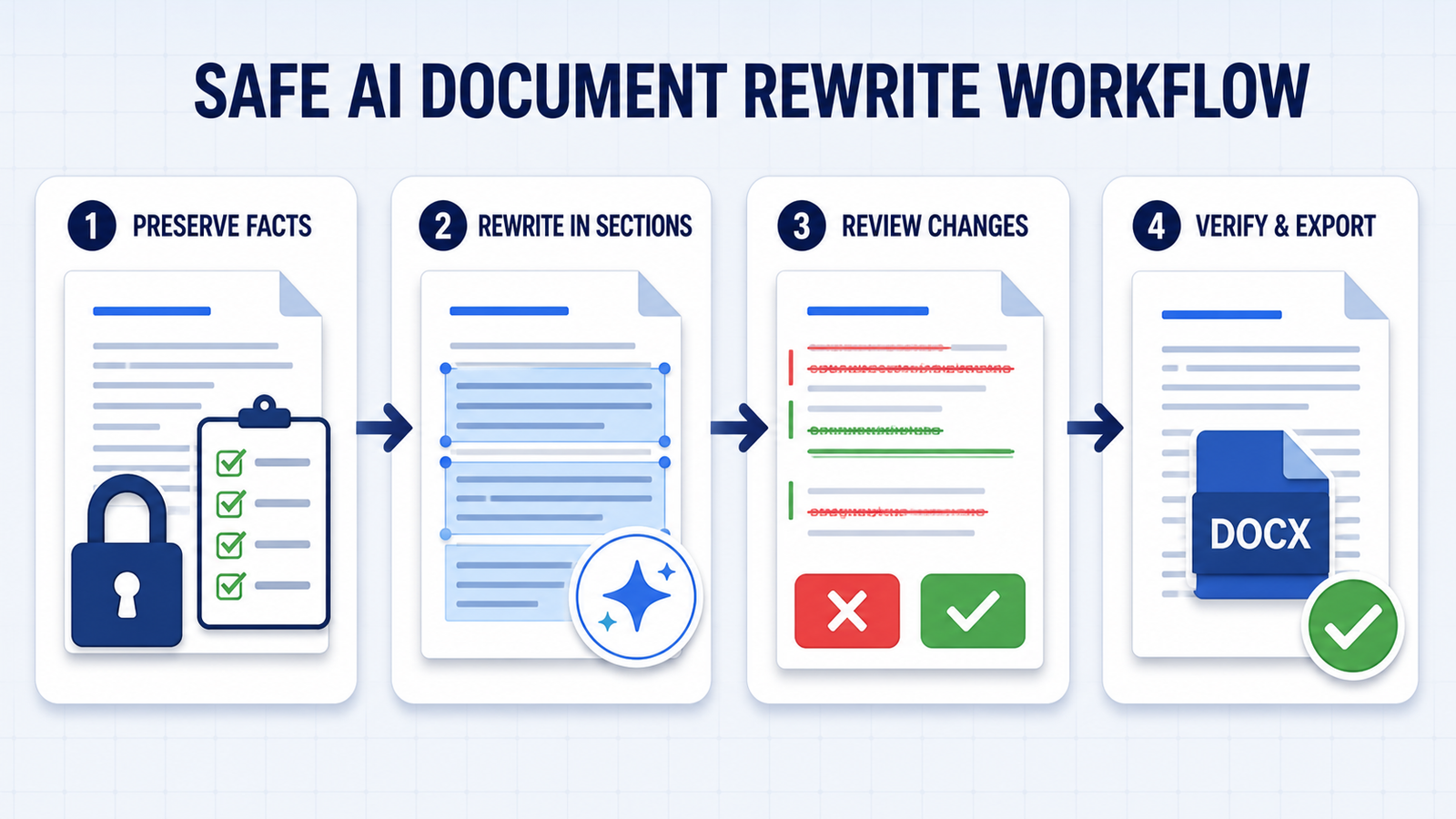
- Duplicate the file first. Keep the original and work on a clearly named revision copy.
- State what cannot change. List names, figures, dates, citations, legal language and required terminology before requesting a rewrite.
- Rewrite in sections. Smaller sections reduce context loss and make factual comparison easier.
- Use suggestions or Track Changes. Never let a whole-document replacement become the only copy. Microsoft and Google offer the best review paths.
- Compare claims, not just wording. Numbers, negation, deadlines and responsibility assignments are common failure points.
- Inspect formatting after export. Check headings, page breaks, tables, footnotes, links, comments, fields and the table of contents.
- Review privacy before upload. Remove unnecessary personal or confidential data and use an approved business workspace for regulated material.
If your real task is creating a document from scratch, see our comparison of AI document creation tools for small businesses. For extracting key points rather than changing the prose, use the guide to AI tools that summarize Word documents. Better instructions also improve revision quality; our prompt engineering guide explains how to specify constraints, examples and review criteria.
Which tool should you choose?
Choose Microsoft Copilot if preserving the Word workflow, formatting and tracked review matters most. Choose Zoho Writer for the best practical free DOCX editor, Grammarly or QuillBot for sentence-level polish, and Gemini when your team already collaborates in Google Docs. Use ChatGPT or Claude for deep structural work only when you can manually return the text to Word and perform a disciplined comparison.
No AI rewrite should be treated as final. The writer or document owner remains responsible for factual accuracy, citations, permissions, confidentiality and the meaning of the finished document.


