

Direct answer: Google Product Studio is the best genuinely free AI product-photo tool for merchants because it can create scenes, remove backgrounds and upscale images without a published credit price. Pixelcut is the easiest watermark-free editor to sample, while Mokker, Flair AI, SellerPic and Claid are better treated as limited tests. Every option still needs a close product-accuracy review.
AI image generators for product photos can turn a clean packshot into a studio or lifestyle scene, but the free label hides important differences. Some tools provide an ongoing free workspace, some issue one batch of credits, and others let you generate previews but charge for a usable download. Commercial rights, watermarks and output resolution can also change between plans.
This comparison was checked on August 30, 2026, using US-facing product, pricing, help and terms pages. It ranks seven credible options by what a seller can actually do without paying today. It is a documentation-based review, not a GravityDevOps hands-on image-quality benchmark. Free allowances and product access can change, so confirm the checkout screen and current terms before uploading a catalog.
Best free AI image generators for product photos at a glance
| Tool | Best for | Free access checked | Main limitation |
|---|---|---|---|
| Google Product Studio | Merchants already using Google | Free Merchant Center account; no published image-credit charge | Merchant workflow and product-policy restrictions |
| Pixelcut | Fast listing edits | Limited removal, upscale and AI edits; watermark-free export | No numerical free allowance or free commercial license published |
| Mokker | Trying ready-made product scenes | 20 photos once | Not a renewing monthly allowance |
| Flair AI | Creative ad compositions | Five generated images and one custom model | Very small quota; batch and collaboration are paid |
| SellerPic | Shopify and fashion workflows | 20 one-time credits with no expiry | Free-plan watermark and commercial-use terms are not clearly stated |
| Claid | Testing an ecommerce image pipeline | 50 trial credits, enough for up to 12 standard AI photoshoots | A trial, not a permanent free tier |
| insMind | Low-resolution concept drafts | Free low-quality downloads | High-quality, watermark-free output requires Pro |
Bottom line: start with Google Product Studio if you have a Merchant Center catalog. Use the other free allowances to test product fidelity with your hardest SKU before buying a plan. A tool that works on a matte box can still alter a reflective bottle, jewelry setting or small label.
How we selected and ranked these AI product-photo tools
We screened 12 services: Google Product Studio, Pixelcut, Mokker, Flair AI, SellerPic, Claid, insMind, Photoroom, Pebblely, CreatorKit, Adobe Express and Canva. A tool needed current US-accessible documentation and a meaningful product-photo workflow, such as background generation, scene staging, product-preserving edits, shadows, resizing or listing export.
The ranking weights were product fidelity and editing control first, followed by the practical free allowance, watermark, export quality, account or store requirements, commercial-use language, privacy, batch support and ease of use. We gave ongoing free access more weight than a one-time trial. We also penalized plans whose free commercial rights or exact quotas were not documented clearly.
We did not create a controlled output set in paid accounts, so visual-quality claims from vendor galleries were not treated as test results. Independent same-input comparisons reinforce a more useful rule: product fidelity, label preservation and edge quality vary by product and tool. Run your own matched-input test rather than choosing from a polished demo gallery.
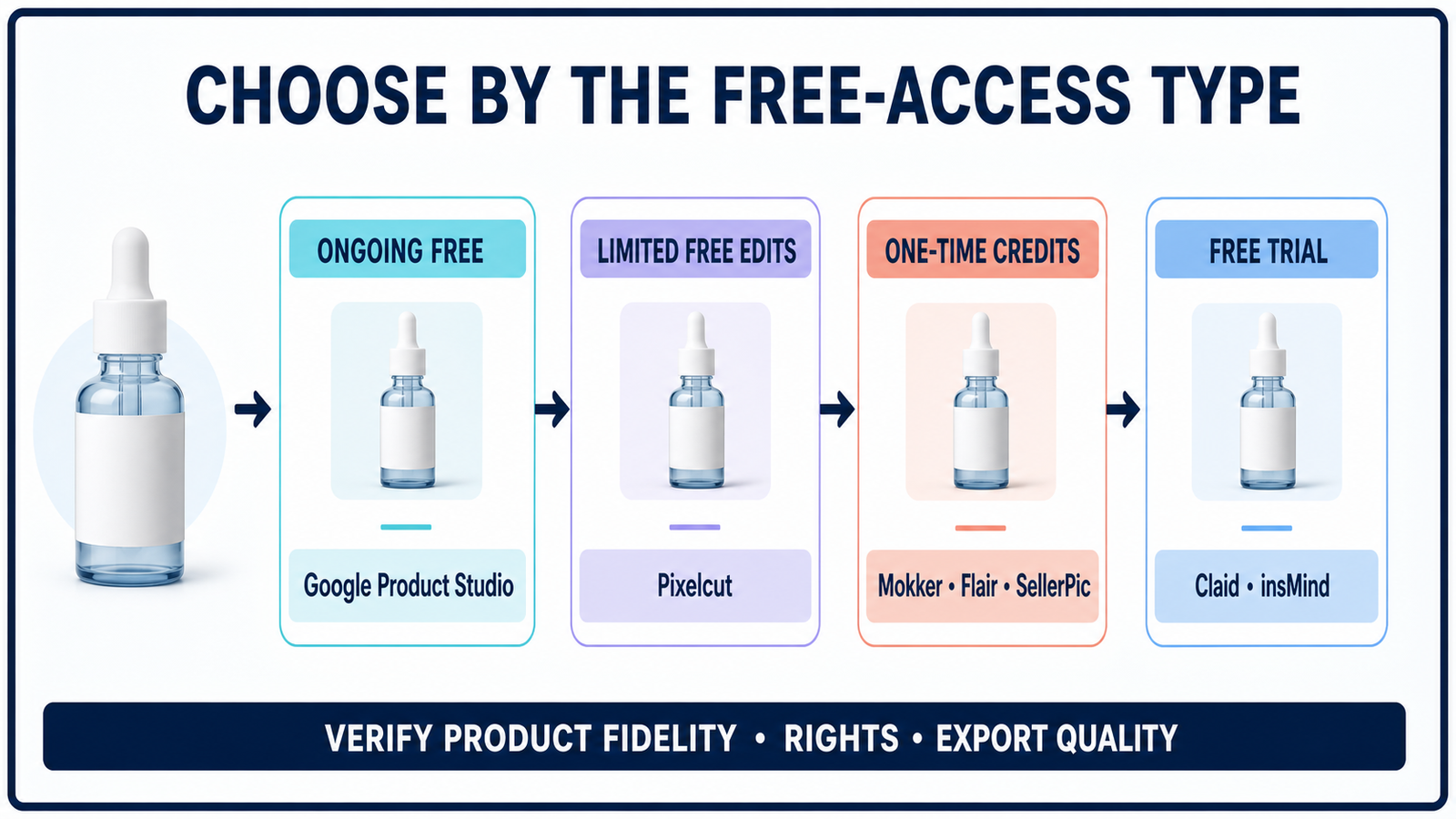
1. Google Product Studio: best genuinely free option for merchants
Google Product Studio is the strongest no-cost choice if your products are already in Merchant Center. Google describes the suite as free and lets merchants generate scenes, remove backgrounds, increase resolution and download images. The current workflow can also use up to three uploaded images or existing catalog assets as references.
Its biggest advantage is that the free claim is not framed as a short trial or a small credit pack. Merchant Center accounts are free, and Product Studio is available in the United States. It is particularly practical for a clean, centered product on a mostly white background.
Limitation: this is a merchant tool, not a general design canvas. Google says results are experimental, may be reviewed for quality improvement and work poorly with hands, products worn by people, wall art, light fixtures and multiple main objects. Regulated products are restricted. The history view stores only the 20 most recent generated scenes, and Merchant Center listing rules still apply.
2. Pixelcut: best for quick watermark-free listing edits
Pixelcut’s Free plan includes limited background removal, upscaling, generative fill, image expansion and basic editing. Its clearest advantage is a free export without a watermark, which many product-photo tools reserve for paid plans. The web and mobile workflow is approachable for marketplace sellers who need a clean cutout, a new background or a quick social crop.
Limitation: Pixelcut does not publish a numerical free quota on the pricing page. It labels advanced features as limited, while the paid Pro tier carries 600 monthly AI credits, batch export and an explicit commercial license. Because the page does not extend that commercial-license statement to Free, confirm current rights inside the product before using a generated image in an ad or listing.
3. Mokker: best one-time test of product scene templates
Mokker’s Free plan provides 20 photos once, with full access to its studio and templates. The product-specific workflow starts with one item photo and generates a replacement setting. Templates cover categories including cosmetics, jewelry, food, furniture and electronics, so a seller can test several visual directions without writing elaborate prompts.
Limitation: the 20-photo allowance does not renew. High-quality exports and custom prompts are listed on the paid Starter plan, so free access is best viewed as a product-fit test. Check the downloaded dimensions and current license before publishing.
4. Flair AI: best for creative ad compositions
Flair AI Free includes one custom model and five generated images. Its scene-building approach is more art-directable than a one-click background swap: marketers can arrange products with props and generated settings, then build variations for ads or social creative.
The Flair terms grant Free members a license to use created assets for personal or commercial purposes, which makes the tiny free allowance more useful than an ambiguous demo. That is a documented license, not a guarantee that an output is free of third-party trademarks, copyrighted material or design rights.
Limitation: five images disappear quickly when each prompt produces imperfect alternatives. Paid tiers add more generations, image upscaling, variations, collaboration and higher-volume controls. Free users should reserve the quota for one representative product and inspect the label, silhouette, material and shadow at full size.
5. SellerPic: best for Shopify and fashion experimentation
SellerPic combines product backgrounds, fashion models, retouching, resizing and short-form media in a Shopify-oriented workflow. Its help center says new accounts receive 20 one-time credits that do not expire. A background replacement costs one credit per image, while some operations return multiple variants.
Limitation: the Free listing does not clearly promise UHD, no-watermark output or commercial use; those benefits are explicit on paid tiers. Treat the free credits as evaluation access until the export screen and license confirm otherwise. Fashion outputs also need human review for garment geometry, color, fit cues and representation.
6. Claid: best free trial for a multi-step ecommerce pipeline
Claid’s Free trial provides 50 credits usable across enhancement, background removal, AI Photoshoot, AI Fashion, shadows, outpainting and other operations. Standard AI Photoshoot costs four credits, so the published allowance covers up to 12 generations if no credits are spent elsewhere. It also offers a separate API starter pack, useful for teams evaluating automation.
Limitation: this is a free trial, not a recurring free plan. Trial history is retained for 24 hours, and combining several operations reduces the number of final images. Claid says its generated and edited images are not subject to Claid copyright, but that statement cannot clear rights in your inputs, packaging, people or prompted brands.
7. insMind: best for low-resolution product concepts
insMind’s product photography tool combines background generation, templates, shadows, resizing and fashion-model features. The vendor offers a free version and positions it for ecommerce listings and campaigns.
Limitation: free downloads are low quality. A Pro account is required for high-quality images without a watermark. The general image generator also gives new users a finite pool of free credits rather than an unlimited allowance. That makes insMind useful for mood boards and scene selection, but not necessarily for final marketplace assets.
Tools we screened but did not rank
- Photoroom: its Free workspace supports limited exports and AI generations, but Photoroom says Free cannot be used commercially. That conflicts with the core use case for product listings.
- Pebblely: the current official pricing describes paid plans starting at 200 images per month. We found no continuing free image allowance to support a “best free” recommendation.
- CreatorKit: generation previews are unlimited, but downloads start at $2.99 per selected image. Free generation is not the same as a free usable export.
- Adobe Express: Free users receive an unpublished limited daily generation allowance. It is a capable general editor, but its current documentation does not provide a dependable product-photo quota for comparison.
- Canva: its design workflow is useful after generation, but AI availability and usage limits vary by plan and feature. The official pages did not disclose a stable Free product-photo allowance.
How to choose an AI generator for product photos
Use the free allowance as a test budget, not as proof that a tool is production-ready. Start with the product most likely to expose errors: reflective glass, metallic jewelry, transparent packaging, fine typography, repeating patterns or an unusual silhouette. Upload the same source image, use the same scene description and compare exports at the same dimensions.
- Check identity first. Compare logo spelling, label text, color, proportions, ports, seams and included accessories against the real item.
- Inspect compositing. Zoom into edges, shadows, reflections and contact points. A floating product or impossible reflection makes an otherwise polished image untrustworthy.
- Separate listing and campaign needs. Marketplace main images may require a plain background and accurate product-only framing. Lifestyle scenes are usually safer as secondary images or ads.
- Verify rights and disclosures. Confirm commercial permission, model or likeness consent, trademark use and the marketplace’s synthetic-media rules. Do not upload confidential prototypes unless the privacy terms fit your risk.
- Keep the real source. Preserve the original packshot and an edit record so a reviewer can identify generated changes.
If you are new to the underlying technology, start with our beginner’s guide to generative AI. For stronger scene instructions, use the constraints and examples in prompt engineering for developers. You can also compare broader free AI image generators and our focused review of free generators for realistic photos.
Practical recommendation
Google Product Studio is the first stop for an active Merchant Center catalog because its free status is the clearest and its tools are designed around product feeds. Pixelcut is the simplest fallback for a few watermark-free edits. Mokker, Flair AI, SellerPic and Claid make more sense as controlled evaluations: choose one difficult SKU, spend the allowance carefully and buy only after the tool preserves that product consistently.
Do not replace a verified packshot solely because an AI scene looks more polished. Generated product photos can invent features, modify labels or imply a size and material the customer will not receive. Keep a human reviewer accountable for factual accuracy, platform compliance and the final commercial decision.
Frequently asked questions
Is there a completely free AI product photo generator?
Google Product Studio is the clearest ongoing free option we verified, but it requires a Merchant Center account and follows merchant and product restrictions. Most standalone alternatives offer limited free edits, one-time credits or trial access.
Can free AI product photos be used commercially?
It depends on the tool and plan. Flair explicitly licenses Free-created assets for commercial use, while Photoroom says its Free plan is noncommercial. Several vendors do not state free-plan rights clearly. Always check the current terms, and remember that a tool license does not clear third-party trademarks, copyrighted packaging or likeness rights.
Will an AI generator preserve product labels and logos?
Not reliably. Even product-specific tools can alter small text, proportions, reflections and accessories. Use a clean source image, generate the background around the product when possible, and compare every output against the real item at full resolution.
Are AI product photos allowed on Amazon, Google Shopping and Shopify?
Policies vary by marketplace, image position and product category. A main listing image may have stricter background and accuracy rules than a secondary lifestyle image. Check the current platform policy and avoid any generated change that could misrepresent the product.


