

Direct answer: Canva is the best free AI image generator for YouTube thumbnails when you want generation, templates, text and export in one browser editor. Adobe Express is the strongest alternative for quick channel-ready layouts, while Ideogram is better for generating artwork with legible headline text. Every free option has an allowance, account or rights limitation.
A good thumbnail generator has to do more than make an attractive picture. It should produce a clean 16:9 composition, leave room for a short headline, preserve a face or product when supplied as a reference, and export a file that remains readable on a phone. Free plans complicate that workflow with pooled AI credits, public generations, variable rate limits and premium-only assets.
This comparison was checked on August 30, 2026, using current US-facing product, pricing, help and terms pages. It is a documentation-based review, not a GravityDevOps hands-on image-quality benchmark. AI allowances and model access change frequently, so confirm the live meter and download terms before committing a channel workflow.
Best free AI image generators for YouTube thumbnails at a glance
| Tool | Best for | Free access checked | Main limitation |
|---|---|---|---|
| Canva | Complete thumbnail workflow | Free editor plus limited pooled AI usage | Premium assets and higher AI usage require payment |
| Adobe Express | Fast template-based thumbnails | Free editor and limited daily AI generations | No stable numerical Free generation quota |
| Ideogram | Artwork that includes short text | Weekly slow credits for eligible accounts | Free generations are public; allowance varies |
| Microsoft Designer | Simple AI layouts and banners | Free with a Microsoft account | Published generation count is unspecified |
| ChatGPT Images | Prompt-led concepts and revisions | Image creation on Free with a separate variable limit | Needs a second pass for precise canvas layout |
| Gemini | Editing a supplied still or portrait | Image generation and editing without a paid AI plan | Compute-based limits can change without notice |
| Leonardo.Ai | Many visual styles and references | 150 tokens daily | Free creations are public and quality controls are basic |
Bottom line: choose Canva or Adobe Express if the final design must be assembled in one place. Choose Ideogram, ChatGPT, Gemini or Leonardo when the generated artwork matters more, then add exact text and brand elements in a layout editor. Do not rely on an image model to reproduce a logo, face, product label or factual diagram without review.
How we selected and ranked these thumbnail generators
We screened ten services: Canva, Adobe Express, Ideogram, Microsoft Designer, ChatGPT Images, Gemini, Leonardo.Ai, Recraft, Krea and Midjourney. A ranked tool needed current US access at zero cost, a practical way to create or edit a 16:9 visual, and enough control to support a YouTube thumbnail rather than only a generic square image.
The ranking weights were thumbnail workflow fit, text and layout control, reference-image editing, free allowance, export practicality, watermark, privacy, commercial-use language and ease of revision. Ongoing free access ranked above a short trial. We penalized unpublished quotas, public-by-default generations and rights terms that make a free output unsuitable for a monetized channel.
We did not run a controlled matched-prompt test across paid accounts. Independent model rankings from the Artificial Analysis Image Arena provide useful quality context, but they measure blind preference for generated images, not thumbnail readability, brand accuracy or click performance. The best workflow still needs a small-screen preview and a YouTube test.
1. Canva: best free all-in-one YouTube thumbnail generator
Canva’s YouTube thumbnail maker combines channel-sized templates, uploads, stock elements, text, background tools and AI image generation in one editor. That matters because a generated scene is only one layer of a strong thumbnail. Canva lets you replace an imperfect AI headline with editable typography, align a face or product, add a border and export without moving between several apps.
Canva Free can access AI image tools after sign-in. Its current pricing estimates up to 200 monthly uses of Standard AI tools or up to 20 uses of Premium AI tools, but those uses come from a shared allowance and task complexity can reduce the practical total. Free templates and assets can be downloaded; designs containing Pro content must be upgraded, purchased or have the premium element removed.
Limitation: the AI allowance is pooled across tools rather than reserved for thumbnails. Canva says users own Magic Media creations subject to its terms, but copyright protection may be limited and recognizable people, characters or brands still require permission. Check every element’s license before using a design on a monetized channel.
2. Adobe Express: best for a fast template-first workflow
Adobe Express opens a YouTube thumbnail at the recommended 1280 by 720 pixels and provides free templates, photo editing, stock assets and Firefly-powered generation. It is especially useful when you already have a video still or headshot and need an AI-generated background, object edit or alternate composition rather than a wholly synthetic image.
Adobe says Express has a free plan and gives free users a limited number of complimentary generations that refresh daily. The company no longer publishes one durable numerical allowance for free Express users, so the in-product meter is the source of truth. The free editor remains usable after the generative allowance is exhausted, provided the project uses free assets.
Limitation: a daily allowance with no public number is difficult to budget for a channel producing several variants per video. Firefly is designed for commercial creative work, but Adobe’s service terms cannot clear rights in a celebrity likeness, trademark, copyrighted character or image you did not have permission to upload.
3. Ideogram: best for artwork with a short headline
Ideogram is a strong generator for thumbnail concepts that need a few visible words inside the image. The Free plan provides weekly slow credits to eligible accounts, supports one running or queued generation and lets users create in wide formats. Ideogram says it does not claim ownership of generated images and permits commercial use under its terms.
Limitation: the amount of weekly Free credit can vary, and AI editing plus image references require priority credits. Free generations are published by default; private generation and the ability to unpublish are paid features. That makes the free tier inappropriate for confidential launches or unreleased sponsor material. Even with a text-focused model, replace misspelled or distorted copy in an editor.
4. Microsoft Designer: best for simple AI layouts
Microsoft Designer is free to use with a Microsoft account and can generate images, banners and editable designs from a description. You can choose dimensions, add an uploaded image, download the generated banner or open it in the Designer canvas for further edits. That is a practical route for a simple creator thumbnail without learning a full graphics suite.
Limitation: Microsoft says a subscription may be required for more frequent creation but does not publish a stable free generation count. It also warns that generated text can be misspelled. AI images include Content Credentials metadata, and prompts and model responses are collected under Microsoft’s privacy statement. Use editable text for the final headline rather than baking important words into the generated scene.
5. ChatGPT Images: best for prompt-led concepts and revisions
ChatGPT Images can create or edit an image in any aspect ratio, follow layout instructions, add text and revise an uploaded still conversationally. It is useful when the thumbnail needs several targeted changes, such as moving the subject left, simplifying the background or increasing contrast behind a headline.
Image creation is available on the ChatGPT Free tier, but OpenAI publishes no fixed Free image count. The image limit is separate from the main chat allowance and the product displays the reset timing when a user reaches it.
Limitation: ChatGPT is not a precision layout canvas. Export the artwork, resize it to 1280 by 720 and add final typography in a design editor. Do not upload private client footage or unreleased product images without reviewing Data Controls and the applicable account’s training settings.
6. Gemini: best for editing an existing video still
Gemini Apps can generate and edit images, including a supplied photo or several reference images. That makes it useful for creators who want to keep the real presenter or product while changing the setting, extending a background or building alternate thumbnail scenes.
Personal accounts can use image generation without a paid Google AI plan, but Google describes the limits as compute-based and subject to capacity, prompt complexity and model choice. The allowance shown in the product can change, and users must be signed in.
Limitation: free availability is not a dependable production quota. Google tells users to review generated content and avoid violating copyright or privacy rights. Inspect faces, hands, product details and any text at full size, then finish the layout in a tool with precise typography.
7. Leonardo.Ai: best for visual styles and references
Leonardo.Ai Free provides 150 tokens every day, basic quality settings, presets and limited reference guidance. Its range of models and styles is useful when a channel needs game art, illustrated explainers, cinematic scenes or a consistent color mood rather than a template-led design.
Limitation: token cost varies by model and operation, so 150 tokens does not equal a fixed number of completed thumbnails. Free creations are public. Leonardo retains broad rights to use free-tier images, although it grants the creator a non-exclusive, royalty-free commercial-use license. Paid plans add private generation and enhanced quality.
Tools we screened but did not rank
- Recraft: its free image and vector tools are capable, but Free outputs are public, owned by Recraft and licensed only for personal use. That is a poor fit for a monetized or sponsored channel.
- Krea: it offers limited free real-time generation, but the current plan and model entitlements are less transparent for a repeatable thumbnail workflow than the ranked options.
- Midjourney: it remains a prominent image generator, but it does not provide a continuing general free plan that supports this comparison’s zero-cost requirement.
How to make a better YouTube thumbnail with free AI
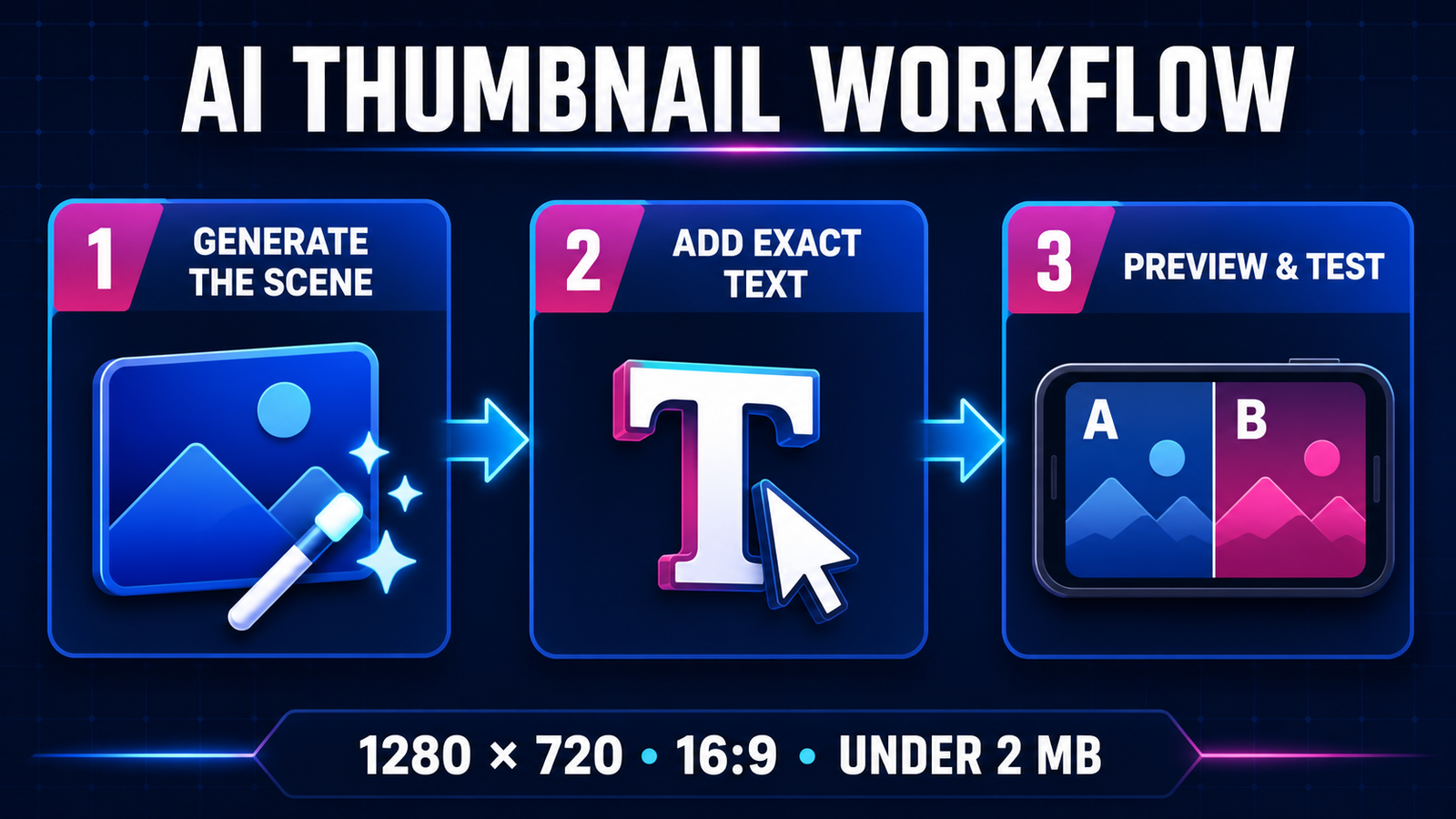
YouTube recommends a 1280 by 720 image in a 16:9 ratio, using JPG, GIF or PNG and remaining under 2 MB for a standard video. Custom thumbnails must follow Community Guidelines. Start from those delivery constraints, not from whatever default square format an image model chooses.
- Generate the scene without critical text. Ask for one clear subject, strong foreground-background separation and negative space for a short headline. AI text can still fail, so add exact words in an editor.
- Use the real subject when accuracy matters. Upload an authorized frame, portrait or product photo and ask the tool to change only the surrounding scene. Compare the edited face, logo and product against the source.
- Preview at phone size. Reduce the design until it is roughly the width it will occupy in a mobile feed. Remove details that disappear and make sure the subject and three-to-five-word headline remain legible.
- Match the video honestly. A dramatic image that implies a person, result or event absent from the video can damage trust and may conflict with platform rules.
- Test variants with watch time in mind. YouTube Test and Compare can compare up to three thumbnails for eligible long-form videos and uses watch-time share, not only clicks, to evaluate performance.
For the underlying image tools, compare our broader guide to free AI image generators. For a full channel workflow, see the best free AI video generators for YouTube. Our prompt engineering guide explains how constraints and examples improve repeatability, while the generative AI beginner’s guide covers the technology and its limits.
Practical recommendation
Start in Canva if you want one free workspace for generation, layout and export. Try Adobe Express when templates and an existing video still matter more than raw model choice. Use Ideogram for a concept built around short display text, or ChatGPT and Gemini when iterative edits to a supplied image are the core job.
Whichever tool you choose, keep the original frame, confirm likeness and asset permissions, and review the final thumbnail at actual feed size. Free access does not transfer rights to a celebrity, brand, copyrighted character or private photo, and an AI-generated image should not misrepresent what the video contains.
Frequently asked questions
Can I make a YouTube thumbnail with AI for free?
Yes. Canva, Adobe Express, Microsoft Designer, Ideogram, ChatGPT, Gemini and Leonardo all provide some zero-cost access. The boundary may be a shared monthly allowance, limited daily generations, variable rate limits or public outputs rather than unlimited use.
Which free AI thumbnail generator has no watermark?
The ranked tools can export usable images without a visible vendor watermark in their normal free workflows, but premium stock elements or templates may still require payment. Content Credentials and invisible provenance metadata are not visible watermarks.
What size should an AI YouTube thumbnail be?
Use 1280 by 720 pixels in a 16:9 ratio. YouTube accepts JPG, GIF and PNG, and standard video thumbnails should remain under 2 MB. Exporting a model’s wide image at the correct size also prevents unexpected cropping.
Can I monetize videos that use AI-generated thumbnails?
A tool may permit commercial use, but that permission does not clear third-party rights. Verify the plan’s current license and obtain permission for recognizable people, trademarks, copyrighted characters and source images. The thumbnail must also comply with YouTube policies and accurately represent the video.


Pingback: Best Free AI Image Generators for Digital Art: 7 Compared - GravityDevOps