


Direct answer: The best AI presentation makers for marketing presentations are Canva, Adobe Express, Pitch, Plus AI, Gamma, Beautiful.ai and Visme. Canva is the strongest all-rounder for campaign teams, while Pitch suits collaborative reporting and Plus AI fits marketers who must deliver native PowerPoint or Google Slides files. Every option still needs human fact, brand and rights review.
AI can turn a campaign brief, research memo or performance report into a credible first draft much faster than building slides one by one. The useful distinction is not which app makes the prettiest demo. It is which one preserves approved messaging, applies the right brand system, accepts the team’s real source material and produces a file or link that stakeholders can actually use.
This comparison was checked on September 5, 2026, for US users. Plans and AI allowances change frequently, so confirm the checkout page and workspace controls before uploading confidential campaign data. GravityDevOps reviewed published product, pricing and help documentation, then used reputable independent tests only as supporting context. We did not run a controlled, matched-prompt visual benchmark and do not present vendor claims as our own test results.
Best AI presentation makers for marketing presentations at a glance
| Tool | Best for | Free or trial boundary | Main limitation |
|---|---|---|---|
| Canva | Campaign decks plus social and creative assets | Free plan; up to 200 Standard or 20 Premium pooled AI uses | Many brand and premium assets require a paid plan |
| Adobe Express | Brand-controlled presentations and channel variants | Free plan; five lifetime presentation generations | Free generation allowance does not reset |
| Pitch | Collaborative campaign plans and performance decks | Free plan; 100 nonrenewing AI credits | Free exports and embeds carry branding; no free PPTX |
| Plus AI | Native PowerPoint and Google Slides workflows | Seven-day, card-required trial with 1,000 credits | No permanent free tier; advanced branding costs more |
| Gamma | Fast briefs, thought-leadership decks and web sharing | Free plan; 400 nonrefilling starter credits | Free output carries Gamma branding |
| Beautiful.ai | Consistent layouts for teams without designers | 14-day, card-required trial | No continuing free plan and less free-form layout control |
| Visme | Interactive campaign reports and data storytelling | Free plan with limited templates, assets and AI | PPTX, analytics and Brand Kit require Pro |
Free-plan and trial details are documentation-based snapshots, not guarantees. “Free” means an ongoing zero-dollar tier; a time-limited or card-required evaluation is labeled as a trial.
How we ranked AI presentation tools for marketers
We screened 11 credible products and ranked seven. The comparison weighted capabilities that matter in a repeatable marketing workflow: turning briefs and source files into a useful outline; brand kits, templates and locked elements; collaboration and approvals; charts and data imports; editable PowerPoint or Google Slides output; reusable asset libraries; web sharing and engagement analytics; free or trial access; published privacy and security controls; and the ease of checking every claim, image and number before delivery.
Canva, Adobe Express, Pitch, Plus AI, Gamma, Beautiful.ai and Visme made the final list. Prezi, SlidesAI, Microsoft Copilot in PowerPoint and Gemini in Google Slides were also screened. Those alternatives can be useful, but their strongest use cases were narrower, their AI or branding entitlements depended heavily on another paid subscription, or they overlapped tools with clearer marketing workflows.
Rankings reflect documented fit, not a universal winner. A brand team creating dozens of campaign variants needs different controls from a consultant presenting a quarterly report. Independent testing also suggests the first draft is only a starting point: Gamma can produce a coherent deck quickly, while Canva tends to reward teams that want more hands-on design control. Treat those observations as external testers’ experiences, not a promise that every prompt will perform the same way.
1. Canva: best overall for campaign teams
Canva’s AI presentation maker generates an outline, content and layouts from a prompt, then keeps the result inside an editor that also handles social posts, video, diagrams and other campaign assets. That wider canvas is valuable when a launch deck must be adapted into a webinar graphic, LinkedIn carousel or one-page summary without recreating the visual system elsewhere.
The Free plan includes one limited Brand Kit and a pooled AI allowance of up to 200 Standard or 20 Premium uses, according to Canva’s US pricing page. Canva separately says Magic Design for Presentations can be used up to 10 times for free, so marketers should expect feature-specific limits within the broader pool. Pro unlocks richer Brand Kit controls, premium assets and more AI access.
Pros: broad template and media library; real-time collaboration; one workspace for decks and campaign derivatives; straightforward sharing and download options.
Cons: AI allowances are pooled and can be hard to forecast; premium stock and brand features can make a “free” draft expensive to reproduce; third-party media remains subject to its own license.
2. Adobe Express: best for controlled brand production
Adobe Express Generate Presentation accepts prompts plus PDF, DOCX, PPTX, TXT, RTF, XLS, VTT and web sources—up to 10 documents and 150 combined pages in the documented workflow. Marketers can choose an audience, length and detail level before reviewing the outline. The editable result can be downloaded as PDF or PowerPoint.
Express becomes more compelling when a creative team provides approved kits and templates. Adobe’s business plans support brand colors, fonts, logos, template locking and roles. The Free plan is genuinely available, but Adobe currently lists only five lifetime Generate Presentation uses; this is a product evaluation allowance, not a recurring monthly quota. Teams pricing and generative credits vary by package.
Pros: strong source-file support; editable outline before generation; good fit with Adobe creative workflows; business-grade brand controls.
Cons: five free presentation generations do not refill; K–12 accounts cannot currently use the feature; some generated visuals can come from third-party models, so provenance still needs review.
3. Pitch: best for collaborative marketing plans and reporting
Pitch combines AI drafting with assignments, comments, shared assets, data integrations and presentation analytics. A campaign team can build a launch plan, import data from Google Analytics or Google Sheets, assign slide owners and share a live link. That makes it a particularly practical choice for recurring planning and performance reviews, not just one-off keynote design.
Pitch Free supports unlimited presentations, custom templates, two external guests and 100 lifetime AI credits that do not renew. Its free PDF exports and embeds carry Pitch branding, and PowerPoint export begins on paid plans. Advanced links that show visits, slide views and time spent are a Team or Business feature; use those signals as engagement indicators, never as proof of buyer intent or individual sentiment.
Pros: strong team workflow; custom templates even on Free; useful data integrations; clear sharing and analytics ladder.
Cons: no recurring Free AI allowance; no Free PPTX export; deeper analytics and workspace governance sit on higher tiers.
4. Plus AI: best inside PowerPoint and Google Slides
Plus AI works natively in PowerPoint and Google Slides, which reduces format conversion for teams already using approved corporate templates. Marketers can generate a full deck, insert individual slides, rewrite copy or remix an existing slide into another layout. Pro and higher tiers accept documents, while Team adds shared brand settings, presets and custom instructions.
This is not a free tool. Plus AI’s seven-day trial requires a credit card, includes 1,000 credits and automatically converts to the selected paid plan unless canceled. Basic starts at $10 per user monthly when billed annually; Team, the level that includes organization-wide custom branding, is $30 per user monthly on annual billing at the review date.
Pros: native editable slides; no separate presentation editor; granular insert, rewrite and remix controls; useful for established template libraries.
Cons: card-required trial rather than Free; uploads need Pro or higher; Plus warns that its file workflow synthesizes rather than faithfully restyles a whole deck, and it cannot extract every source image, diagram or chart.
5. Gamma: best for fast narrative drafts and web delivery
Gamma is effective when a marketer needs to turn a brief or article into a compact story, then share it as a live web presentation. It can import PDF and PPTX, generate up to 10 cards per prompt on Free and export to PDF, PPTX, PNG or Google Slides. Its flexible card format is well suited to thought leadership, event recaps and lightweight campaign narratives.
Gamma Free includes 400 starter credits with no credit card, but those credits do not refill. Free exports and shared content carry Gamma branding. Custom branding, fonts, detailed analytics, advanced sharing and workspace templates are paid capabilities. Independent testing by Tom’s Guide found its draft structure and design polished after light editing, while noting that collaboration was not tested in that review.
Pros: quick coherent drafts; flexible restyling; multiple export formats; strong live-link experience.
Cons: nonrenewing Free credits and branding; custom brand systems and useful analytics cost extra; card-based designs can need cleanup in conventional PPTX workflows.
6. Beautiful.ai: best for automatic design guardrails
Beautiful.ai uses adaptive Smart Slides to keep layouts aligned as content changes. For marketers who routinely break a template by adding one more statistic or paragraph, those constraints can save cleanup time. Pro includes AI content, custom branding, PowerPoint import and export, while Team adds shared libraries, locked slides, live data links and engagement analytics.
Beautiful.ai does not have a permanent free plan. Its 14-day trial requires a credit card and automatically bills unless canceled. Pro costs $12 per month when billed annually, while Team costs $40 per user monthly on annual billing at the review date.
Pros: consistent layout behavior; reusable brand themes; controlled team libraries; viewer analytics and editable PowerPoint export.
Cons: card-required trial only; Team features are comparatively expensive; design guardrails can feel restrictive when a campaign needs an unconventional art direction.
7. Visme: best for interactive campaign reports
Visme combines presentations with charts, maps, data widgets, interactive content and other visual formats. It fits quarterly marketing reviews, research readouts and campaign reports where the deck must explain metrics rather than merely announce a concept. Its Free plan permits unlimited projects with a limited asset, template and AI selection.
The important boundary is export and governance. According to Visme pricing, Starter adds JPG, PNG and PDF downloads; Pro, listed at $24.75 per user monthly on annual billing, adds PPTX, HTML5, video and GIF export, Brand Kit, analytics, most integrations and privacy controls. Free is useful for testing the editor, not for a fully governed marketing-production workflow.
Pros: rich data visualization; interactive output; broad visual-content formats; useful combination of analytics and brand governance on Pro.
Cons: the most relevant marketing controls are paid; Free export options are constrained; a broad editor can take longer to learn than a prompt-first deck generator.
How to choose the right AI presentation maker for marketing
- Choose Canva when the deck is one part of a multi-format campaign and your team already creates social, video and print assets there.
- Choose Adobe Express when approved Adobe assets, lockable templates and rapid channel variants matter more than the largest free allowance.
- Choose Pitch for campaign planning, ownership, live collaboration and link-based reporting.
- Choose Plus AI when the final deliverable must stay natively editable in PowerPoint or Google Slides.
- Choose Gamma for the fastest narrative first draft or a presentation designed to live primarily on the web.
- Choose Beautiful.ai when non-designers need firm layout guardrails and a controlled slide library.
- Choose Visme when interactive charts and campaign data are the center of the story.
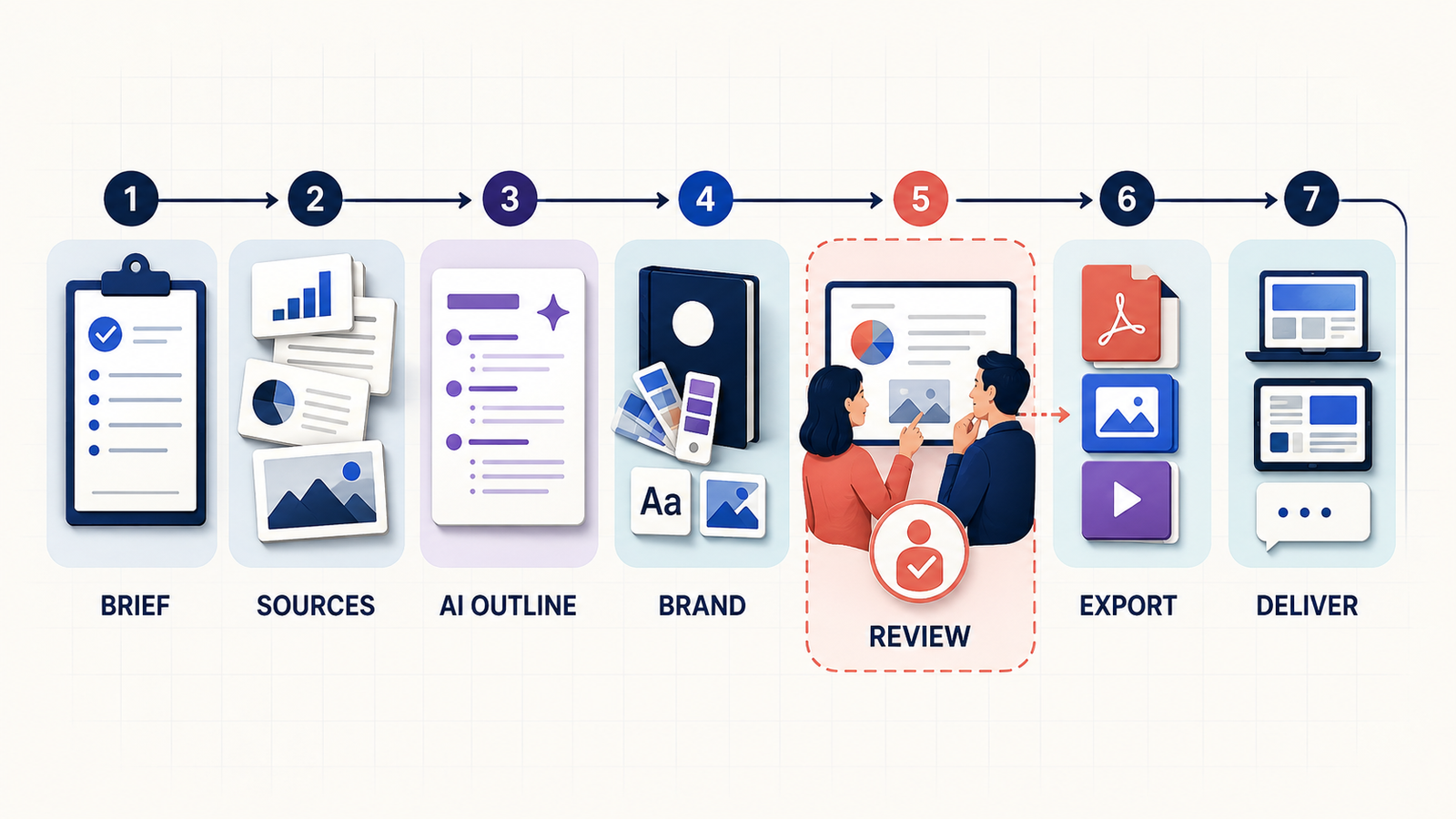
Before adopting any tool, run one representative deck through the complete workflow: brief, source upload, outline, claims review, brand review, accessibility check, export and stakeholder handoff. For better first drafts, use a structured campaign brief and the principles in our prompt engineering guide. If the deck draws from a large research library, understand how retrieval-augmented generation can improve grounding without eliminating the need to verify sources.
A safer workflow for AI-generated marketing decks
- Start with approved evidence. Give the tool a dated brief, audience, objective, approved claims, source links, campaign vocabulary and required call to action.
- Generate an outline before visuals. Check the argument, order and missing evidence before spending credits on images or layouts.
- Separate facts from creative suggestions. AI may invent market sizes, customer quotes, performance figures or competitor claims. Replace unsupported material with sourced facts.
- Apply the real brand system. Use approved templates, logos, typefaces, colors and image rules. Do not assume “on brand” in a prompt equals compliance.
- Review rights and consent. Confirm stock licenses, commercial-use terms and model releases. Never use a person’s face, voice, testimonial or logo without authorization.
- Check accessibility and export. Inspect contrast, reading order, text size, alt descriptions and the actual PPTX or PDF—not only the web preview.
- Keep a human approver. Marketing, legal, product and subject-matter owners should sign off according to the risk of the claims.
AI presentation software can accelerate production, but it does not own the accuracy, licensing or strategic judgment in the final deck. Teams operationalizing these workflows may also benefit from the governance ideas in our LLMOps guide and the broader context in our generative AI introduction. For customer-facing enablement rather than marketing planning, see our separate comparison of AI presentation makers for sales teams.
Frequently asked questions
What is the best free AI presentation maker for marketing?
Canva is the best starting point for most marketers because its Free plan combines presentation generation, editing, collaboration and a large creative library. Pitch is better for collaborative deck workflows, while Gamma is faster for a narrative first draft. Each has AI, branding or export limits, so “free” does not mean unlimited production.
Can AI presentation makers follow a brand guide?
Yes, but capability varies. Some tools apply colors, logos and fonts; higher business tiers may offer locked templates, shared libraries and permissions. A generated deck can still misuse spacing, imagery, tone or claims, so a brand owner should review the exported result.
Can I use AI-generated slides commercially?
Often, but not automatically. The presentation tool’s terms, the AI model terms, stock-asset licenses and rights in uploaded or generated material can all apply. Commercial access does not guarantee exclusive copyright or protection from third-party claims. Keep source and license records for important campaigns.
Should I upload confidential campaign data?
Only after reviewing the exact workspace plan’s privacy, retention, training, access-control and deletion terms. Consumer and business plans may handle content differently. For unreleased products, customer lists or regulated data, involve security and legal teams before upload.
Bottom line
Canva is the most versatile default for marketing presentations, Adobe Express is strongest for brand-controlled creative production, and Pitch is the better fit for collaborative campaign planning and reporting. Plus AI wins when native office-file compatibility is nonnegotiable; Gamma prioritizes speed, Beautiful.ai prioritizes layout discipline, and Visme prioritizes interactive data storytelling. Choose with one real campaign deck, not a demo prompt—and budget time for human verification before anything reaches an audience.


