


Direct answer: The best AI presentation makers for pitch decks are Pitch, Gamma, Canva, Plus AI, Beautiful.ai, Slidebean and Storydoc. Pitch is the strongest all-rounder for editable, collaborative investor decks; Gamma is fastest for a narrative first draft; and Slidebean offers the most fundraising-specific workflow. None can validate your market, traction or financial claims for you.
An AI presentation maker can turn a founder brief, business plan or existing deck into a useful first draft. The hard part is not generating ten attractive slides. It is building an investor narrative that connects the problem, solution, market, business model, evidence, team, financial logic and fundraising ask without inventing facts or burying the point.
This comparison was checked on September 5, 2026, for US users. Plans, AI allowances and export rules change, so verify the product page before paying or uploading confidential fundraising material. GravityDevOps reviewed current product, pricing and help documentation and used a matched-prompt independent comparison only as supporting context. We did not run our own controlled design benchmark or test paid accounts.
Best AI presentation makers for pitch decks at a glance
| Tool | Best for | Free or trial boundary | Main limitation |
|---|---|---|---|
| Pitch | Collaborative investor decks and live sharing | Free plan; 100 lifetime AI credits | Free output is branded and PPTX export is paid |
| Gamma | Fast narrative drafts and web delivery | Free plan; up to 10 slides per prompt | Free exports and shared decks carry Gamma branding |
| Canva | Brand control and visual customization | Free plan with limited Canva AI use | AI allowance is limited and premium assets can complicate reuse |
| Plus AI | Native PowerPoint and Google Slides workflows | Seven-day card-required trial | No permanent free tier |
| Beautiful.ai | Automatic layout guardrails | 14-day card-required trial | No continuing free plan |
| Slidebean | Fundraising structure, review and startup templates | Paid from $7/month billed yearly | Cannot import an existing deck for editing |
| Storydoc | Interactive pitch links and investor engagement analytics | 14-day no-card trial | Web-first output; no conventional editable PPTX workflow |
A free tier is not the same as a trial. Pitch, Gamma and Canva have ongoing zero-dollar plans, but their AI, branding or export limits still matter. Plus AI and Beautiful.ai require a card for their trials; Storydoc says its 14-day trial does not.
How we ranked AI presentation makers for pitch decks
We screened 11 credible products and ranked seven. The methodology weighted investor-specific narrative support; control over problem, market, traction, business-model, team, financial and ask slides; source-file input; editable charts and tables; brand control; collaboration and comments; PPTX, PDF or live-link delivery; viewer analytics; free or trial boundaries; published privacy controls; and how easily a founder can verify every claim before sharing.
Pitch, Gamma, Canva, Plus AI, Beautiful.ai, Slidebean and Storydoc made the final list. Decktopus, Adobe Express, Microsoft Copilot in PowerPoint and SlidesAI were also screened. They remain credible alternatives, but their strongest documented workflows overlapped higher-ranked tools or were less focused on investor delivery at the review date.
Rankings are documentation-based. An independent 2026 comparison by 24Slides tested multiple tools with the same eight-slide venture-capital brief and found meaningful differences in narrative structure, data treatment and visual compliance. We use that work as context, not as proof that every founder will get the same result. Your source material, prompt, template and editing choices can change the outcome substantially.
1. Pitch: best overall AI presentation maker for pitch decks
Pitch combines prompt-based drafting with a mature collaborative editor, pitch-deck templates, charts, comments, assignments and share links. A founder can generate an initial deck, let finance and product owners revise their slides, then send a live link instead of emailing another static file. That balance of creation, teamwork and delivery makes Pitch the most complete default in this comparison.
Pitch Free supports unlimited presentations and sharing links. Its current AI-credit guide gives new Free workspaces 100 lifetime, nonrenewing credits. The important export boundary is paid: Free PDF downloads and public links retain small Pitch branding, while editable PowerPoint export starts on Plus. Advanced links with email capture and slide-level engagement analytics begin on Team, according to Pitch’s current plan documentation.
Pros: strong real-time collaboration; pitch-deck templates and flexible layouts; live links; clear path to analytics and editable PPTX.
Cons: Free AI credits do not reset; Free output is branded; meaningful investor-view analytics require a higher plan.
2. Gamma: best for a fast pitch-deck narrative
Gamma turns a prompt, outline or imported document into a card-based presentation and lets the user review structure before polishing the design. It works well when a founder needs to discover the story quickly: what the company does, why the problem matters, why now, what evidence exists and what the round will fund. The result can stay as a responsive web presentation or move into a conventional file.
Gamma Free requires no credit card, creates up to 10 slides per prompt and supports PDF, PPTX, PNG and Google Slides export. Free shared and exported material carries Gamma branding; Plus removes it. Gamma’s export documentation says tables remain editable in PowerPoint, but web-style cards, fonts and complex layouts can still shift after export, so inspect the actual file before sending it to investors.
Pros: fast outline-to-deck workflow; clear Free plan; multiple export formats; effective live-link presentation.
Cons: Free branding; a ten-slide generation cap can compress complex funding stories; PPTX export needs visual QA.
3. Canva: best for visual customization and brand assets
Canva’s presentation workflow can generate an outline and deck from a prompt, then opens the result in a full visual editor. It is the most flexible choice here for founders who already have logos, product screenshots, diagrams, founder photos and launch assets in Canva. Templates cover pitch decks, and the same brand system can support a one-pager, social announcement and demo-day graphic.
Canva AI is available on Free with limited use; its current presentation page does not promise unlimited generations. A separate Canva product page says Magic Design has historically allowed up to 10 free uses across presentations, video and search, but Canva is moving AI access into pooled plan limits. Check the in-product counter. Canva Free is $0, while higher tiers provide more AI use, brand controls and premium content.
Pros: deep visual editor; large template and media library; convenient brand reuse; easy collaboration and common download formats.
Cons: Free AI limits are pooled and can be hard to predict; premium assets may not be licensed for every collaborator; design freedom can encourage clutter.
4. Plus AI: best inside PowerPoint and Google Slides
Plus AI works inside PowerPoint and Google Slides instead of sending the founder into a separate web editor. It can generate a full presentation from a prompt, convert PDF or Word source material, insert a single slide, rewrite text or remix an existing layout. This is the best fit when investors, advisers or the company’s board already exchange native office files.
Plus AI is not free. Its seven-day trial requires selecting a paid plan and adding a credit card, according to the official installation guide. The product creates native PPTX or Google Slides output and supports organization templates on higher tiers, but AI-generated charts, market claims and financial numbers still require manual checking against the founder’s model and cited sources.
Pros: native editable slides; works with existing templates; useful document-to-deck and slide-level editing controls.
Cons: card-required trial and no permanent free tier; requires the PowerPoint or Google Slides environment; visual quality depends heavily on the selected template.
5. Beautiful.ai: best for automatic layout guardrails
Beautiful.ai’s Smart Slides adapt spacing and alignment as content changes. That is helpful when a pitch deck is edited by several non-designers shortly before a meeting: the product, market and traction slides can evolve without every revision breaking the grid. Pro includes AI generation, custom branding, viewer analytics, and PowerPoint import and export.
Beautiful.ai offers a 14-day trial, not an ongoing free plan. A credit card is required and the subscription automatically charges unless canceled. Pro is listed at $14.50 per month when billed annually or $45 for a one-month option at the review date. Editable PowerPoint export is available on Pro, Team and Enterprise, but animations and some rich media do not survive export.
Pros: disciplined adaptive layouts; useful brand settings; editable PPTX; presentation analytics.
Cons: card-required trial only; automatic layouts can constrain unusual storytelling; exported fonts and media need checking.
6. Slidebean: best for fundraising-specific structure and review
Slidebean is the most startup-specific product in this list. Its Starter plan includes an AI pitch-deck builder, more than 100 startup deck templates, view tracking and AI deck reviews, plus adjacent fundraising resources such as cap-table and financial-modeling material. The generator can start from a company website or a short description.
There is no permanent free creator tier documented on the current pricing page. Starter costs $7 per month when billed yearly and includes unlimited use of the AI pitch-deck builder and AI reviews. Slidebean also states that users cannot upload an existing presentation or document for editing, which matters if a board-approved deck must be preserved. Higher advisory services are separate from the software subscription and do not guarantee fundraising success.
Pros: strong startup and investor focus; practical deck templates; view tracking; fundraising-adjacent resources.
Cons: paid access; no existing-deck import; software feedback is not a substitute for legal, finance or experienced investor review.
7. Storydoc: best for interactive investor links
Storydoc creates scroll-based, interactive pitch presentations rather than conventional slide files. A founder can add video, calendars, forms and live content, personalize versions and track how recipients move through the story. It is useful for warm outreach or an asynchronous follow-up where the investor will view the pitch on a phone or browser.
Storydoc says its pitch-deck tool has a 14-day trial with no credit card. The current Starter plan is $19.80 per month when billed annually and includes five active documents, 25 monthly AI text credits, 20 image credits, basic analytics and PDF export. Storydoc is web-first; teams needing a deeply editable PowerPoint handoff should prefer Pitch, Plus AI or Beautiful.ai.
Pros: interactive storytelling; personalization; engagement analytics; no-card trial.
Cons: not a native PPTX workflow; paid plan after trial; view data shows interaction, not investor intent or commitment.
How to choose an AI pitch-deck maker
- Choose Pitch for the best balance of team editing, investor-friendly templates, live sharing and a path to PPTX and analytics.
- Choose Gamma when speed and narrative exploration matter more than strict PowerPoint conventions.
- Choose Canva when visual identity, screenshots and cross-channel assets are central to the deck.
- Choose Plus AI when the final deliverable must remain native in PowerPoint or Google Slides.
- Choose Beautiful.ai when multiple non-designers need guardrails that keep slides tidy.
- Choose Slidebean when you want startup-specific deck structure and fundraising-oriented review tools.
- Choose Storydoc when the pitch will be sent as an interactive, trackable web experience.
Before committing, recreate one real section of your deck—preferably market, traction and financials—then export and share it through the exact workflow you will use. A polished demo is less important than correct numbers, editable charts, readable footnotes, working links and a file an investor can open without friction. For a broader category view, see our comparison of AI presentation tools for non-designers.
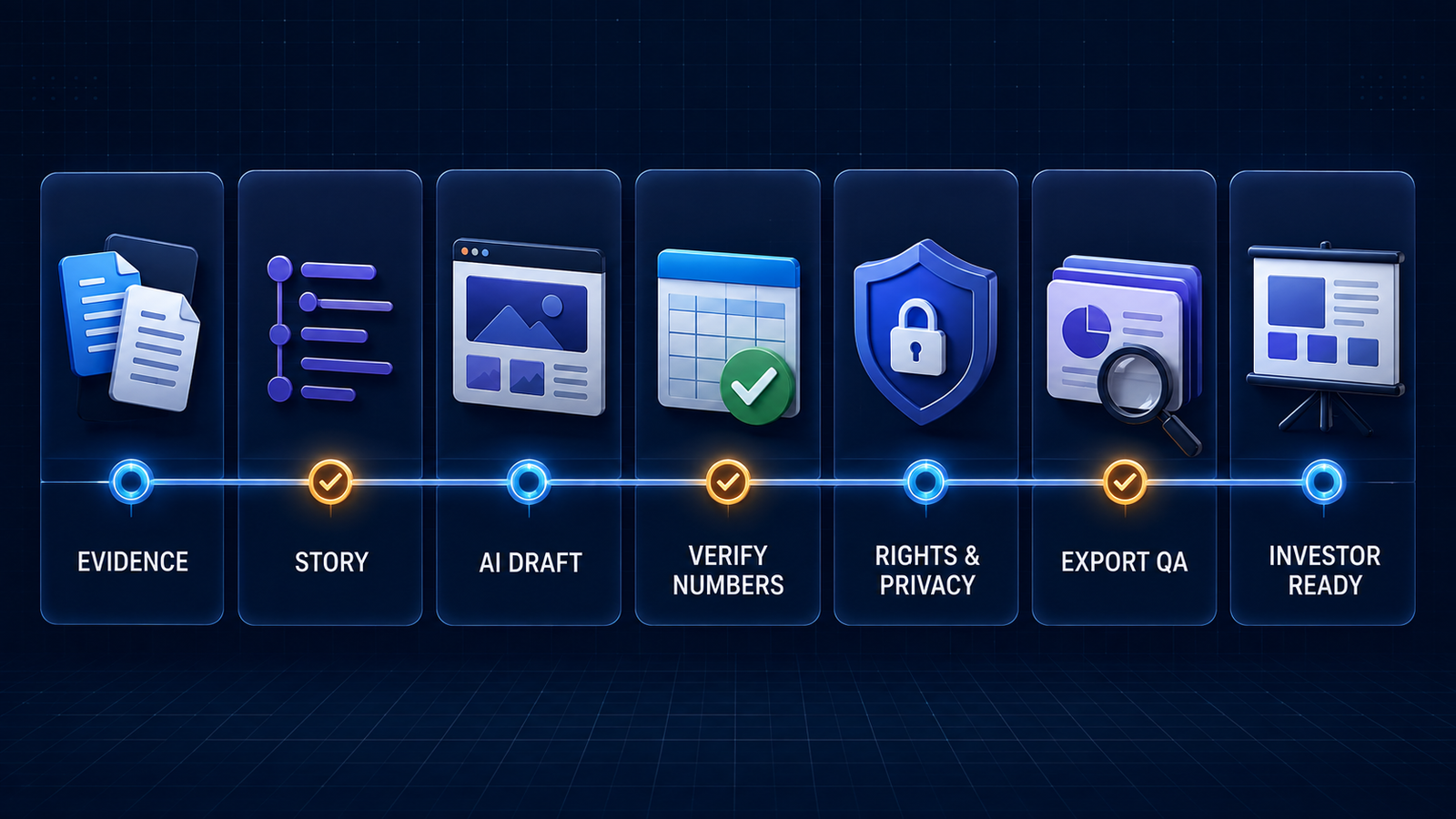
A safer workflow for an AI-generated investor deck
- Build an evidence pack first. Use a dated company summary, customer evidence, market sources, product metrics, cap-table assumptions, financial model and the exact funding ask. Do not ask the model to “fill in” missing traction.
- Write the investor argument before styling. Define why this problem matters, why the company can win, what proof exists and what the next round enables. Our prompt-engineering guide can help structure constraints and required evidence.
- Generate and review the outline. Delete generic slides, repeated claims and unsupported market language before generating visuals.
- Reconcile every number. Tie revenue, growth, margins, runway, use of funds and projections back to the finance model. Label forecasts clearly and keep units, periods and definitions consistent.
- Check rights and confidentiality. Confirm permission for customer logos, quotations, employee photos, product screenshots and third-party charts. Review the chosen plan’s retention, training, access and deletion terms before uploading nonpublic data.
- Test the delivered artifact. Inspect PDF and PPTX exports, fonts, charts, speaker notes, links, accessibility and mobile rendering. Send the final link to an unauthenticated browser before investor outreach.
- Keep human owners accountable. Founders, finance, legal and subject-matter owners should approve claims in their domains. AI-generated polish does not transfer responsibility to the software.
If a team is turning many internal sources into recurring decks, the governance principles in our LLMOps guide help with source control, review and monitoring. For a plain-language explanation of the underlying technology and its limits, read What Is Generative AI? Sales teams with a different buyer-enablement workflow should use our separate guide to AI presentation makers for sales teams.
Frequently asked questions
What is the best free AI pitch-deck maker?
Pitch is the best free starting point for most founders because it combines unlimited presentations, collaboration, templates and live sharing, although its 100 AI credits do not renew and Free output is branded. Gamma is faster for initial narrative generation, while Canva offers more visual control. None provides unlimited, watermark-free AI generation and every deck needs fact review.
Can AI create financial projections for a pitch deck?
AI can format assumptions, summarize a founder-approved model and suggest clearer charts. It should not invent projections or replace financial review. Keep the spreadsheet as the source of truth, label forecasts and scenarios, reconcile every figure, and explain the assumptions behind revenue, cost, hiring, runway and use of funds.
Do investors know when a pitch deck was made with AI?
Free exports may show product branding, but the more important issue is credibility. Generic claims, invented metrics and inconsistent numbers are visible regardless of how the deck was made. Use AI as a drafting and design assistant, then replace filler with specific, verifiable company evidence.
Is it safe to upload confidential company data?
Only after checking the exact plan’s privacy, retention, model-training, access-control and deletion terms. Consumer and business plans can differ. Remove personal, regulated or deal-sensitive data when possible, use approved enterprise controls, and involve legal or security reviewers before uploading a cap table, customer list or unreleased financials.
Bottom line
Pitch is the best all-round AI presentation maker for pitch decks because it combines drafting, collaboration and investor delivery. Gamma is the fastest route to a coherent narrative, Canva offers the deepest visual editor, and Plus AI is the cleanest fit for native PowerPoint or Google Slides. Beautiful.ai adds layout discipline, Slidebean adds fundraising focus, and Storydoc adds interactive analytics. Pick the workflow that preserves your evidence and review process—not the tool that promises a finished fundraise from one prompt.


