

The best free AI presentation maker for most students is Canva, especially for visual assignments and eligible K–12 classrooms. Prezi is stronger for a nonlinear live presentation, Gamma for a fast web-first draft, Slidesgo for recurring PowerPoint exports, and Adobe Express for turning source files into slides. Every free option has a limit, so match the tool to your required file format and school rules.
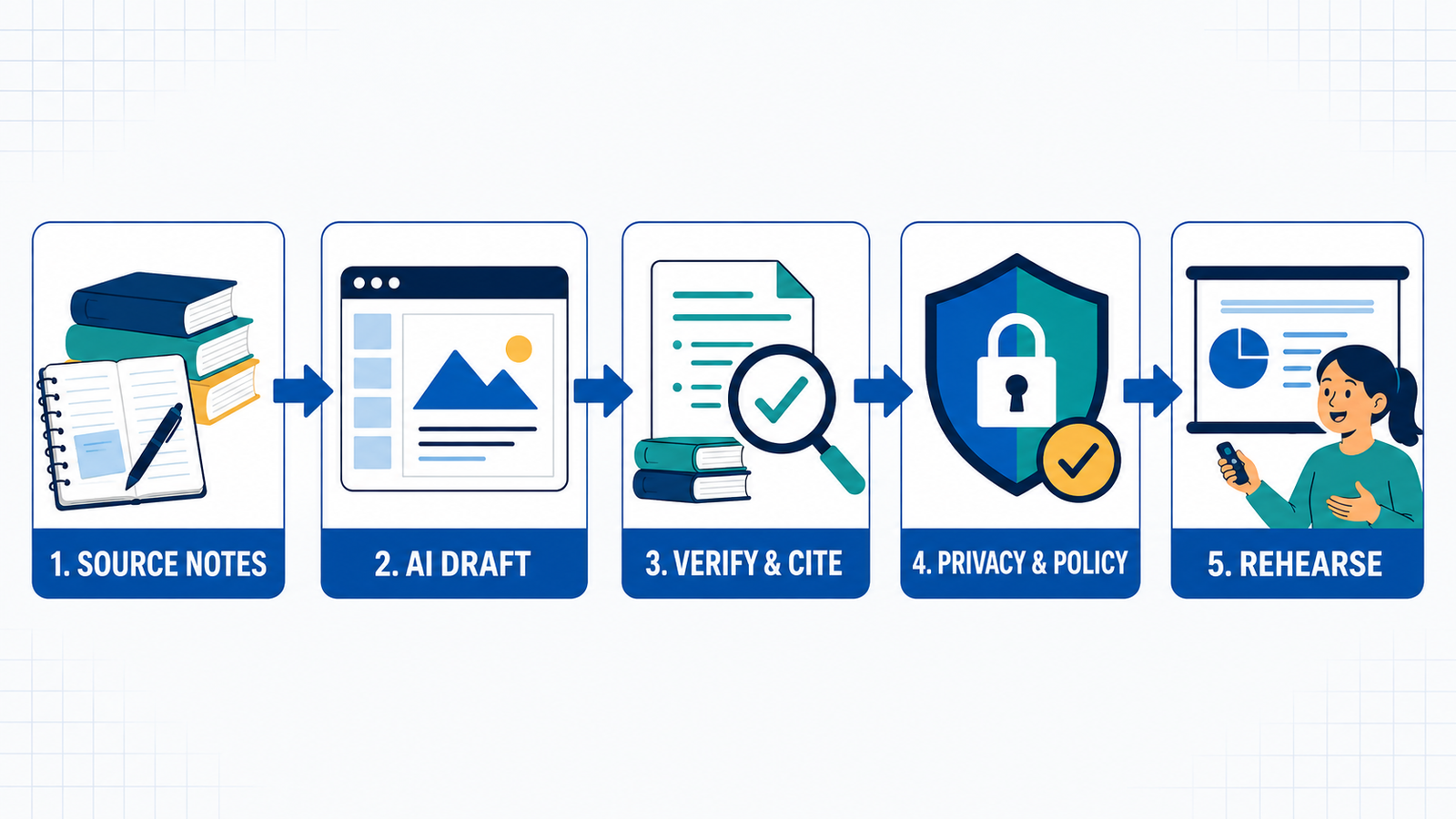
AI presentation makers can turn a prompt, outline, notes or source document into a designed first draft. That saves layout time, but it does not verify facts, cite sources correctly or prove that a student understands the material. The useful workflow is to research first, generate second and then rewrite, cite and rehearse the deck yourself.
This comparison was checked on September 6, 2026 using current US-facing product, pricing and help pages. Free plans change often. “Free” here means a continuing free tier, a clearly bounded complimentary allowance or a verified student offer—not a card-required trial presented as free.
Best free AI presentation makers for students at a glance
| Tool | Best for | What is free | Main limitation |
|---|---|---|---|
| Canva | Visual class projects and K–12 collaboration | Up to 10 Magic Design uses on a regular Free account; eligible K–12 Education access is free | Education access needs a teacher or school, and some library assets require replacement |
| Prezi | Nonlinear, live presentations | Basic plan plus a starting AI-credit balance | Free work is public; downloads and privacy controls require a paid plan |
| Gamma | Fast web-first decks | Limited AI creation, up to 10 cards per prompt and major export formats | Free exports carry Gamma branding; AI credits do not provide an unlimited monthly workflow |
| Slidesgo | Editable PowerPoint or Google Slides | Three AI presentations and three template downloads monthly | Attribution slide must remain |
| Adobe Express | Generating from PDFs, Word files and notes | Five lifetime Generate Presentation uses | Generation is unavailable to K–12 accounts |
| SlidesAI | Occasional Google Slides or PowerPoint assignments | 12 presentations and 120 AI editing credits yearly | Only 1,000 input characters per Free presentation |
| Beautiful.ai | College students with a verified .edu address | One year of Pro for eligible new student subscribers | It is a time-limited student offer, not a permanent free tier |
How we selected the best free AI presentation makers for students
We screened 10 credible tools and ranked seven. The comparison is documentation-based: GravityDevOps did not run a matched-prompt visual benchmark, use paid accounts or grade generated presentations. We compared each service across six practical criteria:
- Real zero-dollar access: whether a student can generate a deck without entering a card, plus whether the allowance renews.
- Useful input: prompts, pasted notes, PDFs, Word documents, existing slides and links.
- Editable output: web editing, PowerPoint, PDF and Google Slides options.
- Presentation quality controls: outline review, layouts, images, speaker notes, collaboration and live presenting.
- Hidden friction: branding, public-by-default work, attribution, account requirements and export restrictions.
- Student fit: privacy, age and school-admin controls, source traceability and room for genuine student authorship.
Pitch, SlidesPilot and MagicSlides were also screened. Pitch has a useful Free workspace and 100 nonrenewing AI credits, but its Free exports are branded and PowerPoint export is paid. SlidesPilot offers no-card credits and editable PPTX export but does not publish a stable numeric Free allowance. MagicSlides’ current consumer pricing page emphasizes paid subscriptions, while its generous free API allowance is a developer product rather than a normal student workflow.
1. Canva: best free AI presentation maker for most students
Canva is the most balanced choice when the assignment needs strong visuals, group editing and a familiar slide editor. Magic Design for Presentations turns a short prompt into a draft deck and is available up to 10 times free across Magic Design’s supported formats. Students can edit every slide, add charts or media, collaborate and present without leaving Canva.
The bigger advantage applies to eligible primary and secondary schools. Canva Education is free for verified K–12 educators and invited students and includes most premium features, LMS integrations and school-oriented safeguards. It is not a general free college plan, and a student cannot self-activate it without an eligible teacher or institution. Education admins can also disable AI features.
Pros: strong editor, group workflow, large media library and flexible presenting. Cons: Free users may need to replace Pro assets before downloading, and AI output still needs fact and copyright review.
2. Prezi: best for a memorable live presentation
Prezi remains distinctive because it builds a zoomable visual canvas instead of a conventional stack of slides. That can work well for concept maps, scientific systems, historical timelines and other topics where relationships matter more than a linear list.
Prezi’s current plan guide says the free Basic license includes 500 starting AI credits for presentation generation, file import, AI images and text transformation. Those credits do not refresh monthly. The important boundary is delivery: Free users can create and present online, while private sharing, offline access and common download options sit on higher plans. Check the credit counter shown in your account because Prezi’s public plan descriptions have changed during 2026.
Pros: unusual visual storytelling, collaborative links and genuine free AI generation. Cons: public-by-default presentation access and weak free offline/export options.
3. Gamma: best for a fast web-first draft
Gamma is useful when a student needs to turn an outline into a clean deck quickly, then share it as a link. Its Free plan creates up to 10 cards per prompt, imports PDF and PowerPoint files and exports to PDF, PPTX, PNG and Google Slides. The editor is easier to reshape than a static AI export, and link sharing suits remote group review.
Free use is bounded by an initial AI-credit allowance rather than an unlimited recurring quota. Gamma says Free users cannot purchase top-up credits, and Free-plan exports include Gamma branding. Treat it as a strong tool for occasional drafts, not a guaranteed semester-long supply of generated decks.
Pros: fast structure, multiple exports and good web sharing. Cons: branding and nonrenewing AI access make the long-term Free value less predictable.
4. Slidesgo: best recurring free PowerPoint option
Slidesgo is the clearest choice for students who need an editable PowerPoint file and only make a few decks each month. Its Free plan includes three AI-generated presentations and three template downloads per month. Generated decks arrive as PPTX files that can also be opened in Google Slides.
The tradeoff is explicit: Free users must keep the attribution slide. That is normally reasonable for a class presentation, but students should confirm that the instructor permits branded templates and citations in that format. An account is required.
Pros: monthly reset, conventional editable slides and a broad template catalog. Cons: attribution is mandatory and the monthly cap is low.
5. Adobe Express: best for turning source files into slides
Adobe Express has one of the broadest input lists. Its Generate Presentation workflow accepts PDF, DOCX, PPTX, TXT, RTF, XLS, VTT and web links, with up to 10 documents and 150 combined pages. Students can edit the outline before generation, set the audience and detail level, collaborate and download the result as PDF or PowerPoint.
The regular Free plan provides five lifetime presentation generations, not five each month. Adobe also says the feature is available to Higher Education plans but currently unavailable for K–12 accounts. Free access needs an Adobe account but no credit card.
Pros: excellent source-file support, editable outline and familiar exports. Cons: a small lifetime allowance and no K–12 generation access.
6. SlidesAI: best for occasional text-to-slides assignments
SlidesAI works in its web app, Google Slides and PowerPoint, making it a practical bridge for students who already know those editors. The Basic plan includes 12 presentations per year, 1,000 input characters per presentation and 120 AI editing credits per year. Presentation creation itself is counted separately from credits; credits cover rewriting and other AI edits.
Twelve yearly decks may be enough for an occasional assignment, but the 1,000-character input cap is tight for a research paper or detailed lecture notes. Students should prepare a concise outline instead of expecting the tool to digest a full report.
Pros: works with established slide editors and has a clearly documented annual allowance. Cons: short input and only one generated presentation per month on average.
7. Beautiful.ai: best verified college-student offer
Beautiful.ai’s Smart Slides automatically maintain spacing and layout as content changes, which is helpful for thesis defenses, data-heavy class projects and students who struggle with slide design. The normal product is paid with a card-required 14-day trial, so that trial does not qualify for this ranking.
The reason it appears here is a separate student offer: new subscribers with a verified .edu email can receive one year of Pro at no cost. Pro includes AI content generation, PowerPoint import/export, data visualizations and collaboration. Eligibility is narrower than a universal Free plan, and students should check the renewal terms before the 12 months end.
Pros: strong automatic layout and a full Pro feature set for eligible students. Cons: .edu verification, new-subscriber restriction and a one-year boundary.
How to choose the right free AI presentation maker
- Need an editable PPTX? Start with Slidesgo, Gamma, Adobe Express or SlidesAI. Prezi’s Free plan is primarily an online experience.
- Need recurring free generations? Slidesgo’s three-per-month allowance is easier to plan around than lifetime credits.
- Need group work? Canva is the safest default, especially when the school already manages Canva Education.
- Need to transform a paper or PDF? Adobe Express has the clearest published source-file limits. Still compare every slide with the original.
- Need a thesis or university presentation? Check Beautiful.ai’s verified .edu offer before starting a card-required trial.
If you are learning presentation structure rather than choosing software, GravityDevOps’ guide to AI presentation tools for non-designers explains the broader tradeoffs. For source conversion, see the dedicated comparisons of Word-to-PowerPoint tools and PDF-to-PowerPoint tools. Better instructions also matter: use the practical framework in prompt engineering for developers to specify audience, evidence and constraints.
Student privacy and academic-integrity checklist
- Follow the course policy. Some instructors allow AI for layout but not for research or writing. Disclose assistance when required.
- Do not upload protected material casually. Remove grades, student IDs, unpublished research, interview transcripts and personal data unless the school has approved the service.
- Open every citation. An AI-generated reference can be incomplete, irrelevant or invented. Cite the original source, not the presentation tool.
- Rewrite in your own voice. The final claims, examples and conclusion should reflect your understanding.
- Check every visual license. Free templates and stock assets can carry attribution or reuse conditions.
- Rehearse without the tool. If you cannot explain a slide or answer a basic question about it, the deck is not finished.
For US K–12 use, the privacy question belongs with the school, not only the student. The Federal Trade Commission’s COPPA guidance says school authorization can stand in for parental consent only when data is collected for a school-authorized educational purpose rather than another commercial purpose. Schools also have separate FERPA obligations. Use an approved school account when one exists.
Frequently asked questions
Can students make an AI presentation completely free?
Yes, but usually within a generation, credit, branding or eligibility boundary. Canva, Prezi, Gamma, Slidesgo, Adobe Express and SlidesAI all provide usable zero-dollar access. Beautiful.ai is free for one year only for eligible new students with verified .edu addresses.
Which free AI presentation maker exports to PowerPoint?
Slidesgo, Gamma, Adobe Express and SlidesAI document PowerPoint-compatible export workflows. Canva can also download presentations, but students should check that all chosen assets are included in the Free license before exporting. Prezi’s free strength is online presenting rather than offline PowerPoint delivery.
Can I submit an AI-generated deck as my own work?
Only if the course rules permit that level of AI assistance and you meet any disclosure requirement. Even then, verify every fact and citation, rewrite the argument and make sure the final presentation reflects your own analysis. An attractive generated deck is not evidence of understanding.
What is the best free option for students under 18?
A school-managed platform is preferable. For eligible K–12 learners, Canva Education provides teacher invitations and administrator controls. Students should not create unsanctioned accounts or upload personal and school records to a consumer AI tool merely because it has a Free button.


