

An AI resume builder can turn verified career details into a structured first draft, suggest clearer achievement bullets and tailor wording to a job description. The best starting points are Teal for a generous free workflow, Rezi for a tightly constrained ATS-style resume and Jobscan for guided coaching. AI should improve presentation, not invent experience, credentials or results.
This guide compares seven credible tools for creating a resume with AI. It was checked on September 8, 2026, using current US-facing product, pricing and help pages. Access terms change frequently, so confirm the export and renewal screen before adding sensitive career data or paying.
Best AI resume builders at a glance
| Tool | Best for | Free or trial boundary | Main limitation |
|---|---|---|---|
| Teal | Best overall free workflow | Unlimited resumes and exports; small one-time AI allowance | Advanced matching and unlimited AI require Teal+ |
| Rezi | ATS-focused first resume | One resume, three PDF downloads, limited AI; no card | Free plan is deliberately narrow |
| Jobscan | Guided resume coaching | Core builder and PDF downloads are free | Most advanced AI writing and optimization are paid |
| Kickresume | Generating a draft from scratch | Four templates and unlimited basic downloads | Pricing page places the full AI Writer in Premium |
| Huntr | Managing many applications | Unlimited base and tailored resumes with free PDF export | Unlimited AI generations require Pro |
| Canva | Visual and creative resumes | Free builder plus limited Magic Write access | Decorative layouts need an ATS-safe alternative |
| Enhancv | Design feedback and multilingual resumes | Free tools and a seven-day builder trial | Ongoing full access is paid |
How we selected these AI resume builders
We screened 11 products and ranked seven. The review considered the quality of the guided workflow, job-description tailoring, control over AI suggestions, templates, PDF or Word export, account and payment requirements, published free limits, privacy disclosures and the ease of keeping every claim truthful. Resume.io, Resume Worded, ResumeNerd and Careerflow were screened but not ranked because their current free or trial boundaries were less competitive or less clearly documented for this specific create-a-resume intent.
This is a documentation-based comparison, supported by Zapier’s three-week hands-on test and WIRED’s 2026 resume-builder review. GravityDevOps did not run a controlled output-quality benchmark or submit generated resumes to employers. Vendor statements about being “ATS-friendly” are not guarantees that a particular employer’s system will rank or advance an application.
1. Teal: best overall free AI resume builder workflow
Teal’s resume builder combines resume versions, job tracking, job-description matching and exports in one workspace. That makes it useful for a real search, where a candidate needs a truthful master resume and several tailored versions rather than one generic document.
The free builder supports unlimited resumes and unlimited PDF and Word exports without a credit card. Teal’s current help center says free accounts receive 10 nonrenewing AI bullet-generation credits, two summary credits and two cover-letter credits. Free matching shows the top five job-description keywords; deeper analysis and unlimited generation sit behind Teal+.
Best for: job seekers who want a reusable master resume, application tracker and several tailored exports. Watch out for: the AI allowance is a sample, not a monthly renewable pool.
2. Rezi: best for a focused ATS-style first resume
Rezi’s free plan is unusually clear: one resume, three PDF downloads, one AI interview and limited access to its AI writer, editor, score and keyword tools, with no card required. The standard template favors straightforward structure over visual experimentation.
Rezi is a sensible choice when the goal is one clean application document and the candidate wants prompts for summaries, bullets and relevant keywords. Its limitation is equally clear: multiple resume versions, unrestricted AI and unlimited downloads require the $29 monthly Pro plan or the advertised lifetime purchase.
Best for: a first ATS-oriented resume with a small number of exports. Watch out for: keyword suggestions must describe experience you actually have; adding a term solely because it appears in a job ad can misrepresent your background.
3. Jobscan: best guided AI resume coach
Jobscan’s AI resume builder uses a question-led coach instead of asking for a single broad prompt. Candidates can accept, edit or skip each suggestion. The core builder includes ATS-oriented templates and free resume creation and download.
The free boundary needs careful reading. Jobscan says its coach can cover the most recent work experience for free, while broader AI content generation, advanced matching and AI Optimize require a free trial or Premium. Its separate core builder remains free and supports unlimited resumes and downloads, but that does not mean every AI feature is free.
Best for: people who know what they did but need structured questions to surface useful details. Watch out for: a match score is a diagnostic, not a forecast of an interview.
4. Kickresume: best for generating a resume from scratch
Kickresume’s AI Resume Writer can draft a resume from a job title and target role, then place the content in a polished template. Its free plan provides four basic resume templates and unlimited downloads when only free customization options are used.
Kickresume describes the AI builder as free to try, but its detailed plan comparison places the full AI Writer and ATS checker in Premium. It also offers one free resume-tailoring use. Treat the no-cost AI experience as limited evaluation access rather than unlimited free writing.
Best for: quickly overcoming a blank page. Watch out for: generated accomplishments can sound plausible even when they are not true. Replace generic or invented metrics with verifiable facts.
5. Huntr: best for resumes tied to an application tracker
Huntr’s AI resume builder connects resume versions with job tracking, keyword extraction and application management. Its current free plan lists unlimited base resumes, unlimited job-tailored resumes, access to all resume templates and free PDF export. It also offers lite bullet, summary and keyword tools before signup.
The important boundary is generation: Huntr’s plan page places unlimited AI summaries, skills, achievements, job-tailored writing and cover letters in Pro, listed at $40 monthly before longer-term discounts. Free users can build and organize extensively, but should not assume the full AI layer is unlimited.
Best for: candidates managing many openings and versions. Watch out for: a tracker accumulates sensitive employment history, contacts and documents, so review retention and deletion controls before centralizing everything.
6. Canva: best for visual resumes and manual control
Canva’s resume maker combines a large template library with Magic Write for drafting, rewriting and summarizing. Canva says Magic Write is available on Free with usage limits; a published Canva newsroom guide describes up to 50 free uses, though pooled AI allowances can change.
Canva gives the most visual control in this group, which can help designers or candidates sending a resume directly to a person. For online application portals, keep a second version with one column, conventional headings, selectable text and minimal decorative graphics. A beautiful layout is not automatically easy for every parser.
Best for: creative roles and direct-share resumes. Watch out for: premium template elements can trigger payment, and complex layouts may be less portable than plain documents.
7. Enhancv: best for detailed feedback and presentation
Enhancv combines inline rewriting, job-description tailoring, multilingual output and a checker that evaluates content, grammar, length, formatting and keyword match. It can import an existing PDF, DOCX or LinkedIn profile and export PDF or plain text.
Some individual tools, including its summary generator and resume checker, are presented as free. The full builder is offered as a seven-day trial before paid access, so it belongs in the trial category rather than the ongoing-free category. Confirm the checkout screen and renewal terms before starting the trial.
Best for: candidates who value design guidance and line-level feedback. Watch out for: polished language can erase a candidate’s natural voice if every suggestion is accepted unchanged.
How to create a resume with AI without inventing facts
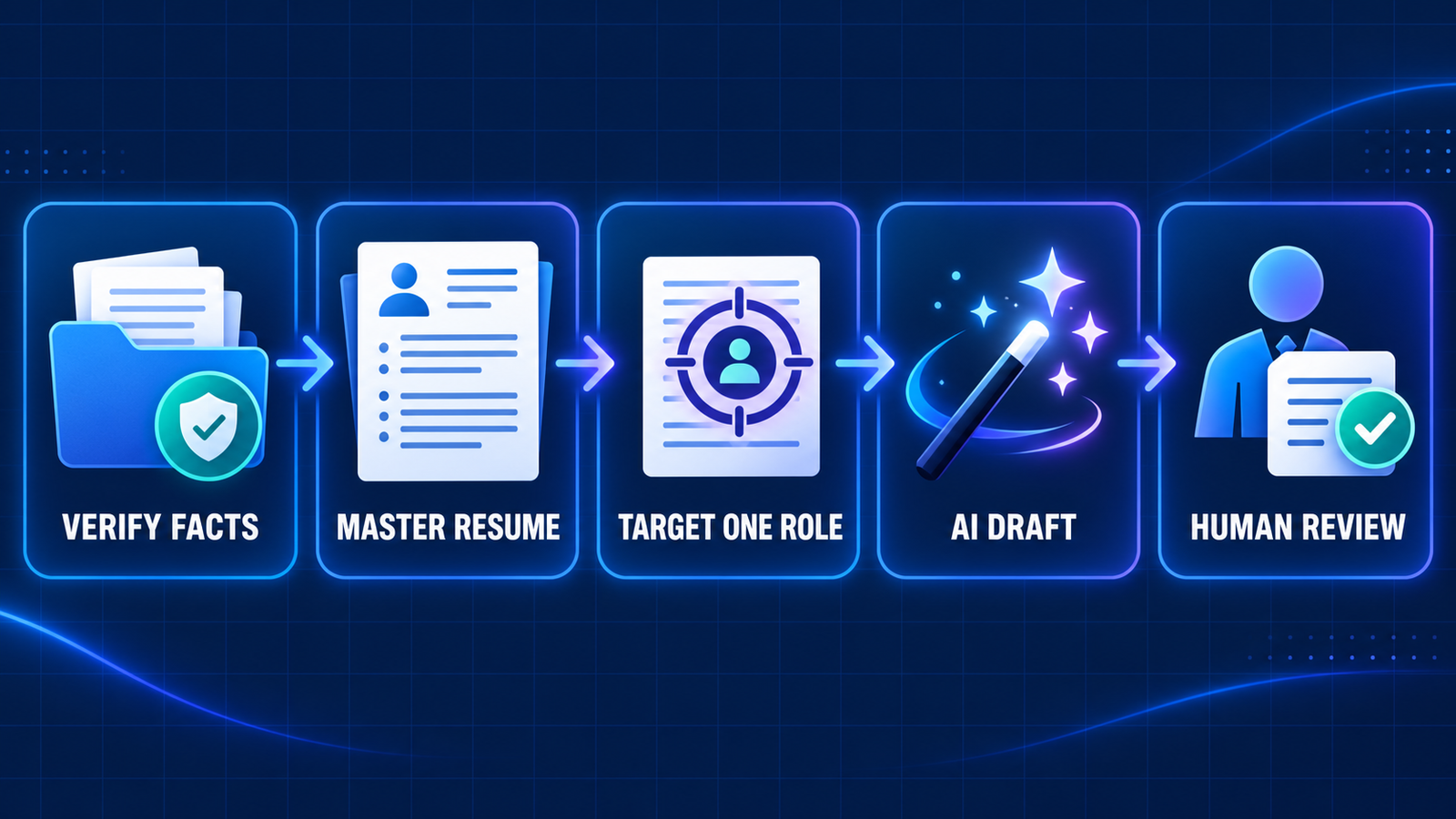
- Build a fact bank. List real roles, dates, responsibilities, tools, certifications and measurable outcomes. Keep supporting records where appropriate.
- Start with a master resume. Include the full relevant history before tailoring. This reduces the chance that useful evidence disappears between versions.
- Add one job description. Ask the tool to identify requirements that genuinely match the fact bank, not to manufacture missing experience.
- Generate alternatives, not final truth. Request two or three versions of a summary or bullet, then select and edit the most accurate one. The principles in this prompt-engineering guide apply here too: provide context, constraints and an explicit instruction not to infer facts.
- Verify every noun and number. Check job titles, dates, technologies, team size, percentages and dollar figures. Remove unsupported superlatives.
- Test the exported file. Copy text from the PDF into a plain document, confirm the reading order, and keep a simple DOCX or PDF alternative if the employer specifies a format.
- Get human review. Ask someone who knows the work to check accuracy, clarity and tone before submission.
If you need to refine a longer existing file instead of starting over, this comparison of AI tools for rewriting Word documents explains formatting and review tradeoffs. For a broader explanation of how generative systems produce plausible text, see the GravityDevOps generative AI guide.
Privacy and employment caveats
A resume can contain a home address, phone number, work history, education and references. Upload only what the service needs. Remove an exact street address, reference contact details, employee IDs, confidential project data and employer-owned material unless they are essential and permitted. Check whether the provider uses content to improve models, how long uploaded files remain available and how to delete the account and documents.
AI resume tools do not know what an employer will decide, and no builder can guarantee an interview or bypass every applicant tracking system. Follow the employer’s requested format, answer application questions truthfully and disclose AI assistance if a specific employer or regulated process requires it. A candidate—not the software vendor—remains responsible for the final document.
Which AI resume builder should you choose?
Choose Teal when you want the strongest ongoing free workflow and several tailored versions. Choose Rezi when one tightly formatted resume and a few PDF exports are enough. Choose Jobscan when guided questions are more useful than a blank editor. Kickresume is the easiest starting point for a rapid draft, Huntr is strongest when document versions must stay connected to an application tracker, Canva offers the most visual freedom and Enhancv is worth considering when a short trial and detailed feedback fit the project.
The practical winner is the tool that preserves your facts, produces the format the employer requested and lets you review every suggestion. Generate less, verify more and maintain a clean master copy outside the platform.
Frequently asked questions
Can AI create a complete resume from scratch?
Yes, several tools can generate a structured draft from a job title and supplied experience. The result still needs fact-checking, tailoring and human editing. Do not ask the system to fill gaps with assumed skills or achievements.
Is there a genuinely free AI resume builder?
Teal offers an ongoing free builder with unlimited resumes and exports, plus a small nonrenewing AI allowance. Rezi offers one resume and three PDF downloads with limited AI. Jobscan, Huntr and Canva keep useful core features free but reserve parts of their advanced AI for paid access.
Will an AI resume pass an ATS?
No tool can guarantee that. Use conventional headings, readable fonts, selectable text, simple structure and the file type requested by the employer. Treat ATS scores and keyword suggestions as review aids, not admissions tickets.
Should I put private information into an AI resume builder?
Share the minimum needed. Omit sensitive identifiers, confidential work material and reference details, and inspect the provider’s current privacy, retention and deletion terms before uploading a full career history.

