

The best AI writing tools for research and drafting are ChatGPT, Claude, Gemini, Perplexity, NotebookLM, Elicit and Grammarly—but they solve different parts of the job. ChatGPT offers the most complete all-purpose workflow, Perplexity and Elicit are stronger for finding sources, NotebookLM is best for a controlled source pack, and Grammarly is most useful after a draft exists.
That distinction matters. A fluent paragraph is not evidence, and a citation link does not prove that the linked source supports the sentence beside it. The safest workflow separates discovery, source checking, outlining, drafting and editing instead of asking one model to produce a publishable document in a single prompt. This guide was checked on September 9, 2026; plans and usage limits can change.
Best AI writing tools for research and drafting at a glance
| Tool | Best for | Research strength | Free-access boundary | Main limitation |
|---|---|---|---|---|
| ChatGPT | One-workspace research and drafting | Web, files, connected sources and cited Deep Research reports | Free includes search, Canvas and limited Deep Research | Exact allowances are variable and shown in-product |
| Claude | Long-form synthesis and revision | Free web search; paid Research performs multi-step cited research | Free plan has daily usage limits | Full Research is not on the free plan |
| Gemini | Google-centered research workflows | Deep Research can use Search, files, Gmail, Drive and NotebookLM | All users can access Deep Research with changing limits | Free capacity can tighten during high demand |
| Perplexity | Fast source discovery | Research mode performs iterative web research with citations | Free users receive limited Research access | Less controlled as a long-form writing environment |
| NotebookLM | Writing from an approved source set | Answers and reports stay grounded in uploaded sources | Standard access supports 100 notebooks and 50 sources per notebook | Not a full editorial drafting suite |
| Elicit | Academic literature review | Searches scholarly papers, extracts evidence and builds reports | Basic is free with limited Research Agent and report usage | Designed around research evidence, not polished general prose |
| Grammarly | Revising an existing draft | Limited; primarily a writing and editing layer | Free includes 100 generative AI prompts monthly | Should not be the primary research tool |
How we selected and ranked these tools
We screened ten credible products and ranked seven using documentation available to US users. The criteria were source visibility, ability to constrain research scope, citation traceability, file support, outlining and drafting control, long-document workflow, export options, free-plan boundaries, privacy controls and the ease of inserting human review. We also considered current independent testing and research on AI-assisted work.
This is a documentation-based comparison, not a controlled output-quality benchmark. We did not run every service against the same proprietary source pack or test paid enterprise accounts. Product capabilities and limits below are confirmed from official documentation; judgments about best-fit use cases are editorial analysis. If you are new to the underlying technology, start with our beginner’s guide to generative AI.
1. ChatGPT: best overall research-to-draft workspace
ChatGPT is the strongest general choice when one person wants to move from a question to a sourced report, outline and editable draft without constantly changing tools. OpenAI says Deep Research can use the public web, uploaded files and connected apps, proposes a research plan before it starts, and returns a report with citations. Completed reports can be downloaded as Markdown, Word or PDF. Canvas provides a separate surface for editing longer documents.
The free plan includes web search, Canvas and limited Deep Research, but OpenAI does not promise one durable task count for every free user. The product displays remaining Deep Research usage, so check that counter before planning a deadline. For better results, specify allowed sources, audience, evidence standards and what the model must leave unresolved; our prompt-engineering guide explains why those constraints matter.
Pros: combines planning, cited research, file analysis, outlining and drafting; supports practical report exports. Cons: free limits vary, and a polished answer can still misread a source. Consumer users should review ChatGPT Data Controls; the “Improve the model for everyone” setting can be turned off, while Temporary Chats are deleted after 30 days.
2. Claude: best for shaping long-form arguments
Claude is particularly useful after the source set is reasonably stable and the hard work is organizing an argument, comparing interpretations and revising long passages. Its free plan includes web search and content creation. Anthropic’s separate Research feature conducts multiple searches and returns cited findings, but it requires a paid Claude plan and web search must be enabled.
That makes the free version a capable drafting partner but not a free substitute for the full research agent. A practical approach is to give Claude verified notes with a claim-evidence table, then ask it to expose gaps before drafting. Independent 2026 testing by TechRadar found Claude useful for turning niche research into structured outlines and talking points, but that observation is not a guarantee for every subject.
Pros: strong document-level synthesis, revision and style control; web search is available on Free. Cons: agentic Research is paid, and web retrieval consumes the same limited free usage. Anthropic says consumer chats are used for model improvement only when a user allows it or in specified safety and feedback cases, so verify the setting before uploading confidential material.
3. Gemini: best for Google-connected research
Gemini fits writers whose source material already lives in Google’s ecosystem. According to Google’s Deep Research documentation, a report can use Google Search by default and add files, Gmail, Drive or NotebookLM notebooks. Canvas can then help turn findings into a draft or working document.
Google says all users can use Deep Research, but daily and concurrent-request limits vary; Google AI Pro and Ultra receive higher allowances, and free access may be restricted during heavy demand. This is more honest than translating a changing compute quota into a fixed number of guaranteed reports.
Pros: broad source routing and a convenient path from Google services into a draft. Cons: limits are dynamic, and consumer privacy deserves attention. Google’s Gemini Apps Privacy Hub says a subset of chats may be reviewed by trained human reviewers, so avoid entering confidential or unpublished data unless the applicable account terms and controls are acceptable.
4. Perplexity: best for fast, cited web discovery
Perplexity is the most focused option here for quickly mapping a topic, finding candidate sources and identifying competing explanations. Its Research mode runs in-depth, multi-step analysis and is available in limited form to free users. Ordinary use can also begin without signing in, although account features and advanced allowances differ.
Use Perplexity to assemble an evidence map rather than to write a final article untouched. Open every important citation, confirm the publication date, find the original document and copy the exact supporting passage into your notes. Then draft from those notes. This source-grounded pattern is conceptually similar to retrieval-augmented generation, but retrieval still does not replace verification.
Pros: fast web exploration, visible citations and limited free Research access. Cons: it is less comfortable for controlled long-form revision than a dedicated document workspace. Perplexity says AI data retention is enabled by default for Free, Pro and Max users, with an account setting to opt out prospectively; Enterprise data is excluded from training.
5. NotebookLM: best for a controlled source pack
NotebookLM is the safest fit when the question is not “What does the whole web say?” but “What do these approved documents say?” You add sources, interrogate them, build reports and follow citations back to the supplied material. That boundary is useful for policy briefs, interview synthesis, literature notes and internal documentation.
Google’s current NotebookLM standard-access table lists 100 notebooks, 50 sources per notebook, 50 chats daily and 10 reports daily. Limits are explicitly subject to change. Google also states that files and chats in NotebookLM are not used directly to train its foundational generative AI models unless the user provides feedback.
Pros: excellent source containment, traceable answers and generous standard limits. Cons: it is better at retrieval and structured notes than final prose. A June 2026 Tom’s Guide test likewise found NotebookLM strong for retrieval and summary but weaker for nuanced drafting. Pair it with a writing tool, or move a verified outline into your normal editor.
6. Elicit: best for academic literature research
Elicit is purpose-built for scholarly evidence rather than general web content. The free Basic plan offers unlimited search across more than 138 million papers, unlimited summaries, paper chat and visible sources, with limited use of Research Agent and Research Reports. Elicit says reports can be exported as PDF or Word on any plan, while richer table and systematic-review exports require paid tiers.
This specialization is valuable when a draft must distinguish study design, population and measured outcome. It is less useful for breaking news, product comparisons or polished brand copy. The service itself recommends evaluating extraction accuracy and screening precision against your own known sample rather than assuming either AI or a human reviewer is always correct.
Pros: disciplined academic discovery, evidence extraction and useful report exports. Cons: free report usage is limited and the tool is not a complete prose editor. Even with Elicit, read the original paper before turning an extracted claim into a consequential conclusion.
7. Grammarly: best for revising a draft in place
Grammarly belongs at the end of this list because its main value is improving language after research and argument choices have been made. It works across common writing surfaces, flags mechanics and tone issues, and can generate or rewrite text. The current free plan includes 100 generative AI prompts per month; Pro lists 2,000 prompts per member monthly and starts with a seven-day trial.
Pros: low-friction editing where people already write, with a meaningful free allowance. Cons: it does not provide the research planning, evidence search or citation audit needed for a source-heavy document. Grammarly’s privacy and security FAQ says generative-AI prompts and context are shared with a small number of vetted service providers to deliver the feature, while those providers may not train on user content. Organizations should still assess extension access and data policy before deployment.
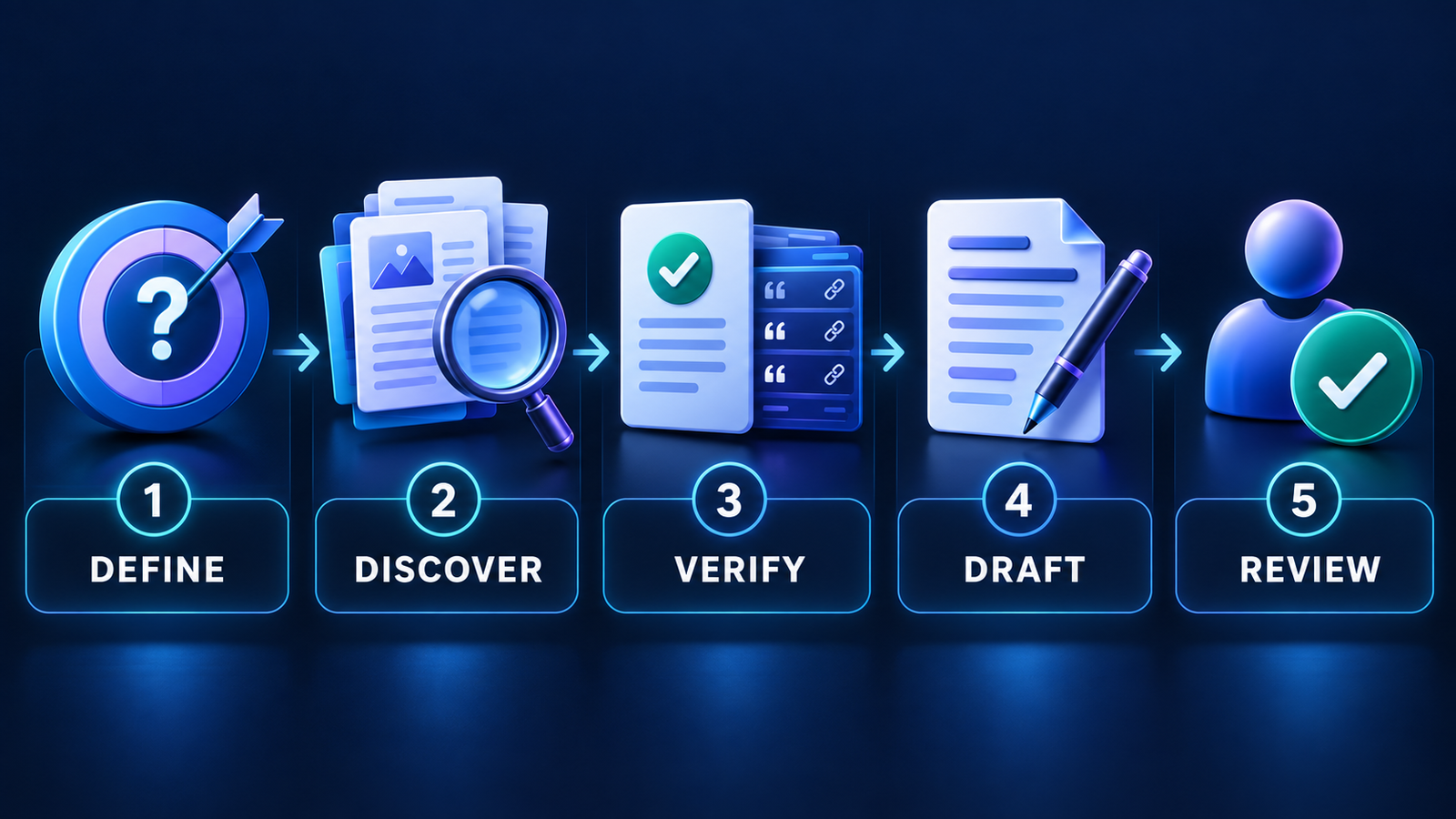
A safer five-step AI research and drafting workflow
- Define the question and evidence bar. State the audience, time range, geography, acceptable source types and decisions the document will support.
- Build a source ledger. Record each claim, original URL, publication date, author or institution, and the exact passage or data supporting it.
- Create an evidence-first outline. Every substantive section should have sources before prose. Mark disagreements and missing evidence explicitly.
- Draft in controlled sections. Ask the tool to use only the approved notes, label uncertainty and avoid manufacturing transitions that imply unsupported causality.
- Run human verification. Open every citation, check numbers and quotations, remove generic language, test the argument, and follow the relevant employer, client, school or publisher disclosure policy.
For teams, treat prompts, retrieved documents and generated drafts as governed information assets. The same operational thinking behind LLMOps—versioning, evaluation, access control and monitoring—applies to repeatable editorial workflows.
Which tool should you choose?
Choose ChatGPT when you want the broadest single-workspace path from research plan to editable draft. Choose Claude when you already have credible material and need help shaping a long argument. Choose Gemini when Google Search, Drive or Gmail are core sources. Choose Perplexity for rapid web discovery, NotebookLM for a closed source pack, Elicit for academic literature, and Grammarly for the final editing pass.
Many writers will get a better result from a two-tool workflow than from one supposed universal winner: Perplexity or Elicit for discovery, NotebookLM for source-grounded notes, and ChatGPT, Claude or Gemini for outlining and drafting. If the final deliverable needs formal document workflows, compare our guide to AI document creation tools for small businesses.
Frequently asked questions
Can AI writing tools do reliable research?
They can accelerate search, synthesis and note organization, but they are not independent authorities. A 2026 PNAS study found AI-assisted research teams performed similarly to human-only teams on many reproducibility tasks, while humans caught more critical errors. Treat AI as an assistant and verify the source behind every important claim.
What is the best free AI tool for research and writing?
ChatGPT is the most complete free starting point because it combines search, limited Deep Research and Canvas. Perplexity is better for quick source discovery, NotebookLM for approved documents, and Elicit for scholarly papers. Free allowances change, so check the current account screen before committing to a large project.
Should I cite an AI tool or its sources?
Cite the original source for the factual claim whenever possible, and separately disclose AI assistance if your employer, client, school, journal or publisher requires it. Never copy a generated bibliography without opening and validating every reference.
Can I upload confidential research or unpublished drafts?
Only after confirming the exact account tier, retention terms, training controls, connected-app permissions and organizational policy. Consumer and enterprise protections differ. Remove unnecessary personal or confidential data, and do not assume a privacy toggle makes a consumer tool suitable for regulated information.


