

The best free AI PDF summarizer for long documents is Gemini Notebook, formerly NotebookLM, because it accepts large sources, grounds answers in uploaded material and provides source citations. Claude is stronger for nuanced analysis of one dense PDF, ChatGPT is the most flexible general assistant, and ChatPDF is the quickest no-sign-up option.
No free PDF summarizer is unlimited, and a polished summary is not proof that the tool read every page correctly. We checked US-facing plans and documentation on September 16, 2026. File limits, daily quotas and model access can change, so verify the current allowance inside the product before uploading important material.
Best free AI PDF summarizers for long documents at a glance
| Tool | Best for | Free boundary checked | Main limitation |
|---|---|---|---|
| Gemini Notebook | Long PDFs and multi-source research | 50 sources per notebook; up to 500,000 words or 200 MB per source | Retrieval can miss details unless prompts target sections |
| Claude | Nuanced reading of one dense document | 30 MB per file, up to 20 files per chat; variable Free usage | PDFs over 100 pages are processed as text only |
| ChatGPT | Custom summaries and follow-up analysis | Three Free uploads daily; 512 MB and two million tokens per file | Non-Enterprise PDF handling is primarily text retrieval |
| Gemini Apps | Large mixed files in a familiar chatbot | Up to 10 files per prompt and 100 MB per file | Free accounts have tighter, changing usage and context limits |
| Smallpdf | Simple PDF-first workflow | 50 MB and roughly 25,000–35,000 words on Free | AI use and downloads are limited |
| Adobe Acrobat | Section summaries with source links | A limited number of complimentary AI requests | Adobe does not publish a durable numeric free quota |
| ChatPDF | Fast use without creating an account | Two documents per day on Free | Advanced multi-file work and higher limits require Plus |
Quick recommendation: begin with Gemini Notebook when the PDF is long and citations matter. Choose Claude when the document’s argument or wording needs close reading, and ChatGPT when you want a custom output such as a briefing, comparison matrix or study guide. Smallpdf and Adobe fit people who want a PDF-native interface. ChatPDF is useful for a quick anonymous first pass.
How we chose and ranked the free AI PDF summarizers
We screened nine credible products: Gemini Notebook, Claude, ChatGPT, Gemini Apps, Smallpdf, Adobe Acrobat, ChatPDF, Humata and AskYourPDF. Seven are ranked. This is a documentation-based comparison, not a controlled matched-document benchmark. We did not upload confidential files, buy subscriptions or claim that one model produced the most accurate summary.
We evaluated each option on eight criteria:
- Long-document capacity: published page, word, token and file-size limits.
- Free access: ongoing allowance versus trial, complimentary requests or an unpublished quota.
- Traceability: citations, page links or source navigation that help a reader verify claims.
- Document fidelity: treatment of headings, tables, charts, images, scans and multi-column layouts.
- Summary control: ability to request section-by-section, audience-specific or question-led outputs.
- Multi-file support: whether the tool can compare several PDFs without losing source boundaries.
- Privacy: training controls, retention signals and suitability for sensitive documents.
- Practicality: account requirements, speed, exports and how quickly a user can verify the result.
Independent testing supplied context, including TechRadar’s NotebookLM review and Tom’s Guide’s comparison of NotebookLM retrieval with Claude’s deeper synthesis. Our rankings prioritize verifiable reading workflows rather than the smoothest prose.
1. Gemini Notebook: best free AI PDF summarizer for long documents
Gemini Notebook is the strongest free starting point because it treats the PDF as a source rather than a disposable chat attachment. It creates a source guide, answers questions against selected material and provides citations that lead back to supporting passages. That makes it useful for research papers, manuals, reports and document collections.
Free limit: Google’s source documentation says Free users can place 50 sources in a notebook. Each source may contain up to 500,000 words or an uploaded file up to 200 MB. The current plan comparison lists 100 notebooks and 50 chats a day on the base tier. A Google account is required.
Privacy: Google says notebook content is not used directly to train its foundational models unless the user chooses to provide feedback. Feedback may include the associated sources and outputs, so do not attach confidential material to product feedback. Work and school accounts may have stronger contractual handling.
Pros: large published source limit, citations, multi-source comparison and useful study outputs. Cons: citations show where an answer came from but do not prove completeness; broad prompts may retrieve only the most relevant chunks instead of examining every section equally.
2. Claude: best for a dense PDF’s argument and nuance
Claude is a strong choice when the job is not merely “list the key points,” but “explain how the author reaches the conclusion, identify qualifications and preserve competing interpretations.” The free plan includes a 200,000-token context window, although actual usage is variable and resets depend on demand.
Free limit: Anthropic’s file guidance sets a 30 MB limit per file and up to 20 files per chat, subject to the context window. Claude can analyze text and visual elements in supported PDFs under 100 pages. For PDFs over 100 pages, it extracts text only. Anthropic recommends splitting larger documents when they exceed practical limits.
Pros: good fit for structured synthesis, counterarguments and careful rewriting; the Free plan requires no card. Cons: variable message limits, no Free Projects workspace and no visual analysis for PDFs over 100 pages. A scanned 300-page report may therefore need OCR and sectioning before upload.
3. ChatGPT: best for flexible summary formats
ChatGPT is the most adaptable option when the required output is specific: an executive brief, decision log, glossary, study quiz, risk register or comparison against another file. It can also help turn a verified summary into tables or charts. That flexibility is useful after the reading step, but users should explicitly request page references and evidence for every important claim.
Free limit: OpenAI’s file-upload FAQ lists a 512 MB hard limit and a two-million-token limit for text and document files. Free users can upload three files per day, and the rate may be lowered at peak times. The ChatGPT pricing page labels file uploads on Free as limited.
PDF caveat: OpenAI says visual retrieval for embedded PDF images is an Enterprise capability. Other plans primarily extract digital text and discard images. That makes the free workflow unsuitable for scan-only documents, diagrams or tables whose meaning lives in layout. In Data Controls, users can turn off “Improve the model for everyone” so new chats are not used to train ChatGPT.
4. Gemini Apps: best general chatbot for large mixed files
Gemini Apps is useful when a PDF must be analyzed beside Word files, slides or Google Drive material without building a notebook. It supports follow-up questions, comparisons and custom summaries in a familiar chat interface.
Free limit: Google’s file-analysis help says users can add up to 10 files in one prompt, with a 100 MB limit for most supported non-video files. PDF, DOCX, PPTX and several other document formats are supported. Google warns that very large uploads may produce responses that miss connections or details. Free users have tighter and changing limits than Google AI subscribers, and the larger one-million-token context is associated with paid access.
Pros: broad file support, convenient Google integration and strong multimodal potential. Cons: the free usage allowance is not expressed as a stable daily number, and Gemini Apps privacy terms differ from Gemini Notebook. Review activity and retention settings before uploading sensitive material.
5. Smallpdf: best simple PDF-first interface
Smallpdf combines summarization with familiar tools for compression, conversion, splitting and OCR. That makes it practical when a long PDF must first be reduced, divided into chapters or made searchable before summarization.
Free limit: the current Smallpdf plan table lists limited access to Chat with PDF and AI PDF Summarizer, a 50 MB AI-tool file limit and an approximate 25,000–35,000-word document limit on Free. Pro increases the word ceiling to 100,000 and removes several task and download limits. The product page says users can start without signing up, but some features or repeated use require an account.
Pros: focused PDF workflow, useful preparation tools and no need to learn a general chatbot. Cons: the Free word ceiling is much smaller than Gemini Notebook’s, AI access is described only as “limited,” and advanced OCR is not part of the unrestricted free path.
6. Adobe Acrobat: best for source-linked section summaries
Acrobat’s Generative Summary produces an overview with section headings, key points and links back to the source location. The familiar side-by-side PDF experience is valuable when reviewers need to move between a summary and the original page rather than copy text into another tool.
Free boundary: Adobe’s AI usage policy says individual users may receive a limited number of complimentary requests. It does not publish a durable numeric allowance for the free path. Continued access requires a plan that includes AI Assistant; eligible individual plans receive 1,000 monthly requests.
Pros: purpose-built PDF navigation, section summaries, source links and cloud processing under documented Adobe terms. Cons: the free promise is a small tryout with an unpublished quota, not an unlimited free tier. Treat it as an evaluation option.
7. ChatPDF: best for a quick no-sign-up summary
ChatPDF offers the fastest route from a local file to a cited conversation. The interface keeps the document and chat together, and cited answers can jump to supporting material. It is a convenient option for a public paper or report when creating another account is undesirable.
Free limit: ChatPDF’s current product FAQ says the free plan analyzes two documents daily and can be tried without an account. A free account adds saved history and multi-document chats. The public page does not state a durable page or file-size limit for the current free plan, so check the upload screen before relying on it for a very large PDF.
Pros: no-sign-up first use, source citations, side-by-side review and a clear daily document count. Cons: important size limits are not plainly disclosed on the public landing page, and higher-volume or advanced workflows require Plus.
Why Humata and AskYourPDF are not ranked
Humata is a credible dedicated PDF assistant, but its Free plan covers only 60 pages a month and excludes OCR. That is useful for testing, yet it is a poor fit for the core query when one long report can consume the entire allowance.
AskYourPDF offers document chat and several integrations, but its public free-plan boundaries and document-processing limits were not clear enough across the official surfaces we reviewed to rank confidently. A service should not move ahead of competitors with specific, current limits merely because it advertises “free.”
How to summarize a long PDF without missing the middle
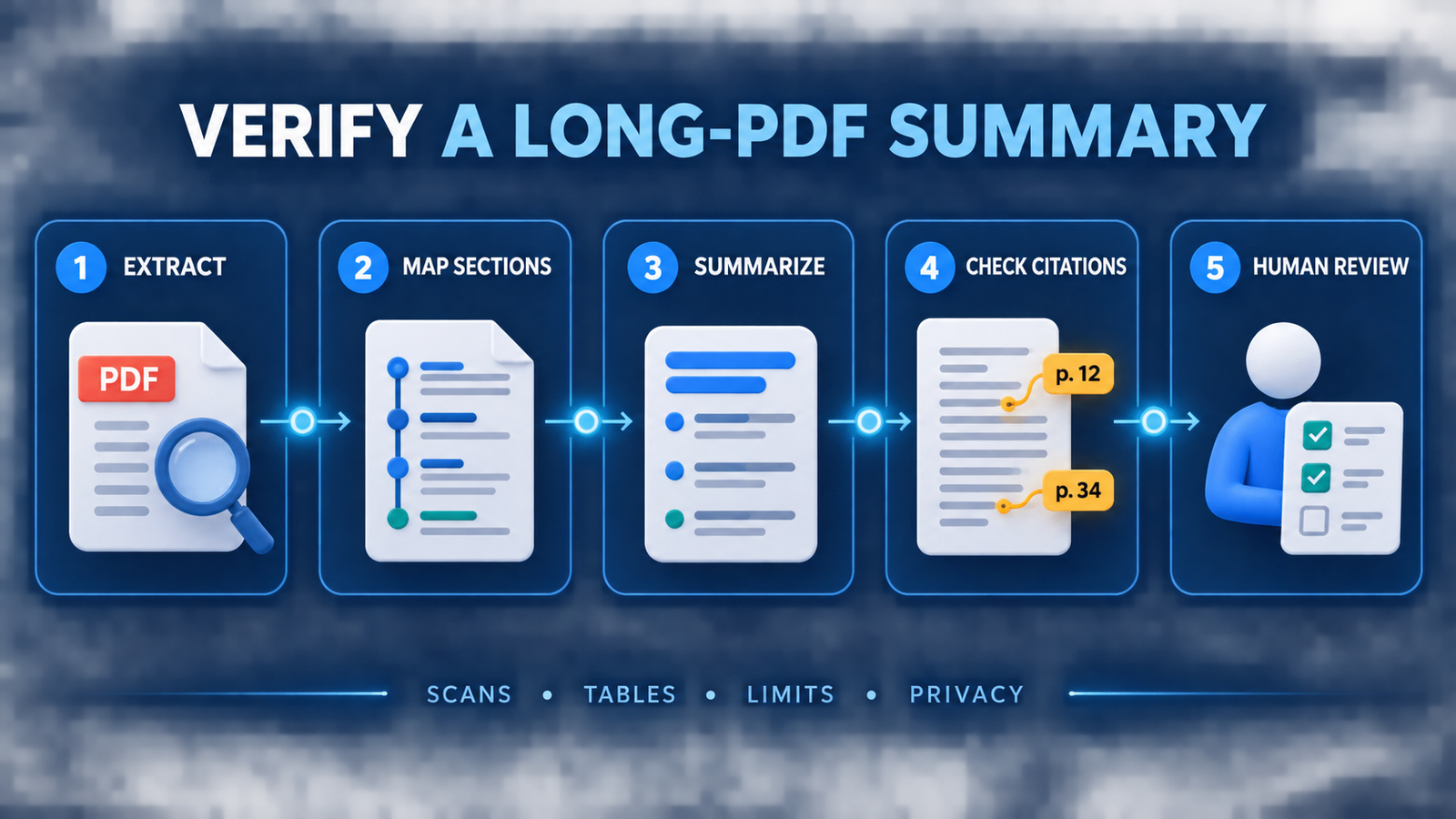
- Check the file first. Confirm that text can be selected. Run OCR locally or with an approved tool if the PDF is scanned.
- Map the structure. Ask for the table of contents, section list and page ranges before asking for conclusions.
- Summarize section by section. Request key claims, evidence, assumptions and limitations for each chapter.
- Create a synthesis last. Build the executive summary from the verified section notes, not directly from one broad prompt.
- Demand traceability. Ask for page numbers or citations and open the source for every consequential statement.
- Test omission. Choose several facts from the beginning, middle and end, then check whether the tool can locate and explain them.
- Keep a human reviewer. Legal, medical, financial, employment and compliance documents require qualified review.
This workflow is a practical form of retrieval-augmented generation: the system answers from supplied material, but retrieval can still omit relevant passages. Better prompt design helps specify sections, evidence and output structure. Production teams should also apply LLMOps controls for evaluation, access and change monitoring. If the source is a Word file rather than a PDF, see our dedicated comparison of AI tools for summarizing Word documents.
Privacy and copyright checklist
Do not upload a confidential contract, patient record, unpublished manuscript or customer file merely because a tool has a free button. Check whether consumer content can improve models, how long files remain stored, who can access shared links and whether a work account provides stronger terms. Remove personal data when possible and use an approved enterprise service for regulated information.
A summary also does not replace permission to upload or redistribute a document. Use material you own, are authorized to process or may lawfully analyze. Keep quotations short, preserve attribution and review licenses before sharing generated notes or derivative work.
Frequently asked questions
Can AI summarize a 500-page PDF for free?
Sometimes, but page count alone is misleading. Gemini Notebook accepts up to 500,000 words or 200 MB per source, while Claude and ChatGPT use file, token and usage limits. Scans, complex tables and dense formatting reduce reliability. Split the PDF by logical section and verify citations instead of trusting one whole-document summary.
Which free PDF summarizer works without signing up?
ChatPDF and Smallpdf both advertise a no-sign-up starting path. Anonymous access is still limited, and saved history or repeated use may require an account. Do not assume “no sign-up” means no logging, no retention or safe handling of confidential material.
Do AI PDF summarizers read charts and scanned pages?
Not consistently. Claude analyzes visual elements only for supported PDFs under 100 pages, and ChatGPT’s full visual PDF retrieval is documented for Enterprise. OCR quality, layout and image resolution matter. For charts, scans and tables, compare the answer with the actual page.
Bottom line
Gemini Notebook is the best free AI PDF summarizer for most long-document work because its published limits are generous and its citations make verification practical. Claude is better for nuanced analysis within its file and usage boundaries, while ChatGPT excels at custom outputs after the source has been checked. Use Smallpdf, Adobe or ChatPDF when a focused PDF interface matters more than maximum capacity—and never treat an AI summary as a substitute for reading the pages that drive a decision.

