


NEW DELHI, August 27, 2026, 5:02 p.m. IST — Anthropic has made Claude in Chrome generally available across its paid plans and introduced a separate built-in browser for Claude Cowork, moving autonomous web actions from a limited pilot toward routine workplace use.
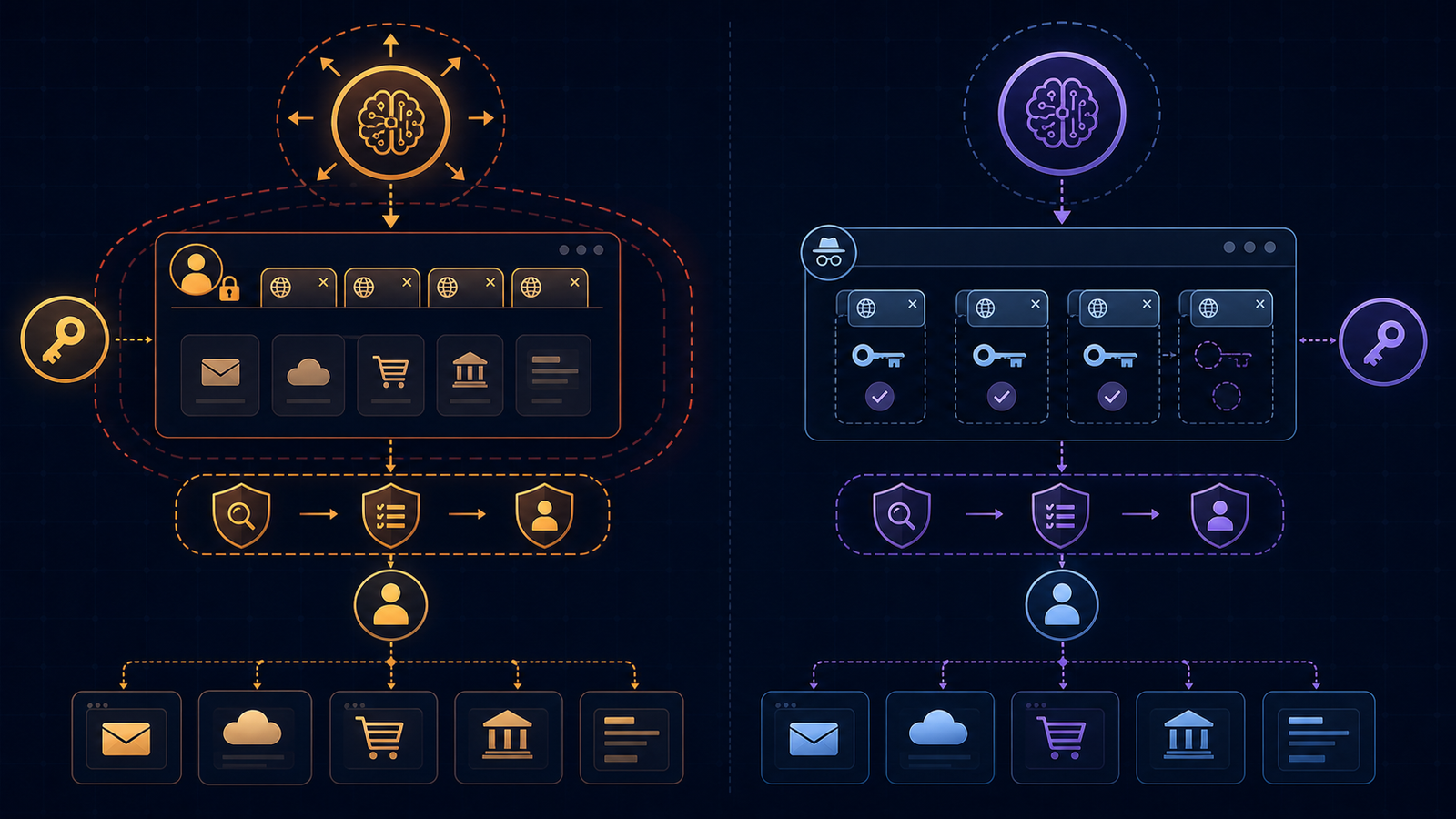
The two releases let Claude navigate pages, click links, enter text and complete forms. But they expose different security boundaries: the Chrome extension works inside a user’s existing browser and signed-in sessions, while Cowork’s built-in browser is separated from personal tabs, bookmarks and passwords unless a user deliberately imports selected logins.
That distinction matters for developers, DevOps engineers and platform teams because browser agents can operate internal dashboards, cloud consoles and vendor portals that lack APIs or formal connectors. They can also encounter untrusted content while holding the same session authority as the user. The operational question is therefore not simply whether an agent can automate a browser task, but which identity, sites and write permissions it should receive.
What Anthropic confirmed
In its general-availability announcement, Anthropic said Claude in Chrome is now offered on Pro, Max, Team and Enterprise plans. The extension can use existing logins and work across tabs. It also introduces automatic approval for actions that an internal classifier considers safe and consistent with the user’s original request. Users can return to manual approval in settings.
Anthropic separately announced that Cowork now has its own browser in the desktop app. The built-in browser is rolling out during the week to Pro, Max and Team customers on macOS, Windows and Linux, with the Linux version described as beta. Enterprise administrators can enable it now.
The built-in browser does not see a user’s normal tabs, bookmarks or passwords by default. Logins can be imported site by site. Anthropic says banking, email and single sign-on sites are excluded from import unless the user explicitly includes them. By comparison, the Chrome extension is intended for work on pages already open in a user’s authenticated browser, such as updating a CRM record or editing a document.
Prompt injection remains the central risk
Anthropic says it scans incoming web content with probes and checks proposed actions against the user’s request before execution. In a vendor-run evaluation using stronger attacks from professional red-teamers, the company reported that no attacks succeeded against Sonnet 5, Opus 5 or Mythos 5 when probes and the action classifier were enabled. It reported a 0.3% success rate against Fable 5.
Those results should not be read as proof that browser-agent risk has been eliminated. Anthropic’s own safety guidance says novel attacks may fall outside its evaluations and could lead to data exfiltration. The extension captures screenshots of tabs it is using, so information visible on those pages becomes part of the conversation. Anthropic advises against using it on sensitive or regulated pages and says the product is unavailable to organizations covered by HIPAA.
The reported attack rates are internal product measurements, not an independent security certification. Anthropic also changed its attack set and grading pipeline as older evaluations became saturated, which makes direct historical comparisons difficult. Independent coverage by GIGAZINE confirmed the wider release and the extension’s autonomous-action model, but did not independently reproduce the security testing.
What platform teams should do now
Enterprise administrators can separately enable the Chrome extension and Cowork’s built-in browser. Anthropic’s admin documentation says the Chrome extension is disabled by default for Enterprise organizations but enabled by default for Team plans. Administrators can deploy it through existing Chrome management tools, grant access by role and apply domain allowlists and blocklists.
A prudent rollout starts with a small user group, manual approval and a restrictive allowlist containing low-impact internal systems. Teams should test prompt injection, cross-tab data exposure, unintended writes, file downloads and recovery from partial form submissions. Any page that can change infrastructure, secrets, billing, identity or production data should keep its own least-privilege controls and human approval gates rather than treating the browser agent’s classifier as the authorization layer.
Operational telemetry also needs to distinguish proposed actions, blocked actions and successful writes. Existing browser, identity-provider and application audit logs remain important because the model’s conversation history alone may not be sufficient for incident reconstruction. Teams building similar systems can use GravityDevOps’ guides to LLMOps and prompt engineering for developers for broader deployment and testing context.
The larger shift
Browser automation gives AI agents a compatibility layer for software that was never designed for agents. Anthropic’s release makes that layer easier to deploy, but it also turns browser profiles, stored sessions and site permissions into production control surfaces.
For DevOps and security teams, the near-term value is likely to come from bounded, reversible workflows such as collecting status data or preparing drafts. High-impact changes should remain behind application-native permissions, explicit confirmation and auditable promotion steps. Anthropic has confirmed broader availability and new safeguards; it has not established that autonomous browser actions are risk-free or appropriate for every authenticated workflow.


