
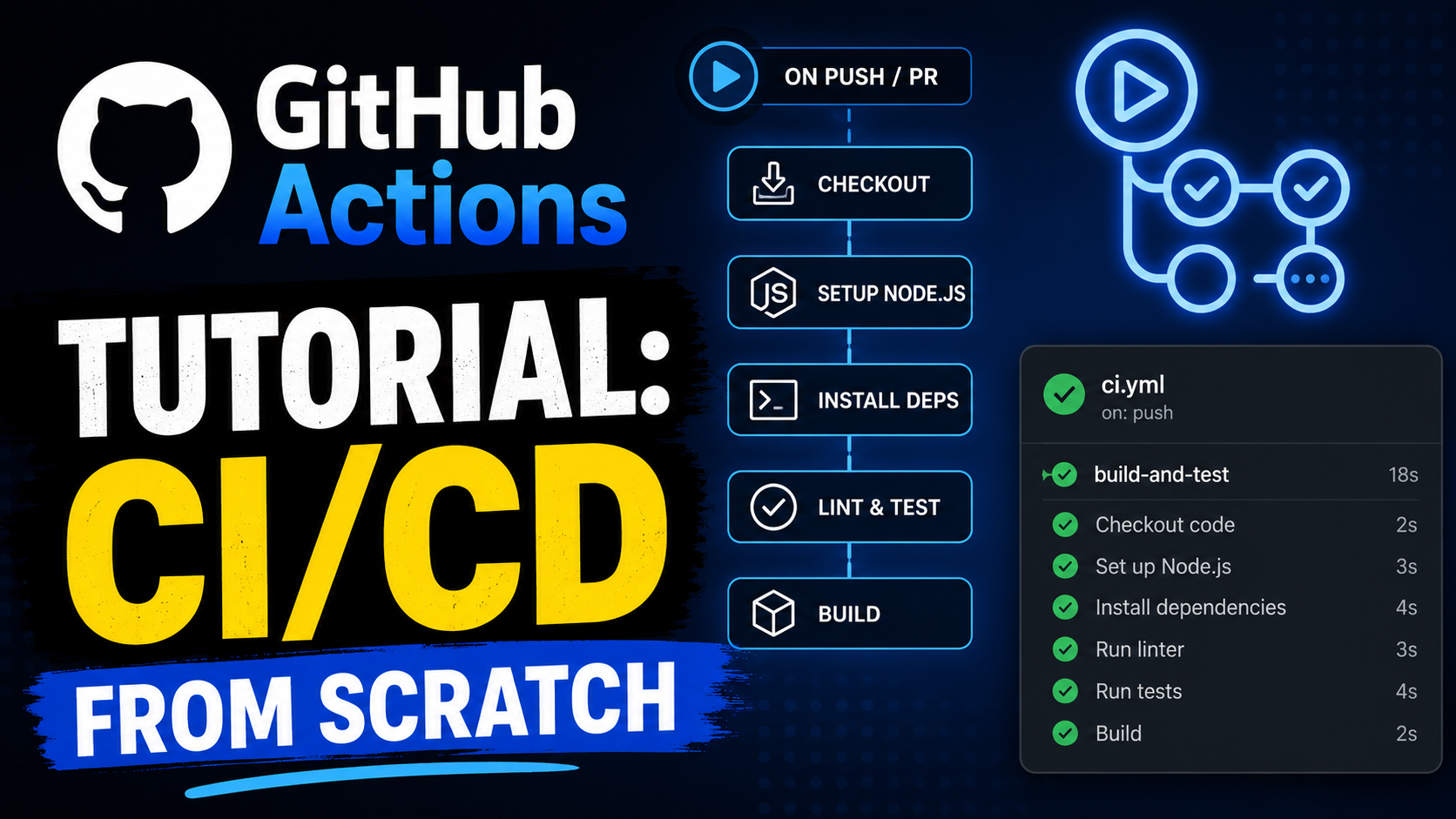

A complete, hands-on guide to building Continuous Integration and Continuous Deployment pipelines with GitHub Actions — from your first workflow file to production-grade deployments.
If you are still choosing a pipeline platform, compare GitHub Actions with Jenkins, GitLab CI/CD, Harness, and other options in our best CI/CD tools comparison.
1. What is CI/CD and Why It Matters
Continuous Integration (CI)
Continuous Integration is the practice of automatically building and testing your code every time a developer pushes a change. The goal is to catch bugs early — before they reach production — by running your test suite, linters, and other quality checks on every commit.
Without CI, teams often fall into “integration hell”: developers work in isolation for days or weeks, then spend even longer merging their changes together. CI eliminates this by keeping the codebase always in a working, tested state.
Continuous Deployment (CD)
Continuous Deployment takes CI one step further. Once code passes all automated tests, it is automatically deployed to production without human intervention. Continuous Delivery is a slightly softer variant: code is always ready to deploy, but a human presses the button.
A mature CI/CD pipeline can take code from a developer’s laptop to production in minutes, with high confidence that nothing is broken.
Why GitHub Actions?
GitHub Actions launched in 2019 and quickly became one of the most popular CI/CD platforms because:
- It lives inside GitHub, so there’s no separate service to connect or pay for initially
- Workflows are YAML files committed to your repo — versioned alongside your code
- The marketplace has thousands of community-built actions covering virtually every task
- The free tier is generous (2,000 minutes/month for private repos, unlimited for public)
- It natively integrates with GitHub events: pushes, pull requests, issues, releases, and more
2. GitHub Actions Core Concepts
Before writing a single line of YAML, you need to understand the vocabulary.
Workflow
A workflow is an automated process defined in a YAML file inside .github/workflows/. A repo can have many workflows, each triggered independently. Workflows orchestrate one or more jobs.
Events (Triggers)
Events are the things that cause a workflow to run. Examples include push, pull_request, schedule (cron), workflow_dispatch (manual), and dozens more. You specify which events start your workflow in the on: block.
Jobs
A workflow contains one or more jobs. Jobs run in parallel by default, though you can define dependencies between them. Each job runs on its own fresh virtual machine (runner).
Steps
A job is made up of steps that execute sequentially on the same runner. Steps can run shell commands (run:) or invoke an action (uses:).
Actions
Actions are reusable units of work. They can be pre-built (from the GitHub Marketplace or another repo) or custom scripts. An action accepts inputs, performs a task, and can set outputs that later steps read.
Runners
A runner is the virtual machine that executes your job. GitHub provides hosted runners running Ubuntu, Windows, and macOS. You can also host your own runners for custom hardware or software requirements.
Artifacts and Caches
Artifacts are files produced by a workflow (build outputs, test reports) that you want to keep after the run. Caches store dependencies (node_modules, pip packages) between runs to speed things up.
Secrets and Variables
Secrets are encrypted values (API keys, passwords) stored in GitHub and injected into workflows at runtime. Variables are plain-text values for non-sensitive configuration.
3. Your First Workflow
Let’s build a minimal workflow step by step.
Setting Up the File
Every workflow file lives in .github/workflows/ and has a .yml extension. Create the directory from your repo root:
Want a reviewed starting point before adapting the examples below? The open-source GravityDevOps CI/CD starter pipelines repository includes copy-ready Node.js, Python, Docker, Kubernetes, and secure pull-request workflows with least-privilege permissions and validation examples.
mkdir -p .github/workflowsA “Hello World” Workflow
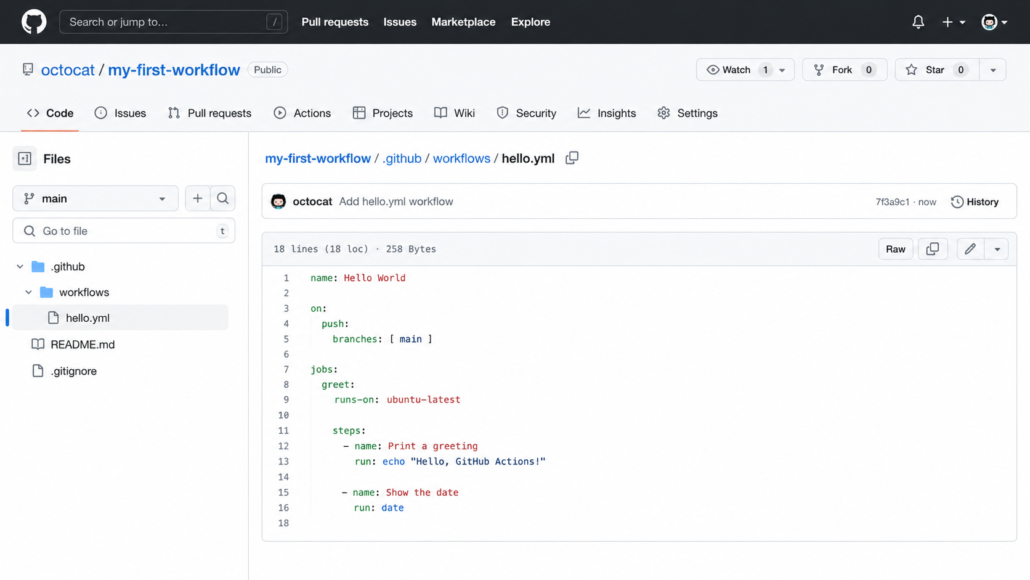
Create .github/workflows/hello.yml:
name: Hello World
on:
  push:
    branches: [ main ]
jobs:
  greet:
    runs-on: ubuntu-latest
    steps:
      - name: Print a greeting
        run: echo "Hello, GitHub Actions!"
      - name: Show the date
        run: date
What this does:
name:— display name shown in the GitHub UIon: push: branches: [main]— fires whenever someone pushes tomainjobs: greet:— defines a job namedgreetruns-on: ubuntu-latest— uses a GitHub-hosted Ubuntu runnersteps:— two sequential shell commands
Commit and push this file. Go to your repo → Actions tab and you’ll see the workflow run.
A Practical CI Workflow for a Node.js Project
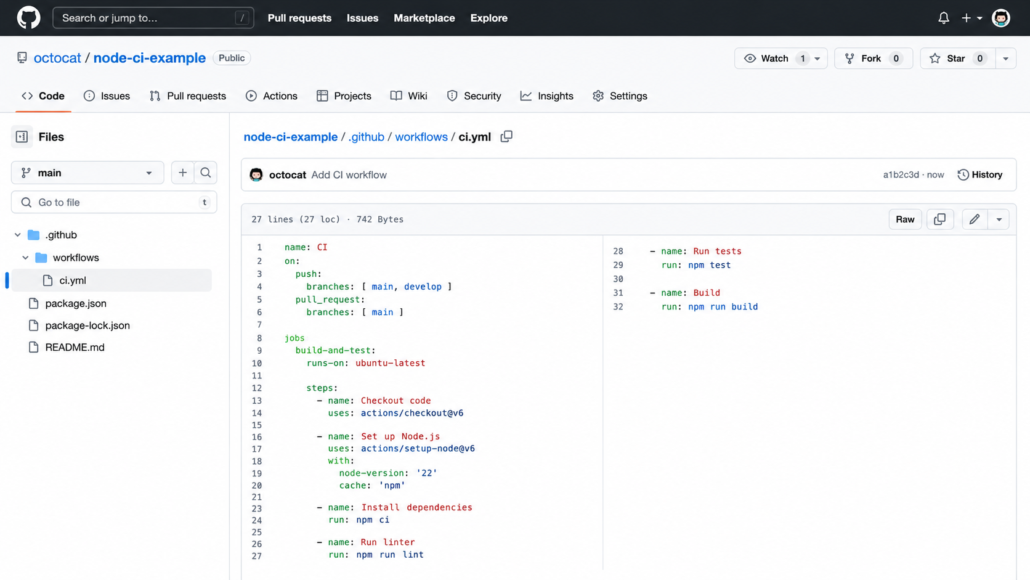
name: CI
on:
  push:
    branches: [ main, develop ]
  pull_request:
    branches: [ main ]

jobs:
  build-and-test:
    runs-on: ubuntu-latest

    steps:
      - name: Checkout code
        uses: actions/checkout@v6

      - name: Set up Node.js
        uses: actions/setup-node@v6
        with:
          node-version: '22'
          cache: 'npm'

      - name: Install dependencies
        run: npm ci

      - name: Run linter
        run: npm run lint

      - name: Run tests
        run: npm test

      - name: Build
        run: npm run build
This is a complete, working CI pipeline. It checks out your code, installs Node.js 20, installs dependencies (using npm ci for reproducible installs), lints, tests, and builds.
4. Triggers: Controlling When Workflows Run
The on: block is one of the most powerful parts of GitHub Actions. Here’s a deep dive.
Push and Pull Request
on:
  push:
    branches:
      - main
      - 'release/**'   # matches release/1.0, release/2.0, etc.
    tags:
      - 'v*'           # matches v1.0, v2.3.1, etc.
    paths:
      - 'src/**'       # only when files under src/ change
      - '!src/**/*.md' # but ignore markdown files

  pull_request:
    branches: [ main ]
    types: [ opened, synchronize, reopened ]
The paths filter is invaluable for monorepos — you can ensure the frontend CI only runs when frontend files change.
Schedule (Cron)
on:
  schedule:
    # Runs at 8:00 AM UTC every weekday
    - cron: '0 8 * * 1-5'
    # Runs at midnight every Sunday
    - cron: '0 0 * * 0'
Scheduled workflows are useful for nightly builds, dependency audits, and data sync jobs. Note that GitHub may delay scheduled workflows during periods of high load.
Manual Trigger (workflow_dispatch)
on:
  workflow_dispatch:
    inputs:
      environment:
        description: 'Environment to deploy to'
        required: true
        type: choice
        options: [ staging, production ]
      dry_run:
        description: 'Run without making changes'
        required: false
        type: boolean
        default: false
This adds a “Run workflow” button in the Actions tab. You can define typed inputs (string, boolean, choice, environment) that the user fills in before triggering. As of December 2025, workflow_dispatch supports up to 25 inputs (previously limited to 10).
Repository Dispatch (API Trigger)
on:
  repository_dispatch:
    types: [ deploy-triggered ]
This lets external systems trigger your workflow via the GitHub API:
curl -X POST \
  -H "Authorization: token $GITHUB_TOKEN" \
  -H "Accept: application/vnd.github.v3+json" \
  https://api.github.com/repos/OWNER/REPO/dispatches \
  -d '{"event_type":"deploy-triggered","client_payload":{"version":"1.2.3"}}'
Other Useful Triggers
on:
  release:
    types: [ published ]    # when a GitHub Release is published

  issues:
    types: [ opened ]       # when an issue is created

  issue_comment:
    types: [ created ]      # when someone comments on an issue

  workflow_run:
    workflows: [ "CI" ]
    types: [ completed ]    # after another workflow finishes
5. Jobs and Steps in Depth
Job Dependencies (needs)
By default, jobs run in parallel. Use needs to create a sequential pipeline:
jobs:
  test:
    runs-on: ubuntu-latest
    steps:
      - uses: actions/checkout@v6
      - run: npm test

  build:
    runs-on: ubuntu-latest
    needs: test         # only runs if test succeeds
    steps:
      - uses: actions/checkout@v6
      - run: npm run build

  deploy:
    runs-on: ubuntu-latest
    needs: [ test, build ]  # waits for both
    steps:
      - run: echo "Deploying..."
Conditional Job Execution
jobs:
  deploy:
    runs-on: ubuntu-latest
    # Only deploy on pushes to main, not on PRs
    if: github.ref == 'refs/heads/main' && github.event_name == 'push'
    steps:
      - run: echo "Deploying to production"
Job Outputs
Jobs can pass data to downstream jobs:
jobs:
  set-version:
    runs-on: ubuntu-latest
    outputs:
      version: ${{ steps.get-version.outputs.version }}
    steps:
      - id: get-version
        run: echo "version=$(node -p "require('./package.json').version")" >> $GITHUB_OUTPUT

  deploy:
    runs-on: ubuntu-latest
    needs: set-version
    steps:
      - run: echo "Deploying version ${{ needs.set-version.outputs.version }}"
Step Options
steps:
  - name: Install dependencies
    run: npm ci
    working-directory: ./frontend   # run in a subdirectory
    env:
      NODE_ENV: test                # step-level environment variable
    timeout-minutes: 10             # fail if this takes longer than 10 minutes
    continue-on-error: true         # don't fail the job if this step fails
    id: install                     # give this step an ID to reference later
Multi-line Run Commands
steps:
  - name: Setup database
    run: |
      psql -c "CREATE DATABASE test_db;"
      psql -c "CREATE USER test_user WITH PASSWORD 'password';"
      psql -c "GRANT ALL PRIVILEGES ON DATABASE test_db TO test_user;"
    env:
      PGHOST: localhost
      PGUSER: postgres
Using Shell Options
steps:
  - name: Run script
    shell: bash
    run: |
      set -euo pipefail   # fail on errors, unset vars, pipe failures
      ./deploy.sh
6. Runners: GitHub-Hosted vs Self-Hosted
GitHub-Hosted Runners
GitHub provides three operating systems, each with a specific software package pre-installed:
| Label | OS | Notes |
|---|---|---|
ubuntu-latest | Ubuntu 24.04 | Most common, fastest to start |
ubuntu-24.04 | Ubuntu 24.04 | Pinned to 24.04 |
ubuntu-22.04 | Ubuntu 22.04 | For older toolchain requirements |
ubuntu-24.04-arm | Ubuntu 24.04 (ARM64) | Free for public repos — GA since Aug 2025 |
ubuntu-22.04-arm | Ubuntu 22.04 (ARM64) | ARM64, free for public repos |
windows-latest | Windows Server 2025 + VS 2026 | Migration to VS 2026 completed June 15, 2026 |
windows-2025 | Windows Server 2025 + VS 2026 | Same as windows-latest now |
windows-2022 | Windows Server 2022 + VS 2022 | Pin here to stay on VS 2022 |
macos-latest | macOS 15 → macOS 26 | Migration to macOS 26 image begins June 15, 2026 (30-day rollout) |
macos-15 | macOS 15 (Sequoia) | Stable, pinned |
macos-14 | macOS 14 (Sonoma) | For Xcode 15 compatibility |
⚠️ Deprecations as of June 2026:
ubuntu-20.04is removed.macos-13runner image is closing down — migrate tomacos-14or later. Node.js 20 reached end-of-life in April 2026; update your matrix to use Node 22 or 24.
Each runner comes with common tools pre-installed: Git, Docker, Node.js, Python, Java, .NET, Go, and more. You can check the full software inventory in GitHub’s virtual-environments repo.
Larger Runners
For compute-intensive builds, GitHub offers larger runners (2-64 cores, 8-256 GB RAM) at additional cost. These are configured in your organization settings.
jobs:
  large-build:
    runs-on: ubuntu-latest-8-cores
    steps:
      - run: make -j8   # take advantage of 8 cores
Self-Hosted Runners
Self-hosted runners run on your own infrastructure. Use them when you need:
- Custom hardware (GPU, specialized CPU)
- Access to internal network resources
- Specific operating systems or software
- Lower costs at high volume
- Faster execution (especially for macOS builds)
Setting up a self-hosted runner:
- Go to your repo → Settings → Actions → Runners → New self-hosted runner
- Follow the platform-specific instructions (they provide a script)
- The runner registers itself with GitHub
jobs:
  build-on-prem:
    runs-on: self-hosted     # uses any self-hosted runner
    # Or target specific runners by labels:
    # runs-on: [ self-hosted, linux, gpu ]
    steps:
      - run: nvidia-smi   # GPU is available
Running the agent as a service (Linux):
sudo ./svc.sh install
sudo ./svc.sh start
Running the agent as a service (Linux):
sudo ./svc.sh install
sudo ./svc.sh start
ARM64 hosted runners (free for public repos):
As of August 2025, Linux ARM64 runners are generally available at no cost for public repositories, and available in private repos since January 2026:
jobs:
  build-arm:
    runs-on: ubuntu-24.04-arm   # free 4-vCPU ARM64 runner
    steps:
      - uses: actions/checkout@v6
      - run: uname -m   # prints aarch64
This makes native multi-architecture builds trivial — no QEMU emulation needed for ARM64.
Security note: Never use self-hosted runners on public repos unless you fully understand the risk — anyone who can open a pull request could run arbitrary code on your runner.
7. The Actions Marketplace
The GitHub Marketplace has thousands of pre-built actions. Instead of writing scripts from scratch, you can compose powerful pipelines from community building blocks.
How to Use an Action
steps:
  - uses: actions/checkout@v6         # official GitHub action, pinned to v6
  - uses: actions/setup-node@v6       # set up a specific Node.js version
  - uses: JamesIves/github-pages-deploy-action@v4  # community action
Always pin actions to a specific version tag (or better, a full commit SHA) to avoid supply-chain attacks from authors overwriting tags.
Most Commonly Used Official Actions
actions/checkout — checks out your repository (v6 stores credentials under $RUNNER_TEMP instead of the local git config)
- uses: actions/checkout@v6
  with:
    fetch-depth: 0        # fetch full history (default is 1)
    token: ${{ secrets.GITHUB_TOKEN }}
    submodules: recursive
actions/setup-node — now at v6 (Node.js 24 runtime)
- uses: actions/setup-node@v6
  with:
    node-version: '22'
    node-version-file: '.nvmrc'  # read version from .nvmrc
    cache: 'npm'                  # or 'yarn' or 'pnpm'
Node.js version guidance (June 2026): Node 18 reached EOL in April 2024; Node 20 reached EOL in April 2026. Use Node 22 (LTS) or Node 24 (current) in new workflows. The actions themselves now run on Node.js 24 internally.
actions/setup-python — now at v6 (Node.js 24 runtime)
- uses: actions/setup-python@v6
  with:
    python-version: '3.13'
    cache: 'pip'
actions/setup-java
- uses: actions/setup-java@v4
  with:
    java-version: '21'
    distribution: 'temurin'  # Eclipse Temurin (formerly AdoptOpenJDK)
    cache: maven
actions/upload-artifact / download-artifact — v7 / v8 (both on Node.js 24)
- uses: actions/upload-artifact@v7
  with:
    name: build-output
    path: dist/
    # New in v7: upload a single file unzipped
    # archive: false

- uses: actions/download-artifact@v8
  with:
    name: build-output
    path: dist/
actions/cache — v5 uses the rewritten cache service v2 for improved performance
- uses: actions/cache@v5
  with:
    path: ~/.npm
    key: ${{ runner.os }}-node-${{ hashFiles('**/package-lock.json') }}
    restore-keys: |
      ${{ runner.os }}-node-
Popular Community Actions
# Send Slack notifications
- uses: slackapi/slack-github-action@v1.27.0
  with:
    payload: '{"text":"Build succeeded!"}'
  env:
    SLACK_WEBHOOK_URL: ${{ secrets.SLACK_WEBHOOK_URL }}

# Create GitHub Releases
- uses: softprops/action-gh-release@v2
  with:
    files: dist/*.tar.gz
    body_path: CHANGELOG.md

# Comment on PRs
- uses: actions/github-script@v7
  with:
    script: |
      github.rest.issues.createComment({
        issue_number: context.issue.number,
        owner: context.repo.owner,
        repo: context.repo.repo,
        body: 'Tests passed! ✅'
      })

# Semantic versioning
- uses: cycjimmy/semantic-release-action@v4
  env:
    GITHUB_TOKEN: ${{ secrets.GITHUB_TOKEN }}
    NPM_TOKEN: ${{ secrets.NPM_TOKEN }}
8. Environment Variables and Secrets
Built-in Environment Variables
GitHub Actions provides many context variables automatically:
steps:
  - run: |
      echo "Repo: $GITHUB_REPOSITORY"        # owner/repo-name
      echo "Branch: $GITHUB_REF_NAME"        # main, feature/foo, etc.
      echo "SHA: $GITHUB_SHA"                # full commit hash
      echo "Actor: $GITHUB_ACTOR"            # the user who triggered the run
      echo "Run ID: $GITHUB_RUN_ID"
      echo "Workspace: $GITHUB_WORKSPACE"    # where your code is checked out
      echo "Event: $GITHUB_EVENT_NAME"       # push, pull_request, etc.
Defining Variables
Workflow-level (all jobs see it):
env:
  NODE_ENV: production
  APP_PORT: 3000

jobs:
  build:
    runs-on: ubuntu-latest
    steps:
      - run: echo "PORT=$APP_PORT"
Job-level:
jobs:
  test:
    runs-on: ubuntu-latest
    env:
      DATABASE_URL: postgresql://localhost/test
    steps:
      - run: npm test
Step-level:
steps:
  - name: Build Docker image
    run: docker build -t myapp .
    env:
      DOCKER_BUILDKIT: 1
Setting variables dynamically during a run:
steps:
  - name: Set version
    run: echo "VERSION=1.2.3" >> $GITHUB_ENV

  - name: Use version
    run: echo "Building version $VERSION"
Secrets
Secrets are encrypted, never printed in logs, and redacted if accidentally echoed.
Adding secrets: Go to repo → Settings → Secrets and variables → Actions → New repository secret.
Using secrets in workflows:
steps:
  - name: Deploy
    run: ./deploy.sh
    env:
      AWS_ACCESS_KEY_ID: ${{ secrets.AWS_ACCESS_KEY_ID }}
      AWS_SECRET_ACCESS_KEY: ${{ secrets.AWS_SECRET_ACCESS_KEY }}
      DATABASE_PASSWORD: ${{ secrets.DATABASE_PASSWORD }}
The special GITHUB_TOKEN:
GitHub automatically creates a GITHUB_TOKEN secret for every workflow run. It has permissions to interact with the current repo (create releases, comment on PRs, push packages, etc.). You never need to create this one manually:
- name: Create Release
  uses: softprops/action-gh-release@v2
  env:
    GITHUB_TOKEN: ${{ secrets.GITHUB_TOKEN }}
Controlling token permissions (principle of least privilege):
permissions:
  contents: write       # for creating releases
  pull-requests: write  # for commenting on PRs
  packages: write       # for pushing to GHCR

jobs:
  release:
    permissions:
      contents: write   # job-level override
Organization and Environment Secrets
Organization secrets are shared across multiple repos. Environment secrets are scoped to a specific deployment environment (staging, production) and can require approval before use:
jobs:
  deploy-prod:
    runs-on: ubuntu-latest
    environment: production   # triggers environment protection rules
    steps:
      - run: ./deploy.sh
        env:
          API_KEY: ${{ secrets.PROD_API_KEY }}  # from the 'production' environment
9. Matrix Builds: Test Across Multiple Environments
Matrix builds let you run the same job with different parameter combinations — essential for testing against multiple Node.js versions, operating systems, or database backends.
Basic Matrix
jobs:
  test:
    runs-on: ubuntu-latest
    strategy:
      matrix:
        node-version: [ 20, 22, 24 ]  # Node 18 EOL Apr 2024, Node 20 EOL Apr 2026

    steps:
      - uses: actions/checkout@v6
      - uses: actions/setup-node@v6
        with:
          node-version: ${{ matrix.node-version }}
      - run: npm ci
      - run: npm test
This creates three parallel jobs: one for Node 20, one for Node 22 (LTS), one for Node 24 (current).
Multi-Dimensional Matrix
jobs:
  test:
    strategy:
      matrix:
        os: [ ubuntu-latest, windows-latest, macos-latest ]
        python-version: [ '3.12', '3.13' ]
        # Creates 3 × 2 = 6 jobs
    runs-on: ${{ matrix.os }}
    steps:
      - uses: actions/checkout@v6
      - uses: actions/setup-python@v6
        with:
          python-version: ${{ matrix.python-version }}
      - run: pip install -r requirements.txt
      - run: pytest
Including and Excluding Combinations
strategy:
  matrix:
    os: [ ubuntu-latest, windows-latest, macos-latest ]
    node: [ 20, 22 ]
    include:
      # Add an extra job: Node 24 on Ubuntu only
      - os: ubuntu-latest
        node: 24
    exclude:
      # Skip Node 20 on Windows (EOL, minimal benefit)
      - os: windows-latest
        node: 20
Fail Fast and Max Parallel
strategy:
  fail-fast: false    # don't cancel other matrix jobs if one fails
  max-parallel: 4     # run at most 4 jobs at a time
  matrix:
    version: [ 1, 2, 3, 4, 5, 6, 7, 8 ]
Dynamic Matrix from a Script
jobs:
  setup-matrix:
    runs-on: ubuntu-latest
    outputs:
      matrix: ${{ steps.set-matrix.outputs.matrix }}
    steps:
      - id: set-matrix
        run: |
          MATRIX=$(node -e "
            const versions = ['20', '22', '24'];
            console.log(JSON.stringify({version: versions}));
          ")
          echo "matrix=$MATRIX" >> $GITHUB_OUTPUT

  test:
    needs: setup-matrix
    strategy:
      matrix: ${{ fromJson(needs.setup-matrix.outputs.matrix) }}
    runs-on: ubuntu-latest
    steps:
      - run: echo "Testing on Node ${{ matrix.version }}"
10. Caching Dependencies
Without caching, every workflow run downloads all dependencies from scratch. For large projects, this can add minutes. Caching stores the dependency directory and reuses it on subsequent runs.
How Caching Works
The cache key determines whether a cache hit or miss occurs. On a hit, the cached directory is restored. On a miss, the job runs normally, then saves the directory as a new cache entry at the end.
Node.js (npm)
- name: Cache node modules
  uses: actions/cache@v5
  id: cache-npm
  with:
    path: ~/.npm
    key: ${{ runner.os }}-npm-${{ hashFiles('**/package-lock.json') }}
    restore-keys: |
      ${{ runner.os }}-npm-

- name: Install dependencies
  if: steps.cache-npm.outputs.cache-hit != 'true'
  run: npm ci
The hashFiles function generates a hash of package-lock.json. If the lockfile changes, the hash changes, the key misses, and fresh packages are downloaded.
Many setup-* actions have built-in caching:
- uses: actions/setup-node@v6
  with:
    node-version: '22'
    cache: 'npm'        # handles caching automatically
Python (pip)
- uses: actions/setup-python@v6
  with:
    python-version: '3.13'
    cache: 'pip'

# Or manually:
- uses: actions/cache@v5
  with:
    path: ~/.cache/pip
    key: ${{ runner.os }}-pip-${{ hashFiles('requirements*.txt') }}
    restore-keys: |
      ${{ runner.os }}-pip-
Rust (Cargo)
- uses: actions/cache@v5
  with:
    path: |
      ~/.cargo/registry
      ~/.cargo/git
      target
    key: ${{ runner.os }}-cargo-${{ hashFiles('**/Cargo.lock') }}
Go (modules)
- uses: actions/cache@v5
  with:
    path: ~/go/pkg/mod
    key: ${{ runner.os }}-go-${{ hashFiles('**/go.sum') }}
    restore-keys: |
      ${{ runner.os }}-go-
Docker Layer Caching
- name: Set up Docker Buildx
  uses: docker/setup-buildx-action@v3

- name: Build and push
  uses: docker/build-push-action@v7
  with:
    cache-from: type=gha
    cache-to: type=gha,mode=max
11. Artifacts: Sharing Data Between Jobs
Artifacts are files produced during a workflow run that you want to persist. Common uses: build outputs, test reports, coverage reports, compiled binaries.
Uploading Artifacts
jobs:
  build:
    runs-on: ubuntu-latest
    steps:
      - uses: actions/checkout@v6
      - run: npm run build

      - name: Upload build artifacts
        uses: actions/upload-artifact@v7
        with:
          name: dist-files
          path: dist/
          retention-days: 7      # keep for 7 days (default: 90)
          if-no-files-found: error  # fail if nothing to upload
Downloading Artifacts in Another Job
jobs:
  deploy:
    runs-on: ubuntu-latest
    needs: build
    steps:
      - name: Download build artifacts
        uses: actions/download-artifact@v8
        with:
          name: dist-files
          path: dist/

      - name: Deploy
        run: aws s3 sync dist/ s3://my-bucket/
Uploading Test Results
- name: Run tests
  run: pytest --junitxml=test-results.xml

- name: Upload test results
  uses: actions/upload-artifact@v7
  if: always()    # upload even if tests failed
  with:
    name: test-results
    path: test-results.xml
Multiple Artifact Paths
- uses: actions/upload-artifact@v7
  with:
    name: reports
    path: |
      coverage/
      test-results.xml
      build.log
12. Building and Pushing Docker Images
Docker is central to most modern CI/CD pipelines. GitHub Actions has excellent Docker support.
Simple Docker Build
jobs:
  docker:
    runs-on: ubuntu-latest
    steps:
      - uses: actions/checkout@v6

      - name: Build Docker image
        run: |
          docker build -t myapp:${{ github.sha }} .
          docker tag myapp:${{ github.sha }} myapp:latest
Building and Pushing to Docker Hub
jobs:
  docker:
    runs-on: ubuntu-latest
    steps:
      - uses: actions/checkout@v6

      - name: Log in to Docker Hub
        uses: docker/login-action@v4
        with:
          username: ${{ secrets.DOCKERHUB_USERNAME }}
          password: ${{ secrets.DOCKERHUB_TOKEN }}

      - name: Extract metadata (tags, labels)
        id: meta
        uses: docker/metadata-action@v5
        with:
          images: myusername/myapp
          tags: |
            type=ref,event=branch
            type=ref,event=pr
            type=semver,pattern={{version}}
            type=semver,pattern={{major}}.{{minor}}
            type=sha

      - name: Build and push
        uses: docker/build-push-action@v7
        with:
          context: .
          push: true
          tags: ${{ steps.meta.outputs.tags }}
          labels: ${{ steps.meta.outputs.labels }}
          cache-from: type=gha
          cache-to: type=gha,mode=max
Pushing to GitHub Container Registry (GHCR)
jobs:
  docker:
    runs-on: ubuntu-latest
    permissions:
      contents: read
      packages: write

    steps:
      - uses: actions/checkout@v6

      - name: Log in to GHCR
        uses: docker/login-action@v4
        with:
          registry: ghcr.io
          username: ${{ github.actor }}
          password: ${{ secrets.GITHUB_TOKEN }}

      - name: Build and push to GHCR
        uses: docker/build-push-action@v7
        with:
          context: .
          push: true
          tags: ghcr.io/${{ github.repository }}:${{ github.sha }}
Multi-Platform Builds (ARM + AMD64)
steps:
  - uses: actions/checkout@v6

  - name: Set up QEMU (for emulation)
    uses: docker/setup-qemu-action@v3

  - name: Set up Docker Buildx
    uses: docker/setup-buildx-action@v3

  - name: Build multi-platform image
    uses: docker/build-push-action@v7
    with:
      platforms: linux/amd64,linux/arm64
      push: true
      tags: myapp:latest
13. Deploying to Cloud Providers
Deploying to AWS
Deploy to S3 (static site):
jobs:
  deploy:
    runs-on: ubuntu-latest
    environment: production
    steps:
      - uses: actions/checkout@v6

      - name: Configure AWS credentials
        uses: aws-actions/configure-aws-credentials@v4
        with:
          aws-access-key-id: ${{ secrets.AWS_ACCESS_KEY_ID }}
          aws-secret-access-key: ${{ secrets.AWS_SECRET_ACCESS_KEY }}
          aws-region: us-east-1

      - name: Build
        run: npm run build

      - name: Deploy to S3
        run: |
          aws s3 sync dist/ s3://${{ secrets.S3_BUCKET }} \
            --delete \
            --cache-control "max-age=31536000,public"

      - name: Invalidate CloudFront cache
        run: |
          aws cloudfront create-invalidation \
            --distribution-id ${{ secrets.CF_DISTRIBUTION_ID }} \
            --paths "/*"
Deploy to ECS (Fargate):
jobs:
  deploy:
    runs-on: ubuntu-latest
    steps:
      - uses: actions/checkout@v6

      - name: Configure AWS credentials
        uses: aws-actions/configure-aws-credentials@v4
        with:
          role-to-assume: arn:aws:iam::123456789:role/github-actions-role
          aws-region: us-east-1

      - name: Log in to ECR
        id: login-ecr
        uses: aws-actions/amazon-ecr-login@v2

      - name: Build and push to ECR
        uses: docker/build-push-action@v7
        with:
          push: true
          tags: ${{ steps.login-ecr.outputs.registry }}/myapp:${{ github.sha }}

      - name: Update ECS service
        run: |
          aws ecs update-service \
            --cluster my-cluster \
            --service my-service \
            --force-new-deployment
Using OIDC (no long-lived keys):
Instead of storing AWS keys in secrets, use OpenID Connect to let GitHub Actions assume an IAM role directly — much more secure:
permissions:
  id-token: write
  contents: read

steps:
  - name: Configure AWS via OIDC
    uses: aws-actions/configure-aws-credentials@v4
    with:
      role-to-assume: arn:aws:iam::123456789:role/github-actions-role
      aws-region: us-east-1
      # No access key or secret needed!
You set up the trust relationship in AWS IAM once, and GitHub handles the credential exchange automatically.
Deploying to Google Cloud
jobs:
  deploy:
    runs-on: ubuntu-latest
    permissions:
      contents: read
      id-token: write

    steps:
      - uses: actions/checkout@v6

      - name: Authenticate to Google Cloud
        uses: google-github-actions/auth@v2
        with:
          workload_identity_provider: projects/PROJECT_NUM/locations/global/workloadIdentityPools/POOL/providers/PROVIDER
          service_account: github-actions@PROJECT.iam.gserviceaccount.com

      - name: Deploy to Cloud Run
        uses: google-github-actions/deploy-cloudrun@v2
        with:
          service: my-service
          region: us-central1
          image: gcr.io/my-project/myapp:${{ github.sha }}
Deploying to Azure
jobs:
  deploy:
    runs-on: ubuntu-latest
    steps:
      - uses: actions/checkout@v6

      - name: Azure login
        uses: azure/login@v2
        with:
          creds: ${{ secrets.AZURE_CREDENTIALS }}

      - name: Deploy to Azure App Service
        uses: azure/webapps-deploy@v3
        with:
          app-name: my-app
          images: myregistry.azurecr.io/myapp:${{ github.sha }}
Deploying to Kubernetes
jobs:
  deploy:
    runs-on: ubuntu-latest
    steps:
      - uses: actions/checkout@v6

      - name: Set up kubectl
        uses: azure/setup-kubectl@v4

      - name: Configure kubeconfig
        run: |
          echo "${{ secrets.KUBE_CONFIG }}" | base64 -d > $HOME/.kube/config

      - name: Deploy to Kubernetes
        run: |
          kubectl set image deployment/myapp \
            myapp=myregistry/myapp:${{ github.sha }}
          kubectl rollout status deployment/myapp --timeout=5m
Deploying to Vercel
jobs:
  deploy:
    runs-on: ubuntu-latest
    steps:
      - uses: actions/checkout@v6

      - name: Deploy to Vercel
        uses: amondnet/vercel-action@v25
        with:
          vercel-token: ${{ secrets.VERCEL_TOKEN }}
          vercel-org-id: ${{ secrets.VERCEL_ORG_ID }}
          vercel-project-id: ${{ secrets.VERCEL_PROJECT_ID }}
          vercel-args: '--prod'
14. Reusable Workflows
Reusable workflows let you define a workflow once and call it from other workflows — like a function call for CI/CD. This is the right tool when you have the same pipeline logic across many repos.
Defining a Reusable Workflow
Create .github/workflows/deploy-reusable.yml in your repo (or a shared repo):
name: Reusable Deploy Workflow

on:
  workflow_call:
    inputs:
      environment:
        required: true
        type: string
      image-tag:
        required: true
        type: string
    secrets:
      aws-access-key-id:
        required: true
      aws-secret-access-key:
        required: true

jobs:
  deploy:
    runs-on: ubuntu-latest
    environment: ${{ inputs.environment }}
    steps:
      - name: Configure AWS credentials
        uses: aws-actions/configure-aws-credentials@v4
        with:
          aws-access-key-id: ${{ secrets.aws-access-key-id }}
          aws-secret-access-key: ${{ secrets.aws-secret-access-key }}
          aws-region: us-east-1

      - name: Deploy image ${{ inputs.image-tag }} to ${{ inputs.environment }}
        run: |
          aws ecs update-service \
            --cluster ${{ inputs.environment }} \
            --service myapp \
            --force-new-deployment
Calling a Reusable Workflow
name: CI/CD

on:
  push:
    branches: [ main ]

jobs:
  test:
    runs-on: ubuntu-latest
    steps:
      - uses: actions/checkout@v6
      - run: npm test

  deploy-staging:
    needs: test
    uses: myorg/shared-workflows/.github/workflows/deploy-reusable.yml@main
    with:
      environment: staging
      image-tag: ${{ github.sha }}
    secrets:
      aws-access-key-id: ${{ secrets.AWS_ACCESS_KEY_ID }}
      aws-secret-access-key: ${{ secrets.AWS_SECRET_ACCESS_KEY }}

  deploy-production:
    needs: deploy-staging
    uses: myorg/shared-workflows/.github/workflows/deploy-reusable.yml@main
    with:
      environment: production
      image-tag: ${{ github.sha }}
    secrets: inherit   # pass all secrets from the caller
15. Composite Actions: Writing Your Own
When you have a sequence of steps you repeat across multiple workflows, extract them into a composite action. Unlike reusable workflows, composite actions are steps (not full jobs), and they run on the caller’s runner.
Creating a Composite Action
Create a directory (e.g., .github/actions/setup-app/) with an action.yml:
# .github/actions/setup-app/action.yml
name: 'Setup Application'
description: 'Checks out code, sets up Node.js, and installs dependencies'

inputs:
  node-version:
    description: 'Node.js version to use'
    required: false
    default: '22'   # Node 22 LTS
  working-directory:
    description: 'Directory containing package.json'
    required: false
    default: '.'

outputs:
  cache-hit:
    description: 'Whether the npm cache was hit'
    value: ${{ steps.cache.outputs.cache-hit }}

runs:
  using: 'composite'
  steps:
    - name: Checkout
      uses: actions/checkout@v6

    - name: Setup Node.js
      uses: actions/setup-node@v6
      with:
        node-version: ${{ inputs.node-version }}

    - name: Cache dependencies
      id: cache
      uses: actions/cache@v5
      with:
        path: ${{ inputs.working-directory }}/node_modules
        key: ${{ runner.os }}-node-${{ hashFiles(format('{0}/package-lock.json', inputs.working-directory)) }}

    - name: Install dependencies
      if: steps.cache.outputs.cache-hit != 'true'
      shell: bash
      working-directory: ${{ inputs.working-directory }}
      run: npm ci
Using Your Composite Action
jobs:
  test:
    runs-on: ubuntu-latest
    steps:
      - name: Setup app
        uses: ./.github/actions/setup-app
        with:
          node-version: '22'

      - run: npm test
Publishing a Standalone Action
To share an action publicly, it needs its own repo. The repo root contains action.yml and the action code.
For JavaScript actions:
# action.yml
name: 'My Custom Action'
description: 'Does something useful'
inputs:
  api-key:
    description: 'API key'
    required: true
outputs:
  result:
    description: 'The output result'
runs:
  using: 'node24'   # node20 is deprecated as of June 2, 2026
  main: 'dist/index.js'
// index.js
const core = require('@actions/core');
const github = require('@actions/github');

async function run() {
  try {
    const apiKey = core.getInput('api-key');
    // ... do work ...
    core.setOutput('result', 'success');
  } catch (error) {
    core.setFailed(error.message);
  }
}
run();
16. Expressions, Contexts, and Conditionals
Contexts
GitHub Actions provides many context objects you can reference in expressions:
steps:
  - run: |
      echo "Event: ${{ github.event_name }}"
      echo "Ref: ${{ github.ref }}"
      echo "SHA: ${{ github.sha }}"
      echo "Actor: ${{ github.actor }}"
      echo "Repo: ${{ github.repository }}"
      echo "Run number: ${{ github.run_number }}"

      echo "OS: ${{ runner.os }}"
      echo "Arch: ${{ runner.arch }}"

      echo "Job status: ${{ job.status }}"

      echo "My var: ${{ env.MY_VAR }}"
      echo "My secret: ${{ secrets.MY_SECRET }}"  # will be masked
Functions
steps:
  # contains(string, substring)
  - if: contains(github.ref, 'release')
    run: echo "This is a release branch"

  # startsWith and endsWith
  - if: startsWith(github.ref, 'refs/tags/')
    run: echo "This is a tag"

  # fromJson and toJson
  - run: |
      echo '${{ toJson(github.event) }}'

  # hashFiles
  - run: echo "Lockfile hash: ${{ hashFiles('package-lock.json') }}"

  # format
  - run: echo "${{ format('Hello {0}, you are in {1}', github.actor, github.repository) }}"
Conditional Execution
steps:
  # Only on main branch pushes
  - if: github.ref == 'refs/heads/main' && github.event_name == 'push'
    run: ./deploy.sh

  # Skip on draft PRs
  - if: github.event.pull_request.draft == false
    run: ./integration-tests.sh

  # Run only if a previous step failed
  - if: failure()
    run: ./notify-failure.sh

  # Run always, even if earlier steps failed
  - if: always()
    uses: actions/upload-artifact@v7
    with:
      name: test-results
      path: test-results/

  # Run only if a specific step succeeded
  - if: steps.tests.outcome == 'success'
    run: echo "Tests passed"
GITHUB_OUTPUT, GITHUB_ENV, GITHUB_STEP_SUMMARY
steps:
  # Set an output for later steps/jobs
  - id: compute
    run: echo "value=42" >> $GITHUB_OUTPUT

  - run: echo "The value is ${{ steps.compute.outputs.value }}"

  # Set an environment variable for later steps
  - run: echo "MY_VAR=hello" >> $GITHUB_ENV
  - run: echo "$MY_VAR"

  # Write to the job summary (rendered in the Actions UI)
  - run: |
      echo "## Build Results" >> $GITHUB_STEP_SUMMARY
      echo "| Test | Status |" >> $GITHUB_STEP_SUMMARY
      echo "| --- | --- |" >> $GITHUB_STEP_SUMMARY
      echo "| Unit tests | ✅ Passed |" >> $GITHUB_STEP_SUMMARY
      echo "| Integration tests | ✅ Passed |" >> $GITHUB_STEP_SUMMARY
17. Security Best Practices
Security in CI/CD is critical — a compromised pipeline can expose secrets, push malicious code, or deploy backdoors.
Pin Actions to Commit SHAs
Tags can be overwritten. Commit SHAs are immutable:
# Risky — the author can change what v6 points to
- uses: actions/checkout@v6

# Safe — locked to a specific commit SHA (get from the releases page)
- uses: actions/checkout@<full-commit-sha>  # e.g. the SHA for v6.0.0
Use a tool like Dependabot to keep pinned actions updated automatically.
Minimal Permissions
Always declare the minimum permissions your workflow needs:
permissions: read-all   # start with read-only

jobs:
  deploy:
    permissions:
      contents: write   # only this job gets write access
Never Echo Secrets
GitHub masks secrets in logs, but avoid constructing strings that include them:
# Bad — the secret might leak if tool outputs it differently
- run: echo "Connecting to ${{ secrets.DATABASE_URL }}"

# Good — pass as environment variable
- run: ./connect.sh
  env:
    DATABASE_URL: ${{ secrets.DATABASE_URL }}
Validate Pull Requests from Forks
Workflows triggered by PRs from forks have limited access to secrets (by default). For public repos, be especially careful with pull_request_target, which runs in the context of the base branch and has access to secrets:
# Dangerous if you checkout the PR's code and run it
on:
  pull_request_target:  # has access to secrets!

# Safe pattern: build in a separate workflow, deploy only after approval
on:
  pull_request:  # no secret access for forked PRs
Use OIDC Instead of Long-Lived Keys
For cloud providers that support it (AWS, GCP, Azure), use OIDC authentication instead of static access keys. Keys can be rotated but forgotten; OIDC tokens expire automatically.
Audit Workflow Files
Review workflow changes as carefully as code changes. A malicious workflow.yml change can exfiltrate all your secrets. Consider requiring code owner approval for .github/workflows/ changes:
# CODEOWNERS
.github/workflows/  @your-org/devops-team
Secret Scanning
Enable GitHub’s secret scanning to detect accidentally committed credentials:
Go to Settings → Security → Secret scanning → Enable
Dependency Review
Add a dependency review workflow to block PRs that introduce known vulnerabilities:
name: Dependency Review
on: pull_request
permissions:
  contents: read
  pull-requests: write

jobs:
  dependency-review:
    runs-on: ubuntu-latest
    steps:
      - uses: actions/checkout@v6
      - uses: actions/dependency-review-action@v4
        with:
          fail-on-severity: moderate
18. Debugging and Troubleshooting
Enable Debug Logging
Add these secrets to your repo to get verbose output:
ACTIONS_RUNNER_DEBUG = true
ACTIONS_STEP_DEBUG = true
Or pass them when manually triggering with workflow_dispatch.
Re-running Failed Jobs
In the GitHub UI, click “Re-run failed jobs” to retry without re-running successful jobs — useful when a flaky test or transient network error caused a failure.
Inspecting the Runner Environment
steps:
  - name: Debug environment
    run: |
      echo "=== Environment Variables ==="
      env | sort

      echo "=== Disk Space ==="
      df -h

      echo "=== Memory ==="
      free -h

      echo "=== CPU Info ==="
      nproc

      echo "=== Installed tools ==="
      which node && node --version
      which python3 && python3 --version
      which docker && docker --version
SSH Debugging with tmate
In extreme cases, you can SSH into a running runner to debug interactively:
steps:
  - name: Setup tmate session for debugging
    if: failure()   # only if something went wrong
    uses: mxschmitt/action-tmate@v3
    timeout-minutes: 15
This pauses the workflow and prints an SSH connection string you can use to connect directly to the runner.
Checking Workflow Syntax Locally
Use the act tool to run GitHub Actions locally:
brew install act

# Run the default push event
act

# Run a specific workflow
act -W .github/workflows/ci.yml

# Run with secrets
act --secret-file .env.secrets
Common Errors and Fixes
“Resource not accessible by integration” — your GITHUB_TOKEN lacks the required permission. Add it to the permissions block.
“Context access might be invalid” — you’re referencing a context variable that doesn’t exist in that event type. Check which contexts are available for your trigger.
“The process ‘/usr/bin/git’ failed with exit code 128” — usually means the checkout step is missing. Add uses: actions/checkout@v6 before git operations.
Workflow not triggering — check your on: trigger conditions, branch filters, and path filters. Use the “Actions” tab and look for any skipped workflow notices.
19. Advanced Patterns
Fan-Out / Fan-In Pattern
Run many parallel tasks and collect results:
jobs:
  generate-chunks:
    runs-on: ubuntu-latest
    outputs:
      chunks: ${{ steps.split.outputs.chunks }}
    steps:
      - id: split
        run: |
          CHUNKS=$(find tests/ -name "*.test.js" | jq -Rsc 'split("\n")[:-1]')
          echo "chunks=$CHUNKS" >> $GITHUB_OUTPUT

  test-chunk:
    needs: generate-chunks
    strategy:
      matrix:
        chunk: ${{ fromJson(needs.generate-chunks.outputs.chunks) }}
    runs-on: ubuntu-latest
    steps:
      - uses: actions/checkout@v6
      - run: npx jest ${{ matrix.chunk }}
      - uses: actions/upload-artifact@v7
        with:
          name: results-${{ strategy.job-index }}
          path: test-results.xml

  aggregate-results:
    needs: test-chunk
    runs-on: ubuntu-latest
    steps:
      - uses: actions/download-artifact@v8
        with:
          pattern: results-*
          merge-multiple: true
          path: all-results/
      - run: npx junit-merge all-results/*.xml -o final-results.xml
Canary Deployment Pattern
jobs:
  deploy-canary:
    runs-on: ubuntu-latest
    steps:
      - run: |
          # Deploy to 10% of traffic
          kubectl set image deployment/myapp myapp=myapp:${{ github.sha }}
          kubectl patch service myapp -p '{"spec":{"selector":{"version":"canary"}}}'

  monitor-canary:
    needs: deploy-canary
    runs-on: ubuntu-latest
    steps:
      - name: Watch error rate for 5 minutes
        run: |
          for i in {1..10}; do
            ERROR_RATE=$(curl -s https://metrics.example.com/error-rate)
            if (( $(echo "$ERROR_RATE > 0.05" | bc -l) )); then
              echo "Error rate too high: $ERROR_RATE. Rolling back."
              exit 1
            fi
            sleep 30
          done

  rollback:
    needs: monitor-canary
    if: failure()
    runs-on: ubuntu-latest
    steps:
      - run: kubectl rollout undo deployment/myapp

  promote-full:
    needs: monitor-canary
    if: success()
    runs-on: ubuntu-latest
    steps:
      - run: |
          # Promote to 100% traffic
          kubectl patch service myapp -p '{"spec":{"selector":{"version":"stable"}}}'
Change Detection for Monorepos
jobs:
  detect-changes:
    runs-on: ubuntu-latest
    outputs:
      frontend: ${{ steps.filter.outputs.frontend }}
      backend: ${{ steps.filter.outputs.backend }}
      infra: ${{ steps.filter.outputs.infra }}
    steps:
      - uses: actions/checkout@v6
      - uses: dorny/paths-filter@v3
        id: filter
        with:
          filters: |
            frontend:
              - 'packages/frontend/**'
            backend:
              - 'packages/backend/**'
            infra:
              - 'infra/**'

  build-frontend:
    needs: detect-changes
    if: needs.detect-changes.outputs.frontend == 'true'
    runs-on: ubuntu-latest
    steps:
      - uses: actions/checkout@v6
      - run: cd packages/frontend && npm run build

  build-backend:
    needs: detect-changes
    if: needs.detect-changes.outputs.backend == 'true'
    runs-on: ubuntu-latest
    steps:
      - uses: actions/checkout@v6
      - run: cd packages/backend && go build ./...
Automatic Release Versioning
name: Release

on:
  push:
    branches: [ main ]

jobs:
  release:
    runs-on: ubuntu-latest
    permissions:
      contents: write
      packages: write

    steps:
      - uses: actions/checkout@v6
        with:
          fetch-depth: 0  # full history for semantic-release

      - uses: actions/setup-node@v6
        with:
          node-version: '22'

      - run: npm ci

      - name: Semantic Release
        uses: cycjimmy/semantic-release-action@v4
        env:
          GITHUB_TOKEN: ${{ secrets.GITHUB_TOKEN }}
          NPM_TOKEN: ${{ secrets.NPM_TOKEN }}
Semantic Release reads your commit messages (following Conventional Commits) and automatically determines the next version, creates a GitHub Release, publishes to npm, and generates a changelog.
Workflow Concurrency Control
Prevent multiple deployments from running simultaneously:
concurrency:
  group: deploy-${{ github.ref }}
  cancel-in-progress: true   # cancel older runs when a new one starts
This ensures only one deployment per branch runs at a time.
20. Complete Real-World Example
Let’s put it all together: a production-grade CI/CD pipeline for a Node.js web application that runs tests, builds a Docker image, and deploys to staging and production.
Project structure:
my-app/
├── .github/
│   ├── actions/
│   │   └── setup-app/
│   │       └── action.yml
│   └── workflows/
│       ├── ci.yml
│       └── deploy.yml
├── src/
├── tests/
├── Dockerfile
└── package.json
Composite Action: .github/actions/setup-app/action.yml
name: 'Setup App'
description: 'Checkout, setup Node.js, install dependencies'
inputs:
  node-version:
    default: '22'   # Node 22 LTS as of June 2026
runs:
  using: composite
  steps:
    - uses: actions/checkout@v6
    - uses: actions/setup-node@v6
      with:
        node-version: ${{ inputs.node-version }}
        cache: npm
    - run: npm ci
      shell: bash
CI Workflow: .github/workflows/ci.yml
name: CI

on:
  push:
    branches: [ main, develop ]
  pull_request:
    branches: [ main, develop ]

concurrency:
  group: ci-${{ github.ref }}
  cancel-in-progress: true

permissions:
  contents: read
  pull-requests: write
  checks: write

jobs:
  lint:
    name: Lint
    runs-on: ubuntu-latest
    steps:
      - uses: ./.github/actions/setup-app
      - run: npm run lint
      - run: npm run type-check

  test:
    name: Test (Node ${{ matrix.node }})
    runs-on: ubuntu-latest
    strategy:
      fail-fast: false
      matrix:
        node: [ 20, 22, 24 ]  # Node 18/20 EOL; 22=LTS, 24=current

    services:
      postgres:
        image: postgres:16
        env:
          POSTGRES_USER: test
          POSTGRES_PASSWORD: test
          POSTGRES_DB: testdb
        options: >-
          --health-cmd pg_isready
          --health-interval 10s
          --health-timeout 5s
          --health-retries 5
        ports:
          - 5432:5432

      redis:
        image: redis:7
        options: >-
          --health-cmd "redis-cli ping"
          --health-interval 10s
        ports:
          - 6379:6379

    steps:
      - uses: ./.github/actions/setup-app
        with:
          node-version: ${{ matrix.node }}

      - name: Run unit tests
        run: npm run test:unit -- --coverage
        env:
          NODE_ENV: test

      - name: Run integration tests
        run: npm run test:integration
        env:
          DATABASE_URL: postgresql://test:test@localhost:5432/testdb
          REDIS_URL: redis://localhost:6379

      - name: Upload coverage
        if: matrix.node == '22'
        uses: codecov/codecov-action@v5
        with:
          token: ${{ secrets.CODECOV_TOKEN }}

      - name: Upload test results
        uses: actions/upload-artifact@v7
        if: always()
        with:
          name: test-results-node-${{ matrix.node }}
          path: test-results/

  security:
    name: Security Audit
    runs-on: ubuntu-latest
    steps:
      - uses: actions/checkout@v6
      - uses: actions/setup-node@v6
        with:
          node-version: '22'
          cache: npm
      - run: npm audit --audit-level=moderate
      - uses: actions/dependency-review-action@v4
        if: github.event_name == 'pull_request'

  build-image:
    name: Build Docker Image
    runs-on: ubuntu-latest
    needs: [ lint, test ]
    permissions:
      contents: read
      packages: write
    outputs:
      image-tag: ${{ steps.meta.outputs.version }}
    steps:
      - uses: actions/checkout@v6

      - uses: docker/setup-buildx-action@v3

      - uses: docker/login-action@v4
        with:
          registry: ghcr.io
          username: ${{ github.actor }}
          password: ${{ secrets.GITHUB_TOKEN }}

      - id: meta
        uses: docker/metadata-action@v5
        with:
          images: ghcr.io/${{ github.repository }}
          tags: |
            type=ref,event=branch
            type=ref,event=pr
            type=sha,prefix=sha-
            type=semver,pattern={{version}}

      - uses: docker/build-push-action@v7
        with:
          context: .
          push: true
          tags: ${{ steps.meta.outputs.tags }}
          labels: ${{ steps.meta.outputs.labels }}
          cache-from: type=gha
          cache-to: type=gha,mode=max
          build-args: |
            BUILD_DATE=${{ github.event.head_commit.timestamp }}
            VCS_REF=${{ github.sha }}

  notify-pr:
    name: Comment on PR
    runs-on: ubuntu-latest
    needs: [ lint, test, security, build-image ]
    if: github.event_name == 'pull_request'
    permissions:
      pull-requests: write
    steps:
      - uses: actions/github-script@v7
        with:
          script: |
            const imageTag = '${{ needs.build-image.outputs.image-tag }}';
            github.rest.issues.createComment({
              issue_number: context.issue.number,
              owner: context.repo.owner,
              repo: context.repo.repo,
              body: `## ✅ CI Passed\n\nAll checks passed. Docker image ready:\n\`\`\`\nghcr.io/${context.repo.owner}/${context.repo.repo}:${imageTag}\n\`\`\``
            });
Deployment Workflow: .github/workflows/deploy.yml
name: Deploy

on:
  push:
    branches: [ main ]
  workflow_dispatch:
    inputs:
      environment:
        type: choice
        options: [ staging, production ]
        required: true
        default: staging

permissions:
  contents: read
  id-token: write   # for OIDC with AWS

concurrency:
  group: deploy-${{ github.event.inputs.environment || 'staging' }}
  cancel-in-progress: false  # never cancel an in-progress deployment

jobs:
  deploy-staging:
    name: Deploy to Staging
    runs-on: ubuntu-latest
    environment:
      name: staging
      url: https://staging.myapp.com
    if: github.ref == 'refs/heads/main' || github.event.inputs.environment == 'staging'

    steps:
      - uses: actions/checkout@v6

      - name: Configure AWS credentials (OIDC)
        uses: aws-actions/configure-aws-credentials@v4
        with:
          role-to-assume: ${{ secrets.AWS_STAGING_ROLE_ARN }}
          aws-region: us-east-1

      - name: Deploy to ECS
        run: |
          IMAGE="ghcr.io/${{ github.repository }}:sha-${{ github.sha }}"

          # Update task definition with new image
          TASK_DEF=$(aws ecs describe-task-definition \
            --task-definition myapp-staging \
            --query taskDefinition)

          NEW_TASK_DEF=$(echo $TASK_DEF | jq \
            --arg IMAGE "$IMAGE" \
            '.containerDefinitions[0].image = $IMAGE')

          NEW_TASK_ARN=$(aws ecs register-task-definition \
            --cli-input-json "$NEW_TASK_DEF" \
            --query 'taskDefinition.taskDefinitionArn' \
            --output text)

          # Update service
          aws ecs update-service \
            --cluster staging \
            --service myapp \
            --task-definition $NEW_TASK_ARN

          # Wait for rollout
          aws ecs wait services-stable \
            --cluster staging \
            --services myapp

      - name: Run smoke tests
        run: |
          sleep 30  # wait for new tasks to start
          curl -f https://staging.myapp.com/health || exit 1

      - name: Notify Slack (staging deployed)
        uses: slackapi/slack-github-action@v1.27.0
        with:
          payload: |
            {
              "text": "✅ Deployed to *staging* — <https://staging.myapp.com|staging.myapp.com>",
              "username": "GitHub Actions"
            }
        env:
          SLACK_WEBHOOK_URL: ${{ secrets.SLACK_WEBHOOK_URL }}

  deploy-production:
    name: Deploy to Production
    runs-on: ubuntu-latest
    needs: deploy-staging
    environment:
      name: production
      url: https://myapp.com
    if: github.event.inputs.environment == 'production' || needs.deploy-staging.result == 'success'

    steps:
      - uses: actions/checkout@v6

      - name: Configure AWS credentials (OIDC)
        uses: aws-actions/configure-aws-credentials@v4
        with:
          role-to-assume: ${{ secrets.AWS_PROD_ROLE_ARN }}
          aws-region: us-east-1

      - name: Deploy to ECS production
        run: |
          IMAGE="ghcr.io/${{ github.repository }}:sha-${{ github.sha }}"

          TASK_DEF=$(aws ecs describe-task-definition \
            --task-definition myapp-production \
            --query taskDefinition)

          NEW_TASK_DEF=$(echo $TASK_DEF | jq \
            --arg IMAGE "$IMAGE" \
            '.containerDefinitions[0].image = $IMAGE')

          NEW_TASK_ARN=$(aws ecs register-task-definition \
            --cli-input-json "$NEW_TASK_DEF" \
            --query 'taskDefinition.taskDefinitionArn' \
            --output text)

          aws ecs update-service \
            --cluster production \
            --service myapp \
            --task-definition $NEW_TASK_ARN

          aws ecs wait services-stable \
            --cluster production \
            --services myapp

      - name: Verify production deployment
        run: |
          sleep 30
          curl -f https://myapp.com/health || exit 1
          echo "Production deployment successful"

      - name: Create GitHub Release
        if: startsWith(github.ref, 'refs/tags/')
        uses: softprops/action-gh-release@v2
        with:
          generate_release_notes: true
          token: ${{ secrets.GITHUB_TOKEN }}

      - name: Notify Slack (production deployed)
        uses: slackapi/slack-github-action@v1.27.0
        with:
          payload: |
            {
              "text": "🚀 Deployed to *production* — <https://myapp.com|myapp.com> — commit <https://github.com/${{ github.repository }}/commit/${{ github.sha }}|${{ github.sha }}>",
              "username": "GitHub Actions"
            }
        env:
          SLACK_WEBHOOK_URL: ${{ secrets.SLACK_WEBHOOK_URL }}

      - name: Rollback on failure
        if: failure()
        run: |
          echo "Deployment failed. Rolling back..."
          aws ecs update-service \
            --cluster production \
            --service myapp \
            --task-definition myapp-production  # previous stable version
Putting It All Together: Your CI/CD Maturity Checklist
Work through this checklist to measure your pipeline’s maturity:
Foundation
- [ ] Every push to main triggers automated tests
- [ ] Pull requests cannot be merged if CI fails
- [ ] Dependencies are cached for faster builds
- [ ] Secrets are stored in GitHub Secrets, never in code
Testing
- [ ] Unit tests run on every commit
- [ ] Integration tests run before merge
- [ ] Tests run across relevant OS / runtime version matrix
- [ ] Coverage reports are collected and tracked
Security
- [ ] Actions are pinned to commit SHAs
- [ ] Minimum permissions are declared per workflow
- [ ] OIDC is used instead of long-lived credentials
- [ ] Secret scanning and dependency review are enabled
- [ ]
.github/workflows/is protected by code owners
Docker & Artifacts
- [ ] Docker images are built in CI
- [ ] Images are tagged with commit SHA
- [ ] Docker layer caching is enabled
- [ ] Build artifacts are uploaded for inspection
Deployment
- [ ] Staging is deployed automatically on merge to main
- [ ] Production requires manual approval (environment protection)
- [ ] Smoke tests run after each deployment
- [ ] Rollback procedure is automated
- [ ] Deployments use zero-downtime strategy
Observability
- [ ] Slack/Teams notifications on deployment
- [ ] Failed deployments trigger alerts
- [ ] Deployment frequency and lead time are tracked
- [ ] Job summaries provide at-a-glance results
What’s Next
You now have the complete foundation to build production-grade CI/CD with GitHub Actions. Here are some areas to explore further:
GitHub-specific features: Code scanning with CodeQL, branch protection rules, required status checks, environment protection rules with required reviewers.
Advanced deployment patterns: Blue-green deployments, feature flags with LaunchDarkly or Flagsmith, progressive delivery with Argo Rollouts or Flagger.
Observability: Integrating Datadog, New Relic, or OpenTelemetry into your pipeline; tracking DORA metrics (deployment frequency, lead time, change failure rate, time to restore).
GitOps: Using Flux or Argo CD so your Kubernetes cluster pulls from Git rather than being pushed to from CI — a cleaner security boundary.
Cost optimization: Self-hosted runners for frequent, long-running jobs; larger runners only for compute-heavy tasks; smart caching strategies to minimize billable minutes.
The key insight is that CI/CD is not a one-time setup — it’s a living part of your engineering culture. The best teams treat their pipelines like production code: tested, reviewed, monitored, and continually improved.


