
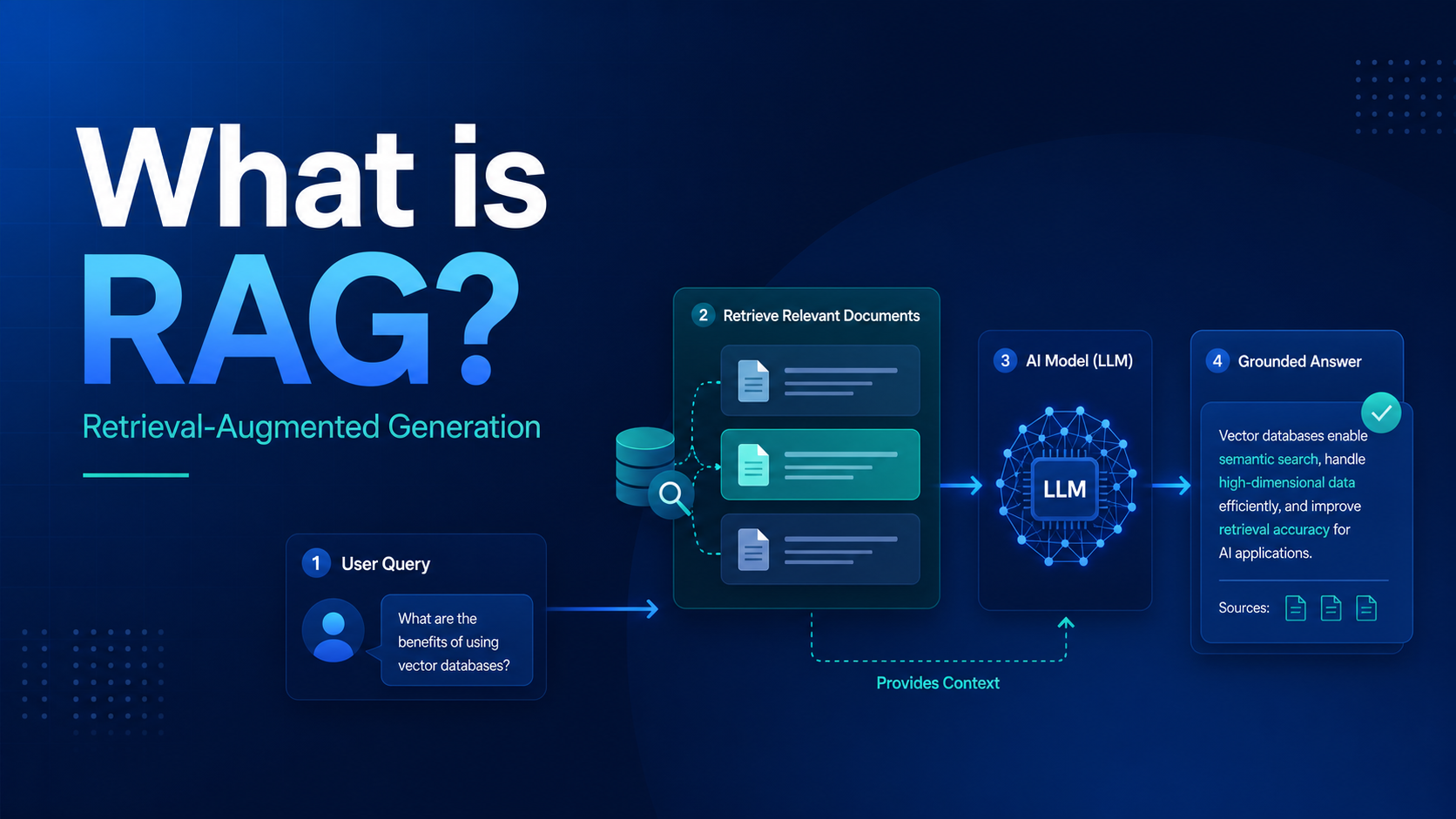

SEO excerpt: Learn what RAG (Retrieval-Augmented Generation) is, how it works, when to use it, how to build a basic RAG pipeline, common mistakes, architecture patterns, and how RAG compares with fine-tuning for real AI applications.
Quick Answer: RAG, or Retrieval-Augmented Generation, is an AI pattern where an application fetches relevant external information first and then gives that information to the model before it answers. Instead of relying only on what the model learned during training, RAG grounds the response in your current documents, knowledge base, product data, or internal content. That makes RAG especially useful for support bots, internal search, documentation assistants, enterprise AI, and any use case where facts must come from specific sources.
What Is RAG?
RAG stands for Retrieval-Augmented Generation. It is a design pattern for AI applications where your system retrieves useful information from an external source and includes that context in the prompt sent to the model. The model then generates an answer using both the user question and the retrieved material.
The core idea is simple: do not ask the model to answer from memory when the answer should come from your own content. If you have documentation, runbooks, policies, tickets, wiki pages, knowledge-base articles, or product specs, RAG helps the model use them at request time.
This matters because most useful business AI systems are not generic chatbots. They need answers grounded in your information. A cloud support assistant should answer from your platform documentation. A DevOps chatbot should answer from your runbooks and incident guides. A SaaS help assistant should answer from your product docs, not vague model intuition.
Why RAG Matters
RAG solves a practical problem: large language models are strong at reasoning over text, but they do not automatically know your latest, private, or domain-specific information. Even when a model knows something in general, that does not mean it knows the exact answer you want, the latest version of a policy, or the wording approved by your organization.
- Current information: RAG can use documents updated today instead of depending on training-time knowledge.
- Private knowledge: RAG can answer from internal docs, tickets, and policies without retraining the model.
- Lower hallucination risk: Good retrieval gives the model evidence to cite or summarize.
- Faster iteration: Updating a document is usually easier than fine-tuning a model.
- Better trust: Users can often see where the answer came from.
That is why RAG shows up so often in production AI systems. It is one of the most practical ways to make an AI application useful without pretending the model should memorize your entire business.
How RAG Works
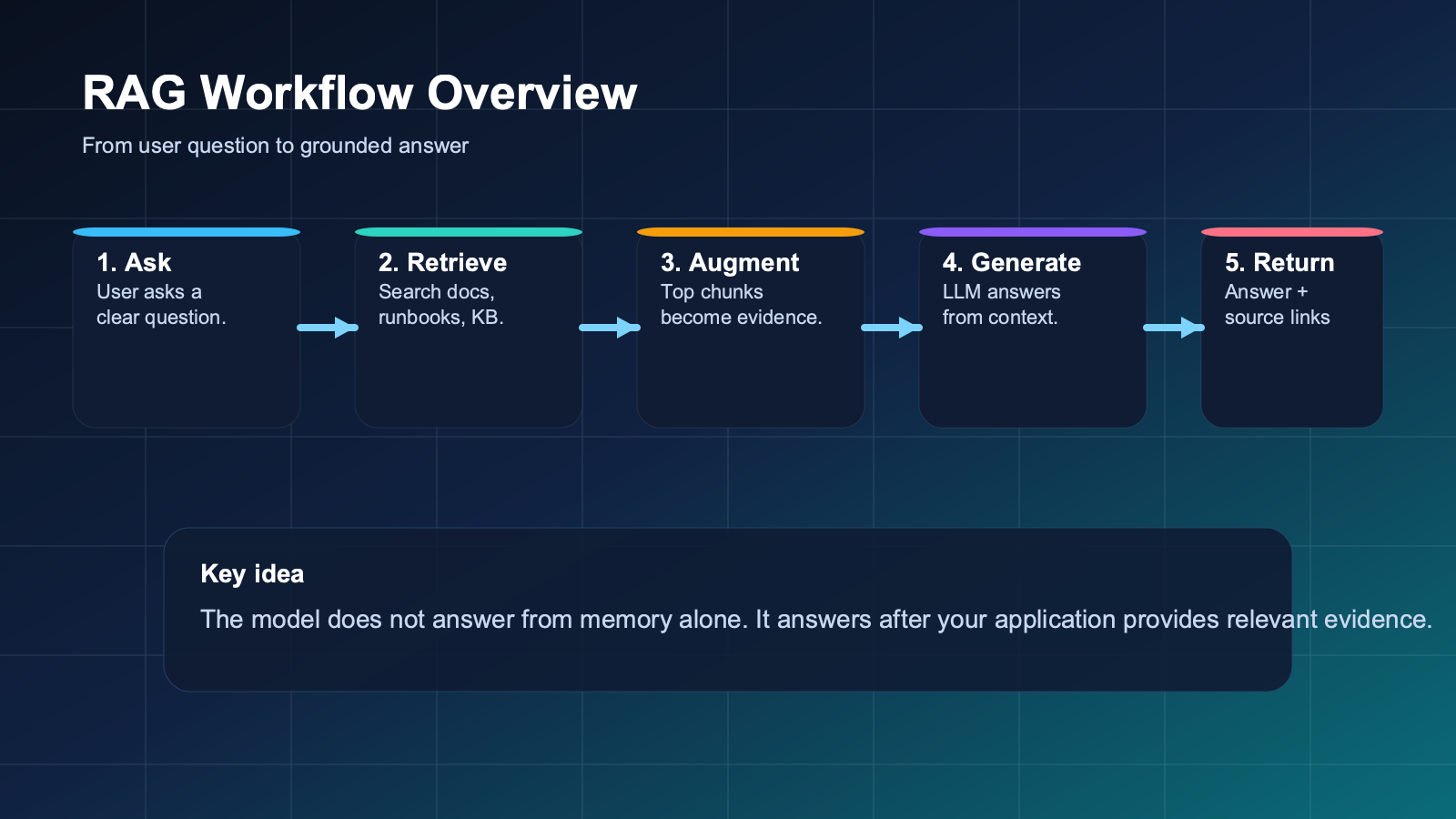
A basic RAG system usually has five steps:
- User asks a question. For example: “Why is my Kubernetes deployment stuck in CrashLoopBackOff?”
- Application searches the knowledge source. It looks through documentation, incident notes, runbooks, or indexed chunks of text.
- System selects relevant context. It retrieves the best matches and packages them into a prompt.
- Model generates an answer. The answer is guided by the retrieved context, not just the model’s memory.
- Application returns the result. Good systems also show citations, links, or source snippets.
Many teams explain RAG as “search plus generation,” and that is directionally correct. But in practice, good RAG is not just search. It depends on chunking strategy, metadata, retrieval quality, prompt design, ranking, context limits, response validation, and feedback loops.
| Stage | What happens | What can go wrong |
|---|---|---|
| Ingestion | Documents are cleaned, split into chunks, and indexed. | Bad chunking, stale docs, missing metadata. |
| Retrieval | The system finds relevant chunks for a user query. | Weak search, wrong ranking, noisy matches. |
| Augmentation | Retrieved content is added to the prompt. | Too much context, conflicting context, poor prompt instructions. |
| Generation | The model answers using the retrieved evidence. | Hallucination, overconfidence, poor synthesis. |
| Post-processing | The app formats the answer, adds citations, and logs results. | No validation, broken citations, hard-to-debug failures. |
A Simple Example of RAG
Imagine you run an internal DevOps assistant for your engineering team. An engineer asks:
“How do I roll back a failed Argo CD deployment in our staging cluster?”
If you ask a model directly, it may give a generic answer about Argo CD rollbacks. That answer might be technically reasonable but still wrong for your environment. Your staging cluster may use a specific GitOps workflow, a different namespace, approval rules, or internal rollback steps.
With RAG, your application first retrieves the relevant runbook, Argo CD operational guide, and rollback checklist from your internal docs. Then the model answers using those materials. Instead of giving a broad internet-style answer, it can respond with the actual internal process your team expects.
This is the real value of RAG. It is not merely about adding more text to the prompt. It is about grounding the answer in the correct source of truth.
RAG vs Fine-Tuning
One of the most common beginner questions is whether RAG replaces fine-tuning. It does not. They solve different problems.
| Approach | Best for | Not ideal for |
|---|---|---|
| RAG | Current facts, private documents, product docs, internal knowledge, support content | Teaching a model a persistent response style or behavior pattern by itself |
| Fine-tuning | Stable style, repeated output patterns, domain-specific behavior, task specialization | Frequently changing knowledge or large document libraries |
| Prompt engineering | Instructions, constraints, output format, tone, safety rules | Replacing missing source data |
A practical rule is this:
- Use prompt engineering to control how the model should behave.
- Use RAG when the model needs external facts or private documents.
- Use fine-tuning when you need more consistent domain behavior or output style across many repeated tasks.
Most production systems combine these approaches rather than treating them as competitors. If you want a deeper comparison, this article should later connect naturally with the planned topic Fine-Tuning vs RAG: When to Use Each.
When You Should Use RAG
RAG is a strong fit when answers should come from a changing body of content rather than from general model knowledge.
- Internal knowledge assistants for engineering, HR, legal, or support teams
- Customer support bots grounded in your docs or help center
- Developer assistants that answer from internal APIs, runbooks, and architecture notes
- Enterprise search interfaces over policies, contracts, or project documents
- AI copilots that need citations and source traceability
RAG is less useful when the problem is really about workflow design, poor instructions, or lack of output validation. If your model keeps returning the wrong JSON shape, retrieval will not fix that. If your answer needs a specific tone, tone examples or fine-tuning may help more than retrieval.
When RAG Is Not Enough
RAG is powerful, but it is not a universal patch for every AI problem. Teams often overestimate what retrieval alone can do.
- If retrieval quality is weak, the model still gets poor context.
- If documents conflict, the answer may still be uncertain.
- If chunking is poor, the right evidence may never be retrieved.
- If your prompts are vague, the model may summarize badly even with good evidence.
- If the task requires multi-step tool use, RAG may need to be combined with agents or workflow code.
This is why strong RAG systems are engineering systems, not just prompt hacks. They need careful indexing, ranking, prompting, validation, observability, and user feedback.
The Basic Components of a RAG Stack
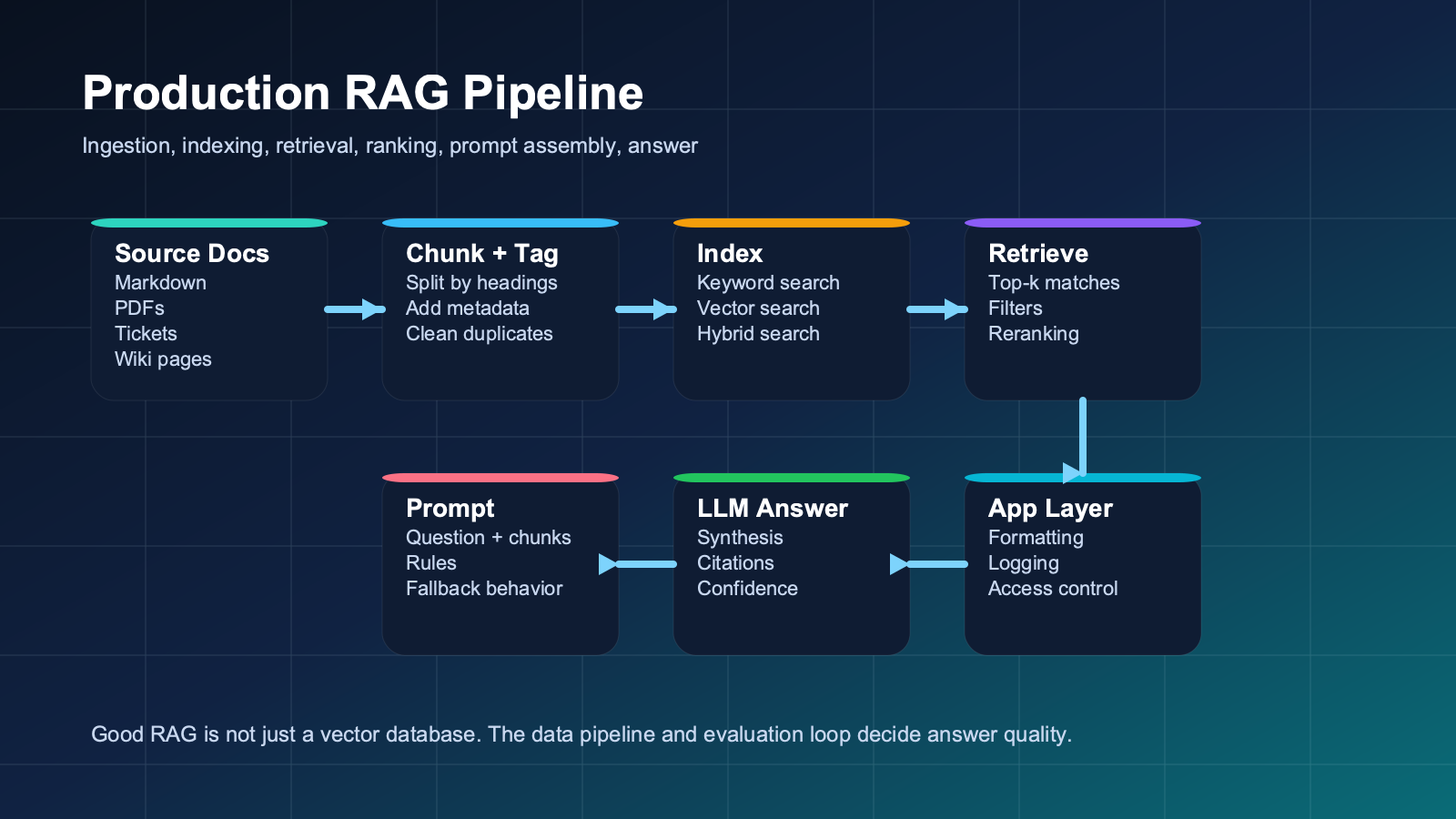
A beginner-friendly RAG stack usually includes these parts:
- Source documents: Docs, PDFs, tickets, wikis, markdown files, policies, or database content.
- Chunking logic: The rule for splitting documents into pieces small enough to retrieve effectively.
- Index or vector store: A way to search chunks efficiently using keyword, semantic, or hybrid retrieval.
- Retriever: The part that finds likely matches for a query.
- Reranker or filtering layer: Optional but useful for improving relevance.
- Prompt template: Instructions that tell the model how to use the retrieved evidence.
- LLM: The model that turns the question plus context into a final answer.
- Application logic: Citations, confidence handling, logging, feedback, and safety controls.
Beginners often focus too much on the vector database and not enough on document quality, metadata, and evaluation. Those boring layers often decide whether the system is actually useful.
A Beginner RAG Tutorial: Build the Mental Model First
If you are new to RAG, do not start by obsessing over frameworks. Start with a small corpus and a clear question-answering task.
- Choose a narrow document set such as 20 internal markdown files or a small documentation folder.
- Clean the content so navigation noise, headers, and repeated footers do not dominate the index.
- Split documents into useful chunks, usually by heading or paragraph groups rather than arbitrary lines.
- Add metadata such as title, path, owner, product area, or updated date.
- Index the chunks into a search layer or vector database.
- Retrieve the top matches for a user query.
- Assemble a prompt that says the model must answer from the provided context and say when evidence is missing.
- Return the answer with source references.
That basic loop will teach you more than reading five framework landing pages. Once the mental model is clear, you can evaluate tools more intelligently.
A Minimal RAG Prompt Example
You are an internal support assistant.

Answer the user's question only from the retrieved context below.
If the answer is not supported by the context, say you do not have enough evidence.
Keep the answer practical and include the most relevant source titles.

User question:
{{question}}

Retrieved context:
{{top_chunks}}

Return:
- answer
- sources
- confidence: high | medium | low
This prompt is simple, but it does three important jobs. It defines the evidence boundary, describes the fallback behavior, and asks for a predictable output structure. Those are the basics of a useful RAG answer.
Common RAG Mistakes
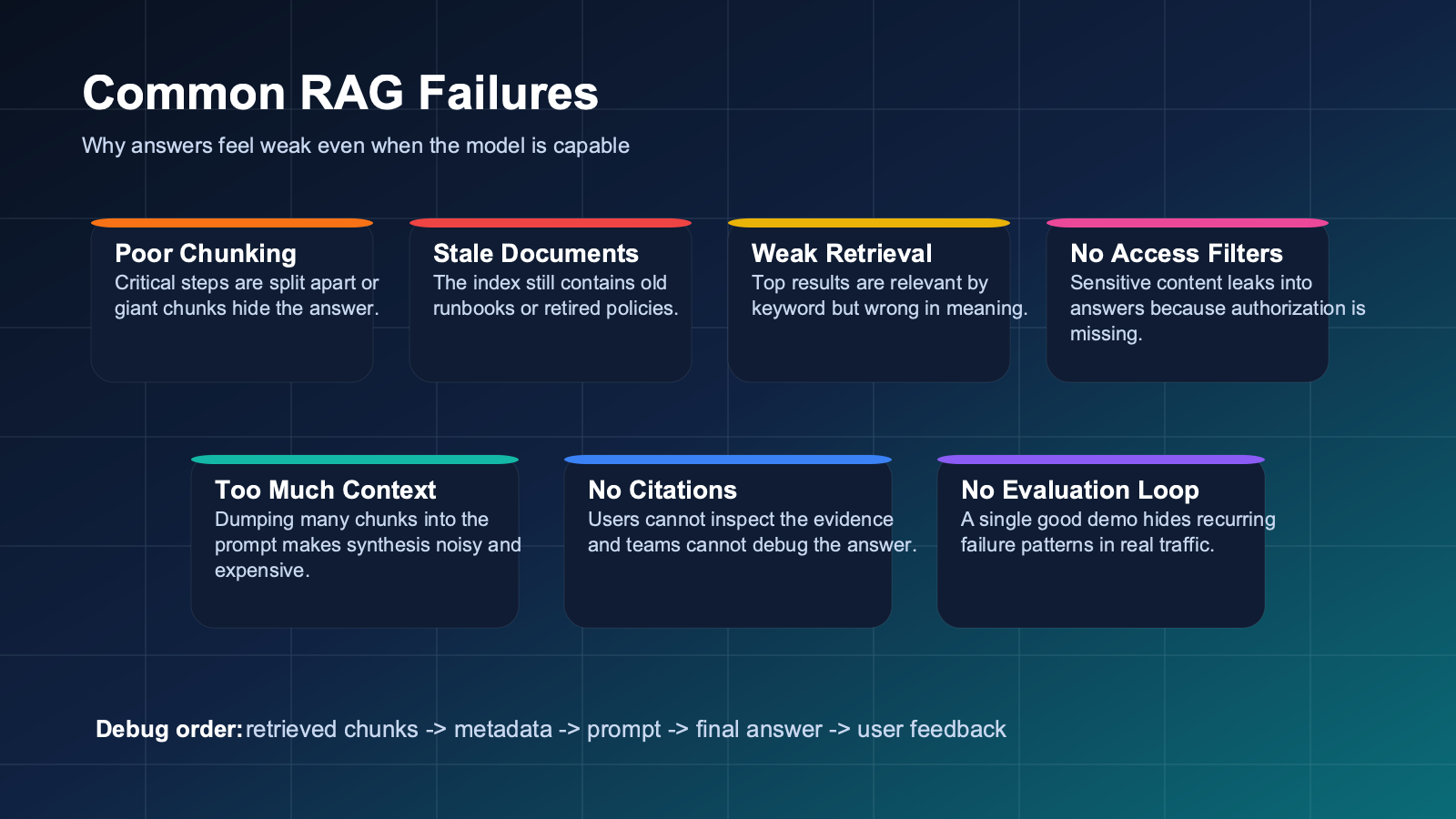
- Bad chunking: If chunks are too large, retrieval gets noisy. If they are too small, the answer loses context.
- No metadata: Without source labels, dates, or categories, filtering and trust become harder.
- Stale content: RAG is only as current as the documents you index.
- Retrieving too much: Dumping ten pages into the prompt often hurts answer quality.
- No evaluation set: Teams assume RAG works because one demo looked good.
- No citations or source display: Users trust grounded answers more when they can inspect the evidence.
- Ignoring access control: Private documents still need proper authorization and filtering.
Troubleshooting a Weak RAG System
If your RAG application gives mediocre answers, debug the pipeline in order.
- Inspect the retrieved chunks. If the right content is not retrieved, generation is not the main problem.
- Check chunk boundaries. Did you split a procedure across multiple tiny fragments?
- Review metadata. Can you filter by product, version, team, or freshness?
- Test the prompt. Does it clearly tell the model to stay within evidence?
- Limit the context window. More context is not always better.
- Create evaluation queries. Use real support questions, not only ideal examples.
- Track failures. Log wrong answers, missing answers, and ambiguous cases for later improvement.
In practice, many “model quality” complaints are really retrieval-quality problems. If the model never sees the right chunk, it cannot produce a grounded answer.
Beginner Checklist
- Start with a small, trusted document set.
- Use clear chunking based on headings or paragraph groups.
- Store metadata with every chunk.
- Tell the model what to do when the answer is missing.
- Show sources in the final response.
- Test with realistic user questions.
- Refresh the index when documents change.
Practitioner Checklist
- Separate ingestion, retrieval, prompting, and evaluation into distinct layers.
- Use metadata filters for version, team, environment, and access control.
- Compare keyword, semantic, and hybrid retrieval instead of assuming one approach wins.
- Measure retrieval quality separately from final answer quality.
- Add citations and inspectability for trust and debugging.
- Track freshness and document ownership so stale content does not linger.
- Log unanswered questions to improve both content and retrieval strategy.
RAG in the GravityDevOps Context
For the GravityDevOps audience, RAG matters because it connects AI ideas to real engineering operations. A DevOps or platform team can use RAG to build internal assistants over deployment runbooks, incident playbooks, Kubernetes troubleshooting docs, cloud standards, or onboarding material.
That makes RAG a natural follow-on from foundational AI concepts in What is Generative AI? A Beginner’s Guide. It also connects to workflow and operational topics because grounded AI features still need testing, observability, and automation. For that operational mindset, readers should also explore Best CI/CD Tools in 2026 Compared.
Future cluster links from this article should include LLMOps, vector databases, local LLM workflows, and the later fine-tuning vs RAG comparison. Those topics become much easier once the retrieval pattern itself is clear.
FAQ: What Is RAG?
What does RAG stand for in AI?
RAG stands for Retrieval-Augmented Generation. It means the system retrieves relevant external information before the model generates an answer.
Why is RAG better than asking the model directly?
RAG is often better when answers should come from current, private, or domain-specific information. It gives the model evidence from your own sources instead of relying only on training-time knowledge.
Does RAG eliminate hallucinations?
No. RAG reduces hallucination risk, but it does not eliminate it. Poor retrieval, conflicting documents, vague prompts, or missing validation can still produce weak answers.
Do I need a vector database for RAG?
Not always. Many RAG systems use vector search, but keyword or hybrid search can also work well depending on the content and query type. The right choice depends on your documents, scale, and quality goals.
When should I use RAG instead of fine-tuning?
Use RAG when the main problem is access to changing or private knowledge. Use fine-tuning when the main problem is model behavior, style consistency, or repeated task specialization.
What is the first step to learning RAG?
Start by building a tiny pipeline over a small set of documents and inspect the retrieved chunks manually. That teaches you the retrieval problem before you add more infrastructure.
Internal Link Suggestions
- What is Generative AI? A Beginner’s Guide
- Best CI/CD Tools in 2026 Compared
- Future link target: Running LLMs Locally with Ollama
- Future link target: What is LLMOps?
- Future link target: Vector Databases Explained (pgvector, Pinecone)
- Future link target: Fine-Tuning vs RAG: When to Use Each


