

AI is now showing up in every DevOps conversation: pipeline copilots, incident summaries, log correlation, runbook automation, code review agents, platform engineering assistants, and AIOps tools that promise fewer alerts. The hard question is no longer whether AI belongs in DevOps. The hard question is where it belongs first.
Quick Answer
Start with AI where the blast radius is low and the signal is measurable: alert deduplication, incident summarization, runbook recommendations, flaky test analysis, deployment risk scoring, documentation search, and change-impact review. Keep human approval for production changes, security exceptions, infrastructure mutations, and customer-facing remediation until the team has strong telemetry, audit logs, rollback paths, and clear ownership.
This guide turns today’s most searched AI and DevOps questions into a practical framework for 2026. It is written for engineers, SREs, DevOps leads, platform teams, and technical managers who need to choose between classic DevOps automation and AIOps without buying hype or blocking useful progress.
Why AI + DevOps Is a High-Intent Topic in 2026
Recent industry signals explain why teams are asking so many questions about AI in DevOps. Google Cloud’s DORA research has a dedicated 2025 State of AI-assisted Software Development report, GitHub’s Octoverse describes AI and agents as major forces reshaping software development, and CNCF’s cloud native research highlights Kubernetes as an increasingly common foundation for production AI workloads. Those sources point in the same direction: AI is not just a coding assistant trend. It is moving into delivery systems, cloud infrastructure, observability, service management, and platform operations.
Search demand follows the pain. Teams are asking: What is AIOps? Is AIOps the same as DevOps automation? Can AI fix incidents automatically? Which DevOps tasks should be automated first? What are the risks of AI in CI/CD? How do we measure ROI? These are not beginner-only questions. They are the questions teams ask when budget, reliability, security, and engineering credibility are all on the line.
AIOps vs DevOps Automation: The Practical Difference
DevOps automation usually means deterministic workflow automation. A script, pipeline, policy, or controller performs a known action when known conditions are met. Examples include running tests on every pull request, applying Terraform through a gated pipeline, deploying with Argo CD, rotating secrets through a scheduled workflow, or rolling back a deployment when a health check fails.
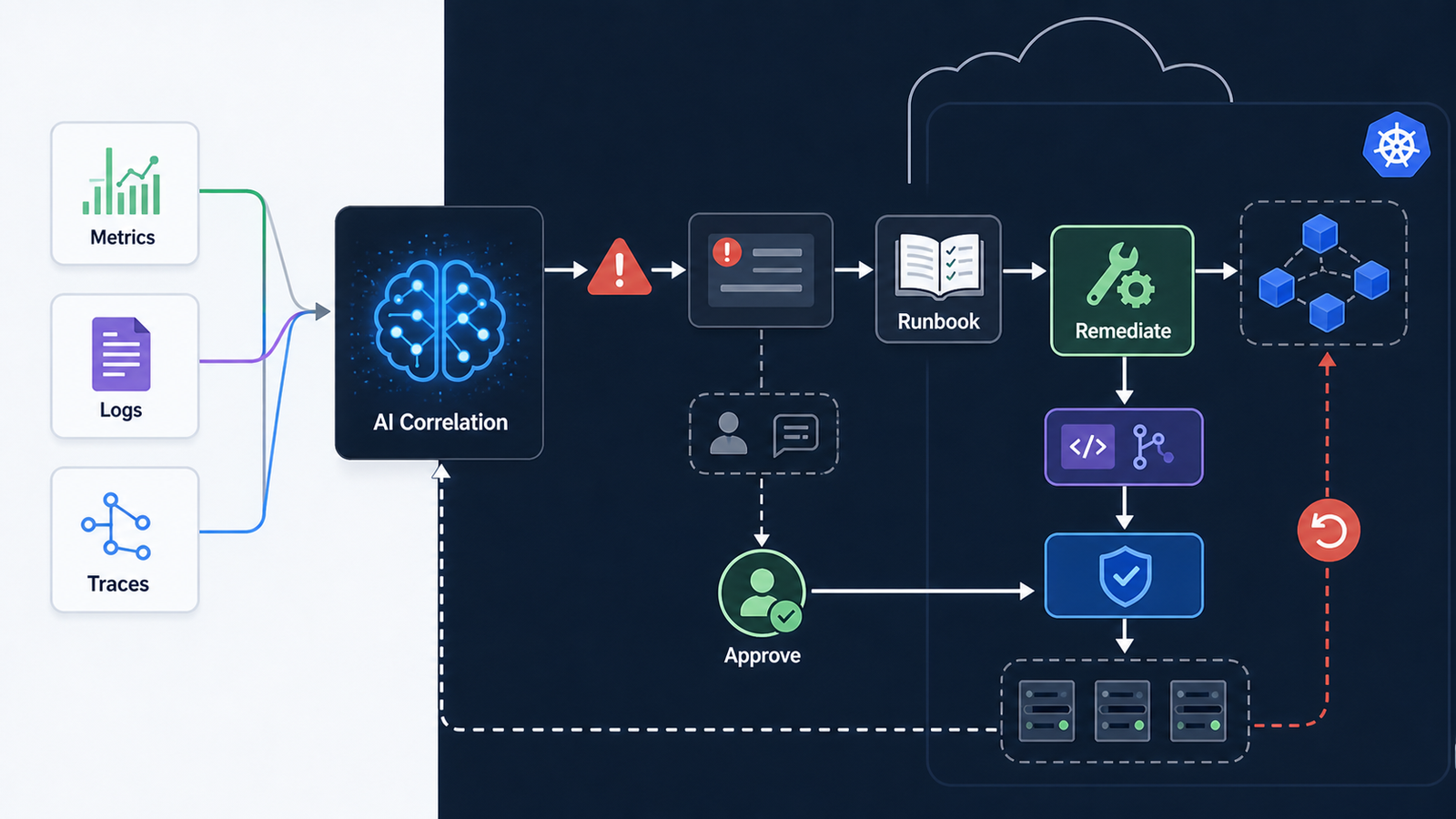
AIOps uses machine learning or generative AI to interpret operational data, reduce noise, identify patterns, recommend action, or assist remediation. Examples include clustering duplicate alerts, correlating logs with traces, summarizing an incident timeline, predicting risky deployments, explaining a Kubernetes failure, or suggesting the most relevant runbook.
| Area | DevOps automation | AIOps | Best first use |
|---|---|---|---|
| CI/CD | Build, test, deploy, rollback | Flaky test analysis, change-risk scoring | Recommend before auto-change |
| Monitoring | Threshold alerts, dashboards | Anomaly detection, alert grouping | Noise reduction |
| Incidents | Runbook execution, paging rules | Timeline summaries, probable cause hints | Human-approved remediation |
| Infrastructure | IaC plans, policy checks | Impact analysis, drift explanation | Review support |
| Security | Scanning, policy gates | Finding triage, exploit context | Prioritization, not silent exceptions |
The mistake is treating AIOps as a replacement for DevOps automation. It is better understood as a decision and context layer above existing automation. If your pipelines, observability, ownership map, and incident process are messy, AI will surface that mess faster. It will not magically create a reliable operating model.
What Teams Should Automate With AI First
The best first projects have three traits: they save real time, they are easy to validate, and a wrong answer does not directly break production. Start with these areas before giving AI permission to make changes on its own.
1. Alert grouping and incident summaries
Most on-call teams lose time before remediation begins. They open five dashboards, scan Slack, compare recent deployments, read logs, and decide whether ten alerts are one incident or ten incidents. AIOps can help by grouping related alerts, pulling recent deploys into the incident view, and generating a first-pass timeline.
A useful output looks like this: “Errors increased on checkout-api five minutes after deployment build 1842. The same pod set shows rising latency and database timeout logs. Similar incident: INC-2147. Suggested runbook: checkout database connection pool saturation.” The AI should link to evidence, not simply assert a conclusion.
2. Flaky test and pipeline failure triage
CI/CD failures are a strong AI use case because the inputs are structured: commit, changed files, test logs, runner image, dependency lockfile, and previous failures. AI can cluster failures by signature, identify likely flaky tests, and suggest the owner or recent change that deserves review.
Keep the automation modest at first. Let AI label a failure as likely infrastructure, flaky test, dependency issue, or code regression. Then have the pipeline route it to the right Slack channel or issue tracker. Do not skip required tests automatically unless the rule is deterministic and approved by the team.
3. Runbook recommendations
Runbooks often exist, but responders forget which one applies under pressure. AI search over internal documentation, service catalogs, previous incidents, and dashboards can help the responder find the right procedure faster. This is especially useful for platform teams that own many services but do not hold all application context.
For beginners, a simple version can be built without buying a full AIOps platform: collect incident tags, service names, alert labels, and runbook metadata in a searchable index. Ask the AI assistant to return the top three matching runbooks with reasons and links. The key is retrieval from trusted internal sources, not free-form guessing.
4. Deployment risk scoring
AI can review a change and highlight risk signals: database migration, permission change, dependency upgrade, wide blast radius, missing rollback, low test coverage, or ownership ambiguity. This is valuable because it improves human review before production impact.
Example policy: low-risk UI copy changes can continue through normal automation; high-risk infrastructure changes require senior review; risky database migrations require a rollback plan attached to the pull request. AI helps classify the change, but the policy remains explicit.
Where Human Approval Still Matters
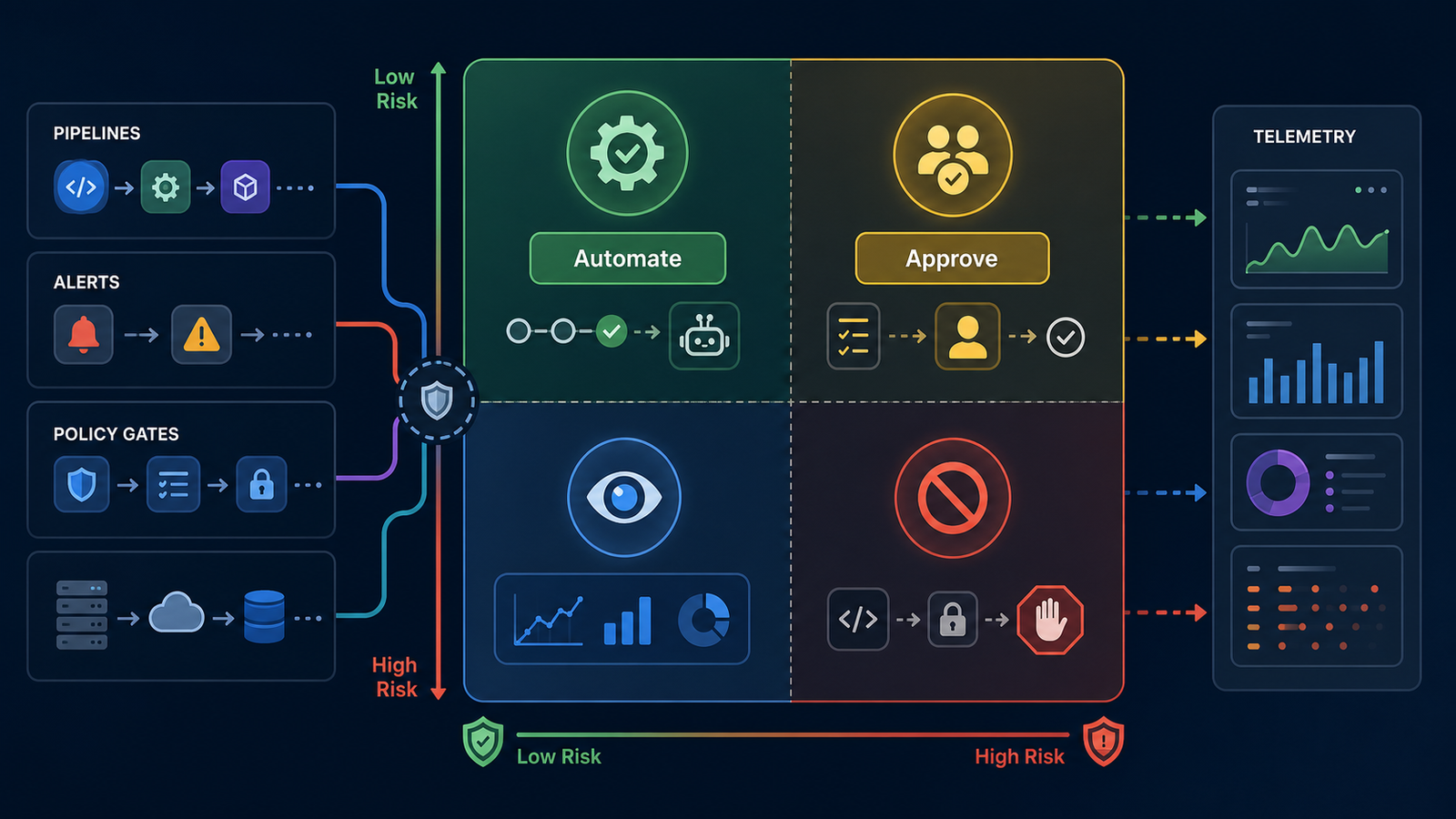
AI should not silently perform high-impact operations just because the vendor demo looked smooth. Keep human approval for production infrastructure changes, permission changes, customer data operations, security exceptions, cost-impacting cloud changes, and any remediation that can delete, scale down, migrate, or expose a service.
A practical approval rule is simple: AI may recommend, summarize, rank, and prepare. Existing automation may execute after a clear human approval event. The approval should leave an audit trail with who approved, what evidence was shown, what command or runbook was executed, and how rollback works.
A 30-Day AIOps Pilot Plan
A good pilot should be small enough to finish and serious enough to measure. Do not start with “automate incident response.” Start with one service, one on-call rotation, and one measurable pain point.
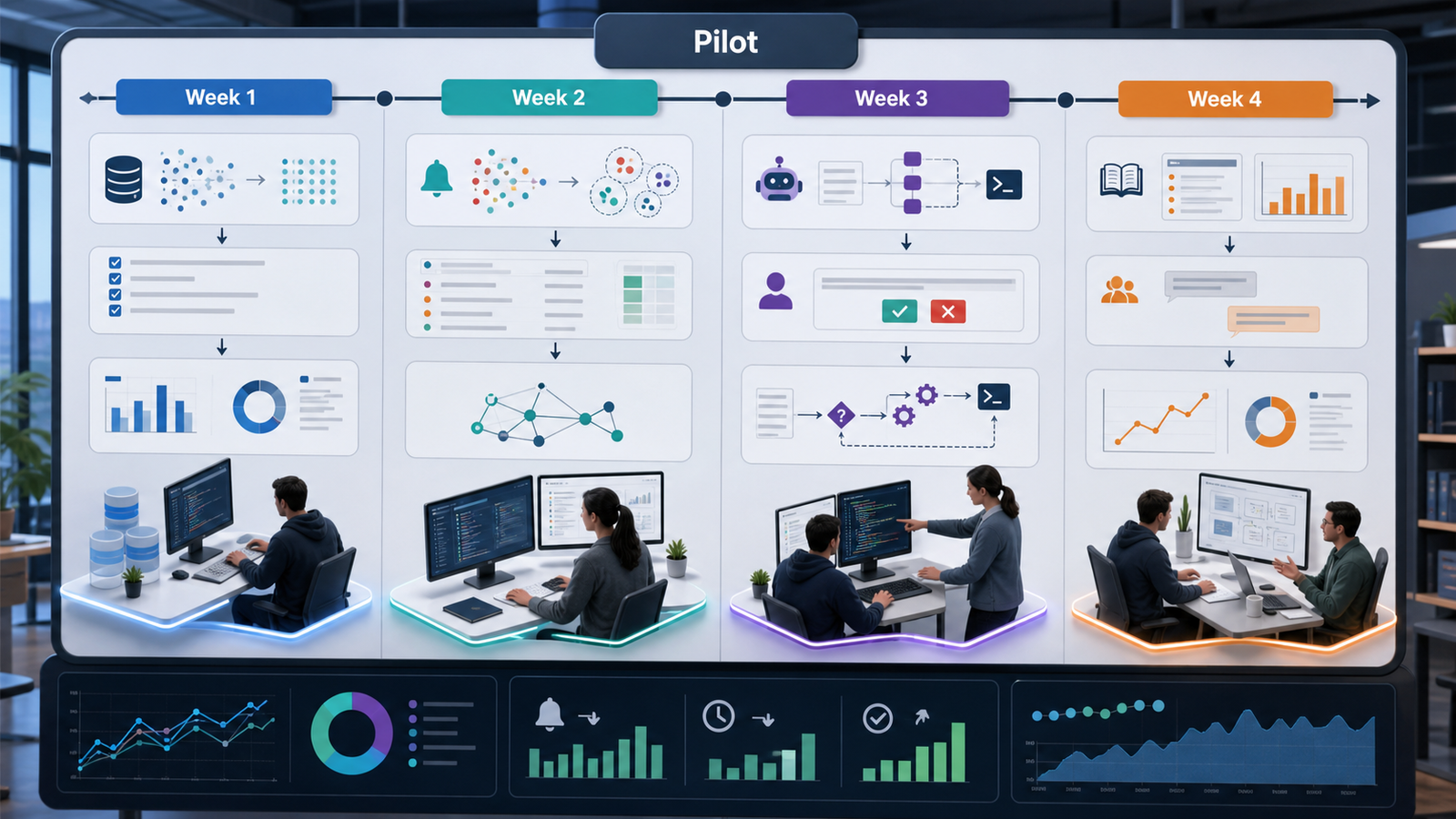
Week 1: Choose the workflow and clean the data
Pick one target: alert grouping, incident summary, flaky test triage, or runbook retrieval. Gather the minimum useful data: service names, owners, deployment events, alert labels, logs, traces, dashboards, runbooks, and recent incident tickets. Remove stale runbooks and fix missing ownership before feeding AI more context.
Week 2: Run in suggestion mode
Let AI generate summaries or recommendations without changing the workflow. Compare outputs against what responders actually did. Track false positives, missing context, hallucinated links, and time saved. This week is about trust calibration.
Week 3: Add human-approved actions
Connect the assistant to approved runbooks, ticket creation, Slack summaries, or pull request comments. Keep the action behind an approval button or command. Measure whether responders use it and whether it reduces handoff time.
Week 4: Decide whether to expand
Review hard metrics: mean time to acknowledge, duplicate alert volume, incident summary accuracy, time to identify owner, flaky test reruns, and responder feedback. Expand only if the pilot reduced friction without adding hidden review burden.
Tool Selection Criteria for AIOps and AI DevOps Platforms
Tool choice depends on your current stack. A small team with GitHub Actions and basic monitoring may get more value from focused AI features in CI/CD and documentation search. A large platform team running Kubernetes, distributed services, and multiple on-call rotations may need observability-native AIOps.
| Selection factor | Why it matters | What to ask vendors |
|---|---|---|
| Data access | AI needs logs, metrics, traces, deploys, incidents, and ownership context | Which sources are indexed, and how is sensitive data handled? |
| Evidence links | Teams need to verify recommendations quickly | Does every answer link back to logs, traces, tickets, or docs? |
| Approval controls | Production actions need governance | Can we require human approval for specific action classes? |
| Auditability | Incident reviews need traceability | Can we export who approved what, when, and why? |
| Integration depth | Shallow chatbots become shelfware | Does it integrate with CI/CD, observability, ITSM, and repo workflows? |
| Pricing model | Usage-based AI costs can surprise teams | Is pricing per seat, event, log volume, token, or workflow? |
Pricing and Licensing Caveats
AIOps pricing is rarely apples-to-apples. One product may charge by user seat, another by ingested telemetry, another by incident volume, and another by AI usage. A cheap pilot can become expensive if every log line, trace, and alert is sent to an AI layer.
Before buying, estimate three numbers: monthly telemetry volume, number of responders or developers who need access, and expected AI action volume. Also check data retention, model-training terms, private cloud options, and whether security or compliance features require an enterprise tier.
Pros and Cons of Using AI in DevOps
| Pros | Cons |
|---|---|
| Reduces alert noise and repeated triage work | Can create false confidence if evidence is weak |
| Speeds up incident summaries and handoffs | Needs clean service ownership and quality telemetry |
| Improves access to runbooks and internal docs | May expose sensitive operational data if governance is weak |
| Helps prioritize risky changes before deployment | Pricing can grow with usage, seats, or data volume |
| Supports newer team members during on-call | Bad automation can amplify bad process |
Common Mistakes to Avoid
Automating before observing. If you cannot explain the incident path manually, do not ask AI to remediate it automatically.
Sending noisy data to an expensive AI layer. Clean labels, ownership, and telemetry first. AI is not a substitute for basic observability hygiene.
Ignoring rollback. Every approved remediation should have a rollback path, owner, and expiry.
Measuring only “time saved.” Also measure accuracy, responder trust, review burden, and incident quality.
Buying a platform without workflow ownership. AIOps touches SRE, DevOps, platform, security, app teams, and leadership. Assign owners before rollout.
Beginner Checklist: Your First AI DevOps Workflow
- Pick one service with enough incident or CI/CD history.
- Collect service ownership, deployment events, alert labels, runbooks, and recent incidents.
- Choose one use case: alert grouping, incident summary, flaky test triage, or runbook search.
- Run the assistant in read-only suggestion mode for one week.
- Compare AI output with human decisions and record accuracy.
- Add a human-approved action only after the output is consistently useful.
- Document what the AI can do, what it cannot do, and who owns failures.
- Review cost, security, and data-retention settings before expanding.
Neutral Recommendation
If you are early in DevOps maturity, improve CI/CD, observability, runbooks, and ownership before buying a broad AIOps platform. Start with targeted AI features that reduce obvious friction. If you already run complex cloud native systems with mature telemetry and on-call processes, AIOps can be valuable for correlation, summarization, and controlled remediation.
For related foundations, read What Is Generative AI? Beginner’s Guide, Best CI/CD Tools 2026 Compared, What Is AIOps?, Prometheus and Grafana Monitoring Tutorial, and GitOps with Argo CD Tutorial.
FAQ: AIOps vs DevOps Automation
Is AIOps the same as DevOps automation?
No. DevOps automation executes known workflows using defined rules. AIOps analyzes operational data, identifies patterns, summarizes incidents, and recommends or assists actions. The best implementations combine both.
What is the safest AI DevOps use case to start with?
Alert grouping, incident summaries, runbook recommendations, and flaky test triage are safer starting points because they reduce toil without directly changing production systems.
Can AI automatically fix production incidents?
Technically, yes in limited cases, but most teams should require human approval for production remediation until telemetry, rollback, audit trails, and governance are mature.
How do you measure AIOps ROI?
Measure duplicate alert reduction, time to identify owner, incident summary accuracy, mean time to acknowledge, mean time to resolve, flaky test handling time, responder satisfaction, and tool cost.
Do small DevOps teams need an AIOps platform?
Not always. Small teams often get better results from improving monitoring, CI/CD quality, runbooks, and targeted AI assistance before buying a broad platform.
What data does AIOps need?
Useful AIOps systems need logs, metrics, traces, deployment events, incident tickets, service ownership, runbooks, and sometimes source-control context. The quality of labels and ownership data matters as much as the volume.


