

GitOps with Argo CD: Tutorial
GitOps sounds simple: put your Kubernetes configuration in Git and let automation apply it. The hard part is making that loop reliable enough for real teams. You need a source of truth, a reconciler, clear rollback behavior, access control, and a way to see when the cluster has drifted away from what Git says should be running.
Argo CD is one of the most common tools for that job. It is a declarative GitOps continuous delivery tool for Kubernetes. Instead of pushing manifests from a CI job with kubectl apply, Argo CD watches a Git repository, compares the desired state with the live cluster, and syncs the cluster when there is a difference.
Quick Answer
GitOps with Argo CD means storing Kubernetes application manifests in Git and letting Argo CD continuously compare that desired state with the live cluster. When Git changes, Argo CD detects the difference and syncs Kubernetes back to the declared state, giving teams auditable, repeatable, rollback-friendly deployments.
In practice, the workflow looks like this:
- A developer changes Kubernetes YAML, Helm values, or Kustomize overlays in Git.
- CI tests the application and optionally updates an image tag or manifest.
- Argo CD detects the Git change.
- Argo CD shows the application as
OutOfSync. - A user or automated policy syncs the change to Kubernetes.
- Argo CD reports whether the live objects are healthy.
This tutorial walks through that flow from a clean Kubernetes cluster to a working Argo CD-managed application.
What Argo CD Does
Argo CD sits inside or near your Kubernetes environment and continuously reconciles application state.
The key idea is desired state versus live state:
| State | Where it lives | Example |
|---|---|---|
| Desired state | Git repository | Deployment YAML says replicas: 3 |
| Live state | Kubernetes API | The cluster currently has 2 running pods |
| Sync status | Argo CD comparison | Argo CD marks the app OutOfSync |
| Health status | Kubernetes resource condition | Deployment is Progressing, Healthy, or Degraded |
Argo CD can work with plain Kubernetes manifests, Kustomize, Helm charts, Jsonnet, and other config management approaches. If your team already uses Helm, read the GravityDevOps Helm tutorial first, because the same chart/value structure can be managed by Argo CD.
Why Use GitOps Instead of a Traditional CI/CD Push?
In a traditional push-based deployment, a CI system authenticates to the cluster and runs deployment commands. That works, but it often creates operational problems:
- Cluster credentials live in the CI platform.
- It is harder to answer "what should be running right now?"
- Manual
kubectlchanges can remain unnoticed. - Rollbacks depend on pipeline history instead of Git history.
- Multi-cluster promotion becomes a custom scripting problem.
With Argo CD, Git becomes the deployment contract. The cluster continuously converges toward the versioned configuration in Git. That makes changes reviewable, reversible, and easier to audit.
Argo CD does not replace CI. CI should still build images, run tests, scan containers, and publish artifacts. Argo CD handles the continuous delivery part: applying the approved desired state to Kubernetes.
Architecture: The GitOps Loop
The core Argo CD loop is straightforward:
- Argo CD reads application definitions.
- It pulls manifests from Git.
- It renders manifests if you use Helm or Kustomize.
- It compares rendered desired state with live Kubernetes objects.
- It syncs changes manually or automatically.
- It watches health and reports drift.
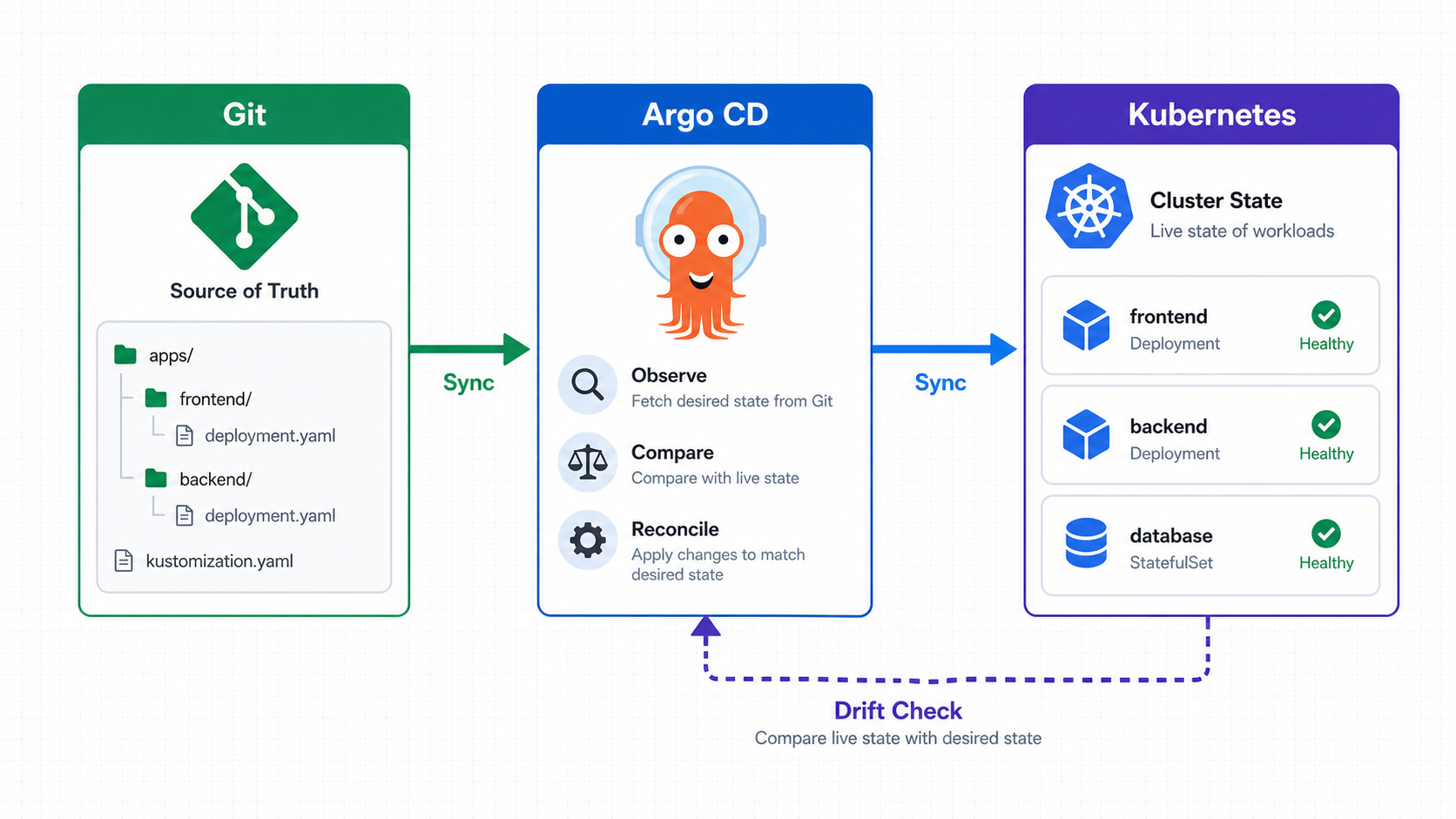
This pull-based model is especially useful when you manage multiple clusters. Each cluster can run or be managed by Argo CD while Git remains the shared source of truth.
Prerequisites
For this tutorial, you need:
- A Kubernetes cluster: local
kind,minikube, Amazon EKS, Azure AKS, Google GKE, or another conformant cluster. kubectlconfigured for that cluster.- A Git repository for the demo manifests.
- Optional but useful: the
argocdCLI.
If you are learning Kubernetes on AWS, pair this article with the GravityDevOps Amazon EKS tutorial. For Azure, use the AKS tutorial.
To confirm cluster access:
kubectl get nodes
kubectl get namespaces
If those commands fail, fix your kubeconfig before installing Argo CD.
Step 1: Install Argo CD
Create the Argo CD namespace:
kubectl create namespace argocdInstall the standard Argo CD manifests:
kubectl apply -n argocd \
  -f https://raw.githubusercontent.com/argoproj/argo-cd/stable/manifests/install.yaml
Wait for the control plane components:
kubectl get pods -n argocd
kubectl rollout status deployment/argocd-server -n argocd
kubectl rollout status deployment/argocd-repo-server -n argocd
kubectl rollout status deployment/argocd-applicationset-controller -n argocd
For a quick lab, the standard manifest is fine. For production, review high availability, SSO, RBAC, network exposure, and upgrade planning before treating the install as finished.
Step 2: Install the Argo CD CLI
On macOS or Linux with Homebrew:
brew install argocdOn Linux, you can also download the CLI from the Argo CD releases page. The exact binary URL changes by version, so use the official CLI installation docs when scripting this for a team.
Verify the CLI:
argocd version --clientYou can use Argo CD through the UI, CLI, declarative Kubernetes resources, or the API. Beginners usually start with the UI and CLI, then move important app definitions into Git as YAML.
Step 3: Access the Argo CD UI
By default, the Argo CD API server is not exposed outside the cluster. For a local tutorial, port-forward it:
kubectl port-forward svc/argocd-server -n argocd 8080:443Then open:
https://localhost:8080Your browser may warn about the local certificate. That is expected in a lab. Production setups should use a proper ingress, TLS certificate, identity provider, and access policy.
Get the initial admin password:
kubectl -n argocd get secret argocd-initial-admin-secret \
  -o jsonpath="{.data.password}" | base64 -d && echo
Log in with:
argocd login localhost:8080Use username admin and the initial password. Change or disable the local admin account when moving beyond a lab.
Step 4: Create a Demo Kubernetes App in Git
Create a repository with this structure:
demo-gitops-repo/
  apps/
    hello-nginx/
      deployment.yaml
      service.yaml
Add a simple Deployment:
apiVersion: apps/v1
kind: Deployment
metadata:
  name: hello-nginx
  namespace: default
  labels:
    app: hello-nginx
spec:
  replicas: 2
  selector:
    matchLabels:
      app: hello-nginx
  template:
    metadata:
      labels:
        app: hello-nginx
    spec:
      containers:
        - name: nginx
          image: nginx:1.27
          ports:
            - containerPort: 80
          resources:
            requests:
              cpu: 50m
              memory: 64Mi
            limits:
              cpu: 200m
              memory: 128Mi
Add a Service:
apiVersion: v1
kind: Service
metadata:
  name: hello-nginx
  namespace: default
spec:
  selector:
    app: hello-nginx
  ports:
    - port: 80
      targetPort: 80
Commit and push:
git add apps/hello-nginx
git commit -m "Add hello nginx Kubernetes app"
git push
For production, avoid mutable image tags such as latest. Use a specific version, digest, or automation that updates tags through pull requests.
Step 5: Create an Argo CD Application
An Argo CD Application tells Argo CD where the manifests live and where to deploy them.
Replace https://github.com/YOUR_ORG/demo-gitops-repo.git with your repository URL:
apiVersion: argoproj.io/v1alpha1
kind: Application
metadata:
  name: hello-nginx
  namespace: argocd
spec:
  project: default
  source:
    repoURL: https://github.com/YOUR_ORG/demo-gitops-repo.git
    targetRevision: main
    path: apps/hello-nginx
  destination:
    server: https://kubernetes.default.svc
    namespace: default
  syncPolicy:
    syncOptions:
      - CreateNamespace=true
Apply it:
kubectl apply -f hello-nginx-application.yamlCheck the app:
argocd app get hello-nginxAt this point, the app will usually show as OutOfSync because Argo CD knows the desired state but has not applied it yet.
Step 6: Sync the Application
Sync manually:
argocd app sync hello-nginx
argocd app wait hello-nginx --health
Confirm the Kubernetes objects:
kubectl get deployment hello-nginx
kubectl get pods -l app=hello-nginx
kubectl get service hello-nginx
Argo CD now tracks the app from Git to Kubernetes.
Step 7: Test GitOps Drift Detection
Change the live Deployment manually:
kubectl scale deployment hello-nginx --replicas=1Now inspect Argo CD:
argocd app get hello-nginxArgo CD should detect that the live cluster no longer matches Git. The app becomes OutOfSync.
To restore the Git state:
argocd app sync hello-nginxKubernetes returns to the replica count declared in Git.
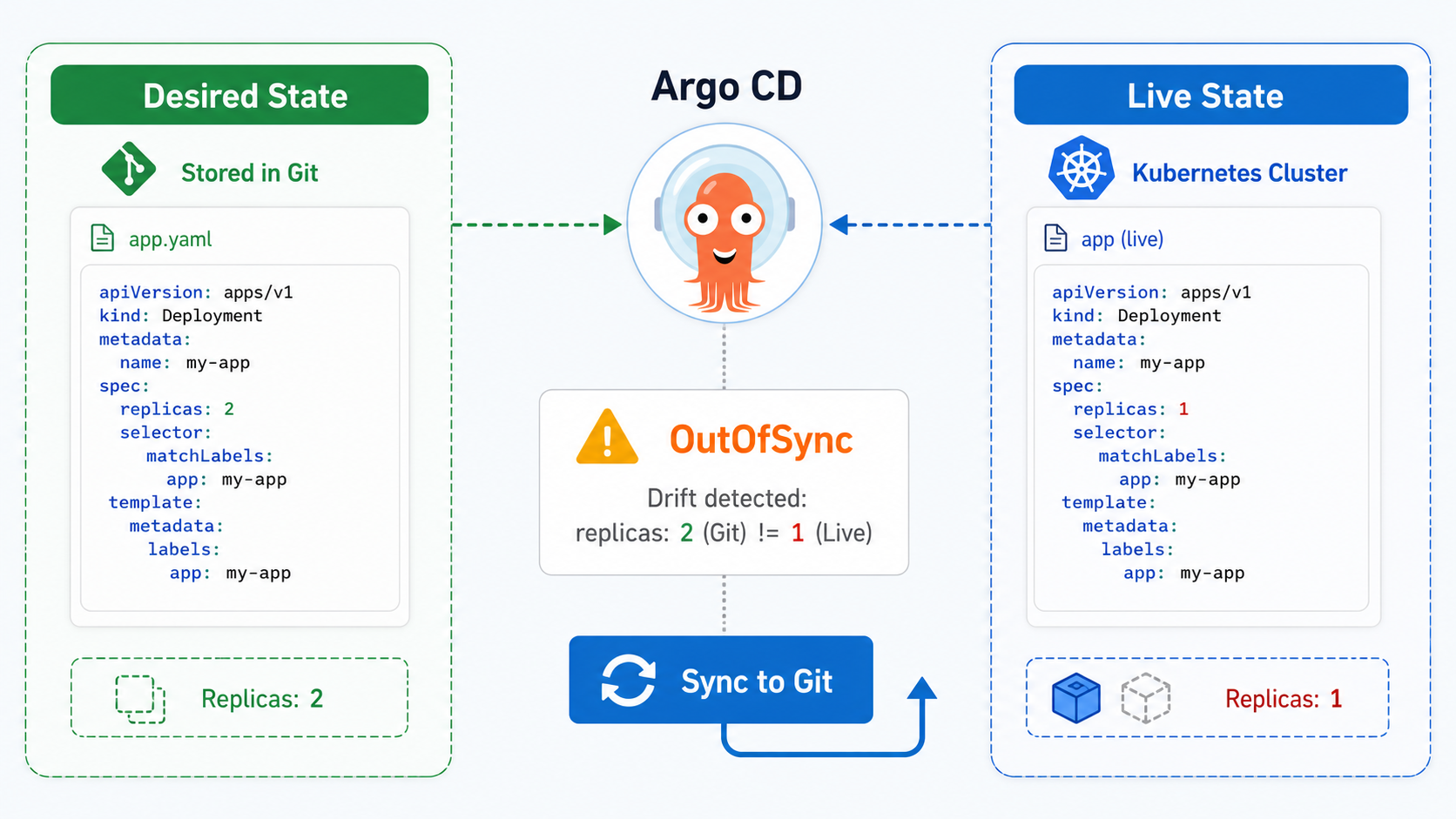
This is one of the biggest operational benefits of GitOps: drift is visible instead of hidden.
Step 8: Enable Automated Sync Carefully
Manual sync is good for learning and controlled production environments. Automated sync lets Argo CD apply Git changes without a human clicking the sync button.
Example:
syncPolicy:
  automated:
    prune: true
    selfHeal: true
  syncOptions:
    - CreateNamespace=true
What these settings mean:
| Setting | Meaning | Use carefully because |
|---|---|---|
automated | Sync when Git changes | Bad commits deploy quickly |
prune | Delete live resources removed from Git | Accidental deletion becomes real deletion |
selfHeal | Correct manual drift automatically | Emergency manual changes may be reverted |
CreateNamespace=true | Create destination namespace if needed | Namespace ownership must be clear |
A practical production pattern is:
- Enable automated sync for lower environments.
- Use pull request reviews and policy checks before merge.
- Use manual sync or progressive rollout controls for sensitive production apps.
- Use Argo CD Projects and RBAC to limit what each team can deploy.
If you are comparing this with pipeline-first deployment tools, see GravityDevOps' best CI/CD tools comparison.
Step 9: Use Helm or Kustomize with Argo CD
Most real teams do not manage a large app with a single folder of raw YAML. Argo CD works well with both Helm and Kustomize.
For Helm:
source:
  repoURL: https://github.com/YOUR_ORG/platform-apps.git
  targetRevision: main
  path: charts/my-app
  helm:
    valueFiles:
      - values-prod.yaml
For Kustomize:
source:
  repoURL: https://github.com/YOUR_ORG/platform-apps.git
  targetRevision: main
  path: overlays/prod
Choose based on how your team packages configuration:
| Approach | Best for | Watch out for |
|---|---|---|
| Plain YAML | Small apps, learning, simple services | Duplication across environments |
| Kustomize | Environment overlays without templates | Overlay sprawl if structure is unclear |
| Helm | Packaged apps and reusable charts | Complex templating and values inheritance |
Recommended Repository Layouts
There is no single perfect GitOps repository layout. Use the smallest structure that supports your release process.
Option 1: App repo contains manifests
service-a/
  src/
  Dockerfile
  k8s/
    base/
    overlays/
      dev/
      prod/
This is simple for one team owning one service. The app code and deployment config evolve together.
Option 2: Separate environment repo
platform-gitops/
  clusters/
    dev/
    prod/
  apps/
    service-a/
    service-b/
This works better when a platform team controls production promotion, cluster-wide policies, or shared add-ons.
Option 3: App-of-apps
The app-of-apps pattern uses one Argo CD Application to manage other Applications. It is powerful for bootstrapping clusters, but it can become confusing if ownership and naming conventions are weak.
Beginners should start with one app and one environment, then introduce app-of-apps only when the operational need is obvious.
Production Best Practices
Use these practices before relying on Argo CD for critical workloads.
Secure Argo CD access
- Put the UI/API behind HTTPS.
- Use SSO instead of shared local accounts.
- Disable or tightly restrict the default admin account.
- Apply Argo CD RBAC by team and environment.
- Avoid giving every user cluster-admin permissions through Argo CD.
Protect Git
- Require pull request reviews.
- Require CI checks before merge.
- Use branch protection.
- Keep secrets out of Git unless they are encrypted with a tool such as Sealed Secrets, External Secrets Operator, SOPS, or a cloud secrets manager integration.
Control sync behavior
- Be careful with
prunein production. - Use sync windows if deployments should only happen during approved periods.
- Use resource hooks only when you need lifecycle behavior.
- Keep rollback steps documented.
Observe deployments
Argo CD tells you whether Kubernetes accepted and reconciled resources, but you still need runtime monitoring. Pair Argo CD with metrics, logs, and alerts. The GravityDevOps Prometheus and Grafana tutorial is a good next step.
Scan and verify artifacts
GitOps does not automatically make images safe. Keep container scanning, dependency scanning, policy checks, and admission controls in the delivery path. For tool options, review the DevSecOps and container security tools guide.
Common Mistakes
Mistake 1: Treating Argo CD as CI
Argo CD should not build your app, run unit tests, or publish container images. Keep that in CI. Let Argo CD deploy approved artifacts.
Mistake 2: Using mutable image tags everywhere
If Git says image: my-app:latest, you cannot tell which image Git intended. Prefer immutable tags or digests.
Mistake 3: Enabling auto-prune too early
prune: true is useful, but it can delete resources when a manifest is removed or a path is misconfigured. Test it in a non-production environment first.
Mistake 4: Ignoring namespace and project boundaries
Without Argo CD Projects and RBAC, teams can accidentally deploy outside their intended namespace or cluster.
Mistake 5: Letting manual cluster changes become normal
Emergency manual changes happen. But if they are not backported to Git, Argo CD will either flag drift or revert them. The long-term fix belongs in Git.
Troubleshooting Argo CD
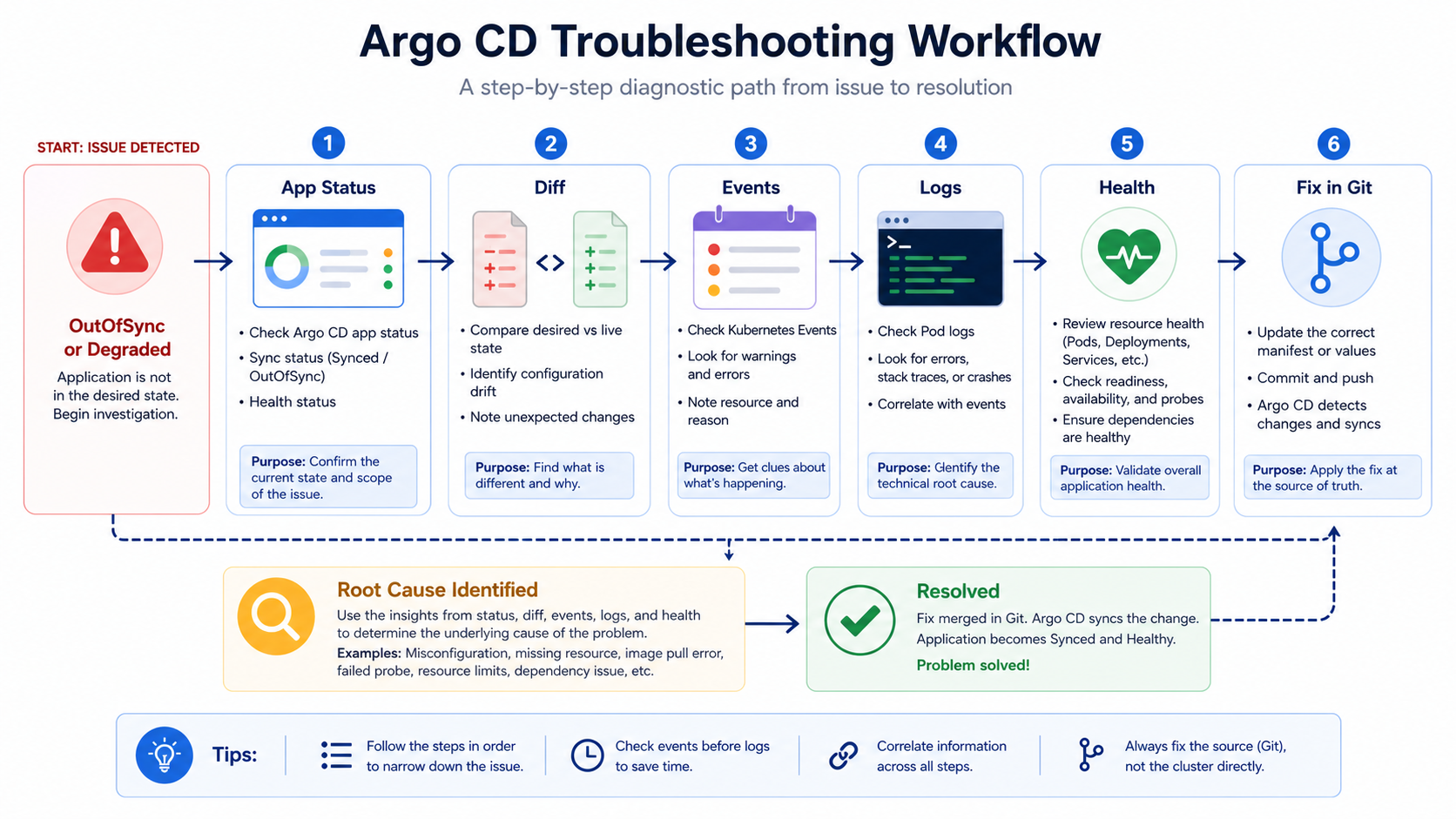
App is OutOfSync
Check what differs:
argocd app diff hello-nginxCommon causes:
- Someone changed the live resource manually.
- A generated field is being compared unexpectedly.
- The wrong Git branch, path, or Helm values file is configured.
- A controller mutates resources after Argo CD applies them.
App is Degraded
Check Kubernetes health:
kubectl describe deployment hello-nginx
kubectl get events --sort-by=.lastTimestamp
kubectl logs deployment/hello-nginx
Common causes:
- Image pull error.
- Readiness probe failure.
- Insufficient CPU or memory.
- Missing ConfigMap or Secret.
- Invalid ServiceAccount or RBAC.
Repo connection fails
Check repository credentials and network access. Private repositories need credentials configured in Argo CD. If your organization uses strict egress rules, the Argo CD repo-server must be able to reach the Git host.
Sync fails with permission errors
The Argo CD application controller needs permission to create or update the target resources. Review namespace, cluster role, and AppProject restrictions.
Helm rendering fails
Run Helm locally against the same chart and values:
helm template my-app ./charts/my-app -f values-prod.yamlIf local rendering fails, fix the chart before debugging Argo CD.
When Argo CD Is a Good Fit
Argo CD is a strong fit when:
- Your applications run on Kubernetes.
- You want Git to be the source of truth.
- You manage multiple environments or clusters.
- You need visible drift detection.
- You want self-service deployment with guardrails.
- You use Helm, Kustomize, or declarative Kubernetes manifests.
It may be less useful when:
- You do not use Kubernetes.
- Your deployment process is entirely serverless and managed elsewhere.
- Your team is not ready to maintain clean manifests in Git.
- You need a full CI platform rather than a Kubernetes CD reconciler.
Practical Next Steps
If you are new to GitOps, do this in order:
- Install Argo CD in a local or non-production cluster.
- Deploy one simple app from Git.
- Test manual sync, drift detection, and rollback.
- Add Helm or Kustomize only after the basic loop is clear.
- Configure SSO and RBAC before giving access to a wider team.
- Add monitoring and alerting around application health.
- Move toward automated sync only after pull request controls are solid.
GitOps works best when the process is boring: Git change, review, merge, reconcile, observe. Argo CD gives Kubernetes teams the reconciliation engine and visibility needed to make that workflow practical.
FAQ
What is GitOps in simple terms?
GitOps is a deployment approach where Git stores the desired state of your system and automation keeps the live environment aligned with that state. For Kubernetes, that usually means manifests, Helm values, or Kustomize overlays live in Git, and a controller applies them to the cluster.
What is Argo CD used for?
Argo CD is used for continuous delivery to Kubernetes. It watches Git repositories, renders Kubernetes manifests, compares them with live cluster resources, and syncs changes when instructed or when automated sync is enabled.
Does Argo CD replace Jenkins, GitHub Actions, or GitLab CI?
No. Argo CD usually complements CI tools. CI builds, tests, scans, and publishes artifacts. Argo CD deploys the approved Kubernetes desired state from Git to the cluster.
Is Argo CD only for Kubernetes?
Argo CD is designed for Kubernetes-native continuous delivery. It manages Kubernetes resources and applications that can be represented as Kubernetes manifests.
Should I use automatic sync in production?
Automatic sync can work in production, but only when pull request reviews, CI checks, rollback plans, RBAC, and monitoring are mature. Many teams start with manual production sync and use automatic sync in development or staging.
What is the difference between sync status and health status in Argo CD?
Sync status tells you whether live cluster resources match the desired state in Git. Health status tells you whether those live resources appear operational from Kubernetes conditions and Argo CD health checks.
Can Argo CD deploy Helm charts?
Yes. Argo CD can deploy Helm charts from Git repositories or chart repositories and can use values files to customize releases across environments.
How do I roll back with Argo CD?
The cleanest rollback is usually a Git revert or a change that restores the previous manifest, image tag, or Helm values. After the revert is merged, Argo CD syncs the cluster back to that desired state.
Schema-Ready FAQ
{
  "@context": "https://schema.org",
  "@type": "FAQPage",
  "mainEntity": [
    {
      "@type": "Question",
      "name": "What is GitOps in simple terms?",
      "acceptedAnswer": {
        "@type": "Answer",
        "text": "GitOps is a deployment approach where Git stores the desired state of your system and automation keeps the live environment aligned with that state. For Kubernetes, that usually means manifests, Helm values, or Kustomize overlays live in Git, and a controller applies them to the cluster."
      }
    },
    {
      "@type": "Question",
      "name": "What is Argo CD used for?",
      "acceptedAnswer": {
        "@type": "Answer",
        "text": "Argo CD is used for continuous delivery to Kubernetes. It watches Git repositories, renders Kubernetes manifests, compares them with live cluster resources, and syncs changes when instructed or when automated sync is enabled."
      }
    },
    {
      "@type": "Question",
      "name": "Does Argo CD replace Jenkins, GitHub Actions, or GitLab CI?",
      "acceptedAnswer": {
        "@type": "Answer",
        "text": "No. Argo CD usually complements CI tools. CI builds, tests, scans, and publishes artifacts. Argo CD deploys the approved Kubernetes desired state from Git to the cluster."
      }
    },
    {
      "@type": "Question",
      "name": "Is Argo CD only for Kubernetes?",
      "acceptedAnswer": {
        "@type": "Answer",
        "text": "Argo CD is designed for Kubernetes-native continuous delivery. It manages Kubernetes resources and applications that can be represented as Kubernetes manifests."
      }
    },
    {
      "@type": "Question",
      "name": "Should I use automatic sync in production?",
      "acceptedAnswer": {
        "@type": "Answer",
        "text": "Automatic sync can work in production, but only when pull request reviews, CI checks, rollback plans, RBAC, and monitoring are mature. Many teams start with manual production sync and use automatic sync in development or staging."
      }
    }
  ]
}

