


AI DevOps Roadmap 2026: Skills, Tools, Projects, and a 30-Day Learning Plan
AI DevOps is no longer vague future trend. In 2026, people searching for AI and DevOps are asking: which skills should I learn, will AI replace DevOps engineers, how does AIOps fit with CI/CD, which tools are worth learning, and what projects prove real ability?
This roadmap gives beginners and practitioners a practical path to use AI without turning production into an experiment.
Quick Answer
The best AI DevOps roadmap for 2026 is: learn DevOps fundamentals first, then add AI-assisted coding, CI/CD automation, observability, AIOps, security scanning, platform engineering, and governance. Start with one workflow such as pipeline review, log summarization, test failure triage, cloud cost analysis, or incident response. Build small projects, measure outcomes, and keep humans responsible for production changes.
Why AI DevOps Is a Real Skill Area Now
Search demand around AI and DevOps has shifted from hype to implementation. Developers want safer delivery, operations teams want fewer noisy alerts, security teams want controlled AI-assisted reviews, and hiring teams increasingly expect engineers to understand both automation and responsible AI usage.
Recent industry research supports this cautious view. Google Cloud’s DORA research describes AI as an amplifier: it can strengthen good engineering systems, but it can also magnify weak processes. GitHub’s Octoverse coverage shows AI and agents reshaping development workflows. CNCF platform engineering discussions in 2026 also point toward platforms built for AI-era workloads.
The lesson is simple: AI does not replace DevOps discipline. It rewards teams that already have good version control, reliable tests, observability, and safe release practices.
The AI DevOps Skill Stack
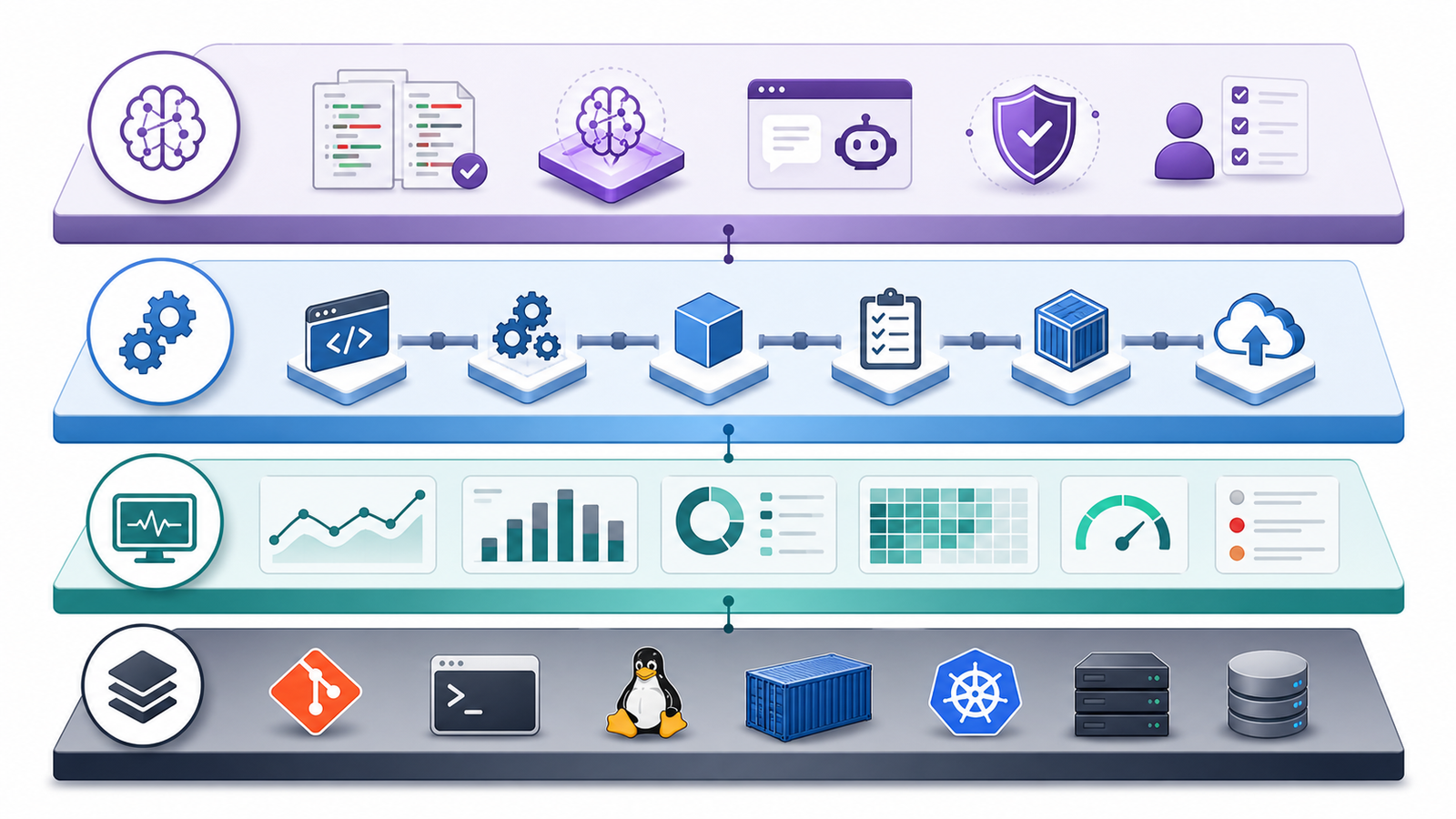
Think of AI DevOps as four layers.
| Layer | What to Learn | Why It Matters |
|---|---|---|
| DevOps foundation | Linux, Git, networking, CI/CD, containers, cloud, IaC | AI cannot safely automate systems you do not understand |
| Delivery automation | GitHub Actions, GitLab CI, Jenkins, Argo CD, Terraform, Helm | Most AI DevOps use cases touch pipelines and deployment |
| Operations intelligence | Logs, metrics, traces, SLOs, alert routing, incident review | AIOps depends on clean operational data |
| AI guardrails | Prompting, policy checks, secret handling, evals, approval gates | Prevents AI from becoming an unreviewed production actor |
Beginners often jump straight into “AI tools for DevOps” lists. Learn the workflow first, then choose AI assistance that reduces toil inside that workflow.
Roadmap Stage 1: Strengthen Core DevOps Fundamentals
Before using AI in pipelines, make sure you can explain and troubleshoot the pipeline without AI.
Start with these basics:
- Git branching, pull requests, code review, and release tags
- Linux, networking, Docker, Kubernetes, Terraform or OpenTofu
- CI/CD basics: build, test, scan, package, deploy, verify, rollback
Practical project: create a small web API, containerize it, write a CI pipeline, publish an image, deploy it to a test Kubernetes namespace, and add rollback. Then ask an AI assistant to review your pipeline and compare suggestions with official documentation.
Roadmap Stage 2: Use AI for CI/CD Without Losing Control
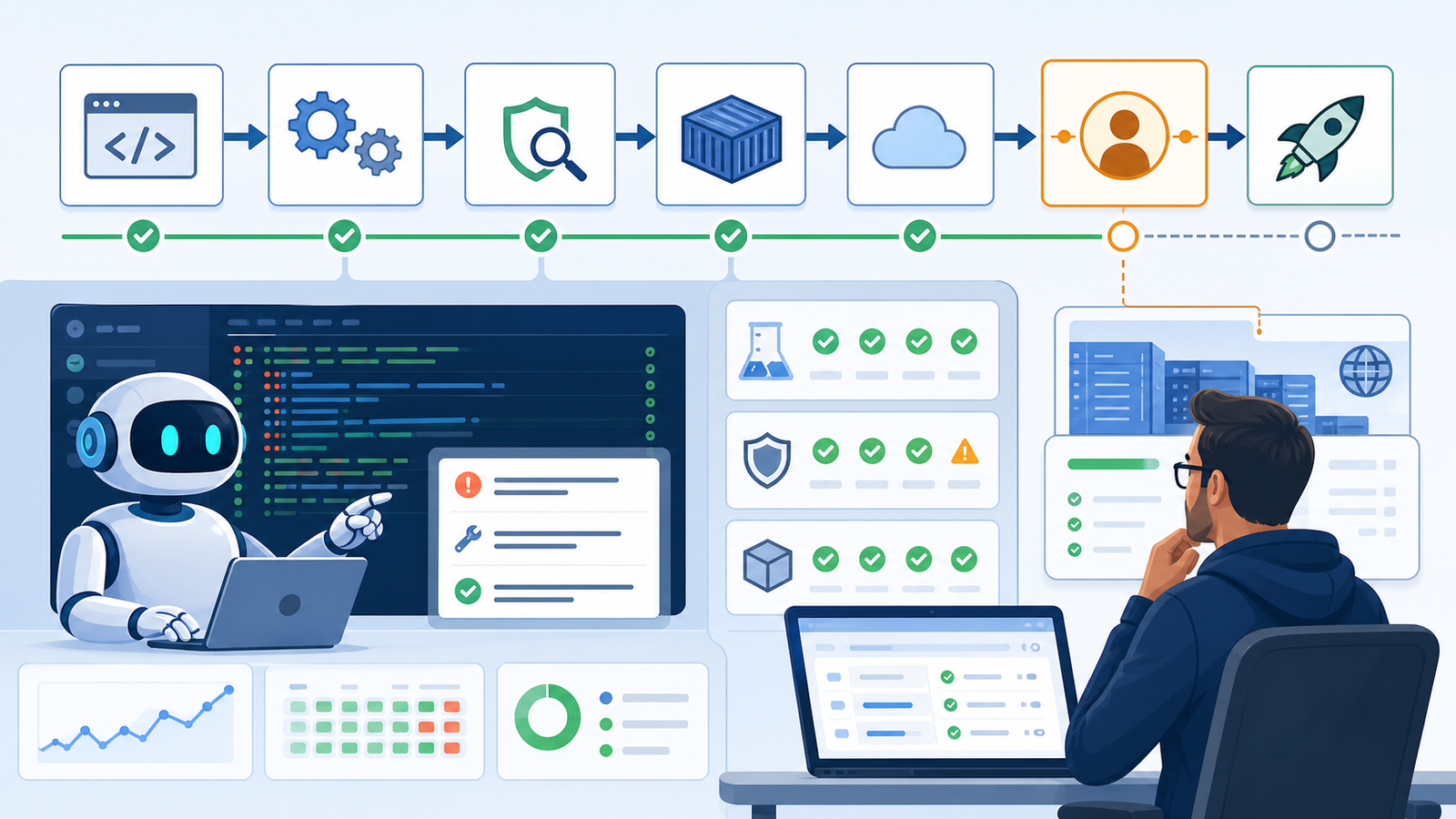
AI is useful in CI/CD when it improves review quality or saves repetitive investigation time. It is dangerous when it silently changes deployment behavior.
Good beginner use cases:
- Summarize failed test logs and explain pipeline errors
- Suggest missing cache steps or draft YAML for a known CI/CD system
- Compare pipeline versions and draft rollback instructions
Avoid giving an agent permission to deploy to production early. A safer pattern is “AI suggests, human approves, pipeline enforces.”
name: ai-assisted-ci
on:
  pull_request:

jobs:
  test-and-scan:
    runs-on: ubuntu-latest
    steps:
      - uses: actions/checkout@v4
      - uses: actions/setup-node@v4
        with:
          node-version: 22
      - run: npm ci
      - run: npm test
      - run: npm audit --audit-level=high
The AI assistant can explain failures or suggest improvements, but the pipeline still runs deterministic tests and security checks.
For a deeper tool comparison, link to Best CI/CD Tools 2026 Compared.
Roadmap Stage 3: Learn AIOps the Practical Way

AIOps means applying AI and machine learning to IT operations. In real teams, it usually starts with alert grouping, anomaly detection, incident summaries, probable root cause suggestions, and runbook assistance.
Start with observability first:
- Logs, metrics, and traces
- SLOs tied to user impact
- Incident notes with timeline, impact, mitigation, root cause, and follow-up
Then add AI on top. If logs are messy, alerts are duplicated, and incident notes are missing, an AIOps tool will struggle. Clean data beats a flashy dashboard.
Practical project: run a demo app, generate normal and failure traffic, collect logs and metrics, then use an AI assistant to summarize the incident timeline. The goal is to learn what signals the model needs to be useful.
Roadmap Stage 4: Add DevSecOps Guardrails for AI Workflows
AI makes DevSecOps more important, not less. Generated pipeline changes can introduce broad permissions, unsafe secrets handling, weak image scanning, or unreviewed dependency upgrades.
Use these guardrails:
- Never paste production secrets into AI tools
- Use least-privilege tokens, dependency scans, and container scans
- Require code owner approval for pipeline and IaC changes
- Keep production deploys behind manual or policy gates
- Treat AI-generated code as untrusted until reviewed and tested
Example policy prompt: “Review this Terraform change for public exposure, broad IAM permissions, missing tags, cost risk, and deletion risk. Return findings only. Do not rewrite the file.”
Roadmap Stage 5: Understand Platform Engineering in the AI Era
Platform engineering is becoming the home for many AI DevOps patterns. Instead of every team inventing its own workflow, platform teams can provide approved templates, golden paths, internal developer portals, standard observability, secure secrets handling, and audited automation.
Useful platform ideas:
- A standard service template with CI, tests, scans, Dockerfile, Helm chart, and dashboards
- A pull request bot that explains test failures and links to runbooks
- A deployment risk score based on test results, changed files, and service history
- An incident assistant that drafts timeline notes but does not close the incident
CNCF’s 2026 platform engineering discussions point in the same direction: platforms need to support AI-native workloads and faster delivery patterns while keeping governance built in.
Tool Categories Worth Learning
Do not try to learn every tool. Learn one or two tools in each category deeply enough to troubleshoot.
| Category | Examples | What to Practice |
|---|---|---|
| CI/CD | GitHub Actions, GitLab CI, Jenkins, CircleCI | Build, test, scan, deploy, rollback |
| IaC | Terraform, OpenTofu, Pulumi | Plan review, drift checks, policy gates |
| Containers | Docker, Kubernetes, Helm | Image builds, probes, rollouts, resource limits |
| GitOps | Argo CD, Flux | Declarative deployments and rollback |
| Observability | Prometheus, Grafana, OpenTelemetry, Datadog, New Relic | Logs, metrics, traces, SLOs |
| Security | Trivy, Snyk, Semgrep, OPA, Checkov | Dependency, image, code, and policy scanning |
| AI assistance | Coding assistants, chat tools, AIOps features, incident copilots | Review, summarization, triage, documentation |
For beginners, GitHub Actions plus Docker plus Terraform plus one observability stack is enough. For practitioners, the differentiator is whether you can explain failure modes and design safe automation.
Buyer-Intent Checklist: How to Choose AI DevOps Tools
If you are evaluating paid AI DevOps tools, use a neutral checklist.
Selection criteria:
- Does it integrate with your CI/CD, Git, cloud, and observability tools?
- Can you control data retention and prevent secret exposure?
- Does it support RBAC, audit logs, and evidence-backed recommendations?
- Can it work in read-only mode before automation is enabled?
- Can you measure impact on MTTR, change failure rate, lead time, alert volume, and review time?
Pricing caveat: AI features are often bundled differently from base DevOps or observability plans. Watch for charges based on seats, telemetry volume, ingestion, retention, model usage, or premium automation features.
Pros of AI DevOps tools:
- Faster log and incident summarization
- Better first drafts for pipelines and runbooks
- Reduced repetitive triage
- More consistent review checklists
- Helpful learning support for beginners
Cons:
- Incorrect recommendations can look confident
- Poor telemetry leads to poor answers
- Tool sprawl can increase cost
- Secret and data handling needs careful review
- Automation without approval can create production risk
For a broader buyer guide, link to What Is Generative AI? Beginner’s Guide.
A 30-Day AI DevOps Learning Plan
Days 1-5: DevOps refresh. Build a small API, add tests, create a Dockerfile, and run it locally.
Days 6-10: CI/CD. Create a GitHub Actions or GitLab CI pipeline. Add install, test, lint, audit, and artifact steps.
Days 11-15: Infrastructure. Provision a small test environment with Terraform or OpenTofu. Practice plan review and safe destroy.
Days 16-20: Kubernetes and GitOps. Deploy the app to a local or cloud Kubernetes cluster. Add health probes, resource requests, and rollback.
Days 21-24: Observability. Add structured logs, basic metrics, and a dashboard. Create one fake incident and write a postmortem.
Days 25-27: AI-assisted review. Ask an AI assistant to review your pipeline, Dockerfile, Terraform, and incident notes. Accept only changes you understand.
Days 28-30: Portfolio project. Publish a short README explaining your architecture, pipeline, security checks, observability, AI usage, and known limitations.
This plan is intentionally practical. A hiring manager or client learns more from one working project than from a list of AI tool names.
Common Mistakes
Common mistakes include using AI to skip fundamentals, confusing AIOps with observability, trusting generated YAML without branch testing, ignoring security, and measuring activity instead of outcomes. More automated comments do not matter if lead time, MTTR, reliability, and review quality do not improve.
Troubleshooting AI DevOps Workflows
If AI suggestions are generic, provide the failed command, relevant logs, expected behavior, changed files, and constraints. If fixes look unsafe, narrow the role and ask for risks first. If incident summaries are wrong, improve timestamps, structured logs, trace IDs, and alert labels. If the team does not trust recommendations, start in read-only mode.
FAQ
What is AI DevOps?
AI DevOps is the use of AI, machine learning, and software agents to assist software delivery and operations tasks such as CI/CD, code review, testing, incident response, observability, security triage, documentation, and infrastructure review.
Will AI replace DevOps engineers?
AI will automate some repetitive DevOps tasks, but it does not replace engineers who understand systems, reliability, security, cloud infrastructure, and release risk. The valuable skill is learning how to use AI safely inside real engineering workflows.
Is AIOps the same as DevOps?
No. DevOps is a broad culture and engineering practice for software delivery and operations. AIOps is a narrower category that uses AI for operational data, alerting, incident analysis, anomaly detection, and root cause assistance.
Which AI DevOps skill should beginners learn first?
Beginners should learn CI/CD troubleshooting first. It is practical, visible, and easy to turn into portfolio work. Start by using AI to explain failed builds and review pipeline changes, while still relying on tests and human approval.
What tools should I learn for AI DevOps in 2026?
Start with Git, Linux, Docker, GitHub Actions or GitLab CI, Terraform or OpenTofu, Kubernetes basics, and one observability stack. Then add AI-assisted review, log summarization, AIOps features, and policy checks.
How do I use AI safely in production workflows?
Use least privilege, keep secrets out of prompts, require human approval for production changes, log automation actions, test all generated changes, and start with read-only use cases such as summarization and risk review.
Internal Link Suggestions
- Link “generative AI” to: https://gravitydevops.com/what-is-generative-ai-beginners-guide/
- Link “CI/CD tools” to: https://gravitydevops.com/best-cicd-tools-2026-compared/
- Link “AI DevOps workflow” to: https://gravitydevops.com/ai-devops-workflow-2026/
- Link “AIOps vs DevOps automation” to: https://gravitydevops.com/aiops-vs-devops-automation-2026/
- Link “best AI DevOps tools” to: https://gravitydevops.com/best-ai-devops-tools-2026-selection-framework/


