


Direct answer: The best AI tools to create financial reports are Cube for governed FP&A reporting, Syft Analytics for small-business report packs, Datarails for Excel-based finance teams, Vena for Microsoft-centered planning, Microsoft 365 Copilot for flexible workbook analysis, and Gemini in Google Sheets for collaborative finance work. Every output needs accountant review.
AI can shorten the path from ledgers, budgets and operational data to a management report. It cannot decide whether a revenue-recognition policy is correct, certify that a consolidation is complete or turn an unexplained variance into an audited fact. The useful tools keep formulas, source systems, permissions and human approval close to the generated narrative.
This comparison was checked on August 27, 2026 using current US-facing product, pricing, help, security and privacy pages. Plans and AI features change. This is a documentation-based review: we compared published capabilities and constraints, but did not open paid accounts or claim hands-on output-quality testing.
If you need a general-purpose report from a CSV rather than a finance-specific workflow, see our guide to AI tools that turn data into reports. For continuously refreshed visuals, compare the best AI tools for charts and dashboards.
Best AI tools to create financial reports
| Tool | Best for | Financial-report strength | Lowest practical access | Main limitation |
|---|---|---|---|---|
| Cube | Governed FP&A and board reporting | Traceable variance commentary, consolidations and live decks | Custom quote and demo | No public price or self-serve free tier |
| Syft Analytics | Small businesses and accounting advisers | P&L, balance sheet, cash flow, report packs and AI insights | 14-day no-card trial; paid Standard starts at $23/month | Free Basic does not establish full AI report-pack access |
| Datarails | Excel-native FP&A teams | Consolidated actuals, budgets, dashboards, reports and presentations | Custom quote and demo | Pricing is not public; entry plan is limited to two users and one integration |
| Vena | Microsoft-centered midmarket and enterprise finance | Governed planning data, Copilot analysis and Teams delivery | Custom quote and demo | Implementation and licensing are heavier than a spreadsheet assistant |
| Microsoft 365 Copilot | Ad hoc finance work in Excel | Editable formulas, PivotTables, charts, summaries and variance analysis | Copilot Business currently starts at $18/user/month annually, plus a qualifying plan | Not a finance system of record or automated consolidation platform |
| Gemini in Google Sheets | Collaborative analysis in Google Workspace | Formulas, tables, charts, outliers and narrative across Workspace | Business Standard: $14/user/month annually, with a trial | Not a controlled close, consolidation or statutory-reporting system |
How we ranked them: We screened nine credible products—Cube, Syft Analytics, Datarails, Vena, Microsoft 365 Copilot, Gemini in Google Sheets, Pigment, Workday Adaptive Planning and Anaplan. We compared source-system connectivity, consolidation, financial-statement support, variance analysis, narrative generation, drill-down, export, audit trail, permissions, published access terms and the ability to trace a claim to underlying data. The six selected tools provide the clearest documented path to a financial management report. We gave more weight to control and verifiability than to conversational polish.
The ranking covers management and FP&A reporting, not tax filing, assurance or automated investment advice. “AI-generated” means the software can assist with analysis or commentary; it does not mean the model should calculate or approve authoritative balances.
1. Cube: best for governed FP&A reporting
Cube connects ERP, CRM, HRIS, warehouse and spreadsheet data to a governed finance model, then syncs results into Excel, Google Sheets, PowerPoint and Google Slides. Its current FP&Agent suite documents root-cause variance analysis, transaction-level drill-down, AI-drafted commentary and board-ready reporting. That combination makes Cube the strongest option here when a finance team needs both narrative speed and a visible route back to the general ledger.
Cube also supports multi-entity roll-ups, intercompany eliminations, custom roles, approval workflows and audit trails. Its Workspace documentation says finance can edit and approve AI commentary before it ships, while live deck exports can refresh from governed actuals. Those are more important safeguards than a chatbot that merely writes a persuasive summary.
Why it ranks first: every reported figure can remain connected to the transaction and governed model, while finance retains familiar spreadsheet and presentation workflows.
Access and limitation: Cube’s pricing page lists Bronze, Silver and Gold plans but requires a custom quote. It offers a demo, not a self-serve free plan or a documented free trial. The platform is therefore a procurement decision, not a quick tool for one monthly report.
2. Syft Analytics: best for small-business report packs
Syft Analytics is the most approachable finance-specific product in the ranking. It connects accounting and other business data, then produces financial statements, visualizations, forecasts and shareable report packs. Its Financials documentation covers P&L, balance sheet, working capital, changes in equity and trial balance views, with comparisons against prior periods, budgets or forecasts and drill-down to transactions.
Syft Assist AI can generate report insights, highlight patterns and anomalies, draft an email summary and add commentary to PDF or Word exports. Reports can also be downloaded as Excel files or sent through Slack and Microsoft Teams. That is a practical fit for an accountant or fractional CFO who must explain results to several clients rather than build an enterprise planning model.
Why it ranks here: Syft combines recognizable accounting statements with accessible narrative and delivery tools, and it publishes clearer entry terms than most finance-native competitors.
Access and limitation: the current US pricing page lists a 14-day trial on any plan with no credit card. Standard starts at $23 per month, Plus at $47 and Advanced at $95; the page also lists a free Basic plan. Full financial reporting, exports and Syft Assist AI appear in the paid feature comparison, so do not assume Basic includes an AI-generated management pack. The trial provides some, not necessarily all, features.
3. Datarails: best for Excel-native FP&A teams
Datarails is built for finance teams that want to keep existing Excel models while centralizing versions and source data. It can consolidate actuals, budgets and forecasts across entities and systems, produce dashboards and reports, and update PowerPoint outputs from the same controlled data layer. Genius and the newer Datarails AI agents can answer finance questions, draft summaries and help turn findings into presentations.
The workflow is narrower and more useful than uploading a workbook to a general chatbot: the financial model remains in Excel, while Datarails provides cloud storage, consolidation, drill-down and collaboration. That makes it a strong fit for a team whose monthly reporting process already depends on carefully built workbooks.
Why it ranks here: Datarails reduces spreadsheet version and collection work without demanding that finance abandon Excel.
Access and limitation: Datarails pricing is quote-based, with no public dollar amount or self-serve free tier. Professional includes two users, one integration, unlimited dashboards, reporting and planning, AI agents and the FinanceOS AI connector; Premium increases that to five users and two integrations. The vendor offers a sales demo rather than a documented free trial. Confirm connector scope, implementation work, retention and export rights in the contract.
4. Vena: best for Microsoft-centered finance teams
Vena combines an Excel-oriented planning platform with a governed multidimensional database and AI delivered through Vena Copilot. Its current documentation describes natural-language analysis, report generation, scenario comparison and delivery inside Microsoft Teams. Copilot inherits Vena permissions, and administrators can review questions and responses.
That architecture suits a finance organization already standardized on Excel, Teams and Microsoft identity. Vena can keep planning logic and access rules in the finance platform while allowing business users to ask questions without receiving the entire underlying model.
Why it ranks here: Vena joins familiar Microsoft workflows with finance-specific security, auditability and planning context.
Access and limitation: Vena’s Professional and Complete plans require a quote. Vena Copilot is listed with Professional, while the Complete tier adds Vena Insights, a sandbox and other services; some APIs and add-ons cost extra. A product demo is not free ongoing access. Teams should budget for data modeling, implementation and governance rather than compare Vena with a $20 consumer assistant.
5. Microsoft 365 Copilot: best for flexible Excel analysis
Copilot in Excel can edit workbooks using native tables, formulas, PivotTables and charts. Microsoft specifically documents budgets, financial models, numerical insights, trends and outliers. Its finance guidance also demonstrates forecast-versus-actual variance analysis and reconciliation summaries. Because the generated workbook remains editable, a reviewer can inspect formulas rather than accept only a paragraph.
Copilot is a sensible choice for an ad hoc monthly variance report or management summary when the workbook already exists in Microsoft 365. It is not a substitute for consolidation software, close controls or an ERP. A one-time snapshot from Power BI also does not stay connected for automatic refresh.
Why it is included: it adds useful AI assistance inside the spreadsheet most finance teams already know, with enterprise identity and data protection available to business customers.
Access and limitation: the current US business pricing page lists Microsoft 365 Copilot Business from $18 per user per month when paid annually, and says a separate qualifying Microsoft 365 plan is required. Copilot Chat is available at no additional cost for eligible Entra users, but it is not equivalent to full work-grounded Copilot across Excel and other apps. Feature access and administrator settings vary.
6. Gemini in Google Sheets: best for collaborative finance analysis
Gemini in Google Sheets can create tables, formulas and charts, identify trends and outliers, and answer questions about spreadsheet data. Google’s finance examples include finding budget variances, modeling cash flow and turning financial information into executive summaries across Sheets and Docs. That cross-app workflow is useful when several department owners collaborate on a budget in Workspace.
Google states that Workspace prompts and content are not used to train generative AI models outside the organization without permission, and existing Workspace controls continue to apply. The same caveat as Microsoft remains: inherited permissions are only safe if the shared drive and spreadsheet were correctly permissioned in the first place.
Why it is included: Gemini is the simplest collaborative option for teams whose source model and review process already live in Google Sheets and Docs.
Access and limitation: Google’s current US plan page lists Business Standard at $14 per user per month with an annual commitment or $16.80 billed monthly, with a trial. The page includes premium AI in Sheets and other Workspace apps. Gemini can assist with a management report, but it does not provide the consolidation, transaction lineage, period locks or close workflow of a dedicated FP&A platform.
How to choose financial-reporting AI
- Choose Cube when board reporting, transaction lineage and governed multi-source data matter most.
- Choose Syft for client-ready small-business statements, report packs and clear trial access.
- Choose Datarails when the finance model must stay in Excel but collection and consolidation need control.
- Choose Vena for Microsoft-centered planning teams that need permissions, workflow and scenario modeling.
- Choose Microsoft 365 Copilot for one-off workbook analysis when a finance platform would be excessive.
- Choose Gemini in Sheets when collaborative budgets and narrative already live in Google Workspace.
Do not select a tool from the quality of its demo commentary. Ask whether it can preserve the chart of accounts, entity structure, fiscal calendar, exchange-rate policy, eliminations, period locks, approval status and source lineage. A good sentence about gross margin is still wrong if it used the wrong revenue definition.
A safer workflow for AI-generated financial reports
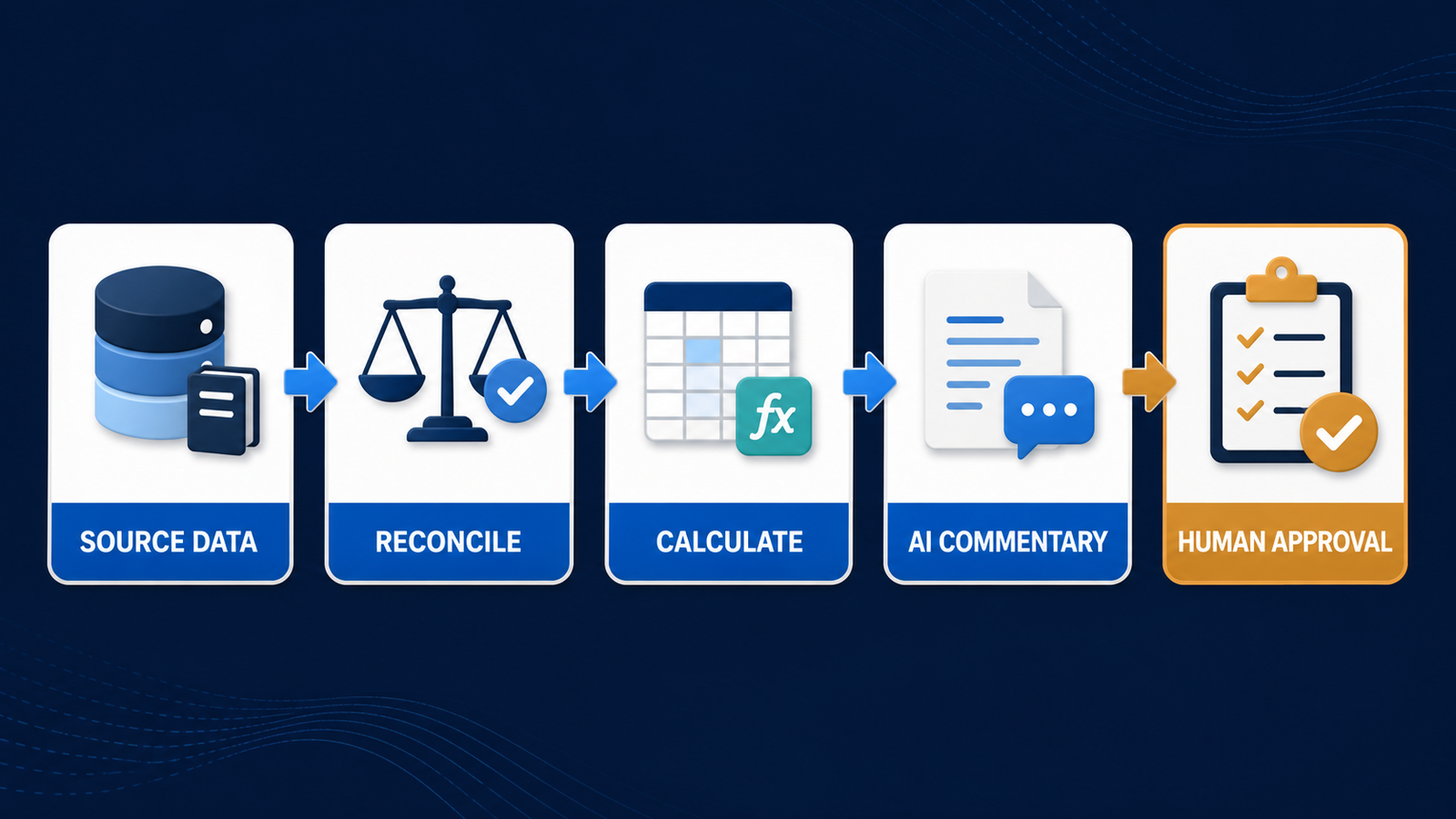
- Lock the reporting basis. Define entities, reporting period, currency, accounting basis, materiality and comparison scenario before prompting.
- Reconcile source data. Tie opening balances, trial balance totals and key subledgers to the approved source before AI analysis begins.
- Keep calculations deterministic. Use ledger rules, spreadsheet formulas or governed semantic models for authoritative numbers. Use AI to explain them.
- Request evidence with commentary. Require every variance explanation to name the amount, period, comparison and source transaction or account group.
- Separate fact from hypothesis. Label confirmed drivers, plausible explanations and questions for business owners.
- Apply reviewer sign-off. Assign a preparer and an approver, preserve versions and record corrections to generated text.
- Review data handling. Check retention, subprocessors, model-training terms, regional hosting and permissions before uploading confidential finance data.
Prompt quality still matters. A useful request names the fiscal period, budget version, materiality threshold, approved metrics and output structure. Our prompt-engineering guide explains how explicit context and constraints reduce ambiguity, while our LLMOps guide covers evaluation and monitoring when generated reporting becomes a repeated process.
For example: “Using the approved Actual and Budget versions for Q2, produce a management variance report by department. Use the company fiscal calendar and existing EBITDA formula. Show absolute and percentage variance, flag items over $25,000 or 8%, link each statement to the account drill-down, and separate confirmed transaction drivers from questions requiring owner input. Do not alter source formulas.”
Privacy, audit and licensing caveats
Financial reports often contain payroll, customer, vendor and forward-looking information. Use the minimum data necessary, remove personal fields when they do not affect the analysis and prefer an approved business tenant over a consumer account. Existing permissions must be audited before an assistant is allowed to retrieve broadly from cloud storage.
Generated commentary should never be described as audited, certified or compliant merely because the software offers an audit log. An audit trail records activity; it does not prove that the accounting treatment or model output is correct. Statutory filings, lender reports and investor communications need the organization’s normal legal, accounting and disclosure review.
Frequently asked questions
Can AI generate financial statements?
Finance platforms such as Syft, Cube, Datarails and Vena can assemble or present P&L, balance-sheet, cash-flow and management-report data from connected systems. AI may add analysis or commentary, but authoritative statements still depend on mapped accounts, complete ledgers, consolidation rules and qualified review.
What is the best free AI tool for financial reports?
There is no strong, fully free substitute for a controlled financial-reporting platform. Syft offers a free Basic plan and a 14-day no-card trial, but its full financial reporting, exports and AI features are associated with paid plans. Spreadsheet assistants may offer trials or limited chat access; verify that confidential data is approved before using them.
Can ChatGPT or another general chatbot create a monthly finance report?
It can draft a one-off analysis from an approved spreadsheet, but it does not automatically supply ledger controls, consolidation, period locking, lineage or recurring governance. Use deterministic formulas for the numbers, disclose the data boundary and have finance verify every material statement.
Should AI write variance commentary automatically?
AI can prepare a first draft when each statement remains tied to a verified amount and source. A finance reviewer should confirm causation with account owners, remove speculation and approve the final narrative before it reaches executives, lenders or investors.
Bottom line
Cube is the best documented choice for governed FP&A reporting, while Syft is more accessible for small-business and adviser report packs. Datarails and Vena suit established Excel and Microsoft finance teams; Copilot and Gemini are better for flexible analysis than controlled close processes. Choose the system that makes every number traceable, then treat AI commentary as a reviewable draft—not accounting evidence.


