

Direct answer: The best free AI voice changers are Voicemod and Voice.ai for live calls or gaming, CapCut for changing voices inside videos, ElevenLabs for natural speech-to-speech conversion, and MyEdit for simple browser-based effects. FineVoice and Media.io offer more online presets, but their free limits and commercial rights are less clearly documented.
Reviewed September 3, 2026. Free allowances, voice libraries and licensing terms change frequently. Confirm the current product page and obtain consent before transforming an identifiable person’s voice.
An AI voice changer transforms an existing recording or microphone feed while keeping some combination of the original words, timing and expression. That is different from text to speech, which creates a new performance from written text. The distinction matters: creators who want to preserve acting or pacing need speech-to-speech conversion, while streamers need a low-latency virtual microphone.
This guide compares seven free AI voice changers online or through free desktop software. It separates genuinely usable free features from previews, rotating libraries and plans that block downloads. It also flags account requirements, export constraints, privacy and commercial-use uncertainty.
Best free AI voice changers online at a glance
| Tool | Best for | Free access | Important limitation |
|---|---|---|---|
| Voicemod | Live gaming, chat and streaming | Free desktop app with a rotating daily voice selection | Full library and custom VoiceLab require Pro |
| Voice.ai | Live AI voice conversion | Free PC and Mac app; vendor says no card required | Exact desktop quotas and voice availability are not clearly itemized |
| CapCut | Voice effects inside social video | Free online and app-based voice effects | Some assets and advanced features vary by region or plan |
| ElevenLabs | Natural recorded speech transformation | 10,000 monthly credits, about 10 voice-changer minutes | Free plan does not include commercial rights |
| MyEdit | Quick browser effects | One free effect download daily | Realistic human voices are preview-only without a subscription |
| FineVoice | Trying a large preset library | Free online conversion and a limited free account | Current numeric allowance is not clearly published |
| Media.io | Broad file-format support | Free browser voice filters and downloads | Free quota and commercial license are not clearly stated |
How we selected and ranked these voice changers
We screened 10 services and ranked seven using current official product, pricing, help and license pages. The criteria were transformation type, live versus uploaded-audio workflow, useful free allowance, account or card requirement, download access, file limits, editing control, privacy disclosures, consent safeguards, commercial-use language and ease of use. Kits AI, EaseUS VoiceWave and MagicMic were screened but not ranked because the current free/export boundary was less useful or less transparent for this intent.
This is a documentation-based comparison, not a matched-voice listening test. We did not claim that one service sounds universally more realistic, nor did we test every desktop app, voice model or region-specific entitlement. “Best for” labels are editorial recommendations based on documented workflow fit.
1. Voicemod: best free live voice changer for gaming and chat
Voicemod is built around a virtual microphone for Discord, games, streaming and voice chat. The free edition includes a limited selection of voices that rotates daily, plus a restricted soundboard. Its desktop workflow is more practical for live sessions than browser tools that require uploading a finished recording.
The company’s Free-versus-Pro guide says the complete voice library, unlimited soundboards and VoiceLab custom voice builder require Pro. Voicemod also warns that its AI voices work best with clear English speech and adequate local hardware.
Why it ranks first: the free app provides a real live workflow rather than a short export preview. Limitation: users cannot choose freely from the full catalog every day, and the rotating selection makes a consistent character harder to maintain.
2. Voice.ai: best alternative for real-time AI conversion
Voice.ai also installs as a virtual microphone and advertises compatibility with Discord, Zoom, OBS, games and any application that accepts a microphone. Its official real-time voice changer page lists PC and Mac support and says the download is free with no credit card.
The product emphasizes user-created voices and live speech-to-speech conversion. That breadth is useful for experimentation, but a community voice library also demands caution: a recognizable voice is not automatically licensed merely because it appears in an app. Use original or clearly authorized voices, and do not imply endorsement by the person being imitated.
Why choose it: broad real-time app compatibility and a large voice ecosystem. Limitation: the vendor does not clearly itemize a stable free desktop quota or guarantee that every voice remains available, so test the current build before planning a recurring show.
3. CapCut: best for changing voices inside videos
CapCut is the strongest fit when the audio already belongs to a video. Users can upload a clip, select Voice Effects, preview styles such as robot or chipmunk and export from the same editor. The official CapCut voice changer page describes free online access and integrates trimming, noise reduction, captions and social-video export.
Why it stands out: timing remains visible against the video, reducing the round trips required by audio-only services. Limitation: CapCut’s catalog, regional availability and licenses vary across effects, stock assets and plans. Do not assume that every element visible in the editor has identical commercial rights.
4. ElevenLabs: best free allowance for natural speech-to-speech
ElevenLabs accepts recorded or uploaded audio and aims to preserve delivery, accent and emotion while changing the speaker. Its Voice Changer supports common formats and files up to 50 MB. The current Free plan provides 10,000 monthly shared credits; the pricing page charges Voice Changer at 1,000 credits per audio minute, which works out to roughly 10 minutes if no credits are used elsewhere.
That allowance resets monthly, but Free credits do not roll over. More importantly, ElevenLabs’ current plan comparison places commercial rights on paid plans rather than Free. Free output is therefore suitable for evaluation and eligible noncommercial use, not an automatically cleared client or monetized production.
Why it is included: the free limit is numeric and easy to understand. Limitation: credits are shared across ElevenLabs products, and commercial use requires an eligible paid plan.
5. MyEdit: best one-click browser effects
MyEdit runs in a browser and accepts MP3, WAV, M4A and FLAC files up to 100 MB or 10 minutes. It separates playful effects from more realistic human transformations. According to the official MyEdit Voice Changer page, free accounts receive one effect download per day, while realistic human voices can be previewed for 10 seconds but require a subscription to download.
MyEdit says uploads are encrypted during transfer and removed after processing. That is helpful documentation, but users should still avoid sending confidential calls, biometric voice data or recordings containing other people without permission.
Why use it: the free-download boundary is unusually explicit for a browser tool. Limitation: “free voice changer” mainly means downloadable effects; the realistic human-voice mode is effectively a preview.
6. FineVoice: best for exploring many online presets
FineVoice supports microphone recording or uploaded audio and advertises more than 1,000 voice choices across character, age and gender styles. Its online voice changer states that users can convert and download audio for free, while the support center confirms that a Free version has monthly allowances.
The current public pages do not consistently expose a simple numeric conversion or download limit. FineVoice says original voices can be used commercially, but that statement should not be extended to celebrity or character-like presets. Rights depend on the specific voice and intended use.
Why it makes the list: a large browser-accessible library and an export path. Limitation: the allowance and licensing boundary need an in-product check before professional use.
7. Media.io: best for unusual audio and video formats
Media.io’s browser tool accepts a broad set of audio and video formats, including MP3, M4A, OGG, MP4 and MOV, then applies gender, pitch and character-style filters. Its official voice changer page describes free processing and local or Dropbox download. The company also says uploaded files are deleted automatically within 24 hours.
Why it is useful: format support can eliminate a separate conversion step. Limitation: the marketing page does not clearly publish a durable free quota, output watermark rule or broad commercial license. Verify those terms inside the current account before relying on it for monetized content.
Free does not always mean downloadable or commercially usable
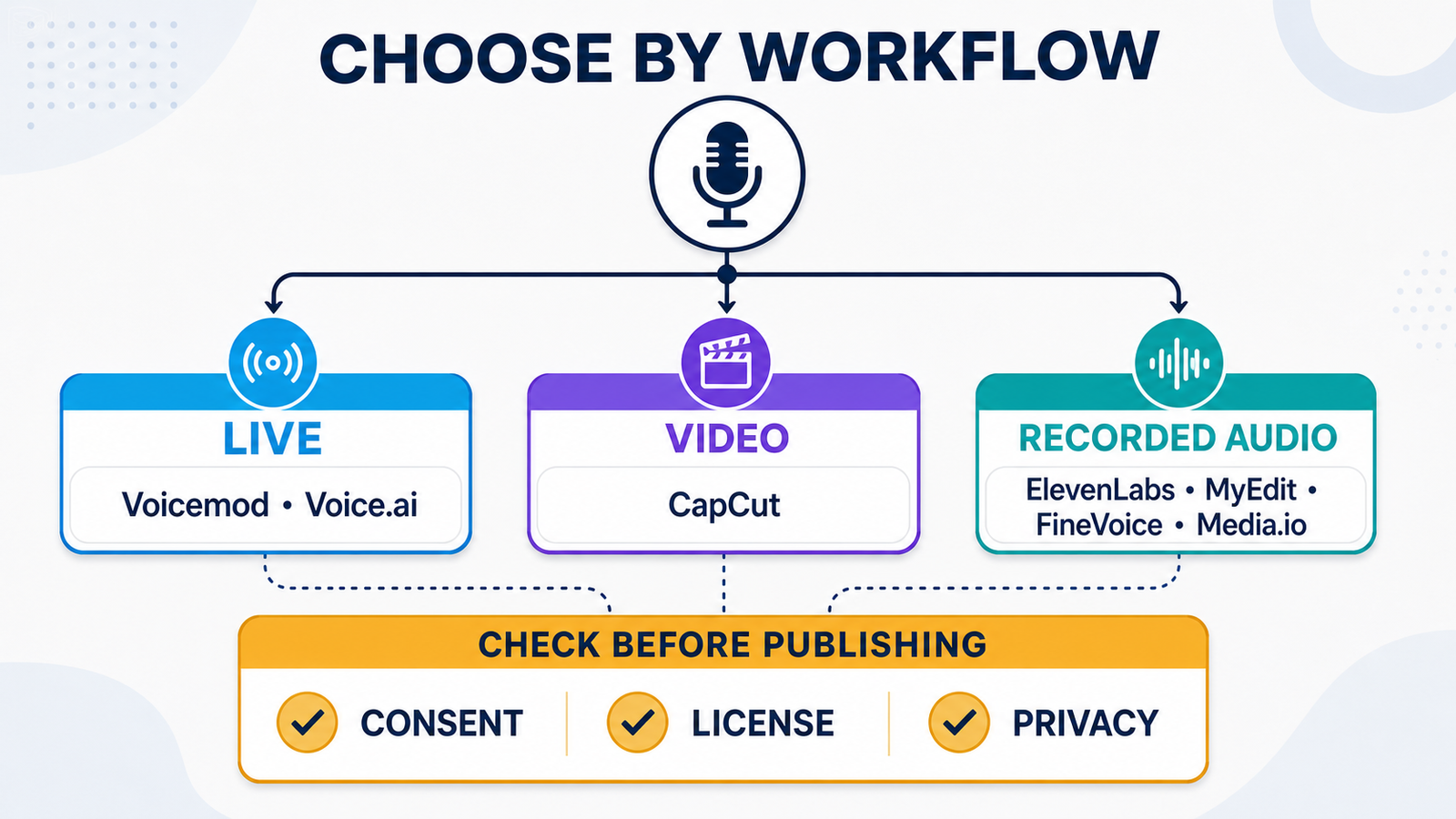
The free offers fall into four different categories. Voicemod and Voice.ai provide live desktop access with library restrictions; CapCut embeds free effects in a video editor; ElevenLabs provides a measurable monthly credit pool; and MyEdit provides one downloadable effect daily while reserving realistic voices for paid export. FineVoice and Media.io advertise free use but publish fewer numerical details.
Kits AI illustrates why the boundary matters. Its Free plan currently lists conversion minutes but zero download minutes, so it is useful for trying vocal transformations but not a practical free exporter. A preview is not the same as a usable free plan, and a free plan is not the same as a commercial license.
Consent, impersonation and privacy checks
A voice can identify a person and may be protected by privacy, publicity, contract, copyright or platform rules. Use your own voice, a licensed library voice or a recording for which every speaker has given informed permission. Never use these tools for fraud, harassment, fake endorsements, deceptive calls or fabricated evidence.
Platform disclosure rules may also apply when altered audio could mislead viewers. Keep the original recording, consent record and project notes; label realistic synthetic media when required; and avoid celebrity or public-figure presets unless the use is clearly authorized and lawful. Changing pitch does not guarantee anonymity because words, background sound and vocal patterns can still reveal identity.
Cloud tools require uploading voice data. Review retention, training controls and account deletion options before sending interviews, client work or unreleased material. For background on how generative systems create new media, see our beginner’s guide to generative AI.
How to choose the right free AI voice changer
- Choose Voicemod or Voice.ai for live gaming, calls and streams where a virtual microphone matters.
- Choose CapCut when the altered voice must stay synchronized with a social video and captions.
- Choose ElevenLabs for short recorded speech when preserving performance matters and the project is noncommercial or appropriately licensed.
- Choose MyEdit for one simple downloadable effect per day without installing desktop software.
- Try FineVoice or Media.io when browser access, preset variety or file compatibility matters, but verify the current quota and rights first.
If you need a voice created from text instead of transformed from a recording, use our comparison of free AI voice generators. Video creators can also compare our YouTube-specific AI voice generator guide and TikTok voice generator guide.
Frequently asked questions
What is the difference between a voice changer and an AI voice generator?
A voice changer transforms existing speech or a live microphone feed. An AI voice generator usually turns written text into new speech. Some products include both, but their limits and licenses may differ.
Is there a completely free real-time AI voice changer?
Voicemod and Voice.ai both offer free real-time desktop tools. Voicemod rotates a limited voice selection daily, while Voice.ai does not clearly publish every free quota. Neither should be treated as an unlimited, permanently fixed catalog.
Can free AI voice-changer output be used commercially?
Not automatically. Rights vary by plan and voice. ElevenLabs excludes commercial rights from its Free tier, FineVoice limits its commercial statement to original voices, and several services do not clearly grant broad commercial rights on their public free pages. Check the exact voice and plan terms before publishing.


