

Lovable is the best AI app builder for most beginners who want to turn a plain-English brief into a polished web app. Base44 is easier when you need a database and login without assembling a stack, while Softr is the safer choice for structured business tools. Replit offers more control, but also exposes more technical decisions.
An AI app builder can create screens, data models and working logic from a prompt, but “working” is not the same as production-ready. Beginners should compare what happens after the first demo: who can access the app, where data lives, whether code can leave the platform, how usage is billed and what must be tested before real users arrive. We checked US-facing plans and documentation on September 14, 2026; allowances and prices can change.
Best AI app builders for beginners at a glance
| Tool | Best for | Current no-cost access | Main limitation |
|---|---|---|---|
| Lovable | Polished web-app prototypes | 5 daily build credits, capped at 30 monthly | Credits also govern iteration and hosted services |
| Base44 | All-in-one apps with a backend | 25 message and 100 integration credits monthly | Private apps and GitHub sync require paid plans |
| Softr | Internal tools and client portals | 5 AI credits, 5 app users and 5,000 records per app | No full source-code export |
| Replit | Learning and growing into code | Daily Agent credits and one published app | Free deployment expires after 30 days and carries branding |
| Bolt | Fast browser-based web builds | Free build tokens and free Bolt hosting | Free sites carry branding and hard traffic limits |
| v0 | UI-first apps on Vercel | $5 monthly credits and 7 messages per day | Better for frontends than no-code business logic |
| Bubble | Complex visual no-code products | Free development environment | A paid plan is required for a live production app |
There is no universal winner. Lovable and Bolt generate editable web code. Base44 and Softr hide more infrastructure. Replit is an approachable development environment rather than pure no-code. v0 is strongest when interface quality and the Vercel workflow matter, while Bubble rewards users willing to learn its visual model.
How we selected the best AI app builders for beginners
We screened 12 credible platforms: Lovable, Base44, Softr, Replit, Bolt, v0, Bubble, GlideOS, Microsoft Power Apps, Airtable Omni, Retool and Emergent. We ranked seven using these criteria:
- First-build friction: how much setup and technical vocabulary appear before a useful preview.
- Functional depth: whether the builder can create data, authentication and logic rather than only a visual mockup.
- Editing control: visual editing, targeted prompts, version history and the ability to inspect or change code.
- Free access: the real allowance, account requirement, deployment boundary, branding and expiration rules.
- Portability: source-code ownership, GitHub synchronization and what happens if you leave.
- Operations: hosting, domains, databases, integrations, usage controls and the path from prototype to production.
- Safety: permissions, secrets, privacy settings and whether a beginner can review critical behavior.
This is a documentation-based comparison informed by independent testing, not a controlled build-off. We did not run the same paid prompt through every platform, conduct penetration tests or measure long-term hosting costs. Zapier’s independent review of more than 30 AI app builders similarly separates established no-code platforms from newer prompt-first builders and warns that AI accelerates the first draft rather than completing every production task.
1. Lovable: best overall AI app builder for beginners
Lovable makes the path from prompt to attractive web app unusually direct. Describe the audience, pages and actions, then refine the result through chat, visual selection and inline editing. The platform can add authentication, a database, storage and server functions through Lovable Cloud, while GitHub synchronization gives growing teams a route into the underlying React code.
Why it ranks first: the interface hides most code without hiding the result. In a 2026 comparison based on product testing, Zapier rated Lovable the most beginner-friendly of Lovable, Bolt and Replit, while describing all three as capable of getting a builder most—but not all—of the way to a finished product.
Free-plan reality: Lovable’s current pricing page gives Free workspaces 5 build credits per day, capped at 30 per month, plus 20 monthly Cloud credits and 4 credits for AI features inside an app. Credit cost varies with the requested work; unused daily grants do not roll over. Lovable says customers own their code and generated output, subject to third-party rights.
Watch out: a small prompt can consume a fraction of a credit, while a multi-part build consumes more, so “30 credits” is not 30 finished apps. Hosting and in-app AI also draw from allowances. Use it for a web MVP, not as proof that authentication, authorization or payment logic is secure.
2. Base44: best all-in-one builder with a managed backend
Base44 is compelling for a beginner who wants a database-backed tool but does not want to connect separate hosting, authentication and storage services. Its prompt-first builder can create a responsive interface, data model, user accounts, analytics and integrations inside one managed system. Public apps can be shared from the free tier.
Why it ranks highly: the platform starts with the pieces beginners commonly discover too late. A task tracker, booking tool or small portal often needs records, users and permissions as much as it needs screens. Base44’s planning mode lets you clarify the brief before building, and its documentation says planning itself does not consume message credits.
Free-plan reality: Base44 Free includes up to 5 apps, 25 message credits per month and 100 integration credits per month, with a maximum of 5 message credits per day. The included core features cover authentication, database functionality and analytics.
Watch out: private apps have required at least Starter since February 2026. In-app code editing begins on Starter, while GitHub integration appears on Builder and higher in the detailed plan table. Base44’s FAQ says customers own their code, but the feature table makes clear that convenient source synchronization is not a free feature.
3. Softr: best for internal tools and client portals
Softr is less about generating an arbitrary software stack and more about assembling a maintainable business application. Its AI Co-Builder can create pages, a database, forms and permissions, after which a beginner can continue in a visual editor. That makes it a strong fit for directories, CRMs, inventory tools, approval workflows and customer portals.
Why it belongs near the top: predictable building blocks are an advantage when the app contains business data. In Zapier’s 2026 hands-on roundup, Softr ranked first for ease of use and speed because it generated a near-usable structure with login, lists, forms and roles, then allowed visual configuration.
Free-plan reality: Softr’s current published materials list unlimited apps, 5 app users, 5,000 database records per app and 5 AI credits on Free. That is enough to generate and validate a small internal workflow; visual editing can continue after AI credits run out.
Watch out: Softr is a managed no-code platform. You can export your data, but not the complete application source code. Advanced logic, larger user counts and some integrations require paid plans. Choose that tradeoff deliberately: simpler maintenance today can mean more platform dependence later.
4. Replit: best for beginners who want room to learn code
Replit combines an AI builder with a browser-based development environment, hosting, databases and version control. It can create web and mobile apps and exposes the project files when you are ready to understand or change them. That makes it a good bridge between prompting and conventional software development.
Why it stands out: Replit is more flexible than a visual no-code system. You can ask Agent for a feature, run the project, inspect logs and gradually learn how the stack works. That flexibility also explains why it feels more technical than Lovable or Softr.
Free-plan reality: Replit Starter documentation promises daily Agent credits and monthly cloud credits but does not publish a durable numeric allowance on that page. It includes Lite build and one free published app. The link automatically goes down after 30 days and carries a “Made with Replit” badge.
Watch out: Full build, Plan Mode, third-party connectors, Replit AI integrations and additional published apps require Core or Pro. Beginners should also learn basic source control before accepting large agent changes. Commit a known-good version, review diffs and keep secrets in environment variables rather than prompts or code.
5. Bolt: best for fast browser-based web prototypes
Bolt runs a modern web stack in the browser, so a prompt can become a working project without local installation. It supports code inspection, targeted edits, GitHub workflows, databases and quick deployment. Compared with fully managed no-code tools, it gives a beginner more direct contact with the application files.
Why it made the list: the feedback loop is fast, and the route from preview to a public URL is straightforward. Bolt is a practical choice for hackathons, landing-page-plus-app prototypes and learners who want an editable codebase but are not ready to configure a local toolchain.
Free-plan reality: Bolt’s free build allowance is token-based and subject to daily and monthly caps; the exact figures have changed across official documentation, so check the subscription screen before starting a large build. Bolt Cloud’s current hosting documentation lists 10 GB of bandwidth and 333,333 requests per month on Free, shared across the account.
Watch out: free previews and published sites show a Made in Bolt badge. Custom domains and branding removal require a paid plan, and a free site stops serving traffic after the hard monthly limit. TechRadar’s 2026 test praised Bolt’s documentation and GitHub path but found its free allowance restrictive for repeated revisions.
6. v0: best for interface-first apps on Vercel
v0 is strongest when the difficult part is turning an interface idea into a clean React application. It can generate components, use visual design mode, synchronize with GitHub and deploy to Vercel. A designer or product beginner can get an interactive front end quickly, then bring in engineering help for deeper behavior.
Why it is included: its output fits a widely used deployment and component ecosystem, making handoff easier than with a closed visual editor. It is particularly good for dashboards, forms, marketing surfaces and UI-heavy proofs of concept.
Free-plan reality: v0 Free includes $5 in monthly credits, a limit of 7 messages per day, visual Design Mode, GitHub sync and Vercel deployment.
Watch out: v0 is not the simplest choice for a beginner who needs a complete permissions model, complex workflows and a managed operations layer. Vercel deployment costs and any external database or API costs are separate considerations. The Business tier, not Free, opts out of training by default according to the current plan table.
7. Bubble: best for learning powerful visual no-code development
Bubble is the most established visual no-code environment in this group. Its AI features can generate an application and help with workflows, while the editor exposes database types, conditions, actions and responsive design. It can support complex web products and native mobile projects without exporting conventional source code.
Why it remains relevant: Bubble’s deeper visual model is useful after the first prompt because a beginner can inspect and change workflows directly. The tradeoff is a steeper learning curve than prompt-first builders.
Free-plan reality: Bubble Free is designed for development and includes enough workload to learn and prototype. It cannot enable workload overages, and a paid plan is needed to deploy a live version. Native mobile publishing to TestFlight or Google Play also requires a paid mobile plan.
Watch out: workload-based pricing requires attention once an app goes live. Bubble applications also stay on Bubble’s runtime; there is no full source export. It is a better fit for someone willing to learn a platform than for someone who needs a portable React repository.
Why GlideOS, Power Apps, Airtable Omni, Retool and Emergent did not rank
GlideOS is promising for spreadsheet-driven internal tools, but its current Free tier is mainly an exploration environment: publishing starts on the $25 monthly Basic plan, and public apps start on Plus. Microsoft Power Apps is powerful inside a Microsoft organization, but setup, licensing and connector concepts make it less friendly for an independent first app. Airtable Omni excels when your app is fundamentally an Airtable data view, not when you need a general-purpose product.
Retool is a strong enterprise internal-tool platform, but it assumes more comfort with APIs, databases and governed company systems. Emergent made the shortlist for prompt-to-product flexibility, yet its published free allowance and operational boundaries were less clear and stable than the seven ranked options at review time.
A safer workflow for building your first AI-generated app
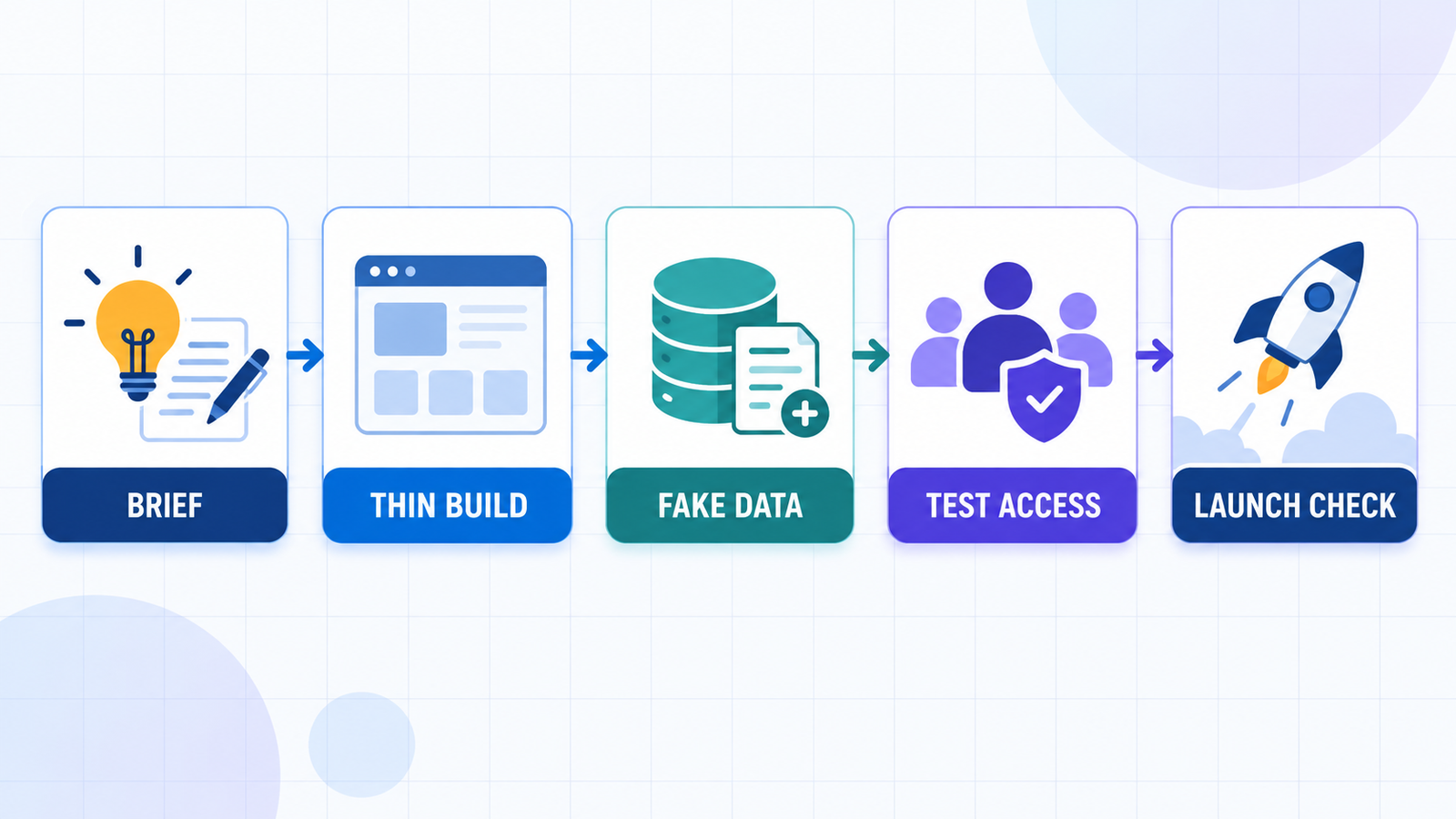
- Write a one-page brief. Define the user, three core tasks, required data and what success looks like. Our prompt engineering guide explains why clear constraints beat a long wish list.
- Build one thin workflow. Start with sign-in, one record type and one useful action. Do not spend credits generating every future feature.
- Use fake data first. Never upload customer records, medical information, credentials or confidential company files to an unapproved prototype.
- Test authorization, not just login. Confirm that one user cannot read or change another user’s records by altering a URL, request or form value.
- Check failures. Test empty fields, duplicate submissions, bad files, expired sessions and unavailable external services. Generated happy paths are not enough.
- Review code and dependencies. If the platform exports code, scan it, update packages and have a developer review authentication, payments and sensitive-data paths.
- Plan the exit before launch. Export code or data, record domain and hosting ownership, and estimate what happens when free credits or traffic allowances end.
Security deserves special attention. Axios reported in May 2026 that researchers found thousands of publicly exposed assets tied to vibe-coded apps, including sensitive company and personal data. That does not prove every generated app is unsafe; it shows why visibility and access controls must be checked deliberately. Teams moving beyond a prototype should use code review and deployment gates such as those in our CI/CD tools comparison, then monitor the model and application lifecycle using the principles in our LLMOps guide.
How to choose the right AI app builder
Choose Lovable when a polished web MVP and an easy visual workflow matter most. Choose Base44 when you want the backend, accounts and data managed together. Choose Softr for structured internal tools that nontechnical colleagues must maintain. Choose Replit when learning, code access or mobile flexibility matters. Choose Bolt for a fast editable web build, v0 for a UI-first Vercel project and Bubble for deep visual logic you are willing to learn.
Before paying, build the smallest complete workflow and test its data boundary. Then compare the cost of the next ten revisions, a custom domain, a real database, private access and the first 100 users. The best beginner tool is not the one with the flashiest first screen; it is the one whose limitations you understand before the app becomes important.
Frequently asked questions
Can a beginner build a real app with AI?
Yes, especially a small web app, internal tool or prototype. AI can generate the interface and basic logic, but a real launch still needs permission checks, failure testing, backups, privacy review and a clear hosting plan. Payments or sensitive data should receive qualified human review.
Which AI app builder is easiest for beginners?
Lovable is the easiest general prompt-to-web-app option in this comparison. Softr is easier for a structured business app, while Base44 is easier when the first version needs a managed database and authentication. The right answer depends on the type of app, not only the interface.
Are AI app builders really free?
Most offer a limited free tier, not unlimited production service. Lovable, Base44, Replit, Bolt, Softr and v0 limit build usage or publishing. Bubble allows free development but requires payment for a live version. Hosting, traffic, domains, databases and third-party APIs can create separate costs.
Do I own code created by an AI app builder?
It depends on the platform and plan. Lovable, Replit, Bolt and v0 provide paths to editable code or GitHub. Base44 states that customers own their code, but convenient GitHub synchronization is paid. Softr and Bubble are managed platforms that do not export the full application source. Third-party licenses still apply.
Can I publish an AI-generated app to the App Store?
Some builders can create or package mobile apps, but App Store and Google Play publication adds developer-account fees, platform review, privacy disclosures, signing and device testing. A responsive web app is not automatically a native mobile app. Confirm the builder’s current mobile and paid-plan requirements first.

