


AI code review tools work best as a fast first reviewer, not as the person who decides whether a change is safe to merge. They can explain a diff, flag likely defects, suggest tests and surface security concerns before a human starts. They cannot reliably prove that the requirement is correct, that a migration is operationally safe or that a subtle business rule has been preserved.
For most teams, the right choice follows the existing pull-request platform. GitHub Copilot is the simplest GitHub-native option; GitLab Duo is the natural fit for GitLab; CodeRabbit and Qodo provide dedicated review workflows; Graphite combines AI review with a broader GitHub review stack; and Amazon Q Developer is worth considering when AWS-oriented security and quality analysis matter. This is a documentation-based comparison, not a hands-on benchmark. US access, plans and limits were checked against official sources on October 29, 2026.
What AI code review tools actually do
An AI reviewer receives some combination of the changed lines, surrounding files, pull-request description, repository instructions, earlier comments and CI results. It then produces natural-language findings or proposed edits. An agentic reviewer may gather more repository context, call tools or prepare a patch; a simpler reviewer comments only on the supplied diff.
That distinction matters. More context can improve relevance, but it also expands the data path and permission surface. A reviewer that can write to a branch is more useful than a read-only commenter, yet a bad suggestion can become code with one click. Treat suggestions as untrusted changes until deterministic tests, security checks and a responsible engineer verify them. The same principle applies to code written by a person or generated by an assistant; the production-readiness checklist for AI-generated code is origin-neutral.
| Tool | Best fit | Where review happens | Access snapshot | Main caveat |
|---|---|---|---|---|
| GitHub Copilot code review | Teams already standardized on GitHub and Copilot | GitHub, CLI, mobile and supported IDEs | Paid Copilot plans; usage consumes AI credits and can use Actions minutes | Cost and available context depend on policy, budget and agentic execution |
| GitLab Duo | GitLab merge-request workflows, including controlled deployments | GitLab.com, Self-Managed and Dedicated | Plan/add-on or credit requirements vary between non-agentic review and Code Review Flow | Large changes may lose file context or hit a context cap |
| CodeRabbit | Dedicated automated PR review with configurable checks | Pull requests plus CLI | 14-day trial; paid per contributing developer; public open source is free | Seat, hourly and overage economics need a real-volume pilot |
| Qodo | Teams that want rules, IDE/pre-PR review and enterprise deployment choices | Git, IDE and CLI workflows | 14-day trial; paid credit packs; enterprise options | Credit burn varies with review size and complexity |
| Graphite Agent | GitHub teams that also want stacked PRs, chat and merge workflow | Graphite’s GitHub-synced review experience | Limited free access; unlimited reviews on Team and Enterprise | It is a broader review platform, not only a drop-in review bot |
| Amazon Q Developer | AWS-oriented teams prioritizing rule-based security and quality findings | GitHub preview and supported IDE workflows | Free allowance with options to increase usage; general Free and Pro tiers | GitHub review is preview, and automatic re-review behavior requires attention |
Best AI code review tools by workflow
1. GitHub Copilot code review: best GitHub-native choice
GitHub documents Copilot code review across GitHub.com, GitHub CLI, GitHub Mobile, VS Code, Visual Studio, Xcode and JetBrains IDEs, with Azure DevOps listed in public preview. Its agentic context gathering can inspect the repository, and suggested fixes can be handed to the Copilot cloud agent. Teams can request reviews manually or configure automatic reviews through personal settings and repository or organization rulesets.
The billing model deserves close reading. GitHub says reviews consume AI credits, while agentic context gathering can also consume GitHub Actions minutes. Copilot Free does not include pull-request code review beyond review-selection behavior in VS Code; paid Copilot plan features and credit allotments differ. This option makes the most sense when Copilot licensing, GitHub policies and repository rules are already part of the team’s operating model.
2. GitLab Duo: best for GitLab-native governance
GitLab offers both a non-agentic reviewer and an agentic Code Review Flow. The non-agentic GitLab Duo review documentation says merge-request title, description, filenames, diffs, original file contents and custom instructions can be sent to the model. When a large request exceeds the model context, GitLab retries without original file contents, which can make comments less specific.
The agentic flow can gather broader context and supports follow-up reviews, but its documentation also describes file and total-context limits. Access depends on the GitLab tier, add-on and feature selected, while GitLab credits meter agent-platform use. GitLab also publishes its Duo data-use and retention terms. It is the strongest operational fit when merge requests, permissions, audit controls and deployment choices already live inside GitLab.
3. CodeRabbit: best dedicated automated reviewer
CodeRabbit focuses on pull-request and CLI review, with suggested fixes, repository learnings, built-in checks and integrations around the review loop. Its official pricing page lists a 14-day trial, per-developer paid plans, hourly review allowances and optional usage-based continuation. It also offers free reviews for public open-source repositories.
This is a practical shortlist candidate when a team wants a specialized review layer without replacing its source-control platform. Check which repositories the app can read, who can trigger fixes, how custom rules are maintained and what an unusually large monorepo does to cost. CodeRabbit’s privacy policy states that neither CodeRabbit nor its model providers use personal information collected as part of review to train models, but a security review should still verify the exact contract and storage controls for the selected plan.
4. Qodo: best for rules and enterprise deployment options
Qodo combines agentic pull-request review, rules, IDE integrations and pre-PR review. Its former Qodo Merge name is now folded into the broader Qodo platform. The Qodo pricing page lists a 14-day trial and credit-based Pro Team packages; review size and complexity affect credit use. Enterprise options add capabilities such as SSO, audit logs, bring-your-own model keys, single-tenant SaaS and on-premises deployment.
Qodo is worth piloting when review policy must be expressed as reusable rules or when deployment architecture is a deciding factor. Do not translate “unlimited reviews” in a trial into a steady-state cost assumption: measure credits against the team’s actual pull-request distribution, including generated code, dependency updates and large refactors.
5. Graphite Agent: best when review workflow is the larger problem
Graphite Agent automatically reviews GitHub pull requests and sits beside Graphite’s stacked-PR, chat, inbox and merge-queue workflows. Its setup documentation describes automatic review, suggested fixes, exclusions and custom rules. The pricing page lists limited reviews on free Hobby and paid Starter plans, with unlimited AI reviews and chat on the Team plan.
Choose Graphite when the bottleneck includes oversized pull requests, review navigation or merge coordination—not merely missing automated comments. Graphite says its AI features are opt-in and that customer data is not used for model training; review its AI privacy and security documentation alongside the repository permissions and indexing controls available on the intended plan.
6. Amazon Q Developer: best for AWS-oriented security review
Amazon Q combines generative feedback with rule-based detectors for security, secrets, infrastructure as code, code quality, deployment risk and software composition. In GitHub, Amazon Q Developer code review is in preview: it reviews new or reopened pull requests automatically, offers threaded findings and proposed fixes, and supports a /q review command for later iterations.
The automatic trigger does not run for every subsequent commit unless a new review is requested, so teams must design that step into their workflow. AWS provides a limited line allowance and registration options for GitHub use; its broader Amazon Q Developer pricing has Free and $19-per-user Pro tiers. AWS also announced that Q Developer IDE plugins reach end of support on April 30, 2027, making the GitHub workflow, Kiro transition and long-term client choice important parts of a pilot.
How to choose an AI code reviewer
- Start with the review surface. A GitHub-native tool is easier to govern in GitHub; the same is true for GitLab. A separate review platform is justified when it solves a larger workflow or deployment problem.
- Map the context boundary. Ask whether the tool sees only changed lines, complete changed files, repository history, other repositories, CI logs, issue text or production telemetry. Confirm truncation behavior for large changes.
- Map every action. Separate commenting, suggesting a patch, committing to a branch, approving, requesting changes and merging. Grant the minimum permission needed for the pilot.
- Review the data path. Record model subprocessors, regions, retention, training terms, deletion, content exclusions and self-hosting or bring-your-own-key options. Never send secrets, customer data or production logs merely because a pull request contains them.
- Model real cost. Use the team’s actual contributors, pull-request count, changed files, large-change tail and repeat-review frequency. Trials, credits, hourly limits and “unlimited” plans describe different cost shapes.
- Keep deterministic evidence authoritative. Linters, type checks, tests, SAST, dependency policy, secret scanning and required human approvals remain merge gates. AI comments complement those controls; they do not replace them.
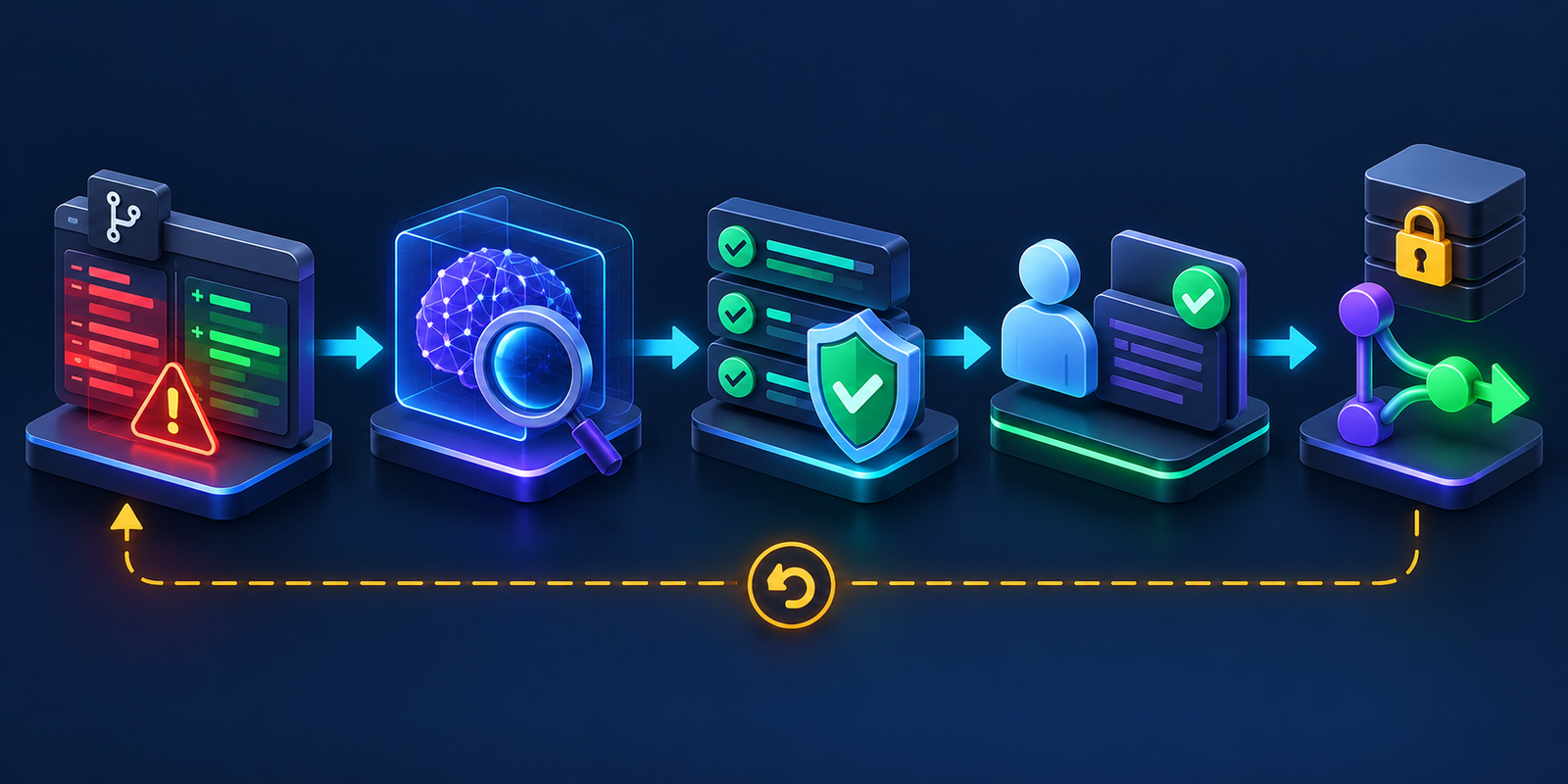
A safer AI-assisted code review workflow
First, keep changes small and give the reviewer a clear requirement. A model can analyze a compact diff with explicit acceptance criteria more reliably than a mixed refactor, migration and feature change. If the author used an agent, preserve the issue, design decision and test plan rather than asking the reviewer to infer intent from code alone.
Second, treat repository content as untrusted. Pull-request descriptions, comments, source files and test fixtures can contain instructions aimed at an agent. A review tool should not combine untrusted input with broad write tokens, package-publishing credentials or production access. The AI agent security guide explains prompt injection, tool permissions and sandboxing in more depth.
Third, run deterministic checks outside the model. A persuasive security comment is not a SAST result; a generated test is not evidence until it fails before the fix and passes after it. Review dependency changes, lockfiles, generated code, workflow files, infrastructure definitions and authentication paths with the controls appropriate to their risk.
Fourth, require a human to validate each accepted finding and proposed patch. The reviewer should understand the requirement, inspect the diff, check failure modes and confirm that tests measure the intended behavior. For a defect found during review, use the same hypothesis-and-evidence discipline described in the AI debugging tools guide.
Finally, merge through normal protections: required checks, code-owner review, branch rules, staged delivery and rollback. An AI approval should not satisfy required human approval. For delivery-pipeline boundaries beyond the pull request, see AI agents for CI/CD from code review to deployment.
How to run a useful 30-day pilot
Select one or two repositories that are representative but not the most sensitive. Start the reviewer in comment-only mode, exclude secrets and regulated data, and document who can install, configure and remove it. Use the same pull requests for a baseline period before changing merge policy.
Track findings reviewed, findings accepted, findings rejected as noise, serious defects found, repeat comments, review latency, cost and permission exceptions. Sample both accepted and dismissed comments for correctness. Do not count comment volume as value; a tool that produces fewer actionable findings may be better than one that floods every diff.
At the end, decide whether the reviewer should remain advisory, gain permission to prepare patches, or be removed. Expanding authority should require evidence that the team can audit actions, bound spending, recover from a bad edit and keep human ownership clear. For the wider product-selection context, use the complete AI coding tools guide.
Frequently asked questions
What is the best AI code review tool?
The best default is usually the option native to the team’s source-control platform, provided its context, data terms, permissions and cost fit. Dedicated tools become attractive when custom rules, cross-repository context, analytics, deployment choices or a broader review workflow justify another integration.
Can AI code review replace human reviewers?
No. AI can provide a quick first pass and reduce repetitive review work, but a human remains responsible for intent, architecture, business rules, operational risk and merge approval. Models can miss defects and produce plausible but incorrect findings.
Should an AI reviewer be allowed to commit fixes?
Only after a comment-only pilot. Use a narrowly scoped token, restrict writes to the pull-request branch, require checks on every generated commit and keep merge permission separate. High-risk repositories may reasonably keep the tool read-only.
Are AI code review tools secure for private repositories?
They can be, but “private repository” is not the entire security review. Verify app permissions, subprocessors, regions, retention, training terms, content exclusions, incident response, audit logs and contract terms. Self-hosted or single-tenant deployment may be necessary for some organizations.
Do AI reviewers replace linters, tests or security scanners?
No. AI review is probabilistic and context-dependent. Linters, type systems, tests, SAST, dependency scanning, secret scanning and policy-as-code provide repeatable evidence and should remain authoritative merge gates.
Bottom line: use AI review to widen attention, not to outsource accountability. Pick the tool that fits the repository and risk boundary, start read-only, measure signal on real pull requests and promote only verified checks into policy.

