

AI coding tools can now complete code, explain a repository, edit multiple files, run tests, review pull requests and carry out bounded development tasks. The useful question in 2026 is no longer whether AI can write code. It is which level of assistance fits the job, what context the tool can safely access, and what evidence a developer must review before a change ships.
This guide explains the main categories of AI coding tools, how the leading options differ, where they help, where they fail, and how to introduce them without weakening engineering controls. It is a documentation-based guide, not a hands-on benchmark. Product access and limits were checked against official US-facing sources on October 4, 2026 and can change.
What are AI coding tools?
An AI coding tool is software that uses a language model plus development context to help create, understand, change or validate code. The context may include the open file, selected code, repository search results, terminal output, issue text, documentation, tests and connected tools.
The model is only one component. The surrounding harness determines what the system can read, which commands it can run, whether it may edit files, how it asks for approval and how changes are presented for review. Two products using the same model can therefore behave very differently.
It also helps to separate three levels of capability:
- Suggestion: predicts a line, block or response while the developer remains in control of each edit.
- Generation: produces a function, test, explanation or patch from an explicit request.
- Agentic execution: plans a multi-step task, searches the repository, edits files, runs tools and revises its work based on results.
An agent is not automatically better. A completion tool may be faster and safer for a local edit. An agent is useful when the task genuinely spans files, tools and validation steps. For a deeper explanation of the plan-act-observe pattern, see how AI agents work.
The five types of AI coding tool
| Type | Best for | Typical authority | Main risk |
|---|---|---|---|
| Inline completion | Boilerplate, familiar APIs, repetitive code | Suggests text in the editor | Plausible but subtly wrong code accepted too quickly |
| Repository chat | Explaining unfamiliar code and tracing behavior | Reads selected or indexed context | Confident answers based on incomplete context |
| Editor agent | Multi-file features, debugging and refactoring | Edits files and may run approved commands | Oversized diffs, unsafe commands or dependency changes |
| Terminal or desktop agent | Project-wide work, migrations and automation | Uses shell, files, tests and connected tools | Broad local access and secret exposure |
| Cloud or pull-request agent | Delegated issues, background tasks and code review | Works in a remote environment and returns a branch or PR | Repository, network and credential permissions are easy to over-grant |
Many products span several rows. GitHub Copilot, for example, includes completions, chat, IDE agents, CLI access and cloud agents. Cursor combines an AI-native editor with foreground and background agents. Claude Code and OpenAI Codex emphasize agentic work through terminal, editor, desktop or cloud interfaces. The correct comparison is therefore workflow by workflow—not logo by logo.
Current AI coding tools and where they fit
The table below is a map of representative choices, not a ranking. Pricing is deliberately summarized at the plan level because allowances increasingly depend on credits, model choice, context length and agent activity. Check the linked official page before purchasing.
| Tool | Primary fit | Access model checked | Important limitation |
|---|---|---|---|
| GitHub Copilot | Broad IDE, GitHub, CLI and cloud-agent workflow | Free individual tier; paid individual, business and enterprise plans | Advanced use consumes AI credits; organization policies and feature availability vary by plan |
| Cursor | AI-native editor, multi-file changes and background agents | Free Hobby; paid individual, team and enterprise plans | Model usage can become usage-based, and remote agents require careful repository and network controls |
| Claude Code | Terminal-centered repository work and scripted agent flows | Claude subscriptions, API billing and business premium seats | Usage varies with repository size and task complexity; tool permissions require deliberate configuration |
| OpenAI Codex | Editor, terminal, desktop and delegated cloud tasks | Included allowances or credits depend on the ChatGPT plan | Long-running or high-context tasks can consume substantially more allowance than small edits |
| Google Antigravity / Code Assist | Google’s editor, CLI and Google Cloud development workflow | Consumer Code Assist moved to Antigravity; Standard and Enterprise Code Assist remain for organizations | Old consumer Code Assist sign-in paths stopped serving requests in June 2026, so older setup guides are stale |
| Amazon Q Developer | AWS-aware development, IDE/CLI help and application transformation | Perpetual Free tier with monthly limits; Pro at $19 per user monthly when checked | The strongest operational context is AWS-centric, and transformation quotas are separate from general agent requests |
| JetBrains AI Assistant and Junie | Deep integration with IntelliJ-based IDEs and language tooling | Free and paid credit tiers; some IDE bundles include paid capacity | Availability differs by IDE edition, version and territory; agent work consumes quota faster |
GitHub documents separate plan allowances and enterprise controls. Cursor documents a free tier, individual and team subscriptions, privacy settings and usage-based model consumption. Anthropic supports Claude Code through consumer subscriptions, API billing and enterprise routes such as cloud platforms. OpenAI describes Codex as the same agent across editor, terminal and ChatGPT, with usage dependent on the plan and workload. These are materially different buying models even when the tools appear to offer similar chat and agent features.
Do not select a product from a feature checklist alone. A tool that supports your IDE but cannot meet your data-handling, identity or audit requirements is not a viable team standard.
A safe AI-assisted development workflow
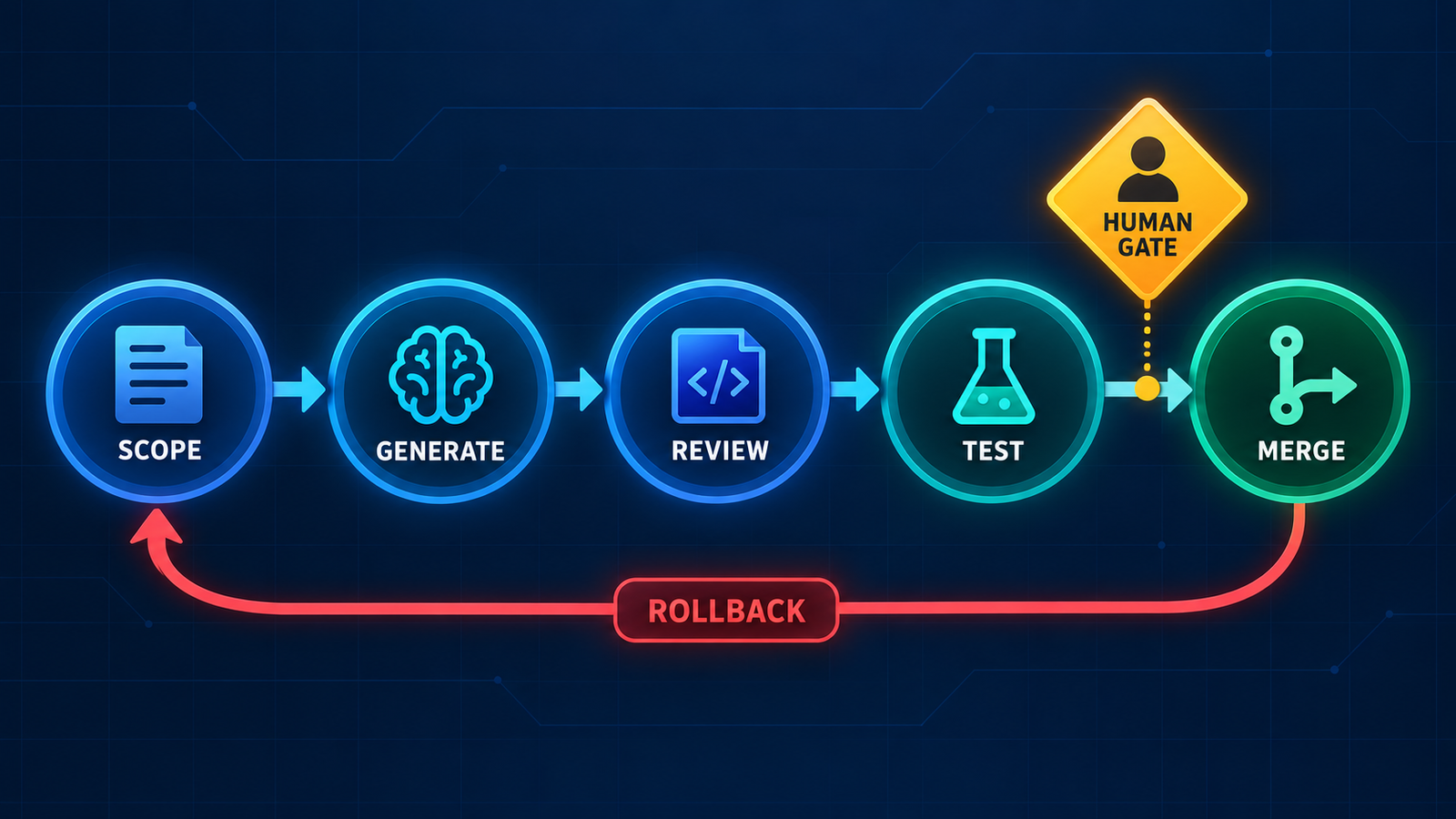
- Scope the task. State the desired behavior, files likely in scope, constraints, non-goals and acceptance tests. Small tasks make review easier and reduce context drift.
- Give the minimum context. Prefer the relevant package, symbols, issue and test output over an unrestricted repository dump. Exclude secrets, customer data, generated files and irrelevant directories.
- Ask for a plan when risk is high. For a migration, authentication change or production fix, review the proposed approach before enabling edits or commands.
- Generate in an isolated branch or worktree. Keep the change reversible. Do not give a coding agent direct write access to the default branch or production infrastructure.
- Review the diff, not the explanation. Confirm behavior, error handling, dependencies, migrations, configuration and deleted code. A persuasive summary is not evidence.
- Run deterministic validation. Use formatters, type checks, unit and integration tests, security scans and build steps. Tests generated by the same model still need independent review.
- Merge through normal controls. Preserve required reviewers, protected branches, CI gates and deployment approvals. Roll back if runtime evidence contradicts the expected result.
This operating model complements a secure delivery pipeline. Our guide to AI agents in CI/CD explains how to separate recommendation, execution and approval from code review through deployment.
How to choose the right AI coding tool
1. Start with the workflow
Measure the work developers actually do: completion-heavy feature work, unfamiliar-code exploration, large refactors, test generation, pull-request review, infrastructure changes or background issue execution. A single organization may need a lightweight completion tool for most developers and a more controlled agent environment for a smaller group.
2. Test context quality
Check how the tool selects files, indexes repositories, respects ignore rules and cites the code behind an answer. Large advertised context windows do not guarantee that the right context reaches the model. Evaluate on your own representative repositories without claiming a universal benchmark.
3. Inspect the action boundary
List every available tool: file edits, terminal, browser, package manager, GitHub, issue tracker, cloud console and external MCP servers. Determine which actions prompt for approval, which can run automatically and whether administrators can enforce those rules.
4. Verify data and enterprise controls
Read the current terms for prompt retention, code storage, model training, subprocessors, region, encryption and deletion. Then check SSO, SCIM, role-based access, repository controls, model allowlists, audit logs, usage budgets and legal protections. “Privacy mode” is not a substitute for understanding the entire data path.
5. Model total cost
Subscription price is only the starting point. Agent use may be metered by credits or tokens, and expensive models, long sessions and background tasks can consume allowances quickly. Include administration, review time, CI load and failed task retries. The useful denominator is cost per accepted, verified change—not prompts per month.
6. Run a controlled pilot
Select a few repositories and task types. Track acceptance rate, review time, escaped defects, CI failures, security findings, spend and developer feedback. Compare against the existing workflow. Do not infer productivity from lines of generated code or vendor benchmarks alone.
Security, quality and licensing risks
- Incorrect code: models can invent APIs, mishandle edge cases or “fix” a test by weakening it. Require executable evidence and human review.
- Prompt injection: repository files, issues, logs or web pages may contain instructions designed to redirect an agent. Treat external content as untrusted data. The AI agent security guide covers permission boundaries, sandboxing and egress controls.
- Secret exposure: agents may read environment files, shell history or credentials and transmit context to a hosted service. Use scoped credentials, secret scanning and explicit deny rules.
- Dependency and supply-chain risk: generated code may add unnecessary packages, hallucinate names or select compromised dependencies. Pin, scan and review every addition.
- License and provenance risk: review source-citation and public-code filtering features, but do not assume they eliminate IP obligations. Apply the same license checks used for human-written contributions.
- Excessive authority: a worktree isolates Git changes but is not a security boundary. Use process, filesystem and network isolation for untrusted or autonomous execution.
For high-impact work, use least privilege: read-only exploration before editing, editing before command execution, and command execution before external side effects. Keep deployments, data deletion, credential changes and financial actions behind explicit human approval.
What AI coding tools are good at—and what remains human work
| Good starting use cases | Needs stronger supervision |
|---|---|
| Explaining unfamiliar modules with cited file references | Authentication, authorization and cryptography |
| Generating boilerplate from an established local pattern | Database migrations and destructive operations |
| Writing test scaffolding and edge-case checklists | Public APIs and backward-compatibility decisions |
| Mechanical refactors with a strong test suite | Performance changes without representative measurement |
| Summarizing diffs, logs and failing tests | Production incidents with incomplete or sensitive evidence |
Humans remain responsible for requirements, architecture, risk acceptance, user impact and release decisions. The tool can accelerate implementation and surface options; it cannot own accountability.
Frequently asked questions
What is the best AI coding tool in 2026?
There is no universal winner. GitHub Copilot is a broad default across common developer surfaces; Cursor emphasizes an AI-native editor; Claude Code and Codex suit agentic terminal and project work; Amazon Q Developer is attractive for AWS-heavy teams; and JetBrains AI fits developers who depend on IntelliJ-based IDE intelligence. Choose with a repository-level pilot and governance review.
Can AI coding tools replace developers?
No. They can automate parts of implementation, exploration, testing and review, but they lack reliable ownership of requirements, architecture, security and operational consequences. More capable agents increase the amount of work a developer can delegate; they also increase the need for clear boundaries and verification.
Are free AI coding tools safe for private code?
A zero-dollar plan is not automatically unsafe, but its data controls may differ from business or enterprise tiers. Check retention, training, subprocessors, account type, privacy settings and organization policy before sending proprietary code. Avoid secrets and regulated data unless the service is explicitly approved.
Do AI coding tools work offline?
Most mainstream assistants use hosted models and need internet access. Some editors can connect to local models, but local execution does not automatically provide equivalent code quality, repository tooling or governance. Also distinguish where commands run from where model inference occurs.
How should a beginner use an AI coding assistant?
Use it to explain code, propose small examples and create tests, then run and inspect everything. Ask why a change works and verify against primary documentation. Avoid delegating a large application before you can read the diff and diagnose failures yourself.
Bottom line
AI coding tools are most valuable when they operate inside an engineering system that already values small changes, visible diffs, automated tests and accountable review. Start with the least autonomous capability that solves the task. Expand authority only after the tool proves reliable on your code and your team can observe, constrain and reverse its actions.
The market will keep changing. The durable selection criteria are context quality, action boundaries, verifiable output, data handling, administrative control and total cost per accepted change.

Pingback: GitHub Copilot Alternatives: 8 Tools to Try in 2026 - GravityDevOps
Pingback: Best AI DevOps Tools in 2026: Coding, CI/CD, Infrastructure and Operations - GravityDevOps
Pingback: AI Tools for Kubernetes and Infrastructure Automation in 2026 - GravityDevOps
Pingback: Can AI-Generated Code Be Production-Ready? A DevSecOps Checklist - GravityDevOps
Pingback: AI Coding Tools for Debugging: Find and Fix Bugs Faster - GravityDevOps