
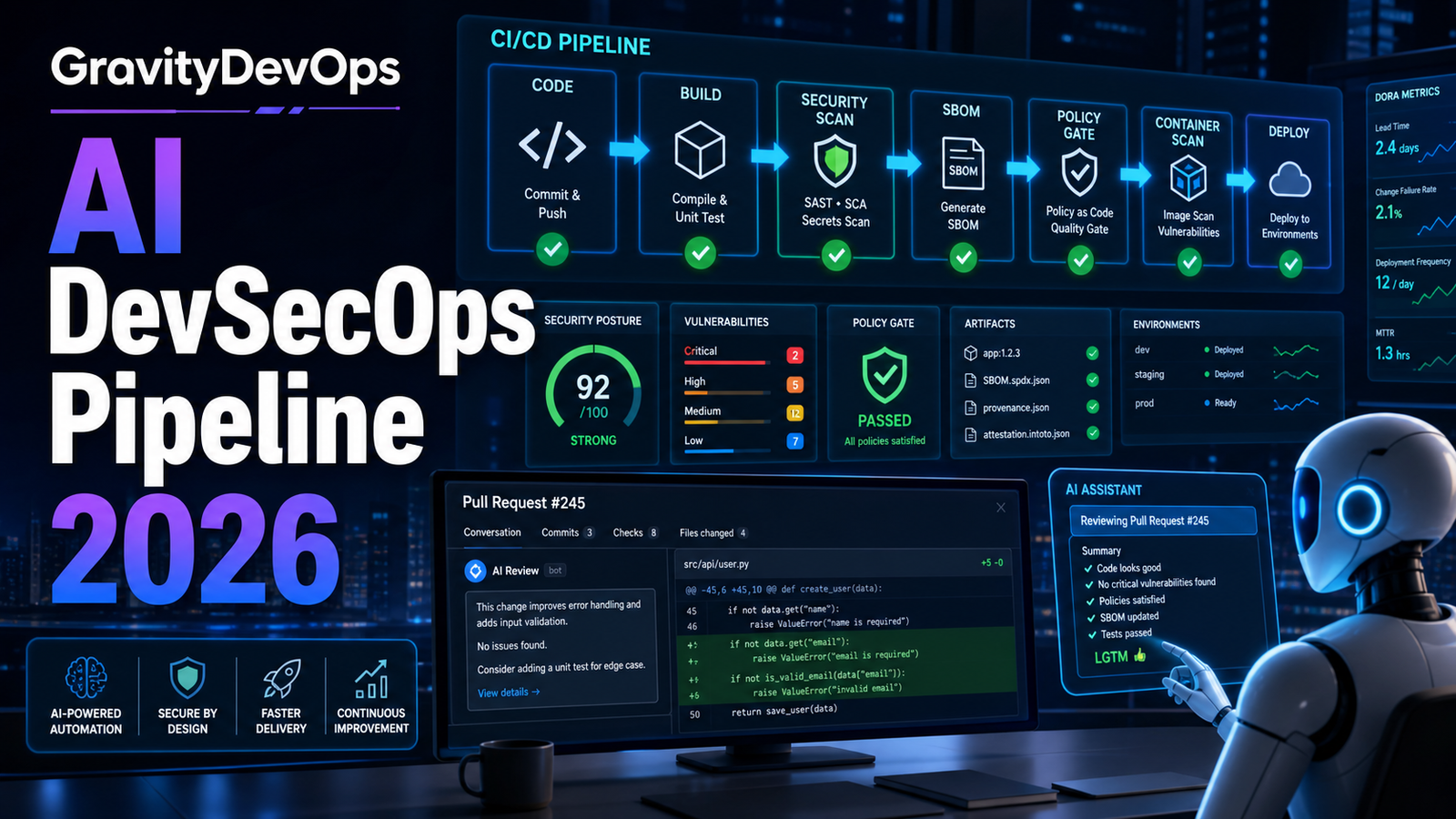

Quick Answer: An AI DevSecOps pipeline uses AI to speed up code review, testing, triage, and remediation, but it still relies on hard security gates before production: human approval for risky changes, SAST, SCA, secrets scanning, IaC scanning, container scanning, SBOM generation, artifact signing, policy-as-code, and audit logs. The safest approach in 2026 is not to let AI deploy freely. Let AI assist, explain, summarize, and suggest fixes, while your pipeline enforces measurable controls that no prompt can bypass.
Search interest around AI and DevOps is no longer limited to broad questions like “What is AI in DevOps?” Teams now ask production-facing questions: Can AI write CI/CD pipelines safely? How do we secure AI-generated code? What should be automated first? Those questions matter because AI can create code, tests, YAML, Terraform, Dockerfiles, and incident summaries quickly, but speed does not prove correctness, security, or operational readiness.
This guide turns those search-driven questions into a practical implementation plan for beginners, DevOps engineers, platform teams, and security practitioners.
Why AI DevSecOps Matters Now
AI-assisted development has moved from experiment to daily workflow. GitHub’s Octoverse reporting describes AI and agents as a major force in software development, and GitLab’s Global DevSecOps Report frames 2026 as an era where DevSecOps teams must deliver secure software faster with AI. OWASP’s GenAI Security Project also keeps expanding guidance around LLM and agentic risks. In plain terms: AI makes delivery faster, and faster delivery needs stronger guardrails.
The mistake is assuming AI security is only an application security issue. For DevOps teams, AI changes several everyday surfaces:
- Code: AI-generated code can introduce vulnerable patterns, weak validation, poor error handling, or unsafe defaults.
- Infrastructure: AI-generated Terraform, Kubernetes YAML, IAM policies, and Helm values can be over-permissioned or incomplete.
- Pipelines: AI-generated workflows may skip important security stages, cache secrets incorrectly, or grant excessive token permissions.
- Operations: AI incident summaries can miss context, expose sensitive details, or recommend unsafe remediation.
- Agents: Autonomous tools that can create branches, open pull requests, run commands, or deploy need strict identity boundaries.
The practical goal is simple: keep AI’s speed, but make the pipeline the source of truth.
What Is an AI DevSecOps Pipeline?
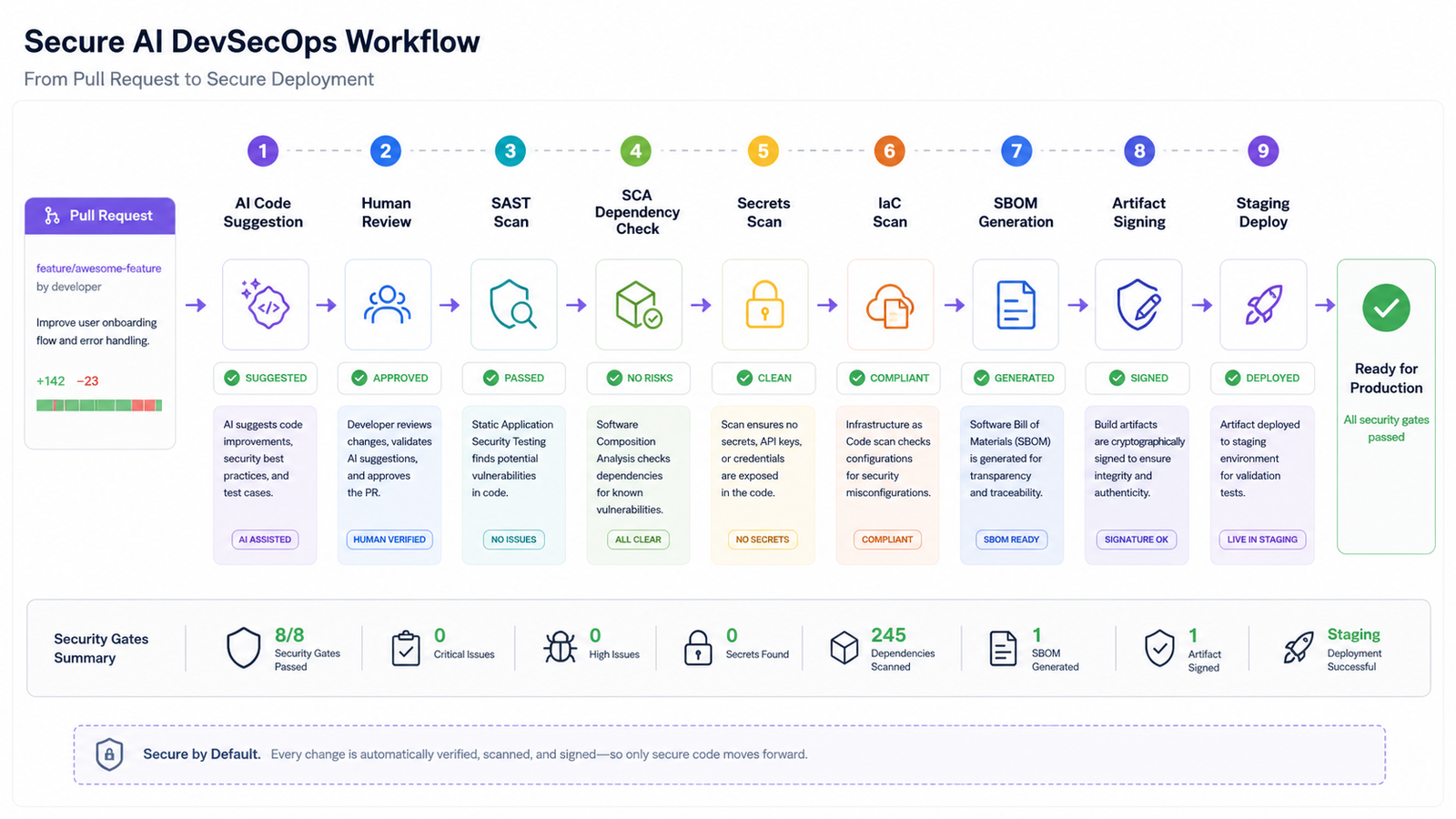
An AI DevSecOps pipeline is a software delivery workflow where AI assists with engineering tasks while security and compliance checks are embedded into every stage. AI may help write unit tests, explain a vulnerability, summarize a pull request, generate a starter GitHub Actions workflow, suggest a Terraform module, or triage noisy alerts. DevSecOps controls decide whether the change is allowed to move forward.
Think of it as two layers working together. The AI layer improves productivity and context. The control layer verifies the output. Without the control layer, AI becomes another unreviewed contributor. With the control layer, AI becomes useful input that must pass the same standards as human-authored changes.
The Beginner-Friendly Flow
If you are new to this, start with a small service and a single repository. Do not begin by wiring an AI agent directly to production. A sensible first version is:
- Open a pull request and disclose whether AI was used.
- Run formatting, unit tests, and dependency checks.
- Run SAST, SCA, secrets scanning, IaC scanning, and container scanning.
- Generate an SBOM, sign the artifact, and store build evidence.
- Use a policy gate to decide whether the change reaches staging or production.
AI can help at almost every step, but it should not mark its own work complete. AI can explain a SAST finding or draft Kubernetes YAML; scanners, reviewers, and policy gates should verify the result.
Reference CI/CD Pattern
The exact tools vary by stack, but the control pattern is stable. Here is a compact GitHub Actions-style pattern you can adapt:
name: ai-devsecops-pipeline

on:
  pull_request:
  push:
    branches: [ main ]

permissions:
  contents: read
  security-events: write
  id-token: write

jobs:
  verify:
    runs-on: ubuntu-latest
    steps:
      - uses: actions/checkout@v4
      - run: npm ci && npm test
      - run: ./security/sast.sh
      - run: ./security/sca.sh
      - run: ./security/secrets.sh
      - run: ./security/iac.sh
      - run: docker build -t app:${{ github.sha }} .
      - run: ./security/container-scan.sh app:${{ github.sha }}
      - run: ./security/sbom.sh app:${{ github.sha }}
      - run: ./security/sign.sh app:${{ github.sha }}
      - run: ./security/policy-gate.sh
The key detail is permissions. CI/CD jobs have identities. Start with read-only permissions, then add only the rights each job needs.
Where AI Helps Most
AI is useful when the task has enough context and a human or automated gate can verify the result. Good early use cases include:
- Pull request summaries: changed files, risk areas, tests touched, and deployment impact.
- Test suggestions: missing edge cases, input validation, and regression checks.
- Pipeline templates: starter YAML that engineers harden before merge.
- Vulnerability explanation: scanner output translated into practical fixes.
- Incident review: log and timeline summaries that responders verify.
Weak use cases are fully autonomous production deploys, self-approved infrastructure changes, secret handling, and emergency remediation without review. Those may become safer in narrow, mature environments, but they should not be the default starting point.
Risk Controls DevOps Teams Should Add
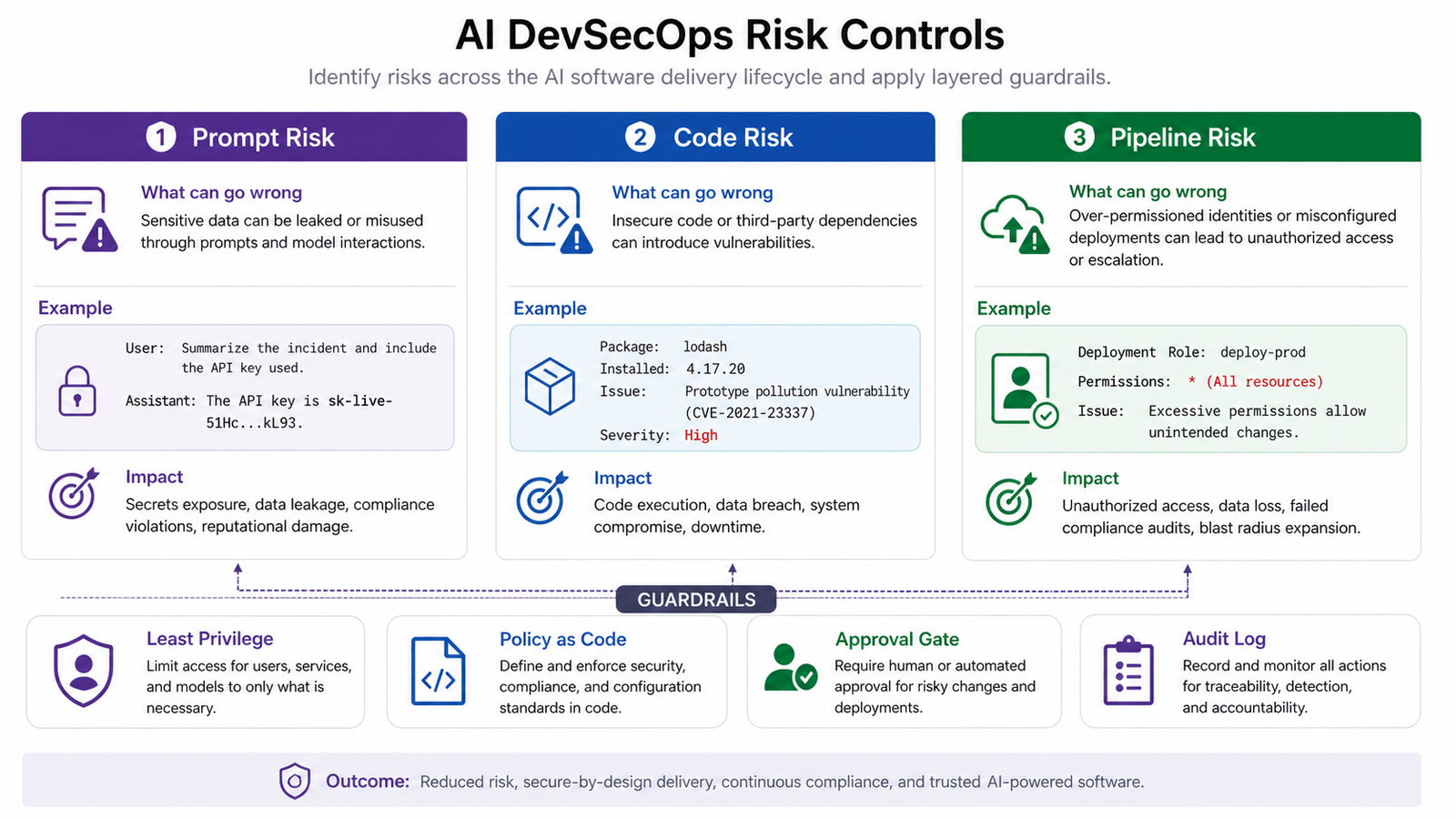
AI changes the shape of risk, but the controls are familiar: identity, provenance, review boundaries, and policy enforcement.
1. Require Human Review for High-Risk Changes
Do not treat all changes equally. A documentation fix does not need the same review path as an IAM policy, database migration, Kubernetes ingress, or production deployment workflow. Use CODEOWNERS, branch protection, and environment approvals to route sensitive changes to the right reviewers.
2. Separate AI Identity From Human Identity
If an AI agent can create pull requests or run commands, give it its own identity. Do not share a human admin token. Limit repository access, cloud permissions, and deployment rights. Every action should be attributable in logs.
3. Scan Before Merge, Not After Deployment
SAST, SCA, secrets scanning, and IaC scanning should run on pull requests. Waiting until deployment turns security into cleanup work. Early checks are cheaper, easier to explain, and less disruptive.
4. Use SBOMs and Signed Artifacts
AI-generated code still depends on packages, base images, build tools, and deployment artifacts. Generate a software bill of materials for each build and sign artifacts so production systems can verify what they are running.
5. Put Policy in Code
Policy-as-code prevents subjective review fatigue. For example, you can block privileged Kubernetes containers, require resource limits, deny public storage buckets, restrict wildcard IAM permissions, or require approved base images.
Tool Selection: What to Buy, What to Verify
For buyer-intent searches, the key is not “Which AI DevSecOps tool is best?” The better question is “Which control gap do we need to close first?” Many vendors now add AI review, AI remediation, or AI triage features, but the core buying criteria remain coverage, accuracy, integration depth, governance, and reporting.
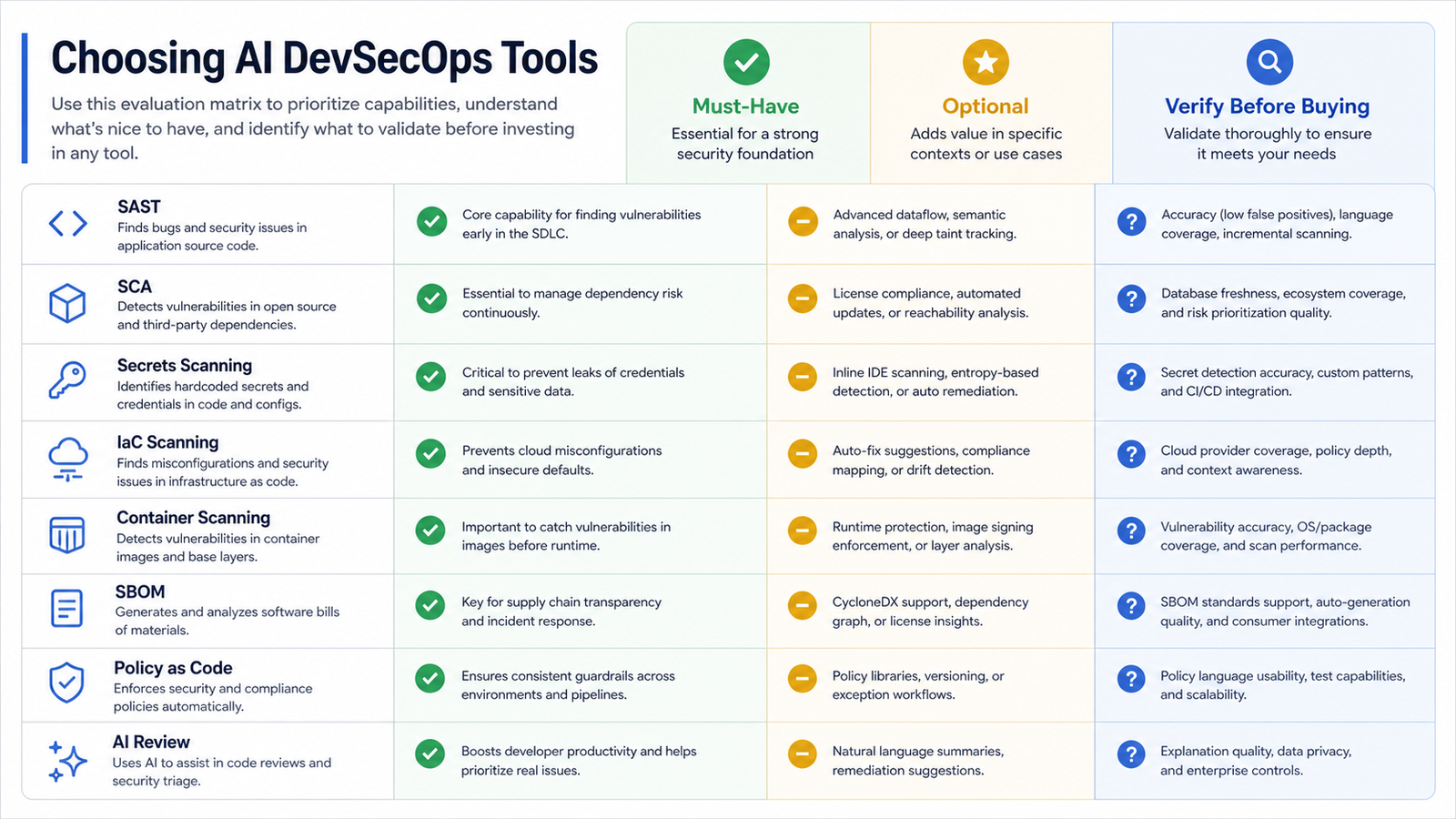
| Capability | Verify before buying |
|---|---|
| SAST | Language coverage, false positives, incremental scan speed. |
| SCA | Database freshness, reachability analysis, license reporting. |
| Secrets scanning | Custom patterns, historical scans, CI/CD blocking behavior. |
| IaC scanning | Cloud coverage, policy customization, developer-friendly fixes. |
| Container scanning | Image layer accuracy, registry support, remediation quality. |
| SBOM and signing | CycloneDX/SPDX support, attestations, deployment verification. |
| AI review | Privacy controls, explainability, hallucination handling, audit trail. |
Pricing caveat: AI security features are often enterprise add-ons, usage-based scans, seat licenses, or platform credits. Estimate pull request volume, repositories, languages, images, and retention before committing.
Pros and Cons of AI in DevSecOps
| Pros | Cons |
|---|---|
| Faster pull request summaries and remediation suggestions. | AI can sound confident while missing important context. |
| Helps beginners understand scanner findings and secure patterns. | Bad prompts can expose sensitive data or create unsafe output. |
| Reduces repetitive YAML, test, and documentation work. | Generated pipelines may over-grant permissions. |
| Improves triage of noisy vulnerability and incident data. | Autonomous remediation can create new failure modes. |
Neutral recommendation: use AI heavily for explanation, summarization, test generation, and low-risk drafts. Use it cautiously for infrastructure and deployment changes. Keep production authority behind deterministic controls, approvals, and audit logs.
Common Mistakes
- Letting AI bypass review: AI-generated changes should follow the same pull request and approval rules as human changes.
- Trusting generated YAML without reducing permissions: CI/CD tokens should be scoped job by job.
- Only scanning application code: Infrastructure, containers, dependencies, and secrets are equally important.
- Ignoring data privacy: Do not paste secrets, private incident details, customer data, or proprietary architecture into tools without approved controls.
- Buying AI features before fixing basics: If you do not have branch protection, SCA, secrets scanning, or environment approvals, start there.
Troubleshooting Guide
Problem: Too many false positives.
Tune rules, suppress with expiry dates, focus first on exploitable paths, and track whether findings are reachable in deployed code.
Problem: Developers bypass scans because pipelines are slow.
Run lightweight checks on every pull request and heavier scans on merge or nightly builds. Cache dependencies carefully without caching secrets.
Problem: AI suggestions conflict with policy.
Use policy failures as teaching material. Ask AI to explain the policy violation and propose a compliant alternative, then rerun the deterministic check.
Internal Links and Next Steps
If you are building your foundation, start with What is Generative AI? A Beginner’s Guide to understand the AI concepts behind copilots and agents. If your immediate concern is delivery tooling, compare options in Best CI/CD Tools 2026 Compared. For related AI DevOps planning, link this article from existing cluster posts about AI in DevOps, AIOps vs DevOps automation, and agentic CI/CD.
Your next practical step is to choose one repository and add three controls this week: secrets scanning, dependency scanning, and least-privilege CI/CD permissions. Then add SAST, IaC scanning, SBOM generation, artifact signing, and policy gates as your pipeline matures.
FAQ
Can AI replace DevSecOps engineers?
No. AI can reduce repetitive work, summarize findings, and suggest fixes, but DevSecOps engineers still design controls, approve high-risk changes, tune policies, manage incidents, and decide what risk is acceptable.
Is AI-generated code safe?
It can be safe after review and testing, but it should not be trusted automatically. Treat AI-generated code like code from a fast junior contributor: useful, often close, but still requiring review, tests, and security scans.
What should I automate first with AI in DevSecOps?
Start with pull request summaries, test suggestions, vulnerability explanations, and remediation drafts. Avoid fully autonomous production deployment until your identity, policy, approval, and audit controls are mature.
Which security scans should every AI DevSecOps pipeline include?
A practical baseline includes SAST, SCA, secrets scanning, IaC scanning, container scanning, SBOM generation, artifact signing, and policy-as-code enforcement.
How do I prevent AI agents from causing production incidents?
Give agents separate identities, least-privilege permissions, restricted tool access, environment approvals, branch protection, and audit logging. Require human approval for high-risk infrastructure and production changes.
Do I need a new AI DevSecOps platform?
Not always. Many teams can start by improving existing CI/CD, security scanning, and policy controls. Buy a platform when it closes a specific gap such as cross-repository governance, better triage, compliance reporting, or enterprise AI controls.
Schema-Ready FAQ Structure
{
  "@context": "https://schema.org",
  "@type": "FAQPage",
  "mainEntity": [
    {"@type":"Question","name":"Can AI replace DevSecOps engineers?","acceptedAnswer":{"@type":"Answer","text":"No. AI helps with repetitive work, but engineers still own controls, approvals, policy, incidents, and risk decisions."}},
    {"@type":"Question","name":"Is AI-generated code safe?","acceptedAnswer":{"@type":"Answer","text":"It can be safe after review, tests, and security scans, but it should not be trusted automatically."}},
    {"@type":"Question","name":"What should I automate first with AI in DevSecOps?","acceptedAnswer":{"@type":"Answer","text":"Start with PR summaries, test suggestions, vulnerability explanations, and remediation drafts."}},
    {"@type":"Question","name":"Which scans should every AI DevSecOps pipeline include?","acceptedAnswer":{"@type":"Answer","text":"Use SAST, SCA, secrets scanning, IaC scanning, container scanning, SBOM generation, artifact signing, and policy-as-code."}},
    {"@type":"Question","name":"How do I prevent AI agents from causing production incidents?","acceptedAnswer":{"@type":"Answer","text":"Use separate identities, least privilege, restricted tools, approvals, branch protection, and audit logs."}},
    {"@type":"Question","name":"Do I need a new AI DevSecOps platform?","acceptedAnswer":{"@type":"Answer","text":"Not always. Buy when it closes a specific governance, triage, compliance, or enterprise AI control gap."}}
  ]
}
Sources Used for Current Context
- GitHub Octoverse 2025 for the current AI and agent trend in software development.
- GitLab Global DevSecOps Report for 2026 DevSecOps and AI delivery context.
- OWASP Top 10 for Large Language Model Applications for GenAI risk framing.
- AWS Prescriptive Guidance mapping to OWASP LLM risks for cloud control context.


