
Creating a video traditionally involves writing a script, filming scenes, recording audio, and editing everything together. Even a short promotional video can take considerable time to produce.
Text-to-video AI is making this process easier. Instead of starting with a camera or existing footage, creators can describe their ideas in words and let AI generate moving visuals.
These tools can create cinematic scenes, animations, product demonstrations, and supporting footage from written instructions. Some platforms can also turn complete scripts into videos with voiceovers, music, and edited scenes.
But how does text-to-video AI actually work, and what happens between entering a prompt and receiving a video?
This guide explains the technology, its practical applications, and four tools that support AI video generation.
What Is Text-to-Video AI?
Text-to-video AI is a type of generative artificial intelligence that creates videos from written descriptions, scripts, or instructions.
Users describe what they want to see, including the subject, setting, movement, lighting, and visual style. The AI interprets this information and generates a sequence of moving images.
Consider this prompt:
“A cinematic shot of a red sports car driving along a coastal road at sunset. The camera follows the car from behind as waves crash against the cliffs.”
The model uses these instructions to generate a moving scene without requiring the creator to film it.
Some platforms focus on producing individual clips, while others combine generated scenes with narration, music, and editing to create longer videos.
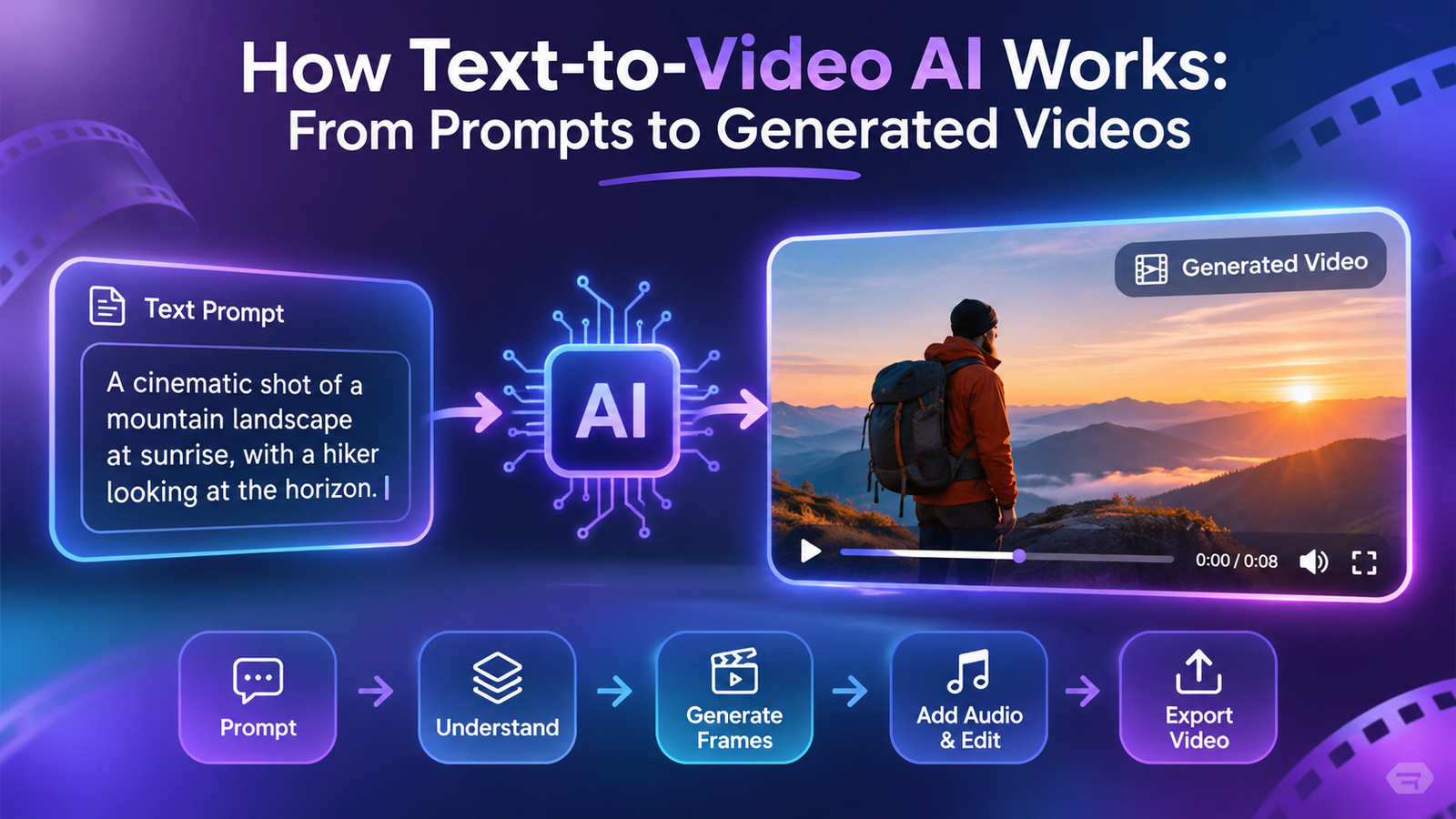
How Does Text-to-Video AI Work?
Although platforms use different models, the general process follows several stages.
1. Understanding the Written Prompt
The AI analyzes the prompt to identify important details such as the subject, surroundings, actions, camera movements, and visual style.
Clear instructions help the model understand what the creator wants. A prompt describing a camera angle and specific movement provides more direction than a simple request for a beautiful landscape.
2. Planning the Scene and Movement
The model uses the prompt to guide how the scene should look and move.
It needs to determine how objects change position, how the camera moves, and how the environment behaves over time.
Some video creation platforms also break longer scripts into separate scenes before generating visuals.
3. Generating Video Frames
Many modern text-to-video models rely on diffusion-based or related generative techniques.
These systems generate visual information across a sequence of frames, creating the appearance of continuous movement when played together.
The model attempts to maintain consistent objects, lighting, and motion throughout the clip.
4. Adding Audio and Editing
Some AI video models generate audio alongside visuals. Other platforms provide separate tools for narration, background music, and sound effects.
For script-based videos, the software may also arrange scenes, add captions, and prepare an editable sequence.
5. Reviewing and Exporting
The generated video may not match the original idea perfectly.
Creators can revise their instructions, regenerate scenes, or refine footage in an editor before exporting.
GravityDevOps also explores different generation platforms in its guide to free AI video generators, including their usage and export limitations.
4 AI Text-to-Video Tools Worth Exploring
Several platforms allow creators to generate videos from written instructions. Their features differ depending on whether the goal is cinematic footage, social media content, or a complete video project.
1. Invideo: Best Overall for Turning Text Into Videos
Invideo is an AI-powered video creation platform that turns written prompts, scripts, and ideas into videos with AI-generated scenes, voiceovers, music, and edits. It supports cinematic clips, product ads, realistic AI characters, and complete video projects.
With invideo’s prompt to video feature, creators can access AI models such as Seedance 2.5, Gemini Omni Flash, Veo 3.1, Kling, and MiniMax. These models offer different capabilities, including realistic lighting, detailed motion, native audio generation, and video output up to 4K.
Creators can also upload a script or brief to invideo’s AI agents. The agents analyze the content, generate clips, organize scenes, and assemble an editable timeline that users can review and refine.
The platform also supports storyboarding, in-app script writing with an AI co-writer, a timeline editor, and real-time multiplayer collaboration. Users can create custom AI agents for specific production roles, including cinematography, sound design, music, and color grading.
Key features:
- Text-to-video generation: Create videos from written prompts, scripts, and ideas.
- Multiple AI models: Access Seedance, Gemini Omni Flash, Veo, Kling, and MiniMax.
- Cinematic video creation: Generate realistic characters, detailed motion, and clips with supported 4K output.
- AI editing agents: Generate and organize scenes into an editable timeline.
- Audio generation: Create voiceovers, music, and audio-supported scenes.
- Creative editing tools: Storyboarding, AI script writing, timeline editing, and real-time collaboration.
Best for: Content creators, marketers, and creative teams who want to turn written ideas into complete videos with AI assistance and ongoing editing control.
2. Runway: Best for Cinematic Video Generation
Runway is an AI video generation and editing platform designed for creators who want detailed control over visual storytelling. It allows users to generate short video clips from written prompts and refine their creative ideas through AI-powered tools.
Its Gen-4.5 model supports text-to-video generation, allowing creators to describe camera angles, subject movement, lighting, and scene composition.
Runway is particularly useful for filmmakers and designers creating cinematic sequences, visual concepts, and experimental footage.
Creators can adjust their prompts and generate new versions to improve motion, framing, and visual consistency.
Key features:
- Text-to-video generation: Create moving scenes directly from written descriptions.
- Camera controls: Guide zooms, tracking shots, and subject movements through prompts.
- Cinematic visuals: Describe lighting, environments, and visual styles.
- Generation settings: Choose supported durations and output formats.
- Creative refinement: Generate new versions with updated instructions.
Best for: Filmmakers, creative agencies, and artists producing cinematic scenes and visual concepts.
3. Pika: Best for Creative Short-Form Videos
Pika is an AI video creation platform that allows users to generate and edit videos from text prompts, images, and visual references.
Its Video Studio provides a workspace where creators can describe scenes, select available AI models, and generate short moving visuals.
Users can explain the desired movement, camera angle, and overall style. Depending on the selected workflow, Pika also supports reference images and keyframes to guide how scenes develop.
This makes it useful for social media content, animated concepts, and creative experiments.
Key features:
- Prompt-based generation: Create videos from written scene descriptions.
- Multiple AI models: Choose from supported video generation options.
- Visual references: Guide scenes using uploaded images.
- Keyframe support: Control transitions in compatible workflows.
- Creative effects: Generate short animations and stylized videos.
Best for: Social media creators, digital artists, and content creators experimenting with animated visuals.
4. Luma Dream Machine: Best for Realistic AI-Generated Scenes
Luma Dream Machine is an AI video generation platform that helps creators turn text descriptions and visual references into moving scenes.
Its Ray models are designed to produce realistic movement, detailed environments, and cinematic visuals.
Creators can describe a scene’s location, lighting, subject, and camera movement. Dream Machine then generates a video based on those instructions.
The platform also supports image-based generation and video modification, making it useful for testing visual ideas and developing creative sequences.
Key features:
- Text-to-video generation: Create clips using written prompts.
- Cinematic motion: Generate movement across subjects and environments.
- Visual control: Describe camera angles, lighting, and scene composition.
- Image-to-video: Animate existing images using supported models.
- Video modification: Refine or change generated content using available tools.
Best for: Filmmakers, designers, and creators developing realistic or experimental video scenes.
How to Write Better Text-to-Video Prompts
A well-written prompt helps AI understand the intended result.
Describe the Subject Clearly
Start with the subject, setting, and main action. Instead of writing “a person walking,” explain where the person is walking and what the scene should look like.
Include Camera Movement
Camera instructions help shape the visual style. You can request a slow zoom, tracking shot, overhead view, or close-up.
Keep the Action Simple
Avoid including too many unrelated actions in one short prompt. Start with one main movement and add details as needed.
Review the Generated Scene
Check whether the movement, objects, lighting, and important details match your instructions. If something looks unnatural, revise the prompt.
These steps can also help creators planning YouTube content. GravityDevOps’ guide to starting a faceless YouTube channel with AI explains how generated visuals can fit into a broader content workflow.
Where Is Text-to-Video AI Useful?
Text-to-video generation supports several creative and business applications.
- Marketing: Create product promotions, social media ads, and campaign videos.
- Education: Produce visual explanations for lessons and training.
- Filmmaking: Develop concept scenes and visual previews.
- Social media: Generate short videos without filming new footage.
- Content production: Create supporting visuals for longer projects.
Generated clips can also be adapted for different platforms. GravityDevOps’ comparison of AI video repurposing tools covers related workflows for turning long recordings into short social media clips.
What Are the Limitations of Text-to-Video AI?
Text-to-video tools can produce impressive results, but they still have limitations.
Generated characters may change appearance between scenes, complex movement can look unnatural, and small details may not remain consistent.
Video length, generation credits, and output quality also vary between platforms.
Creators should review their videos carefully, particularly when producing advertisements or educational content. It is also important to check commercial-use rights before publishing.
Conclusion
Text-to-video AI is changing how creators turn written ideas into moving visuals. By interpreting prompts, generating video frames, and supporting editing workflows, these tools make video production more accessible.
Platforms such as invideo, Runway, Pika, and Luma Dream Machine offer different ways to create videos from text.
The best results still depend on clear instructions, creative decisions, and careful review. AI can generate footage, but creators remain responsible for the final story and its accuracy.
Frequently Asked Questions
1. Can AI generate a video from a written prompt?
Yes. Text-to-video AI models can turn written scene descriptions into moving clips. Some platforms can also create longer videos from scripts.
2. How does text-to-video AI generate movement?
AI models interpret the described subject, environment, and actions, then generate a sequence of frames that creates the appearance of movement.
3. Can text-to-video AI create videos with sound?
Yes. Some models generate audio with the video, while other platforms add voiceovers, music, and sound effects through separate AI tools.
4. Can text-to-video AI replace traditional filming?
Not completely. It is useful for creating short scenes, animations, and visual concepts, but traditional filming remains important when accurate real-world footage or precise performances are required.


Pingback: Free AI Video Generators in 2027: 7 Tools and Their Limits - GravityDevOps