
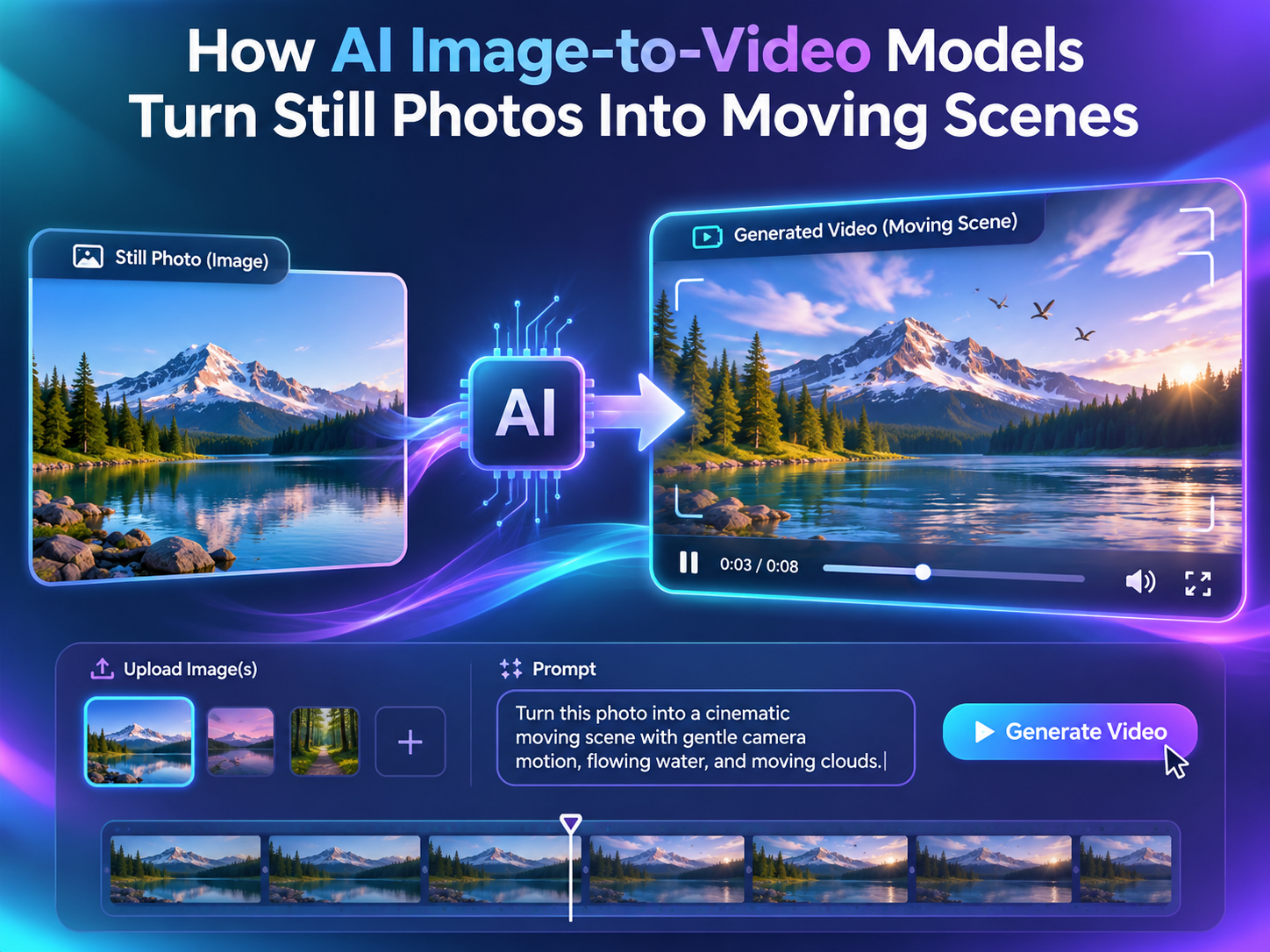
A single photograph captures one moment, but what if that moment could continue moving? Imagine turning a product photo into a short advertisement, adding movement to a landscape, or bringing an old family picture to life.
AI image-to-video models make this possible without traditional animation or filming. By analyzing an uploaded image and following written instructions, these models can generate moving scenes that build on the original photograph.
The technology is becoming useful for marketers, content creators, designers, and businesses looking to produce videos from existing visual assets.
This guide explains how image-to-video AI works, where it can be useful, and which tools support the process.
What Is Image-to-Video AI?
Image-to-video AI is a type of generative artificial intelligence that transforms a still image into a moving video clip.
The uploaded image provides the starting visual information, including the subject, background, lighting, colors, and composition. The AI then generates additional frames to introduce movement over time.
Users can guide the process through text prompts that describe the movement they want.
For instance, someone could upload a photograph of a mountain and request slowly moving clouds, flowing water, and a gentle camera zoom. The model would generate new frames to create the requested scene.
Unlike traditional animation, which requires manually creating movement, AI models predict how a scene might change based on the image and instructions.
How Do AI Image-to-Video Models Work?
Although different platforms use their own models and methods, the basic process follows several stages.
1. Understanding the Original Image
The model first analyzes the uploaded photograph to identify important visual details, including objects, people, backgrounds, and their relationships.
This helps it understand what should remain consistent when movement is introduced.
2. Interpreting Motion Instructions
The user provides a prompt describing what should happen.
For example:
“The camera slowly moves toward the product as soft light passes across the background. Keep the product shape and packaging unchanged.”
The model interprets instructions about camera movement, subject actions, and environmental changes.
3. Generating New Video Frames
Many modern video models use diffusion-based or related generative techniques to create a sequence of frames.
Rather than simply moving the entire image across the screen, they can generate new visual information, such as changing facial expressions, moving objects, or shifting camera perspectives.
4. Maintaining Visual Consistency
A major challenge is keeping the subject recognizable as the scene changes.
Models use information from the starting image and, where supported, additional references to reduce unexpected changes in appearance, lighting, and composition.
5. Producing the Final Clip
The generated frames are assembled into a video. Users can review the results, adjust their prompts, and generate another version if necessary.
For a broader comparison of generation platforms, GravityDevOps also covers free AI video generators and their limitations.
4 AI Image-to-Video Tools Worth Exploring
The following tools offer different ways to turn photographs into moving scenes. Each has its own strengths, creative controls, and limitations.
1. Invideo
Invideo is an AI-powered video creation platform that helps creators turn still photos into moving video clips. It supports product photography, brand images, portraits, and other visual assets, making it useful for marketing videos, social media content, and creative projects.
With invideo’s image to video feature, users can upload a JPG, PNG, or WEBP image, describe the desired movement, and choose an AI video model. The platform offers models such as Seedance 2.5, Kling 3.0, and Runway Gen-4.5, giving creators different options for generating movement and visual styles.
Invideo also provides reference-to-video workflows that help maintain consistent product details, characters, and brand elements across multiple clips. Creators can refine generated videos through written instructions or use the multitrack timeline editor to make manual changes before exporting in their preferred aspect ratio.
Key features:
- Image-to-video generation: Animate still photos using text-based motion instructions.
- Multiple AI models: Choose from video generation models such as Seedance, Kling, and Runway.
- Reference-to-video: Maintain consistent products, characters, and visual details across multiple scenes.
- Video editing: Refine generated clips with written instructions or the multitrack timeline editor.
- Platform-ready exports: Create videos in aspect ratios suited to Instagram, TikTok, and YouTube.
Best for: Ecommerce brands, social media marketers, and content creators who want to turn existing photos into promotional or creative videos.
2. Runway
Runway is an AI video generation and editing platform designed for creators who want detailed control over visual movement. Its image-to-video capabilities allow users to animate a starting photograph using written instructions.
With models such as Gen-4.5, creators can describe camera movements, subject actions, and changes in the environment.
Runway is particularly useful for cinematic scenes that require specific camera directions or more complex visual movement.
The platform also allows users to adjust prompts and generate new versions until the results better match their intended scene.
Key features:
- Image-to-video generation using AI models.
- Prompt-based camera and subject movement.
- Control over supported video durations and aspect ratios.
- Detailed instructions for scene changes.
- Options for generating and refining video clips.
Best for: Filmmakers, creative agencies, and content creators producing cinematic visual sequences.
Where it falls short: Complex motion can require several attempts, and model access depends on the subscription and available credits.
3. Pika
Pika is an AI video creation platform that helps users animate still images and generate short visual sequences. It offers tools for creating motion from photographs, written prompts, and selected image frames.
Pika 2.5 supports image-to-video generation, allowing creators to upload a photograph and describe the desired action.
The platform also supports keyframe-based generation, where users provide multiple images to guide transitions between different moments.
This makes Pika useful for experimenting with visual storytelling, animated illustrations, and short social media videos.
Key features:
- Animate photos using motion prompts.
- Image-to-video and text-to-video generation.
- Multiple keyframes for guiding scene transitions.
- Support for short videos at different resolutions.
- Creative controls for visual movement.
Best for: Social media creators, digital artists, and people experimenting with animated visual content.
4. Luma Dream Machine
Luma Dream Machine is an AI video generation platform designed to produce realistic movement and cinematic scenes from images and prompts.
Its Ray models support image-to-video generation, allowing users to animate photographs with camera movement and changes in the scene.
Dream Machine also offers keyframe controls, making it possible to guide transitions between selected images. Additional tools support extending clips and creating looping animations.
These features make it useful for landscape animations, creative concepts, and short cinematic sequences.
Key features:
- Image-to-video generation using Ray models.
- Camera movement and scene animation.
- Keyframe controls for guided transitions.
- Video extension and looping options.
- Different generation and quality settings.
Best for: Filmmakers, designers, and creators producing cinematic or artistic videos.
How to Get Better Results From Image-to-Video AI
Creating a convincing video involves more than uploading a photograph. The quality of the starting image and the clarity of the prompt both matter.
Choose a Clear Image
Start with a high-quality photograph that has good lighting and a clearly visible subject.
Blurry images or complicated backgrounds can make it harder for the model to maintain consistent details.
Describe One Main Movement
Avoid asking for too many actions in a short clip. Begin with a simple instruction, such as a slow camera movement or gentle subject animation.
Once the first result looks right, add more detail if needed.
Keep Important Details Consistent
For product videos, describe which elements should remain unchanged, such as the logo, packaging, colors, and product shape.
Review the output carefully because written instructions do not guarantee perfect accuracy.
Match the Output to Its Purpose
A vertical video may work better for Instagram Reels or YouTube Shorts, while a horizontal clip may suit a website or presentation.
Creators planning a complete YouTube production workflow can also explore GravityDevOps’ guide on starting a faceless YouTube channel with AI.
Where Can Image-to-Video AI Be Used?
Image-to-video generation has several practical applications.
Product marketing: Businesses can animate product images to create short advertisements and promotional clips.
Social media content: Creators can turn photographs, illustrations, and branded graphics into moving posts.
Real estate: Property photographs can become short animated previews, although generated movement should not misrepresent the property.
Travel and storytelling: Landscape photographs can be animated with clouds, water, lighting changes, and camera movement.
Video production: Editors can generate supporting footage from reference images and combine it with existing recordings.
Once these clips are created, they can be included in longer videos or adapted for different platforms. GravityDevOps’ article on turning long videos into short clips explains the wider process of repurposing video content.
What Are the Limitations of Image-to-Video AI?
AI-generated motion does not always look natural. Models may change product details, distort faces or hands, or introduce movement that does not match the original image.
Longer sequences can also become inconsistent, especially when a character or object must look identical across several shots.
Creators should review generated videos before publishing and make sure they have permission to use the uploaded images.
For commercial content, it is also important to check the tool’s usage rights and avoid presenting generated events as real footage when that could mislead viewers.
Conclusion
AI image-to-video models are changing how people create moving visuals from photographs. By combining image understanding with motion instructions, these tools can turn existing pictures into short video scenes without traditional animation.
Platforms such as invideo, Runway, Pika, and Luma Dream Machine offer different creative controls and workflows.
The best results come from clear images, specific instructions, and careful review. AI can generate movement, but the creator still decides whether the finished scene communicates the right message.
Frequently Asked Questions
1. Can AI turn any photograph into a video?
Most image-to-video tools accept common image formats, but results depend on image quality, subject complexity, and the selected model. Clear photographs generally provide a better starting point.
2. How do AI models create movement from still images?
AI models analyze the starting image and generate additional frames based on learned visual patterns and user instructions. These frames create the appearance of movement when played in sequence.
3. Can AI-generated videos be used for marketing?
Yes, provided the platform’s terms permit the intended commercial use and the creator has rights to the source images and other materials.
4. Do image-to-video tools replace traditional animation?
Not completely. AI can create short moving scenes quickly, but traditional animation remains useful when projects require precise movement, detailed character control, or consistent results across longer sequences.


