


The best AI coding tool for most Java developers is GitHub Copilot when broad IDE support and a familiar workflow matter most. JetBrains AI and Junie are stronger fits for IntelliJ-centered teams. Amazon Q Developer is unusually useful for supported Java modernization jobs, while Gemini Code Assist, Claude Code and OpenAI Codex fit teams that need broader cloud or agent workflows.
The useful question is not whether a model can produce plausible Java syntax. It is whether the tool understands your JDK, modules, Maven or Gradle graph, framework conventions, generated sources, tests and deployment constraints—and whether it produces a small, reviewable diff. Java compilers catch type errors, but they do not prove transaction behavior, authorization, concurrency safety, dependency compatibility or production readiness.
Best AI coding tools for Java at a glance
| Tool | Best fit | Primary surface | Main tradeoff |
|---|---|---|---|
| GitHub Copilot | Broad IDE and GitHub workflows | IntelliJ, Eclipse, VS Code and more | Features differ by plan and IDE |
| JetBrains AI / Junie | IntelliJ-native context and refactoring | JetBrains IDEs and terminal | Best value depends on JetBrains workflow |
| Gemini Code Assist | Google Cloud and Android teams | IntelliJ, Android Studio and VS Code | Governance varies by edition |
| Amazon Q Developer | Supported Java and dependency upgrades | JetBrains, VS Code and CLI | IDE plugins reach end of support in April 2027 |
| Claude Code | Terminal-driven repository work | CLI and IDE integrations | Command authority needs strict controls |
| OpenAI Codex | Local, IDE and delegated tasks | CLI, IDE, app and cloud | Sandbox and approval choices matter |
This comparison uses current official documentation and workflow fit, not invented hands-on benchmarks. We did not measure accuracy or productivity. Pricing, quotas, models and agent capabilities change frequently, so verify the linked vendor pages before buying. For the broader landscape, start with the AI coding tools pillar.
How we compared the tools
A useful Java assistant must work with the repository’s sources of truth rather than guess from a few open files. We compared each option against six requirements:
- Project context: JDK and language level, modules, generated code, annotations, framework conventions and configuration.
- Build awareness: Maven or Gradle wrappers, multi-module graphs, profiles, plugins, dependency management and toolchains.
- Verification: compilation, unit and integration tests, static analysis, dependency checks and the production packaging path.
- Action boundaries: approval before commands, dependency changes, migrations, network access or deployment.
- Data controls: retention, model-training choices, indexing behavior, identity and organization policy.
- Total cost: subscription or usage charges plus review time, CI use, infrastructure and administration.
The decisive evidence comes from the repository: wrapper versions, build files, compiler configuration, tests and CI. An assistant can produce compilable code that still breaks Spring proxy behavior, Hibernate fetch patterns, transaction boundaries or backward-compatible APIs.
Six AI coding tools for Java developers
1. GitHub Copilot: best overall for familiar IDE workflows
Copilot combines completion, chat, edits and agent features in IntelliJ-based IDEs, Eclipse, VS Code and other editors. GitHub’s feature matrix shows that capabilities vary by IDE; agent mode is broadly available, while some features remain preview-only or absent on particular surfaces. Current plan documentation lists Free, individual and organization options with different allowances and controls.
For Java, its strength is low-friction help inside an established workflow. Ask for a bounded service change or test, but let IntelliJ inspections, the compiler and the actual build decide whether the patch works. GitHub also documents limitations around content exclusion in some chat and agent modes, so enterprises should test policy behavior rather than assume every excluded path stays invisible.
Choose it when: your team already uses GitHub and mainstream IDEs. Watch for: hallucinated artifacts, stale framework APIs and broad build-file edits.
2. JetBrains AI and Junie: best for IntelliJ-centered teams
JetBrains AI sits beside IntelliJ IDEA’s symbol resolution, refactoring, inspections and debugger. JetBrains documents completion, project-aware chat, multi-file edits and access to coding agents. Junie can plan multi-step work, edit files and run tests or terminal commands while reporting changes for review.
This is a strong fit when the IDE already understands a large Java codebase better than a generic editor. Current access can involve a JetBrains AI plan, provider credentials or local models, and features depend on that setup. The AI layer should complement—not replace—safe rename, call hierarchy, inspections and compiler feedback.
Choose it when: IntelliJ is the team’s trusted environment. Watch for: assuming structurally valid refactors preserve runtime framework behavior.
3. Gemini Code Assist: best for Google Cloud and Android workflows
Gemini Code Assist supports chat and code assistance in VS Code, IntelliJ and other JetBrains IDEs; it is also available in Android Studio. Google’s documentation describes file, folder and terminal-output context, custom rules, diffs and enterprise code customization for private repositories.
For Java teams on Google Cloud or Android, that proximity can be useful. Still, teams should compare the individual, Standard and Enterprise data terms and controls before sending proprietary code. Custom rules are guidance, not an enforcement boundary: CI, IAM and repository protections remain authoritative.
Choose it when: Android Studio, IntelliJ or Google Cloud is central. Watch for: edition-specific capabilities and assumptions about cloud APIs or project configuration.
4. Amazon Q Developer: best specialized Java modernization option
Amazon Q Developer stands out for supported Java transformations rather than ordinary autocomplete. AWS documents Maven-based upgrades from supported Java versions to Java 17 or 21 in JetBrains IDEs and VS Code. The service creates a plan, builds the project, performs transformations, reruns builds and tests, then presents a summary and diff for review.
The boundaries matter. AWS documents project, line and job quotas, supported JDK combinations and Maven prerequisites. It also states that IDE plugins will reach end of support on April 30, 2027, with Kiro positioned for related coding capabilities. Treat this as a dated migration path to reassess, not a permanent default.
Choose it when: a supported Java or dependency upgrade is the concrete job. Watch for: unsupported Gradle projects, partial transformations, server-side processing and the announced plugin transition.
5. Claude Code: best for terminal-centered repository work
Claude Code can inspect files, edit a repository and run commands from the terminal. The official setup guide documents supported systems, authentication and local workflow, including enterprise deployment through Amazon Bedrock or Google Vertex AI.
Give it the exact module, wrapper and goal: for example, one Maven module plus a narrow test selector rather than an unrestricted root build. Start read-only, approve commands individually and keep production credentials outside the process. A build plugin can execute code, so even a normal-looking Maven or Gradle command deserves a deliberate trust decision.
Choose it when: terminal, Git and build commands drive development. Watch for: inherited secrets, plugin execution and commands that affect every module.
6. OpenAI Codex: best for local and delegated agent work
Codex spans CLI, IDE, app and cloud workflows. OpenAI’s code-generation guide describes IDE, CLI, web, mobile and CI/CD surfaces for writing, reviewing and debugging code. This can fit a Java task that starts with a local failing test and later becomes a longer refactor or review.
Carry the same contract across surfaces: name the JDK, module, wrapper, allowed directories, required tests and prohibited actions. A delegated task should return a diff and verification evidence, not deploy the application. Use sandboxing and approvals to limit network and shell authority.
Choose it when: you want a workflow across editor, terminal and asynchronous tasks. Watch for: granting filesystem, network or shell access that the task does not need.
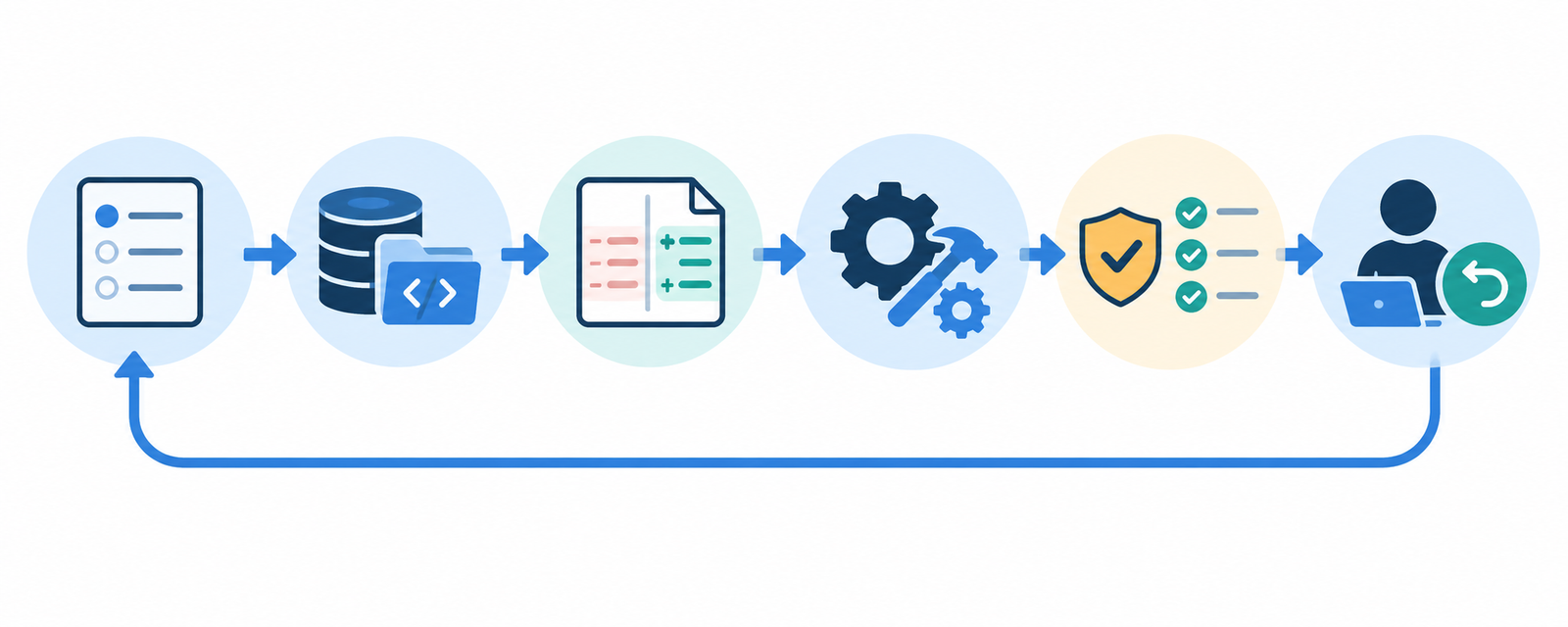
A safe AI-assisted Java workflow
- Pin the environment. Record the JDK vendor and version, language level, wrapper version, module and active build profile.
- Define the contract. State intended behavior, compatibility constraints, files allowed to change and commands allowed to run.
- Scope context. Include build files, configuration, relevant interfaces, implementations and tests; exclude secrets and unrelated modules.
- Ask for a plan. Require expected files, dependency changes, API changes, migrations and verification commands before editing.
- Generate a small diff. Prefer one behavior and its tests over a broad framework rewrite.
- Verify dependencies. Confirm artifact coordinates, version, license, maintenance and advisories. Never trust a generated coordinate without checking.
- Run independent checks. Use the repository’s Maven or Gradle wrapper, targeted tests, full relevant suite, static analysis and production package task.
- Review runtime behavior. Check authorization, validation, transactions, ORM queries, serialization, concurrency, resource cleanup and compatibility.
- Commit and deploy normally. Keep human review, CI, staged rollout and rollback intact.
Issue text, repository documentation, test fixtures and command output can contain instructions that manipulate an agent. Treat retrieved text as untrusted, keep secrets outside the workspace and require approval for dependencies, scripts, migrations, publishing and deployment. The AI agent security guide covers prompt injection, permissions and sandboxing in more depth.
How to choose for your Java stack
- IntelliJ enterprise team: compare Copilot with JetBrains AI/Junie using the same representative tasks and controls.
- Eclipse or mixed-editor team: Copilot offers broad reach, but verify the exact feature matrix for each IDE.
- Android or Google Cloud team: include Gemini Code Assist in the pilot and evaluate edition-specific governance.
- Supported JDK modernization: test Amazon Q on a disposable branch and validate every build, test and dependency change.
- Terminal and agent workflow: compare Claude Code and Codex with least-privilege command approval.
- Regulated code: start with data flow, retention, identity, audit, extension policy and repository protections.
Run a controlled pilot on representative work: a failing unit test, a service or API change, a dependency update and a small refactor. Measure review time, CI failures, defects found before merge, rework and total cost. For action boundaries, see the AI code generator guide and the AI editor versus traditional IDE comparison.
Frequently asked questions
Which AI coding tool is best for Java?
GitHub Copilot is the broadest low-friction option. JetBrains AI and Junie are compelling for IntelliJ-heavy teams. Amazon Q is specialized for supported Java upgrades, while Gemini Code Assist, Claude Code and Codex suit particular cloud or agent workflows.
Can AI coding tools understand Spring Boot?
They can generate and explain common Spring patterns, but familiarity is not proof of correctness. Verify bean scope, proxy behavior, security rules, validation, transactions, configuration precedence, database queries and integration tests.
Can an AI tool safely upgrade Java 8 to Java 21?
It can accelerate a supported migration, but no tool makes it automatically safe. Preserve behavioral tests, review library and framework compatibility, inspect build changes, test runtime and performance behavior, and keep rollback available.
Should an agent be allowed to change Maven or Gradle dependencies?
Only with explicit approval. Verify group, artifact and version, inspect transitive dependencies and licenses, run vulnerability checks, review repository changes and build in an isolated environment.
Can AI-generated Java code go straight to production?
No. Treat it as an untrusted contribution. Require human review, compilation, tests, static and dependency analysis, CI, staged deployment and rollback just as you would for any other change.
Bottom line
Choose the tool that fits your Java build and control model, not the longest feature list. Copilot is the practical default; JetBrains AI and Junie reward IntelliJ-centered workflows; Gemini Code Assist fits Google-oriented teams; Amazon Q targets supported modernization; Claude Code and Codex support broader agent work. Whatever you select, let the build, tests, analysis, CI and human review decide whether generated code is ready.


