


An AI code generator turns a developer’s request and available project context into a probable code change. The useful ones do more than predict the next line: they can search a repository, propose multi-file edits, explain the diff and run bounded checks. They still do not know whether a change is correct for your users, architecture or risk tolerance. Treat generated code as an untrusted draft that must pass the same review, test and security gates as human-written code.
This guide explains the generation pipeline, the difference between completion, chat and agent workflows, which current tool types are worth evaluating, and a practical way to use them without turning speed into hidden technical debt. It is based on product documentation and secure-development guidance, not a hands-on benchmark.
What is an AI code generator?
An AI code generator is software that uses a language model to produce or modify source code from instructions and context. The instruction might be a natural-language prompt, a partially written function, a failing test or a tracked issue. Context can include the active file, neighboring symbols, repository search results, dependency manifests, documentation, terminal output and prior conversation.
The model is only one part of the system. The surrounding harness decides what the model can see, which files it may edit, whether it can run commands, when it needs approval and how it presents a diff. That is why two products using a similar model can feel very different in practice.
AI code generators are one category within the broader AI coding tools landscape. A completion tool predicts code at the cursor. A repository-aware assistant retrieves relevant project material before answering. A coding agent can take multiple steps, use tools and revise its work after a test fails.
How AI code generation works
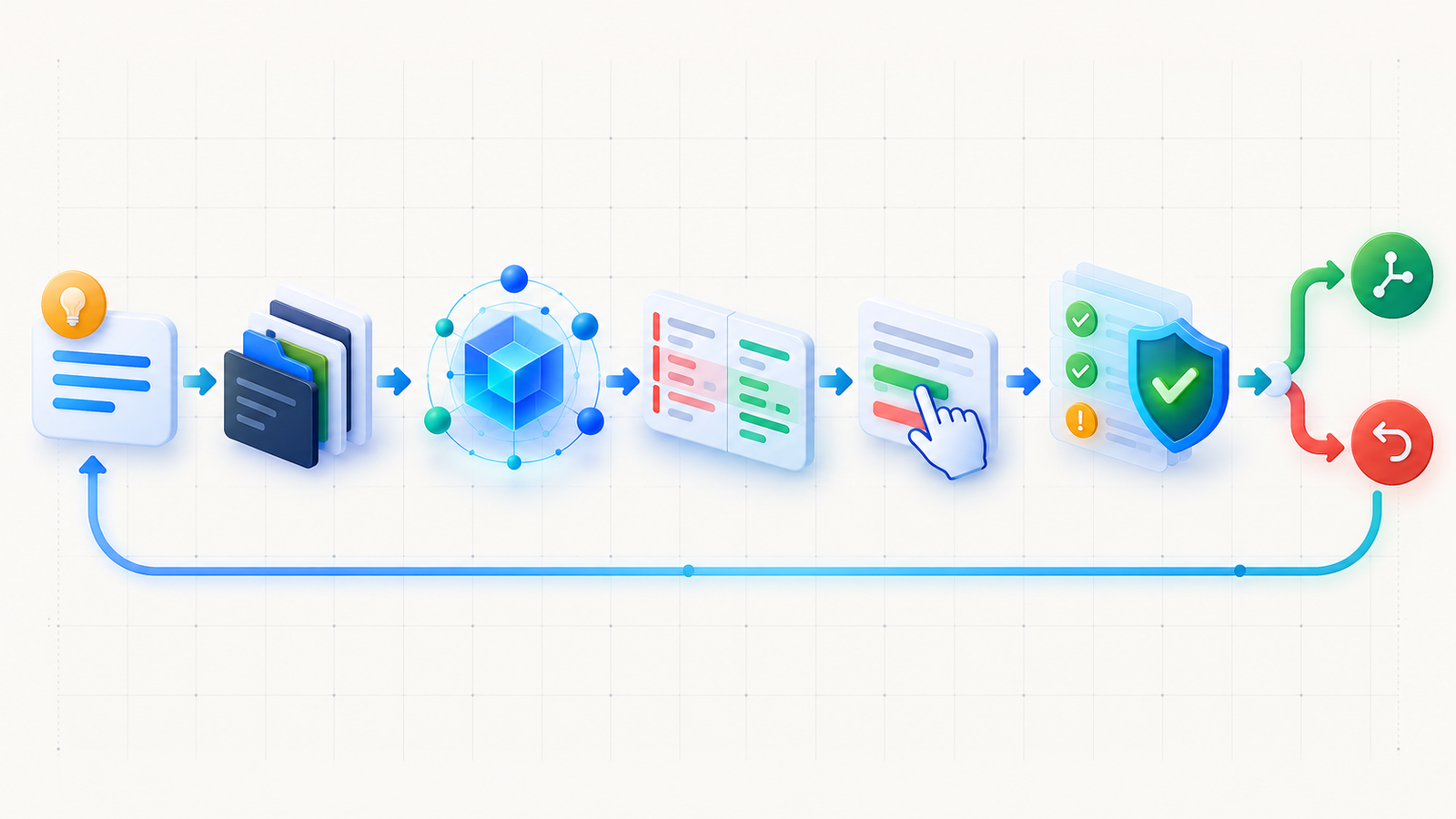
The exact implementation varies by product, but a modern generation request usually moves through seven stages.
- Intent: the developer describes an outcome, starts typing or supplies an issue and acceptance criteria.
- Context selection: the tool gathers selected code, open files and relevant repository material. Repository-aware agents may use semantic search, text search, symbol references and dependency information. Microsoft’s VS Code workspace-context documentation describes this as an iterative search process rather than sending an entire large repository on every request.
- Prompt assembly: the harness combines instructions, retrieved context, tool rules and output constraints into input for the model. Context windows are finite, so selection quality matters more than raw repository size.
- Token generation: the model predicts a sequence of code and prose tokens that is plausible given the input. It is generating a likely solution, not proving the program correct.
- Edit construction: the harness turns the response into an inline completion, a patch or a set of file edits. Better tools show a reviewable diff and preserve unchanged files.
- Feedback: an agent may run a formatter, compiler or tests, inspect the output and attempt a bounded correction. This loop improves evidence; it does not eliminate the need for human review.
- Decision: a developer accepts, modifies or rejects the change. CI, security scanning, review rules and deployment controls remain the final authority.
Why context quality changes the result
A vague prompt with the wrong files can produce polished but incompatible code. A bounded task with the relevant interface, tests and local conventions gives the model stronger constraints. Context also carries risk: pasted secrets, customer data and untrusted repository instructions may leave the expected boundary or steer an agent toward unsafe actions. Review the provider’s data controls and give tools the least access required for the task.
Completion, chat and agent modes are not the same
| Mode | Best use | Typical context | Main risk |
|---|---|---|---|
| Inline completion | Boilerplate, repetitive code and the next small edit | Cursor position, current file and nearby code | A plausible line is accepted without checking behavior |
| Chat or edit | Explanation, focused functions, tests and controlled refactors | Prompt plus selected files, symbols or repository search | Missing architecture constraints lead to a locally correct but systemically wrong patch |
| Agent | Bounded multi-file tasks with a clear verification command | Repository search, files, terminal output and approved tools | Excessive permissions, unsafe commands or repeated edits amplify an error |
Use the least autonomous mode that can complete the job. Inline suggestions are often enough for a serializer or test fixture. A cross-cutting change may justify an agent, but only when the task has narrow acceptance criteria, a clean working tree, limited credentials and a reliable way to verify the result.
Which AI code generators are worth using?
There is no universal winner. The worthwhile tool is the one that fits where your code lives, how your team reviews changes and how much execution authority you are prepared to grant. The following are representative starting points, not a ranking.
| Tool | Worth evaluating when | Check before adoption |
|---|---|---|
| GitHub Copilot | You want editor completions, chat and GitHub-centered team workflows | Organization policies, public-code matching, model availability and plan-specific limits |
| Cursor | You prefer an AI-first editor with repository-aware edits and agent workflows | Repository indexing, privacy mode, model-specific usage and how edits are reviewed |
| Claude Code | You work comfortably in a terminal and want a tool that can inspect and change a repository | Allowed tools, permission mode, network path and the scope of directories and credentials |
| OpenAI Codex | You want delegated coding work with an isolated or review-oriented workflow | Execution environment, repository access, approvals, usage limits and evidence returned with a change |
| JetBrains AI Assistant and Junie | Your team is standardized on JetBrains IDEs and wants AI inside that development environment | IDE and language support, licensing, agent availability and enterprise controls |
Start with the environment your developers already use. Then run the same small, representative tasks through two candidates: one new feature with tests, one bug with a reproducible failure and one repository-explanation task. Compare accepted diffs, review time, failed checks, data boundaries and total cost. Do not substitute vendor benchmarks for your own controlled pilot.
GitHub documents that its suggestions range from ghost-text completions to next-edit predictions, while its code-suggestions guide notes that quality varies across languages. The official responsible-use guidance also tells users to review and test generated code. Those limitations apply broadly: generation quality is uneven, and fluent output is not evidence of correctness.
A safe AI code-generation workflow
- Write acceptance criteria first. Name the behavior, affected boundary, prohibited changes and exact verification command.
- Start from a reviewable state. Use version control, a short-lived branch or isolated workspace, and make rollback easy.
- Provide only relevant context. Point to interfaces, tests and conventions. Exclude secrets, production credentials and unrelated customer data.
- Generate a small diff. Split large features into independently testable changes. Ask for assumptions when requirements are ambiguous.
- Read every changed line. Check error handling, authorization, input validation, concurrency, data migration behavior and failure paths.
- Verify independently. Run formatters, type checks, unit and integration tests, dependency review and appropriate security scans. NIST’s Secure Software Development Framework treats code review and executable testing as complementary practices.
- Merge through normal controls. Keep peer review, branch protections, CI gates and deployment rollback. The generator should not approve its own work.
For agents that can run commands, also apply the controls described in the AI agent security guide: least-privilege tools, task-scoped credentials, restricted network access, approval for consequential actions and durable logs. The same principle carries into AI-assisted CI/CD: generated changes should enter an observable delivery system, not bypass it.
Where generated code fails
It optimizes for plausibility, not truth
A generator can invent an API, use a deprecated option or satisfy the visible test while breaking an unstated invariant. Verify library versions and behavior against installed dependencies and official documentation.
It sees an incomplete system
Retrieved files rarely capture every runtime constraint, operational dependency or business rule. Architecture decisions, production traffic patterns and incident history may exist outside the repository.
It can reproduce insecure patterns
Generated code may omit authorization, weaken TLS validation, concatenate a query, log a secret or select an unsafe dependency. Security-sensitive changes need threat-aware review and tests, not a generic request to “make it secure.”
It can create licensing and provenance questions
Review product controls for public-code matches and keep the same provenance checks used for externally sourced code. GitHub’s code-referencing documentation explains how matching suggestions can be linked to public repositories and license information. That feature helps; it does not replace an organization’s IP review.
Agents increase the blast radius
A wrong completion affects a few lines. A wrong agent action can edit many files, install a dependency, run a destructive command or expose credentials through a tool call. Autonomy should rise only when isolation, approvals, tests and rollback rise with it.
Frequently asked questions
Do AI code generators understand code?
They model patterns and relationships in code and can use retrieved repository context, but they do not possess a guaranteed semantic understanding of your running system. Compilers, tests, review and production evidence remain necessary.
Can an AI code generator build a complete application?
It can scaffold and implement substantial parts of an application, especially with an agent loop. A production system still needs requirements, architecture, identity, data design, observability, security review, deployment controls and maintenance decisions.
Which AI code generator is best for beginners?
An editor-integrated assistant with visible diffs and low default autonomy is usually the safest starting point. Beginners should ask for explanations, generate small changes and run tests instead of delegating an entire unfamiliar project.
Is AI-generated code copyrighted?
Copyright and licensing depend on jurisdiction, source material, product terms and the specific output. Treat generated code like other external material: review provenance, public-code matches, dependencies and organizational policy, and seek legal advice for consequential decisions.
Should teams allow coding agents to merge directly?
Not by default. Keep protected branches, required checks and human approval for consequential repositories. Limited auto-merge can be considered only for narrowly defined, low-risk changes with strong tests, isolated credentials and a reliable rollback path.
Bottom line
AI code generators are worth using when they shorten a well-defined engineering loop: gather the right context, propose a small change, expose the diff, run independent checks and let a developer decide. They are poor substitutes for requirements, architecture or accountability. Choose a tool by workflow fit and control boundaries, then judge it by the quality of accepted changes rather than the volume of code it produces.


Pingback: Can AI-Generated Code Be Production-Ready? A DevSecOps Checklist - GravityDevOps