


The best AI coding tool for most JavaScript and TypeScript developers is GitHub Copilot when they want broad IDE support with minimal workflow change. Cursor is a stronger fit for AI-first, repository-wide editing; JetBrains AI pairs well with WebStorm’s deterministic navigation and refactoring; and Claude Code, OpenAI Codex, Continue or Aider suit terminal-centered and more configurable agent workflows.
The right choice depends less on whether a model can write React or Node.js and more on whether it understands your actual runtime, package manager, module system, framework conventions, workspace boundaries and test commands. JavaScript code can be syntactically valid while failing in a browser, server, edge runtime or build tool. TypeScript catches many mistakes, but it cannot prove runtime behavior, authorization, accessibility or dependency safety.
Best AI coding tools for JavaScript and TypeScript at a glance
| Tool | Best fit | Primary surface | Main tradeoff |
|---|---|---|---|
| GitHub Copilot | Established IDE and GitHub workflows | VS Code, JetBrains, Visual Studio and more | Capabilities and quotas vary by plan and surface |
| Cursor | AI-first multi-file work | Cursor desktop editor and agents | Requests route through Cursor’s backend |
| JetBrains AI | WebStorm navigation and refactoring | JetBrains IDEs | Cloud features consume AI credits |
| Claude Code | Terminal-driven repository tasks | CLI and IDE integrations | Shell authority needs strict permissions |
| OpenAI Codex | Local, IDE and delegated tasks | CLI, IDE, app and cloud | Sandbox and approval choices matter |
| Continue | Model choice and local setups | VS Code, JetBrains and CLI | Quality and cost depend on configuration |
| Aider | Git-first terminal editing | Terminal | Best for developers comfortable with Git |
| VS Code AI ecosystem | Flexible extension-based workflows | VS Code | Extension overlap and policy need management |
This comparison uses current official documentation and workflow fit, not invented hands-on benchmarks. We did not measure accuracy or productivity. Plans, quotas, included models and agent features change often, so verify the linked vendor documentation before purchasing. For the broader market and terminology, start with the AI coding tools pillar.
How we compared the tools
A useful JavaScript or TypeScript assistant should work with the repository’s sources of truth rather than guessing from a few open files. We compared each option against six practical requirements:
- Runtime and module awareness: Node.js, browser, edge, Deno or Bun behavior; ESM versus CommonJS; and the relevant build target.
- Workspace context: package boundaries, project references, generated types, shared configs and monorepo task graphs.
- Verification: the ability to run TypeScript checks, ESLint, unit tests, browser tests and the real production build.
- Action boundaries: clear approval before package installation, scripts, network calls, migrations or deployment.
- Data controls: documented retention, model-training choices, indexing behavior and organization policy.
- Total cost: subscription or usage charges plus review time, CI use, local hardware and administrative overhead.
The TypeScript team notes that one configuration represents one environment; browser, server, worker and test code may need separate configurations linked with project references. An agent that ignores those boundaries can produce a clean-looking patch against the wrong globals or module rules. Use official TypeScript module guidance as the authority, not a generated explanation.
Eight AI coding tools for JavaScript and TypeScript developers
1. GitHub Copilot: best overall for familiar IDE workflows
Copilot combines inline completion, chat, edits and agent features across widely used editors. GitHub’s plan documentation currently lists a limited Free plan, individual subscriptions and organization tiers with centralized policy controls. It also warns that models and feature support differ by plan and IDE.
For JavaScript and TypeScript, Copilot works best beside the compiler, linter and debugger already configured by the project. VS Code includes JavaScript and TypeScript language services plus a built-in Node.js debugger. Ask Copilot for a bounded change, then run the repository’s own scripts instead of accepting a green-looking editor state.
Choose it when: your team already uses GitHub and conventional IDEs. Watch for: invented package names, stale framework APIs and silent changes to lockfiles or build configuration.
2. Cursor: best AI-first editor for repository-wide changes
Cursor is well suited to tasks that cross a component, API route, shared schema and tests. Its JavaScript and TypeScript guide describes JSX and TSX support, framework extensions and an agent loop that can read linter output. That is useful, but lint repair is not equivalent to type safety, runtime correctness or browser testing.
Cursor’s privacy documentation says requests route through its backend, including when using an API key, and explains privacy modes and codebase indexing. Teams should set those choices before opening proprietary monorepos.
Choose it when: multi-file planning and editing are central. Watch for: broad diffs that mix client and server boundaries, change generated files or rewrite package metadata without a clear reason.
3. JetBrains AI in WebStorm: best integrated IDE analysis
WebStorm brings deterministic symbol resolution, refactoring, inspections and debugger integration to JavaScript and TypeScript. JetBrains AI adds chat, generation and agent features without replacing that IDE evidence. JetBrains documents the AI Assistant integration for WebStorm.
Current JetBrains plans use AI credits for cloud-backed features and also allow selected third-party or local models. Its data-handling documentation says detailed code-related data collection is opt-in and disabled by default, while prompts and relevant code still need to reach the selected model provider.
Choose it when: WebStorm inspections and refactoring are already trusted gates. Watch for: treating a successful structural refactor as proof that framework behavior or tests are correct.
4. Claude Code: best for terminal-centered repository work
Claude Code can inspect files, edit a repository and run commands from the terminal. The official setup guide documents its supported systems and local command-line workflow. It fits developers who already use package scripts, Git and CI commands as their primary interface.
Give it the exact package manager and workspace command. In a monorepo, specify the package path and avoid a root-level dependency update unless that is the intended task. Begin with planning or read-only access, approve commands individually and keep production credentials outside the agent environment.
Choose it when: terminal tools and repository search drive the workflow. Watch for: inherited secrets, lifecycle scripts and commands that affect more workspaces than expected.
5. OpenAI Codex: best for moving between local and delegated work
Codex spans CLI, IDE, app and cloud workflows, which can suit a TypeScript task that begins with a local failing test and later becomes a longer refactor or review. OpenAI’s current Codex hub links the supported surfaces and developer guidance. The underlying harness uses configured sandboxes and approval policies to bound tool execution.
Carry the same acceptance contract across surfaces: name the Node.js version, package manager, lockfile policy, workspace, build target, tests and allowed directories. A delegated task should return a reviewable diff and evidence, not a deployment.
Choose it when: you want one workflow across editor, terminal and asynchronous tasks. Watch for: granting filesystem, network or shell access that the task does not need.
6. Continue: best configurable open client
Continue supports VS Code, JetBrains and CLI workflows with configurable model providers and modes. Its offline guide shows how to use local models and disable telemetry. This can help teams with model portability or restricted-network requirements.
The client may be open source, but the full stack still has costs and risks: hosted inference, local hardware, provider keys, model evaluation and configuration maintenance. Continue’s documentation also notes that IDE extensions do not automatically inherit shell environment variables, so secrets need an intentional storage approach.
Choose it when: provider choice or local inference matters. Watch for: placing API keys in repository files or assuming every model handles tools reliably.
7. Aider: best Git-first terminal pair programmer
Aider builds a repository map, edits files and works directly with Git. Its language support table lists JavaScript and TypeScript repository maps and linting, while the lint and test guide explains automatic commands after edits.
That makes it easy to connect a focused edit to the existing type-check, ESLint and test scripts. The client is open source, but provider usage can still cost money. Review commits and ensure any auto-test command uses the correct workspace rather than a partial or unrelated package.
Choose it when: small diffs, commits and terminal control are priorities. Watch for: generated commits that have not passed the same CI gates as human changes.
8. VS Code’s AI extension ecosystem: best for modular adoption
VS Code is not one AI tool, but its language service, debugger, testing UI and extension model make it a practical host for several assistants. Microsoft documents built-in JavaScript support, including IntelliSense, navigation and refactoring, while its debugger supports JavaScript, TypeScript and Node.js.
This modularity lets a team standardize on deterministic tooling and choose an assistant separately. It also creates governance work: multiple extensions can index the same code, send context to different providers or expose overlapping agent permissions.
Choose it when: flexibility and existing extension workflows matter. Watch for: uncontrolled extension sprawl, duplicate telemetry paths and inconsistent organization settings.
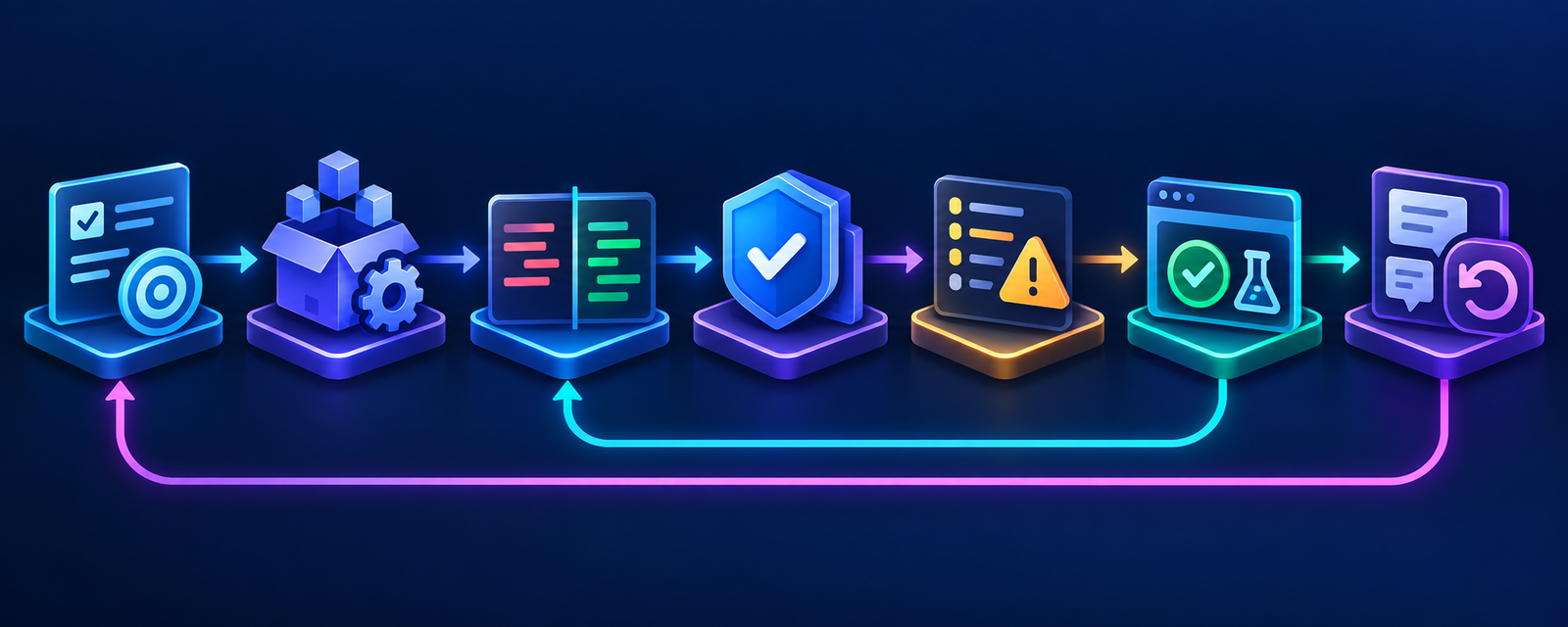
A safe AI-assisted JavaScript and TypeScript workflow
- Pin the environment. Record the Node.js or alternative runtime version, package manager and workspace path.
- Define the execution target. State whether code runs in a browser, server, worker, edge runtime or build tool and whether it uses ESM or CommonJS.
- Scope context. Include the relevant package manifest, lockfile, TypeScript configuration, lint rules and nearby tests; exclude secrets and unrelated packages.
- Ask for a plan. Require the agent to identify files, dependency changes, public API changes and commands before editing.
- Generate a small diff. Prefer one behavior and its tests over a broad framework or dependency rewrite.
- Verify dependencies. Confirm exact package identity, version, license, maintenance and advisories. Do not auto-install a model-suggested package.
- Run independent checks. Use the repository’s type-check, ESLint, unit test, browser or integration test and production-build commands.
- Review runtime behavior. Check authorization, input validation, serialization, async errors, race conditions, hydration, accessibility and browser compatibility.
- Commit and deploy normally. Keep human review, CI, staged rollout and rollback intact.
Issue text, repository documentation, test fixtures and package output can contain instructions that manipulate an agent. Treat retrieved text as untrusted, keep secrets outside the workspace and require approval for installs, scripts, migrations, publishing and deployment. The AI agent security guide covers prompt injection, permissions and sandboxing in more depth.
How to choose for your stack
- VS Code plus GitHub: start with Copilot and preserve your TypeScript, ESLint and test commands as the authority.
- WebStorm team: compare JetBrains AI against the value of existing inspections, refactors and organization controls.
- Large React, Next.js or Node.js changes: pilot Cursor, Claude Code or Codex in a disposable branch or worktree with explicit package boundaries.
- Local models or provider portability: evaluate Continue or Aider and include inference, setup and maintenance in the cost.
- Regulated or proprietary code: begin with data flow, retention, identity, audit, extension policy and deployment controls, then choose a product.
Run a controlled pilot on representative work: a failing unit test, a typed API change, a dependency update and a browser-facing feature. Measure review time, CI failures, defects found before merge, undo rate and cost. For tool modes and action boundaries, see the AI code generator guide and the AI editor versus traditional IDE comparison.
Frequently asked questions
Which AI coding tool is best for TypeScript?
GitHub Copilot is the broadest low-friction choice for familiar IDEs. Cursor is better for AI-first multi-file edits, while JetBrains AI is attractive when WebStorm’s structural analysis and refactoring matter. Terminal users should compare Claude Code, Codex and Aider.
Can AI coding tools understand a JavaScript monorepo?
Some can search and edit across a monorepo, but context size is not the same as correct package boundaries. Provide the task graph, workspace path, project references and exact package commands. Review root manifests and lockfiles separately.
Does TypeScript make generated code safe?
No. TypeScript catches many static inconsistencies, but it does not prove authorization, validation, runtime environment behavior, accessibility, dependency integrity or business correctness. Keep linting, tests, security scanning and human review.
Should an agent be allowed to install npm packages?
Not by default. Package names can be hallucinated or malicious, and install scripts can execute code. Require approval, verify the package and version, inspect lockfile changes and run the build in an isolated environment.
Are local AI coding tools private?
Local inference can keep prompts and code on your machine, but clients may still send telemetry or call external tools. Read the configuration and observe network behavior. Local operation also shifts model updates, access control and hardware cost to your team.
Bottom line
Choose the tool that fits your repository and control model, not the longest feature list. Copilot is the practical default for established IDE users; Cursor, Claude Code and Codex suit broader agent work; WebStorm plus JetBrains AI favors integrated analysis; Continue and Aider offer more configuration. Whichever tool you select, let TypeScript, linting, tests, CI and review decide whether generated code is ready.


