

The best free AI singing voice generators are Musicfy for quick song drafts, FineShare Singify for downloadable AI covers, Audimee for testing royalty-free conversion voices, OpenUtau with DiffSinger for a genuinely free local workflow, and Synthesizer V Studio Basic for note-by-note vocal production. Kits AI is useful for auditioning generative vocals, but its current free plan lists zero download minutes.
These tools do not all solve the same problem. Some transform a vocal recording into another licensed voice, some generate a complete song from a prompt, and others synthesize a sung performance from MIDI notes and lyrics. The right choice depends less on a flashy demo than on whether you need an export, pitch control, commercial rights, or a private local workflow.
This comparison was checked on September 24, 2026, using official pricing, help, licensing and product pages available to US users. Free plans change frequently, so confirm the current checkout and voice-specific license before releasing a track.
Best free AI singing voice generators at a glance
| Tool | Best for | Free access checked | Main limitation |
|---|---|---|---|
| Musicfy | Fast song and voice-conversion drafts | 3 voice conversions and 5 song generations | Commercial license is tied to eligible paid plans |
| FineShare Singify | Downloadable AI song covers | 1,000 signup credits; full-cover download | Free output is noncommercial and attributed |
| Audimee | Trying licensed conversion voices | 15 one-time conversion minutes and MP3 | Personal use only; no custom voice slot |
| OpenUtau plus DiffSinger | Free local editing and technical users | Open-source software with no service quota | Voicebank licenses and setup vary |
| Synthesizer V Studio Basic | MIDI-and-lyrics vocal arranging | Free Basic editor and limited Lite voices | Lite voices have reduced features and separate terms |
| Kits AI | Auditioning generative vocals | 15 conversion minutes | Free plan currently lists zero download minutes |
Direct answer: Start with Musicfy or Singify if you want a browser workflow, Audimee if you already have a sung input and want a different licensed timbre, or OpenUtau with a properly licensed DiffSinger voicebank if you want a no-subscription desktop route. Choose Synthesizer V Basic when note and lyric editing matter more than instant generation.
How we selected and ranked these tools
We screened eight singing-synthesis and singing-conversion products, then ranked the six with the most useful verifiable no-cost access. We compared the generation method, free allowance, export path, watermark or attribution requirement, pitch and lyric control, custom-voice access, commercial-use language, privacy implications, platform support and clarity of documentation.
This is a documentation-based comparison, not a controlled listening test. We did not run the same melody through every service or claim that one model is objectively the most realistic. Vendor statements are labeled as such, and unpublished limits are not guessed. ACE Studio and its 160-plus premade voices were screened, but its current pricing page presents paid membership and a money-back guarantee rather than a durable free singing tier, so it is discussed as a paid alternative rather than ranked as free.
1. Musicfy: best for quick browser drafts
Musicfy combines voice conversion with full-song generation. Its current pricing panel lists three free voice conversions and five free song generations, which makes it one of the easiest ways to test both workflows without installing production software. Song generation can create vocals and instrumentation from a description, while conversion changes a recorded or uploaded performance into a selected voice.
The strongest reason to start here is speed: you can establish whether a melody, lyric and vocal color work together before committing to a detailed arrangement. Musicfy also separates copyright-free house voices from community models, an important distinction for anyone publishing beyond a private demo.
Pros: browser-based; supports both song generation and conversion; explicit small free allowance; copyright-free voice collection.
Cons: requires an account; free usage is very limited; the site says commercial use applies when the plan includes a commercial license, so do not assume a free draft is release-ready. Community or celebrity-style models may carry separate publicity and copyright risks.
Best for: rapidly testing a chorus, vocal character or arrangement idea.
2. FineShare Singify: best for downloadable AI covers
Singify gives a new free account 1,000 credits and says free users can download the full cover, although separate vocal and instrumental downloads require a subscription. That makes it more useful than preview-only tiers when you need an actual file for private evaluation.
The legal boundary is unusually important here. Singify’s terms say free output is owned by Singify and licensed to the user only for lawful internal, noncommercial use with attribution. Paid users receive broader ownership language. The terms also require permission from the person whose voice recording is uploaded or cloned.
Pros: downloadable cover on the free account; simple upload-or-link workflow; clear initial credit grant; official singer models and community models are visibly distinguished.
Cons: signup required; free rights are personal and noncommercial; the 1,000 credits are an introductory balance rather than a clearly documented monthly refill; community voice rights can differ.
Best for: making private cover-song experiments that need a downloadable result.
3. Audimee: best for trying royalty-free conversion voices
Audimee is a voice-to-voice converter rather than a text-to-song engine. You supply a sung performance, choose a voice, and keep the original melody and timing. Its Free plan currently includes 15 conversion minutes, 11 royalty-free voices, MP3 downloads, a pitch editor, vocal isolation and stem splitting.
The allowance is useful but not recurring: Audimee’s FAQ describes the 15 minutes as a one-time introduction that does not reset. Free downloads are also personal-use only. Commercial publication and WAV output begin on paid plans, and the Free tier has no custom voice-model slot.
Pros: clear one-time allowance; MP3 download; pitch editing; licensed catalog instead of relying only on public impersonation models.
Cons: requires a source vocal; one-time rather than monthly minutes; no free custom voice; commercial release is paid-only.
Best for: testing how an existing vocal line sounds in a different approved timbre.
4. OpenUtau with DiffSinger: best truly free local option
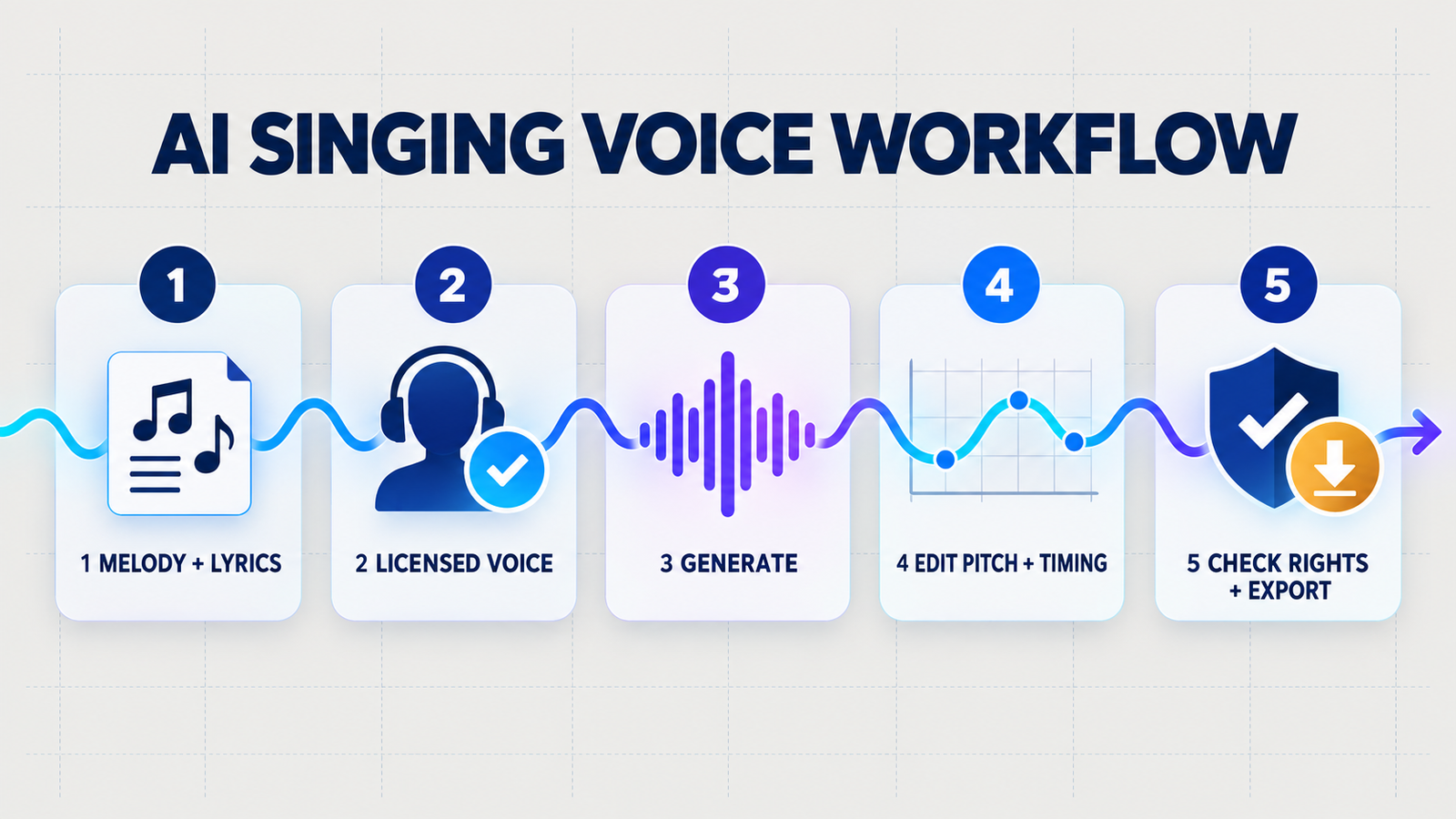
OpenUtau supports DiffSinger, a machine-learning singing synthesizer, inside a free open-source piano-roll editor. Unlike a hosted free tier, the software does not meter generations or require an online account. You can import or enter notes, add lyrics, draw pitch and expression curves, and render locally with a compatible voicebank.
This route offers the most control for zero subscription cost, but it also asks the most from the user. You must install the editor, a vocoder and a compatible singer, then understand the singer’s phonemizer and license. OpenUtau’s software license does not automatically grant commercial rights to every community voicebank. Read the license shipped with the specific singer and retain a copy for project records.
Pros: open source; Windows, macOS and Linux support; no hosted-service quota; detailed pitch, dynamics, breathiness and tension controls when supported.
Cons: setup is technical; voicebank quality varies; licensing is decentralized; it is an editor, not a one-click prompt-to-song service.
Best for: technically comfortable producers who want local control and can manage voicebank licenses.
5. Synthesizer V Studio Basic: best for MIDI-and-lyrics arranging
Synthesizer V Studio Basic is the free edition of a mature singing-synthesis editor. Instead of transforming a recorded singer, you enter notes and lyrics and shape the performance. Dreamtonics documents Lite versions of some voice databases for evaluation, with limited functionality and an attribution requirement when publishing.
The key caveat is that each voice database has its own terms. Dreamtonics’ general documentation says Lite voices have limited usage, while partner voices may use different agreements. Do not transfer commercial-use language from one singer to another. The free Basic editor is useful for learning the workflow, but producers who need cross-language features, advanced controls or an unrestricted production voice will likely need paid components.
Pros: detailed note and lyric control; established desktop workflow; useful free editor; no per-generation cloud meter.
Cons: free voices are limited; licensing is voice-specific; setup and arranging take longer than a browser cover tool; advanced features are reserved for Pro.
Best for: composers who want to write the vocal performance rather than upload one.
6. Kits AI: best free preview, not free exporting
Kits AI offers voice conversion, generative vocals, voice design and audio utilities. The Free pricing row currently lists 15 conversion minutes and access to Kits generative vocals, but also lists zero download minutes. That means it can help audition ideas inside the service, yet it should not be presented as a free export solution.
Kits’ licensing documents are stronger than many community-model marketplaces: its royalty-free and custom-model terms describe broad personal and commercial output rights when the relevant licensed model and subscription conditions are satisfied. You still need authority over the input performance, and artist models may carry their own terms.
Pros: polished music-focused workflow; licensed model categories; useful vocal utilities; clear rights documents.
Cons: no download minutes on the current Free plan; free-plan details conflict in places on the pricing page, so the restrictive table should control expectations; custom cloning and advanced controls are paid.
Best for: auditioning Kits’ voices before deciding whether paid export access is worthwhile.
Which AI singing voice generator should you choose?
- You have a recorded vocal: use Audimee for a licensed-voice test, Musicfy for a quick conversion, or Singify for a private downloadable cover.
- You have MIDI and lyrics: use Synthesizer V Studio Basic for the friendliest structured editor, or OpenUtau with DiffSinger for a fully open workflow.
- You only have an idea or prompt: Musicfy and Singify can produce complete songs, but a dedicated comparison of free AI music generators is more useful if the full arrangement matters as much as the singer.
- You need a commercial release: verify the exact plan and voice license first. Audimee Free and Singify Free are explicitly noncommercial, while Kits Free currently blocks downloads.
- You need a custom clone: get written consent from the vocalist and read retention, deletion and model-access terms before uploading training recordings.
If you are new to generative media, the beginner’s guide to generative AI explains why model output is probabilistic. Better prompting can help with style and arrangement direction, but it cannot replace pitch editing or a rights review; see this practical prompt-engineering guide for a structured approach.
Consent, copyright and commercial-use checks
A technically successful vocal is not automatically safe to publish. Use only your own voice, a properly licensed synthetic singer, or a voice for which you have explicit permission. Do not use a public figure, performer or private individual’s likeness to imply an endorsement, create a deceptive recording, or evade platform disclosure rules.
Also separate the rights in the voice from the rights in the song. A tool may license its vocal model while you still lack permission to use the composition, lyrics, backing track or source recording. Cover-song distribution can require mechanical licensing, and video use may require synchronization rights. “Royalty-free voice” does not mean “copyright-free song.”
For privacy, treat raw vocals and custom-voice datasets as biometric-like identity material. Prefer clear deletion controls, avoid uploading another person’s isolated vocals without permission, and keep consent and license records with the project. For team workflows, review who can access the model after a collaborator leaves.
Frequently asked questions
Can an AI singing voice generator create vocals from lyrics alone?
Some can create an entire song from a prompt and lyrics, but vocal synthesizers such as Synthesizer V and DiffSinger normally need melody notes plus lyrics. Voice converters such as Audimee need a recorded sung performance.
Is there a free AI singing voice generator with commercial rights?
Commercial rights depend on the tool, plan and specific voice. Open-source software can be free while a voicebank remains noncommercial. Musicfy limits commercial licensing by plan, and the free plans from Audimee and Singify are explicitly personal or noncommercial. Always retain the voice-specific license you relied on.
Can I clone a singer’s voice without permission?
No responsible workflow should do that. Obtain explicit authorization from the voice owner, disclose synthetic use where appropriate, and follow the service’s terms and the distribution platform’s impersonation and manipulated-media policies.
Do free AI vocals have watermarks?
Audio tools more often restrict downloads, formats, credits, attribution or commercial use than add an audible watermark. Kits Free currently lists zero download minutes; Singify requires attribution for free output; Audimee Free provides MP3 but limits it to personal use.
Bottom line
There is no universal winner. Musicfy is the quickest all-round browser test, Singify provides the clearest free cover download, Audimee is the strongest documented conversion trial, and OpenUtau plus DiffSinger is the most capable no-subscription route for users willing to learn the setup. Synthesizer V Studio Basic is the better starting point for deliberate MIDI-and-lyrics arranging. Treat Kits AI Free as a preview because its current plan does not include download minutes.


