


Best free AI tools for small business owners in 2026 include ChatGPT for flexible drafting and analysis, Gemini for Google-connected work, Perplexity for source-led research, Canva for visual content, Grammarly for editing, HubSpot for customer management and Zapier for basic automation. Each has a real free option, but every one also limits usage, features or business controls.
Reviewed September 17, 2026. Free plans change often, so confirm the current allowance before building a recurring workflow around any product. This guide evaluates what a small business can use at zero subscription cost today; it does not treat a limited paid-plan trial as a free plan.
Best free AI tools for small business owners: quick comparison
| Tool | Best for | What is genuinely free | Main limitation |
|---|---|---|---|
| ChatGPT | Drafting, analysis and brainstorming | Core assistant, web search and limited files, data analysis and images | Advanced features have variable caps; consumer data settings need review |
| Gemini | Research and Google-connected tasks | Consumer assistant with changing compute-based limits | Limits vary by prompt complexity and capacity |
| Perplexity | Cited market and competitor research | Practically unlimited basic searches, three Pro searches daily and one Research query monthly | Advanced models and heavier file work require payment |
| Canva | Social graphics, flyers and presentations | Free editor, assets and up to 20 pooled Standard or Premium AI uses monthly | Premium assets, stronger brand controls and larger AI allowance are paid |
| Grammarly | Polishing email and customer-facing copy | Core writing suggestions plus 100 generative AI prompts monthly | It is an editor, not a full research or publishing system |
| HubSpot | Contact, lead and deal tracking | No-expiry CRM with no card, Breeze Assistant and reporting dashboard | Advanced automation, scoring and customer agents sit in paid editions |
| Zapier | Simple app-to-app automation | 100 tasks monthly, two-step Zaps and limited Copilot messages | Published AI workflow steps and multi-step automations generally need payment |
The best starting stack for most owners is smaller than this list: choose one general assistant, one job-specific tool and a human approval step. Seven overlapping subscriptions do not create a system; a repeatable workflow does. If generative AI is new to you, start with our plain-English guide to generative AI.
How we selected and ranked these tools
We screened 11 credible products and ranked seven using documentation available to US users. The criteria were zero-dollar access after any trial ends, usefulness for a recurring small-business task, published or clearly disclosed limits, setup effort, export and handoff options, privacy controls, accuracy risk and the cost of outgrowing the free plan.
This is a documentation-based comparison, not a controlled output-quality benchmark. We verified plan details on official pricing and help pages, then used independent testing from Zapier and TechRadar as context for workflow fit. We did not connect live customer records, purchase paid subscriptions or measure revenue, response-rate or ranking outcomes. Where a provider does not publish a fixed quota, we say so instead of estimating one.
1. ChatGPT: best all-purpose free AI assistant
ChatGPT is the most flexible first tool for an owner who needs help turning rough inputs into useful work. It can outline a proposal, compare a spreadsheet, rewrite a customer email, summarize a document, research a topic with web search or produce a first visual concept. That breadth makes it useful before a business knows which narrow AI product it needs.
Free-plan reality: OpenAI says the ChatGPT Free plan includes core chat, web search and limited access to file uploads, data analysis, image generation, voice and deep research. Limits vary by model, feature and system demand. That is enough for occasional work, but not a reliable allowance for a daily production queue.
Best use: draft a customer FAQ from approved facts, analyze a non-sensitive CSV or turn meeting notes into an action list. Use a structured brief rather than a one-line request; these prompt-engineering patterns work for business tasks too.
Watch out for: confident errors and data handling. OpenAI says individual-service content may be used to improve models unless the user opts out; Temporary Chat is not used for training. Do not paste passwords, payment details, medical information, private employee records or unredacted customer data into a consumer workspace.
2. Gemini: best free option for Google-centered work
Gemini is a strong fit when an owner already works in Gmail, Docs, Drive and Google Search. The consumer app handles drafting, research, images and file questions, while its biggest practical advantage is familiarity with Google’s ecosystem. It is especially useful for summarizing public information, comparing options and preparing a first draft that will be finished in Docs.
Free-plan reality: Google’s current Gemini Apps limit guide describes compute-based caps that depend on prompt complexity, model, feature and conversation length. Limits refresh every five hours until a weekly limit is reached, but Google can change them with capacity. This is free access, not a guaranteed number of business tasks.
Best use: turn public research into an outline, create variants of an approved email or ask questions across non-confidential files.
Watch out for: privacy settings. Google’s Gemini Apps Privacy Hub says chats may help improve services when Keep Activity is on and a subset can be human reviewed. Turning Keep Activity off prevents future chats from training models unless feedback is submitted, although chats are retained briefly for service and safety. Some connected features may then be unavailable.
3. Perplexity: best free AI tool for cited research
Perplexity is the most focused choice here for market scans, vendor comparisons and finding primary sources. Its answers place citations next to claims, which makes checking the underlying evidence faster than copying an uncited chatbot response into a business plan.
Free-plan reality: Perplexity’s current plan comparison lists practically unlimited basic searches, three Pro searches per day, one Research query per month and limited file uploads on Standard. Advanced model selection, image generation and heavier file work require a paid plan.
Best use: map competitors, locate current government guidance or collect sources before drafting. Open every important citation and verify that the page supports the sentence you intend to publish.
Watch out for: citations improve traceability, not truth. Sources can be old, weak or misread. Perplexity says search data may be used to improve its models and provides an AI Data Usage opt-out in settings; keep customer and deal data out of consumer research queries.
4. Canva: best free AI design tool for everyday marketing
Canva combines a familiar design editor with AI-assisted copy, images, layout and presentation features. A small business can build social posts, menus, flyers, simple presentations and ad concepts without learning a full professional design suite.
Free-plan reality: Canva’s US pricing page lists a free editor, more than a million templates, millions of free assets, 5 GB of storage and up to 20 pooled Standard or Premium AI uses per month. Canva notes that tool complexity affects the number of uses and the allowance resets monthly. Sign-in is required, and a free design can still contain paid stock that must be replaced or purchased before download.
Best use: create a repeatable set of branded social, print and presentation templates, then use AI for first drafts rather than every edit.
Watch out for: visual similarity, stock licensing and brand inconsistency. Review the live AI allowance, inspect every asset’s license and check generated people, logos and text before publication. Our marketing-copy tool comparison covers the writing side of the same workflow.
5. Grammarly: best for polishing customer-facing writing
Grammarly is useful after the thinking is done. It can tighten an email, adjust tone, shorten a proposal paragraph and catch mechanical problems across browser-based work. That narrower role is a strength: it encourages review of an existing draft rather than outsourcing the entire message.
Free-plan reality: Grammarly currently documents 100 generative AI prompts per month for Free users, alongside its standard writing suggestions. The counter resets monthly based on when generative AI became available to the account.
Best use: revise proposals, support replies, website copy and sensitive emails for clarity while keeping the business owner responsible for claims and tone.
Watch out for: an elegant sentence can still be inaccurate or legally risky. Check names, prices, deadlines, refund language and contractual promises against the source document. Free access also lacks many team administration and brand-governance features.
6. HubSpot: best free AI-supported CRM
HubSpot is the most operational product on this list. Instead of generating isolated text, it gives a small business one place to track contacts, companies, deals and follow-ups. The free CRM includes Breeze Assistant and a reporting dashboard, so AI sits beside the underlying customer record.
Free-plan reality: HubSpot describes its free CRM as no-expiry and no-credit-card, with contact management, deal pipelines, CRM import, Breeze Assistant and reporting. Paid editions add capabilities such as advanced permissions, automation, custom reporting, scoring and customer agents.
Best use: establish a clean lead pipeline and use AI to summarize or draft around approved CRM data. Start with a small property set and a written rule for who owns data quality.
Watch out for: free CRM is not free unlimited AI automation. Product packaging and credits can change, while customer records may carry privacy and consent obligations. Define retention, access and deletion practices before importing a mailing list. For broader document workflows, see our guide to AI document creation tools for small businesses.
7. Zapier: best for testing a simple automation
Zapier helps an owner stop moving the same information between apps by hand. A two-step workflow can take a new form response and add it to a table, create a calendar item or send a notification. Zapier Copilot can help describe and troubleshoot the automation in natural language.
Free-plan reality: the current Free plan includes 100 tasks per month, unlimited workflow assets, two-step Zaps, one user and 15-minute polling. Zapier’s pricing page says Copilot is included with daily message limits. However, its official model-pricing guide says publishing an AI by Zapier step requires Professional or above. The free tier is best for simple automation and AI-assisted setup, not a production AI agent.
Best use: automate one low-risk handoff with an obvious audit trail, such as copying a website inquiry into a lead table. Monitor the first runs and define what happens when the task allowance is exhausted.
Watch out for: every app connection expands the blast radius of a mistake. Use minimum permissions, avoid automatically sending generated claims to customers and keep approval in the loop for prices, refunds, legal language and account changes.
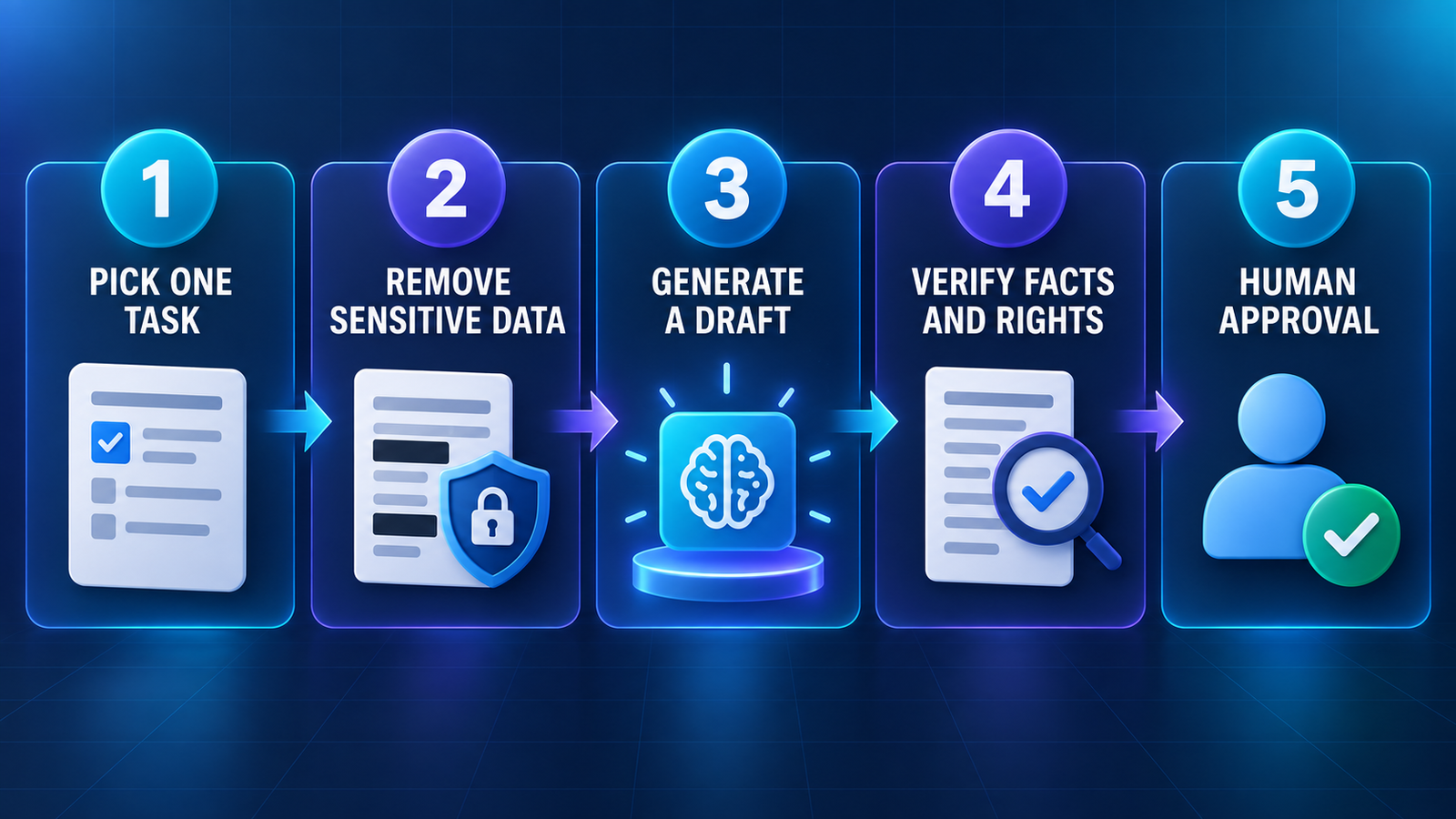
How to choose without building a messy tool stack
- Name one repeated task. “Write faster” is vague. “Turn approved product notes into a weekly email draft” is testable.
- Classify the data. Public information is different from customer, employee, payment, health or legal data. Redact sensitive fields before using a consumer AI tool.
- Set a baseline. Measure current time, error rate and review effort before testing AI. Speed without accuracy is not savings.
- Test five representative examples. Include an easy case, an ambiguous one and a case the tool should refuse or escalate.
- Assign a reviewer. The named human checks facts, tone, rights, consent and the final action.
- Review the limit and exit path. Know what stops working at the free cap and how to export your work before adopting the tool.
For many businesses, the sensible starter combination is Perplexity for source discovery, ChatGPT or Gemini for a draft, Grammarly for a final language pass and a person for approval. Add Canva, HubSpot or Zapier only when the specific workflow justifies another account and another data-processing relationship.
Free AI is useful, but it is not free of responsibility
Do not use these products as autonomous accountants, lawyers, hiring decision-makers or financial advisers. Generated facts, calculations and recommendations require verification. Obtain permission before uploading another person’s image, voice or private information. Check copyright, stock-asset and commercial-use terms for every final deliverable rather than assuming that an AI output is automatically safe to sell.
The best free AI tools for small business owners are the ones attached to a narrow, reviewable job. Start with one workflow for two weeks. Keep the input non-sensitive, record corrections and stop if review time exceeds the time saved. That modest approach produces better evidence than signing up for every free plan at once.
Frequently asked questions
Can a small business use AI for free?
Yes. Every ranked product has a zero-dollar path, but “free” usually means variable model access, monthly prompts, pooled credits, branding, two-step workflows or feature restrictions. A free plan is suitable for testing and light recurring work, not guaranteed production capacity.
Which free AI tool should a small business start with?
Start with ChatGPT or Gemini for a broad drafting task, or Perplexity when citations matter. If the problem is specifically design, customer tracking, editing or app handoffs, begin with Canva, HubSpot, Grammarly or Zapier instead.
Can free AI tools handle confidential business data?
Do not assume they can. Consumer plans may have different training, retention, administration and contractual protections from paid business products. Review the provider’s current privacy controls and agreement, minimize the data shared and use an approved business service for regulated or confidential information.


