
The best free AI video script generator depends on what you need after the first draft. Ahrefs is the simplest no-subscription option, Kapwing is useful when you want platform-specific short-form structure, and vidIQ is the strongest fit for YouTube planning. Canva, Descript, and Simplified make more sense when the script must continue into a broader creation workflow. All six can produce usable text without an upfront payment, but “free” does not mean unlimited.
This comparison was checked against US-facing official product, pricing, help, and policy pages on November 16, 2026. It is documentation-based; we did not claim identical output quality, run a benchmark, or verify every account-specific limit by generating and downloading content. Treat any generated script as a draft that still needs fact-checking, rights review, and a read-aloud edit.
Quick comparison: which free script generator should you use?
| Tool | Free access checked | Best fit | Important limit |
|---|---|---|---|
| Ahrefs | Standalone tool; no subscription required | Fast scripts without joining an editing suite | 2,048-character prompt field; output still needs manual review |
| Kapwing | Free workspace | TikTok, YouTube, Reels, and Shorts drafts | Script generation shares up to five TTS minutes on Free; free video exports carry a watermark |
| Canva Magic Write | 50 free queries advertised | Scripts that will become Canva designs | Account required; usage is capped and output can be inaccurate or non-unique |
| Descript | Free plan with 100 AI credits per month | Script-to-recording and text-based editing | AI tools are limited; Free video export tops out at 720p |
| vidIQ | Free plan with 150 AI credits per month | Long-form YouTube scripts and channel planning | Script Writer uses one credit per selected script minute; less direct for one-minute Shorts |
| Simplified | Free plan; first script without a card | YouTube, TikTok, and Reels formats in one workspace | The public script page does not state a durable numeric allowance; check the in-app meter |
If you want the AI to produce footage rather than text, use our separate comparison of free AI video generators. If you already have a recording and want clips, the right job is covered in our guide to turning long videos into Shorts. Keeping those workflows separate prevents you from paying for video generation when you only need a script.
How we compared the tools
We looked for a currently usable US-facing path to generated script text without an upfront payment. A free preview counted only when the documentation explained how a user could reach meaningful output. We compared account requirements, recurring versus one-time limits, platform or duration controls, copying and editing options, the route from script to video, ownership language, privacy signals, and disclosure obligations.
Script generators do not have video-specific export details until you continue into an editor. That distinction matters. A text draft may be free to copy while the optional video stage can consume credits, lower resolution, add a watermark, or introduce stock-music and footage licenses. We call out those boundaries instead of treating “generate a script” and “export a finished video” as the same feature.
Limits can also vary by account, region, rollout, and billing date. The table reflects what the companies publicly documented when checked, not a promise that a particular account will always receive the same quota.
Six free AI video script generators compared
1. Ahrefs Video Script Generator: best no-subscription starting point
Ahrefs’ official Video Script Generator provides a 2,048-character topic field, tone controls, and language selection. Ahrefs’ help center says its standalone writing tools do not require a subscription. That makes it the cleanest choice when you want draft text to copy into another document or teleprompter without adopting a full video editor.
The tradeoff is limited workflow context. The page generates text but does not document timeline editing, caption formats, aspect-ratio output, or a video export because it is not a production suite. Avoid pasting confidential client plans, unpublished financial data, or personal information into any public writing utility. Fact-check names, figures, quotations, and product claims before recording.
2. Kapwing AI Script Generator: best for platform-specific short drafts
Kapwing’s official generator supports short scripts for YouTube, TikTok, Instagram, podcasts, ads, and explainers. Its help page says a Free workspace can use the script generator for up to five minutes if those text-to-speech minutes are not used elsewhere. The interface can vary tone and duration, preserve earlier versions, and copy the result or continue into script-to-video.
That five-minute allowance is shared capacity, not five unlimited scripts. Continuing into video can add narration, subtitles, B-roll, music, and 9:16, 16:9, or 1:1 framing, but Kapwing documents that free video exports include its watermark. Review stock and music licensing for the exact assets you select rather than assuming every generated project has identical commercial rights.
3. Canva Magic Write: best for scripts that become visual designs
Canva’s AI Script Generator uses Magic Write and advertises 50 queries for free users. It can draft video, podcast, presentation, and promotional scripts, then pass the copy into Canva Docs or a video design. Canva says Magic Write accepts up to 1,500 words of input and produces roughly 2,000 words of output, so it suits structured briefs better than extremely long source material.
Canva warns that generated text may be outdated, inaccurate, or non-unique. Its AI terms say users are responsible for inputs and outputs, must review output, should not include sensitive personal data, and should disclose AI’s role when publishing AI-assisted written content. Canva also says third-party providers may process prompts. Do not paste a private customer brief unless your agreement and Canva settings permit it.
4. Descript AI Script Generator: best script-to-recording workflow
Descript’s AI Script Generator creates video, podcast, and marketing drafts and keeps them inside a text-based audio and video editor. The Free plan currently lists 100 AI credits per month, one media hour per month, limited AI-tool use, and watermark-free 720p export. This is useful when you want to revise the script, record narration, edit by transcript, and export from one project.
Credits are shared across AI actions, so 100 credits are not the same as 100 complete scripts. Descript’s terms say the user owns protectable input and output as between the parties, but inputs and outputs can be processed to operate and improve the service; users can opt out of Descript model-improvement use. Voice features introduce separate consent obligations. Never clone or imitate a speaker without clear permission.
5. vidIQ Script Writer: best for long-form YouTube planning
vidIQ’s YouTube Script Generator turns an idea into an opening, sections, transitions, and a call to action. The public preview produces a hook and intro; a free account unlocks full scripts. Its Script Writer supports 5-, 10-, 15-, 20-, and 30-minute selections and tone choices, which is more useful for long-form YouTube than for a 30-second TikTok.
vidIQ’s current credit documentation gives Free accounts 150 shared AI credits per month and charges Script Writer one credit per selected minute. Unused plan credits do not roll over. A five-minute draft therefore uses five credits, but other tools such as thumbnails and coaching draw from the same balance. The product page does not promise views or retention; neither should your script.
6. Simplified AI Script Generator: best multi-format workspace with an unclear cap
Simplified’s official script page supports YouTube long-form, TikTok, and Instagram Reels formats, plus topic, tone, and audience controls. It says users can start on a free plan, generate a first script without a credit card, edit the result, and carry it into voiceover, design, or video tools. Simplified states that users may edit, publish, and monetize scripts they generate.
The limitation is transparency: the public script page does not publish a specific lasting generation allowance or reset period. Treat it as free to start, not unlimited. Confirm the in-app balance before building a recurring workflow, and separately check export, stock, music, and voice terms if you continue beyond copied text.
A practical prompt and review workflow
A useful prompt specifies the audience, promise, duration, platform, evidence, visual constraints, and ending. For example:
Write a 60-second vertical-video script for beginner home gardeners. Open with a clear problem, explain three evidence-based ways to prevent overwatering, include on-screen text cues, avoid medical or environmental claims, and finish with one practical question. Use short spoken sentences and leave space for B-roll.
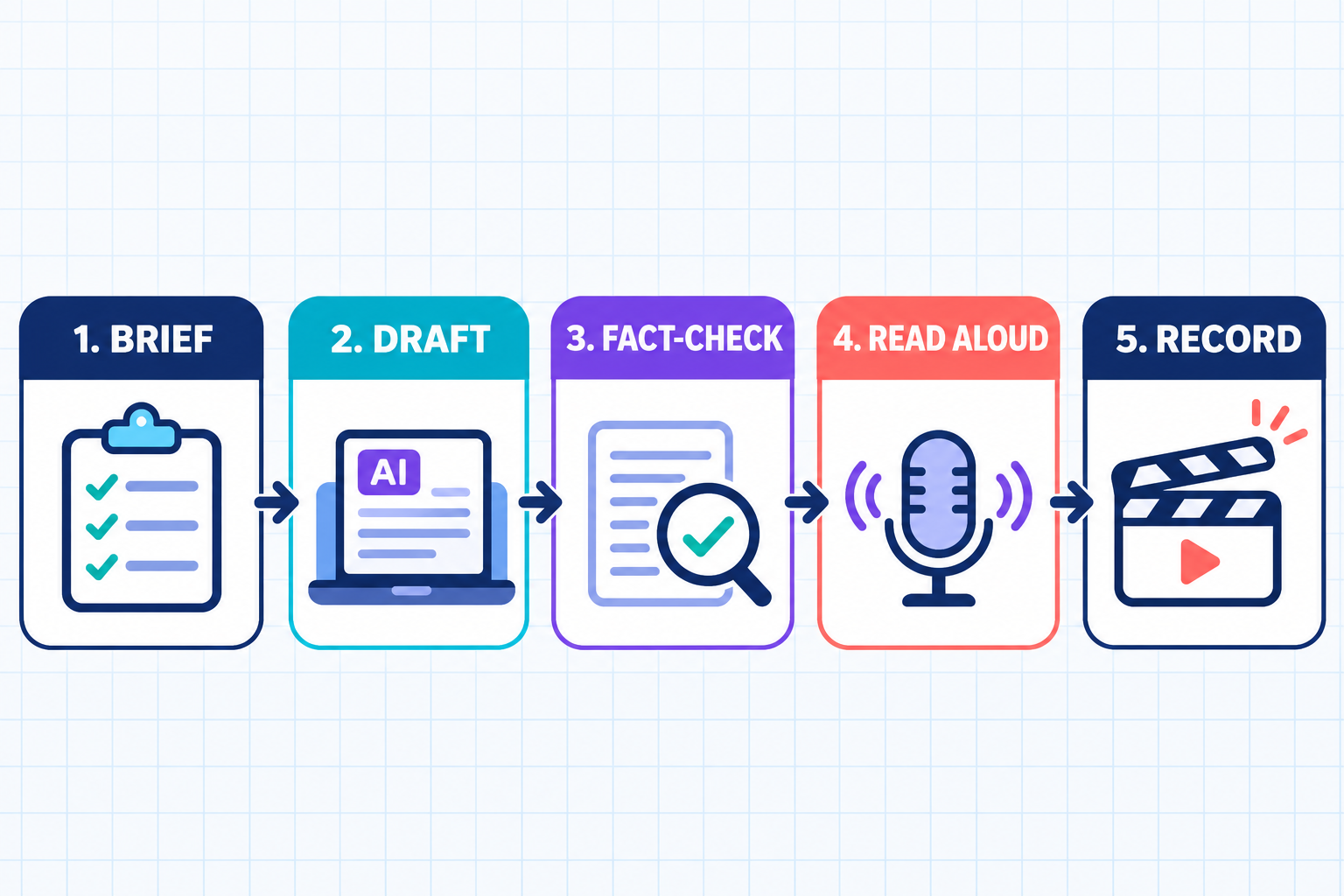
- Brief: define one viewer problem and one honest outcome. Do not ask for “viral” wording or a guaranteed result.
- Draft: generate two angles, then choose one. Combining every idea usually produces a crowded script.
- Fact-check: verify every statistic, quote, name, product capability, and safety claim against a primary source.
- Read aloud: remove long sentences, repeated setup, unnatural transitions, and claims you would not comfortably say on camera.
- Record and edit: confirm rights to footage, music, voices, faces, and trademarks; then add accurate captions and the correct disclosure.
For production after scripting, compare purpose-built AI video generators for YouTube. TikTok creators may also need our comparison of AI voice generators, while YouTube channels should review music licensing and Content ID limits before adding a soundtrack.
YouTube and TikTok rules for AI-assisted scripts
An AI-written outline alone does not automatically trigger YouTube’s disclosure. YouTube requires disclosure when generated or meaningfully altered content appears realistic—for example, making a person seem to say something they did not say, altering a real event, or generating a realistic scene that did not occur. YouTube’s May 2026 guidance explicitly treats scripts and outlines as production assistance rather than disclosure-triggering synthetic media. The finished video can still require a label if it uses realistic AI visuals, audio, or meaningful alteration.
TikTok requires labels for realistic AI-generated images, audio, or video and encourages disclosure for content fully generated or significantly edited by AI. It prohibits harmful impersonation and certain uses of private people’s likenesses. A script generator does not give you permission to copy another creator’s wording, imitate a recognizable person, fabricate endorsements, or make deceptive product claims.
Neither platform guarantees distribution or monetization because you used—or avoided—AI. Original reporting, useful demonstrations, accurate captions, licensed assets, and real editorial judgment matter more than an automated first draft.
Frequently asked questions
Are AI video script generators really free?
These six have a documented route to generated script text without an upfront payment, but most impose queries, credits, minutes, account requirements, or shared usage meters. Optional video creation may have separate watermarks, resolution limits, or paid assets.
Which free tool is best for TikTok scripts?
Kapwing is the clearest platform-specific choice because its help documentation names TikTok, Reels, Shorts, and YouTube modes. Simplified also advertises TikTok and Reels formats. Use the generated timing as a starting point and read it aloud before recording.
Which free tool is best for YouTube scripts?
vidIQ offers the most explicit long-form controls, including scripts from five to 30 minutes. Ahrefs is simpler for a quick draft, while Descript is more useful when you want to record and edit in the same workspace.
Can I monetize an AI-generated script?
A tool’s terms may allow commercial use, but that does not guarantee copyright protection, originality, platform approval, or rights to material echoed in the output. Check quotations, trademarks, music, footage, voice, and likeness permissions. Keep records of your human edits and sources.
Should I disclose that AI helped write the script?
Follow the tool’s terms and the publication context. YouTube does not require its synthetic-content label for production assistance such as a script alone, but realistic synthetic media in the finished video can require disclosure. TikTok requires labels for realistic AIGC and encourages transparency for substantial AI creation or editing.
Bottom line
Start with Ahrefs when you want the least friction, Kapwing for a short-form platform template, or vidIQ for long-form YouTube structure. Choose Canva, Descript, or Simplified when the script should remain inside a larger creation workflow. Whichever tool you choose, the valuable work happens after generation: verify the facts, make the language sound like you, secure rights, and record a version that serves a real viewer rather than an algorithmic cliché.


