

A free AI image generator can turn a written prompt into a downloadable picture without charging upfront, but “free” rarely means unlimited. The best current options are ChatGPT Images for instruction-following, Gemini for fast iteration, Microsoft Designer for everyday graphics, Adobe Firefly for design workflows, Ideogram for text-heavy artwork, Leonardo.Ai for daily experimentation and Canva for finishing images inside a layout.
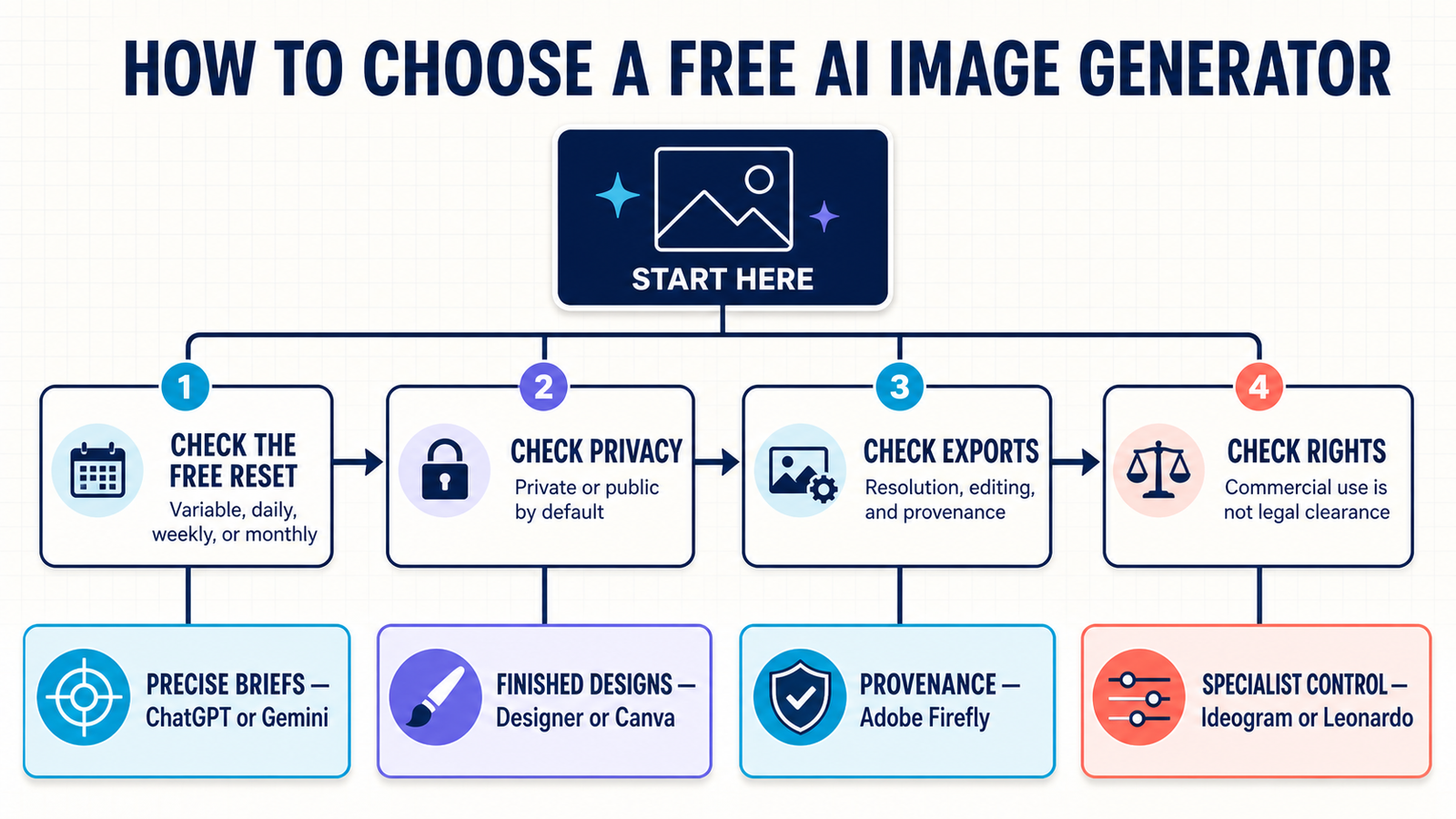
The important difference is not whether a tool can produce one free image. It is what happens after the first few generations: whether limits reset, whether creations are public, what editing and export controls remain available, and what the provider says about commercial use. This guide was reviewed on August 28, 2026, using current US-facing documentation. Free plans change frequently, so confirm the allowance shown in your account before starting a deadline-sensitive project.
Best free AI image generators at a glance
| Tool | Best for | Documented free access | Main limitation |
|---|---|---|---|
| ChatGPT Images | Following detailed instructions and revising an image conversationally | Image creation on the ChatGPT Free tier; separate variable rate limit | No fixed public image quota |
| Gemini | Fast generation and multi-turn image edits | Nano Banana is available to all signed-in users | Limits are compute-based and may change |
| Microsoft Designer | Social graphics, invitations, stickers and simple edits | Free plan with monthly AI credits | Microsoft does not publish a fixed credit count on the plan page |
| Adobe Firefly | Commercial design workflows and provenance | Limited daily image, video and audio generations | Daily free quantity is not stated publicly |
| Ideogram | Posters, logos and images containing readable text | Weekly slow credits for eligible accounts | Free creations are public; credit amount varies |
| Leonardo.Ai | Trying many styles and models | 150 fast tokens per day | Free creations are public and rights are non-exclusive |
| Canva | Turning an AI image into a finished design | Up to 20 Premium AI uses monthly on Canva Free | The allowance is shared across several AI tools |
Free access above reflects provider documentation checked August 28, 2026. “Free” means a zero-dollar tier, not unlimited generation and not a guarantee that every model or editing feature is included.
How we selected and ranked these free AI image generators
We screened nine widely available products and ranked seven that offered a credible zero-dollar path in the United States. The comparison considered prompt adherence, model and style choice, editing control, text rendering, free allowance, reset period, account and card requirements, download options, public-versus-private generation, provenance, provider licensing language and ease of moving an image into a practical workflow.
This is a documentation-based comparison, not a controlled hands-on test. Product facts such as allowances, privacy defaults and usage terms are attributed to current provider pages. For a separate signal on output quality, we consulted the crowdsourced Artificial Analysis Text to Image Arena, where people compare model outputs without treating a single leaderboard score as a universal verdict. Image quality varies by prompt, model, aspect ratio and subjective taste, so the rankings below emphasize the whole free workflow rather than one benchmark.
1. ChatGPT Images: best free AI image generator for following instructions
ChatGPT Images is the strongest general-purpose starting point when your request contains several constraints or when you expect to revise the same image through conversation. It can generate a new image, edit an uploaded one, place text inside an image and create transparent backgrounds. OpenAI says the image tool is available on all ChatGPT tiers and images can be downloaded from the web or mobile app.
The ChatGPT Free tier includes image creation, but OpenAI does not publish a durable image-per-day number. Image generation has a separate rate limit, and the interface tells you when the allowance resets. That makes it genuinely free for occasional work, but difficult to budget for a batch.
Pros: strong conversational revisions; useful text and transparency controls; downloadable output; broad model quality. Cons: variable free quota; an account is the practical requirement for ongoing use; consumer chats may be used to improve models unless you change Data Controls or use Temporary Chat.
Choose it for: a hero image, product concept, diagram-like illustration or marketing visual that needs several rounds of precise feedback.
2. Gemini: best for quick image generation and editing
Google’s Gemini image generator offers Nano Banana for quick, everyday generation and editing to signed-in users. You can create an image from text, upload one or more images for edits, refine the result in follow-up prompts and download the full-size output. The standard Nano Banana path is available to all users, while higher-compute Pro image generation is tied to stricter quotas.
Google describes Gemini limits as compute-based: capacity depends on prompt complexity, model choice and demand, and can change without notice. That is a real free tier, but not a predictable production allowance. Google also applies SynthID to content created or edited by its AI models; this is an invisible provenance signal, not a visible corner logo.
Pros: fast conversational edits; multiple-image inputs; full-size downloads; capable free model. Cons: variable limits; sign-in required; availability depends on supported countries, languages and age rules.
Choose it for: rapidly exploring compositions, combining references or editing an existing image while keeping the workflow conversational.
3. Microsoft Designer: best for everyday graphics
Microsoft Designer is a free AI image generator wrapped in a lightweight design editor. The free plan includes monthly credits for creating images, stickers, cards, collages, avatars and other graphics, plus common edits such as object removal, background removal, cropping, resizing and adding text.
Microsoft no longer makes users manage separate speed boosts: its current FAQ says every image is automatically generated at the quickest available speed. The tradeoff is that the plan page does not publish a fixed monthly credit count, so users must check the live counter in Designer. A personal Microsoft account and regional age eligibility are required for its generative features.
Pros: generation and editing in one browser tool; useful design formats; no paid subscription required. Cons: undocumented monthly quantity; fewer specialist model controls than creator-focused platforms.
Choose it for: a social post, invitation, simple brand graphic or quick image cleanup where a finished canvas matters more than deep model tuning.
4. Adobe Firefly: best for design and commercial workflows
Adobe Firefly’s free plan now provides limited daily generations across image, video and audio, including access to selected Adobe and partner models. Adobe does not state a universal daily quantity, but the allowance refreshes daily and does not require buying a plan. Firefly also connects naturally to Adobe Express and Creative Cloud editing workflows.
Adobe says non-beta Firefly outputs can be used in commercial projects and that Firefly models are trained on licensed and public-domain material. It also attaches Content Credentials to certain exports. Those statements reduce ambiguity, but they are not a blanket legal guarantee: partner models can have different terms, enterprise indemnification is limited to eligible plans, and users remain responsible for trademarks, likenesses and other third-party rights.
Pros: daily-refreshing free access; built-in provenance; strong path into professional editing. Cons: free quantity is undisclosed; premium partner models and advanced media features may consume credits quickly.
Choose it for: marketing concepts and design-team drafts where provenance and an Adobe editing path are important.
5. Ideogram: best free AI image generator for text in images
Ideogram is particularly useful for posters, signs, social graphics and concept logos where readable lettering matters. Its current free plan offers weekly slow credits to eligible users who sign in with Google, Apple or Microsoft. The exact weekly amount can vary, and AI editing features and image references require paid priority credits.
The biggest free-tier caveat is privacy. Ideogram says free generations are public by default; private generation and the ability to unpublish are paid features. Quality export is also excluded from Free. Ideogram does not claim ownership of generated images and says they may be used commercially, but public visibility makes it unsuitable for confidential campaigns or unreleased products.
Pros: strong fit for typography; recurring weekly access; commercial use permitted by the provider. Cons: public generations; variable allowance; no quality export or AI editing on the slow queue.
Choose it for: posters and title cards that need legible words and do not contain confidential ideas.
6. Leonardo.Ai: best for daily creative experimentation
Leonardo.Ai Free includes 150 fast tokens per day, basic quality settings, presets and access to multiple platform and third-party models. Token cost changes with the model, resolution and operation, so 150 tokens should not be translated into a fixed number of images. The daily reset makes it more predictable for regular experimentation than a one-time trial.
Free generations are public. Leonardo grants free users a non-exclusive, royalty-free license for commercial use, while retaining broad rights to use, reproduce, modify and distribute free-tier creations. Other users may also access public assets through platform features. Do not upload confidential product references or client material unless those terms are acceptable.
Pros: clear daily token allowance; model and preset variety; commercial-use license. Cons: public-by-default work; token costs vary; basic rather than enhanced quality settings.
Choose it for: daily style exploration, game-art concepts and learning how different models respond to the same prompt.
7. Canva: best for turning an AI image into a finished design
Canva Free provides up to 200 Standard AI uses or 20 Premium AI uses per month. Creating images with Canva AI is classified as a Premium AI task, and the allowance is pooled with other Premium tools. In practice, using video generation or advanced AI design features can reduce how many image generations remain.
Canva’s advantage is the editor around the generator: templates, type, shapes, stock assets and exports are immediately available. Canva says users can use AI-generated images for lawful commercial projects, but it does not guarantee exclusivity or clearance from third-party copyright, trademark or publicity claims. Free users should also avoid Pro stock elements unless they plan to replace or license them before export.
Pros: clear estimated monthly allowance; excellent layout workflow; PNG and JPG export. Cons: pooled credits; some editing and stock assets are paid; generation has fewer specialist controls.
Choose it for: social posts, slide graphics, flyers and thumbnails where generation is only one step in the design.
Which free AI image generator should you choose?
- Start with ChatGPT Images when following a complex brief and revising details matter most.
- Use Gemini for fast, conversational edits or combining multiple references.
- Pick Microsoft Designer or Canva when the image needs to become a finished social or marketing layout.
- Choose Adobe Firefly when provenance and an Adobe production workflow matter.
- Try Ideogram for typography-heavy posters and Leonardo.Ai for daily model exploration.
Before choosing, run the same realistic prompt through two or three tools. Include the subject, setting, composition, lighting, aspect ratio and intended use. The practical techniques in our prompt engineering guide apply to image generation too: state constraints explicitly, change one variable at a time and keep the successful parts of the prompt stable.
Free does not remove copyright, privacy or consent risks
An AI image can be free to generate and still be risky to publish. Do not upload a confidential product photo, private customer information or a person’s likeness unless you have permission and understand the service’s data controls. Public-by-default platforms deserve particular caution. Avoid prompts that imitate a living artist, reproduce protected characters or place real people in deceptive situations.
Provider permission for commercial use is not the same as copyright ownership or legal clearance. In the United States and elsewhere, copyright protection for purely machine-generated material remains fact-specific, and similar outputs may be generated for other users. Human selection, editing and original design work can strengthen a project, but they do not erase trademark, publicity or licensing obligations. For a conceptual grounding in how these systems work, see our beginner’s guide to generative AI.
If your final deliverable is motion rather than a still image, compare these limits with our tested documentation guide to a free AI video generator. Video tools typically impose tighter credit, duration and watermark limits than image generators.
Frequently asked questions
Is there a completely free AI image generator?
Yes. ChatGPT, Gemini, Microsoft Designer, Adobe Firefly, Ideogram, Leonardo.Ai and Canva all document zero-dollar image generation. None should be treated as unlimited: their free access uses variable rate limits, daily or weekly tokens, monthly credits or pooled AI allowances.
Can I generate AI images without creating an account?
Not reliably among the tools ranked here. The credible free tiers generally require sign-in to track allowances, store creations and enforce safety rules. A page may let you begin a prompt before sign-in, but generation or download can still require an account.
Can I use free AI-generated images commercially?
Several providers permit commercial use under their terms, but permission is not a guarantee of exclusivity, copyright protection or freedom from third-party claims. Check the exact model and account terms, avoid protected brands and unauthorized likenesses, and have a human review the final asset.
Do free AI image generators add watermarks?
Many current tools do not place a visible logo over every output, but provenance can still be embedded through Content Credentials or invisible systems such as Google SynthID. Do not remove or misrepresent provenance markers, and disclose synthetic media when a platform or context requires it.
Bottom line
For most people, ChatGPT Images or Gemini is the fastest free starting point. Microsoft Designer and Canva are better when the goal is a finished layout, Adobe Firefly is the strongest provenance-conscious design choice, and Ideogram or Leonardo.Ai offers more specialized creative control. The best tool is the one whose free reset, privacy default, export options and rights language fit the actual project—not the one with the loudest “unlimited” claim.


