


Best AI presentation makers for sales teams: Pitch is the strongest all-around choice for collaborative, trackable sales decks. Storydoc is better for interactive proposals and CRM-driven personalization, while Plus AI is best when PowerPoint or Google Slides must remain the system of record. Beautiful.ai offers tighter brand guardrails, and Gamma is the fastest low-friction option for a first draft.
A sales presentation is not finished when the slides look polished. It must be accurate, easy to personalize, safe to share, consistent with the brand and useful after the meeting. For that reason, this ranking gives more weight to reusable templates, customer-specific versions, permissions, viewer analytics and editable handoff than to one-click visual novelty.
This comparison was checked on September 4, 2026, using current US-facing product, pricing, help and security pages. Plans, AI credits and integrations change frequently. Confirm the live entitlement in your account before standardizing a sales workflow.
Best AI presentation makers for sales teams at a glance
| Tool | Best for | Access checked | Main limitation |
|---|---|---|---|
| Pitch | Collaborative sales decks and pitch rooms | Free plan; paid sales analytics | Free AI credits do not renew |
| Storydoc | Interactive proposals and personalized follow-up | 14-day no-card trial | No permanent free tier; web-first format |
| Plus AI | Native PowerPoint and Google Slides workflows | 7-day trial with 1,000 credits | Card required; no ongoing free plan |
| Beautiful.ai | Brand-controlled team production | 14-day trial | Card required and auto-bills unless canceled |
| Microsoft Copilot in PowerPoint | Microsoft 365 sales organizations | Paid Copilot plus qualifying plan | Licensing and rollout depend on tenant |
| Gamma | Fast visual drafts and web sharing | Free, no card; nonrenewing credits | Free branding; full analytics are paid |
| Canva | Small-team design and multimedia | Free plan with pooled AI allowance | Sales engagement analytics are limited |
How we selected the best AI presentation makers for sales teams
We screened 11 credible products and ranked seven. The criteria were draft quality controls, source-file support, PowerPoint compatibility, reusable templates, brand governance, customer personalization, team collaboration, sharing permissions, viewer analytics, CRM or workflow integrations, published access boundaries, privacy documentation and ease of human review.
Pitch, Storydoc, Plus AI, Beautiful.ai, Microsoft Copilot in PowerPoint, Gamma and Canva made the list. Prezi, Adobe Express, Qwilr and SlidesAI were screened as alternatives. This is a documentation-based comparison, not a GravityDevOps hands-on output benchmark. We used official documentation for changing features and limits, plus Tom’s Guide’s hands-on Gamma test and aggregate user-review context from G2’s Storydoc reviews. Vendor claims about engagement or sales outcomes were not treated as proof that a tool increases conversion.
1. Pitch: best overall for collaborative sales decks
Pitch combines AI drafting with the practical machinery a sales team needs after generation. Pitch Agent can start from a prompt, uploaded files and a chosen template. Teams can then co-edit, use content variables, share tracked links and organize decks and collateral inside pitch rooms.
The sales-specific advantage is workflow. Pitch’s pitch rooms can package a deck with supporting resources and provide link analytics. Its HubSpot integration can create rooms from deal records. That makes Pitch more useful than a generator that stops at export.
The Free plan supports up to five members, unlimited presentations, custom templates and basic sharing, but its 100 AI credits are lifetime credits rather than a recurring monthly allowance. Free PDF and embed output carries Pitch branding, and PowerPoint export is paid. At the checked prices, Team was €15 per seat monthly when billed annually and included 25 advanced links plus two shared pitch rooms; Business was €20 and removed those numeric limits.
Pros: strong collaboration, reusable templates, HubSpot workflow, buyer-facing rooms and useful paid engagement analytics.
Cons: the free AI allowance runs out permanently, serious sales tracking is paid, and pricing is displayed in euros on the checked US-facing page.
2. Storydoc: best for interactive proposals and personalized follow-up
Storydoc is purpose-built for sales collateral rather than conventional slide files. It creates scrollable, mobile-responsive web presentations with calls to action, forms, calendars, e-signatures, videos and live embeds. Dynamic variables can personalize versions for a buyer, and integrations can connect content with CRM and marketing systems.
Its analytics are designed for asynchronous follow-up: teams can see how a shared document was viewed and connect engagement data with systems such as HubSpot, Salesforce, Gong, Marketo, Zoho and Pipedrive. That is useful when a deck must travel through an buying committee after the meeting.
Storydoc is not free software. Its official help center documents a 14-day free trial without payment details; the trial does not auto-charge. Starter was listed at $33 per user monthly on annual billing with five active documents, limited analytics and 25 monthly AI-text credits. Pro was $60 with 30 active documents, extended analytics, collaboration, variables and integrations.
Pros: sales-specific personalization, interactive buyer experience, CRM connections, engagement alerts and no-card trial.
Cons: no permanent free plan, a higher starting price, and a web-first deliverable that is not a substitute for an editable PPTX in every procurement process.
3. Plus AI: best inside PowerPoint and Google Slides
Plus AI works directly inside PowerPoint and Google Slides, which matters when sales operations already maintains approved masters, existing product slides and a normal review process. It can generate a deck, insert a single slide, rewrite content or remix a slide into another layout without moving the file into a proprietary web format.
The current pricing page lists a seven-day trial with 1,000 AI credits and access in both PowerPoint and Google Slides. The trial requires a credit card and automatically converts unless canceled. Basic starts at $10 per user monthly on annual billing and includes 1,500 monthly credits; Plus says normal tasks use roughly 40 to 170 credits. Custom branding is available on Team, while using an organization’s actual custom slide template requires Enterprise setup.
Pros: native editable files, low workflow disruption, precise single-slide editing and support for both major slide ecosystems.
Cons: it is a trial rather than free access, the card boundary needs a prominent calendar reminder, and full template fidelity is an enterprise feature.
4. Beautiful.ai: best for brand-controlled team production
Beautiful.ai’s Smart Slides automatically rebalance layouts as content changes. For sales teams, its stronger feature is the Team workspace: centralized templates and slide libraries, locked slides, custom branded themes, shared assets, permissions, version control and viewer analytics. This can reduce the familiar problem of every representative rebuilding the corporate deck differently.
The official pricing page lists Pro at $12 monthly when billed annually and Team at $40 per user monthly on annual billing, or $50 on monthly billing. There is no permanent free plan. The 14-day trial requires a credit card and automatically bills unless canceled. Editable PowerPoint export is listed, but any exported sales deck should be opened and inspected before it reaches a prospect.
Pros: effective auto-layout, centralized brand assets, locked content, collaboration and engagement tracking.
Cons: expensive for a multi-seat team, no ongoing free tier and a card-required auto-renewing trial.
5. Microsoft Copilot in PowerPoint: best for Microsoft 365 organizations
Copilot is a practical choice when the team already works in PowerPoint, OneDrive and Microsoft 365. It can create a presentation from a prompt or approved file, produce an outline, generate editable slides, add topics, rewrite content and work with an organization’s template. Microsoft’s current PowerPoint guidance also emphasizes that generated output must be reviewed.
Microsoft’s creation documentation says Word source files work best below 24 MB. A separate topic workflow can reference up to five Word, PDF, TXT, Excel or Loop files while some support remains in preview or gradual rollout. Enterprise users can use brand kits, subject to licensing and administrator configuration.
Microsoft 365 Copilot Business was listed from $18 per user monthly on an annual commitment for up to 300 users, and requires a separate qualifying Microsoft 365 plan. Copilot Chat may be included for eligible business users, but included chat is not the same entitlement as full work-grounded creation inside PowerPoint.
Pros: native PowerPoint output, familiar review controls, Microsoft 365 permissions and easier adoption in existing enterprise workflows.
Cons: paid layered licensing, tenant-dependent features, rollout variation and no sales-specific presentation analytics comparable to Pitch or Storydoc.
6. Gamma: best for fast visual first drafts
Gamma is useful when a representative needs a polished web deck quickly from notes, a brief, a PDF or an existing PPTX. It can generate up to 10 slides per prompt on Free and export to PDF, PPTX, PNG and Google Slides. Tom’s Guide’s hands-on test found that Gamma produced a coherent 10-slide draft in under 30 seconds, although that test was not sales-specific.
The Free plan requires no credit card, but free AI credits do not refresh and free shared or exported content keeps Gamma branding. Full analytics, advanced sharing, custom branding and workspace templates are Pro features. Gamma’s own analytics documentation says Pro can report slide views, relative time per slide and unique viewers, while Free and Plus have limited or no access.
Pros: very fast generation, low-friction free start, flexible web sharing and several export formats.
Cons: nonrenewing free credits, free branding, paid analytics and possible layout changes when a web-native design is exported to PowerPoint.
7. Canva: best for small teams that need more than decks
Canva is the broadest creative workspace on this list. A small sales and marketing team can build presentations, one-pagers, social assets, short videos and leave-behinds from shared visual components. That breadth is valuable when a campaign needs coordinated collateral rather than one isolated deck.
The Free plan lists up to 200 Standard or 20 Premium pooled AI uses, one limited Brand Kit and 5 GB of storage. Canva Business was $250 per person yearly and added collaboration and team administration, 100 Brand Kits, approvals, 500 GB of storage and an AI allowance estimated at 20 times Free. Those pooled limits are estimates across AI tiers, not a guarantee of a specific number of complete presentations.
Pros: strong templates and media, easy visual editing, useful cross-format campaign work and a real free plan.
Cons: weaker buyer-level deck analytics than sales-specialized tools, pooled AI limits are not deck counts, and teams need governance to prevent template sprawl.
Which AI presentation maker should your sales team choose?
- Choose Pitch when several sellers collaborate on decks and tracked buyer sharing matters.
- Choose Storydoc when proposals should be interactive, personalized and connected to the CRM.
- Choose Plus AI when approved PowerPoint or Google Slides files must remain editable and portable.
- Choose Beautiful.ai when central brand control matters more than editor freedom.
- Choose Microsoft Copilot when the company already licenses Microsoft 365 and governs content there.
- Choose Gamma when speed and web sharing matter more than perfect PowerPoint fidelity.
- Choose Canva when the same small team also creates campaign graphics, video and leave-behinds.
For a broader starting point, compare our guide to AI presentation tools without design skills. If source conversion is the core task, use the focused guides to PDF-to-PowerPoint tools and Word-to-PowerPoint tools.
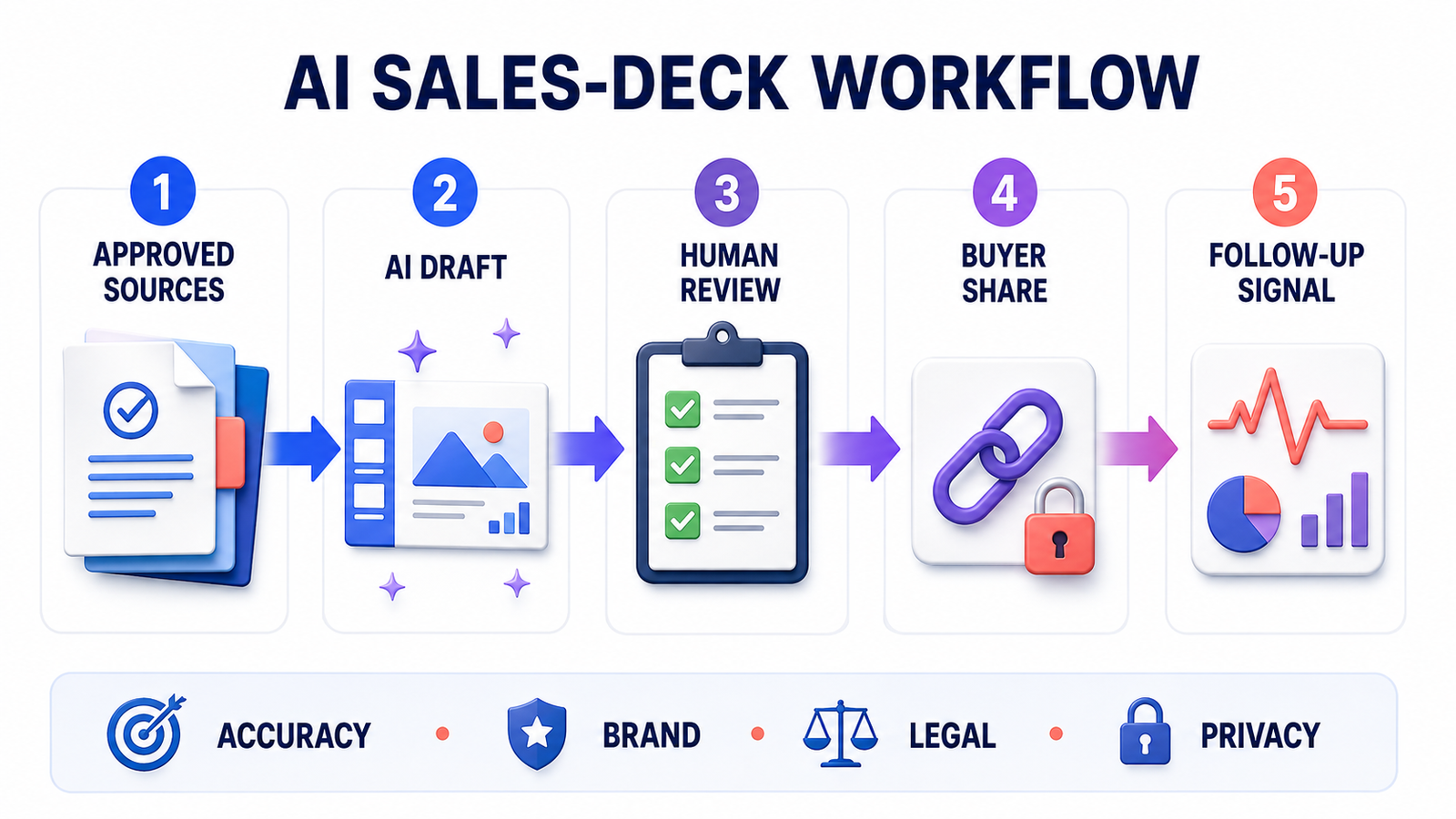
A safer AI sales-deck workflow
- Start with approved facts. Use current product positioning, customer-approved quotes, pricing rules and source links rather than asking the model to invent a persuasive story.
- Define the buyer and stage. A discovery deck, technical validation deck and executive proposal should not share the same narrative.
- Generate an outline first. Confirm the problem, evidence, solution, differentiation, proof and next step before polishing layouts.
- Lock sensitive content. Protect legal language, security statements, pricing rules and required disclaimers in approved slides or templates.
- Review every claim. Product, finance, security and legal owners should verify claims within their domains. AI can paraphrase obsolete or unsupported material confidently.
- Test the real delivery path. Open the PPTX, mobile link or buyer room exactly as the customer will see it. Check fonts, videos, charts, permissions and downloads.
- Use analytics carefully. A view or long dwell time is a follow-up signal, not proof of purchase intent. Respect consent requirements and the buyer’s privacy.
Better prompts help, but they do not replace governance. Our prompt-engineering guide explains how context, constraints, examples and explicit output requirements improve first drafts. Sales teams should turn those instructions into approved templates rather than expecting each representative to improvise.
Privacy, confidentiality and licensing caveats
Do not upload customer names, unpublished pricing, contracts, security questionnaires or confidential roadmap material until the organization has approved the vendor, plan and data flow. Check retention, model-training terms, subprocessors, administrator controls, SSO, audit logs and link permissions. A vendor’s general security certification does not automatically approve every document or sales process.
Also check the rights attached to stock media and AI-generated visuals. A generated image may be available to download without giving the seller exclusive ownership, and a template license may restrict redistribution. Never fabricate testimonials, customer logos, benchmark results or competitor claims. For foundational context on model limitations, see the GravityDevOps guide to generative AI.
Frequently asked questions
What is the best AI presentation maker for a sales team?
Pitch is the best-balanced option for most collaborative sales teams because it combines AI drafting, templates, pitch rooms, HubSpot workflow and paid engagement analytics. Storydoc is stronger for interactive proposals, while Plus AI is better when editable PowerPoint or Google Slides files are mandatory.
Can an AI presentation maker build a customer-ready sales deck?
It can create a useful first draft, but the deck still needs human review for customer context, product accuracy, security and legal claims, pricing, references, brand rules and a credible next step. The safest workflow generates from approved source material and keeps accountable owners in the review.
Which option has the most useful free plan?
Pitch and Canva have genuine ongoing free plans. Gamma also has a no-card Free plan, but its AI credits do not refresh and its branding remains. Storydoc, Plus AI and Beautiful.ai provide trials, not permanent free tiers; Plus AI and Beautiful.ai require cards.
Do presentation analytics show that a buyer is interested?
No. Opens, slide views and time spent can help prioritize a follow-up, but they are incomplete behavioral signals. Links may be forwarded, security scanners may trigger visits, and a long view can have many explanations. Treat analytics as context, not intent scoring or an automated decision.
Bottom line: choose the delivery workflow before choosing the generator. Pitch is the best all-around sales workspace; Storydoc is the strongest interactive proposal option; Plus AI and Microsoft Copilot preserve familiar slide operations; Beautiful.ai enforces design consistency; Gamma favors speed; and Canva supports broader campaign production. The winning deck still depends on accurate evidence, buyer relevance and disciplined human review.


