

Short answer: Colossyan offers the most generous recurring free allowance for avatar-led training videos, while HeyGen is the simplest choice for short marketing-style clips. Synthesia is strong for shareable business explainers, and Vidnoz offers broad avatar choice. Every free option has a catch: watermarks, blocked downloads, regional credits or trial-only access.
An AI avatar video generator turns a script into a video presented by a synthetic person or animated digital character. The useful question is not whether a landing page says “free,” but whether you can generate, export and legally use the result without paying. We checked US-facing plans and documentation on September 26, 2026. Limits can change, so confirm the allowance shown in your account before building a long project.
This guide compares seven credible free AI avatar video generator options for talking-presenter videos. “Free” may mean a recurring plan, a share-only plan, regional credits or a limited trial. We label those boundaries rather than treating every offer as an unlimited free editor.
Free AI avatar video generators at a glance
| Tool | Best for | Current no-cost access | Main catch |
|---|---|---|---|
| Colossyan | Training and interactive learning | 20 NEO minutes monthly, 300+ stock avatars and no card | Free output keeps branding; MP4 downloads and watermark removal are paid |
| HeyGen | Short creator and marketing videos | Usually three one-minute videos monthly, one digital-twin slot and 500+ stock avatars | Quota can vary by region; free videos are watermarked |
| Synthesia | Business explainers you can share by link | 10 video minutes monthly on Basic, nine avatars and no card | Watermarked and no MP4 download on Basic |
| Vidnoz AI | Broad avatar and template choice | Recurring daily credits, 1,800+ avatars and 720p export | Credit display is account-dependent; watermark removal is paid |
| Elai | One-minute course or explainer test | One free video minute, 80+ avatars and 75+ languages | Only one minute; Full HD and custom selfie avatars are paid |
| VEED | Trying an avatar inside a full video editor | Stock avatars are free to try where Free-plan AI credits are available | Credits and avatar access vary by region; 720p free exports are watermarked |
| D-ID | Animating a photo for a quick proof of concept | Two-week trial with standard photo avatars | Trial output has a full-screen watermark and is noncommercial |
These rankings are based on current documentation and accessible product information, not a matched-script visual-quality benchmark. We did not claim paid-account testing. Independent testing from Zapier favors Synthesia for digital-avatar creation and notes HeyGen’s strength in polish, while actual results still depend on the avatar, voice, language and script.
How we selected and ranked these tools
We screened Colossyan, HeyGen, Synthesia, Vidnoz AI, Elai, VEED, D-ID, Krikey and Canva’s third-party avatar apps. A ranked service had to turn a typed script into a talking-avatar video and provide a credible zero-dollar path to a US user. We compared:
- recurring free access versus a one-time trial;
- minutes, credits, account and payment-card requirements;
- watermarks, downloads, resolution and sharing options;
- stock avatars, custom avatars, voices, languages and editing control;
- commercial-use clarity, consent safeguards and privacy controls;
- documentation quality and suitability for repeatable work.
Krikey remains useful for stylized 3D-avatar animation, and Canva offers avatar apps inside its editor, but neither provided a cleaner first-party free talking-presenter proposition for this intent than the seven choices below. We weighted useful finished output and transparent limits more heavily than raw avatar counts.
1. Colossyan: best free AI avatar video generator for training
Colossyan’s Starter plan is the strongest documented recurring free offer we found. It requires no credit card and currently includes 20 NEO video minutes per month, 0.5 minute of its newer NEO2 generation, a library of more than 300 stock avatars, 700-plus voices, multiple avatars in one video and up to 15 automatic translations monthly.
The workflow is aimed at learning and enablement rather than quick social clips. You can import presentations or documents, organize scenes and create interactive material. That makes Colossyan unusually useful for testing onboarding, compliance or customer-education concepts before buying.
Why it ranks first: the free allowance is recurring, clearly quantified and broad enough to evaluate a real multi-scene project. Limitation: the pricing table reserves unlimited MP4 downloads and watermark removal for Professional. Treat Starter as a branded, share-first workspace and verify the exact export option before promising a downloadable deliverable.
2. HeyGen: best for short marketing-style avatar videos
HeyGen Free usually provides three videos per month, videos up to one minute, more than 500 stock digital twins, 30-plus languages and one custom digital-twin slot. No credit card is required. Its current help documentation warns that the free quota can range from one to three videos depending on region, so the dashboard—not an old review—should be your final source of truth.
HeyGen is a practical fit for short product announcements, sales intros and social clips where a camera-facing presenter matters more than course structure. The Free plan also offers limited access to newer avatar features, but usage caps can change dynamically.
Why it ranks second: the short-video workflow is approachable and includes a path to a personalized digital twin. Limitation: free videos automatically include a HeyGen watermark, and clean 1080p export is a paid-plan benefit. Use only your own likeness or a person who has explicitly consented.
3. Synthesia: best for shareable business explainers
Synthesia Basic currently includes 10 video minutes per month, nine AI avatars, one editor and no credit-card requirement. The editor supports scripts, scene layouts, uploaded media and many languages, giving a small team enough room to prototype a structured explainer or internal training video.
Why it ranks third: ten monthly minutes and a mature scene editor make it a credible ongoing sandbox. Limitation: Basic videos carry a Synthesia watermark, and Basic users cannot download MP4 files. You can share the hosted video, but offline delivery requires Starter or above. Custom personal avatars also sit outside the basic free workflow.
4. Vidnoz AI: best for avatar and template variety
Vidnoz AI’s Free plan advertises recurring daily credits, 1,800-plus stock avatars, thousands of templates, hundreds of voices, 2,000 characters per scene and 720p export. It also includes limited photo-avatar and expressive-avatar access.
Why it ranks fourth: the catalog makes it easy to test different presenter styles without starting a design from scratch. Limitation: the public pricing page’s live credit counter does not consistently expose the numeric daily allowance in static documentation. Standard video generation consumes credits by duration, and watermark removal appears only on paid tiers. Check your account balance and render cost before drafting a long script.
5. Elai: best one-minute course prototype
Elai’s Free plan includes one user, one video minute, more than 80 avatars, 75-plus languages and the core Creator features. The editor is geared toward narrated slides, explainers and learning material, with stock media and interactive options available across the product.
Why it ranks fifth: one minute is enough to validate pacing, pronunciation and a slide-to-presenter concept. Limitation: this is a small evaluation allowance. Full HD, larger monthly minute pools, voice cloning and a reusable selfie avatar require paid access or an add-on. Do not describe the one-minute plan as a continuing free production pipeline.
6. VEED: best free try inside a complete browser editor
VEED’s stock AI avatars can read a typed script and then move into the same timeline as captions, music, stock footage and uploaded clips. The official page says stock avatars are free to try, while the help center says generation consumes AI credits.
Why it ranks sixth: it combines avatar generation and familiar video editing, so you can judge the entire workflow in one place. Limitation: Free-plan credits are available in some regions and absent in others. VEED also says avatar creation in its Gen-AI Studio is unavailable in India and several other countries, although US availability is supported. Free exports are limited to 720p and carry a VEED watermark; a custom AI twin requires a paid Pro plus Avatar plan.
7. D-ID: best trial for turning a photo into a presenter
D-ID can animate a still photo or supplied illustration with typed text or uploaded speech. Its standard avatar path is available across plans, making it convenient for a fast proof of concept when you already have a permitted source image.
Why it makes the list: the photo-to-talking-presenter workflow is direct and distinct from template-heavy training tools. Limitation: the zero-cost route is a two-week trial, not a permanent free plan. D-ID’s terms state that trial use is limited, noncommercial and watermarked; the pricing page describes the trial mark as full-screen. Use a fictional character, your own image or a likeness you have permission to animate.
Which free avatar video generator should you choose?
- Choose Colossyan for recurring training-video experimentation and interactive learning workflows.
- Choose HeyGen for short marketing, social or sales clips with a polished presenter format.
- Choose Synthesia when a hosted, watermarked business explainer is acceptable.
- Choose Vidnoz AI when avatar and template variety matter more than perfectly transparent credit accounting.
- Choose Elai to validate a one-minute course or slide-based explainer.
- Choose VEED if you want generation, captions and timeline editing in the same browser tool.
- Choose D-ID only for a clearly bounded photo-avatar trial.
If you need animated characters rather than realistic presenters, compare our free AI animation generator picks. For general text-to-video and image-to-video workflows, see the free AI video generator guide. Creators building a complete channel workflow can also use our comparison of free AI video generators for YouTube.
A responsible avatar-video workflow
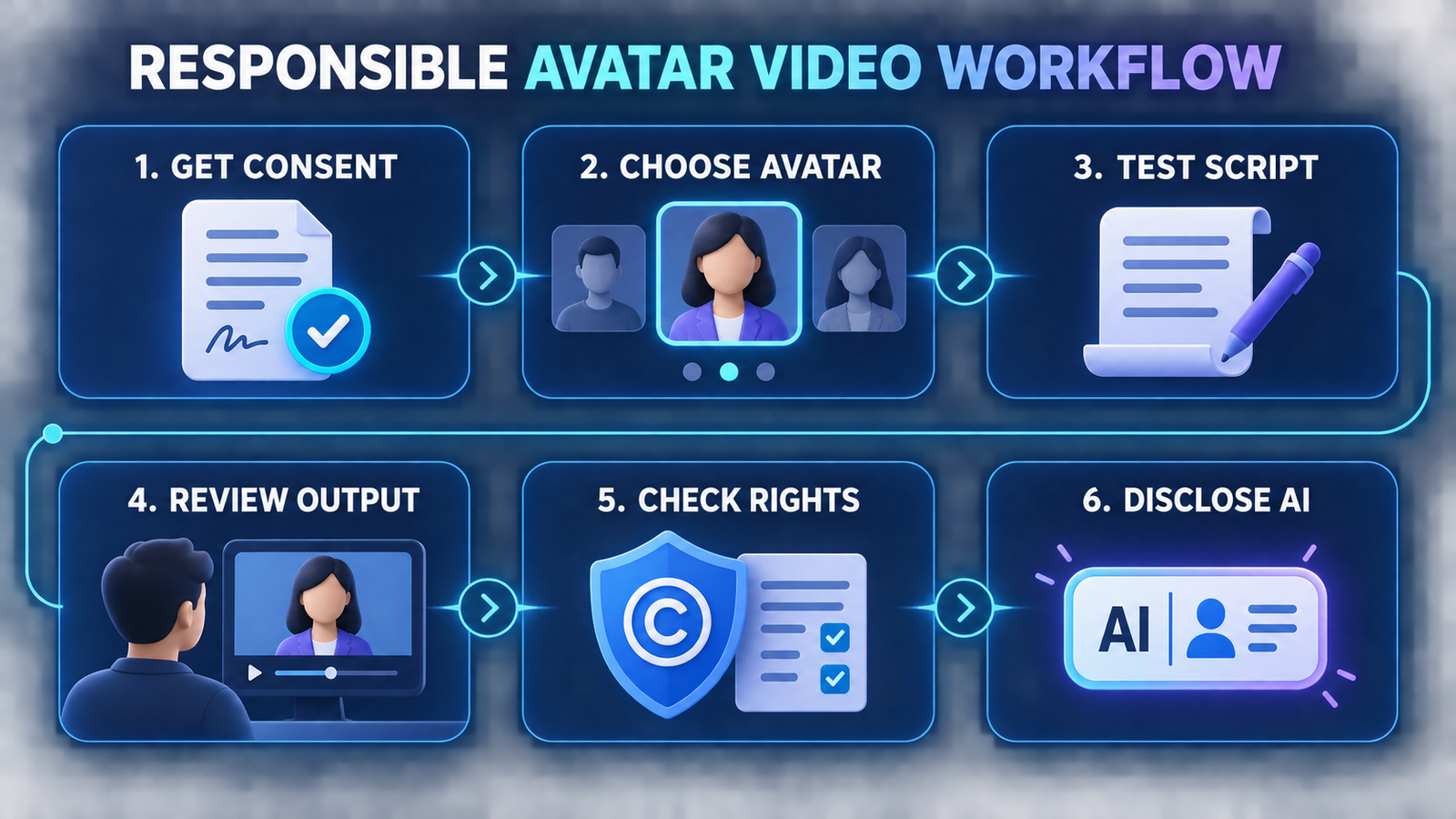
- Get permission before creating a likeness. Written, informed consent should cover the face, voice, intended audience, distribution channels and how long the avatar may be reused.
- Start with a stock or synthetic avatar. It reduces impersonation risk while you test the editor, voice and layout.
- Write a 20-second pilot. Check names, numbers, technical terms, gestures and lip sync before consuming a larger allowance.
- Review every scene. Watch for unnatural emphasis, incorrect pronunciation, misleading expressions and background assets you are not licensed to publish.
- Confirm export and usage rights. A free render, hosted share link and commercial license are separate things. Save the applicable terms and consent record.
- Disclose synthetic presentation. Add an on-screen or accompanying label when platform policy, contract, context or law requires it. Never imply that a real person said words they did not approve.
Avatar video combines generative media with voice synthesis, so the safety bar should be higher than for a decorative image. Avoid public-figure impersonation, fraudulent testimonials, political deception and unauthorized employee or customer clones. Our free AI voice-cloning comparison covers consent, privacy and licensing questions in more depth. For better script control, the principles in our prompt-engineering guide also apply: specify audience, tone, pronunciation and constraints, then review the result rather than accepting the first generation.
Free plan, trial and usable export are not the same
A recurring free plan is useful only if its delivery method fits your project. Colossyan and Synthesia may let you generate substantial content, but their free tiers restrict clean downloads or watermark removal. D-ID offers a real trial, yet its terms limit trial output to noncommercial use. VEED and Vidnoz expose credits whose exact availability can depend on region or account state.
Before choosing, answer four questions: Can you download an MP4? Does it have a watermark? May you use it commercially? Can you delete uploaded footage and a custom avatar later? Those answers matter more than the number of stock faces on the home page. For an accessible overview of the underlying category, read our beginner’s guide to generative AI.
Frequently asked questions
Is there a completely free AI avatar video generator?
Colossyan, HeyGen, Synthesia and Vidnoz AI have recurring free access, but none is unrestricted. Expect a watermark, download restriction, resolution cap, regional quota or some combination. Elai offers one free minute, while D-ID’s no-cost access is a two-week trial.
Can I download a free avatar video without a watermark?
Not reliably across these services. HeyGen, Synthesia, VEED, Vidnoz and D-ID reserve clean output for paid access or watermark it on free use. Colossyan lists watermark removal and unlimited MP4 downloads under Professional. Check the final export screen before committing to a project.
Can I make an AI avatar of another person?
Only with that person’s informed permission and the necessary legal rights. A public photo or video is not automatic consent. Use the platform’s required consent recording, keep written authorization and never create a deceptive endorsement or impersonation.
Are free AI avatar videos safe for business use?
They can be suitable for internal prototypes, but commercial rights, privacy controls, branding and disclosure rules vary. Do not upload confidential scripts or employee footage until you have reviewed the provider’s current terms, retention settings and deletion process.
Bottom line: start with Colossyan for recurring training prototypes, HeyGen for short marketing clips or Synthesia for hosted business explainers. Choose Vidnoz for variety, Elai for a one-minute test, VEED for integrated editing and D-ID for a photo-avatar trial. In every case, verify the live quota, obtain consent and review the finished video before publishing.

