

The best free AI voice cloning generators are Descript for a small browser-based test, VEED for a one-time multilingual trial, CapCut for creator workflows, Canva for designs, Resemble AI for one free clone and Chatterbox for local control. None offers unlimited, effortless cloud cloning with unrestricted commercial rights. Free allowances, export rights and consent rules differ sharply.
Voice cloning turns a recording of a real speaker into a reusable synthetic voice. That makes it more sensitive than choosing a stock narrator from a free AI voice generator: the input can be biometric data, and a convincing output can impersonate someone. This guide focuses on legitimate self-cloning and authorized production, not celebrity imitation or deceptive calls.
We checked the tools and their current US-facing documentation on September 24, 2026. Plans and regional access can change. “Free” below can mean a recurring allowance, one test, one free clone or open-source software you run on your own hardware. It does not automatically include commercial rights.
Best free AI voice cloning generators at a glance
| Tool | What is free | Best for | Main limitation |
|---|---|---|---|
| Descript | Limited custom voice clone access and about 5 minutes of TTS | Editing a podcast or video in one workspace | Small allowance; training and review involve cloud services |
| VEED | One voice-cloning trial | Testing multilingual narration | Full access requires payment; free AI credits are regional |
| CapCut | Free-to-try custom voice workflow | Short social-video voiceovers | No stable public clone quota; features vary by device and region |
| Canva | Voice cloning draws from a shared Free AI allowance when available | Voiceovers inside visual projects | Shared allowance is estimated, not a fixed clone count |
| Resemble AI | First voice clone free | Developers evaluating an API platform | Additional clones and production synthesis can cost money |
| Chatterbox | Open-source local models | Technical users who want local processing | Setup, compute, security and consent controls are your job |
How we ranked free AI voice cloning tools
We screened ten credible products: Descript, VEED, CapCut, Canva, Resemble AI, Chatterbox, ElevenLabs, Kits AI, Speechify Studio and FineVoice. We compared whether a real clone can be created at zero cost, the account or card boundary, synthesis allowance, download path, multilingual support, workflow, published commercial-use terms, consent controls, privacy disclosures and the clarity of current documentation.
This is a documentation-based comparison, not a matched-speaker listening test. We did not enroll a real person’s voice across six services, because doing so would create biometric profiles and would not establish a durable quality result: microphone, script, accent, model version and post-processing all matter. Where a provider publishes no fixed quota, we say so rather than estimate.
1. Descript: best free voice clone for podcast and video editing
Descript is the most practical starting point if the clone needs to repair a sentence or narrate a short passage inside an existing edit. Its current Free plan lists custom voice clones as “limited,” and Descript’s text-to-speech page says the free allowance is 5 minutes of TTS plus five Regenerate actions. No credit card is required to open the Free plan.
The strongest reason to start here is consent, not a universal quality claim. During custom-voice enrollment, the speaker must read a designated statement identifying themselves and consenting to synthesis. Descript also discloses that it uses Google Cloud to train and host the voice, uses submitted training audio to improve the service, and may send non-defamatory generated samples to human reviewers for quality assessment. Read Descript’s custom-voice policy before uploading sensitive audio.
Pros: a real free clone path, voice generation inside a capable editor, and an explicit speaker-consent step.
Cons: the free output allowance is short; cloud training and human quality review may be unsuitable for confidential or regulated recordings.
2. VEED: best for a one-time multilingual voice-cloning trial
VEED is easy to evaluate because its documentation draws a clear boundary: the voice-cloning tool is free to try once, after which full access requires an upgrade. You record roughly a minute, create your own clone, type a script and add the result directly to a video timeline. VEED says the clone can narrate in 29 languages and each generation can be up to four minutes.
Do not confuse that one trial with a recurring free plan. VEED’s help center says AI generation uses credits on every plan. Where Free accounts receive credits, they can provide up to 10 minutes a month, but free availability is region-dependent and individual generated files may be limited to 12 seconds. VEED also prohibits cloning someone else and tells users to disclose AI-generated voiceovers.
Pros: simple browser workflow, clear one-test promise, multilingual output and MP3 or video export.
Cons: not an ongoing free cloning service; regional credit differences make the longer-term allowance unpredictable.
3. CapCut: best for short social-video narration
CapCut combines custom voices with captions, timing, background audio and video export. Its current text-to-speech page says users can record a few sentences to create a clone, generate speech, then download audio in AAC, FLAC, MP3 or WAV. It markets the workflow as free to try and says generated TTS audio may be used commercially subject to its terms and platform rules.
The important limitation is documentation. CapCut does not publish a stable US free allowance specifically for custom voice cloning, and its own help text notes that voices can disappear during maintenance, gradual rollout or platform differences. Treat the current dashboard as the source of truth before recording. Do not upload an employee, client or performer without a written release that covers synthetic reuse.
Pros: useful all-in-one workflow for Shorts, Reels and TikTok-style projects; multiple audio formats and editing controls.
Cons: clone availability and quotas are not transparent enough for a repeatable production commitment.
4. Canva: best when the voiceover belongs inside a design
Canva’s dedicated AI voice-cloning tool accepts a 10-second to five-minute sample of up to 15 MB and says it supports more than 130 languages. It is convenient when narration will sit inside a presentation, social post or video design instead of leaving the design suite.
Canva Free users get a shared monthly AI allowance rather than a guaranteed number of voice clones. Canva currently estimates up to 20 uses of Standard or Premium AI tools per month under simple conditions, and AI Voice is listed among the tools that draw from that pool. Actual usage can be lower, and the clone feature’s entitlement can depend on the current account. Canva also requires disclosure that a cloned voice is AI-generated and bans harmful impersonation.
Pros: broad language support and an efficient design-to-voiceover workflow.
Cons: the allowance is shared, variable and not expressed as a dependable number of cloned minutes.
5. Resemble AI: best for testing a developer platform
Resemble AI changed its cloning pricing in May 2026: the first clone is free, each additional clone costs $2, and card capture is deferred until after that first clone. That makes it a valid zero-dollar model-creation test, especially for developers comparing APIs and detection features.
The word “clone” matters here. A free model does not imply unlimited free synthesis. Resemble’s Flex plan is pay as you go, so production audio can require purchased credits. Its privacy policy also identifies voiceprints as biometric data. Use the free clone to evaluate enrollment and a short sample, then price the actual script volume before committing.
Pros: transparent first-clone boundary, API orientation and related watermarking and detection tools.
Cons: free cloning is not the same as a free production allowance; the platform is more technical than a creator editor.
6. Chatterbox: best free local and open-source option
Resemble AI’s Chatterbox is the outlier: it is software you can run locally instead of a metered cloud editor. The official project offers English, multilingual and smaller CPU-capable models, uses a short reference clip for zero-shot cloning, and ships under the MIT License. Generated audio includes Resemble’s imperceptible PerTh watermark.
Local execution can keep the source recording off a third-party editing service, but it is not effortless or literally costless. You supply storage, compute and technical setup. You also become responsible for access control, deletion, audit records and lawful consent. The official Chatterbox repository documents Python installation and says the Nano model can run on a CPU, while larger models are better suited to capable hardware.
Pros: no subscription meter, local processing, permissive software license and built-in watermarking.
Cons: setup is significantly harder; there is no hosted editor team enforcing your consent or retention policy.
Popular tools that are not free for voice cloning
Several strong voice platforms have free plans, but their cloning feature is paid. ElevenLabs currently gives Free users 10,000 credits for stock voices and Voice Design, while Instant Voice Cloning starts on Starter and commercial rights start on a paid plan. Kits AI’s Free tier offers voice tools but zero custom-voice slots and zero download minutes; cloning begins on Starter. Speechify Studio’s Free plan explicitly excludes voice cloning and commercial rights. FineVoice’s support guide says cloning is not supported on its Free version.
Those services may still be better paid choices for a particular workflow, but listing them as free voice cloners would blur a meaningful boundary. A no-cost stock voice, voice effect or free TTS quota is not the same thing as training a reusable copy of your voice.
How to choose a free AI voice cloning generator
For one short correction: start with Descript. It keeps transcription, editing and synthetic replacement together.
For a single multilingual test: VEED has the clearest trial boundary. Use a short script and verify the export before building a larger project around it.
For social video: CapCut is convenient if custom voice is available on your device and account. If you mainly need stock narration, compare the options in our guide to free AI voice generators for YouTube.
For design teams: Canva is the most integrated option, but check the AI-usage meter first because voice work shares the allowance with other AI tools.
For developers: Resemble AI offers a clear first-clone test, while Chatterbox offers local control. The latter is closer to operating an AI model than using a consumer app; our LLMOps guide explains why model access, monitoring and governance matter even when inference happens in-house.
Consent, privacy and commercial-use checklist
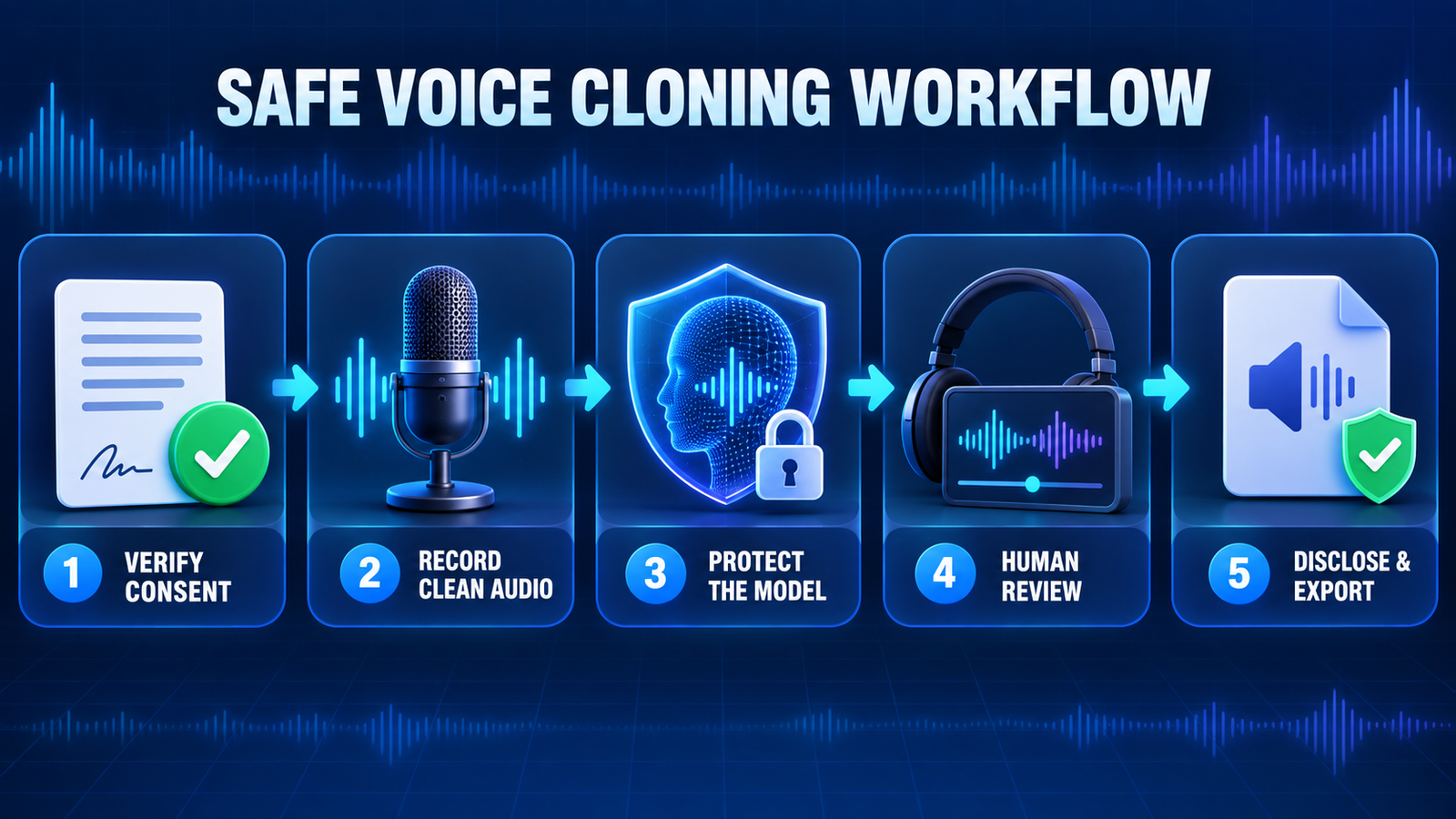
The US Federal Trade Commission warns that voice clones can enable fraud and misuse of biometric data and creative work. A safe project should pass all of these checks before anyone uploads a sample:
- Get specific permission. The speaker should know which service will process the recording, what scripts may be generated, who can use the model and when consent ends.
- Keep proof. Save the release, enrollment date, approved uses and deletion procedure. Do not rely on a casual message for a long-lived commercial voice.
- Disclose synthetic speech. Label the result when a reasonable listener could mistake it for a real recording, especially in advertising, news, customer support or education.
- Protect the source audio. A voiceprint can be sensitive biometric data. Avoid uploading private calls, children’s voices, medical recordings or unreleased client material to a consumer free tier.
- Verify licensing separately. Software access, model licensing, music rights, a performer’s publicity rights and permission to monetize an output are different questions.
- Require human review. Check names, numbers, pronunciation, emotional meaning and whether the clone implies an endorsement the speaker never made.
If the goal is an audiobook or a polished podcast rather than cloning itself, a stock licensed voice may be safer and faster. See our comparisons of free AI voices for audiobooks and free AI podcast editing tools.
Frequently asked questions
Can I clone my voice for free?
Yes, but the allowance is usually small. Descript offers limited cloning and TTS, VEED offers one test, Resemble AI offers the first clone free, and Chatterbox can run locally without a subscription. Always check synthesis and export limits separately.
Can I clone someone else’s voice if I have a recording?
A recording is not permission. Use another person’s voice only with specific, documented authorization covering synthetic generation and the intended distribution. Some services restrict cloning to your own verified voice even when you have a file.
Are free cloned voices safe for commercial use?
Not automatically. Commercial rights depend on the provider, plan, speaker release, source material and intended use. Free trials may allow evaluation but not monetized publishing. Confirm the current terms before release.
Does a voice clone sound exactly like the speaker?
No service should be treated as a guaranteed perfect replica. Results vary with recording quality, accent, language, emotion, model and script. Review every line and keep a human fallback for consequential communication.
Bottom line
Descript is the most balanced free starting point for a short, consent-based edit. VEED is useful for one multilingual trial, CapCut and Canva fit creator workflows, Resemble AI offers a clear first-clone evaluation, and Chatterbox gives technical teams the most local control. The best choice is the one whose consent, retention, export and licensing rules fit the project—not simply the model that sounds most convincing.


