


The best AI coding tool for most Python developers is GitHub Copilot when they want broad IDE support and low setup friction, or JetBrains AI in PyCharm when Python-aware navigation, debugging, refactoring and type analysis matter more than an AI-first editor. Choose Cursor for repository-wide editing, Claude Code or OpenAI Codex for terminal-centered agent work, and Continue or Aider when model choice and local control are priorities.
There is no universally best option. Python work ranges from notebooks and small scripts to Django services, data pipelines and typed production packages. A useful tool must respect the active interpreter, virtual environment, dependency files, framework conventions and test command. Faster generation is valuable only when the result survives linting, type checks, tests, security review and a human-readable diff.
Best AI coding tools for Python at a glance
| Tool | Best fit | Where it works | Main tradeoff |
|---|---|---|---|
| GitHub Copilot | Best overall for familiar IDE workflows | VS Code, Visual Studio, JetBrains and more | Feature support varies by IDE and plan |
| JetBrains AI | PyCharm inspections, refactors and debugging | PyCharm and other JetBrains IDEs | Free access has license and quota restrictions |
| Cursor | AI-first, repository-wide editing | Cursor desktop editor | Broad agents need careful scope control |
| Claude Code | Terminal agents and large codebase work | Terminal plus IDE integrations | Commands can have real system effects |
| OpenAI Codex | Local, IDE and cloud agent workflows | CLI, IDE extension, app and cloud | Autonomy requires sandbox and approval choices |
| Amazon Q Developer | Python on AWS and AWS CDK | VS Code and JetBrains | IDE plugins have an announced 2027 end date |
| Continue | Model choice and local/offline setups | VS Code, JetBrains and CLI | Quality and cost depend on configured models |
| Aider | Git-centered terminal pair programming | Terminal | Requires comfort with Git and model billing |
| Devin Desktop | Editor plus delegated agents | Desktop editor, formerly Windsurf | Product and plan changes require rechecking |
| Tabnine | Enterprise privacy and deployment controls | Major IDE plugins | Strongest controls target team plans |
This is a workflow comparison based on current official documentation, not a hands-on benchmark. We did not measure model accuracy or claim productivity gains. Plans, quotas and included models change frequently, so confirm the vendor page before purchasing. For a broader market map, start with the AI coding tools pillar.
How we compared Python AI coding tools
We evaluated each option against the work a Python developer actually has to protect:
- Environment awareness: can the workflow keep the correct interpreter, virtual environment and dependency manifest in view?
- Python tooling: can you run pytest, a linter, a formatter and a type checker rather than trusting generated syntax?
- Context and scope: can you choose files, inspect a plan and review a bounded diff?
- Action boundaries: does the agent ask before running commands, installing packages or reaching the network?
- Privacy and administration: are data use, retention, policy controls and enterprise deployment options documented?
- Cost clarity: is access a free tier, trial, subscription, usage pool or bring-your-own-model arrangement?
Language fluency alone was not enough. Python’s dynamic behavior makes plausible code especially easy to over-trust. A model may import a nonexistent symbol, select the wrong package, miss an async boundary or produce a test that only confirms its own assumption. Deterministic tools remain the evidence layer.
Ten AI coding tools for Python developers
1. GitHub Copilot: best overall for established IDE users
Copilot combines inline completion, chat and agent capabilities across popular editors. GitHub’s current plan documentation includes a limited Free plan and paid individual and organization tiers; its feature matrix should be checked because agent, indexing and policy capabilities differ by editor and plan.
For Python, the strongest setup is Copilot beside deterministic language tooling. In VS Code, the official Python extension handles interpreter selection, IntelliSense, debugging and pytest or unittest discovery. Use Copilot to explain a traceback, draft a test or propose a small patch, then let the selected environment and test runner prove the result.
Choose it when: your team already uses GitHub and conventional IDEs. Watch for: suggestions that silently add dependencies or target the wrong Python version.
2. JetBrains AI in PyCharm: best integrated Python IDE workflow
PyCharm remains attractive when navigation, debugger state, inspections and structural refactoring are as important as generation. JetBrains documents Python-specific AI features, including type-annotation support, while the IDE supplies deterministic knowledge of symbols and environments.
JetBrains AI uses credits for cloud-model features and offers external or local model paths. The current AI Free tier is not available when PyCharm Unified is used free, so do not assume that a free IDE automatically includes a recurring free AI allowance.
Choose it when: you develop Django, FastAPI, scientific or typed Python in PyCharm. Watch for: confusing IDE licensing with AI-service eligibility.
3. Cursor: best AI-first editor for multi-file Python changes
Cursor is designed around repository understanding, plans, diffs and agents. It works well for tracing a request through routers, services, schemas and tests, then changing a bounded set of files. Its official documentation describes plan and review workflows rather than Python-only features.
Cursor requests pass through its backend, and its privacy documentation explains the available privacy modes and codebase indexing behavior. Teams should decide those settings before opening proprietary repositories.
Choose it when: repository-wide editing is the main job. Watch for: large coherent-looking diffs that still use the wrong framework version or migration strategy.
4. Claude Code: best for terminal-centered codebase work
Claude Code runs in the terminal and can inspect files, edit code and execute commands. Its CLI exposes plan and permission modes plus allow and deny lists for tools. That makes it useful for a Python engineer who already works through pytest, Ruff, mypy, package managers and Git from the shell.
Anthropic documents access through Claude subscriptions, API billing and enterprise cloud providers. Treat shell authority as a production control: start read-only, approve dependency changes, and never expose unrestricted cloud credentials.
Choose it when: the terminal is the center of your workflow. Watch for: broad command approval and inherited environment secrets.
5. OpenAI Codex: best for switching between local and delegated work
Codex supports local CLI and IDE work as well as longer-running app or cloud tasks. The official Codex CLI documentation and IDE extension guide describe these surfaces. That range fits Python work that moves from a local failing test to a delegated refactor or review.
Keep the same acceptance criteria across surfaces: name the Python version, dependency manager, exact test and lint commands, allowed directories and whether network access is needed. Review generated changes locally before merging.
Choose it when: you want one agent workflow across CLI, IDE and asynchronous tasks. Watch for: granting more filesystem, network or command authority than the task requires.
6. Amazon Q Developer: best for AWS-heavy Python projects
Amazon Q Developer has strong published support for Python suggestions and for AWS CDK in Python. AWS also documents code review coverage for Python 3 releases through a stated version boundary. That makes it relevant for Lambda, boto3, CDK and service-integration work.
There is an important lifecycle detail: AWS says Q Developer IDE plugins will reach end of support on April 30, 2027 and points customers toward Kiro. Evaluate it for today’s AWS workflow, but include migration cost in a new long-term rollout.
Choose it when: AWS context is central. Watch for: service permissions, IaC blast radius and the announced plugin transition.
7. Continue: best open configuration layer
Continue provides open-source extensions for VS Code and JetBrains plus a terminal agent. You can configure hosted providers or local models, and its modes separate chat, read-only planning and tool-using agents. Continue also documents an offline setup with local models and telemetry disabled.
This is useful for Python teams that want to control the model, context providers and cost path. The tradeoff is operational: the client may be free, but model inference, local hardware, configuration maintenance and evaluation are not.
Choose it when: model portability or local inference matters. Watch for: assuming every configured model supports reliable tool use.
8. Aider: best Git-first terminal pair programmer
Aider works directly in a Git repository, builds a repository map and creates reviewable commits. Its linting and testing workflow can run a configured command after edits, which maps cleanly to Ruff, mypy and pytest.
The client is open source, but model access can still cost money. Keep provider keys out of shell history and repository files. Also note that Aider’s default commit behavior may bypass pre-commit verification unless you enable the documented verification option; CI should remain authoritative.
Choose it when: diffs, commits and terminal commands are your preferred control surface. Watch for: accidental credential exposure and relying on generated commits without review.
9. Devin Desktop, formerly Windsurf: best for editor-plus-agent delegation
Windsurf has become Devin Desktop while retaining the editor workflow and existing plan continuity. Its current product page includes a Pyright extension for Python type checking and positions the app as an editor plus agent command center.
The naming transition matters when comparing old reviews or plan pages. Use the current Devin Desktop product and pricing page, then verify organization data controls separately before a team rollout.
Choose it when: you want editor work and delegated agents in one desktop surface. Watch for: relying on outdated Windsurf pricing or feature comparisons.
10. Tabnine: best when enterprise data controls lead the decision
Tabnine emphasizes private deployment and code-data controls across IDE plugins. Its privacy documentation states a no-train, no-retain policy and explains ephemeral processing and self-hosted options.
That can outweigh model novelty for regulated Python teams. Still evaluate suggestion quality on your frameworks, internal libraries and typed code. Privacy controls do not catch incorrect authorization logic, unsafe deserialization or vulnerable dependencies.
Choose it when: deployment and data policy are top requirements. Watch for: treating privacy posture as a substitute for secure code review.
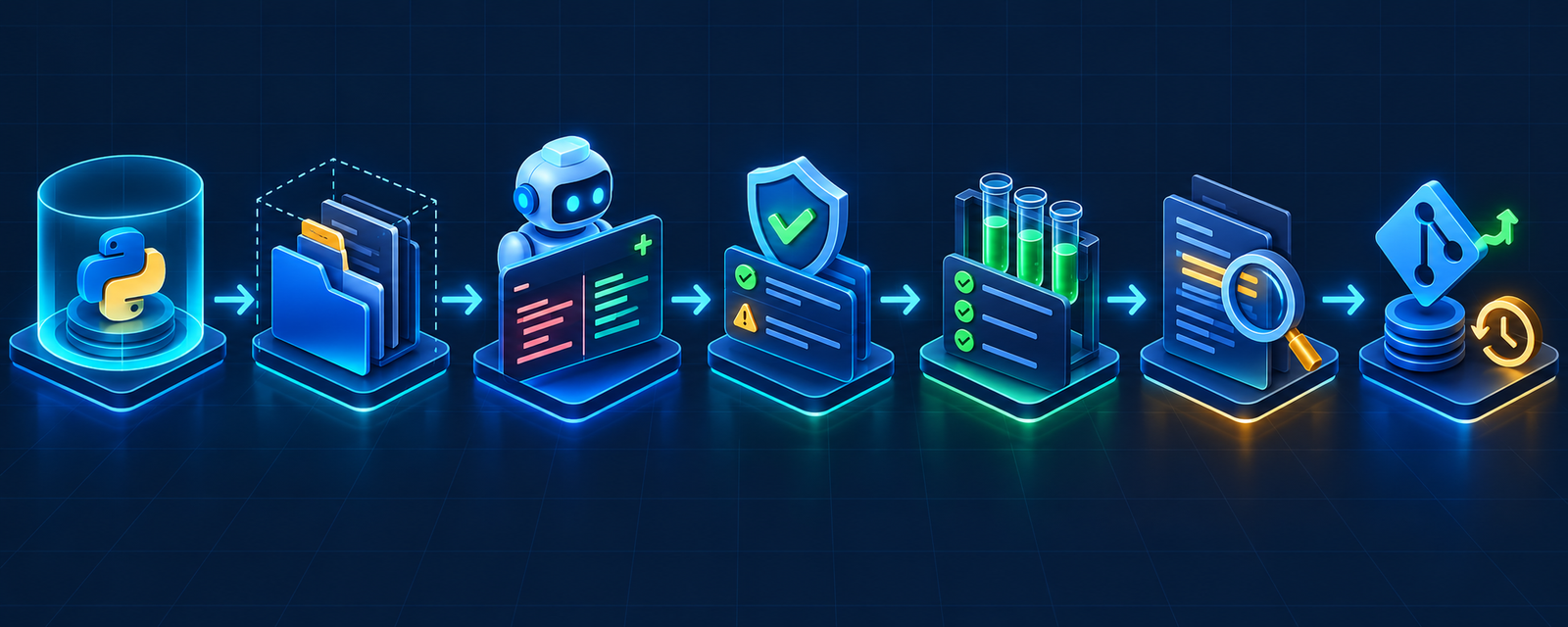
A safe AI-assisted Python workflow
- Pin the environment. State the Python version and activate the intended virtual environment before the agent runs anything.
- Define the contract. Give acceptance criteria, failure cases and the exact files or subsystem in scope.
- Ask for a plan first. Require the tool to identify imports, dependency changes, migrations and commands before editing.
- Generate a small diff. Prefer one behavior plus its tests over a repository-wide rewrite.
- Inspect dependencies. Confirm package names, versions, licenses, maintainers and vulnerability status. Never install a guessed package automatically.
- Run deterministic checks. Use your project’s formatter, linter, type checker, security scanner and pytest suite.
- Review behavior, not just syntax. Check authentication, authorization, async behavior, time zones, serialization and error handling.
- Commit a known-good state. Keep rollback cheap and deploy through normal CI gates.
Repository text, issue bodies, notebooks and dependency output can contain instructions that manipulate an agent. Treat all retrieved content as untrusted. Keep secrets outside the workspace, use least-privilege credentials, block unnecessary network access and require approval for package installation, database migration and deployment. The AI agent security guide covers prompt injection, permissions and sandboxing in depth.
How to choose for your Python stack
- VS Code and GitHub team: begin with Copilot beside the Microsoft Python extension.
- PyCharm-heavy team: compare JetBrains AI with the IDE’s existing refactoring and debugger advantages.
- Large multi-file feature work: pilot Cursor, Claude Code or Codex in a disposable branch or worktree.
- AWS application or CDK work: evaluate Amazon Q while planning for its documented IDE-plugin transition.
- Local model or provider portability: use Continue or Aider and budget for setup, inference and ongoing evaluation.
- Regulated enterprise code: start with data flow, retention, identity, audit and deployment requirements; then compare Tabnine and enterprise plans from the other vendors.
Run a controlled pilot on representative tasks: a bug fix with a failing test, a typed refactor, a dependency update and a security-sensitive change. Measure review time, escaped defects, test failures, cost and how often developers must undo agent actions. For the underlying distinction between completion, chat, editing and agents, see the AI code generator guide and the AI editor versus IDE comparison.
Frequently asked questions
Which AI coding tool is best for Python?
GitHub Copilot is the safest general recommendation for broad IDE support. JetBrains AI is stronger when PyCharm’s Python-aware debugger, navigation and refactoring are central. Cursor, Claude Code and Codex fit broader agent tasks, but require tighter permission and diff controls.
Can AI coding tools run pytest and fix failures?
Many agents can run a configured pytest command, read the output and propose a fix. That does not prove the test is correct. Review assertions, fixtures, mocks and coverage of failure paths before accepting the change.
Can an AI tool manage Python dependencies safely?
It can edit pyproject.toml, requirements files or lockfiles, but a human or policy gate should approve new packages and versions. Verify the exact package identity, license, release history and known vulnerabilities, then rebuild from a clean environment.
Are local AI coding tools private?
Local inference can keep prompts and code on your machine, but the client may still send telemetry, fetch models or call external tools. Read the configuration and network behavior. Local execution also shifts model security, updates and hardware cost to your team.
Should Python beginners use an autonomous agent?
Begin with explanations, completion and small edits. Learn environments, imports, tracebacks, pytest and Git before approving multi-file commands. The beginner AI coding tools guide provides a skill-preserving learning loop.
Bottom line
Pick the tool that fits your Python environment and control model, not the longest feature list. For most developers, Copilot or JetBrains AI is the practical starting point. Add an agent such as Cursor, Claude Code, Codex, Continue or Aider when the work justifies multi-file action—and only after the repository has repeatable linting, typing, tests, review and rollback.


