

Quick answer: The best AI tool for Kubernetes depends on the boundary of the job. Use GitHub Copilot for repository-side YAML, Helm, Terraform and policy changes; K8sGPT for read-only diagnosis; kubectl-ai for an interactive cluster assistant; kagent when you are building governed, reusable agents on Kubernetes; and Pulumi Neo when infrastructure state, previews and pull-request workflows matter. Start with repository or read-only access. Do not give an AI tool production write credentials merely because it can generate a plausible manifest.
This guide compares current US-available tools using official documentation checked on October 25, 2026. The method is practical: context quality, action boundary, deployment model, cost model, governance and the evidence a reviewer gets before a change reaches a cluster. It does not claim hands-on benchmarks. For the wider market, start with the complete AI coding tools guide; for coding, CI/CD and operations beyond Kubernetes, see the AI DevOps tools comparison.
AI tools for Kubernetes: five practical options
| Tool | Best fit | Where it runs and what it sees | Access and cost model | Main caution |
|---|---|---|---|---|
| GitHub Copilot | Generating and reviewing manifests, Helm charts, Terraform, tests and documentation in a repository | IDE, CLI, GitHub and cloud-agent surfaces; repository context rather than live cluster state by default | Free and paid individual plans; cloud agent requires a paid plan; premium-request allowances vary by plan | Generated IaC can be syntactically valid and operationally wrong |
| K8sGPT | Read-only cluster scanning, issue triage and plain-language explanations | CLI or operator; reads selected Kubernetes resources and optionally sends analyzer findings to a chosen model backend | Apache-2.0 open source; model-provider and operating costs are separate | An explanation is a hypothesis, not proof of root cause |
| kubectl-ai | Interactive investigation and natural-language Kubernetes operations | Local CLI or container using kubeconfig; includes kubectl and shell tools and supports hosted or local models | Apache-2.0 open source; model and hosting costs are separate | It can execute operations with the authority of the supplied credentials |
| kagent | Building reusable, Kubernetes-native agents with selected tools, approvals and observability | Runs an agent control plane and sandboxed runtime in Kubernetes; tools act through configured service accounts | Open-source platform plus model, database, cluster and operations costs | More platform to operate, and the current 1.0 documentation describes an alpha release line |
| Pulumi Neo | Infrastructure-aware analysis and IaC changes backed by Pulumi state, previews, policies and pull requests | Pulumi Cloud, CLI, editor, Slack and integrations; can inherit user RBAC and connected infrastructure context | Included with paid Pulumi editions; Neo usage is metered by tokens | “Read-only” in Pulumi Cloud does not automatically remove downstream cloud access |
This is not a universal ranking. These products sit at different layers. A repository assistant should not be judged as if it has live cluster evidence, and a cluster agent should not receive broad write access simply because it has better context.
Choose by execution boundary, not by chatbot quality
The safest useful progression is repository-first, then read-only cluster context, then previewed changes, and only then narrowly scoped execution. That sequence matters because Kubernetes credentials can expose more than workloads. Permission to create a Pod may allow use of a powerful service account; permission to read Secrets can reveal credentials; and a cluster-wide role can turn one bad tool call into a broad incident.
Ask four questions before comparing model quality:
- What context enters the model? Repository files, rendered Helm output, events, logs, object names, Secret values, Pulumi state and cloud metadata are materially different data sets.
- What can the tool change? Suggestions, local file edits, pull requests, dry runs, namespace-scoped writes and production deployment are separate authority levels.
- Which identity performs the action? A developer kubeconfig, a Kubernetes service account, a VCS app and a cloud role create different audit and blast-radius properties.
- Which independent gate can reject bad output? Schema validation, policy checks, tests, previews, admission controls, peer review and progressive delivery should remain outside the model’s control.
What each tool is good at
1. GitHub Copilot: repository-side Kubernetes and IaC work
Copilot is the most natural fit when the desired output belongs in version control: a Deployment manifest, Helm template, Terraform module, policy test, CI validation step or runbook update. It spans editor, CLI, GitHub and cloud-agent workflows. GitHub’s current Copilot plan documentation lists a limited Free tier and paid individual plans; the cloud agent is available on paid plans.
The important boundary is that repository context is not live cluster truth. A generated resource may use the wrong storage class, obsolete API, unavailable admission policy or unrealistic capacity. Keep the agent on a branch, render templates, validate against the intended cluster version, run policy and security checks, and require a human-reviewed pull request. GitHub documents an enabled-by-default cloud-agent firewall, but also states that the firewall is not comprehensive and has limits around MCP servers and setup steps. Treat network controls as one layer, not proof that an agent cannot exfiltrate data.
2. K8sGPT: read-only diagnosis before remediation
K8sGPT is a focused Apache-2.0 open-source scanner that queries Kubernetes resources, applies analyzers and can ask a selected model backend to explain findings. Its maintainers’ security self-assessment describes the tool as read-only and explicitly separates analysis from remediation. That makes it a sensible first cluster-aware tool for teams that want help ranking likely causes without creating an autonomous operator.
Model use is optional for the core analysis path. With explanation enabled, K8sGPT sends analyzer output to the selected backend. Its privacy documentation says collected data depends on the analyzer, logs are not collected by default, and the --anonymize option can obscure some names and namespaces. That is useful but not a substitute for a data-flow review: inspect the exact analyzer fields, backend retention terms and network route before using real production evidence. For a diagnosis workflow with commands and evidence bundles, use the AI Kubernetes troubleshooting guide.
3. kubectl-ai: interactive cluster assistance
kubectl-ai translates natural-language intent into Kubernetes operations through built-in kubectl and shell tools. It supports several hosted providers as well as local Ollama and llama.cpp models, so the software license is not the whole deployment decision. Model processing, credentials and session data follow the provider and configuration you select.
The project is Apache-2.0 licensed but clearly says it is not an officially supported Google product. Its configuration retains permission prompts by default; a skipPermissions option exists and should stay off for production-facing use. If you expose its MCP server over HTTP, the project warns that the endpoint is unauthenticated unless OAuth is configured. Prefer a local interface, a read-only kubeconfig and a non-production cluster during evaluation. Never bind it to cluster-admin for convenience.
4. kagent: a platform for governed Kubernetes-native agents
kagent is for teams building agents as part of their platform, not for someone who only wants a smarter kubectl prompt. Its current documentation models agent behavior, models and tool bindings as Kubernetes resources and runs conversations in a sandboxed runtime. Its tool ecosystem covers Kubernetes, Helm, Argo, Prometheus, Grafana, Cilium and other cloud-native systems.
The controls are promising but require deliberate configuration. The tool server can omit write tools with a read-only flag, RBAC can bind its service account to get/list/watch permissions, and selected tool bindings can require human approval. Those controls are separate: hiding write tools does not repair overly broad RBAC, and an approval prompt does not make a dangerous request safe. Current installation documentation for the 1.0 line uses an alpha release and adds a controller, sandbox runtime and PostgreSQL, so production adoption should include lifecycle, upgrade, backup and supply-chain planning.
5. Pulumi Neo: infrastructure state plus controlled change
Pulumi Neo is the strongest fit in this group when Kubernetes resources and surrounding cloud infrastructure are already managed with Pulumi. It can use Pulumi Cloud state, propose IaC changes, open pull requests, run previews and, when permitted, execute updates. Current Pulumi pricing places Neo on paid editions and meters Neo usage by tokens; the free edition does not include it.
Neo’s permission model is unusually explicit: it acts within the invoking user’s Pulumi RBAC, supports plan and approval modes, and offers a Pulumi Cloud read-only mode. The caveat is important. Pulumi states that read-only mode blocks Pulumi Cloud mutations but does not technically prevent access to downstream cloud accounts unlocked through environments. Start with a dedicated low-privilege role, disable unnecessary integrations, use plan mode and require review before previews, pull requests or updates as appropriate.
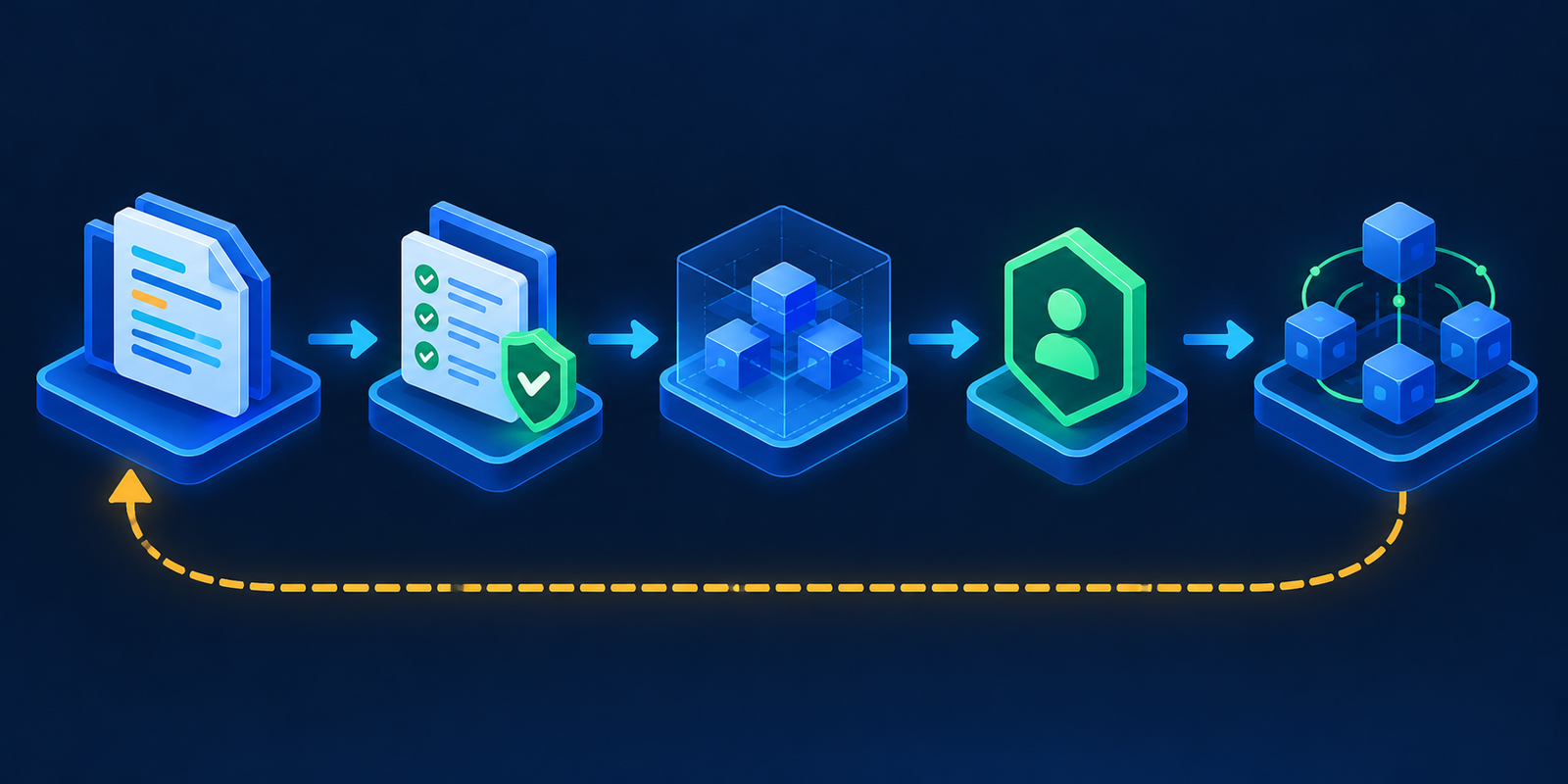
A safe workflow for AI-generated Kubernetes changes
- Draft in version control. Ask the tool for a minimal change and the assumptions behind it. Keep credentials, kubeconfigs, rendered Secrets and production logs out of prompts.
- Render generated configuration. Expand Helm or Kustomize output so reviewers inspect the objects the API server will actually receive.
- Run strict validation. Use the target Kubernetes schema, linters, policy-as-code and security scanning. The Kubernetes API supports strict field validation; unknown or duplicate fields should fail instead of being silently ignored.
- Use server-side dry run. A server dry run reaches authentication, authorization, defaulting, validation and admission without persisting the object. It still requires the same authorization as the real request, so run it with the deployment identity.
- Review the diff and plan. A human should check selectors, probes, resources, disruption budgets, network policy, RBAC, images, volumes and rollback behavior.
- Deploy progressively. Start in an isolated environment or namespace, observe rollout and service-level signals, and stop automatically on regressions.
- Preserve rollback. Retain the previous artifact and declarative state. An AI-generated fix must not become the only record of how production changed.
For telemetry and alerting choices around that workflow, see the Kubernetes monitoring tools comparison. For prompt injection, tool permissions and sandbox design, use the AI agent security guide.
How to evaluate an AI Kubernetes tool
Run the same three bounded tasks against every candidate: explain a known failed rollout from sanitized evidence, propose a small manifest or IaC change, and produce a validation and rollback plan. Do not score prose quality alone. Record:
- whether the tool cites the resource, event, file or state behind each conclusion;
- whether it distinguishes an observation from a hypothesis;
- how often generated configuration passes strict schema, policy and security checks;
- which data leaves your environment and how the provider handles retention and training;
- the exact identity, tools, network destinations and write permissions used;
- whether every mutation creates a reviewable diff, preview, audit event and rollback path;
- total cost, including model usage, infrastructure, integration, security review and operator time.
A free open-source client is not a free operating model. Model tokens, private inference, cluster capacity, databases, upgrades and incident ownership can exceed the software license cost. Conversely, a paid platform can be economical when its state, policy and audit context remove custom integration work. Measure the complete workflow.
Final recommendation
Most teams should begin with two layers: a repository assistant such as GitHub Copilot for declarative changes and K8sGPT for read-only diagnosis. Add kubectl-ai only when interactive cluster work has a clear read-only or namespace-scoped role. Adopt kagent when operating an agent platform is itself a product requirement. Choose Pulumi Neo when Pulumi state, previews and governance are already central to infrastructure delivery.
The best AI tool for Kubernetes is therefore not the one with the broadest autonomy. It is the one whose context matches the task and whose authority can be constrained, observed and reversed.
Frequently asked questions
Can AI safely generate Kubernetes YAML?
Yes, as a draft. Render templates, validate against the target API, run policies and security scans, use server-side dry run, review the diff and deploy progressively. Generated YAML should never bypass the same gates as human-authored configuration.
Should an AI Kubernetes tool have cluster-admin access?
No. Use a dedicated identity with the smallest namespace, resource and verb set required. Kubernetes RBAC guidance warns that workload creation and Secret access can enable privilege escalation, so even apparently limited roles need review.
What is the difference between K8sGPT and kubectl-ai?
K8sGPT centers on analyzer-driven, read-only diagnosis and optional explanation. kubectl-ai is an interactive assistant with kubectl and shell tools that can perform operations allowed by its credentials. The second has a wider action boundary and therefore needs stronger permission controls.
Can local models keep Kubernetes data private?
They can reduce disclosure to an external model provider, but local does not automatically mean private. Review logs, session storage, telemetry, network access, model-serving endpoints and every tool connected to the agent.
Can AI replace GitOps for Kubernetes?
No. AI can propose and explain changes, but GitOps provides desired-state history, review, reconciliation and rollback mechanics. The safer pattern is to make the agent produce a pull request that follows the existing GitOps path.

