

SEO excerpt: Learn how DevOps teams can use AI for Kubernetes troubleshooting in 2026 without trusting guesses blindly. Includes kubectl commands, a safe workflow, prompt examples, common mistakes, tool selection criteria, and FAQs.
Quick Answer: AI can help Kubernetes troubleshooting by summarizing pod events, explaining log patterns, suggesting likely root causes, and turning repeated incidents into runbook steps. It should not replace the basic diagnostic path: check pod status, describe the resource, inspect events, read logs, verify recent changes, and test the smallest safe fix. The best 2026 workflow is to give an AI assistant sanitized, current cluster evidence and ask for ranked hypotheses, commands to verify each one, and rollback-safe next steps.
Search demand around AI and DevOps has moved from broad hype to practical questions: “AI CI/CD pipeline,” “Kubernetes troubleshooting AI agent,” “AI DevOps tools,” “AIOps vs DevOps,” and “GitHub Copilot DevOps integration.” Teams want help with the messy middle of operations, where a deployment fails, a pod loops, an alert fires, and someone has to connect symptoms to a real cause.
Kubernetes troubleshooting is a good place to use AI because the work is evidence-heavy. A useful diagnosis usually comes from pod status, container logs, events, resource limits, probes, service selectors, ingress rules, recent deploys, node pressure, image pulls, secrets, and config. AI is good at summarizing that evidence and proposing a sequence. It is bad at knowing your cluster state unless you provide it. Treat it like a sharp incident scribe and junior pair, not as an operator with permission to change production.
This guide gives beginners and working DevOps engineers a practical workflow, with internal paths to generative AI basics, CI/CD tooling, AI DevOps prompt engineering, observability, and DevSecOps safety.
Why Kubernetes Troubleshooting Is a Strong AI Use Case
Kubernetes failures are rarely explained by one screen. A CrashLoopBackOff might come from bad config, a missing secret, a database issue, an incompatible image, a broken probe, or a low memory limit. A service outage might be a selector mismatch, endpoint problem, network policy, ingress rule, DNS, or external dependency.
The official Kubernetes troubleshooting docs still point engineers toward the fundamentals: triage the object, inspect pod state, read logs, use events, and debug services or running pods with the right `kubectl` commands. AI fits around that workflow. It can reduce the time spent translating noisy output, but the evidence still comes from Kubernetes itself.
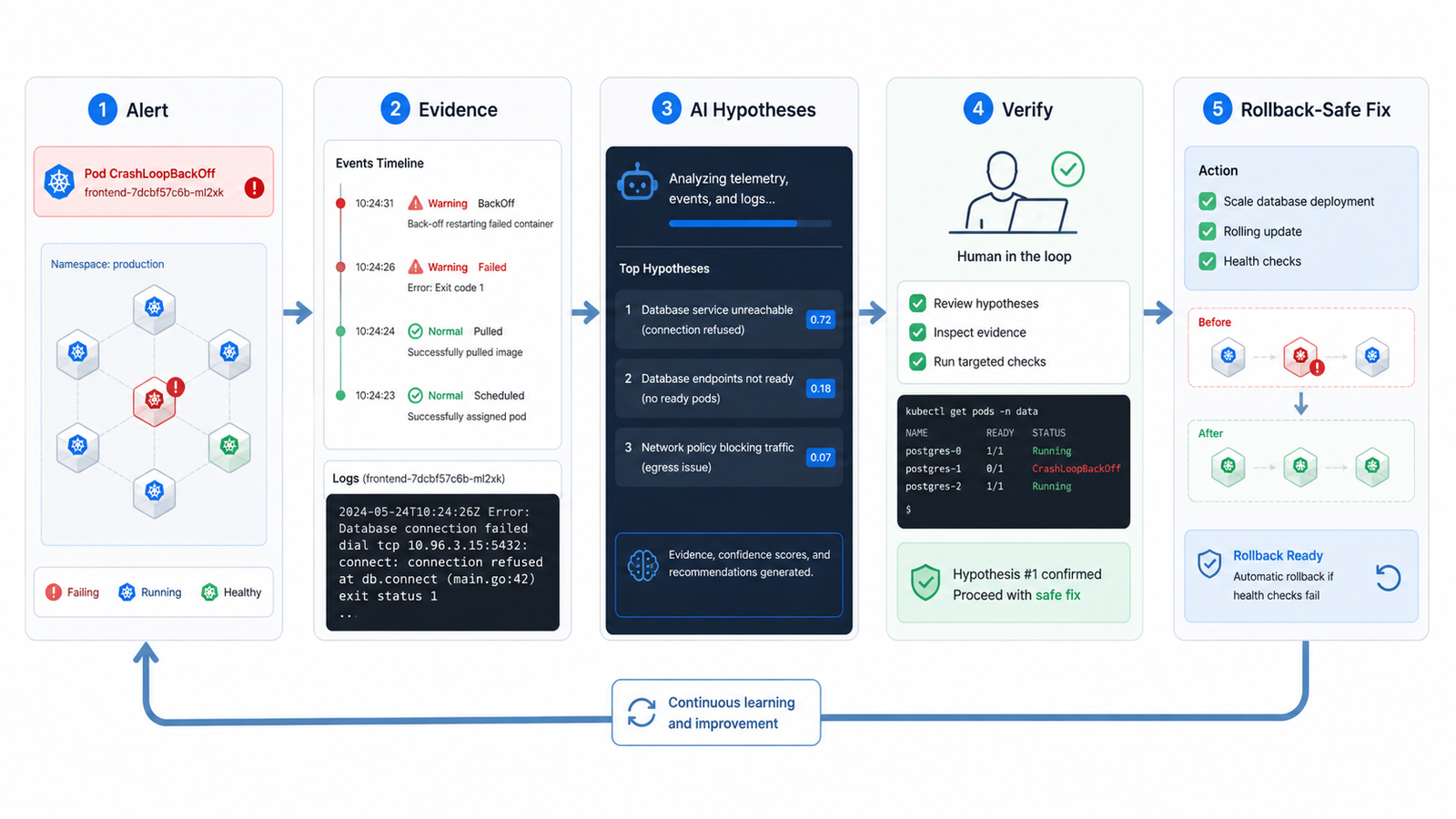
The Safe AI Troubleshooting Loop
Use this loop when an application is unhealthy, a deployment is failing, or an alert points to a Kubernetes workload.
- Capture the symptom. Record the namespace, workload, time window, alert name, user impact, and recent deploy or config change.
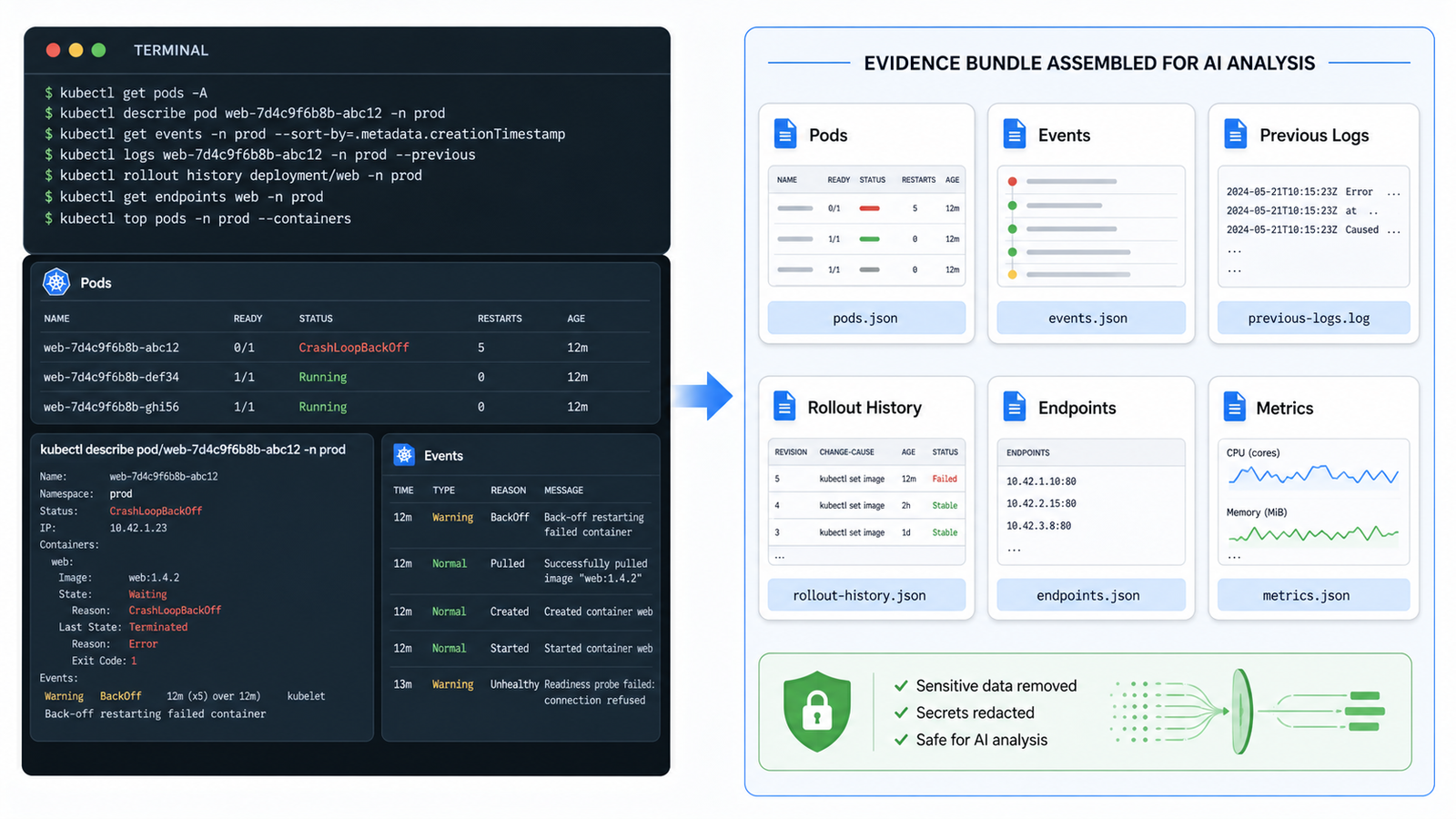
- Collect evidence with read-only commands. Use status, describe, events, logs, rollout history, and metrics before changing anything.
- Sanitize the output. Remove secrets, tokens, customer data, private hostnames, and sensitive environment values before sending evidence to an AI tool.
- Ask for ranked hypotheses. Make the AI explain why each hypothesis fits the evidence and what command would prove or disprove it.
- Verify manually. Run the smallest command that confirms the likely cause.
- Apply the safest fix. Prefer rollback, scaling, config correction, or resource adjustment through reviewed paths.
- Capture the learning. Turn the incident into a runbook entry, alert tuning note, or CI/CD guardrail.
The “prove or disprove” step matters most. Production workflows need evidence, not confident prose.
Beginner Workflow: Debug a Failing Pod With AI
Start with a pod that is not healthy. Do not begin by asking an AI tool, “Why is my cluster broken?” Give it facts.
kubectl get pods -n payments
kubectl describe pod -n payments payments-api-7f9c8b8b8d-x42pm
kubectl logs -n payments payments-api-7f9c8b8b8d-x42pm --previous
kubectl get events -n payments --sort-by=.lastTimestamp
kubectl rollout history deployment/payments-api -n payments
Then summarize the situation in a prompt like this:
You are helping troubleshoot a Kubernetes workload.
Do not suggest a fix until you list the evidence.
Rank the top 3 likely causes and give one read-only command to verify each.

Context:
- Namespace: payments
- Workload: deployment/payments-api
- Symptom: pods enter CrashLoopBackOff after today's rollout
- Impact: checkout API returns intermittent 503
- Recent change: image tag changed from 2.18.4 to 2.19.0

Evidence:
[paste sanitized describe output, previous logs, recent events]
A good answer should look boring: “The previous container log shows the app cannot find `PAYMENTS_DB_URL`; verify the secret and env mapping.” A weak answer jumps straight to “increase memory” or “restart the deployment” without connecting to evidence.
Practitioner Workflow: Build an AI-Ready Evidence Bundle
Teams that handle incidents often can create a small evidence bundle script. Keep it read-only and namespace-scoped. The goal is not to automate remediation first; the goal is to standardize what evidence humans and AI assistants see.
#!/usr/bin/env bash
set -euo pipefail

NS="${1:?namespace required}"
APP="${2:?app label required, for example app=payments-api}"

mkdir -p k8s-evidence
kubectl get pods -n "$NS" -l "$APP" -o wide > k8s-evidence/pods.txt
kubectl get deploy,rs,svc,endpoints -n "$NS" -l "$APP" -o wide > k8s-evidence/objects.txt
kubectl get events -n "$NS" --sort-by=.lastTimestamp | tail -80 > k8s-evidence/events.txt

for pod in $(kubectl get pods -n "$NS" -l "$APP" -o jsonpath='{.items[*].metadata.name}'); do
  kubectl describe pod -n "$NS" "$pod" > "k8s-evidence/describe-$pod.txt"
  kubectl logs -n "$NS" "$pod" --all-containers --tail=200 > "k8s-evidence/logs-$pod.txt" || true
  kubectl logs -n "$NS" "$pod" --all-containers --previous --tail=200 > "k8s-evidence/logs-previous-$pod.txt" || true
done
Before any AI step, run a sanitizer. Strip bearer tokens, passwords, private keys, and obvious secrets. In regulated environments, use an approved enterprise AI tool with logging and data controls.
What AI Can Diagnose Well
AI is most useful when the evidence has recognizable patterns. Common examples include:
- CrashLoopBackOff: connect previous logs to startup errors, missing env vars, bad command arguments, failed migrations, or probe failures.
- ImagePullBackOff: identify likely registry auth, tag, network, or image name problems from events.
- Pending pods: interpret scheduling errors, node selectors, taints, tolerations, affinity rules, and resource requests.
- Service 503s: compare service selectors, endpoints, readiness probes, ingress status, and pod labels.
- OOMKilled: connect termination reason, restart count, memory limits, traffic patterns, and recent releases.
- Slow rollouts: read rollout status and explain why replicas are unavailable.
AI is less reliable when it lacks data. One log line invites guesswork; a clean evidence bundle can make the next five minutes much faster.
AI Prompt Patterns That Work During Incidents
Use prompts that constrain the assistant. These are better than broad “fix this” prompts.
Prompt 1: Rank Causes
Based only on the evidence below, rank the top 5 likely root causes.
For each cause, include:
1. Evidence that supports it
2. Evidence that would contradict it
3. One read-only kubectl command to verify it
4. The safest rollback or mitigation if confirmed
Prompt 2: Explain an Event
Explain this Kubernetes event in plain English.
What object emitted it?
What condition triggered it?
What should I inspect next?
Do not recommend deleting pods unless the evidence shows that is useful.
Prompt 3: Convert Incident Notes Into a Runbook
Turn these incident notes into a runbook.
Include detection, impact, first checks, commands, decision points,
rollback criteria, and prevention work for CI/CD.
That final prompt is where AI often creates long-term value. A good incident should improve the system. If a missing secret caused a failed rollout, add a deployment validation check. If a readiness probe caused a bad deployment, add a staging smoke test. If resource limits were too low, update load testing and capacity review.
Tool Selection Criteria
You do not need a paid AIOps suite on day one. Pick based on how risky the environment is and how much context the tool can safely access.
| Option | Best For | Pros | Cons | Pricing / Licensing Caveat |
|---|---|---|---|---|
| General AI assistant | Learning, prompt experiments, sanitized logs | Fast, flexible, low setup | No live cluster context; data leakage risk if misused | Check enterprise data controls before production use |
| IDE or repository assistant | Connecting Kubernetes errors to manifests, Helm charts, Terraform, and CI/CD changes | Understands repo context and pull requests | May miss live runtime state | Usually licensed per developer seat |
| Kubernetes-specific AI tool | Cluster scanning, plain-English issue summaries, team runbooks | Closer to Kubernetes objects and events | Needs RBAC design and careful access scope | Open source tools may still require paid model/API usage |
| Observability platform AI | Production incidents, traces, metrics, logs, SLOs | Strong operational context and alert correlation | Can become expensive at scale | Review ingest, retention, host, and feature-based pricing |
Neutral recommendation: start with a simple evidence-bundle workflow and an approved AI assistant. Add Kubernetes-specific or observability-native AI when you can measure a real need: faster mean time to detect, faster mean time to restore, fewer repeated incidents, or better on-call handoff quality.
Common Mistakes
Mistake 1: Pasting secrets into prompts. Logs and `describe` output can contain sensitive values. Sanitize first.
Mistake 2: Asking AI to make production changes. Read-only analysis is a lower-risk starting point. Write actions should go through existing review, deployment, and rollback controls.
Mistake 3: Ignoring Kubernetes events. Logs show what the container says. Events show what Kubernetes says. You need both.
Mistake 4: Treating restarts as root cause. Restarting a pod may clear a symptom. It rarely explains why the pod failed.
Mistake 5: Skipping rollout context. Many incidents become obvious after checking what changed in the last deployment.
Next Steps for Teams
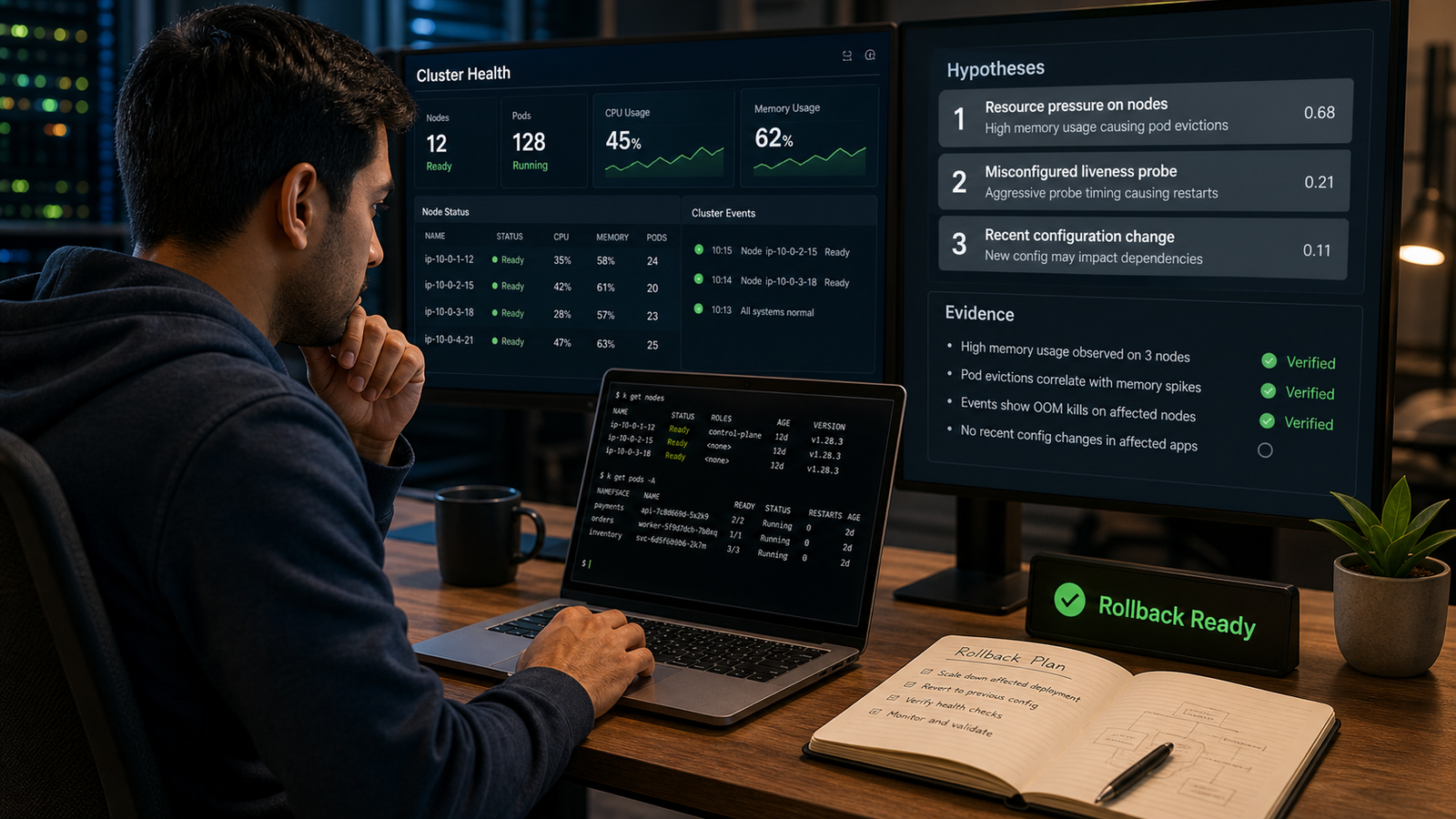
If you are new to this, practice on a non-production namespace. Break a demo deployment intentionally: use a missing image tag, wrong service selector, bad readiness probe, and too-low memory limit. Collect the evidence, ask AI for hypotheses, then compare its answer against what you know you broke.
If you are already running Kubernetes in production, formalize three things. First, define which data can be sent to which AI tools. Second, create a standard read-only evidence bundle. Third, update incident review templates so AI-generated summaries are checked by a human and converted into durable prevention work.
For related reading, start with What Is Generative AI? A Beginner’s Guide, then connect this workflow to Best CI/CD Tools 2026 Compared. Also internally link this post from AI DevOps roadmap, AI-powered CI/CD, observability, prompt engineering, and DevSecOps articles.
FAQ
Can AI troubleshoot Kubernetes automatically?
AI can assist with Kubernetes troubleshooting, but fully automatic remediation is risky unless the action is tightly scoped, tested, approved, and reversible. Start with read-only diagnosis and human-approved fixes.
What Kubernetes data should I give an AI assistant?
Give sanitized pod status, `kubectl describe` output, recent events, previous container logs, rollout history, service endpoints, and relevant metrics. Avoid secrets, tokens, customer data, and private credentials.
Is AIOps the same as DevOps?
No. DevOps is a culture and practice for building, testing, releasing, and operating software. AIOps uses analytics and AI to help with operations signals such as alerts, logs, metrics, incidents, and root-cause analysis.
Which Kubernetes errors are best for AI-assisted debugging?
AI is useful for CrashLoopBackOff, ImagePullBackOff, Pending pods, OOMKilled containers, failed readiness probes, service endpoint issues, and confusing event messages, especially when you provide complete evidence.
Should AI agents have write access to my cluster?
Most teams should avoid giving AI agents broad write access. If you experiment with write actions, use least-privilege RBAC, non-production environments first, approval gates, audit logs, and automatic rollback paths.
Schema-Ready FAQ Structure
Use the five FAQ questions above as `FAQPage` `mainEntity` items. Each question should map to one `Question.name`, and the paragraph below it should map to `acceptedAnswer.text`. Keep the answers identical to the visible FAQ copy so search engines and readers see the same information.


