
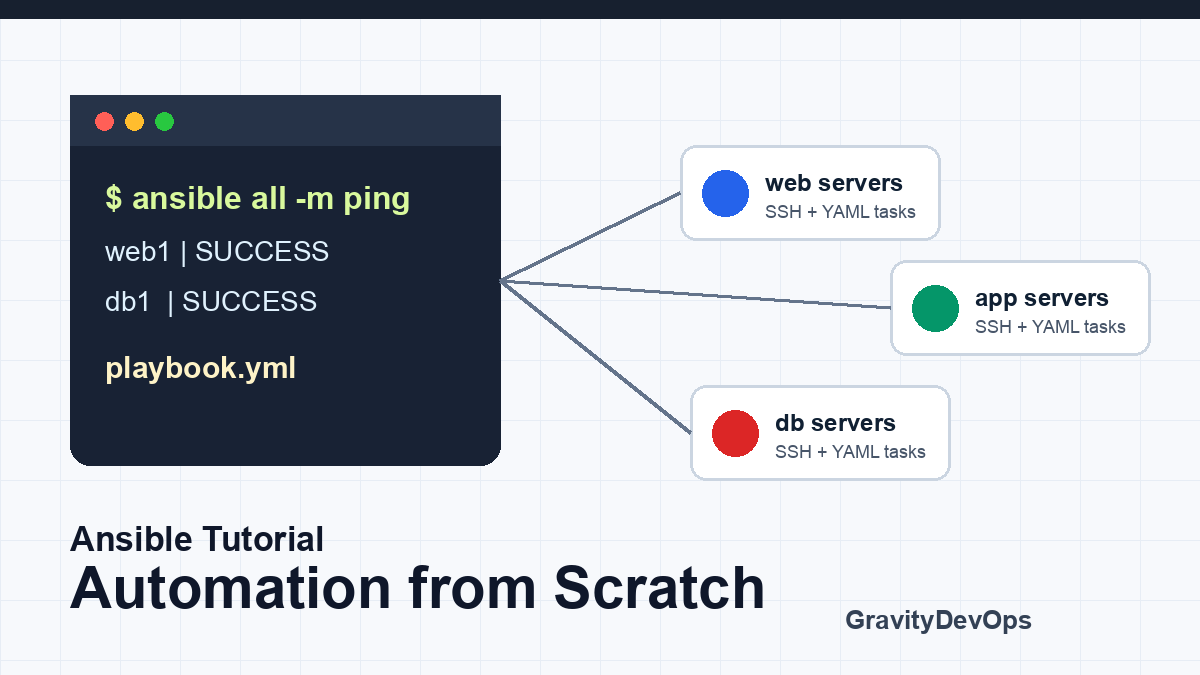

Quick Answer: Ansible is an automation tool that lets you configure servers, deploy applications, run operational tasks, and keep environments consistent using simple YAML playbooks. You install Ansible on a control node, define target machines in an inventory, then run modules over SSH to make systems match the state described in your playbooks.
This Ansible tutorial starts from scratch and builds toward the way practitioners actually use Ansible: inventories, ad hoc commands, playbooks, variables, handlers, roles, secrets, CI/CD runs, and troubleshooting. The goal is not just to memorize syntax. It is to understand the workflow well enough to automate a small fleet safely.
Ansible fits especially well when you need repeatable server configuration, patching, service management, file templating, or deployment tasks across many machines. It also complements infrastructure tools: Terraform, Pulumi, or OpenTofu can create infrastructure, while Ansible can configure operating systems and application dependencies after those resources exist.
What Is Ansible?
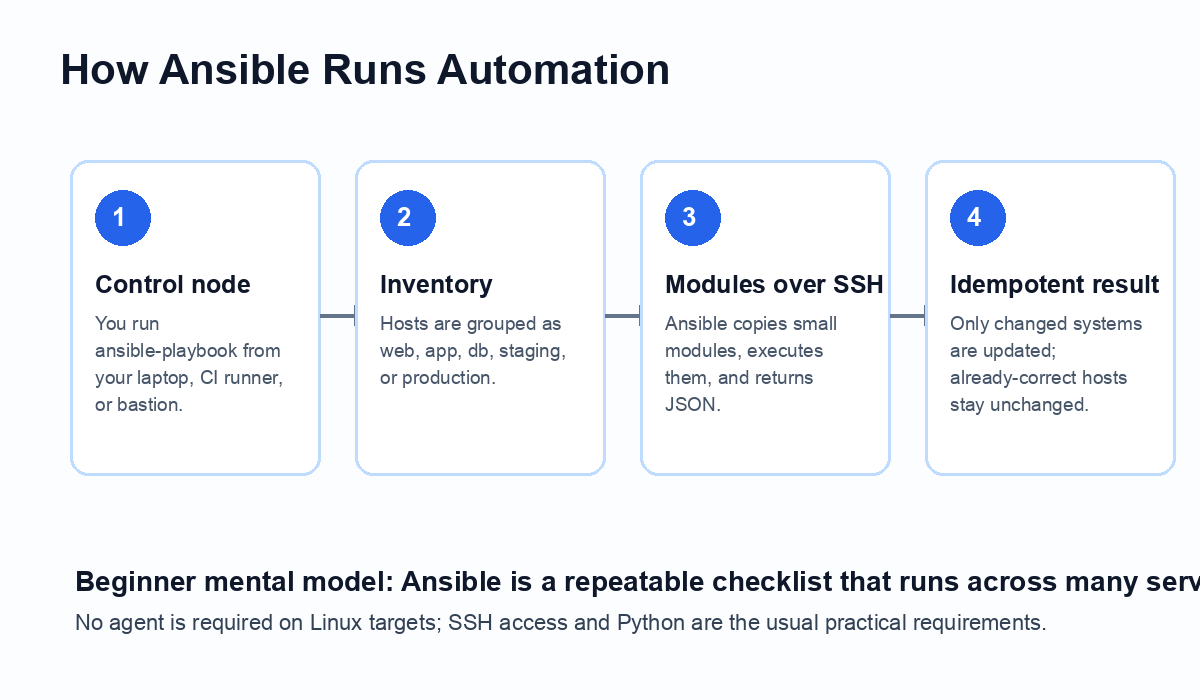
Ansible is an open-source automation platform maintained in the broader Red Hat Ansible ecosystem. The common open-source workflow uses a control node, an inventory, and playbooks. A control node can be your workstation, a bastion host, or a CI runner. The inventory lists managed hosts. Playbooks describe what should happen on those hosts.
The important beginner-friendly idea is idempotency. A good Ansible playbook can run repeatedly. If nginx is already installed, the package task should report ok instead of reinstalling it. If a config file changes, Ansible can notify a handler to restart the service only when needed. That makes automation safer than hand-running shell commands on each server.
The official Ansible documentation is the source of truth for module behavior and installation details, and you should keep it nearby when moving beyond basic examples: Ansible getting started docs.
When Should You Use Ansible?
Use Ansible when you need repeatable operations across machines or environments. Good examples include installing packages, managing users, configuring system services, deploying application config files, rotating certificates, patching Linux servers, bootstrapping Kubernetes nodes, and running controlled operational tasks.
Ansible is not always the right primary tool. For immutable container workloads, Kubernetes manifests and Helm charts may own most runtime configuration. For cloud resource provisioning, Terraform, Pulumi, or OpenTofu often provide better state tracking. For observability pipelines, specialized tools may be more appropriate. In practice, teams often use Ansible alongside those tools rather than replacing them.
Install Ansible on a Control Node
Start on a control node, not on every managed server. On macOS, many developers install Ansible with Python tooling or Homebrew. On Linux, you can use distribution packages or Python packaging depending on your environment and support policy. The official installation guide should be checked for your operating system before standardizing a team setup: Ansible installation guide.
A common lab setup is one control machine and one or two Linux VMs that you can reach over SSH. Confirm SSH first, because Ansible troubleshooting is much easier when the basic network path is already proven.
ssh ubuntu@web1.example.com
python3 --version
Then confirm Ansible is available:
ansible --version
ansible-playbook --version
Create Your First Inventory
An inventory tells Ansible which machines belong to which groups. For a small tutorial, create an inventory.ini file:
[web]
web1 ansible_host=192.0.2.10 ansible_user=ubuntu
web2 ansible_host=192.0.2.11 ansible_user=ubuntu

[db]
db1 ansible_host=192.0.2.20 ansible_user=ubuntu

[production:children]
web
db
Test that Ansible can parse it:
ansible-inventory -i inventory.ini --list
Beginners often put production, staging, and local lab hosts into one messy file. That works for experiments, but it becomes risky quickly. For real projects, separate environments and make host limits explicit when running production automation.
Run Your First Ad Hoc Command
An ad hoc command is useful for quick checks. The classic first command is ping, but this is an Ansible connectivity/module test, not an ICMP network ping.
ansible all -i inventory.ini -m ping
If it succeeds, ask for uptime:
ansible web -i inventory.ini -m command -a "uptime"
Then try a package fact or service check. The exact package module depends on the operating system, so do not blindly copy Ubuntu examples to RHEL or Amazon Linux without checking the appropriate module.
Write Your First Playbook
A playbook is where Ansible becomes maintainable. The example below installs nginx, ensures it is running, and deploys a simple index page. It uses become: true because package and service management usually require elevated privileges.
---
- name: Configure web servers
  hosts: web
  become: true

  tasks:
    - name: Install nginx
      ansible.builtin.package:
        name: nginx
        state: present

    - name: Start and enable nginx
      ansible.builtin.service:
        name: nginx
        state: started
        enabled: true

    - name: Deploy homepage
      ansible.builtin.copy:
        dest: /var/www/html/index.html
        content: "Hello from Ansible
"
        mode: "0644"
Run it like this:
ansible-playbook -i inventory.ini web.yml
Before running against anything important, use check mode and diff mode:
ansible-playbook -i inventory.ini web.yml --check --diff
Check mode is not perfect for every module, but it is a valuable guardrail. Diff mode helps you see what file content would change.
Understand Tasks, Modules, and State
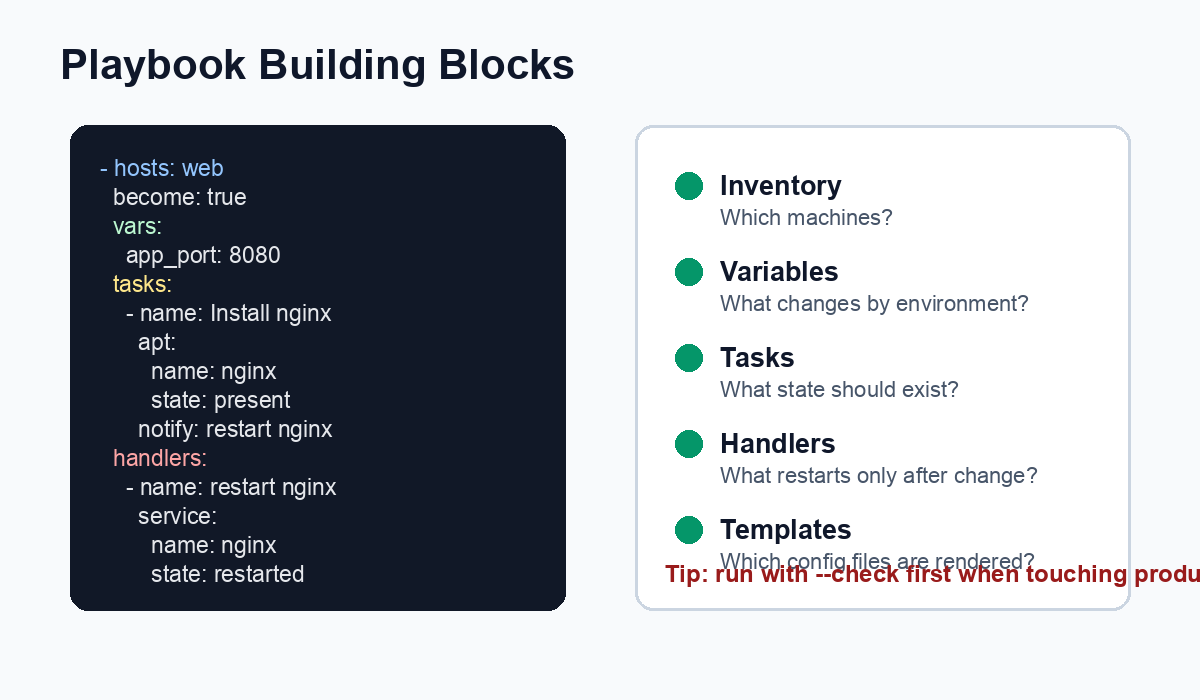
Tasks call modules. Modules are the work units that manage packages, files, users, services, cloud resources, and many other things. Prefer purpose-built modules over raw shell commands because modules usually understand state and can report whether they changed anything.
For example, this is usually better:
- name: Ensure deploy user exists
  ansible.builtin.user:
    name: deploy
    shell: /bin/bash
    groups: sudo
    append: true
Than this:
- name: Create deploy user with shell
  ansible.builtin.shell: useradd deploy
The shell version may fail if the user already exists, or worse, appear to work while hiding drift. There are valid uses for command and shell, but they should be deliberate.
Add Variables and Templates
Variables let the same playbook behave differently across environments. For example, staging might run two app workers while production runs eight. Keep environment-specific values in group variables:
project/
  inventory/
    staging.ini
    production.ini
  group_vars/
    staging.yml
    production.yml
  playbooks/
    app.yml
A simple variable file might look like this:
app_port: 8080
worker_count: 4
log_level: info
Templates use Jinja2 syntax. A systemd environment file template might contain:
APP_PORT={ app_port }
WORKER_COUNT={ worker_count }
LOG_LEVEL={ log_level }
Then deploy it with:
- name: Write app environment file
  ansible.builtin.template:
    src: app.env.j2
    dest: /etc/myapp/app.env
    mode: "0640"
  notify: restart myapp
Use Handlers for Controlled Restarts
A handler runs only when notified by a changed task. This is ideal for service restarts. Without handlers, beginners often restart services on every playbook run, which creates unnecessary disruption.
tasks:
  - name: Deploy nginx config
    ansible.builtin.template:
      src: nginx.conf.j2
      dest: /etc/nginx/nginx.conf
      mode: "0644"
    notify: reload nginx

handlers:
  - name: reload nginx
    ansible.builtin.service:
      name: nginx
      state: reloaded
This pattern keeps routine playbook runs calm: no config change, no reload.
Move from One Playbook to Roles
Once a playbook grows, use roles. Roles organize tasks, templates, files, defaults, handlers, and metadata into a reusable structure. A practical role layout looks like this:
roles/
  nginx/
    defaults/main.yml
    handlers/main.yml
    tasks/main.yml
    templates/nginx.conf.j2
    files/
Then your playbook becomes easier to scan:
- name: Configure web tier
  hosts: web
  become: true
  roles:
    - nginx
The official best-practices documentation includes more guidance on structure and reuse: Ansible sample setup.
Handle Secrets Safely
Do not commit plaintext passwords, tokens, SSH private keys, or database credentials into playbooks. For a basic Ansible-native approach, use Ansible Vault:
ansible-vault create group_vars/production/vault.yml
ansible-playbook -i inventory/production.ini playbooks/app.yml --ask-vault-pass
In team environments, you may prefer an external secret manager such as AWS Secrets Manager, Azure Key Vault, Google Secret Manager, HashiCorp Vault, or your platform’s existing secret workflow. The key point is the same: secrets should not live as readable values in Git.
Run Ansible in CI/CD
For production, treat playbooks like application code. Store them in Git, review changes, run linting, and execute from a controlled runner. A minimal workflow is:
- Developer opens a pull request with playbook changes.
- CI runs syntax checks and linting.
- Staging deployment runs with an explicit staging inventory.
- Production requires approval and a narrow host limit for the first run.
ansible-playbook -i inventory/staging.ini playbooks/app.yml --syntax-check
ansible-playbook -i inventory/staging.ini playbooks/app.yml --check --diff
ansible-playbook -i inventory/production.ini playbooks/app.yml --limit web1
If you are building a broader deployment pipeline, compare this workflow with the GravityDevOps guide to the best CI/CD tools in 2026. Ansible is often one step inside a pipeline, not the whole pipeline by itself.
Common Beginner Mistakes
Using shell for everything. Shell commands are tempting because they feel familiar, but they usually make playbooks less idempotent. Reach for modules first.
Mixing staging and production carelessly. Keep inventories separate, use clear group names, and run with --limit when testing risky changes.
Ignoring changed output. If a task reports changed on every run, fix it. Constant changes hide real drift.
Restarting services unnecessarily. Use handlers so restarts happen only after relevant config changes.
Storing secrets in plain YAML. Use Vault or a secret manager before playbooks become shared team assets.
Skipping rollback thinking. Ansible can enforce state, but it is not a time machine. Know how you will restore config, packages, or service versions if a deployment fails.
Troubleshooting Ansible
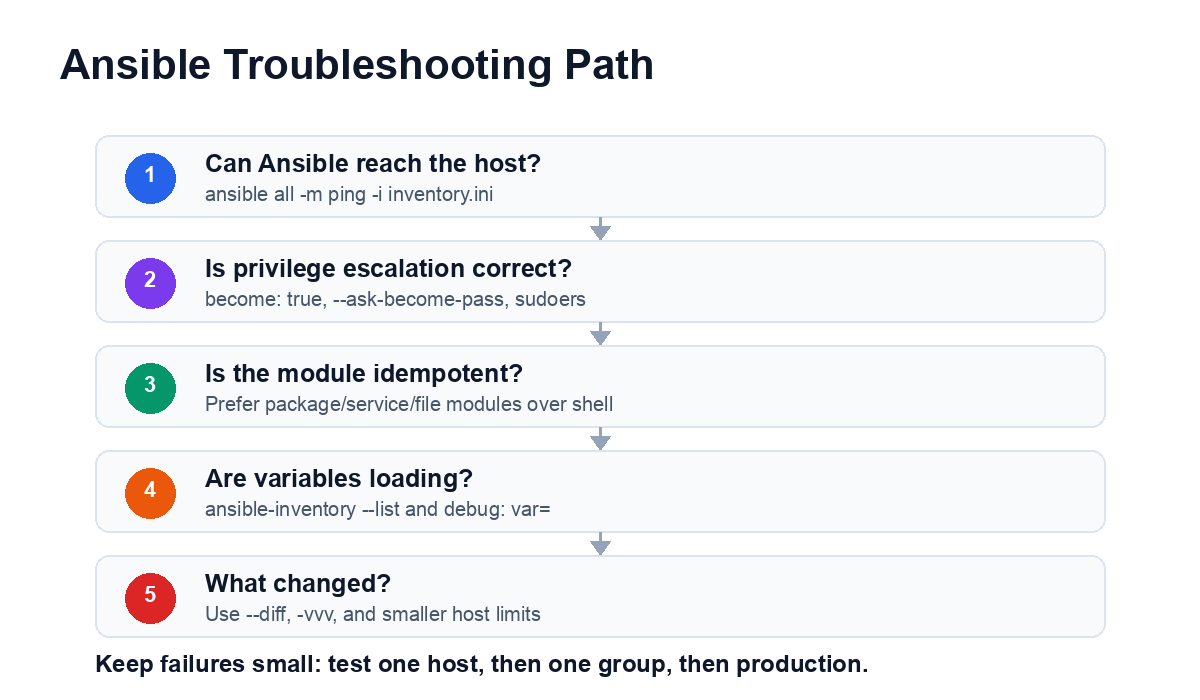
Start with reachability. If ansible all -m ping fails, do not debug playbook logic yet. Confirm DNS, SSH key access, username, Python availability, and firewall rules.
ansible all -i inventory.ini -m ping -vvv
If privilege escalation fails, test a simple become command:
ansible web -i inventory.ini -b -m command -a "whoami"
If variables are not loading, inspect inventory output:
ansible-inventory -i inventory.ini --host web1
ansible-inventory -i inventory.ini --graph
If a task behaves differently than expected, isolate it. Run against one host, increase verbosity, and use --start-at-task when appropriate.
ansible-playbook -i inventory.ini web.yml --limit web1 -vv
ansible-playbook -i inventory.ini web.yml --start-at-task "Deploy nginx config"
Ansible vs Terraform, Kubernetes, and Shell Scripts
Use Terraform, Pulumi, or OpenTofu when you need infrastructure state management for cloud resources. Use Kubernetes and Helm for container orchestration and application packaging. Use Ansible when you need procedural but repeatable operating-system and service configuration across hosts.
Shell scripts still have a place for very small local tasks, but they become fragile across multiple servers. Ansible gives you inventory, host grouping, reusable roles, privilege escalation, structured output, and a large module ecosystem.
For cloud and Kubernetes teams, Ansible is most useful around bootstrapping, patching, configuration drift repair, and operational workflows that touch systems outside the Kubernetes control plane. If your work is increasingly AI-driven, the same automation mindset applies to infrastructure for AI systems; for background, see What Is Generative AI? A Beginner’s Guide.
A Practical 7-Day Learning Plan
- Day 1: Install Ansible and run
ansible all -m pingagainst one lab VM. - Day 2: Build an inventory with
webanddbgroups. - Day 3: Write a playbook that installs and starts a service.
- Day 4: Add variables and a Jinja2 template.
- Day 5: Add handlers and verify the playbook is idempotent.
- Day 6: Convert the playbook into a role.
- Day 7: Run syntax checks, check mode, and a staged deployment from CI.
FAQ
Is Ansible good for beginners?
Yes. Ansible is one of the easiest automation tools to start with because it uses YAML playbooks, SSH connections, and readable modules instead of requiring a custom agent on each Linux server.
Do I need to install Ansible on every server?
No. You install Ansible on a control node such as your laptop, bastion host, or CI runner. Managed Linux hosts are typically reached over SSH and do not need a long-running Ansible agent.
What is the difference between an Ansible ad hoc command and a playbook?
An ad hoc command is a one-time command for quick checks or small tasks. A playbook is a reusable YAML file that describes the desired state of systems and can be reviewed, versioned, and repeated.
Is Ansible still useful with Kubernetes and Terraform?
Yes. Terraform or OpenTofu usually provisions infrastructure, Kubernetes schedules containers, and Ansible remains useful for server configuration, bootstrapping, patching, legacy systems, and workflow automation around those platforms.
How do I make Ansible safer for production?
Use inventories that separate environments, run with –check and –diff, limit the first run to a small host group, prefer idempotent modules over shell commands, review changes in Git, and keep secrets in Ansible Vault or an external secret manager.
Next Steps
After you finish this beginner tutorial, choose one real but low-risk task: install a monitoring agent, manage a service config, rotate a test certificate, or standardize users on lab servers. Keep the first playbook small, review every changed result, and grow toward roles only when repetition appears.
For production teams, the next maturity step is connecting Ansible to source control and CI/CD. That creates review, repeatability, and auditability around infrastructure changes instead of relying on terminal history and individual memory.


