

Direct answer: Adobe Podcast is the best free AI audio enhancer for quickly rescuing a noisy voice recording, while Auphonic is better for loudness and final mastering. Descript is the strongest option when cleanup must sit inside an editor. Every free route has a boundary: daily minutes, monthly credits, a jingle, limited exports, personal-use rights or a one-time trial.
AI audio enhancers can reduce steady noise, tame room echo, isolate speech and even out inconsistent levels, but they cannot reliably reconstruct words that were never captured. The right choice depends on whether you need speech restoration, podcast mastering, a full editor or real-time cleanup. This comparison was reviewed on September 7, 2026; free allowances and product availability can change.
Best free AI audio enhancers for voice recordings at a glance
| Tool | Best for | Current free route | Main limitation |
|---|---|---|---|
| Adobe Podcast | One-click speech rescue | 1 hour per day; files up to 30 minutes and 500 MB | Free tier has audio-only, one-at-a-time processing and no strength control |
| Auphonic | Podcast loudness and mastering | 2 processed hours per month | Free productions include an Auphonic jingle |
| Descript | Cleanup inside an editor | 1 media hour per month; limited Studio Sound use | Free AI allowance is small and export tops out at 720p for video |
| ElevenLabs | Separating a voice from difficult noise | 10,000 shared credits monthly, about 10 Voice Isolator minutes | Free output is for personal use, not commercial publishing |
| CapCut | Voice cleanup inside social-video edits | Advertised as a free voice-enhancement tool | No stable numeric allowance; availability can vary by platform and region |
| VEED | Trying one-click cleanup in a browser editor | One Clean Audio use per account | It is a one-time sample, not an ongoing free allowance |
| Cleanvoice | Podcast cleanup beyond denoising | 30-minute no-card trial | Trial only; continued processing is paid |
Free-plan facts above come from current vendor documentation. “Best” recommendations are editorial analysis, not vendor claims.
How we selected and ranked these AI audio enhancers
We screened 10 credible services: Adobe Podcast, Auphonic, Descript, ElevenLabs, CapCut, VEED, Cleanvoice, Riverside, Krisp and Podcastle. Seven made the ranked list because they provide a documented free plan, free allowance or clearly bounded no-card trial that can improve recorded speech.
The ranking considers speech clarity features, noise and echo handling, loudness control, file and time limits, download access, account and card requirements, editing control, commercial-use restrictions, privacy information and ease of use. We also checked whether a product actually improves an existing recording rather than only preventing noise during a live call.
This is a documentation-based comparison. GravityDevOps did not run a matched set of recordings through every product and does not claim a controlled listening benchmark. Independent testing can help describe workflow tradeoffs, but audio quality remains source-dependent: a fan, clipping, overlapping speakers and severe reverberation stress models in different ways.
1. Adobe Podcast: best free AI audio enhancer for quick speech rescue
Adobe Podcast Enhance Speech is the easiest starting point for a voice memo, interview or narration with obvious room noise or echo. The free plan processes audio files up to 30 minutes and 500 MB, with a total allowance of one enhanced hour per day. It requires an Adobe account and accepts one upload at a time.
Adobe’s free tier does not include video uploads, bulk processing or the enhancement-strength controls available to Premium users. That missing strength slider matters: aggressive reconstruction can make a voice sound unnaturally smooth or alter breaths and consonants. Keep the original file, compare several passages and do not assume “cleaner” automatically means more faithful.
Pros: generous recurring daily allowance; minimal setup; strong fit for spoken voice. Cons: limited control on Free; audio-only free workflow; cloud upload and account required.
2. Auphonic: best for podcast loudness and final mastering
Auphonic is better viewed as an automatic post-production and mastering system than a dramatic voice-reconstruction effect. It can level speakers, normalize loudness, reduce noise and hum, filter audio and produce delivery-ready formats. That makes it especially useful after you have edited a podcast or interview.
The Free plan includes two processed hours each month, requires registration and does not ask for a card. Unused free credits do not accumulate. The crucial caveat is that free productions include an Auphonic jingle, so the output may not be suitable as a final client or published file. Its privacy policy says audio productions are normally deleted after 21 days, while video and API productions are deleted after seven; it also describes limited possible use of selected material to improve processing, so review the policy before uploading confidential audio.
Pros: useful mastering controls; two recurring hours; multiple output and publishing workflows. Cons: jingle on free productions; more settings than one-click tools; cloud processing.
3. Descript: best free option for cleanup plus transcript editing
Descript Studio Sound combines noise and echo reduction with a transcript-based audio and video editor. It is the most practical pick here when cleanup is only one step in a workflow that also needs cuts, filler-word review, captions and rearranging speech by editing text.
The current Descript Free plan includes one media hour per month and limited Studio Sound access. Descript also lists 100 AI credits for Free; its detailed pricing table describes those as a one-time allocation, so it should not be treated as a large renewable monthly allowance. Free video export is 720p and watermark-free. Account creation is required.
Pros: enhancement, transcript and editing in one project; free media allowance; no card required. Cons: limited AI use; unnecessary complexity for a single short file; cloud project workflow.
4. ElevenLabs Voice Isolator: best for extracting speech from difficult backgrounds
ElevenLabs Voice Isolator focuses on separating spoken voice from ambient noise, music and interference. It accepts common audio formats, supports files up to one hour or 500 MB and offers web and API access.
The Free plan has 10,000 shared monthly credits. Voice Isolator costs 1,000 credits per audio minute, giving roughly 10 minutes if none of the account’s credits are spent on text-to-speech, music, dubbing or other ElevenLabs tools. The most important restriction is rights: the Free plan is personal-use only; the Starter tier adds a commercial license. Do not use free output in monetized client or business work without confirming the applicable license.
Pros: focused voice separation; clear published credit math; API available. Cons: short effective allowance; shared credit pool; no commercial use on Free.
5. CapCut: best for enhancing voice inside a social-video project
CapCut Voice Enhancer is useful when the recording already belongs to a short video. Its editor can apply voice enhancement, noise reduction and loudness controls without sending the audio through a separate specialist tool, then return the result to the same timeline.
CapCut describes the voice-enhancement tools as free, but its public page does not provide a durable numeric allowance. Features, export entitlements and AI availability can vary by region, device and account. Treat the free claim as current access rather than a guarantee of unlimited processing, and check the export screen before committing a large project.
Pros: integrated video workflow; adjustable enhancement; useful creator tools around the audio. Cons: poorly documented quota; account and region variation; less suitable for audio-only mastering.
6. VEED Clean Audio: best for a one-time browser test
VEED Clean Audio removes hum, wind, static, traffic and echo while normalizing volume inside VEED’s web editor. It works with audio files and video clips, making it a low-friction way to see whether automatic cleanup can help a recording.
The Free plan includes exactly one Clean Audio use per account. That is a demo-like allowance rather than an ongoing free plan for regular enhancement. Because processing is applied per clip, a multi-clip project may also consume paid access sooner than expected.
Pros: simple browser workflow; handles audio and video; combines denoising and normalization. Cons: one free use; limited manual control; continued use is paid.
7. Cleanvoice: best trial for broader podcast cleanup
Cleanvoice combines its Studio Sound enhancer with background-noise removal, filler-word and silence removal, breath and mouth-sound cleanup, transcription and podcast mixing. It is worth testing when distracting speech habits and edit cleanup matter as much as the underlying room sound.
This is not a forever-free service. The vendor offers a 30-minute free trial with no credit card, after which users need pay-as-you-go credits or a subscription. Cleanvoice says paid credits cover all features and its developer page describes default file deletion after seven days, with a zero-retention option for API workflows. Verify retention settings for sensitive recordings.
Pros: broader speech cleanup than basic denoising; no-card test; pay-as-you-go option. Cons: trial rather than recurring Free; destructive edits still need human review; cloud upload.
Why Riverside, Krisp and Podcastle did not make the top seven
Riverside offers useful free recording and basic cleanup, but its own 2026 plan guidance places Magic Audio on paid plans. Krisp is excellent for noise cancellation during live calls, yet its help center explicitly says it is not intended for post-production removal from recorded audio. Podcastle promotes Magic Dust as an enhancer, but its current public plan material did not make the free processing boundary as clear as the ranked products at review time.
How to choose the right free AI audio enhancer
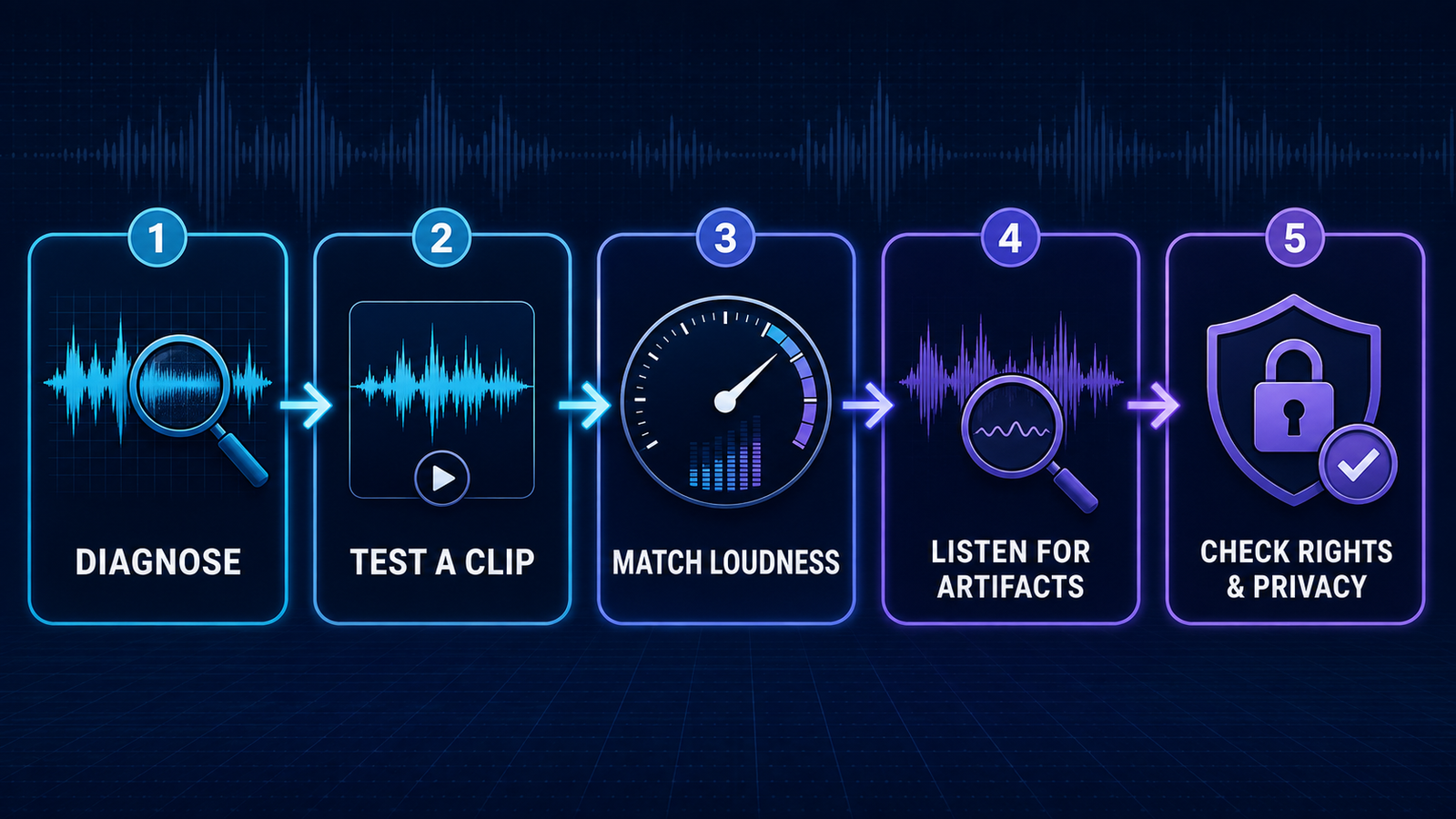
Start by naming the defect. Use Adobe or ElevenLabs when speech is buried under noise or reverberation. Choose Auphonic when the recording is already understandable but needs consistent loudness and finishing. Pick Descript when you also need transcript editing, and CapCut when the voice belongs to a social-video timeline.
Then test a representative 30–60 second section before processing a whole episode. Include the noisiest passage, a quiet phrase, sibilant sounds and any overlap between speakers. Compare the output at matched loudness; louder audio often seems “better” even when it has more artifacts.
Always keep the untouched original. Listen for clipped word endings, metallic consonants, pumping ambience, changed speaker identity and missing background sounds that the story actually needs. AI cleanup can also remove music or another speaker by mistake. For more context on synthetic-media tradeoffs, see our beginner’s guide to generative AI.
Privacy, consent and commercial-use checks
Uploading a voice recording can expose names, health information, workplace discussions or biometric voice characteristics. Get permission from recorded participants, remove confidential sections where possible and check retention, model-training and deletion terms before using a cloud service. For highly sensitive material, prefer a local editor or an approved enterprise workflow.
Audio enhancement usually does not change who owns the underlying recording, but product licenses still govern the processed output. ElevenLabs Free, for example, is personal-use only; Cleanvoice is a trial; and Auphonic adds a jingle to free work. If you are building a larger creator workflow, compare the separate rights issues in our guides to free AI voice generators, free AI sound-effect generators and free AI music generators.
FAQ
Can a free AI audio enhancer fix a badly clipped recording?
It may reduce noise and make surviving speech easier to understand, but it cannot reliably recreate detail lost to severe clipping, an unplugged microphone or words masked by another speaker. Test a short segment and rerecord when accuracy matters.
Which free enhancer is best for podcasts?
Adobe Podcast is the simplest first pass for noisy speech. Auphonic is better for final loudness and mastering, while Descript is better when cleanup must be followed by transcript-based editing.
Do free AI audio enhancers add watermarks?
Audio-only services rarely use a visual watermark, but other restrictions apply. Auphonic adds an audible jingle to free productions, Riverside adds an audio tag to some free exports, and free commercial-use rights vary by vendor.
Should I enhance audio before or after editing?
For simple speech rescue, enhance a copy before detailed editing. For long podcasts, first remove unusable sections, then process the cleaned timeline so you do not spend credits on discarded audio. Apply final loudness normalization near the end.
Bottom line
For most people, begin with Adobe Podcast and keep the original beside the result. Use Auphonic when loudness and delivery standards matter, or Descript when you need an editor as well as cleanup. The free-plan limits are real: check minutes, credits, jingles, export rules and commercial rights before building a repeatable workflow around any service.


