

The best free AI audio transcription tools are TurboScribe for simple file uploads, OpenAI Whisper for private local processing, Otter for live meetings, Descript for creators, Fireflies for scheduled calls, Notta for multilingual trials and Riverside for recording-to-caption workflows. Each is genuinely usable without paying, but the limits differ sharply.
We reviewed the free access and official documentation for these services on September 19, 2026. The key distinction is not just accuracy. It is whether you need to upload a recording, capture a live meeting, edit media through text, keep audio off a vendor’s servers or export a usable transcript. Free plans change, so confirm the allowance shown in your account before committing a sensitive or time-critical project.
Best free AI audio transcription tools at a glance
| Tool | Best for | Documented free access | Main limitation |
|---|---|---|---|
| TurboScribe | Uploading recorded files | 3 files daily, up to 30 minutes each | Daily cap and account-based cloud processing |
| OpenAI Whisper | Private local transcription | Open-source software with no service quota | Setup, storage and compute are your responsibility |
| Otter | Live meeting notes | 300 minutes monthly; 30 minutes per conversation | Only 3 lifetime file imports on Basic |
| Descript | Transcript-based audio and video editing | 60 media minutes monthly | Small allowance for long recordings |
| Fireflies | Calendar meetings | Unlimited eligible auto-join transcription; 400 stored minutes | Uploads, summaries and downloads have separate limits |
| Notta | Short multilingual tests | 120 minutes monthly and 50 uploads | Only 3 minutes per recording on Free |
| Riverside | Recording, editing and captions together | Free recording and editing with transcription | Transcript export features and recording allowances vary by plan |
Allowance wording comes from the linked official pages. “Free” does not mean unlimited exports, unlimited storage or suitability for confidential recordings.
How we chose the best free AI audio transcription tools
We screened 11 credible services and ranked seven using documentation available to US users. We considered recurring zero-dollar access, maximum file or meeting length, monthly or daily allowances, speaker labels, language support, editing, transcript export, account requirements, privacy controls and the practical effort required to get useful text.
This is a documentation-based comparison, not a controlled accuracy benchmark. We did not feed the same recording into every service or test paid accounts. Independent testing from Zapier’s 2026 transcription-app review helped check workflow positioning, while the numerical limits below come from vendor documentation. Accuracy varies with microphones, cross-talk, accents, names, jargon and background noise. A peer-reviewed study of difficult forensic audio warns that automatic speech recognition should stay within the tasks for which it was designed and receive measured human review.
Rev, Sonix and Trint were screened but not ranked because their no-cost access is primarily a trial rather than a durable free plan. API credits from developer services were also excluded from the main list because they require integration work and are not a straightforward consumer workflow.
1. TurboScribe — best free option for recorded files
TurboScribe is the most practical starting point when you already have an interview, lecture, podcast or voice memo. Its official free-transcription page promises three files per day, with each file capped at 30 minutes. That is enough for recurring short jobs, and it is easier to explain than monthly credit systems.
Why it made the list: the allowance refreshes daily, accepts common audio and video workflows and does not require local model installation. For many people, this is the shortest route from file to editable text.
Main limitation: a 45-minute interview exceeds the per-file boundary, while a large archive quickly hits the three-file daily cap. Audio is processed in the cloud, so review TurboScribe’s privacy terms and obtain recording consent before uploading confidential conversations.
2. OpenAI Whisper — best for local privacy and no service quota
Whisper is different from the other entries. It is an open-source speech-recognition model that you run on your own computer. The official Whisper repository publishes the code and model weights under the MIT License and supports multilingual transcription, language identification and speech translation. There is no vendor minutes counter when you run it locally.
Why it made the list: local processing can keep recordings off a third-party transcription service, and the only practical limits are your hardware, storage and time. The smaller models run on modest systems; larger models generally demand more memory and take longer.
Main limitation: installation requires Python, FFmpeg and comfort with a command line. The official model card also says Whisper is not a complete real-time system out of the box and warns against transcribing people without consent or using imperfect transcripts for high-risk decisions. Local processing improves control, but it does not make the output automatically accurate or lawful.
3. Otter — best for live meetings and searchable notes
Otter’s Basic plan is strongest when the audio happens live rather than arriving as a backlog of files. The company documents 300 transcription minutes per month, a 30-minute cap per conversation and access to the 25 most recent conversations.
Why it made the list: the mobile and web workflow is built around recording, speaker separation, search and meeting follow-up. It is easier to use during an interview or internal call than a file-only transcriber.
Main limitation: Basic users receive only three audio or video file imports for the lifetime of the account, not three every month. Recordings longer than 30 minutes can continue, but the free transcript is limited to the first 30 minutes. That makes Otter a weak choice for a large existing archive even though its monthly live allowance looks generous.
4. Descript — best for creators who edit through the transcript
Descript connects every word in the transcript to the underlying media. Delete a sentence in the text and the corresponding audio or video is cut. This makes it useful for podcasts, tutorials and talking-head videos where transcription is part of editing rather than the final deliverable.
Why it made the list: the Free plan includes 60 media minutes per month, multi-language transcription and the core record, transcribe and edit workflow. That hour is small, but it is enough to evaluate a complete text-based production process.
Main limitation: media minutes cover imported or recorded material, so experiments consume the same allowance as final work. Paid plans also unlock higher export quality and more AI editing capacity. If all you want is a text file from many recordings, TurboScribe or local Whisper is a better fit.
Creators who need cleanup as well as text should also compare our guides to free AI podcast editing tools and free AI audio enhancers for voice recordings.
5. Fireflies — best for automatically joining scheduled meetings
Fireflies is oriented around Zoom, Google Meet, Microsoft Teams and other business calls. Its September 2026 help documentation says new Free users begin with a small number of transcription credits, but enabling auto-join can unlock unlimited transcription for eligible future calendar meetings. The Free plan includes 400 minutes of total storage per team and 20 monthly AI credits for advanced features.
Why it made the list: for recurring scheduled meetings, auto-join removes the need to start a recorder or upload each file manually. Search, playback and collaboration live alongside the transcript.
Main limitation: “unlimited transcription” does not mean unlimited everything. Uploaded files consume credits, the 400-minute storage ceiling does not reset monthly, advanced summaries use separate AI credits and transcript downloads require a paid plan. Fireflies is therefore best treated as a meeting workspace, not a free bulk-export service.
6. Notta — best for testing multilingual transcription in short clips
Notta’s Free plan advertises 120 transcription minutes per month, 50 file uploads and 10 AI summaries. It supports live conversations, imported files and major meeting platforms, and requires an account but no credit card for the continuing Free tier.
Why it made the list: the interface covers live, file and meeting transcription in one account, and the monthly allowance is recurring rather than a one-off trial.
Main limitation: Free transcriptions are capped at three minutes per recording. That boundary matters more than the headline 120 minutes for interviews, classes and podcasts. It is useful for short voice notes, language checks and feature evaluation, but not for a normal hour-long meeting unless you pay.
7. Riverside — best for recording, captions and editing in one place
Riverside is primarily a remote recording studio, but it automatically generates transcripts that power captions and text-based edits. The company says its free account includes core recording and editing, while its help center identifies transcript language settings as available across plans.
Why it made the list: it fits a workflow where you need to capture a conversation, correct its transcript, add captions and edit the media without moving between unrelated apps. The Free plan also allows a no-card starting point.
Main limitation: Riverside’s plan pages emphasize recording and production rather than a stable standalone transcription quota. Some transcript download and copy options are documented for paid plans, and the free recording allowance has changed over time. Check the live plan screen before assuming a particular export format is included.
Which free transcription tool should you choose?
- Choose TurboScribe for occasional uploaded files under 30 minutes.
- Choose Whisper when privacy, local control and no service quota matter more than setup simplicity.
- Choose Otter for live personal meetings and searchable notes.
- Choose Descript when the transcript is also your audio or video editing interface.
- Choose Fireflies for automatic capture of recurring calendar meetings.
- Choose Notta to evaluate multilingual features with very short recordings.
- Choose Riverside when you are recording and captioning content in the same project.
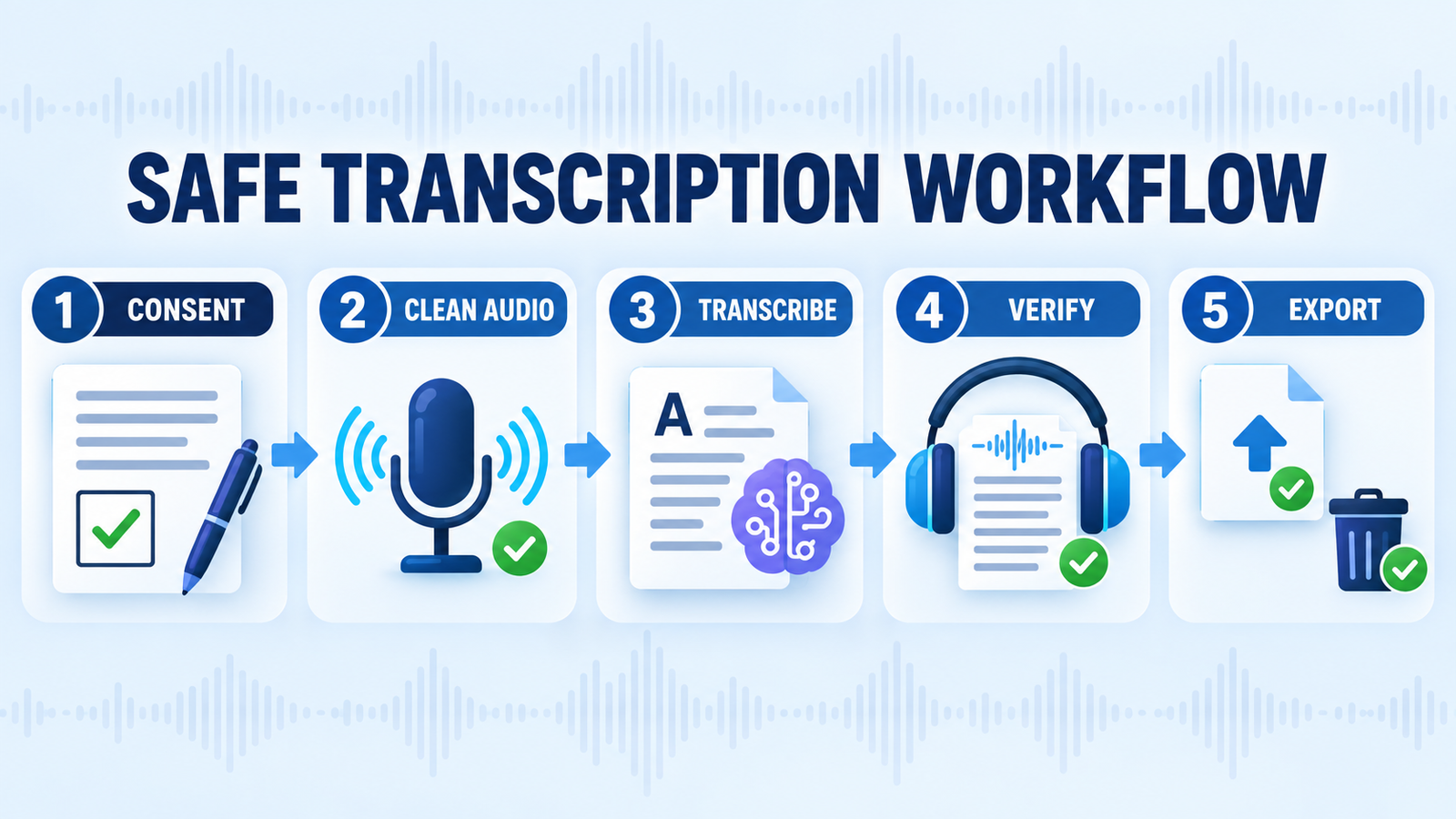
A safer workflow for AI audio transcription
- Get permission first. Recording and consent rules vary by location and context. Tell participants what is being recorded, where it will be processed and who will receive the transcript.
- Improve the source audio. Use individual microphones where possible, reduce background noise and avoid people speaking over one another. Better input usually matters more than switching between similar transcription services.
- Choose cloud or local processing deliberately. Local Whisper offers more control. Cloud tools are easier, but you should check retention, training, sharing and deletion settings before uploading sensitive material.
- Add names and technical terms manually. Product names, acronyms and proper nouns are common failure points. Treat generated summaries as a second transformation that can introduce new errors.
- Verify against the audio. Replay every quote, number, instruction and decision that matters. Never use an AI transcript alone for medical, legal, employment or safety-critical conclusions.
- Export and delete intentionally. Save the format you need, restrict access and remove cloud copies when the project or retention policy no longer requires them.
If you plan to turn a transcript into a summary, brief or script, our prompt engineering guide explains how to define the task and require source-grounded output. Our generative AI beginner’s guide covers the broader distinction between generating fluent language and verifying facts.
Frequently asked questions
Can I transcribe audio for free without a time limit?
Yes, if you run open-source Whisper locally. There is no hosted-service quota, although you pay for the computer, storage and electricity and must install the software. Most browser services cap files, minutes, storage or exports.
Which free transcription tool is best for a one-hour recording?
Local Whisper is the clearest quota-free option. Among browser tools, you may need to split the file or use a paid plan because TurboScribe caps free files at 30 minutes, Otter caps free conversations at 30 minutes and Notta caps each free recording at three minutes.
Are AI transcripts accurate enough to quote?
They are useful drafts, not authoritative records. Listen to the original audio before publishing a quote or relying on a name, number or commitment. Cross-talk, low volume, jargon and accents can all increase errors, and speech-recognition systems can occasionally insert plausible words that were never spoken.
Can I upload confidential meetings?
Do so only when your organization and every applicable policy allow it. Review the vendor’s retention, access, model-training and deletion terms, and prefer approved enterprise controls or local processing for regulated or highly sensitive audio.
Bottom line
There is no single best free AI audio transcription tool for every recording. TurboScribe offers the easiest recurring file allowance, while local Whisper is the most flexible route for people who can manage the setup. Otter and Fireflies are meeting tools; Descript and Riverside make more sense when transcript-driven editing matters; Notta is best treated as a short multilingual evaluation. Whichever tool you choose, build human verification into the workflow.


