

The best free AI lip sync generator for most quick tests is Magic Hour because its dedicated browser route offers up to three no-sign-up generations a day. Sync Labs is better for testing production-grade models and an API, while LipSync.video is the clearest watermark-free browser option. CapCut, Vidnoz and Adobe Express suit different editing and animation workflows.
“Free” is unusually slippery in this category. It can mean a short recurring allowance, daily promotional credits, a watermarked evaluation or a free editor whose AI quota is not published. We checked the current US-facing product, pricing and help pages on September 28, 2026, and separated ongoing access from trials. Limits can change, so confirm the generation screen before uploading irreplaceable or sensitive footage.
Best free AI lip sync generators at a glance
| Tool | Best for | Free access checked | Main limitation |
|---|---|---|---|
| Magic Hour | No-sign-up browser tests | Up to 3 free generations daily, up to 576p | Basic output is watermarked; the simplified route excludes YouTube input |
| Sync Labs | Model and API evaluation | 3 generations monthly, generally up to 20 seconds; no card | Free output carries a Sync watermark |
| LipSync.video | Watermark-free experiments | Daily free credits; no-sign-up route and no-watermark claim | The exact daily credit amount is not fixed on the pricing page |
| CapCut | Lip sync inside a full editor | Free AI lip-sync feature for image or video input | Quota, availability and asset entitlements vary by account and region |
| Vidnoz | Simple existing-video workflow | Official page promises free use and download | No durable numerical allowance is published |
| Adobe Express | Stylized character animation | Free Animate Characters workflow, up to 2 minutes | Uses Adobe characters rather than retiming a real person’s video |
There is no universal winner. Magic Hour offers the most concrete no-account allowance we found. Sync Labs publishes the clearest technical trial boundary. LipSync.video is attractive when a watermark would invalidate the test, although its free-credit amount is less predictable. Adobe Express solves a safer, narrower problem: making a built-in illustrated character speak rather than altering a real face.
How we selected and ranked these tools
We screened nine credible services: Magic Hour, Sync Labs, LipSync.video, CapCut, Vidnoz, Adobe Express, VEED, HeyGen and Hedra. A ranked tool had to offer a current zero-dollar route to a US user and perform lip synchronization rather than merely shift an audio track on a timeline.
The comparison is documentation-based. We evaluated input type, allowance, duration, resolution, watermark, account and card requirement, download, editing control, privacy signals, rights language and fit for an honest repeatable workflow. We did not run a matched-video quality benchmark, buy plans or claim that one model produces the most realistic mouth movement. Vendor demos are not controlled tests.
VEED was screened but not ranked because its current lip-sync page describes access as “free to try” and says usage moves to AI credits without publishing a stable free allowance. HeyGen’s free video quota can vary from one to three videos by region, and its most relevant lip-sync features are limited trials inside a broader avatar product. Hedra offers limited free generation, but its stable official quota, export boundary and rights details were not clear enough for a stronger recommendation.
1. Magic Hour: best free AI lip sync generator without sign-up
Magic Hour’s official route guide distinguishes its simplified Free Lip Sync page from the signed-in Create editor. The free route needs no account, allows up to three generations a day and outputs at up to 576p. You can upload a video or use a preset, then add uploaded or preset audio.
Why it ranks first: it publishes a concrete daily allowance and lets a new user test the core video-plus-audio workflow without creating an account. That is more useful than a landing page that says only “try free.”
Limitations: the free route does not accept a YouTube URL. The same help documentation says Basic output is watermarked unless the account has a credit pack, so do not treat this as a clean-export recommendation. The full editor requires sign-in, consumes credits and applies plan-specific resolution limits.
Choose it if: you need to learn whether a short, clear, front-facing clip will sync acceptably before registering or paying.
2. Sync Labs: best for evaluating advanced models and an API
Sync Labs documents its free plan unusually well. A free account receives three lip-sync generations per month, with a maximum of 20 seconds for most models. One of those generations can use Sync 3 for up to 15 seconds. Ten text-to-speech generations are separate, and no credit card is required.
Why it ranks second: the trial includes the Studio and API, exposes multiple model choices, and states the inputs and duration rules. That makes it a credible evaluation path for creators and developers comparing a manual studio workflow with automation.
Limitations: all free outputs include a Sync watermark. A source video or image needs a visible face, and direct uploads are subject to file limits. Three short monthly renders are enough for evaluation, not regular publishing.
Choose it if: you care more about testing model behavior, an API and predictable constraints than producing many free clips.
3. LipSync.video: best watermark-free browser experiment
LipSync.video’s current product page says users can try its lip-sync models for free and download finished results without a watermark. It accepts a video, photo or avatar plus text, recorded speech or uploaded audio. Its pricing page says free credits can refresh daily and normally charges one credit per second for the basic LipSync 1.0 model; higher-end models consume more.
Why it ranks third: a watermark-free result is meaningful when you need to place a test in an edit or review it without a brand overlay. The service also separates the lighter portrait model from a more expensive model intended for broader characters and movement.
Limitations: the pricing documentation does not state one durable numerical daily grant. Free credits can depend on login or promotional actions and expire. Its commercial-use answer specifically covers paid output, so free-output commercial rights are not clear enough to assume.
Choose it if: you need a clean short test and can verify the current credit balance and usage terms before production.
4. CapCut: best lip sync inside a complete video editor
CapCut’s AI lip-sync tool accepts an image or video and either typed dialogue or uploaded audio. It supports real people, virtual avatars and stylized subjects, then keeps the result inside the CapCut editing workflow for captions, trimming, overlays and final export.
Why it ranks fourth: most dedicated generators hand back a clip that still needs editing. CapCut can handle generation and the finishing timeline in one application, which is useful for TikTok, Reels and Shorts.
Limitations: the product page calls the feature free but does not publish a stable numerical allowance, supported-platform matrix or universal watermark rule for every region and account. Some models, effects, templates and stock assets can be Pro-only. CapCut’s terms also allow service differences by device and jurisdiction.
Choose it if: lip sync is only one step in a short-form editing workflow and you are willing to confirm the feature and export labels on your device first.
5. Vidnoz: best simple browser workflow for existing video
Vidnoz’s dedicated lip-sync page says the tool is free to use and that finished videos can be downloaded. The workflow targets existing footage of a real person or an AI avatar, detects the visible face and adjusts the mouth to the new audio.
Why it ranks fifth: it is simpler than a full avatar studio when you already have the source video and voice track. It also presents the tool as a direct browser utility rather than making users assemble a scene from templates.
Limitations: the public page does not state a durable free minute count, maximum duration, resolution, watermark rule or broad commercial license. Treat it as an evaluation route, and inspect the sign-in and export screen before processing a long clip.
Choose it if: you want the shortest path from an existing talking-head clip and replacement audio to a downloadable test.
6. Adobe Express: best free option for animated characters
Adobe Express Animate Characters lets you select one of Adobe’s illustrated characters, record a voice or upload WAV, MP3 or compatible audio, choose a background and aspect ratio, and download the result. Audio can be up to two minutes, and Adobe lists the workflow within its free plan.
Why it ranks sixth: it is a well-defined, low-risk way to synchronize speech with a character without uploading a real person’s face. It also supports common social aspect ratios and continued editing in Express.
Limitations: this is not a general-purpose real-face lip-sync generator. You choose from Adobe’s character library; it does not retime an existing human performance. Premium templates or assets elsewhere in Express can change the export boundary.
Choose it if: an illustrated presenter, classroom character or playful social clip fits the brief better than photorealistic synthetic footage.
How to choose a free AI lip sync generator
Start with the input. Video-to-video lip sync preserves an existing performance while replacing the mouth movement. Photo-to-talking-video generates motion that was not in the original image. Character animation uses a predefined animated subject. These are different jobs, even when vendors group them under one label.
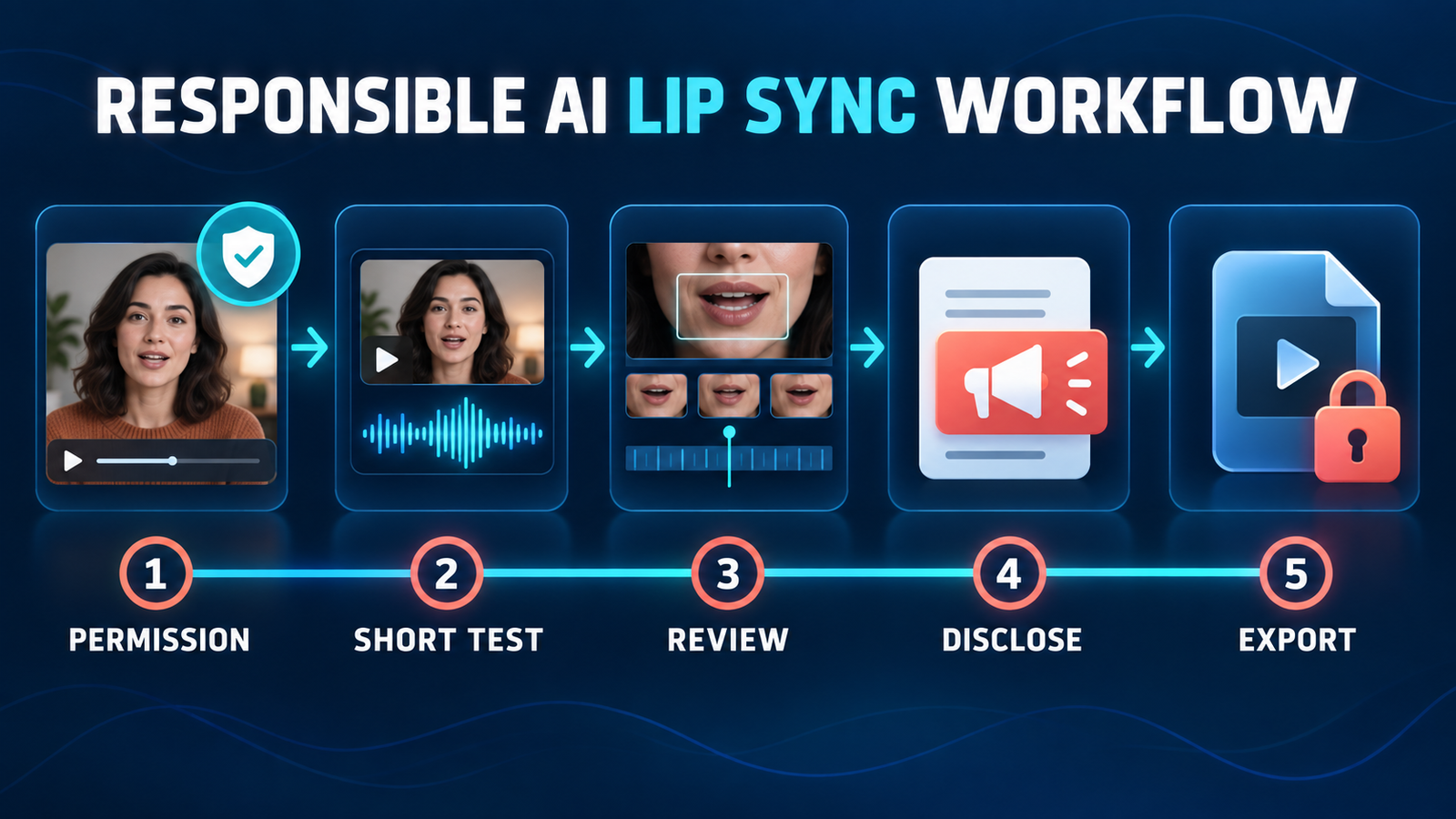
Test five to ten seconds first. Use a front-facing face, clean speech, normal pacing and no mouth obstruction. Review plosive sounds such as “p” and “b,” teeth, jaw edges, head turns and frames around pauses. A strong vendor demo does not predict performance on profile angles, facial hair, fast lyrics or low-resolution footage.
Check the usable export, not just generation. A free render can still be unsuitable because of a watermark, low resolution, blocked download or unclear commercial rights. If you need a complete creator pipeline, compare our guides to free AI video dubbing tools, free AI avatar video generators and free AI caption generators for social videos.
Minimize sensitive uploads. Read retention, training and deletion terms before uploading client footage, minors, unreleased performances or biometric data. A public free service is not automatically appropriate for confidential work. For a broader foundation, see our beginner’s guide to generative AI.
Consent, impersonation and platform rules
Use only faces, voices, footage and music you own or have permission to modify. Lip syncing can make a real person appear to say words they never said. A disclosure does not cure unauthorized impersonation, defamation, fraud, copyright infringement or a breach of a talent agreement.
YouTube requires disclosure when realistic content meaningfully makes a real person appear to say or do something they did not. Its altered or synthetic content guidance explains the upload disclosure, while its privacy process lets identifiable people request removal of realistic synthetic likenesses. Keep written consent, label realistic alterations when required and never use a public figure or private person to imply an endorsement.
Frequently asked questions
Is there a completely free AI lip sync generator?
Yes, but “completely free” rarely means unlimited. Magic Hour offers a small daily no-sign-up allowance, Sync Labs gives three short monthly tests, LipSync.video uses changing daily credits and Adobe Express offers free character animation. Watermarks, resolution and rights still differ.
Can I make an AI lip-sync video without a watermark?
LipSync.video currently advertises free watermark-free downloads. Other services may watermark free output, vary by account or reserve clean export for paid plans. Verify the export preview and current plan text before investing time in a long project.
Can AI lip sync translate a video?
Lip sync only changes or generates mouth movement to match audio. Translation adds transcription, language translation, a new voice track and often speaker handling before lip sync. Use a dedicated dubbing workflow when those extra steps matter.
Can I legally lip-sync someone else’s face?
Do not assume so. Permission, publicity and privacy rights, copyright, contracts and platform rules can all apply. Obtain documented consent from the identifiable person and rights holders, avoid misleading endorsements and disclose realistic synthetic changes where required.
Bottom line
Magic Hour is the most practical first stop for a no-account test, Sync Labs offers the clearest model and API evaluation, and LipSync.video is the strongest documented watermark-free experiment. CapCut is more useful when editing matters, Vidnoz keeps the existing-video workflow simple, and Adobe Express is the safest fit for stylized characters. Whichever tool you choose, validate a short clip, inspect the actual export terms and get consent before changing a real person’s speech.


