

Short answer: ElevenLabs is the strongest recurring free AI video dubbing tool we found, while Canva is the easiest option for a one-minute clip. Rask AI, VEED and Dubverse are useful for short evaluations, not continuing free production. CapCut can also dub videos at no cost in supported regions, but its allowance and export terms are less clearly documented.
AI dubbing can translate speech, generate a replacement voice and synchronize that audio with a video. The difficult part is not finding a demo; it is finding a tool that still lets a US user export something useful without immediately paying. We checked the products and their documentation on September 25, 2026. Free plans change, so confirm the limit shown in your account before starting a long upload.
This guide ranks the best free AI video dubbing tools in 2026 by practical no-cost output, editing control and transparency. “Free” below may mean a recurring free plan, a one-time allowance or a time-limited trial. We label each one instead of treating those offers as equivalent.
Best free AI video dubbing tools at a glance
| Tool | Best for | Current no-cost access | Main limitation |
|---|---|---|---|
| ElevenLabs | Recurring short dubs | 10,000 monthly shared credits; free dubs are watermarked | The current Dubbing v2 allowance is very short |
| Canva | One-minute social clips | One translated video up to one minute through its dubbing integration | Longer videos require an upgrade |
| Rask AI | Testing voice-preserving localization | No-card trial with three total minutes | Each trial video is trimmed to its first minute |
| VEED | Trying dubbing inside a video editor | One AI dubbing use on Free and Creator plans | Not a recurring free allowance |
| Dubverse | Evaluating several short language versions | Two-day, no-card trial with 20 credits, enough for about five dubbing minutes | Trial expires quickly |
| CapCut | Creators already editing in CapCut | Free dubbing is advertised in supported regions | No durable public quota; availability varies by region |
These are documentation-based findings, not a matched-video quality test. We did not claim paid-account or studio testing. Output quality depends heavily on language pair, recording clarity, speaker count and how much the translated script changes in length.
How we chose and ranked the tools
We screened ElevenLabs, Canva’s video translator, Rask AI, VEED, Dubverse, CapCut, HeyGen and Maestra. A product had to create translated speech for a video—not merely translated captions—and provide a usable no-cost path in the United States. We compared:
- whether the offer is recurring, one-time or only a trial;
- minutes, credits, account and payment-card requirements;
- watermarks, resolution and downloadable output;
- speaker detection, voice preservation, lip sync and script editing;
- language coverage and clarity of current documentation;
- consent, privacy, copyright and commercial-use caveats.
HeyGen and Maestra were credible products, but we could not verify a stable, clearly quantified free dubbing allowance from their current public plan documentation. They remain paid alternatives rather than “free” recommendations here. Rankings favor repeatable access and honest limits over a long feature list.
1. ElevenLabs: best recurring free AI video dubbing tool
ElevenLabs Dubbing translates audio or video while attempting to preserve each speaker’s timing, tone and identity. Its documentation says Dubbing v2 supports more than 90 languages and accents, detects multiple speakers and keeps background audio.
The Free plan supplies 10,000 credits each month across ElevenLabs products. The current dubbing page shows roughly 0.4 minute of Dubbing v2 on that allowance; the older automatic v1 watermarked route can cover about five minutes. Free-plan video dubs are automatically watermarked. Because the credits are shared, using text-to-speech, music or other ElevenLabs features reduces what remains for dubbing.
Why it ranks first: it is the clearest recurring zero-dollar allowance in this group, and its product documentation is unusually specific. Limitation: the newest model’s free allowance is suitable for testing or a very short clip, not regular long-form localization. The Free plan also does not include a commercial license, so upgrade or obtain appropriate rights before monetizing output.
2. Canva: easiest for a one-minute clip
Canva’s AI video translator can generate dubbed speech in more than 30 languages and continue the workflow in Canva’s familiar video editor. The official page says the free translator accepts videos up to one minute. The tool is delivered through an EasyDubbing integration, so you should review both services’ current terms before uploading confidential footage.
Why it ranks second: the one-minute boundary is simple, and editing, captions and design tools live in the same interface. Limitation: longer clips require paid access, and the product page does not provide the same detailed credit accounting as ElevenLabs. Free export also depends on using assets licensed for free use.
3. Rask AI: best no-card trial for voice preservation
Rask AI’s free trial includes three dubbing minutes without a credit card. Its help center clarifies an important detail: you can translate up to three videos, but the service trims each trial upload to the first minute. The trial includes the editor and voice cloning for supported target languages.
Why it ranks third: three one-minute samples are enough to compare language pairs or speaker styles before buying. Limitation: this is a trial, not a renewable free tier. A five-minute tutorial will not become a free five-minute dub merely because the upload is accepted.
4. VEED: best one-time test inside a browser editor
VEED’s current help page says Free and Creator accounts can try AI Dubbing once. The tool translates the spoken track, offers multiple voices and can add lip sync. It sits inside VEED’s broader browser editor, which is convenient when you also need captions, trimming and layout changes.
Why it ranks fourth: it is an accessible way to evaluate an end-to-end editing workflow. Limitation: “try once” is not a monthly free quota. Proofreading and SRT upload controls are also reserved for Enterprise, so the free experience is not the right choice for translation-sensitive client work.
5. Dubverse: best short, credit-based evaluation
Dubverse offers a two-day trial without a payment card and grants 20 credits. Dubbing consumes four credits per finished minute, which works out to about five trial minutes if the credits are used only for dubbing. Its product supports dozens of languages and a large voice catalog.
Why it ranks fifth: the published conversion from credits to minutes makes the trial easy to plan. Limitation: two days is a narrow evaluation window, and voice cloning belongs to the higher paid tier after the trial. Treat it as a proof of concept, not a free publishing pipeline.
6. CapCut: useful when the feature is available in your region
CapCut’s AI dubbing page advertises free video translation with speaker detection, voice preservation and optional translated captions. It can be convenient if your source video is already in CapCut and you want to keep editing after the dub.
Why it makes the list: it combines dubbing and a capable mainstream video editor. Limitation: CapCut explicitly says the feature is available only in certain regions, and its public page does not state a stable free-minute quota or a universal watermark rule. Check the export screen before investing time in edits. We rank it below tools with precise documented allowances.
Which free AI video dubbing tool should you choose?
- Choose ElevenLabs for a recurring monthly test allowance and clearly documented dubbing behavior.
- Choose Canva when the source is under one minute and you want simple visual editing in the same workspace.
- Choose Rask AI to compare up to three one-minute samples before committing to a localization service.
- Choose VEED if one test inside a browser-based editor is enough to make a buying decision.
- Choose Dubverse when five short trial minutes are more useful than a single longer upload.
- Choose CapCut only after confirming the dubbing feature, quota and export terms in your US account.
If you only need translated on-screen text, a caption translator is often faster and less risky than cloning a voice. For original narration rather than translation, see our guide to free AI voice generators. For broader creation workflows, compare free AI video generators and our YouTube-focused video generator picks.
A safe workflow for AI dubbing
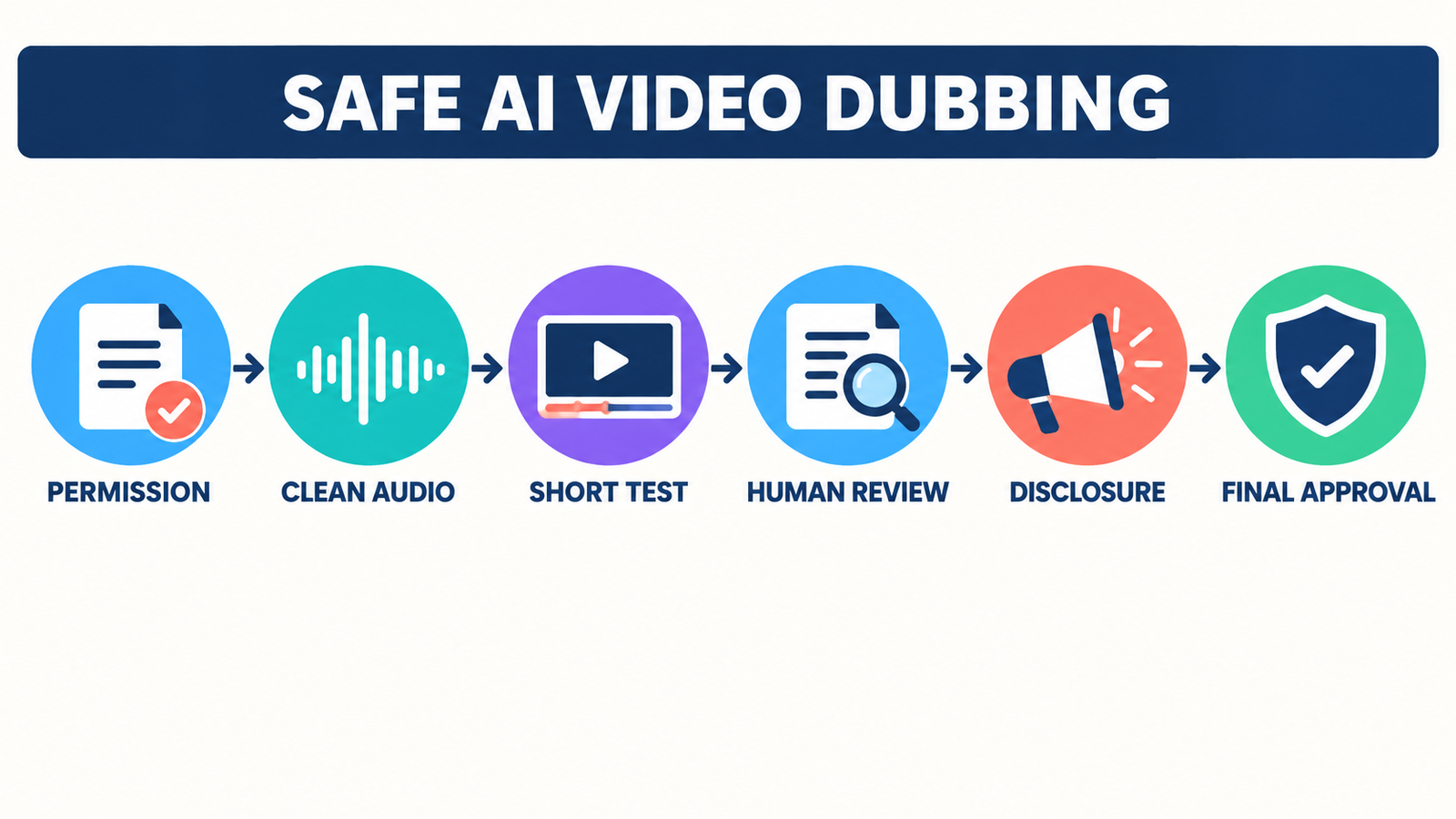
- Confirm rights first. Use footage, music, scripts and voices you own or are authorized to process. Do not clone a performer, employee or public figure without informed permission and a lawful basis.
- Prepare clean source audio. Reduce background noise and overlapping speech. A clean transcript is easier to translate accurately.
- Start with 20 to 30 seconds. Check names, numbers, technical terms, tone and pacing before spending the full allowance.
- Review the translated script with a fluent speaker. Automated localization can miss idioms, safety instructions and cultural context.
- Compare audio and captions. Correct the transcript, speaker labels and timing; do not assume lip sync proves the translation is accurate.
- Disclose synthetic media when appropriate. Platform policies, contracts or local laws may require a label. Never use a dub to mislead viewers about what someone said.
- Archive consent and project settings. Keep written permissions, language versions and the final human-approved script.
AI dubbing frequently uses voice cloning, so the risks are more serious than a cosmetic video effect. ElevenLabs’ prohibited-use policy, for example, bars unauthorized, deceptive or harmful impersonation. Other platforms have their own rules. Read the provider’s current terms and privacy notice, especially before uploading customer interviews, unreleased training material or children’s voices. Our voice-cloning comparison explains the consent and licensing checks in more detail.
Free plan, free trial and paid production are different
A recurring free plan can support periodic experiments, but a one-time allowance is mainly a buying aid. For commercial localization, budget for human review, corrections, additional target languages and re-renders. One minute translated into three languages can consume three minutes or three sets of credits. Watermark removal, higher resolution, reusable cloned voices and commercial licenses may also require payment.
Do not choose by voice resemblance alone. Translation accuracy, pronunciation controls, access to the transcript, the ability to regenerate one sentence and a clear deletion policy are more important for production. For a grounding in what these systems generate and why review matters, read our beginner’s guide to generative AI.
Frequently asked questions
Is there a completely free AI video dubbing tool?
ElevenLabs has a recurring free credit pool, but free dubs are watermarked and the newest dubbing model covers only a very short clip. Canva supports a free one-minute translation. Most other credible services provide a one-time allowance or a trial rather than unlimited free dubbing.
Can free AI dubbing remove a watermark?
Not universally. ElevenLabs automatically watermarks free-plan video dubs. Other tools may change export rules by plan, asset or region. Check the preview and export screen before processing a full video, and never crop or hide a required disclosure.
Can I dub another person’s voice?
Only when you have the necessary consent and legal rights. A public video is not automatic permission to clone its speaker. Keep written authorization, disclose synthetic audio when required, and avoid political, fraudulent or otherwise deceptive impersonation.
Will AI dubbing translate technical videos correctly?
It can create a useful first pass, but product names, acronyms, code terms, measurements and safety instructions need human review. Test a short excerpt, edit the transcript and ask a fluent subject-matter reviewer to approve every target-language version.
Bottom line: start with ElevenLabs for recurring experimentation or Canva for a single one-minute clip. Use Rask AI, VEED and Dubverse as clearly bounded evaluations, and treat CapCut as region-dependent. Whichever tool you choose, test a short segment, verify the translation with a human and secure permission for every voice and asset.


