
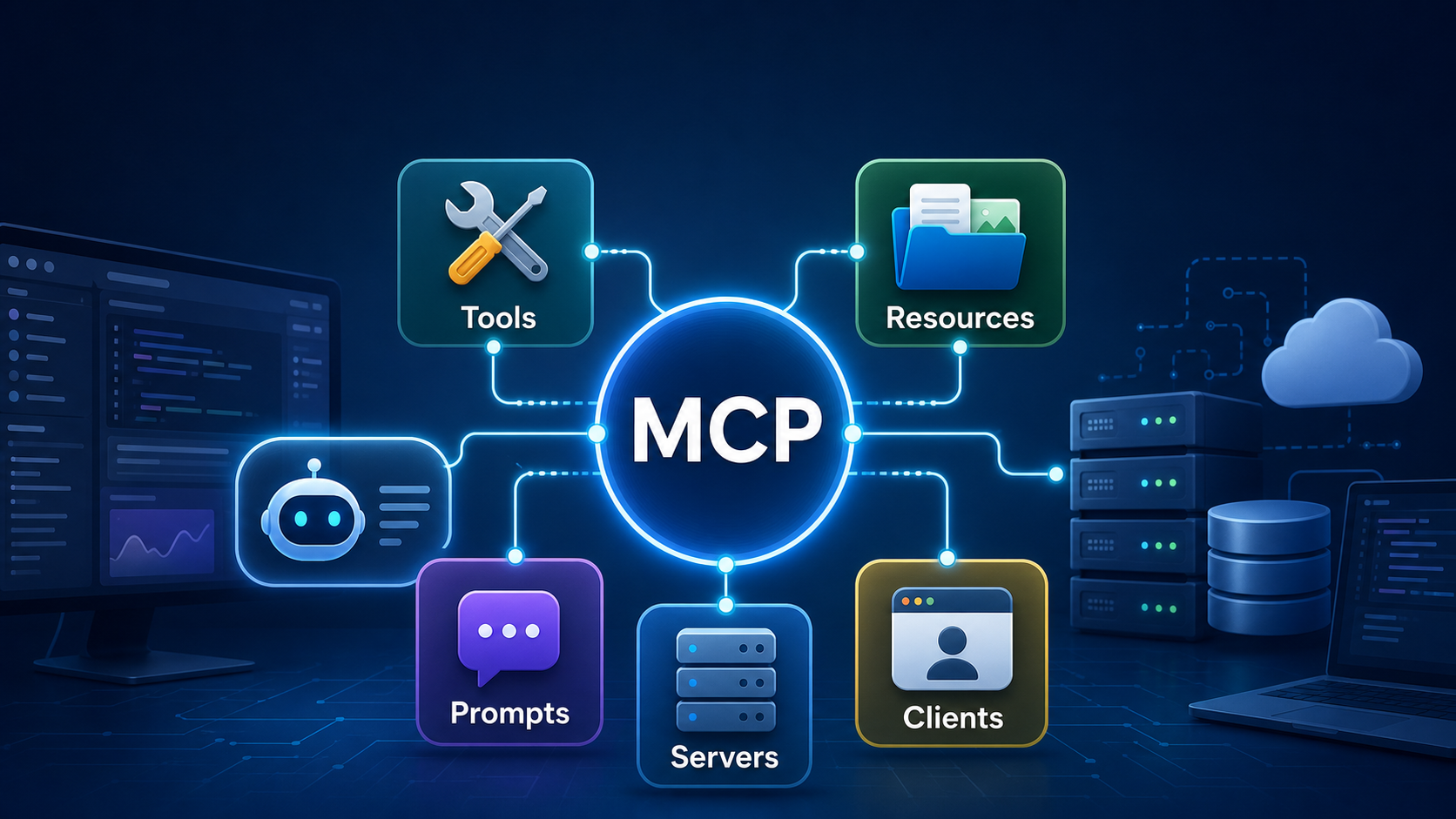

SEO excerpt: Model Context Protocol (MCP) is an open standard for connecting AI apps and agents to tools, data sources, prompts and workflows. This beginner-friendly guide explains MCP architecture, servers, clients, tools, resources, security risks, and how developers can start building with MCP in 2026.
Quick Answer: What Is MCP?
Model Context Protocol (MCP) is an open protocol that standardizes how AI applications connect to external systems such as files, databases, Git repositories, internal APIs, SaaS tools and reusable prompt workflows. Instead of building a custom connector for every AI app and every data source, developers can expose capabilities through MCP servers and let MCP-compatible clients use them through a common interface.
In plain English: MCP is a practical integration layer for tool-using AI. It does not make a model smarter by itself. It gives an AI application a structured, governed way to discover context, call tools, request data and follow workflows. That is why MCP matters for AI agents, coding assistants, enterprise chatbots and internal developer platforms.
Official MCP documentation describes it as an open-source standard for connecting AI applications to external systems, including data sources, tools and workflows. The current specification is built around JSON-RPC 2.0 messages, capability negotiation, hosts, clients and servers. Anthropic introduced MCP publicly in November 2024 as a way to replace fragmented one-off integrations with a standard protocol for context-aware AI systems.
Why MCP Exists
Modern AI applications are often limited by isolation. A model may be good at reasoning, writing code or summarizing text, but it cannot safely use your private repository, ticket queue, database schema, incident runbook or design file unless the application around it can fetch that context and expose useful actions.
Before MCP, teams typically solved this with custom integrations. A coding assistant might need one connector for GitHub, another for Jira, another for Postgres, another for local files and another for internal deployment APIs. Another AI client would need similar connectors again. That approach creates duplicated work, uneven security controls and brittle integrations.
MCP tries to make the integration model more reusable. A team can build an MCP server for a system once, define the tools and resources it exposes, and connect compatible clients to it. The client still needs good UX, permissions, approval flows and model behavior, but the connector boundary becomes more consistent.
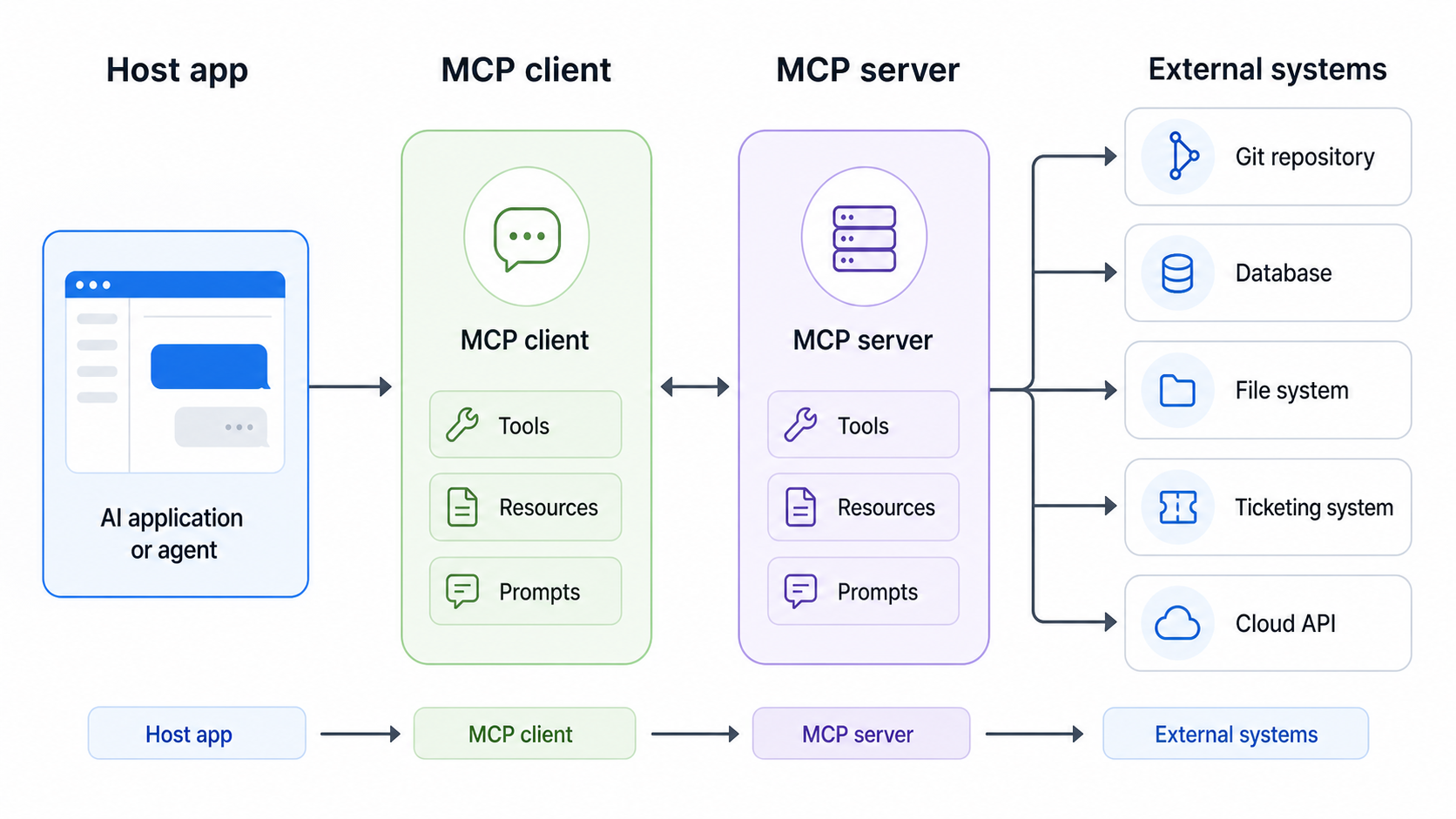
MCP Architecture: Hosts, Clients and Servers
The simplest MCP architecture has three parts:
- Host: the AI application the user interacts with, such as an IDE assistant, desktop AI app, internal chatbot or agent platform.
- MCP client: the connector inside the host that manages communication with a specific MCP server.
- MCP server: the process or service that exposes capabilities from an external system, such as files, a database, Git repository, monitoring system or business API.
The MCP server does not replace the external system. It wraps access to that system in a protocol the AI client can understand. For example, a Postgres MCP server might expose schema resources and query tools. A Git MCP server might expose repository state and safe branch operations. A runbook MCP server might expose incident-response prompts and links to current service dashboards.
A Practical Example
Imagine a platform team wants an internal AI assistant to help with Kubernetes incidents. Without MCP, the team might wire custom code directly into the assistant. With MCP, they can create or configure servers for:
- Observability: expose selected metrics, traces and alert summaries.
- Runbooks: provide approved troubleshooting steps for common failures.
- Git: read deployment manifests and recent configuration changes.
- Ticketing: create or update incident tickets after human confirmation.
The host application can then ask the model to reason over the context while the MCP boundary controls which data and actions are available. This connects directly with the operational practices in our Prometheus and Grafana monitoring tutorial, LLMOps guide and AI agents explained guide.
Core MCP Concepts Developers Should Know
Tools
Tools are callable functions exposed by an MCP server. They let an AI app perform an operation, such as searching a repository, querying a database, creating a ticket, reading a log summary or running a safe diagnostic command.
Good tools have narrow names, clear descriptions, strict input schemas and predictable output. A tool called restart_cluster is risky and vague. A tool called get_pod_restart_summary is safer because it reads information rather than changing production. For write actions, require user confirmation and make the operation explicit, such as create_incident_ticket or open_pull_request.
Resources
Resources provide context and data for the AI application to use. Examples include a file, a database schema, a service catalog entry, an API document, a dependency graph or a runbook page. Resources are valuable because they let the model answer from current context instead of guessing from training data.
If you already understand RAG, think of MCP resources as one structured way to expose retrievable context to an AI client. RAG is usually about retrieving relevant documents for generation. MCP is broader: it can expose documents, tools, workflows and client-server capabilities.
Prompts
Prompts are reusable templates or workflows exposed by a server. A DevOps team might publish prompts such as “summarize this incident,” “draft a rollback plan,” “review this Terraform change” or “explain this alert to a junior engineer.” This turns prompt engineering into a reusable platform asset instead of a pile of copied chat snippets.
For background on writing better prompt workflows, see Prompt Engineering for Developers.
Sampling, Roots and Elicitation
The MCP specification also includes client-side features. Sampling allows server-initiated LLM interactions under client control. Roots help define filesystem or URI boundaries. Elicitation lets a server request additional information from a user through the client. These are powerful features, but they require careful UX and security design because they influence what the model sees and what the server can request.
How MCP Differs from APIs, Plugins and RAG
| Concept | What it does | Where MCP fits |
|---|---|---|
| Traditional API | Lets software call a service through endpoints | MCP can wrap APIs so AI clients discover and call approved capabilities consistently |
| Plugin | Adds a feature to one product or ecosystem | MCP aims to be a reusable protocol across multiple clients and servers |
| RAG | Retrieves relevant context before generation | MCP can expose resources used for retrieval, but also exposes tools and workflows |
| AI agent framework | Plans and executes multi-step tasks | MCP can provide the tools and context an agent uses; it is not the whole agent runtime |
The key point: MCP is not “just another API.” It is a protocol boundary designed for AI applications that need context, tools, prompts, permissions and human approval patterns. You still need normal APIs behind it. You still need retrieval quality. You still need application logic. MCP gives those pieces a shared integration shape.
Beginner Tutorial: Build an MCP Server Plan
The exact SDK commands change by language and project template, so beginners should start with the official MCP quickstart and SDK documentation. The engineering plan below is stable regardless of whether you use TypeScript, Python, Go or another supported implementation.
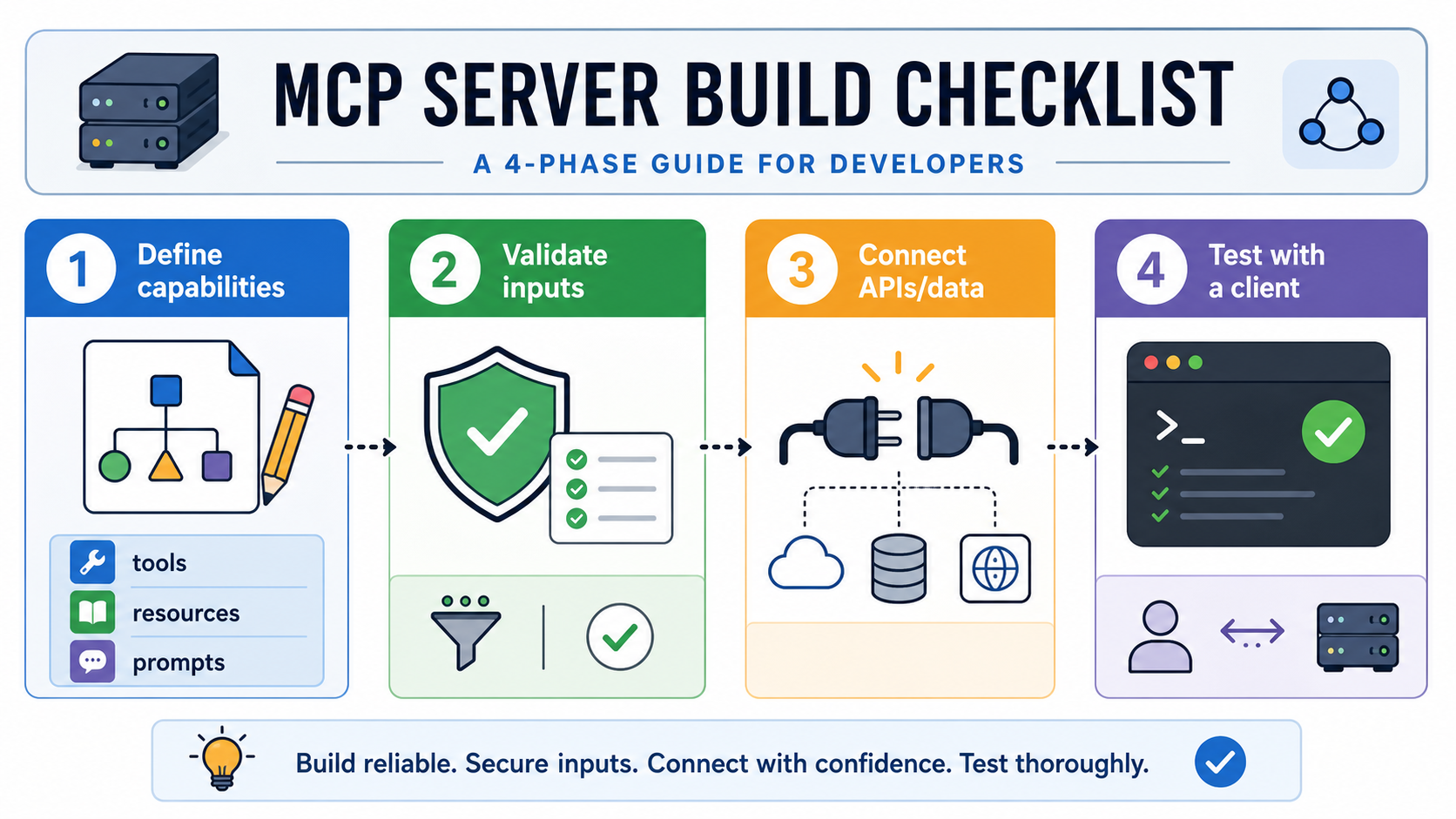
Step 1: Choose One Useful Capability
Do not start with a giant “company knowledge server.” Start with one narrow use case:
- Read a repository’s current branch and recent commits.
- Fetch the schema for a read-only analytics database.
- Search approved runbooks by service name.
- Summarize open incidents for a team.
- Create a draft ticket after user confirmation.
A narrow server is easier to secure, test and explain to users. It also makes failures easier to debug.
Step 2: Define Tools and Resources Before Coding
Write the tool contract first. For example, a read-only incident server might expose:
Tool: list_active_incidents
Input:
  team: string
  severity: "sev1" | "sev2" | "sev3" | "all"
Output:
  incidents: array of { id, title, severity, service, status, owner, updated_at }
Then define resources:
Resource: runbook://service/{service_name}
Purpose: Return the approved runbook for a service.
Access: Read-only.
Constraints: Only published runbooks, no draft pages.
This contract-first approach forces you to decide what the AI app is allowed to know and do before implementation details distract you.
Step 3: Validate Inputs Aggressively
Treat every tool input as untrusted. The model may misunderstand the user, a malicious document may inject instructions, or a user may ask for something outside policy. Validate IDs, enum values, paths, query limits and date ranges.
Good validation examples:
- Allow only known team slugs.
- Reject file paths outside approved roots.
- Limit database queries to read-only views.
- Cap result counts and time ranges.
- Block shell metacharacters unless a tool explicitly supports them.
Step 4: Start Read-Only, Then Add Writes Carefully
Most teams should launch MCP servers in read-only mode first. Reading a runbook, schema or alert summary is much safer than applying a deployment, deleting a file or restarting a service. Once users trust the workflow, add write tools one at a time with explicit confirmation and audit logs.
A good write action should show the user exactly what will happen before execution: target system, object ID, proposed change, reason and rollback path. This mirrors the discipline teams already use in CI/CD change approvals. If you are still improving delivery controls, start with Best CI/CD Tools in 2026 Compared.
Step 5: Test with a Real Client and Bad Inputs
Do not test only the happy path. Test prompts that ask for unauthorized data, oversized results, invalid paths, confusing service names and destructive actions. A useful MCP server should fail closed. If the server is unsure, it should return a clear error rather than inventing data or taking broad action.
Common MCP Use Cases
- Coding assistants: connect to repositories, issue trackers, design files, documentation and test results.
- DevOps agents: inspect alerts, runbooks, deployment history, service ownership and incident records.
- Enterprise chatbots: answer questions from approved business systems without custom connectors for every client.
- Data assistants: expose schema resources and safe query tools for analytics workflows.
- Security workflows: review vulnerabilities, summarize dependency risks and draft remediation tickets.
- Knowledge management: package reusable prompts and resources for teams that want consistent AI workflows.
MCP is especially useful when the same external system needs to serve multiple AI clients. For example, a platform team may want repository context available to an IDE assistant, an internal support assistant and a release automation agent. A shared MCP server can reduce duplicate connector work.
MCP Security: The Part Beginners Should Not Skip
MCP can expose sensitive data and powerful actions. That makes security design part of the protocol conversation, not an afterthought. The official specification emphasizes consent, data privacy, tool safety and user control. In practice, that means the host, client and server all need strong boundaries.
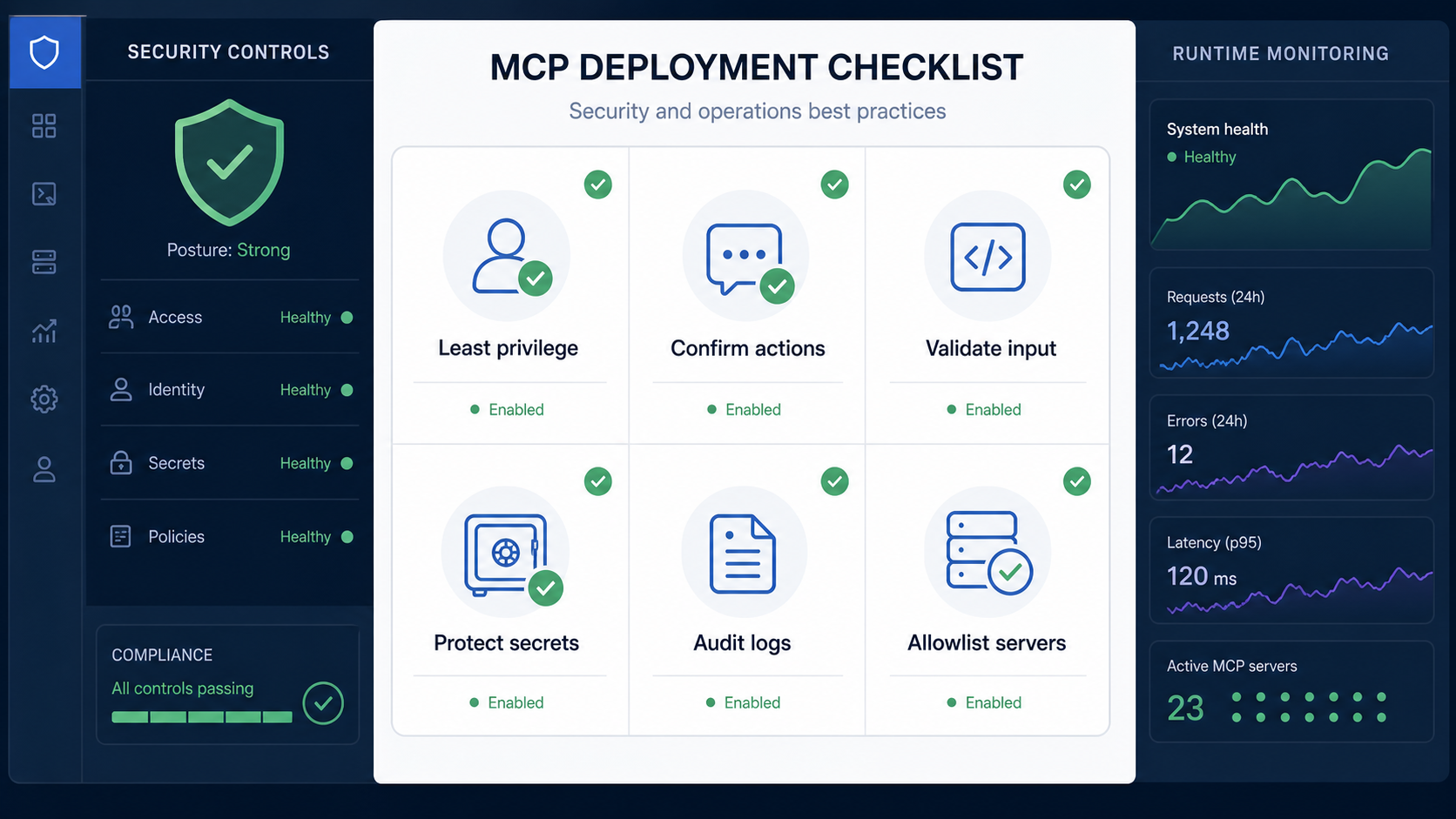
1. Use Least Privilege
An MCP server should not use an all-powerful admin token. Use scoped credentials, read-only accounts where possible and separate identities for different environments. A local documentation server does not need production database write access.
2. Require Confirmation for Risky Tools
Tools that change state should require explicit user approval. Examples include creating tickets, opening pull requests, triggering deployments, restarting services, writing files or running commands. The approval screen should show the exact operation, target and expected effect.
3. Treat Tool Descriptions as Untrusted
A malicious or compromised server could describe a tool innocently while doing something dangerous. Hosts should not blindly trust tool descriptions from unknown servers. Prefer allowlisted servers, signed or reviewed configurations and clear user-facing permissions.
4. Protect Secrets
Never expose raw API keys, tokens or passwords as resources. Avoid logging secrets in prompts, tool arguments or tool results. If a tool needs credentials, keep them server-side and return only the minimum result needed by the user.
5. Add Audit Logs
For production use, log who invoked a tool, through which client, with what parameters, against which target and what result came back. This is essential for incident response and compliance. It also helps teams improve tool design when users get confusing results.
Operational Best Practices for Production MCP
- Version server capabilities. Tool contracts should not change silently. Breaking changes can confuse clients and users.
- Prefer structured outputs. Return JSON-like structures where possible instead of long prose blobs.
- Design for observability. Track request volume, latency, errors, tool invocation counts and permission denials.
- Use environment separation. Keep development, staging and production server configurations separate.
- Document every tool. Users should know what a tool can access, what it can change and who owns it.
- Fail closed. If identity, permissions, validation or external API checks fail, refuse the operation clearly.
These practices overlap with LLMOps, platform engineering and DevSecOps. MCP is a protocol, but successful MCP adoption is an operating model: owners, permissions, tests, monitoring, documentation and review loops.
Common Mistakes with MCP
- Exposing too much too early: a broad server with many tools is harder to secure than a narrow server with one clear job.
- Skipping user consent: users should understand what data is being read and what action is being taken.
- Using vague tool names: names like
manage_serviceorrun_actionhide risk. Prefer precise names. - Returning unbounded data: large result sets are slow, expensive and often less useful. Use limits and filters.
- Letting prompts become policy: security must live in code, identity and permissions, not just instructions to the model.
- Ignoring prompt injection: external content can contain malicious instructions. Do not let retrieved documents override tool policy.
Troubleshooting MCP Integrations
| Problem | Likely cause | Fix |
|---|---|---|
| Client cannot see a server | Wrong server config, path, command or transport setting | Check the client configuration and run the server manually first |
| Tool appears but fails | Bad input schema, missing credentials or external API error | Validate sample inputs and add clear server-side error messages |
| Model uses the wrong tool | Tool names or descriptions are vague | Rename tools around user intent and make descriptions specific |
| Server returns too much data | No limits, pagination or filters | Add required filters, result caps and summary resources |
| Security team blocks rollout | Unclear permissions, secrets handling or audit trail | Document access scopes, add approval flows and log tool calls |
How MCP Fits into the AI and DevOps Stack
MCP sits between AI applications and the systems they need to use. It does not replace cloud platforms, CI/CD tools, vector databases, monitoring stacks or security tooling. It creates a cleaner way for AI clients to interact with them.
A realistic AI engineering stack in 2026 may include:
- Models: hosted or local LLMs that reason over user tasks.
- RAG pipelines: retrieval and ranking for knowledge-heavy answers.
- Vector databases: embedding search for semantic retrieval, as explained in Vector Databases Explained.
- MCP servers: standardized access to tools, resources and prompts.
- Agent runtime: planning, tool selection, memory, retries and human-in-the-loop control.
- DevOps platform: CI/CD, observability, secrets, policy and deployment controls.
This is why MCP is important for developers, not only AI researchers. It turns AI integration into an engineering problem that can be versioned, tested, monitored and governed.
Internal Link Suggestions
- What Is Generative AI? A Beginner’s Guide for readers new to AI fundamentals.
- Prompt Engineering for Developers for designing reusable prompt workflows.
- What is RAG? for grounding AI answers in external knowledge.
- Vector Databases Explained for retrieval infrastructure behind many AI apps.
- AI Agents Explained for understanding tool-using agent workflows.
- Best CI/CD Tools in 2026 Compared for connecting AI-assisted changes to delivery pipelines.
FAQ: Model Context Protocol (MCP)
Is MCP only for Claude?
No. Anthropic introduced MCP, but the protocol is open and the ecosystem includes multiple clients, servers and SDKs. The value of MCP is strongest when servers and clients can interoperate across tools rather than staying locked to one product.
Is MCP the same as an AI agent?
No. An AI agent is a system that can plan and perform multi-step tasks. MCP is a protocol that can provide the tools, resources and prompt workflows an agent uses. You still need an agent runtime, model, permissions and user experience around it.
Does MCP replace REST or GraphQL APIs?
No. MCP often wraps existing APIs or data sources so AI clients can use them consistently. Your backend systems may still expose REST, GraphQL, SQL or internal SDKs. MCP defines how the AI-facing integration is presented.
Can MCP access private data?
Yes, if a server is configured with access to private data. That is why consent, least privilege, audit logs, access controls and clear server allowlists are critical. MCP should not be treated as a security boundary by itself.
What should I build first with MCP?
Start with a narrow read-only server that exposes useful context, such as approved documentation, runbooks, repository metadata or database schemas. Add write tools only after you have validation, confirmation flows, logging and ownership in place.
How is MCP related to RAG?
RAG retrieves relevant information so a model can answer with better context. MCP can expose resources that support retrieval, but it also exposes tools and prompts. Many production AI systems may use both: RAG for knowledge grounding and MCP for standardized tool and system access.
Schema-Ready FAQ Structure
{
  "@context": "https://schema.org",
  "@type": "FAQPage",
  "mainEntity": [
    {
      "@type": "Question",
      "name": "Is MCP only for Claude?",
      "acceptedAnswer": {
        "@type": "Answer",
        "text": "No. Anthropic introduced MCP, but the protocol is open and the ecosystem includes multiple clients, servers and SDKs."
      }
    },
    {
      "@type": "Question",
      "name": "Is MCP the same as an AI agent?",
      "acceptedAnswer": {
        "@type": "Answer",
        "text": "No. MCP provides a protocol for tools, resources and prompt workflows. An AI agent is the broader runtime that plans and executes tasks."
      }
    },
    {
      "@type": "Question",
      "name": "Does MCP replace REST or GraphQL APIs?",
      "acceptedAnswer": {
        "@type": "Answer",
        "text": "No. MCP often wraps existing APIs and data sources so AI clients can use them consistently."
      }
    },
    {
      "@type": "Question",
      "name": "Can MCP access private data?",
      "acceptedAnswer": {
        "@type": "Answer",
        "text": "Yes, if configured to do so. Use least privilege, user consent, audit logs, access controls and allowlisted servers."
      }
    },
    {
      "@type": "Question",
      "name": "What should I build first with MCP?",
      "acceptedAnswer": {
        "@type": "Answer",
        "text": "Start with a narrow read-only server for useful context such as documentation, runbooks, repository metadata or database schemas."
      }
    },
    {
      "@type": "Question",
      "name": "How is MCP related to RAG?",
      "acceptedAnswer": {
        "@type": "Answer",
        "text": "RAG retrieves context for generation. MCP can expose resources for retrieval and also expose tools and prompts."
      }
    }
  ]
}

