
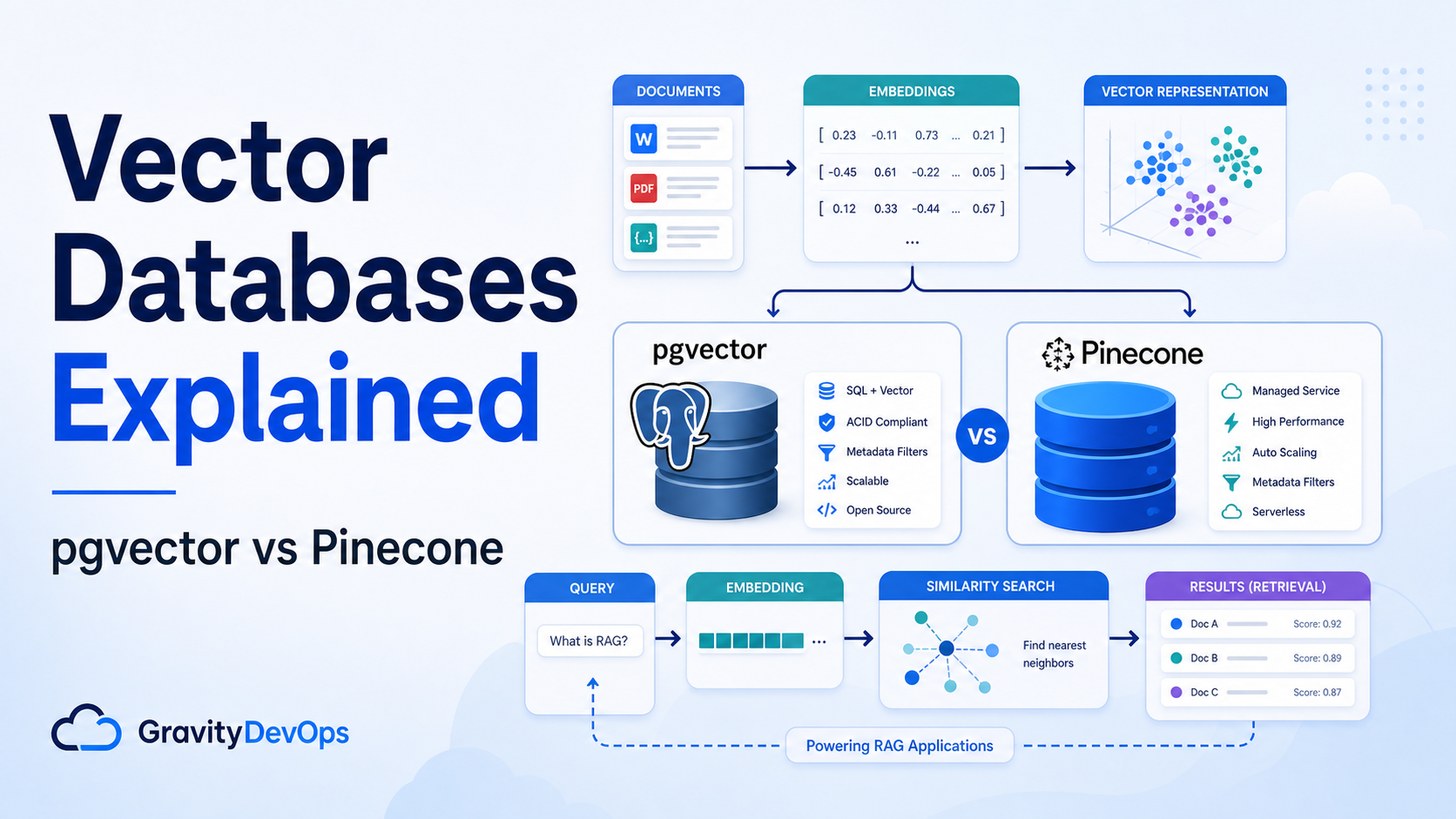

SEO excerpt: A practical beginner-friendly guide to vector databases, embeddings, pgvector, Pinecone, indexing, RAG architecture, and how to choose the right vector store for AI applications.
Quick Answer: A vector database stores embeddings, which are numeric representations of text, images, code, or other data. Instead of searching only for exact keywords, it searches for items with similar meaning. Use pgvector when your vectors belong close to PostgreSQL data and you want SQL-first operations. Use Pinecone when you want a managed vector database built for dedicated similarity search at larger scale or with less infrastructure work. For most RAG applications, the database matters, but chunking, metadata, evaluation, and permission filtering matter just as much.
What Is a Vector Database?
A vector database is a data store optimized for saving and searching embeddings. An embedding is a list of numbers that captures the meaning of some content. A sentence, support ticket, documentation paragraph, product description, code function, image, or audio clip can be converted into a vector by an embedding model.
The useful part is similarity search. If a user asks, “How do I rotate an expired Kubernetes certificate?”, a vector search can retrieve documentation about kubeadm certificate renewal even if the exact words do not match. This is why vector databases are common in Retrieval-Augmented Generation, semantic search, recommendation systems, fraud detection, anomaly detection, and AI support assistants.
Beginners often think the vector database is the AI brain. It is not. The vector database is closer to the retrieval layer. It helps the application find relevant context. The LLM still generates the answer, and your application logic still decides what content is allowed, how results are ranked, how citations are shown, and when a human should review the output.
Why Vector Search Exists
Traditional search is excellent for exact terms, filters, and structured fields. SQL queries, full-text search, and keyword engines are still useful. Vector search solves a different problem: meaning-based lookup.
- Keyword search: finds documents that contain the same or related terms.
- Vector search: finds documents that are close in embedding space.
- Hybrid search: combines keyword relevance, vector similarity, filters, and sometimes reranking.
In real AI products, hybrid search usually wins. Keyword search handles names, IDs, exact commands, and rare terms. Vector search handles paraphrases and conceptual similarity. Reranking can then reorder the top results using a stronger model.
How Embeddings Work in Plain English
An embedding model turns content into a fixed-length vector. For example, a paragraph may become a vector with hundreds or thousands of dimensions. You do not inspect these numbers manually. You store them and compare them mathematically.
Common similarity metrics include cosine similarity, inner product, and L2 distance. The right metric depends on the embedding model and database support. The important rule is consistency: use the same embedding model, same preprocessing approach, and compatible distance metric for both ingestion and query-time search.
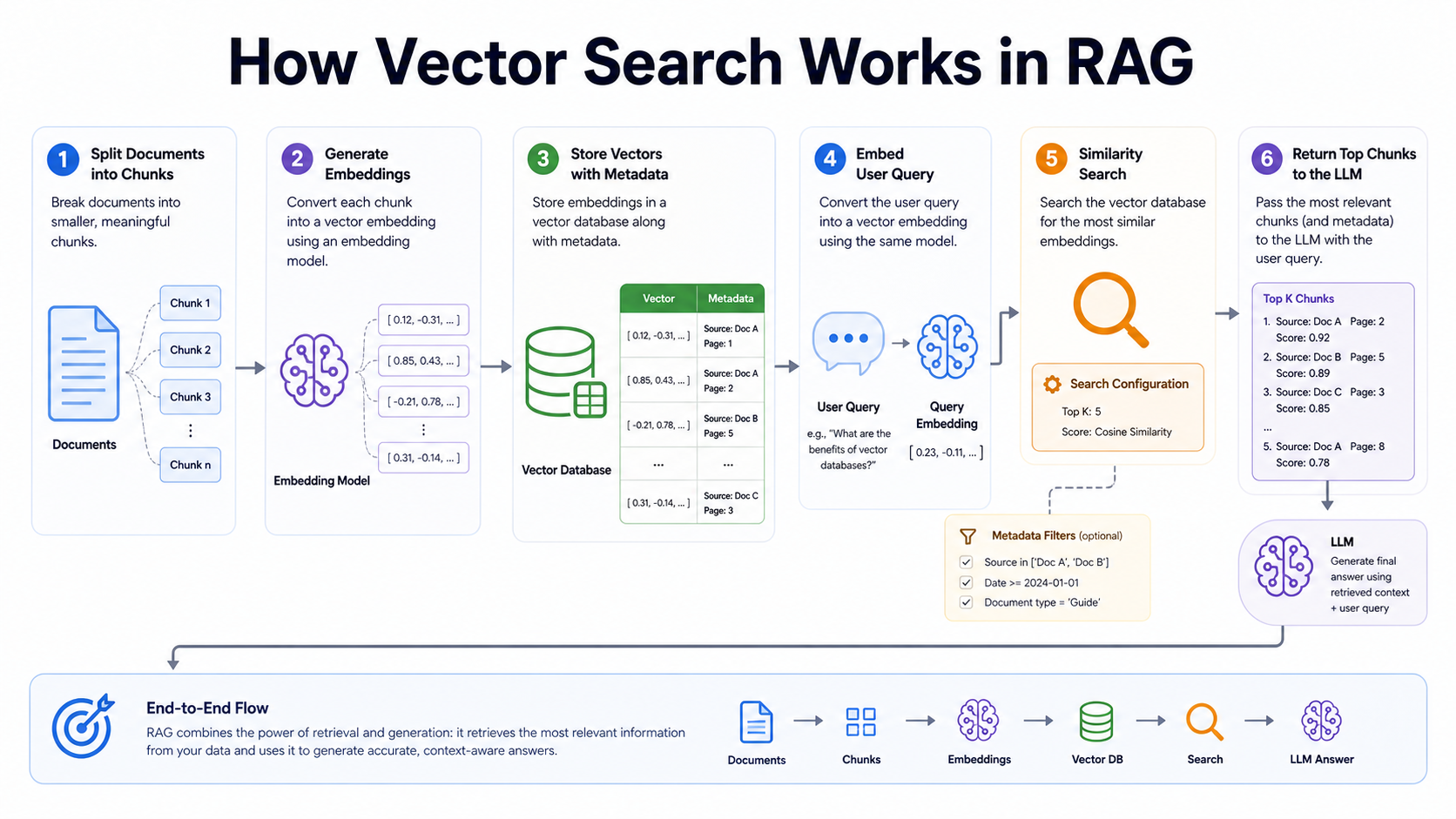
# Minimal RAG retrieval flow
1. Split documents into chunks
2. Generate an embedding for each chunk
3. Store: chunk text + metadata + embedding
4. Embed the user's question
5. Search nearest vectors with filters
6. Send the best chunks to the LLM as context
Where Vector Databases Fit in RAG
Retrieval-Augmented Generation, or RAG, uses retrieval to give an LLM fresh and domain-specific context. The vector database usually sits between your content pipeline and your application runtime.
- Ingestion: collect source documents, clean them, split them into chunks, generate embeddings, and store vectors with metadata.
- Retrieval: embed the user query, apply tenant and permission filters, retrieve similar chunks, and optionally rerank results.
- Generation: pass retrieved context to the LLM with instructions to answer only from the provided material when accuracy matters.
- Evaluation: test whether the system retrieves the right source material before judging the final answer quality.
If your RAG answers are weak, do not immediately switch databases. First inspect the chunks being retrieved. Many failures come from messy source documents, oversized chunks, missing metadata, stale embeddings, poor filters, or a prompt that lets the model ignore the retrieved context.
pgvector Explained
pgvector is an open-source PostgreSQL extension that adds vector storage and similarity search to Postgres. It supports exact and approximate nearest neighbor search, common distance functions, and index types such as HNSW and IVFFlat. The biggest practical benefit is that embeddings can live next to your relational data.
That matters when your application already uses PostgreSQL for users, organizations, documents, permissions, billing plans, environments, projects, or support tickets. You can join vectors with ordinary tables, use transactions, reuse backups, apply row-level security patterns, and keep operations in a familiar database stack.
Simple pgvector Example
-- Enable the extension
CREATE EXTENSION IF NOT EXISTS vector;

-- Store document chunks and embeddings
CREATE TABLE doc_chunks (
  id bigserial PRIMARY KEY,
  source text NOT NULL,
  tenant_id text NOT NULL,
  content text NOT NULL,
  embedding vector(1536)
);

-- Search by vector distance
SELECT id, source, content
FROM doc_chunks
WHERE tenant_id = 'acme'
ORDER BY embedding <-> '[0.012, -0.021, ...]'::vector
LIMIT 5;
In production, you would generate the embedding in application code, pass it as a query parameter, and never manually type the vector. You would also add metadata columns for permissions, source type, timestamps, product area, environment, and document version.
When pgvector Is a Good Fit
- Your app already runs on PostgreSQL and the vector workload is close to relational data.
- You need SQL joins, transactions, constraints, backups, and normal database governance.
- Your dataset is small to medium, or your team is comfortable tuning Postgres for the workload.
- You want a simple architecture for an internal RAG assistant, support search, developer portal, or knowledge base.
pgvector Tradeoffs
pgvector does not remove the need to operate PostgreSQL well. Large vector workloads can increase memory, CPU, index build time, storage, vacuum, and query planning concerns. If your vectors become the dominant workload, you may need dedicated Postgres capacity, read replicas, partitioning, index tuning, or a separate vector service.
Pinecone Explained
Pinecone is a managed vector database service for building applications that need vector search. Its docs describe a serverless model, namespaces, metadata filtering, and indexes designed for vector workloads. The main appeal is operational focus: you use an API while the service handles much of the vector database infrastructure.
Pinecone is often attractive when vector search is a core product capability, when teams do not want to operate vector infrastructure directly, or when workloads need managed scaling patterns separate from the primary relational database.
Simple Pinecone-Style Flow
# Pseudocode: shape of a vector upsert and query
index.upsert([
  {
    "id": "runbook-42-chunk-3",
    "values": embedding,
    "metadata": {
      "tenant_id": "acme",
      "source": "kubernetes-runbook",
      "product": "platform"
    }
  }
])

results = index.query(
  vector=query_embedding,
  top_k=5,
  filter={"tenant_id": "acme", "product": "platform"}
)
When Pinecone Is a Good Fit
- You want a managed vector database instead of operating one yourself.
- Your vector workload is large enough to deserve independent scaling and monitoring.
- Your team is building AI search, recommendations, semantic retrieval, or RAG as a product capability.
- You need vector-first APIs, metadata filtering, namespaces, and managed index behavior.
Pinecone Tradeoffs
Pinecone adds another managed service, another bill, another network call, and another operational dependency. You should model latency, metadata filter behavior, data residency needs, backup or export expectations, and vendor risk before making it the default store for every embedding workload.
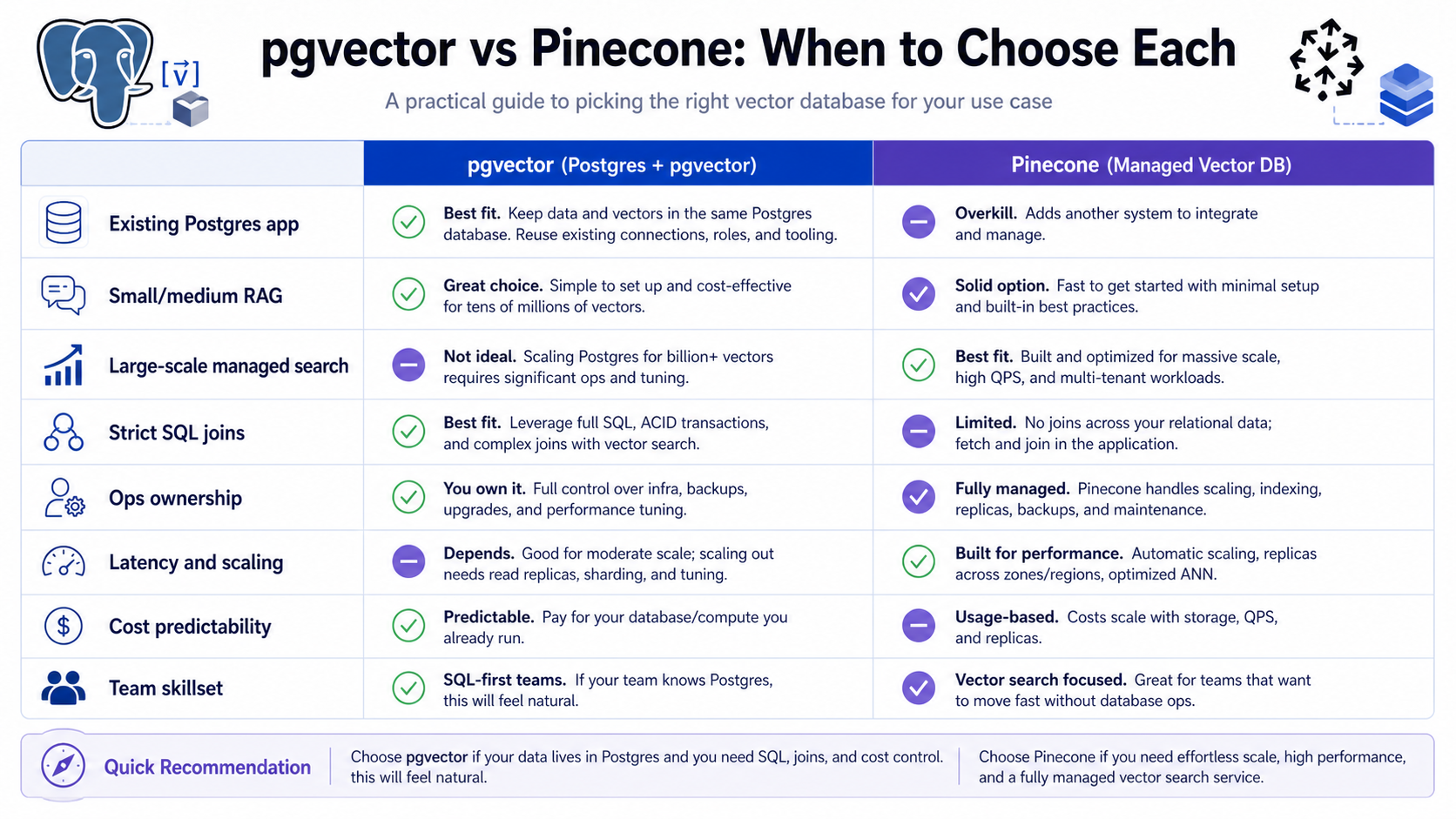
pgvector vs Pinecone: Practical Decision Guide
| Decision Area | Choose pgvector When… | Choose Pinecone When… |
|---|---|---|
| Architecture | Vectors are part of an existing PostgreSQL application. | Vector search is a separate managed service boundary. |
| Operations | Your team can operate and tune Postgres confidently. | You prefer managed vector infrastructure. |
| Data model | You need SQL joins, constraints, transactions, and relational filters. | You mainly need vector search with metadata filters and namespaces. |
| Scale pattern | Workload is moderate or can be scaled with your Postgres strategy. | Vector workload needs independent scaling and service-level focus. |
| Cost model | You can use existing Postgres capacity responsibly. | You accept a dedicated vector database bill for managed capabilities. |
| Team fit | Database engineers already own Postgres well. | Application teams want a vector API without database internals. |
There is no universal winner. A startup building its first internal documentation assistant may move faster with pgvector in the existing app database. A SaaS platform building semantic search across millions of customer records may prefer a managed vector database with separate capacity planning. Some mature systems use both: pgvector for local product features and a dedicated vector service for large-scale retrieval.
Indexing: Exact Search, HNSW, and IVFFlat
Small vector tables can often use exact search. Exact search compares the query vector against every candidate vector, then sorts by distance. It is simple and accurate, but it can become slow as data grows.
Approximate nearest neighbor indexes trade a small amount of recall for much better latency. pgvector supports HNSW and IVFFlat index approaches. Managed vector databases also use specialized indexing strategies internally. The practical point is that index tuning is not magic. You still need to measure recall, latency, memory use, build time, and update behavior with your own data.
Metadata Filtering Is Not Optional
For business and DevOps systems, metadata filtering is as important as vector similarity. A vector database that returns a semantically similar chunk from the wrong tenant, wrong environment, wrong access level, or wrong product can create a security incident.
- Tenant: organization, account, workspace, or customer ID.
- Permissions: role, group, document ACL, repository access, support case ownership.
- Freshness: document version, last updated timestamp, deprecation status.
- Source: runbook, ticket, pull request, incident, wiki, API docs, cloud inventory.
- Environment: production, staging, development, region, cluster, account, namespace.
Never rely on the LLM to ignore unauthorized context. Filter before retrieval, verify after retrieval, and log what sources were used in each answer.
A Beginner Project: Build a Small Documentation Search
Here is a practical learning path for a developer who wants to understand vector databases without overbuilding.
- Pick five to twenty Markdown or text documents from a real project.
- Split each document into chunks of roughly 300 to 800 tokens.
- Generate embeddings with one embedding model and record the model name.
- Store chunk text, source path, section heading, timestamp, and embedding.
- Implement query embedding and top-k vector search.
- Print the retrieved chunks before adding an LLM.
- Add a prompt that answers only from the retrieved chunks and includes citations.
- Create ten test questions and score whether the correct source chunk appears in the top results.
This exercise teaches the most important lesson: retrieval quality is visible before generation. If the right context is not retrieved, the final answer will be unreliable no matter which LLM you use.
Common Mistakes With Vector Databases
- Using chunks that are too large: large chunks hide the exact answer inside too much unrelated text.
- Using chunks that are too small: tiny chunks lose context and produce fragmented answers.
- Skipping metadata: similarity alone cannot enforce tenancy, freshness, or permissions.
- Changing embedding models without reindexing: mixed embedding spaces can break retrieval quality.
- Evaluating only the final answer: inspect retrieval results separately from LLM output.
- Ignoring stale content: old docs can be semantically similar and operationally wrong.
- Retrieving too many chunks: more context can increase cost, latency, and confusion.
Troubleshooting Poor RAG Results
| Symptom | Likely Cause | Fix |
|---|---|---|
| Answer sounds plausible but cites the wrong doc | Retriever found similar but stale or unrelated chunks | Add freshness and source filters; evaluate top-k results manually |
| Correct document appears but answer misses the detail | Chunk too large or prompt does not force evidence use | Improve chunk boundaries; ask model to quote or cite source IDs |
| Good answers for common topics, bad answers for exact IDs | Vector search is weak for exact identifiers | Add keyword or SQL lookup; use hybrid search |
| High latency | Too many candidates, slow filters, no index tuning, large context | Tune indexes, reduce top-k, add prefilters, cache frequent queries |
| Cross-customer leakage risk | Tenant filtering applied too late or only in the prompt | Enforce tenant and permission filters before retrieval |
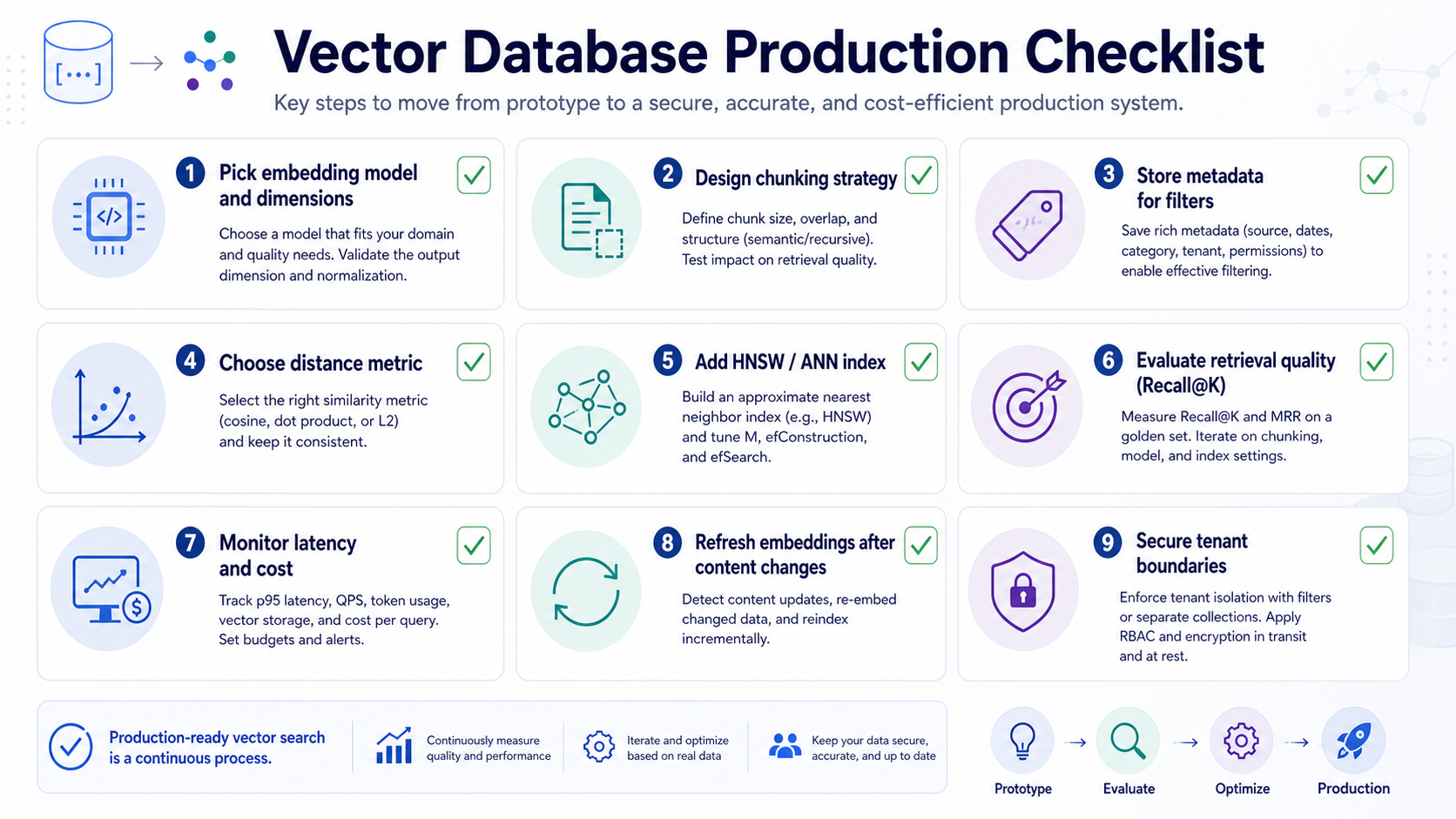
Security and Governance Checklist
- Store source IDs and metadata with every vector.
- Apply tenant and permission filters before similarity search whenever the database supports it.
- Log retrieved source IDs, scores, user ID, tenant ID, and model version.
- Version embeddings when changing the embedding model or chunking strategy.
- Have a deletion workflow for documents that must be removed from search.
- Keep sensitive secrets out of indexed text unless the retrieval system is designed for that access level.
- Measure retrieval quality with realistic questions, not only demo queries.
How to Choose a Vector Database in 2026
Start with the product requirement, not the trend. Ask these questions before choosing pgvector, Pinecone, or any other vector database.
- How many vectors will you store in the next 6, 12, and 24 months?
- Do vectors need to be joined with relational data at query time?
- What latency target do users expect?
- Do you need multi-tenant isolation, namespaces, or row-level permissions?
- Who will operate indexes, backups, monitoring, upgrades, and incident response?
- What is the cost of a wrong answer, stale answer, or leaked answer?
- Can you export or rebuild the index if you change vendors?
For many teams, the best first step is boring: build a small retrieval evaluation set, try pgvector if PostgreSQL is already in the stack, and move to a dedicated vector database when the workload or operational model justifies it.
Recommended GravityDevOps Reading
- What is RAG (Retrieval-Augmented Generation)? for the full retrieval-augmented generation workflow.
- What is Generative AI? Beginner’s Guide for the foundation behind LLM applications.
- AI Agents Explained: Agentic AI in 2026 for how retrieval can support tool-using agents.
- Best CI/CD Tools 2026 Compared if you are building AI-assisted DevOps workflows around delivery pipelines.
FAQ
What is a vector database used for?
A vector database is used to store embeddings and retrieve similar items by meaning. Common uses include RAG, semantic search, recommendations, support assistants, duplicate detection, and anomaly detection.
Is pgvector a real vector database?
pgvector is a PostgreSQL extension for vector storage and similarity search. It is a strong option when vectors belong inside a PostgreSQL-centered application, especially when SQL joins, filters, and transactions matter.
Is Pinecone better than pgvector?
Pinecone is not universally better; it solves a different operational problem. Pinecone is a managed vector database service, while pgvector brings vector search into PostgreSQL. Choose based on scale, operations, data model, latency, governance, and team skills.
Do I need a vector database for every AI app?
No. If your AI app only needs short prompts, structured database lookups, or deterministic workflows, a vector database may be unnecessary. You usually need one when the app must retrieve relevant unstructured content by meaning.
What is the difference between vector search and keyword search?
Keyword search matches terms, phrases, and exact fields. Vector search compares embeddings to find semantically similar content. Many production systems combine both through hybrid search.
What matters most for RAG quality?
Chunking, metadata, permissions, freshness, retrieval evaluation, and prompt design often matter more than the vector database brand. A better database cannot fix poor source content or missing access controls.


