


SEO excerpt: Learn Azure Kubernetes Service (AKS) with a practical beginner tutorial: architecture, Azure CLI setup, cluster creation, app deployment, scaling, monitoring, security, troubleshooting, and production next steps.
Quick Answer
Azure Kubernetes Service (AKS) is Microsoft Azure’s managed Kubernetes service. Azure operates much of the Kubernetes control plane for you, while you manage node pools, workloads, networking, security policies, scaling, upgrades, and cost controls. The fastest learning path is to create a small AKS cluster with Azure CLI, connect with kubectl, deploy a containerized app, expose it with a Service or Ingress, then add monitoring, autoscaling, and security guardrails before treating it as production-ready.
If you already understand basic containers but Kubernetes feels heavy, AKS is a practical middle ground. You still learn real Kubernetes objects such as Deployments, Pods, Services, Namespaces, ConfigMaps, Secrets, and Ingress, but you do not start by building the control plane yourself. That makes AKS useful for cloud engineers, DevOps teams, platform engineers, and developers who need a realistic managed Kubernetes environment on Azure.
What Is AKS?
Azure Kubernetes Service is a managed service for running Kubernetes clusters on Azure. In a self-managed Kubernetes setup, your team is responsible for provisioning and operating the control plane, worker nodes, networking, upgrades, observability, and security integrations. In AKS, Azure handles the managed control plane and integrates the cluster with Azure identity, networking, monitoring, container registry, load balancing, storage, policy, and autoscaling services.
That does not mean AKS removes Kubernetes complexity. You still need to design how applications are deployed, how traffic enters the cluster, how workloads scale, how secrets are managed, how images are scanned, how nodes are upgraded, and how costs are controlled. The real value of AKS is that it removes enough infrastructure work that your team can focus on those higher-level platform decisions sooner.
How AKS Works
An AKS cluster has two broad areas: the Azure-managed control plane and your worker node pools. The control plane exposes the Kubernetes API and coordinates cluster state. The node pools run your application workloads as Pods. Most production clusters separate system workloads from application workloads by using at least one system node pool and one or more user node pools.
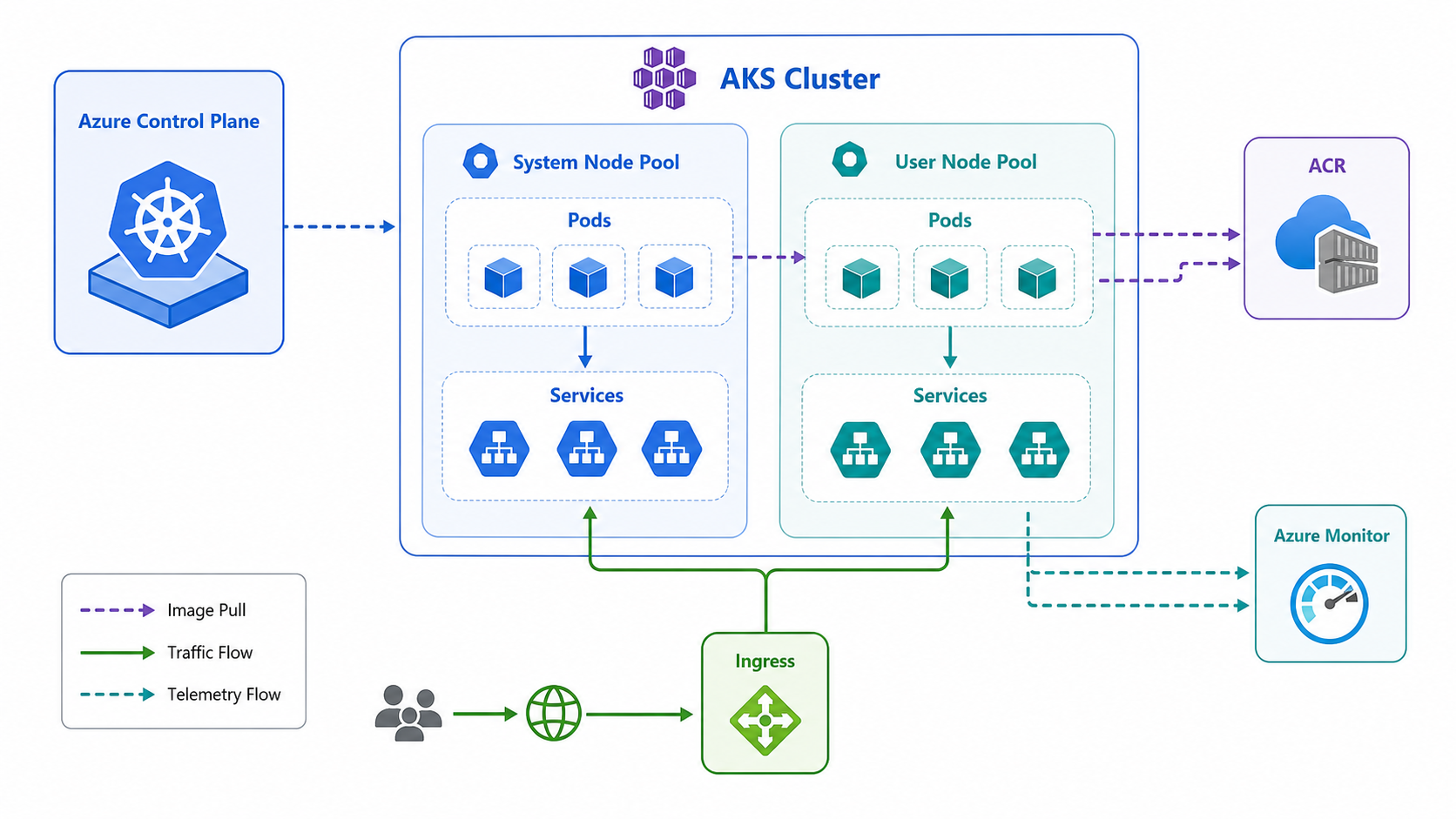
In a typical AKS application path, a developer builds a container image, pushes it to Azure Container Registry or another registry, deploys Kubernetes manifests or a Helm chart, and exposes the workload through a Service, Ingress controller, or Azure load balancer. Telemetry flows to Azure Monitor, managed Prometheus, Grafana, or your existing observability stack. For a deeper look at the AWS equivalent, see the GravityDevOps guide to Amazon EKS and Kubernetes on AWS.
When Should You Use AKS?
AKS is a good fit when your team needs Kubernetes portability, Azure-native integrations, and managed cluster operations. It is especially useful when you are standardizing container workloads across multiple teams, running microservices, building internal developer platforms, or deploying AI and data workloads that benefit from Kubernetes scheduling.
AKS is probably not the right first choice for every application. A simple web app may be easier to run on Azure App Service, Azure Container Apps, or a serverless option. Kubernetes becomes worth it when you need its orchestration model: multiple services, service discovery, custom controllers, workload identity, node pool choices, autoscaling, policy enforcement, and repeatable deployment workflows.
Prerequisites
Before starting the tutorial, install or prepare the following:
- An Azure subscription with permission to create resource groups, managed identities, networks, and AKS clusters.
- Azure CLI installed locally or Azure Cloud Shell.
kubectl, which can be installed through Azure CLI if needed.- Basic Docker/container knowledge.
- A terminal where you can run
azandkubectl.
This tutorial uses Azure CLI because it is the most direct way for beginners to understand the moving parts. In real teams, you should convert the final setup into Terraform, Bicep, Pulumi, or another infrastructure-as-code workflow.
Step 1: Sign In And Set Variables
Start by signing in and setting a few variables so the later commands are easier to read.
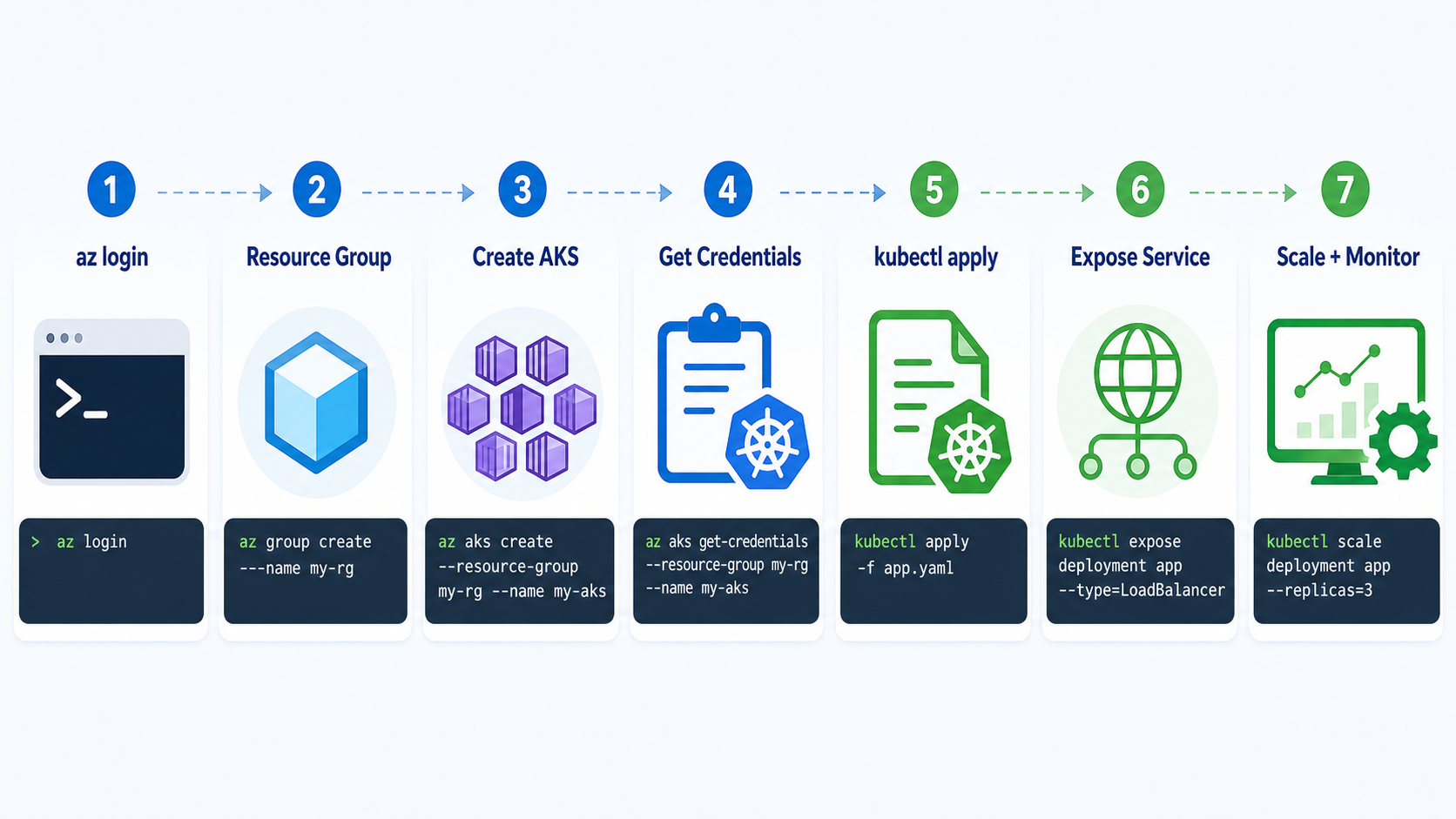
az login

SUBSCRIPTION_ID="your-subscription-id"
RESOURCE_GROUP="rg-aks-demo"
LOCATION="eastus"
AKS_NAME="aks-demo-01"

az account set --subscription "$SUBSCRIPTION_ID"
Choose an Azure region close to your users or team. For learning, a common region such as eastus, westeurope, or centralindia is usually fine. For production, region choice should consider latency, compliance, availability zones, quota, and disaster recovery.
Step 2: Create A Resource Group
Create a resource group to hold the AKS cluster and related resources.
az group create \
  --name "$RESOURCE_GROUP" \
  --location "$LOCATION"
A resource group is not just an organizational folder. It is also a useful boundary for permissions, cost reporting, lifecycle cleanup, and automation. For production, many teams use separate resource groups for shared networking, cluster infrastructure, and application resources.
Step 3: Create A Beginner AKS Cluster
For a learning cluster, start small. The command below creates a managed AKS cluster, enables a managed identity, creates a small node pool, and generates SSH keys if required.
az aks create \
  --resource-group "$RESOURCE_GROUP" \
  --name "$AKS_NAME" \
  --node-count 2 \
  --node-vm-size Standard_B2s \
  --enable-managed-identity \
  --generate-ssh-keys
This is intentionally minimal. Production clusters need more decisions: private or public API server, Azure CNI configuration, network policy, node pool layout, autoscaler settings, upgrade channels, Azure Monitor, image registry access, workload identity, and policy controls.
Step 4: Connect Kubectl To AKS
Once the cluster is created, download the kubeconfig credentials and verify access.
az aks get-credentials \
  --resource-group "$RESOURCE_GROUP" \
  --name "$AKS_NAME"

kubectl get nodes
kubectl get namespaces
If kubectl get nodes returns the worker nodes, your local Kubernetes client can talk to the AKS API. If the command fails, check that you selected the right subscription and that your Azure account has permission to access the cluster.
Step 5: Deploy A Sample Application
Create a simple Deployment using the public NGINX image. This keeps the first deployment focused on Kubernetes mechanics rather than container build tooling.
kubectl create deployment aks-demo-web \
  --image=nginx:stable \
  --replicas=2

kubectl get deployments
kubectl get pods -o wide
A Kubernetes Deployment manages replica count and rollout behavior. The Pods are the actual running workload units. If a Pod fails, the Deployment controller creates another one to match the desired state.
Step 6: Expose The Application
For a simple demo, expose the Deployment with a LoadBalancer Service.
kubectl expose deployment aks-demo-web \
  --type=LoadBalancer \
  --port=80 \
  --target-port=80

kubectl get service aks-demo-web --watch
Wait until the Service receives an external IP address. Then open it in a browser:
EXTERNAL_IP=$(kubectl get service aks-demo-web \
  -o jsonpath='{.status.loadBalancer.ingress[0].ip}')

echo "http://$EXTERNAL_IP"
For production web traffic, you will usually use an Ingress controller or Azure Application Gateway for Containers instead of one public load balancer per service. That gives you better routing, TLS, host-based rules, and centralized traffic management.
Step 7: Scale The Workload
Scale the Deployment from two replicas to three:
kubectl scale deployment aks-demo-web --replicas=3
kubectl get pods -l app=aks-demo-web
This scales the number of Pods, not the number of nodes. If the cluster runs out of capacity, you need node autoscaling or a larger node pool. In production AKS clusters, you typically combine Kubernetes workload autoscaling with cluster autoscaler or node auto-provisioning so that the infrastructure can respond to demand.
Step 8: Add A Namespace And Resource Requests
Beginner tutorials often skip resource requests, but that creates bad habits. Kubernetes scheduling works better when workloads declare CPU and memory needs.
kubectl create namespace demoCreate a file named aks-demo.yaml:
apiVersion: apps/v1
kind: Deployment
metadata:
  name: aks-demo-web
  namespace: demo
spec:
  replicas: 2
  selector:
    matchLabels:
      app: aks-demo-web
  template:
    metadata:
      labels:
        app: aks-demo-web
    spec:
      containers:
        - name: web
          image: nginx:stable
          ports:
            - containerPort: 80
          resources:
            requests:
              cpu: "100m"
              memory: "128Mi"
            limits:
              cpu: "250m"
              memory: "256Mi"
---
apiVersion: v1
kind: Service
metadata:
  name: aks-demo-web
  namespace: demo
spec:
  type: LoadBalancer
  selector:
    app: aks-demo-web
  ports:
    - port: 80
      targetPort: 80
Apply it:
kubectl apply -f aks-demo.yaml
kubectl get all -n demo
This manifest is still simple, but it is closer to real Kubernetes practice than one-line imperative commands. In team environments, store these manifests in Git and deploy them through CI/CD or GitOps. For tooling comparisons, see Best CI/CD Tools 2026 Compared and the Helm tutorial.
AKS Networking Basics
Networking is where many AKS projects become confusing. At a minimum, understand these layers:
- Cluster networking: How Pods and Services receive IP addresses and communicate.
- Node networking: How Azure virtual machines or scale sets connect to your virtual network.
- Ingress: How external traffic reaches services inside the cluster.
- Network policy: How you restrict traffic between workloads.
- Private access: Whether the API server and workloads are reachable from the public internet.
For a learning cluster, defaults are acceptable. For production, choose networking deliberately. Decide whether the cluster should be private, whether Pods need routable VNet IPs, how ingress will be handled, and how network policies will be enforced. These choices are harder to change later than labels or replica counts.
AKS Security Basics
Security in AKS is a shared responsibility. Azure manages part of the service, but your team still owns identity, workload permissions, image security, network exposure, Kubernetes RBAC, secrets handling, and runtime configuration.
Start with these baseline practices:
- Use Microsoft Entra ID integration and Kubernetes RBAC for human access.
- Use managed identities and workload identity instead of long-lived static credentials where possible.
- Keep public exposure small: avoid unnecessary public Services and lock down ingress.
- Define resource requests and limits so noisy workloads do not starve other services.
- Scan container images before deployment and avoid running containers as root.
- Use separate namespaces and policies for different teams or environments.
- Plan cluster and node image upgrades instead of treating them as an emergency task.
Observability: What To Monitor First
For a beginner AKS cluster, start with basic signals:
- Node CPU, memory, disk, and readiness.
- Pod restarts, crash loops, pending Pods, and failed scheduling.
- Deployment rollout status and replica availability.
- Ingress and Service latency, errors, and traffic volume.
- Cluster events and Kubernetes API errors.
- Container logs for application-level debugging.
Azure Monitor and Container Insights are common starting points. Many teams also use managed Prometheus and Grafana or third-party observability platforms. For tool selection, read Best Kubernetes Monitoring Tools in 2026.
Common AKS Mistakes
Creating A Cluster Before Designing Networking
Networking choices affect IP planning, private access, ingress, DNS, network policy, and hybrid connectivity. Treat networking as an early design decision, not a cleanup task.
Running Everything In The Default Namespace
The default namespace is fine for a quick demo, but it becomes messy fast. Use namespaces to separate teams, environments, and system boundaries.
Skipping Resource Requests
Without resource requests, Kubernetes has less information for scheduling. This can lead to unstable workloads and confusing capacity behavior.
Using LoadBalancer Services For Every App
One public load balancer per app is easy for demos and expensive or risky for real platforms. Use ingress patterns for shared entry points.
Ignoring Upgrade Planning
Kubernetes versions move quickly. AKS makes upgrades easier, but your team still needs maintenance windows, workload disruption budgets, release testing, and rollback plans.
Troubleshooting AKS
Use these commands when something does not work:
kubectl get nodes
kubectl describe node <node-name>

kubectl get pods -A
kubectl describe pod <pod-name> -n <namespace>
kubectl logs <pod-name> -n <namespace>

kubectl get events -A --sort-by=.lastTimestamp
kubectl get service -A
kubectl get ingress -A
For Azure-side checks, use:
az aks show \
  --resource-group "$RESOURCE_GROUP" \
  --name "$AKS_NAME" \
  --output table

az aks check-acr \
  --resource-group "$RESOURCE_GROUP" \
  --name "$AKS_NAME" \
  --acr <registry-name>
If Pods are stuck in Pending, check node capacity, taints, tolerations, node selectors, and persistent volume claims. If Pods are in ImagePullBackOff, check the image name, registry permissions, and whether the cluster can access the registry. If a Service has no external IP, check cloud provider events and load balancer quota.
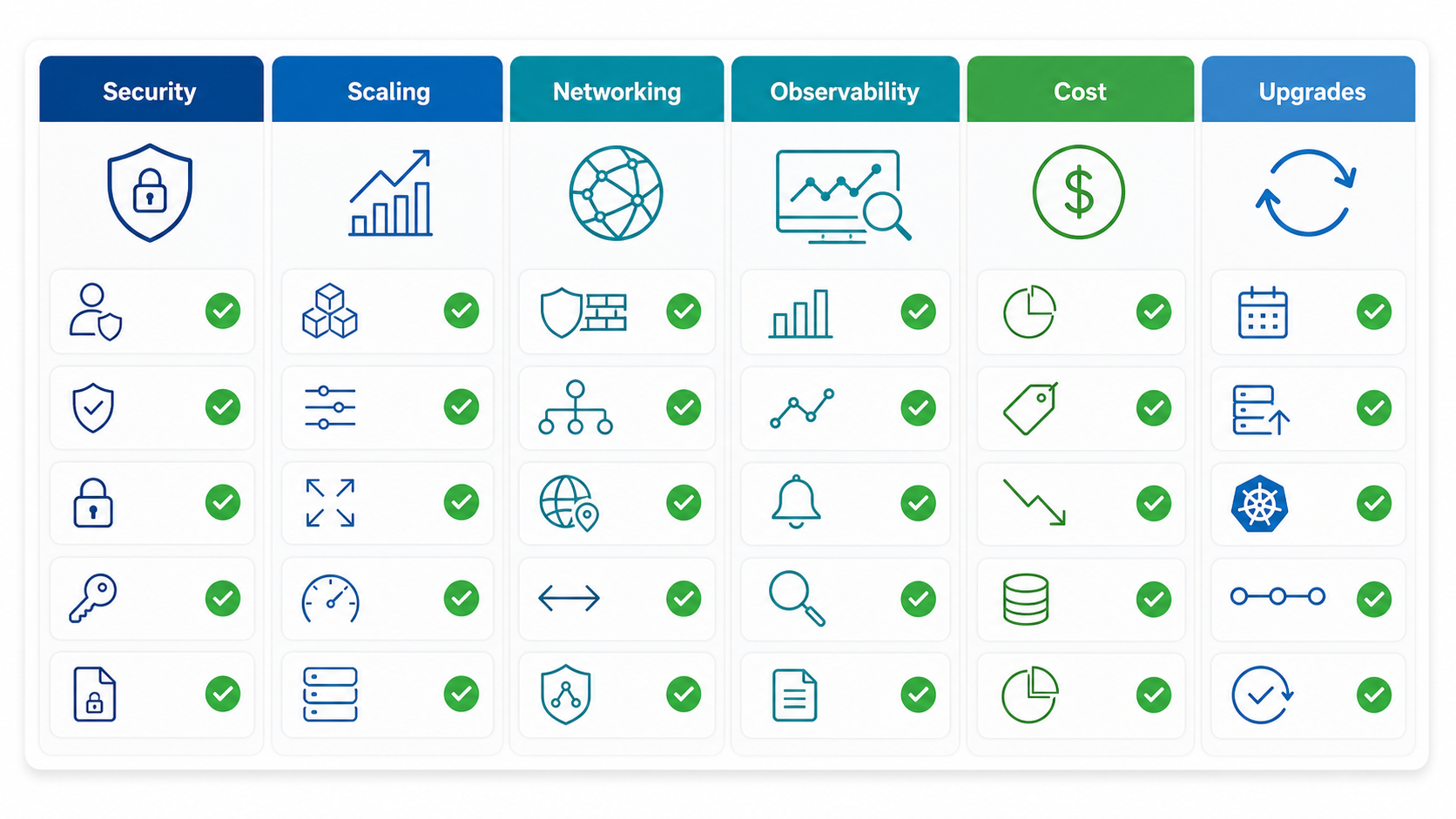
Production Readiness Checklist
Before moving a real workload to AKS, review this checklist:
- Identity: Entra ID integration, RBAC, least privilege, managed identities, and workload identity.
- Networking: VNet design, ingress, DNS, network policy, private cluster requirements, and egress control.
- Node pools: Separate system and user workloads, right VM families, autoscaling, zones, and taints if needed.
- Deployment: CI/CD or GitOps, Helm or Kustomize, rollout checks, and rollback process.
- Observability: Logs, metrics, traces, alerts, dashboards, and runbooks.
- Security: Image scanning, admission controls, secrets strategy, Pod security standards, and vulnerability patching.
- Reliability: Pod disruption budgets, readiness probes, liveness probes, topology spread, and backup strategy.
- Cost: Requests and limits, autoscaling, right-sized nodes, idle workload cleanup, and budget alerts.
- Upgrades: Kubernetes version policy, node image upgrades, maintenance windows, and test clusters.
AKS vs EKS vs GKE: Learning Perspective
AKS, Amazon EKS, and Google Kubernetes Engine all run managed Kubernetes, but they teach slightly different cloud ecosystems. Learn AKS if your target roles use Azure, Microsoft Entra ID, Azure networking, Azure DevOps, Azure Monitor, and Microsoft-heavy enterprise environments. Learn EKS if your organization is AWS-first. Learn GKE if you want strong Google Cloud and Kubernetes-native platform exposure.
If you are deciding which cloud path to prioritize in 2026, compare the broader ecosystem in AWS vs Azure vs Google Cloud: Which to Learn in 2026.
Cleanup
Do not leave demo clusters running. Delete the resource group when you are done:
az group delete \
  --name "$RESOURCE_GROUP" \
  --yes \
  --no-wait
This removes the demo cluster and related resources in that resource group. Be careful in shared or production subscriptions: only delete resource groups created specifically for this tutorial.
Next Steps
After this tutorial, build a more realistic path:
- Push a custom application image to Azure Container Registry.
- Deploy with Helm instead of raw manifests.
- Add an Ingress controller and TLS certificate management.
- Enable cluster autoscaler and test workload scaling.
- Add Azure Monitor, Prometheus, and alerting.
- Move cluster creation into infrastructure as code.
- Connect deployments to a CI/CD or GitOps workflow.
AKS is not just a way to run containers. It is a foundation for platform engineering on Azure. Start small, learn the Kubernetes primitives, and then add production controls one layer at a time.
FAQ
Is AKS free?
AKS has managed service components and Azure infrastructure costs. The main cost drivers are worker nodes, storage, load balancers, networking, monitoring, and related Azure resources. Always check current Azure pricing before estimating production cost.
Do I need to know Kubernetes before learning AKS?
You can start AKS as a beginner, but you should learn Kubernetes basics while using it. Focus first on Pods, Deployments, Services, Namespaces, ConfigMaps, Secrets, Ingress, and resource requests.
Is AKS better than Azure Container Apps?
AKS gives you more Kubernetes control and ecosystem flexibility. Azure Container Apps is simpler for many containerized apps. Choose AKS when you need Kubernetes APIs, custom platform patterns, advanced networking, or multi-service orchestration.
Can AKS run production workloads?
Yes, AKS can run production workloads when designed correctly. Production readiness requires identity controls, secure networking, observability, autoscaling, upgrade planning, workload policies, and cost governance.
Should I use Helm with AKS?
Helm is commonly used with AKS because it packages Kubernetes manifests and makes repeatable installs easier. Beginners can start with raw YAML, then move to Helm once they understand the underlying objects.
How is AKS different from EKS?
Both are managed Kubernetes services. AKS is integrated with Azure identity, networking, monitoring, and registry services. EKS is integrated with AWS IAM, VPC, CloudWatch, ECR, and AWS load balancing patterns.


